A compact 3D printer enclosure can help control drafts, reduce dust, contain odors, and make a desktop printer more comfortable to use. The right model depends on your printer’s dimensions, printing material, and ventilation needs.
We compare 10 enclosure options for popular Creality, Bambu Lab, Prusa, and resin 3D printers, focusing on fit, construction, airflow, lighting, and everyday practicality.
Best 10 Compact 3d Printer Enclosures Picks for 2026
Best Overall Value
Creality Fireproof 3D Printer Enclosure

- Flame-resistant, dustproof tent design
- Folding frame with tool pockets
- Fits many Ender-series printers
Best For: Ender 3 owners wanting straightforward temperature and dust protection
Best for Resin Printing
YOOPAI Resin Enclosure with Filter

- Carbon filter helps manage resin odors
- Fan and pipe support exhaust routing
- Clear window enables closed-cover viewing
Best For: Compatible ELEGOO resin printer users prioritizing odor control
Best for Visibility
Medium 3D Printer Enclosure with LED

- Built-in LED strip improves visibility
- Enclosed design supports temperature stability
- Compatible with many medium-size printers
Best For: Makers who want better print monitoring in low-light spaces
Best DIY Cabinet Kit
DELACK IKEA Lack Enclosure Kit

- Plexiglass cabinet kit with included LED lighting
- Supports fans, HEPA filtration, and external venting
- Requires separately printed connector parts
Best For: Makers customizing an IKEA Lack printer workstation
Best for Quiet Printing
YOOPAI Dustproof Printer Enclosure

- Six-sided cover helps reduce printing noise
- Temperature-stable, dust-resistant protective design
- Includes ports for exhaust and external filament feeding
Best For: Compatible printers in homes where dust and noise matter
Best Ventilated Resin Printer Tent

- 12V fan with adjustable speed control
- Three-layer filter for dust and gases
- UV-blocking viewing window
Best For: Small LCD and resin 3D printers
Best Large Printer Tent

- 21.6 x 25.6 x 29.5-inch interior size
- Built-in LED and clear viewing window
- Dustproof, flame-retardant enclosed design
Best For: Popular FDM and resin printers
Best Resin Ventilation Enclosure
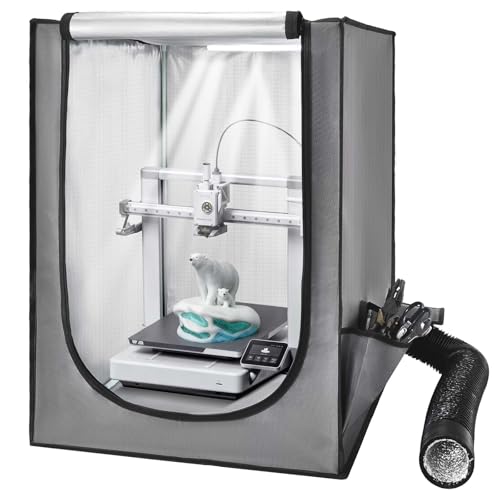
- Built-in ventilation for smoke and dust
- Constant-temperature protective design
- LED lighting with clear viewing window
Best For: Small LCD and resin printers
Best Overall Value – Creality Fireproof 3D Printer Enclosure
For shoppers comparing compact 3d printer enclosures, this Creality tent is a practical choice for popular Ender-series machines. Its enclosed, flame-resistant construction helps reduce dust exposure and supports a more consistent printing environment, while the folding design makes storage and transport easier.
Best For: Ender 3 owners who want a simple, spacious enclosure for temperature stability and dust protection.
Pros:
- Compatible with several Creality Ender models, plus select Anycubic and ELEGOO printers.
- Flame-resistant materials and an aluminum-film interior provide added protection.
- Folding structure, tool pockets, and observation access support convenient use.
- Large 480 × 600 × 720 mm storage size accommodates many compact printers.
Cons:
- It does not include the active ventilation and filtration features found on some specialized enclosures.
- Buyers should confirm printer and spool-holder dimensions before ordering.
This is a strong all-purpose option when you want basic enclosure protection without a complicated setup. Its broad compatibility and portable frame make it especially suitable for an Ender-focused workspace.
Best for Resin Printing – YOOPAI Resin Enclosure with Filter
This YOOPAI model stands out among compact 3d printer enclosures for resin users who want odor management and a fully enclosed workspace. A carbon filter sheet, exhaust fan, and expandable pipe work together to help handle resin odors and emissions, while the clear front window keeps the printer visible.
Best For: Resin printing with compatible ELEGOO Photon, Saturn, Mars, or Halot-series machines.
Pros:
- Built-in carbon filter sheet is designed to adsorb resin odors.
- Exhaust fan and expandable pipe provide a way to direct air away from the workspace.
- Six-sided enclosure helps shield the printer from dust and resin splashes.
- Transparent front window allows monitoring without opening the cover.
Cons:
- Compatibility is focused on resin printers and the listed size range.
- The enclosure is not presented as a universal fit for every printer format.
Choose this enclosure if odor control and contained resin printing are higher priorities than broad filament-printer compatibility. Its enclosed layout and ventilation components make it a focused resin-printing solution.
Best for Visibility – Medium 3D Printer Enclosure with LED
For a brighter, more observable setup, this medium enclosure is one of the more feature-rich compact 3d printer enclosures in the group. Its built-in LED strip helps illuminate the print area, while the enclosed structure is designed to support temperature consistency, reduce dust, and soften operating noise.
Best For: Users with compatible medium-sized printers who want built-in lighting and a stable enclosed workspace.
Pros:
- Built-in LED lighting makes print monitoring easier in dim work areas.
- Sturdy, fire-resistant structure helps protect against dust and accidental contact.
- Enclosed six-sided design is intended to reduce transmitted printing noise.
- Fits a broad selection of Creality, ELEGOO, PRUSA, and AnkerMake models.
Cons:
- It has less emphasis on dedicated ventilation or filtration than the resin-focused option.
- Printer dimensions should be checked carefully before purchase.
This is a sensible pick for makers who value visibility and workspace comfort. The LED strip adds practical convenience, while the enclosure’s temperature and dust-control features support more consistent printing.
Best Monitoring Features – YOOPAI Ender 3 Enclosure
This YOOPAI enclosure is a compelling choice among compact 3d printer enclosures for users who want more information while printing. In addition to built-in LED lighting, it provides real-time temperature and humidity readings, plus an enclosed structure intended to reduce dust, noise, and accidental contact.
Best For: Creality Ender owners who want built-in environmental monitoring, lighting, and broad model compatibility.
Pros:
- Temperature and humidity monitoring helps users track printing conditions.
- Integrated LED strip improves visibility during setup and troubleshooting.
- Fire-resistant, dustproof enclosure helps protect prints and the printer.
- Supports many Creality, ELEGOO, AnkerMake, and Anycubic models within the size limit.
Cons:
- The printer, including spool-holder height, must stay below 21.6 × 25.6 × 29.5 inches.
- Its feature set and 5.57-pound weight may be more than needed for a basic enclosure.
If environmental awareness matters, this model offers more useful feedback than a simple tent enclosure. Confirm the complete printer footprint and height first, then consider it for a more controlled and observable Ender setup.
Best All-Around Cover – ELEGOO Fireproof 3D Printer Enclosure
For shoppers comparing compact 3d printer enclosures, the ELEGOO offers a straightforward fabric-cover setup with a stable printing environment, dust protection, and broad compatibility. Its folding frame and quick installation make it practical for home workspaces where storage and portability matter.
Best For: Users who want a portable enclosure for common Creality, ELEGOO, and Anycubic-style printers.
Pros:
- Helps stabilize temperature and reduce warping and adhesion issues.
- Fire-resistant, heat-resistant aluminum foil Oxford cloth helps protect the printer and surrounding area.
- Transparent viewing windows, zipper access, and an internal tool pocket improve usability.
- Folds for storage and installs in about five minutes.
Cons:
- Its 25.5 × 21.6 × 29.5-inch footprint may be large for very small desks.
- Compatibility still requires checking the printer and spool-holder dimensions.
This is a sensible pick when you want broad compatibility and easy setup rather than a rigid cabinet. The lightweight frame also makes it easier to move or put away between printing sessions.
Best DIY Cabinet Kit – DELACK IKEA Lack Enclosure Kit
The DELACK is a compact 3d printer enclosure kit designed around an IKEA Lack table. It combines plexiglass panels, included lighting, and ventilation-ready features, but it is intended for makers comfortable with customization because printed connector parts are not included.
Best For: DIY users building a modular IKEA Lack workstation for compatible Bambu Lab, Prusa, or similar printers.
Pros:
- Compact 21.7 × 19.1 × 17.7-inch enclosure dimensions fit desks and workbenches.
- Includes plexiglass panels, LED light strip, 5V adapter, and hardware.
- Supports optional 120mm fans, HEPA filtration, and external venting through a 4-inch duct adapter.
- Removable top panel and downloadable accessories support maintenance and customization.
Cons:
- It is a kit only; printed parts and connectors are not included.
- It is engineered for an IKEA Lack table setup rather than a universal freestanding enclosure.
- Ventilation components such as fans and filtration systems are optional.
This option suits buyers who want a more structured cabinet and are willing to print or source the missing parts. The included LED lighting and ventilation-ready design add flexibility for a customized workstation.
Best for Quiet Printing – YOOPAI Dustproof Printer Enclosure
The YOOPAI is one of the more practical compact 3d printer enclosures for users who want a fabric tent with dust control, temperature consistency, and noise reduction. It also includes openings for an exhaust setup and external filament feeding, provided your printer fits within its stated dimensions.
Best For: Users with compatible Creality, Anycubic, or ELEGOO printers who want quieter, cleaner operation.
Pros:
- Enclosed six-sided design helps reduce transmitted printing noise.
- Supports a more consistent temperature and helps limit dust entering the print area.
- Right-side exhaust opening and left-side filament port support flexible setups.
- Quick installation, disassembly, and sturdy construction suit repeated use.
Cons:
- It is not water resistant.
- Users must measure the printer, including spool-holder height, before ordering.
- Exhaust accessories are supported but not stated as included.
Choose the YOOPAI when reducing household dust and printer noise is a priority. Its broad listed compatibility is useful, but the 29.5 × 25.6 × 21.6-inch dimensions make careful measurement essential.
Best Ventilated Resin Printer Tent – Adjustable Filter Enclosure
For shoppers comparing compact 3d printer enclosures for resin printing, this model stands out with built-in adjustable ventilation, a three-layer filter, and a UV-blocking viewing window. Its stainless-steel frame and fire-resistant fabric add practical protection, but you should measure your printer before ordering.
Best For: Small LCD/resin printers such as Anycubic Photon Mono, Elegoo Mars or Saturn, and Creality Halot models.
Pros:
- Includes a 12V fan, filter system, power adapter, and adjustable speed control.
- Three-layer filtration is designed to absorb larger dust particles and harmful gases.
- UV-blocking window lets you monitor resin prints while limiting exposure to harmful UV rays.
- Uses a stainless-steel frame and fire-resistant fabric for added durability and safety.
Cons:
- Compatibility is limited by the enclosure’s internal dimensions, so measuring is essential.
- The fan bracket may require printing a replacement plastic adapter using the supplied Thingiverse file.
- The printer is not included.
This is a well-equipped choice when odor and particle control are priorities. The included ventilation kit and filter make it more complete than a basic fabric tent, while the UV-blocking window is especially useful for resin-printing workflows.
Best Large Printer Tent – VEVOR LED Enclosure
This VEVOR model is a practical option for shoppers seeking compact 3d printer enclosures with extra room for popular FDM and resin machines. The enclosed Oxford-cloth design helps contain dust, moderate noise, and maintain a steadier printing environment, while its LED light improves visibility.
Best For: Popular Creality, Anycubic, and ELEGOO printers that fit within the 21.6 x 25.6 x 29.5-inch enclosure.
Pros:
- Large 21.6 x 25.6 x 29.5-inch size accommodates many popular printer models.
- Heat-resistant, flame-retardant materials help provide added protection.
- Transparent window and built-in LED lighting make print monitoring easier.
- Fully enclosed structure helps reduce noise and keep dust away from the printer.
Cons:
- Ventilation fan components are not included.
- Its larger footprint may be less suitable for very limited workspaces.
- Printer dimensions should be checked before purchase.
Choose this enclosure when space, visibility, and basic environmental control matter more than included air extraction. It provides a roomy protective case with lighting, but buyers who need ventilation will need to add compatible components separately.
Best Resin Ventilation Enclosure – VEVOR LED Tent
For resin users comparing compact 3d printer enclosures, this VEVOR tent combines a ventilation system with a constant-temperature design and built-in LED lighting. Its enclosed structure is intended to help manage dust, smoke, and accidental contact while offering a clear view of the print.
Best For: Small LCD and resin printers such as Anycubic Photon Mono and Elegoo Mars 3 that fit the listed dimensions.
Pros:
- Built-in ventilation is designed to expel smoke and dust after printing.
- Constant-temperature enclosure can help reduce warping, cracking, clogging, and jamming.
- Transparent window and LED lighting support convenient print monitoring.
- Flame-retardant materials and a stable structure add practical protection.
Cons:
- The 21.65 x 25.59 x 29.53-inch size may be larger than necessary for very small setups.
- Printer dimensions must be checked for compatibility.
- The enclosed tent weighs 4.72 pounds.
This is the stronger VEVOR choice for buyers who specifically want ventilation included rather than adding a fan later. Its lighting and clear window improve usability, while the constant-temperature design supports a more controlled resin-printing environment.
How We Picked the Best Compact 3d Printer Enclosures
We evaluated these enclosures by looking at the features that matter most in a small printing workspace: internal dimensions, printer compatibility, enclosure materials, access points, visibility, ventilation options, and ease of setup. We also considered whether each design is better suited to filament or resin printing, since those workflows have different airflow and odor-control requirements.
Fire-resistant or flame-retardant fabric, sealed panels, sturdy frames, and cable openings can improve day-to-day usability, but no fabric enclosure should be treated as a substitute for safe printer operation, smoke detection, or proper supervision.
Quick Comparison
| Best For | Look For | Useful Features |
|---|---|---|
| Creality Ender printers | Model-specific dimensions | LED lighting, cable access, storage pockets |
| Resin printing | Ventilation compatibility | Exhaust port, filter connection, odor management |
| Bambu Lab or Prusa printers | Generous internal clearance | Flexible openings and sturdy support frame |
| Small workspaces | Compact footprint | Front access, foldable construction, viewing window |
Key Buying Factors for Compact 3d Printer Enclosures
Size and Printer Compatibility
Measure the printer, spool position, power connections, and any accessories before buying. Leave room for bed movement, ventilation fittings, and routine maintenance. A listed printer match is helpful, but exact measurements are more reliable, especially for modified machines.
Ventilation and Filtration
Ventilation is especially important for resin printing and for materials that produce noticeable fumes or odors. Look for an exhaust port, duct connection, included fan, or compatible filter system. Route exhaust safely and avoid recirculating contaminated air into the room.
Heat Management
An enclosure can reduce drafts and help maintain a steadier environment, but excessive heat may affect electronics, filament, or print quality. Choose a design with practical access and monitor internal conditions when printing at elevated temperatures.
Build Quality and Safety
Prioritize durable fabric, reinforced seams, stable frames, clear viewing panels, and smooth zippers. Fire-resistant claims should be read carefully: they generally indicate resistance to ignition, not that the enclosure can contain a printer fire indefinitely.
Lighting and Access
Integrated LED lighting makes it easier to inspect first layers and monitor long prints. Multiple access panels, cable openings, and removable sections are useful for loading filament, changing resin, and servicing the printer.
Who Should Buy Which Compact 3d Printer Enclosures?
Choose a Creality-focused enclosure if you use an Ender-series printer and want a straightforward fit with basic temperature and dust protection.
Choose a ventilated or filtered model if you print with resin or need better odor management. Confirm that the fan, filter, and duct arrangement suits your room and printer.
Choose a larger universal enclosure for Bambu Lab, Prusa, or modified printers, but verify clearance carefully before ordering.
Choose an LED-equipped enclosure if your printer sits in a dim area or you regularly monitor first layers. For the smallest desks, prioritize footprint, front access, and cable routing over optional extras.