Vertical mice for gaming can reduce wrist rotation while adding useful controls for MMOs, productivity, and long sessions. This roundup compares ten options across wired and wireless designs, programmable buttons, DPI ranges, and ergonomic features.
Whether you prefer a joystick-style grip, abundant side buttons, RGB lighting, or a simpler office-friendly shape, the right choice depends on your hand size, games, connection needs, and tolerance for a taller learning curve.
Best 10 Vertical Mice for Gaming Picks for 2026
Rocker-Control Performance

- 5D rocker adds five thumb-direction inputs
- 11 programmable buttons with onboard memory
- Wired vertical design with up to 10,000 DPI
Best For: FPS, MOBA, and MMO players needing extensive thumb controls
Wireless Premium Comfort

- 6-button ergonomic design with wrist-supporting base
- 2.4GHz, Bluetooth, and wired connectivity
- 30K sensor and up to six months of stated battery life
Best For: Multi-device users wanting premium gaming and productivity comfort
Most Versatile
12-Button 5D Rocker Vertical Gaming Mouse

- Tri-mode Bluetooth, wireless, and wired connectivity
- 12 programmable buttons plus a five-direction rocker
- Adjustable up to 24,000 DPI with RGB lighting
Best For: Right-handed gamers seeking extensive customization and flexible connectivity
Best Plug-and-Play Pick

- Driver-free USB setup with a 5.9-foot cable
- 57-degree grip designed for a natural forearm position
- Four DPI settings and RGB underglow
Best For: Casual gaming and office users who prefer a simple wired setup
Best for Competitive Controls
TRELC 5D Rocker Vertical Mouse

- 11 programmable buttons for customized commands
- Five-direction rocker for thumb-controlled inputs
- Tri-mode connectivity and sensor performance up to 24,000 DPI
Best For: Right-handed players who want macro controls for FPS, MOBA, and MMO games
Best for Programmable Controls
TKMARS Joystick Vertical Gaming Mouse
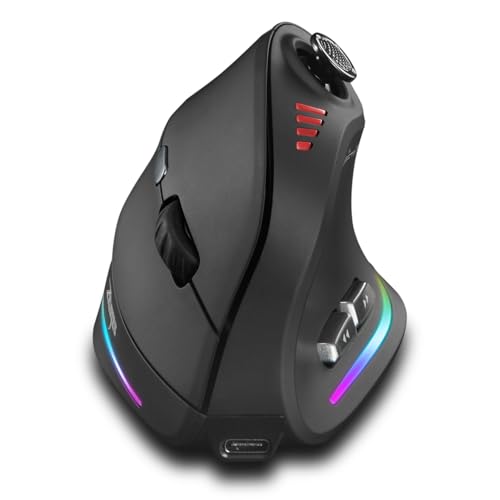
- Five-way joystick for directional control
- Twelve programmable buttons and up to 24000 DPI
- Bluetooth, 2.4G, and wired USB-C connectivity
Best For: Button-heavy gaming and software shortcuts
Best for FPS Immersion

- 65-degree pistol-style vertical grip
- Mechanical trigger with adjustable recoil feedback
- PAW3395 sensor and tri-mode connectivity
Best For: Right-handed FPS players seeking tactile immersion
Rocker-Control Performance – TRELC 5D Rocker Gaming Mouse
For gamers comparing vertical mice for gaming, the TRELC stands out for its thumb-operated 5-direction rocker and extensive button customization. Its wired connection, ergonomic handshake grip, and onboard memory make it a practical choice for PC gaming setups that favor consistent performance and saved profiles.
Best For: FPS, MOBA, and MMO players who want many programmable controls in a wired vertical mouse.
Pros:
- 5D rocker provides five directional inputs through one thumb control.
- All 11 buttons can be programmed, with settings saved to onboard memory.
- Offers five DPI levels from 1,500 to 10,000, plus customizable lighting effects.
- Vertical handshake design is intended to reduce wrist strain and muscle fatigue.
Cons:
- Wired design limits freedom of movement compared with wireless alternatives.
- Right-handed shape may not suit left-handed users.
- Customization software is required for macro and button setup.
The TRELC is a feature-dense option for players who can take advantage of its rocker and 11-button layout. It is especially compelling for MMO and MOBA control schemes, though the wired format and right-hand-only design narrow its audience.
Wireless Premium Comfort – Razer Pro Click V2 Vertical
The Razer Pro Click V2 Vertical is a polished choice among vertical mice for gaming, combining a natural handshake angle with wireless flexibility and a wrist-supporting base. Its high-resolution sensor, multi-device connectivity, and long battery claim make it suitable for gaming and productivity across a full setup.
Best For: Right-handed users who want a premium vertical mouse for gaming, creation, and multi-device work.
Pros:
- 6-button vertical design and base support promote a more elevated wrist position.
- Connects through 2.4GHz HyperSpeed Wireless, Bluetooth for up to three hosts, or wired mode.
- Focus Pro 30K optical sensor is rated for tracking on glass and 99.8% resolution accuracy.
- Battery is rated for up to six months under standard test conditions, with quick USB-C charging.
Cons:
- Limited to six buttons, offering less direct control than MMO-focused mice.
- Listed operating-system requirement is Windows 11.
- Premium features depend on Razer Synapse 4 for customization.
This model prioritizes comfort, connectivity, and refined tracking rather than a large button grid. It is a strong fit for users who switch between devices and want one vertical mouse for gaming and everyday tasks.
MMO Button Hub – SOLAKAKA E9 Vertical MMO Mouse
The SOLAKAKA E9 is built for gamers who need a dense command layout without giving up a vertical grip. As vertical mice for gaming go, its 10 programmable side buttons, tri-mode connection, onboard memory, and 1,000Hz polling rate make it particularly suited to MMO rotations and complex macros.
Best For: MMO players and power users who want ten thumb buttons, multiple connection modes, and stored profiles.
Pros:
- 45-degree vertical design supports a natural handshake position.
- Ten side buttons are programmable through a browser-based configuration tool.
- Supports 2.4GHz, Bluetooth 5.0, and USB-C wired connections.
- PAW3311 sensor offers 1,000Hz polling, six physical DPI presets, and up to 24,800 DPI through software.
Cons:
- Configuration tool is Windows-only, even though saved settings can be used on other listed systems.
- Right-handed design may not work for left-handed players.
- Ten side buttons may require an adjustment period for precise thumb control.
The E9 focuses squarely on MMO flexibility, pairing a large side-button bank with wireless or wired operation. Its Windows-only setup tool is the main compatibility limitation, but onboard memory helps make the configured mouse more portable.
Large-Hand Wired Support – DELUX M618PLUS RGB
The DELUX M618PLUS RGB is a practical pick among vertical mice for gaming for users with larger hands who prefer a stable wired connection. Its removable wrist rest, six programmable buttons, adjustable DPI, and quiet primary clicks make it equally useful for everyday work and casual gaming.
Best For: Right-handed users with 6.7- to 7.5-inch hands who want wired comfort and wrist support.
Pros:
- Large-hand fit is specified for hands measuring 6.7 to 7.5 inches in length.
- Removable palm rest supports the forearm and reduces wrist contact with the desk.
- Six DPI levels range from 400 to 4,000, with driver-based adjustment up to 12,800 DPI.
- Plug-and-play USB connection and silent primary clicks suit quiet workspaces.
Cons:
- Heavy 210-gram build may feel cumbersome for fast competitive play.
- Wired connection does not provide wireless freedom.
- Mac users do not get side-button or driver support.
The M618PLUS RGB is best viewed as a comfort-first vertical mouse with gaming extras rather than a competition-focused model. Its size guidance and wrist rest are important advantages, while the weight and wired design may matter to speed-oriented players.
Most Versatile – 12-Button 5D Rocker Vertical Gaming Mouse
Among vertical mice for gaming, this model stands out for combining a handshake-style grip with extensive control options. It offers tri-mode connectivity, up to 12 programmable buttons, a five-direction thumb rocker, and adjustable sensitivity up to 24,000 DPI, making it suited to users who want one mouse for gaming and general computer work.
Best For: Right-handed gamers who want extensive button customization and wireless flexibility.
Pros:
- Supports Bluetooth, 2.4GHz wireless, and USB-C wired connections.
- Provides up to 12 programmable buttons with macro support.
- Five-direction rocker can handle movement inputs in FPS, MOBA, and MMO games.
- Offers five DPI presets up to 24,000 and customizable RGB effects.
Cons:
- Designed for right-handed use only.
- Button programming requires the included configuration software.
- The large feature set may be more than casual users need.
This is the strongest all-rounder here for players who value programmable controls and multi-device use. Its vertical design and rocker may require an adjustment period, but the combination of connectivity and customization gives it broad gaming potential.
Best Plug-and-Play Pick – Nulea Wired Vertical Mouse
For shoppers comparing vertical mice for gaming but preferring a straightforward setup, the Nulea is a simple wired option. Its 57-degree grip is designed to keep the forearm in a more natural position, while four DPI settings, RGB lighting, and a 5.9-foot cable cover everyday computing and lighter gaming needs.
Best For: Right-handed users who want an affordable, driver-free wired mouse for casual gaming and office work.
Pros:
- Plug-and-play USB connection requires no drivers.
- 57-degree ergonomic design supports a natural grip.
- Offers four DPI levels from 800 to 3,200.
- Includes RGB underglow and forward/back buttons for navigation.
Cons:
- Buttons are not programmable.
- Forward and backward buttons are not compatible with Mac OS.
- Wired design provides less flexibility than wireless alternatives.
The Nulea favors simplicity over gaming-focused features. Its limited DPI range and non-programmable buttons make it less suitable for competitive play, but its ergonomic shape and no-driver setup are practical for mixed office use and casual gaming.
Best for Competitive Controls – TRELC 5D Rocker Vertical Mouse
The TRELC focuses on game-ready controls in a vertical form. It combines a five-direction rocker with 11 programmable buttons, a PMW3311 sensor rated up to 24,000 DPI, and tri-mode connectivity. That makes it one of the more gaming-oriented vertical mice for gaming, especially for players who use multiple input bindings.
Best For: Right-handed FPS, MOBA, and MMO players who want a rocker and macro-capable controls.
Pros:
- Five-direction thumb rocker can replace five directional inputs.
- All 11 buttons are customizable through the included software.
- Supports Bluetooth 5.0, 2.4GHz wireless, and wired USB connections.
- PMW3311 sensor supports up to 24,000 DPI, 300 IPS, and 35G acceleration.
Cons:
- Designed for right-handed users.
- Customization requires attached configuration software.
- Users cannot control two connected devices simultaneously.
With its high-spec sensor and rocker layout, the TRELC is aimed more directly at gaming than the basic wired option. It is a compelling choice for players who can make use of macros and directional thumb inputs, while its vertical shape also targets reduced wrist strain.
Best All-Around Choice – DELUX Seeker OLED Vertical Mouse
Among vertical mice for gaming, the DELUX Seeker stands out as a versatile option for users who also work or browse extensively. Its upright grip, detachable wrist rest, tri-mode connectivity, programmable controls, and status OLED screen make it practical for long sessions, though medium- to large-handed users should expect a short adjustment period.
Best For: Gamers and office users who want ergonomic comfort, visible device status, and flexible wired or wireless connectivity.
Pros:
- Vertical design, thumb rest, and detachable wrist pad help reduce wrist friction and fatigue.
- OLED screen shows DPI, battery, connection mode, and charging status.
- Supports wired, 2.4G wireless, and Bluetooth 5.0 connections.
- Six programmable buttons, adjustable DPI up to 4800 through software, and rechargeable battery.
Cons:
- Requires several days of adaptation for users accustomed to flat mice.
- Driver customization and some side-button functions are unavailable on Mac.
- Thumb wheel support is limited on Mac OS and certain office software.
The Seeker is a strong general-purpose pick when comfort and everyday versatility matter as much as gaming control. Its 4000-DPI physical settings and expanded software range are adequate for many players, while the OLED display and wrist support add useful long-session convenience.
Best for Programmable Controls – TKMARS Joystick Vertical Gaming Mouse
For shoppers comparing vertical mice for gaming, the TKMARS model focuses on control density and navigation flexibility. It combines a five-way joystick, 12 programmable buttons, adjustable sensitivity up to 24000 DPI, dual wireless modes, and USB-C connectivity in a right-handed ergonomic design.
Best For: Right-handed gamers and power users who want many assignable inputs, joystick navigation, and high DPI adjustability.
Pros:
- Five-way joystick provides directional and press inputs for games and software.
- Twelve programmable buttons offer extensive shortcut and command customization.
- Supports Bluetooth 5.0, 2.4G wireless, and wired USB-C use.
- Includes rechargeable 800mAh battery, RGB lighting, DPI indicator, and low-battery alerts.
Cons:
- The feature-rich layout may require time to learn and configure.
- It is designed for right-handed use only.
- Supplied details list a 9V battery requirement despite also describing a built-in rechargeable battery, so buyers should verify the final listing specifications.
The TKMARS is the most control-oriented option in this group. Its joystick and 12-button layout may appeal to MMO, strategy, and shortcut-heavy users, while the vertical grip and Teflon base aim to keep extended movement comfortable.
Best for FPS Immersion – ErgoStrike7 Gun-Grip Mouse
The ErgoStrike7 takes a specialized approach to vertical mice for gaming with a 65-degree pistol-style grip, mechanical trigger, and adjustable recoil feedback. Its PAW3395 sensor, tri-mode connectivity, and software customization make it an unusual choice for FPS players who value immersion alongside ergonomic positioning.
Best For: Right-handed FPS players seeking a gun-grip shape, trigger-style input, and adjustable recoil effects.
Pros:
- 65-degree vertical grip is shaped around a handshake position to help reduce wrist strain.
- Mechanical trigger and adjustable linear motor provide tactile recoil feedback.
- PAW3395 optical sensor supports sensitivity up to 26000 DPI.
- Offers 2.4GHz wireless, Bluetooth 5.1, and wired USB-C modes with up to 70 hours of battery life.
Cons:
- The pistol-shaped design is specialized and may not suit users seeking a conventional mouse.
- It has six buttons, fewer than the TKMARS model.
- The recoil and FPS-focused features may provide limited value for non-action games or general office use.
The ErgoStrike7 is best viewed as an immersive FPS accessory rather than a universal ergonomic mouse. Its distinctive trigger and recoil system set it apart, while the sensor and three connection modes provide the core flexibility expected from a modern gaming mouse.
How We Picked the Best Vertical Mice for Gaming
We focused on features that matter when a vertical mouse is used for both gaming and everyday computing: hand-friendly shape, button placement, sensor resolution, programmable controls, connection type, onboard memory, and compatibility. We also included different designs because no single grip suits every player. Some models prioritize MMO commands, while others are better for general play, work, or users transitioning from a conventional mouse.
Specifications such as DPI and button count are useful starting points, but they do not guarantee better performance. Comfort, control reach, tracking consistency, and software support should carry more weight than headline numbers alone.
Quick Comparison
| Priority | Look for | Best fit |
|---|---|---|
| Maximum control | 10–12 programmable buttons or a joystick | MMO and strategy players |
| Low cable clutter | 2.4GHz wireless, Bluetooth, or both | Flexible desk setups |
| Simple reliability | Wired connection and onboard controls | Competitive or stationary use |
| Large hands | Taller, longer shell with broad thumb support | Users who find compact mice cramped |
| Work and gaming | Moderate button count and quiet, ergonomic design | Mixed-use desktops |
Key Buying Factors for Vertical Mice for Gaming
Grip, Size, and Adjustment Time
A vertical design changes how your fingers contact the shell, so expect a short adjustment period. Check the stated hand-size guidance, palm support, thumb-rest position, and whether your fingers can reach the primary buttons without stretching. A mouse that is too tall or narrow may create new pressure points.
Buttons and Game Type
Extra buttons are most valuable in MMOs, simulators, and productivity-heavy workflows. For FPS games, excessive controls can add weight or accidental presses, while a stable grip and predictable sensor may matter more. Joystick or rocker controls can be useful, but confirm that the software lets you remap them as needed.
Sensor, DPI, and Tracking
High DPI numbers offer flexibility but are not a substitute for accurate tracking. Choose a model with adjustable sensitivity and software that supports practical profiles. Onboard memory is particularly useful if you move between computers or want your settings to remain available without running background software.
Wireless, Wired, and Software Support
Wired mice avoid charging and wireless interference. Wireless models provide a cleaner desk and may offer Bluetooth for secondary devices, but check battery life, charging options, polling behavior, and whether all features work in every connection mode. Verify operating-system support before relying on advanced remapping or RGB controls.
Who Should Buy Which Vertical Mice for Gaming?
Choose a high-button vertical model with a rocker or joystick if you play MMOs and want commands close to your thumb. A wireless option is better for flexible workstations and users who dislike cable drag. Large-handed users should prioritize an extended shell and generous palm support over maximum DPI. For mixed office and gaming use, a simpler six-button ergonomic mouse may be easier to live with. If you play primarily competitive FPS titles, select the lightest, most stable design available and confirm that its vertical angle does not hinder rapid aim corrections.