Switching one keyboard, mouse, printer, or scanner between multiple computers should not require repeatedly unplugging cables. The best USB switch boxes with remote button make shared peripherals easier to manage from a desk, while keeping the setup compact and practical.
This roundup compares 10 options across USB standards, computer capacity, port layouts, remote controls, and device compatibility so you can choose a switch that fits your workspace.
Best 10 USB Switch Boxes with Remote Button Picks for 2026
Best Overall
Jancane 4-Port USB 3.0 Switch with Remote

- Shares four USB devices among up to four computers
- Includes remote and physical button switching
- Up to 5Gbps; four USB cables included
Best For: Multi-computer workstations needing flexible remote control
Best for Audio
eKL 4-Port USB 3.0 Switch with Headset Jacks

- Four computers share four USB peripherals
- Adds 3.5mm headset and microphone connections
- Includes USB cables and USB-C power cable
Best For: Shared workspaces that need USB and headset audio switching
Best Compact USB 2.0 Option

- Shares four USB devices between two computers
- Built-in design reduces cable clutter
- Includes a remote port selector
Best For: Basic two-computer peripheral sharing
Best for Three Computers
THXCDBID USB 3.0 Switch with IR Remote

- Shares four USB-A devices among three computers
- Physical button and IR remote switching
- Up to 5Gbps; power cable included
Best For: Three-computer USB peripheral sharing without monitor switching
Reliable Button-Controlled Sharing
UGREEN 2-Computer USB 2.0 Switch

- Shares four USB 2.0 devices between two computers
- Uses one-button switching with an LED status indicator
- Driver-free; optional power supports demanding devices
Best For: Simple desk-based USB 2.0 peripheral sharing
Remote USB 3.0 Flexibility
BENFEI USB 3.0 Switch with Remote

- Combines remote and physical-button switching
- Provides three USB 3.0 ports plus one USB-C port
- Supports up to 5Gbps and optional USB-C power
Best For: Remote-access switching of modern USB peripherals
Hidden-Desk Remote Switching

- Shares four USB 3.0 peripherals between two computers
- Includes one USB-C and three USB-A ports
- Switches by remote or button, with optional USB-C power
Best For: Tidy workstations needing convenient remote switching
Best Remote-Controlled 4-PC USB Switch

- Shares four USB devices across four computers
- Switches by panel button or wireless remote
- 5Gbps USB 3.0 support with optional 5V power
Best For: Four-computer workstations with shared USB peripherals
Best High-Speed USB Switch

- Delivers USB 3.2 transfer rates up to 10Gbps
- Combines one USB-C with three USB-A ports
- Includes 12V power adapter and remote control
Best For: Four-PC setups sharing fast and mixed-format USB devices
Best Two-Computer USB Switch
4-Port USB 3.0 Remote Selector
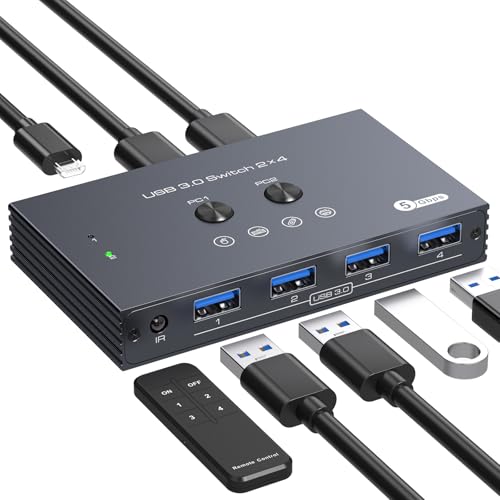
- Shares four USB devices between two computers
- Uses front-button or infrared remote switching
- Supports 5Gbps transfers and optional 5V power
Best For: Two-PC home offices and shared workstations
Best Overall – Jancane 4-Port USB 3.0 Switch with Remote
For shoppers comparing USB switch boxes with remote button control, the Jancane stands out with four host-computer connections, four USB 3.0 peripheral ports, and both onboard and remote switching. It supports transfer rates up to 5Gbps and works with wired or wireless USB devices.
Best For: Sharing several peripherals among up to four computers, especially when the switch needs to sit behind a desk or in a rack.
Pros:
- Supports up to four computers sharing four USB devices.
- Includes a remote control plus physical button switching.
- USB 3.0 speeds up to 5Gbps with backward compatibility for USB 2.0.
- Includes four USB 3.0 cables and supports optional USB-C power.
Cons:
- Optional 5V power adapter is not included.
- Remote control may need to be disabled in RF-sensitive environments.
The Jancane is a flexible choice for multi-computer desks that need fast peripheral sharing without cable swapping. Its included cables and remote make setup convenient, while optional external power can improve stability with power-hungry devices.
Best for Audio – eKL 4-Port USB 3.0 Switch with Headset Jacks
The eKL is a strong option among USB switch boxes with remote button control when audio connections matter. It lets four computers share four USB peripherals and adds 3.5mm microphone and headset connections, with USB 3.0 data speeds and optional power for higher-demand devices.
Best For: Shared workstations where keyboards, mice, printers, cameras, headphones, or microphones need to move between four computers.
Pros:
- Allows four computers to share four USB devices.
- Includes microphone and headset audio jacks supporting CTIA connections.
- USB 3.0 transfer rates reach up to 5Gbps and support USB 2.0 devices.
- Includes four USB 3.0 cables and a USB-C power cable.
Cons:
- The notes describe desktop, button, and RS232 switching rather than a conventional handheld remote.
- High-power devices may require the optional power connection for stable operation.
Choose the eKL if integrated audio is more useful than a simple peripheral-only switch. Its multiple control methods and included power cable also suit setups where the unit may be placed under a desk or in a rack.
Best Compact USB 2.0 Option – ATEN US224 2 x 4 Switch
The ATEN US224 is a straightforward choice for buyers seeking USB switch boxes with remote button control for two computers. Its built-in four-port design reduces cable clutter and lets two systems share a keyboard, mouse, and up to two additional USB peripherals.
Best For: Simple two-computer setups using keyboards, mice, printers, and other USB 2.0 peripherals.
Pros:
- Two computers can share four USB devices.
- Built-in design helps create a tidy installation.
- Includes a remote port selector for convenient switching.
- Supports Windows, macOS, and Linux.
Cons:
- Uses USB 2.0 with data rates up to 480Mbps.
- Optional USB power adapter is not included.
- Designed for two computers rather than larger multi-host setups.
The US224 favors simplicity and cable management over USB 3.0 performance. It is a sensible fit for everyday input devices and printers when two-computer sharing is enough.
Best for Three Computers – THXCDBID USB 3.0 Switch with IR Remote
The THXCDBID provides a middle ground for shoppers comparing USB switch boxes with remote button control: it connects three computers to four USB-A peripheral ports and offers both device-button and IR remote switching. USB 3.0 support reaches up to 5Gbps, but this is a peripheral switch rather than a monitor KVM.
Best For: Three-computer setups sharing keyboards, mice, printers, scanners, and other USB-A devices.
Pros:
- Shares four USB-A ports among three computers.
- Offers physical-button and IR remote switching.
- Supports USB 3.0 data rates up to 5Gbps.
- Includes three input cables, an IR remote, and a Micro USB power cable.
Cons:
- Does not support monitor connections and is not a KVM switch.
- Remote batteries are not included.
- High-power peripherals require separate power for stable operation.
The THXCDBID is a practical choice when three hosts are required but monitor switching is not. Its included power cable and remote simplify installation, although users should plan for batteries and additional power for demanding peripherals.
Reliable Button-Controlled Sharing – UGREEN 2-Computer USB 2.0 Switch
For shoppers comparing usb switch boxes with remote button options, this UGREEN model is a straightforward choice for sharing up to four USB 2.0 peripherals between two computers. It uses a physical one-button switch and LED indicator rather than a remote, making it suitable for a desk where the selector remains within reach.
Best For: Sharing keyboards, mice, printers, scanners, card readers, and other USB 2.0 devices between two computers.
Pros:
- Shares four USB devices between two computers with one-button switching.
- Includes two USB A-to-A data cables.
- Works driver-free with Windows, macOS, Linux, and Chrome OS.
- Optional micro-USB power can help stabilize higher-demand devices.
Cons:
- Does not support monitor or video transmission, so it is not a full KVM switch.
- Uses USB 2.0 rather than USB 3.0 transfer speeds.
- Power cable and charger are not included.
This is a practical, compact option when a physical button is convenient and your peripherals do not require USB 3.0 performance. Plan on adding external power when using several devices or higher-power storage equipment.
Remote USB 3.0 Flexibility – BENFEI USB 3.0 Switch with Remote
This BENFEI model is one of the more versatile usb switch boxes with remote button control, allowing two computers to share three USB 3.0 ports and one USB-C port. You can switch from the included remote or the unit’s button, while LED indicators show the active connection.
Best For: Users who want remote switching, 5Gbps USB 3.0 connectivity, and a USB-C peripheral port for two-computer setups.
Pros:
- Shares three USB 3.0 ports and one USB-C port between two computers.
- Offers both remote-control and physical-button switching.
- Supports data transfer up to 5Gbps and is backward compatible with USB 2.0.
- Uses USB-C for optional power with higher-consumption devices.
Cons:
- Requires BENFEI USB A-to-A cables for the connected setup.
- Extra power may be needed for hard drives, cameras, or headphones.
- The remote adds another component to keep track of.
With faster ports and two switching methods, this is a strong fit for users who want to hide the switcher or change computers from a short distance. Check your computer connections and cable requirements before buying.
Hidden-Desk Remote Switching – UGREEN USB 3.0 USB-C/A Switch
For a tidy two-computer workstation, this UGREEN switch combines remote and button control with four USB 3.0 peripheral ports. Its mix of one USB-C and three USB-A ports lets you connect current and legacy accessories, while the remote can be used when the switch is tucked out of sight.
Best For: Workstations that need remote switching for keyboards, mice, printers, scanners, headphones, or USB cameras.
Pros:
- Lets two computers share four USB 3.0 devices.
- Includes one USB-C port and three USB-A ports.
- Supports up to 5Gbps and works with USB 2.0 devices.
- Provides both remote and physical-button switching.
Cons:
- High-power devices may require separate USB-C power.
- The product is for USB peripheral sharing, not monitor or video switching.
- USB-C compatibility depends on the connected device or hub.
This model stands out when convenience and cable organization matter. Its remote-control design makes it easier to switch between computers without reaching behind the desk, while the four-port USB 3.0 layout handles a broad range of peripherals.
Best Remote-Controlled 4-PC USB Switch – 4-Port USB 3.0 Selector
This 4-port USB 3.0 selector is a practical choice among USB switch boxes with remote button control when four computers need to share the same peripherals. It switches by top-panel button or wireless remote and supports data rates up to 5Gbps, but it does not switch video signals.
Best For: Four-computer workstations sharing keyboards, mice, printers, scanners, storage devices, webcams, or other USB peripherals.
Pros:
- Connects four computers to four shared USB devices.
- Offers both physical-button and wireless-remote switching.
- Supports USB 3.0 speeds up to 5Gbps and is backward compatible with USB 2.0 and 1.1.
- Includes a Micro USB 5V power option for higher-power devices.
Cons:
- USB-only; it does not support HDMI, DisplayPort, VGA, or monitor switching.
- Remote-control batteries are not included.
- Some connected devices may require the computer to install drivers before use.
This model stands out when four-way sharing and remote access are priorities. The included power option can help with demanding peripherals, while the lack of video switching means it should be paired with a separate display solution.
Best High-Speed USB Switch – 10Gbps 4-PC USB 3.2 Selector
For buyers comparing USB switch boxes with remote button control and faster storage performance, this USB 3.2 selector combines 10Gbps transfer rates with four-computer sharing. It includes one USB-C and three USB-A ports, plus a 12V adapter for more consistent power with demanding peripherals.
Best For: Four-PC workstations that share mixed USB-C and USB-A accessories, including fast external drives, printers, keyboards, and mice.
Pros:
- Supports up to 10Gbps USB 3.2 Gen 2 data transfer.
- Shares four USB devices among four PCs or laptops.
- Provides one USB-C and three USB-A peripheral ports.
- Includes a 12V/1A power adapter and remote control.
Cons:
- Does not switch HDMI, DisplayPort, or other video signals.
- Keyboard hotkey switching is not supported.
- Remote-control batteries are not included.
This is the strongest fit for users who regularly move large files through shared storage and need current USB-C connectivity. Its 12V powered design is useful for heavier peripheral loads, but display input selection remains a separate task.
Best Two-Computer USB Switch – 4-Port USB 3.0 Remote Selector
This two-computer model is a straightforward option among USB switch boxes with remote button control. It lets two PCs share four USB 3.0 peripherals, with front-button and infrared remote switching, while supporting transfer rates up to 5Gbps.
Best For: Home offices and shared workstations where two computers need access to the same keyboard, mouse, printer, scanner, or storage devices.
Pros:
- Lets two computers share four USB 3.0 peripherals.
- Supports both front-panel button and infrared remote control.
- Offers up to 5Gbps data transfer with USB 2.0 and 1.1 backward compatibility.
- Includes a Micro USB 5V power port for high-power equipment.
Cons:
- Limited to two computers rather than four.
- USB-only and does not transfer video signals.
- Remote switching requires batteries, which are not specified as included.
Choose this selector when two-PC sharing is enough and you want a simpler setup than a four-computer switch. Its extra power input and broad operating-system compatibility add practicality for everyday office peripherals.
How We Picked the Best USB Switch Boxes with Remote Button
We focused on the features that matter in everyday peripheral sharing: the number of computers and USB devices supported, USB 2.0 versus USB 3.x performance, USB-A and USB-C compatibility, remote-button design, included cables, and practical device support. We also considered whether each model suits simple office sharing, multi-PC workstations, scanners, printers, keyboards, mice, or higher-speed storage accessories.
A USB switch is not the same as a video KVM. These products generally share USB peripherals only, so confirm that you do not need monitor switching before buying.
Quick Comparison
| What to Compare | Best Fit |
|---|---|
| 2 computers, everyday peripherals | Home offices and basic desk setups |
| 3–4 computers | Multi-PC workstations and testing desks |
| USB 3.0 or faster | External drives and higher-speed accessories |
| USB-C plus USB-A | Mixed modern and legacy peripherals |
| Wireless or wired remote button | Setups where the switch is out of reach |
Key Buying Factors for USB Switch Boxes with Remote Button
Computer and Device Capacity
Check both numbers in the specification. A “4-port” switch may let four USB devices share one computer, while another model may support four computers. Make sure the layout matches your intended setup and leave room for all required cables.
USB Speed and Compatibility
USB 2.0 is usually sufficient for keyboards, mice, printers, and many scanners. Choose USB 3.0, USB 3.2, or 10Gbps hardware when transferring files through external storage or using bandwidth-sensitive devices. Faster ports do not automatically make a connected device faster if the computer, cable, or peripheral uses an older standard.
Port Types and Power
USB-A remains common for office accessories, while USB-C can simplify newer laptop setups. Verify whether the switch includes the required upstream cables. Bus-powered devices may work without an adapter, but several high-draw peripherals or external drives can benefit from separately powered hardware.
Remote Control and Placement
A remote button is useful when the switch sits behind a monitor, under a desk, or beside a docking station. Check whether the control is wired, infrared, or wireless, and consider line-of-sight or battery requirements for wireless and IR designs.
Who Should Buy Which USB Switch Boxes with Remote Button?
Choose a compact two-computer USB switch for a home office or a desk shared by a personal computer and work laptop. A four-computer model is better for developers, IT technicians, creators, and testing environments that regularly move the same peripherals between systems.
Pick USB 3.x when storage devices, fast scanners, or frequent file transfers are part of the setup. Choose USB-C support for newer laptops and mixed-device desks, but retain USB-A ports if your keyboard, mouse, printer, or scanner uses traditional connectors. For a simple keyboard-and-mouse workflow, prioritize reliable switching and convenient remote placement over maximum transfer speed.