An 8TB internal hard drive can add substantial capacity to a desktop, NAS enclosure, DVR, or NVR without the cost of a similarly sized SSD. The right model depends less on capacity than on workload, interface, recording pattern, and durability requirements.
This roundup compares 10 reliable 8TB options across desktop, NAS, surveillance, and enterprise categories so you can match the drive to your system instead of paying for features you will not use.
Best 10 8tb Internal Hard Drives Picks for 2026
Everyday Desktop Pick

- 8TB capacity for desktop storage
- SATA 6Gb/s interface
- 5400 RPM and 256MB cache
Best For: General desktop, media, and gaming storage
Enterprise Server Pick
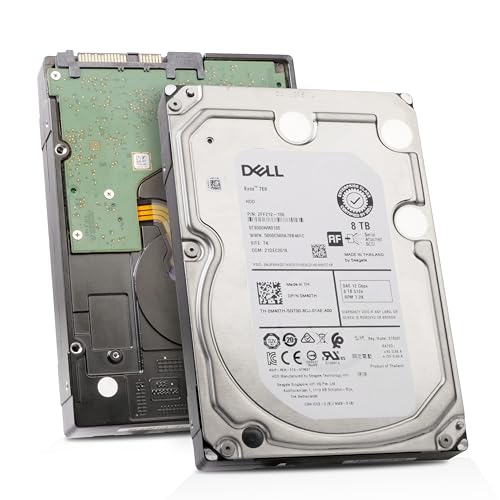
- 8TB 3.5-inch enterprise HDD
- 12Gb/s SAS interface
- 7200 RPM with 256MB cache
Best For: SAS-compatible servers and data centers
NAS-Optimized Pick

- Designed for up to 8-bay NAS systems
- 7200 RPM and 256MB cache
- Three-year warranty and Rescue Services
Best For: Multi-user NAS and shared-file storage
Balanced PC Storage Pick

- 8TB desktop storage capacity
- SATA 6Gb/s interface
- Includes Acronis cloning software
Best For: Everyday desktop and multimedia storage
Best for Standard Surveillance

- Supports up to 64 HD camera streams
- RV sensors suit multi-bay systems
- Includes three-year Rescue Services
Best For: DVR and NVR security-camera systems
Best for AI Surveillance

- Supports 64 HD and 32 AI streams
- Rated for a 550TB annual workload
- Includes RAID RapidRebuild support
Best For: AI-enabled DVR and NVR systems
Best for Surveillance Systems

- Purpose-built for surveillance recording
- AllFrame technology for compatible AI recorders
- 180 TB/year workload rating
Best For: Security systems and surveillance recorders
Best for High-Intensity NAS

- 7,200 RPM NAS-focused performance
- 550 TB/year workload rating
- Five-year limited warranty
Best For: Business NAS and multi-user RAID storage
Best for Enterprise Surveillance

- Enterprise-class surveillance design
- 550 TB/year workload rating
- AI video analytics support
Best For: High-demand business surveillance recorders
Everyday Desktop Pick – Seagate BarraCuda 8TB
For shoppers comparing 8tb internal hard drives for a desktop, gaming setup, or media library, the Seagate BarraCuda offers 8TB of capacity in a standard 3.5-inch SATA design. Its 5400 RPM speed, 256MB cache, and stated transfer rate of up to 190MB/s suit general storage, editing, and gaming workloads.
Best For: Desktop users who want high-capacity everyday storage for personal files, music, video, photos, or PC gaming.
Pros:
- Large 8TB capacity for expanding a desktop or gaming PC.
- SATA 6Gb/s interface works with a broad range of PC applications.
- Includes data recovery service and a two-year limited warranty.
Cons:
- 5400 RPM is slower than the 7200 RPM drives in this roundup.
- Frustration-Free Packaging is an anti-static bag with no cables or box.
The BarraCuda is a straightforward capacity-focused option for conventional desktop storage. Choose it when broad PC compatibility and everyday value matter more than NAS or enterprise features.
Enterprise Server Pick – Dell/Seagate Exos 7E8 8TB
Dell/Seagate Exos 7E8 ST8000NM0185 8TB 7.2K RPM SAS 12Gb/s 512e 256MB 3.5in Enterprise HDD
Check Price On AmazonAmong 8tb internal hard drives, this Dell/Seagate Exos 7E8 stands out as a server-oriented enterprise model with an 8TB capacity, 7200 RPM spindle speed, and 12Gb/s SAS interface. It is designed for data centers and servers rather than ordinary desktop PCs.
Best For: Servers, data centers, and compatible enterprise systems that use SAS connectivity.
Pros:
- 7200 RPM operation is suited to enterprise storage environments.
- 12Gb/s SAS interface and 256MB cache.
- Rated for a 2 million-hour Mean Time Between Failures.
Cons:
- Not compatible with desktop PCs according to the supplied listing.
- Uses SAS rather than the SATA interface common in consumer desktops.
- Limited warranty is listed as 90 days.
This drive makes sense only when the host system supports SAS. Its enterprise positioning and stated reliability rating are appealing for server use, but it is not a plug-and-play choice for a typical home computer.
NAS-Optimized Pick – Seagate IronWolf 8TB
If your 8tb internal hard drives will live in a network-attached storage enclosure, the Seagate IronWolf is purpose-built for the job. This 8TB, 7200 RPM SATA drive supports NAS environments of up to eight bays and includes features aimed at multi-user file sharing and ongoing drive monitoring.
Best For: Multi-user NAS systems with up to eight bays, especially for shared business or personal files.
Pros:
- NAS-optimized design for up to 8-bay enclosures.
- 7200 RPM speed, 256MB cache, and up to 210MB/s read speed.
- Includes IronWolf Health Management, a three-year warranty, and three-year Rescue Data Recovery Services.
Cons:
- Its NAS-focused features may be unnecessary for a basic single-drive desktop.
- As a 3.5-inch mechanical drive, it requires a compatible internal bay.
The IronWolf is the most purpose-specific option here. It is a strong fit when the drive will operate in a NAS and handle shared access, while a simpler desktop drive may be more appropriate for standalone storage.
Balanced PC Storage Pick – Western Digital WD Blue 8TB
For everyday 8tb internal hard drives shopping, the Western Digital WD Blue combines a large 8TB capacity with a standard 3.5-inch SATA 6Gb/s connection. Its 5640 RPM speed, 256MB cache, and stated read speed of up to 215MB/s make it a practical choice for desktop files, multimedia, and business storage.
Best For: Desktop users seeking high-capacity storage for everyday computing, multimedia, business, or personal files.
Pros:
- 8TB capacity in a conventional 3.5-inch desktop form factor.
- SATA 6Gb/s connectivity for broad desktop compatibility.
- Includes Acronis True Image WD Edition cloning software and a two-year limited warranty.
Cons:
- 5640 RPM is below the 7200 RPM speed of the IronWolf and Exos drives.
- Designed for desktop use rather than specifically for NAS or enterprise systems.
WD Blue is a sensible general-purpose option when you need substantial desktop capacity without choosing a specialized NAS or server drive. Its included cloning software is also useful when migrating an existing setup.
Best for Standard Surveillance – SkyHawk 8TB Video HDD
For DVR and NVR systems, the Seagate SkyHawk is a purpose-built choice among 8tb internal hard drives. Its video-optimized design supports up to 64 simultaneously streaming HD cameras, while RV sensors help maintain performance in multi-bay setups.
Best For: Home or business security-camera systems that need dependable, surveillance-focused storage.
Pros:
- Supports up to 180TB per year and 64 simultaneous HD camera streams.
- RV sensors support consistent performance in multi-bay systems.
- Includes three-year Rescue Data Recovery Services and a three-year limited warranty.
- SkyHawk Health Management helps monitor drive condition.
Cons:
- Its 5,400 rpm design is focused on surveillance workloads rather than maximum desktop speed.
- It is specifically optimized for DVR, NVR, and security-camera use.
This is a practical surveillance drive when video reliability, monitoring features, and data-recovery coverage matter more than general-purpose versatility.
Best for Small NAS Systems – WD Red Plus 8TB NAS HDD
The WD Red Plus is a NAS-oriented option among 8tb internal hard drives, designed for small and medium business environments. Its CMR recording, NASware firmware, and support for systems with up to eight bays make it a sensible fit for shared storage and RAID configurations.
Best For: Small or medium business NAS systems operating continuously in RAID-optimized environments.
Pros:
- Supports NAS systems with up to eight bays.
- Uses CMR recording and NASware firmware for compatibility.
- Supports a 180TB annual workload rate.
- Includes a three-year limited warranty.
Cons:
- Its 5,640 rpm speed is not aimed at the highest possible performance.
- The listed specifications are geared toward NAS and business storage rather than surveillance-specific features.
Choose this model when your priority is a compatible, RAID-friendly drive for an always-on NAS rather than a video-surveillance workload.
Best for AI Surveillance – SkyHawk AI 8TB HDD
Seagate’s SkyHawk AI is the performance-focused surveillance option among these 8tb internal hard drives. It supports up to 64 HD video streams alongside 32 AI streams, with ImagePerfect AI, RAID RapidRebuild, and a 550TB-per-year workload rating for demanding monitoring environments.
Best For: AI-enabled DVR or NVR systems handling multiple video and analytics streams.
Pros:
- Supports up to 64 HD video streams and 32 AI streams.
- Offers a 550TB annual workload rate and 2M hours MTBF.
- RAID RapidRebuild can provide up to three-times-faster volume rebuilds than traditional RAID rebuilds.
- Includes a five-year limited warranty and three-year Rescue Data Recovery Services.
Cons:
- Its AI-focused capabilities may be unnecessary for basic camera recording.
- The 7,200 rpm design may be more than needed for lighter surveillance systems.
This is the strongest fit for demanding surveillance deployments where AI streams, higher workload tolerance, and faster RAID recovery justify stepping up from a standard video HDD.
Best for Surveillance Systems – WD Purple 8TB
For surveillance-focused 8tb internal hard drives, the Western Digital WD Purple 8TB is built around write-intensive, low-bit-rate, high-stream workloads. Its 3.5-inch SATA design, 256 MB cache, and AllFrame technology make it a practical fit for compatible security recorders.
Best For: Surveillance systems, security recorders, and installations requiring support for more than eight bays.
Pros:
- Designed specifically for surveillance workloads.
- AllFrame technology supports AI-enabled recorders and higher workload rates.
- Supports up to 180 TB per year workload rate.
- Offers 8TB capacity with SATA 6 Gb/s connectivity.
Cons:
- Its 5,400 RPM speed is less performance-focused than the 7,200 RPM alternatives here.
- The three-year limited warranty is shorter than the five-year coverage on the Pro models.
The WD Purple is a sensible choice when continuous surveillance recording matters more than general-purpose desktop performance. Confirm recorder compatibility and workload requirements before installation.
Best for High-Intensity NAS – WD Red Pro 8TB
The WD Red Pro 8TB is one of the more performance-oriented 8tb internal hard drives for NAS use. With a 7,200 RPM mechanism, CMR recording, RAID optimization, and a 550 TB-per-year workload rating, it is designed for demanding multi-user storage environments.
Best For: RAID-optimized NAS systems, business storage, and high-intensity 24/7 multi-user workloads.
Pros:
- Designed for NAS systems with an unlimited number of bays.
- 7,200 RPM speed and up to 267 MB/s media speed support responsive storage performance.
- Rated for a 550 TB-per-year workload.
- Includes a five-year limited warranty and broad NAS compatibility testing.
Cons:
- It is intended for NAS use rather than typical desktop storage.
- Higher-intensity specifications may be unnecessary for light personal workloads.
Choose the WD Red Pro when your NAS handles frequent access, multiple users, or demanding RAID workloads. Its workload rating and warranty make it particularly suited to business-oriented storage builds.
Best for Enterprise Surveillance – WD Purple Pro 8TB
For demanding surveillance deployments, the Western Digital WD Purple Pro 8TB combines enterprise-class positioning with a 7,200 RPM design and support for AI video analytics. It is a strong candidate among 8tb internal hard drives for compatible video recorders handling substantial workloads.
Best For: Enterprise surveillance, AI-enabled video recorders, and business systems with demanding recording requirements.
Pros:
- Supports AI video analytics, smart video recording, and AllFrame technology.
- 550 TB-per-year workload rating for demanding surveillance environments.
- 7,200 RPM speed with up to 267 MB/s media speed.
- Includes a five-year limited warranty and up to 2.5 million hours MTBF rating.
Cons:
- Its enterprise-oriented features may exceed the needs of a basic home camera system.
- Compatibility should be checked with the intended video recorder and analytics platform.
The WD Purple Pro is the most robust surveillance-focused option in this group for systems using AI analytics or operating under heavier workloads. It makes the most sense when recorder capabilities and reliability requirements justify its Pro specification.
How We Picked the Best 8tb Internal Hard Drives
We organized these drives by their intended workload rather than treating every 8TB model as interchangeable. The selection includes mainstream desktop drives, NAS-rated models, surveillance-focused drives, and an enterprise SAS option. We considered interface compatibility, recording technology, spindle speed, cache, workload design, and the features most relevant to continuous or multi-user operation.
All of these are 3.5-inch hard drives with 8TB capacity, but their firmware and construction target different environments. A drive designed for a desktop may be a poor choice for a multi-bay NAS, while a surveillance model is optimized for sustained video writing rather than general-purpose storage.
Quick Comparison
| Use Case | Best-Fit Drive Type | What to Prioritize |
|---|---|---|
| Desktop expansion and backups | BarraCuda or WD Blue | Low cost, SATA compatibility, adequate capacity |
| Home or small-business NAS | IronWolf or WD Red Plus | NAS workload rating, CMR recording, vibration management |
| Performance-oriented NAS | WD Red Pro | Higher rotational speed, heavier workload support |
| DVR or NVR recording | SkyHawk or WD Purple | 24/7 video workload optimization and write consistency |
| AI-enabled surveillance | SkyHawk AI or WD Purple Pro | Multiple camera streams and analytics workloads |
| Enterprise server with SAS | Exos 7E8 | SAS controller compatibility and enterprise endurance |
Key Buying Factors for 8tb Internal Hard Drives
Interface and Compatibility
Most consumer and NAS choices use SATA, while the Exos 7E8 uses SAS. SAS drives require a compatible host bus adapter, backplane, or enterprise controller and generally cannot be connected directly to a standard desktop SATA port. Confirm the interface before comparing performance or price.
Workload and Recording Design
Desktop drives suit occasional or moderate use. NAS drives are built for multi-user access and prolonged operation, while surveillance drives are tuned for continuous sequential video recording. Do not substitute based on capacity alone, especially in systems that run around the clock.
CMR, Speed, and Cache
CMR is generally preferred for NAS and demanding write workloads because it offers more predictable sustained behavior than shingled recording designs. A 7200 RPM model may provide better responsiveness than a 5640 or 5900 RPM drive, but it can also generate more heat, noise, and power draw. Cache helps bursts but does not turn a hard drive into an SSD.
NAS and Surveillance Compatibility
Check the enclosure or recorder’s approved-drive list, maximum supported capacity, bay count, and vibration requirements. NAS-rated models are better suited to RAID arrays, while surveillance models should match the recorder’s supported camera count, stream type, and analytics capability.
Who Should Buy Which 8tb Internal Hard Drives?
- Choose BarraCuda or WD Blue for affordable desktop storage, media libraries, and local backups.
- Choose IronWolf or WD Red Plus for a home or small-office NAS where multiple users and continuous availability matter.
- Choose WD Red Pro for a busier NAS, larger array, or users who value higher rotational performance.
- Choose SkyHawk or WD Purple for DVR and NVR systems recording video continuously.
- Choose SkyHawk AI or WD Purple Pro when the surveillance system handles heavier camera loads or onboard analytics.
- Choose the Exos 7E8 only when your server supports SAS and you need enterprise-oriented hardware.
Before buying, verify the exact model number, interface, warranty terms, recorder or NAS compatibility, and return policy. For important data, pair any hard drive with a tested backup plan rather than relying on redundancy alone.