The best quiet internal hard drives balance low operating noise with dependable capacity, sensible performance, and compatibility with your desktop or NAS enclosure.
This roundup compares 10 options across everyday PCs, network storage, surveillance systems, and high-capacity backups so you can choose the right drive for your workload.
Best 10 Quiet Internal Hard Drives Picks for 2026
Best Everyday Value

- 4TB capacity for everyday storage
- 5400 RPM design for quieter desktop use
- 256MB cache and up to 190MB/s sustained transfer
Best For: Desktop users needing affordable, spacious general-purpose storage
Best Quiet NAS Option

- 8TB capacity for shared NAS storage
- Designed for up to 8-bay multi-user NAS systems
- Health Management and 3-year recovery services included
Best For: NAS users prioritizing capacity, monitoring, and reduced noise and vibration
Best Quiet Everyday Alternative

- 4TB capacity for personal and creator files
- 5400 RPM design for everyday quiet operation
- Free Acronis cloning software included
Best For: PC users wanting dependable, spacious general-purpose storage
Best High-Capacity Desktop Pick
- 8TB capacity for large media and game libraries
- 5400 RPM format suited to quieter storage
- 256MB cache with up to 190MB/s sustained transfer
Best For: Desktop and compatible console users needing maximum affordable capacity
Best High-Capacity Pick

- 10TB capacity for large storage needs
- 7200 RPM with 512 MB cache
- Includes Acronis cloning software
Best For: Desktop users needing high-capacity everyday storage
Best NAS Option

- NAS-optimized CMR storage
- Designed for low noise and vibration
- Includes health management and recovery services
Best For: Multi-user NAS and RAID storage
Best Budget Quiet Pick

- Near-silent, cool operation
- Low-power 5400 RPM design
- Made for DVR and surveillance use
Best For: Quiet, budget-focused desktop or AV storage
Quiet Desktop Pick
- 2TB capacity for everyday desktop storage
- 7200 RPM and 256MB cache
- Useful for media, editing, and gaming
Best For: Desktop PCs and general-purpose storage
Quiet Enterprise Workload Pick
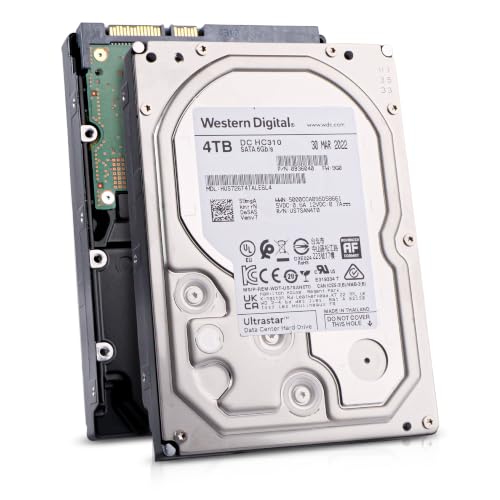
- 4TB enterprise-oriented capacity
- CMR, 7200 RPM, and 256MB cache
- Rated for 24/7 operation and 550TB/year
Best For: Enterprise storage, NAS/SAN arrays, and backups
Best Everyday Value – Seagate BarraCuda 4TB
For shoppers seeking quiet internal hard drives for everyday desktop use, the Seagate BarraCuda 4TB offers a practical balance of capacity, compatibility, and straightforward SATA performance. Its 5400 RPM design and 256MB cache suit general storage, media libraries, editing, and gaming setups.
Best For: Everyday desktop storage, personal files, media, and budget-conscious PC builds.
Pros:
- Large 4TB capacity for files, photos, video, and games.
- 5400 RPM operation is well suited to quieter everyday computing.
- 256MB cache and sustained transfer rates up to 190MB/s.
- Includes access to Seagate DiscWizard for migration and cloning.
Cons:
- Mechanical storage is slower than a solid-state drive.
- Designed for desktop installation rather than portable use.
This BarraCuda is a sensible choice when capacity and dependable general-purpose storage matter more than peak performance. Its 2-year warranty and broad PC compatibility add practical value.
Best Quiet NAS Option – Seagate IronWolf 8TB
The Seagate IronWolf 8TB is built for NAS environments where quiet operation, shared access, and dependable capacity are priorities. Its NAS-focused design is intended for enclosures with up to eight bays and supports multi-user file sharing.
Best For: Home or small-business NAS systems requiring high capacity and NAS-specific monitoring.
Pros:
- 8TB capacity provides substantial shared storage.
- Purpose-built for up to 8-bay, multi-user NAS enclosures.
- Designed for little to no noise and vibration in NAS use.
- Includes IronWolf Health Management, a 3-year warranty, and 3-year Rescue Data Recovery Services.
Cons:
- NAS-oriented features may be unnecessary for a basic desktop PC.
- Its 7200 RPM mechanism may not be as quiet as a slower desktop drive in every setup.
For a compatible NAS, the IronWolf combines generous capacity with features aimed at shared, always-on storage. It is the most purpose-built option here for monitoring and multi-user workloads.
Best Quiet Everyday Alternative – WD Blue 4TB
Western Digital’s WD Blue 4TB is a straightforward choice for quiet internal hard drives in everyday computing systems. Its 5400 RPM speed, SATA 6 Gb/s interface, and 4TB capacity make it suitable for personal, business, and creator storage.
Best For: Reliable everyday PC storage, creator files, and general-purpose desktop upgrades.
Pros:
- 4TB capacity for documents, media, backups, and projects.
- 5400 RPM operation supports a quieter everyday setup.
- Up to 180MB/s read performance for routine file access.
- Includes free Acronis True Image WD Edition cloning software.
Cons:
- Mechanical hard-drive performance is below that of an SSD.
- Only a 2-year limited warranty is listed.
The WD Blue is a practical, no-frills option for users who want familiar SATA compatibility and ample space. Its cloning software is useful when replacing an existing drive.
Best High-Capacity Desktop Pick – Seagate BarraCuda 8TB
When you need a lot of space from quiet internal hard drives, the Seagate BarraCuda 8TB provides desktop-class capacity in a 5400 RPM SATA format. It is suited to large media libraries, PC applications, gaming storage, and compatible console use.
Best For: Desktop users who need 8TB of storage for games, videos, photos, and personal files.
Pros:
- Generous 8TB capacity for large libraries and collections.
- 5400 RPM design is appropriate for quieter general-purpose storage.
- 256MB cache and sustained transfer rates up to 190MB/s.
- Compatible with desktops and listed Sony PlayStation 5 use cases.
Cons:
- Mechanical storage is slower than an SSD.
- Frustration-Free Packaging is listed as an anti-static bag without cables or a box.
This BarraCuda makes sense for capacity-focused desktop builds where low-noise everyday storage is more important than solid-state responsiveness. Check your enclosure and installation requirements before ordering.
Best High-Capacity Pick – WD Blue 10TB 7200 RPM
The WD Blue 10TB is a practical choice for shoppers seeking quiet internal hard drives for everyday desktop storage. Its 7200 RPM mechanism, 512 MB cache, SATA 6 Gb/s interface, and 10TB capacity suit large libraries, backups, and general PC use.
Best For: Desktop users who need substantial capacity and faster mechanical-drive performance for everyday computing.
Pros:
- Large 10TB capacity for files, media, and backups
- 7200 RPM speed and 512 MB cache support responsive everyday storage
- Includes Acronis True Image WD Edition cloning software
- Uses NoTouch Ramp Load Technology and carries a two-year limited warranty
Cons:
- Designed for desktop installation rather than compact devices
- Mechanical storage is not as fast as an SSD
Choose this model when capacity and conventional hard-drive performance matter most. It is a strong all-purpose option, though the supplied specifications do not provide a specific acoustic rating.
Best NAS Option – IronWolf 4TB Quiet NAS Drive
The Seagate IronWolf 4TB is built for quiet internal hard drives in multi-user NAS environments. Its 5400 RPM design, CMR recording, SATA 6 Gb/s connection, and NAS-focused features make it suitable for shared storage and RAID enclosures of up to eight bays.
Best For: Home and small-business NAS users who prioritize shared storage, low noise and vibration, and long-term drive support.
Pros:
- Purpose-built for NAS and RAID environments
- Designed for little to no noise and vibration
- Supports up to eight-bay, multi-user NAS systems
- Includes IronWolf Health Management, a three-year warranty, and three years of Rescue Data Recovery Services
Cons:
- 4TB capacity is smaller than the 10TB desktop option in this roundup
- 5400 RPM favors NAS-oriented operation over maximum rotational speed
For a networked storage build, the IronWolf’s NAS-specific design and stated noise-control focus are more relevant than raw desktop speed. It is the most purpose-built choice here for shared, always-on storage.
Best Budget Quiet Pick – WD AV-GP 500GB Renewed
The renewed WD AV-GP 500GB is aimed at buyers looking for quiet internal hard drives for basic desktop, media-center, DVR, or surveillance storage. Its 5400 RPM operation, 32 MB cache, low-power design, and stated near-silent acoustics emphasize cool, economical operation.
Best For: Budget-conscious users building quiet PCs, media systems, DVRs, or surveillance storage with modest capacity requirements.
Pros:
- Designed for near-silent operation and low heat
- 5400 RPM speed supports lower-power, always-on use
- Suitable for desktop PCs, media servers, DVRs, and surveillance systems
- Supports 24/7 applications and includes SilkStream and Preemptive Wear Leveling features
Cons:
- 500GB capacity is limited for large modern media libraries
- Older SATA 3.0 Gb/s interface and 32 MB cache
- Renewed product status may matter to buyers seeking new hardware
This drive is the clearest fit when quiet operation, low power consumption, and value outweigh capacity or interface speed. Its renewed status and 500GB limit make it better for focused storage roles than expansive primary libraries.
Quiet Desktop Pick – Seagate BarraCuda 2TB
The Seagate BarraCuda 2TB is a practical choice for users seeking quiet internal hard drives for everyday desktop storage, media libraries, photo and video work, or PC gaming. Its 7200 RPM speed, 256MB cache, and SATA 6Gb/s interface provide a capable balance of capacity and performance.
Best For: Desktop PCs, general storage, media collections, and gaming builds.
Pros:
- 2TB capacity suits everyday PC storage needs.
- 7200 RPM spindle speed and 256MB cache support responsive file access.
- Compatible with nearly any PC application, including music, video, photo editing, and gaming.
- Includes access to Seagate DiscWizard for migrating or cloning data.
Cons:
- Its 3.5-inch form factor is intended for desktop systems rather than laptops.
- Mechanical storage is less compact than a solid-state drive.
Choose this BarraCuda model if you want a conventional internal drive with useful speed, broad PC compatibility, and a straightforward 2TB capacity. Its 2-year limited warranty adds extra reassurance for a standard desktop installation.
Quiet NAS Storage Pick – WD Red Plus 8TB
The Western Digital WD Red Plus 8TB is designed for users who need quiet internal hard drives in a small or medium business NAS. Its CMR recording, NASware firmware, support for up to eight bays, and 24×7 positioning make it a strong fit for networked storage rather than a typical single-drive desktop.
Best For: Small or medium business NAS systems, RAID-optimized storage, and large always-on file libraries.
Pros:
- Large 8TB capacity supports extensive business or media storage.
- CMR recording is suited to consistent NAS write performance.
- NASware firmware is intended to improve compatibility in NAS systems.
- Supports up to eight bays and a 180TB-per-year workload rate.
Cons:
- Its 5640 RPM speed prioritizes NAS-oriented operation over higher rotational speed.
- Designed for NAS use, so it may be more specialized than needed for a basic desktop.
- The supplied specifications list a 3-year limited warranty, but warranty terms can vary by region.
For a quiet internal hard drive in an always-on NAS, the WD Red Plus offers the most purpose-built feature set of these options. Its high capacity and NAS compatibility make it especially appropriate when several drive bays and shared business storage are involved.
Quiet Enterprise Workload Pick – HGST Ultrastar 4TB
The renewed HGST WD Ultrastar 4TB is aimed at enterprise storage, NAS/SAN arrays, and backup systems that need quiet internal hard drives with sustained workload capability. It combines 7200 RPM operation, CMR recording, a 256MB cache, and a SATA 6Gb/s interface in a 3.5-inch design.
Best For: Enterprise-style storage, data-center equipment, NAS/SAN arrays, and write-intensive backups.
Pros:
- 4TB capacity provides substantial storage per drive bay.
- CMR recording supports consistent performance during write-intensive workloads.
- 7200 RPM speed and 256MB cache are suited to high-throughput applications.
- Rated for 24/7 operation with a 2 million-hour MTBF and 550TB-per-year workload rating.
Cons:
- As a renewed drive, it may be less suitable for buyers seeking new retail hardware.
- The supplied warranty is limited to 90 days.
- Enterprise-focused features may be unnecessary for ordinary home desktop storage.
This Ultrastar is the specialized choice for demanding storage environments where workload ratings, CMR recording, and continuous operation matter. The short 90-day renewed warranty is an important consideration, but its enterprise specifications make it compelling for compatible arrays and backup systems.
How We Picked the Best Quiet Internal Hard Drives
We focused on the specifications that most affect real-world suitability: spindle speed, recording technology, cache size, capacity, interface, intended workload, and enclosure compatibility. The selection includes mainstream desktop drives, NAS-focused models, surveillance-capable storage, renewed enterprise hardware, and high-capacity options.
Noise depends on more than the drive itself. Seek and rotation sounds can vary by model, workload, mounting system, and case acoustics. For that reason, we treated quiet operation as part of a broader balance of reliability, performance, and value rather than promising silent operation.
Quick Comparison
| Best For | Recommended Type | What to Prioritize |
|---|---|---|
| Everyday desktop storage | 5400 RPM desktop HDD | Lower noise, capacity, warranty |
| Faster desktop workloads | 7200 RPM desktop HDD | Access speed, cooling, vibration control |
| Always-on NAS use | NAS-rated CMR drive | Workload rating, RAID support, reliability |
| Surveillance storage | Surveillance-optimized HDD | Continuous-write support and compatibility |
| Maximum capacity per bay | 8TB or 10TB HDD | Power, heat, noise, and enclosure limits |
Key Buying Factors for Quiet Internal Hard Drives
Speed and Acoustic Trade-Offs
5400 RPM drives generally produce less vibration and noise than 7200 RPM models, while 7200 RPM drives can offer faster access and transfer performance. Choose the slower option for media libraries and backups; choose 7200 RPM when responsiveness matters more and your case has adequate airflow.
CMR Versus SMR
CMR is usually the safer choice for NAS arrays, RAID rebuilds, and frequent sustained writes. SMR drives can deliver good value for lighter desktop or archival use, but their write behavior may be less predictable under heavy workloads. Check the exact model specification before buying.
Compatibility and Capacity
Confirm that your system accepts a 3.5-inch SATA drive and supports the intended capacity. Older computers, NAS enclosures, and operating systems may have storage-size limits. Also check available mounting space, SATA power and data connections, and the manufacturer’s supported-drive list for NAS products.
Noise, Heat, and Mounting
Use vibration-damping mounts where possible, keep the drive securely installed, and maintain airflow around high-capacity or 7200 RPM models. A poorly mounted drive can sound louder than its published operating profile suggests.
Who Should Buy Which Quiet Internal Hard Drives?
Choose a 5400 RPM desktop model for quiet bulk storage, backups, and media libraries. A 7200 RPM desktop drive is better for users who regularly move large files or want quicker application and game loading from an HDD. For an always-on NAS or RAID array, select a CMR NAS drive such as a NAS-rated IronWolf or WD Red Plus model. Surveillance buyers should prioritize continuous-write compatibility rather than desktop acoustics alone. Finally, consider a renewed enterprise drive only if you are comfortable checking health data, warranty coverage, and return terms before relying on it for important files.