Choosing the right hard drive for a media server affects storage capacity, streaming reliability, noise, power use, and long-term maintenance. The best option depends on whether your server runs a simple movie library, multiple simultaneous streams, or a fault-tolerant RAID array.
We selected 10 internal drives across NAS, enterprise, surveillance, and desktop categories to help you match capacity and workload ratings to your setup. Pay close attention to recording technology, rotational speed, workload rating, warranty status, and whether a model is new or renewed.
Best 10 Internal Hard Drives for Media Servers Picks for 2026
Best Enterprise Throughput

- 7,200 RPM enterprise-class drive
- 550TB-per-year workload rating
- Designed for 24/7 operation
Best For: High-demand business media servers
Best Streaming Specialist

- Supports up to twelve simultaneous HD streams
- Power-conscious AV-focused design
- Made for DVR, IPTV, and media-center use
Best For: Stream-focused media servers and DVR systems
Best General-Purpose Value

- 8TB capacity for broad media storage
- 256 MB cache with SATA 6 Gb/s
- Suitable for mixed desktop and media workloads
Best For: Personal media libraries and general-purpose desktops
Enterprise-Ready Value
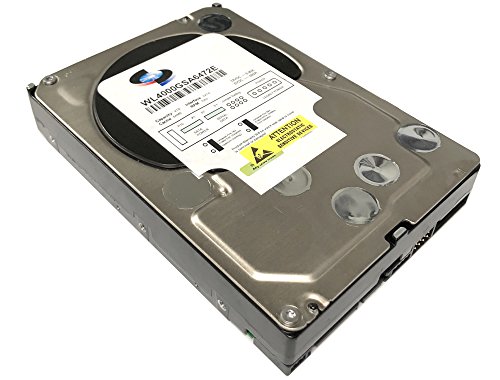
- 4TB capacity with 7200 RPM performance
- Designed for 24x7, high-duty-cycle use
- Enhanced vibration monitoring and correction
Best For: Small media servers, RAID, NAS, and DVR storage
Maximum Mainstream Capacity

- Largest capacity in this roundup at 12TB
- 7200 RPM with a 512 MB cache
- Includes Acronis cloning software
Best For: Large personal or business media libraries
RAID-Focused Enterprise Storage
Seagate Enterprise 6TB Renewed

- 6TB enterprise-class storage for 24x7 use
- Up to 216 MB/s sustained transfer rate
- Supports RAID and hot-plug applications
Best For: RAID arrays, surveillance, and backup servers
Best NAS-Focused Choice

- NAS-tuned with NASware
- RAID support for up to 8 bays
- CMR and continuous-operation design
Best For: NAS media servers and RAID storage
Best Heavy-Duty Pick
- 4TB desktop storage capacity
- 256MB cache
- 190 MB/s listed sustained transfer rate
Best For: Desktop media servers and mixed PC use
Best Everyday PC Option

- 4TB 3.5-inch internal capacity
- SATA 6 Gb/s connectivity
- Includes Acronis cloning software
Best For: Personal media servers and creator PCs
Best NAS Workhorse – WD Red Plus 8TB
For buyers comparing internal hard drives for media servers, the WD Red Plus 8TB is designed around NAS use rather than ordinary desktop storage. Its CMR recording, NASware firmware, 256 MB cache, and support for systems with up to eight bays make it a practical fit for small or medium business setups.
Best For: Small and medium business NAS systems operating continuously in a 24×7 environment.
Pros:
- 8TB capacity with support for NAS systems of up to eight bays
- CMR technology and RAID-optimized design
- Supports workloads up to 180TB per year
- Includes a three-year limited warranty
Cons:
- Lower 5,640 RPM speed than some enterprise alternatives
- Designed for NAS use, so it may be more than needed for a basic desktop
The WD Red Plus balances NAS compatibility, continuous operation, and useful capacity. It is a strong all-around choice when reliability and array support matter more than maximum spindle speed.
Best Enterprise Throughput – Toshiba MG Series 10TB
The Toshiba MG Series 10TB is a high-capacity enterprise drive for demanding internal hard drives for media servers installations. Its 7,200 RPM mechanism, 256 MB cache, 24/7 operation rating, and 550TB-per-year workload rating are suited to heavier business storage environments.
Best For: Enterprise or business media servers that need high capacity and a heavy-duty workload rating.
Pros:
- 10TB capacity for large media libraries
- 7,200 RPM speed and up to 249 MB/s listed read speed
- 550TB-per-year workload rating for demanding use
- Designed for 24/7 operation with a 1-in-10^15 unrecoverable error rate specification
Cons:
- Enterprise-oriented specifications may be excessive for casual home use
- May require a compatible 3.5-inch SATA installation environment
With its faster spindle speed and substantially higher workload rating, the MG Series is aimed at servers that stay busy. Choose it when sustained business use and capacity take priority over a quieter, lower-demand setup.
Best Streaming Specialist – WD AV-GP 2TB
WD 2 TB WD AV-GP SATA III Intellipower 64 MB Cache Bulk/OEM AV Hard Drive WD20EURX
Check Price On AmazonThe WD AV-GP 2TB takes a specialized approach to internal hard drives for media servers, emphasizing smooth video playback and power-conscious operation. Its Silk Stream technology is designed for up to twelve simultaneous HD streams, making it particularly relevant to DVR, IPTV, and media-center applications.
Best For: Media servers, PVRs, DVRs, IPTV boxes, and surveillance systems focused on continuous video streams.
Pros:
- Silk Stream is optimized for up to twelve simultaneous HD streams
- Power-conserving design for thermally optimized operation
- 64 MB cache and SATA 6 Gb/s interface
- Purpose-built for media and surveillance applications
Cons:
- 2TB capacity is modest for large modern media libraries
- Bulk/OEM package includes the drive only, without screws, cables, or manuals
- Listed warranty information varies between the supplied bullet and detail notes
This drive makes the most sense for stream-focused equipment rather than general-purpose bulk storage. Its specialized streaming features can be valuable when simultaneous playback is the main priority.
Best General-Purpose Value – Seagate BarraCuda 8TB
The Seagate BarraCuda 8TB is a straightforward option for buyers seeking internal hard drives for media servers that can also serve desktop, gaming, and editing needs. It combines an 8TB capacity with a SATA 6 Gb/s interface, 256 MB cache, and a listed sustained transfer rate of up to 190 MB/s.
Best For: General-purpose desktop media storage, personal media libraries, and mixed PC workloads.
Pros:
- 8TB capacity for large music, video, and photo collections
- 256 MB cache and SATA 6 Gb/s connectivity
- Versatile fit for desktop, gaming, music, video, and photo applications
- Listed sustained transfer rate of up to 190 MB/s
Cons:
- 5,400 RPM speed is slower than 7,200 RPM enterprise alternatives
- Frustration-Free Packaging is an anti-static bag with no cables or box
- Two-year limited warranty is shorter than the WD Red Plus warranty
BarraCuda is a flexible choice for a personal server or desktop-based media library. It offers substantial capacity and broad compatibility, though specialized NAS or enterprise drives may be preferable for continuous, high-workload arrays.
Enterprise-Ready Value – White Label 4TB 7200RPM
For buyers comparing internal hard drives for media servers, the White Label WL 4TB offers a practical balance of capacity, rotational speed, and server-oriented features. Its 7200 RPM mechanism, SATA 6 Gb/s interface, and 64 MB cache suit storage systems that need dependable access to frequently used media.
Best For: Small media servers, RAID or NAS builds, DVR storage, and 24×7 workloads where a 4TB enterprise-grade drive is sufficient.
Pros:
- 4TB capacity with a 7200 RPM spindle speed and 64 MB cache.
- Rated for 24×7 operation and up to 100% duty-cycle applications.
- Includes vibration monitoring and correction through enhanced RAFF technology.
- Offers sustained sequential data rates of up to 171 MB/s, according to the supplied specifications.
Cons:
- 4TB provides less headroom than the 6TB and 12TB alternatives.
- Includes a 1-year warranty, shorter than the warranty listed for the Seagate option.
- As a mechanical 3.5-inch drive, it may produce more noise and vibration than solid-state storage.
This drive is a sensible choice when enterprise-oriented operation and vibration management matter more than maximum capacity. Verify that your server or NAS supports 3.5-inch SATA drives before purchasing.
Maximum Mainstream Capacity – WD Blue 12TB
The Western Digital WD Blue 12TB is the highest-capacity option in this group, making it appealing for media servers that store large video libraries. It combines a 7200 RPM speed, SATA 6 Gb/s connectivity, and a substantial 512 MB cache in a standard 3.5-inch internal hard drive.
Best For: High-capacity personal or business media servers and desktop-based storage systems that prioritize reducing drive count.
Pros:
- 12TB capacity provides the most storage of these three drives.
- 7200 RPM spindle speed supports responsive everyday storage performance.
- Large 512 MB cache and SATA 6 Gb/s interface.
- Includes Acronis True Image WD Edition cloning software and NoTouch Ramp Load Technology.
Cons:
- The supplied notes describe it as a WD Blue everyday-computing drive rather than an enterprise-specific model.
- Its 2-year limited warranty is shorter than the seller warranty listed for the renewed Seagate drive.
- A single 12TB drive can concentrate more of a media library on one device if no backup is maintained.
Choose the WD Blue when capacity per drive is the priority and your enclosure supports a 3.5-inch SATA disk. For any media server, pair large storage with a separate backup strategy because drive capacity does not replace data protection.
RAID-Focused Enterprise Storage – Seagate Enterprise 6TB Renewed
For internal hard drives for media servers that need RAID-oriented features, the renewed Seagate Enterprise Capacity 3.5 HDD is a strong fit. It provides 6TB of storage, a 7200 RPM spindle speed, 128 MB of cache, and a reported sustained transfer rate of up to 216 MB/s.
Best For: RAID arrays, centralized surveillance storage, backup systems, and media servers that can accommodate a renewed enterprise drive.
Pros:
- Enterprise-oriented design with a 1.4-million-hour MTBF rating and stated 24×7 operation reliability.
- Supports RAID storage, hot-plug use, and centralized surveillance applications.
- 7200 RPM speed and up to 216 MB/s sustained transfer rate.
- Includes PowerChoice technology and a 128 MB multisegmented cache.
Cons:
- This is a renewed drive, so condition and prior usage may require additional buyer scrutiny.
- 6TB offers half the capacity of the 12TB WD Blue.
- As a mechanical enterprise drive, it may use more power and generate more noise than SSD storage.
The Seagate stands out for server builders who value enterprise features and RAID compatibility over maximum single-drive capacity. Because it is renewed, review the seller’s warranty and return terms carefully before deploying it in a critical array.
Best NAS-Focused Choice – WD Red Plus 4TB
For buyers seeking internal hard drives for media servers, the Western Digital WD Red Plus 4TB is designed specifically for NAS environments. Its NASware features, CMR recording, continuous-operation design, and support for RAID systems with up to eight bays make it a strong fit for networked storage.
Best For: NAS-based media servers and RAID setups with up to eight drive bays.
Pros:
- Designed and tuned for NAS use with NASware.
- Supports RAID-optimized systems with up to eight bays.
- CMR technology and continuous-operation design suit ongoing storage workloads.
- Backed by a three-year limited warranty.
Cons:
- Its 4TB capacity may be limiting for very large media libraries.
- As a mechanical 3.5-inch hard drive, it is not as compact as a 2.5-inch drive.
The WD Red Plus is the most purpose-built option here for a dedicated media server. Choose it when NAS compatibility, RAID support, and continuous operation matter more than a general-purpose desktop design.
Best Heavy-Duty Pick – Seagate BarraCuda 4TB
The Seagate BarraCuda 4TB is a practical general-purpose option among internal hard drives for media servers, especially when the system is built from standard desktop components. It provides SATA 6 Gb/s connectivity, a 256MB cache, and a listed maximum sustained transfer rate of 190 MB/s.
Best For: Desktop-based media servers and mixed personal storage, editing, or gaming use.
Pros:
- Offers 4TB of storage for media and general files.
- Includes a 256MB cache.
- Provides a listed maximum sustained transfer rate of 190 MB/s.
- Compatible with Seagate DiscWizard for migration and cloning.
Cons:
- It is positioned as a general PC drive rather than a NAS-specific model.
- The two-year warranty is shorter than the WD Red Plus warranty in this selection.
BarraCuda makes sense for a straightforward desktop media-server build or a system that also handles everyday PC tasks. For a multi-bay NAS running continuously, a purpose-built NAS drive may be a better match.
Best Everyday PC Option – WD Blue 4TB
The Western Digital WD Blue 4TB is an everyday desktop drive that can serve in a PC-based media server. It offers SATA 6 Gb/s connectivity, a 5400 RPM rotation speed, and compatibility with NAS devices as listed, while remaining oriented toward general computing and creator workloads.
Best For: Personal media servers, creator PCs, and everyday storage where a standard desktop drive is suitable.
Pros:
- Provides 4TB of storage in a 3.5-inch internal form factor.
- Includes SATA 6 Gb/s connectivity and a 128MB cache specification.
- Offers free Acronis True Image WD Edition cloning software.
- Available in capacities up to 12TB within the WD Blue range.
Cons:
- It is marketed primarily for reliable everyday computing rather than dedicated NAS operation.
- Its two-year limited warranty is shorter than the WD Red Plus option’s warranty.
WD Blue is a sensible choice for a personal or creator-focused media server that uses a standard PC platform. If your priority is a multi-bay NAS with continuous operation and RAID optimization, the WD Red Plus is more specifically targeted to that role.
How We Picked the Best Internal Hard Drives for Media Servers
We compared the selected drives by capacity, interface, recording technology, rotational speed, cache, workload suitability, and intended operating environment. NAS-oriented models received particular attention because they are designed for sustained use and, in some cases, multi-drive enclosures. Enterprise drives can offer higher workload ratings and faster performance, while desktop and AV models may provide useful value for lighter-duty libraries.
Specifications should be verified before purchase, especially for older, OEM, bulk, or renewed drives. Confirm the seller’s warranty, power requirements, return policy, and whether the drive is compatible with your server’s bays and RAID controller.
Quick Comparison
| Drive Category | Best For | Main Advantage | Important Trade-Off |
|---|---|---|---|
| NAS-rated CMR | Always-on home or small-business servers | Better suited to RAID and sustained workloads | Usually costs more than desktop drives |
| Enterprise HDD | Heavy workloads and larger arrays | High workload ratings and 7200 RPM performance | More heat, noise, and power consumption |
| Desktop HDD | Light media libraries and backups | Lower upfront cost | May not be ideal for continuous multi-drive use |
| AV or surveillance HDD | Recording-focused systems | Designed for continuous sequential writing | May be less suitable for general RAID workloads |
Key Buying Factors for Internal Hard Drives for Media Servers
Capacity and Expansion
Estimate your current library, then allow room for metadata, backups, downloads, and future additions. Several smaller drives can provide flexibility, but larger drives may simplify your server and reduce the number of bays required. Check whether your operating system and RAID setup support the selected capacity.
CMR Versus SMR
CMR drives are generally preferable for NAS arrays, frequent updates, rebuilding, and sustained write workloads. SMR drives can work for archival or mostly sequential use, but their write behavior may make RAID rebuilds and heavy server activity less predictable.
Speed, Noise, and Power
A 7200 RPM drive can improve access and transfer performance, but it commonly produces more heat, vibration, noise, and power draw than a 5400 RPM model. For streaming media, network bandwidth and server processing often matter more than maximum disk speed, so quieter lower-speed drives can be sensible for home use.
Workload Rating and Reliability
Look for a workload rating appropriate to continuous operation and consider drives designed for NAS or enterprise environments when multiple users, frequent writes, or RAID are involved. Do not treat specifications as a guarantee of failure-free operation: maintain backups and monitor drive health with SMART tools.
Compatibility and Warranty
Confirm the SATA interface, 3.5-inch bay clearance, controller support, and vibration requirements. Renewed, OEM, and bulk products may have different warranties or included accessories than retail versions. A lower price is less attractive if the warranty is unclear or the drive has an uncertain operating history.
Who Should Buy Which Internal Hard Drives for Media Servers?
Choose a NAS-rated CMR drive for an always-on Plex, Jellyfin, or general-purpose home server, especially when using RAID. Choose an enterprise model when your server handles heavier activity, larger arrays, or business-critical workloads and you can accommodate extra noise and heat. Choose a desktop drive for a modest library, secondary storage, or a separate backup target where sustained multi-drive operation is not the main requirement. Choose an AV-oriented drive when continuous recording is more important than broad NAS compatibility.
Whichever model you choose, use redundancy where appropriate and keep an independent backup of irreplaceable media. RAID can improve availability, but it is not a substitute for backup.