Managing a Mac, home lab, or remote server does not always require being in front of the machine. The best KVM over IP switches let you view video, send keyboard and mouse commands, and troubleshoot systems remotely through a network connection.
This roundup covers 10 options with different port counts, video standards, remote-access features, and deployment styles. Whether you need occasional access to one Mac or centralized control for multiple servers, compare compatibility, security, and installation requirements before buying.
Best 10 Kvm Over Ip Switches for Mac Picks for 2026
Compact PoE Pick

- PoE and USB-C dual power
- 4K streaming at 30 FPS
- Remote BIOS reinstall support
Best For: Single-computer remote access in compact Mac and home-lab setups
Open-Source Flexibility

- 1080p at 60 FPS
- Local, cloud, and Wake on LAN access
- Open-source Linux and Golang platform
Best For: Developers and home-lab users seeking customizable Mac-compatible remote access
Rack-Ready Four-Port Choice
GL.iNet Comet X Quad-Port Remote KVM

- Controls up to four host systems
- PoE with USB-C backup
- 4K 30Hz HDMI loop-out and touchscreen
Best For: Multi-system Mac labs, server rooms, and rack installations
Value Open-Source Option

- 1080p at 60 FPS
- Mac, Windows, Linux, and Raspberry Pi support
- BIOS-level remote rescue features
Best For: Single-device remote troubleshooting across mixed-platform labs
Feature-Rich Pick
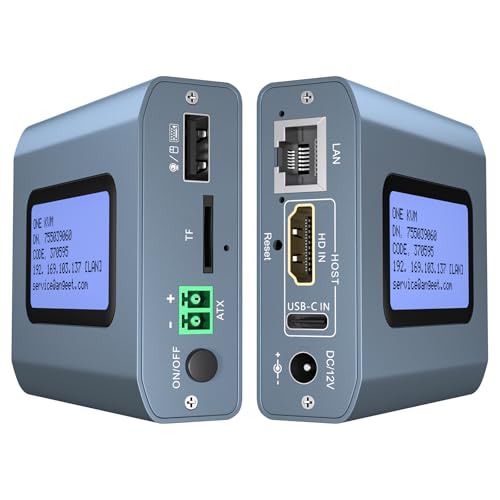
- Works with macOS without additional computer drivers
- Supports 4K at 60Hz and low-latency remote control
- Includes ZeroTier and desktop power control
Best For: Mac users needing 4K remote management and network access
Rack-Mount Enterprise Pick

- Manages up to eight connected systems
- Supports Mac plus legacy and serial interfaces
- Rack-mount design for server-room use
Best For: IT teams managing multiple systems in a rack
Open-Source Value Pick

- Open-source software with optional remote access
- Compact HDMI and USB device with microSD card
- Low-latency design; this model is non-PoE
Best For: Technical users wanting a compact, customizable KVM device
Premium 4K Single-Port Pick
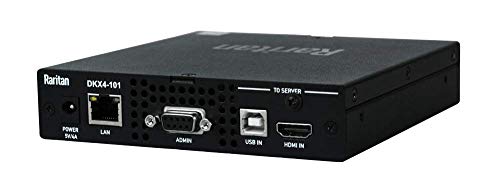
- 4K KVM-over-IP support
- Remote Ethernet and USB control
- Compact rack-mountable enclosure
Best For: Single-system remote management with 4K requirements
Expandable Rack-Mount Pick
Tripp Lite NetCommander 8-Port

- Eight-port server management
- Simultaneous local and remote users
- Cascades up to 128 servers
Best For: Multi-server rack environments needing expansion
Redundant 4K DisplayPort Pick
ATEN CN9950 4K DisplayPort KVM

- 4K DCI DisplayPort support
- Dual LAN and dual power supplies
- FPGA graphics processing
Best For: Redundant remote access for one DisplayPort system
Compact PoE Pick – GL.iNet Comet PoE Remote KVM
If you need kvm over ip switches for mac setups, the GL.iNet Comet PoE Remote KVM offers a compact way to access one computer or server remotely. It supports Ethernet and HDMI, browser-based-style network control through Wi-Fi control, 4K streaming at 30 FPS, and dual PoE/USB-C power.
Best For: Mac users managing a single computer or server in a home lab or remote-work setup.
Pros:
- PoE and USB-C dual power options
- 4K video streaming at 30 FPS
- Supports remote BIOS reinstall and USB accessories
- Compact 4-inch design with a two-year guarantee
Cons:
- Supports only one connected device
- Its listed maximum resolution is 4K at 30 FPS rather than a higher refresh rate
The Comet is a focused single-host solution rather than a multi-computer switch. Its PoE support, small footprint, and BIOS-level recovery features make it especially practical where remote maintenance matters more than switching between several systems.
Open-Source Flexibility – JetKVM IP KVM
For buyers comparing kvm over ip switches for mac, JetKVM provides browser-based remote control over Ethernet with HDMI video and USB-C keyboard-and-mouse connectivity. It combines local network access, optional cloud access, Wake on LAN, and low-latency 1080p streaming.
Best For: Mac-compatible home labs, developers, and users who want open-source remote management options.
Pros:
- 1080p at 60 FPS with stated 30–60 ms latency
- Local browser, cloud, and Wake on LAN access options
- Open-source Linux and Golang foundation with SSH customization
- Supports remote crash recovery, safe mode, and OS reinstall workflows
Cons:
- Video output is limited to 1080p
- Requires Ethernet for network access
- Some expansion functions require additional hardware modules
JetKVM stands out for flexibility and recovery features rather than high-resolution video. Its open-source design and optional cloud access suit technically inclined Mac users who want to customize or remotely troubleshoot a computer.
Rack-Ready Four-Port Choice – GL.iNet Comet X Quad-Port Remote KVM
The GL.iNet Comet X is a strong option for kvm over ip switches for mac when you need to manage several systems. It connects up to four hosts through HDMI and USB-C ports, supports PoE, and provides local touchscreen control alongside HTTPS browser access.
Best For: Mac users, IT professionals, and home-lab operators managing up to four computers or servers.
Pros:
- Four-port remote KVM switching
- PoE with 5V USB-C backup power
- 4K at 30 FPS HDMI loop-out for local viewing
- Rack brackets, touchscreen, and 64GB eMMC included
Cons:
- 4K loop-out is limited to 30 FPS
- Larger and heavier than single-host KVM units
- Designed for a networked rack or lab rather than basic desk use
Comet X is the most capable choice here for multi-system environments. Its four inputs, rack-ready chassis, local controls, and self-hosted HTTPS access make it a practical fit for a small server room or serious home lab.
Value Open-Source Option – JetKVM Network KVM
JetKVM is a compact choice for kvm over ip switches for mac, offering Ethernet networking, HDMI video, and USB-C control without requiring drivers or extra client software. It supports local browser access, optional WebRTC cloud access, Wake on LAN, and BIOS-level troubleshooting.
Best For: Mac, Windows, Linux, and Raspberry Pi users who need affordable remote access for a single computer or lab device.
Pros:
- Works across Windows, Mac, Linux, and Raspberry Pi environments
- 1080p at 60 FPS with 30–60 ms latency
- Onboard LCD displays the device IP address
- Open-source firmware with optional cloud access
Cons:
- Does not transfer audio over HDMI
- Non-PoE model is powered through the host USB-C connection
- Fully powered-off targets need separately sold ATX or DC modules for power control
This JetKVM model keeps setup simple while retaining useful remote recovery tools. It is best suited to single-host troubleshooting and lab access, especially when 1080p video is sufficient and open-source customization is desirable.
Feature-Rich Pick – 4K Remote KVM Over IP
For shoppers comparing kvm over ip switches for mac, this compact remote KVM stands out with macOS compatibility, browser and app access, and 4K output. It can provide remote BIOS-level control without requiring software or drivers on the managed computer.
Best For: Mac users and small IT setups needing remote access, 4K video, and desktop power control.
Pros:
- Supports Windows, macOS, Linux, and Android systems.
- Provides 3840×2160 at 60Hz with latency below 60 milliseconds.
- Includes ZeroTier for peer-to-peer access without manual port forwarding or VPN configuration.
- Supports remote desktop power on/off through the included motherboard wiring.
Cons:
- Remote power control is intended for desktop computers, not laptops.
- ZeroTier requires an online upgrade, and app access requires initial web login.
This is the most feature-packed option here for mixed-device households or small offices. Its 4K support and integrated networking features are appealing, though setup is more involved when using motherboard power control.
Rack-Mount Enterprise Pick – ATEN KN1108VA 8-Port KVM
Among kvm over ip switches for mac, the ATEN KN1108VA is designed for larger installations that need centralized remote access to multiple systems. Its rack-mount chassis supports up to eight connected devices and works with Mac, Windows, Linux, Sun, and legacy interfaces.
Best For: Server rooms and IT environments managing several computers from a rack-mounted console.
Pros:
- Provides eight positions for managing multiple connected systems.
- Compatible with Mac, Windows, Linux, Sun, USB, PS/2, serial, and Sun Legacy connections.
- Rack-mount form factor suits structured server-room installations.
Cons:
- Its 17.3-inch rack-mount chassis is substantially larger and heavier than compact KVM devices.
- The supplied notes do not specify video resolution or detailed remote-access features.
The KN1108VA is the natural choice when port count and broad legacy-device compatibility matter more than a small footprint. Buyers should verify their exact connector and video requirements before purchasing.
Open-Source Value Pick – JetKVM Remote Server Manager
For buyers seeking kvm over ip switches for mac with a lightweight, customizable approach, this open-source remote server management device offers HDMI and USB connectivity. It includes a microSD card and is designed for optional remote access with low latency.
Best For: Technical users who prefer open-source software and a compact device for remote server access.
Pros:
- Uses open-source software for a more customizable experience.
- Offers ultra-low-latency remote access according to the supplied product notes.
- Includes HDMI and USB connectivity plus a microSD card.
- Compact 12-ounce design is easier to place than a rack-mounted switch.
Cons:
- This version is non-PoE; PoE is listed as optional rather than included.
- The supplied notes do not specify macOS compatibility, supported resolution, or port count.
JetKVM is appealing for technically confident users who value open-source software and a small footprint. Because the notes leave some compatibility details unspecified, confirm Mac support and the intended remote-access setup before ordering.
Premium 4K Single-Port Pick – Raritan Dominion KX IV-101
Raritan Dominion KX IV-101 Ultra High Performance 1-Port 4K KVM-Over-IP Switch
Check Price On AmazonFor buyers comparing kvm over ip switches for mac, the Raritan Dominion KX IV-101 is a compact, rack-mountable option for remotely managing one compatible system over Ethernet. It supports 4K operation and USB connectivity, making it a focused choice for a single-device setup.
Best For: Single-server or workstation remote management where 4K video and a compact rack-mounted design matter.
Pros:
- Supports 4K KVM-over-IP operation.
- Remote control over Ethernet with USB-device compatibility.
- Compact 5.7 x 5.5 x 1.2-inch rack-mountable design.
- Includes a two-year warranty.
Cons:
- Designed for one connected position, so it is not suited to multi-server expansion by itself.
- The supplied notes do not specify Mac-specific software support.
This is a streamlined choice when you need remote access to one Ethernet-connected system and want 4K capability without selecting a larger multi-port switch. Confirm compatibility with your Mac workflow and connected peripherals before purchase.
Expandable Rack-Mount Pick – Tripp Lite NetCommander 8-Port
The Tripp Lite NetCommander is a practical option among kvm over ip switches for mac when your setup involves several PCs or servers. Its eight ports, Cat5 connections, and remote-plus-local user support are aimed at organized rack management rather than a small desktop installation.
Best For: Rack-based environments managing multiple PCs or servers with both local and remote access.
Pros:
- Eight ports can manage multiple connected PCs or servers.
- Supports one local and one remote user simultaneously.
- IPv4 and IPv6 support with browser-based remote access over a secure IP connection.
- Can cascade to control up to 128 servers from one station.
Cons:
- Its 1U rack-mount format may be excessive for a single-computer setup.
- The supplied notes identify PC compatibility but do not confirm Mac-specific operating-system support.
- At 6.3 pounds, it is less portable than compact single-port alternatives.
Choose this model if expansion and shared access are more important than minimal hardware. The Cat5 design, rack mounting, authentication support, and cascading capability make it particularly suited to structured server installations.
Redundant 4K DisplayPort Pick – ATEN CN9950 4K DisplayPort KVM
ATEN 1-Local/Remote Share Access Single Port 4K DisplayPort KVM Over IP Switch
Check Price On AmazonThe ATEN CN9950 is worth considering when shopping for kvm over ip switches for mac and your system uses DisplayPort video. It combines single-port remote access with 4K DCI support, dual LAN, and dual power supplies for installations where connectivity and power redundancy are priorities.
Best For: Single DisplayPort-equipped PC or server setups requiring 4K video and redundant network and power connections.
Pros:
- Supports DisplayPort resolutions up to 4096 x 2160 at 30Hz locally and remotely.
- FPGA graphics processing is designed for improved image quality and frame throughput.
- Dual LAN and dual power supply support add backup options.
- Includes relay and digital-input terminals for monitoring and reboot control.
Cons:
- It is a single-port switch, limiting direct management to one system.
- Its DisplayPort design may not fit setups using another video interface.
- The supplied notes do not provide warranty information or confirm Mac-specific software support.
This model stands out for DisplayPort-based installations that need stronger continuity provisions than a basic single-port switch. Verify your Mac, server, cable, and 4K refresh-rate requirements, especially since the listed 4K mode is specified at 30Hz.
How We Picked the Best Kvm Over Ip Switches for Mac
We focused on devices that provide genuine remote KVM functionality rather than simple screen-sharing software. The selection includes compact single-computer units, open-source designs, multi-port rackmount switches, and enterprise-oriented systems. We considered remote video quality, keyboard and mouse control, network access, operating-system flexibility, power-management features, physical connectivity, and suitability for Mac-based workflows.
macOS is generally handled through the connected computer’s HDMI or DisplayPort video output and USB input devices, so compatibility depends more on the switch’s video standard, USB behavior, browser interface, and network setup than on a dedicated Mac driver.
Quick Comparison
| Best For | What to Prioritize | Typical Configuration |
|---|---|---|
| One Mac or workstation | Compact design, reliable USB control, 4K support | Single-port remote KVM |
| Home lab | Open-source tools, Tailscale or ZeroTier, flexible mounting | Network-connected appliance |
| Several computers | Port count, switching speed, user access controls | Multi-port KVM over IP |
| Servers and racks | Remote power control, virtual media, IPv6, audit features | Rackmount enterprise KVM |
Key Buying Factors for Kvm Over Ip Switches for Mac
Video and USB Compatibility
Check whether the unit uses HDMI, DisplayPort, VGA, or a combination of adapters. For modern Macs and high-resolution displays, 4K support can improve readability, but confirm the supported refresh rate and color format. USB emulation should provide dependable keyboard and mouse control during startup, recovery, and firmware screens—not only after macOS loads.
Remote Access and Security
Prefer products with encrypted connections, strong authentication, user permissions, and current firmware. VPN-friendly options such as Tailscale or ZeroTier can simplify safer access without exposing an administration interface directly to the public internet. Avoid port-forwarding a KVM appliance unless its security configuration and update history are well understood.
Power, Storage, and Installation
Remote reboot, Wake-on-LAN, outlet control, virtual media, and ISO mounting can make the difference during unattended troubleshooting. Also check whether the device requires PoE, a separate power adapter, rack hardware, or an extra HDMI/USB capture cable. Some units include local console access, while others are designed primarily for network use.
Port Capacity and Network Limits
A single-port model is usually simpler and less expensive for one Mac. Multi-port systems make more sense when several machines share a rack or lab, but they require careful planning for cable length, switching permissions, bandwidth, and simultaneous users. Gigabit Ethernet is a useful baseline, particularly for high-resolution remote video.
Who Should Buy Which Kvm Over Ip Switches for Mac?
Choose a compact single-port device if you mainly need remote access to one Mac, workstation, or test machine. Home-lab users should look for open-source software, modern VPN integration, and flexible browser access. IT professionals managing multiple systems will benefit from rackmount models with more ports, centralized permissions, virtual media, and remote power capabilities.
If you only need to share a display and peripherals while sitting near the computer, a conventional local KVM may be cheaper and easier. KVM over IP is most valuable when the computer is unattended, located in another room, installed in a rack, or likely to need recovery outside normal working hours.