The best KVM over IP switches for Windows let you access, control, and troubleshoot computers remotely—even before the operating system loads. They are useful for home labs, server rooms, branch offices, and IT support teams that need reliable keyboard, video, and mouse control.
This roundup includes compact remote KVM devices, PoE models, and enterprise-ready multi-port switches with features such as BIOS access, virtual media, 4K video, user management, and IPv6 support.
Best 10 Kvm Over Ip Switches for Windows Picks for 2026
Best Wireless Flexibility
- Wi-Fi 6 and wired connectivity
- 4K passthrough with two-way audio
- Tailscale and Windows web/app access
Best For: Wireless home labs, offices, and remote recovery
Best for Large Server Deployments

- Controls 16 computers or servers
- Supports up to 64 secure users
- USB and PS/2 compatibility
Best For: Rack-based server rooms and IT teams
Best PoE Single-Computer Option

- PoE and Type-C power options
- 4K streaming at 30FPS
- Remote BIOS reinstall and Tailscale
Best For: One PC or server with PoE networking
Best for Virtual Media
Tripp Lite 16-Port Cat5 IP KVM

- Controls 16 computers or servers
- Virtual Media for remote storage
- Redundant C14 power inlets
Best For: Rack-based remote installs and server maintenance
Best Compact Remote KVM

- BIOS-level control without host software
- 4K 30Hz remote video and audio
- File transfer with compact hardware
Best For: Single-PC, laptop, or server remote management
Best Rackmount KVM Switch
Tripp Lite NetCommander 8-Port

- Eight-port Cat5 KVM over IP design
- One local and one remote user
- Cascade support for up to 128 servers
Best For: Business racks and small server rooms
Best Multi-Port Modern KVM
GL.iNet Comet X Quad-Port Remote KVM

- Four HDMI inputs for multi-system control
- PoE with USB-C backup power
- HTTPS access, touchscreen, and rack brackets
Best For: Home labs and compact IT server racks
Best 4K DisplayPort Pick
ATEN CN9950 DisplayPort KVM Over IP

- 4K DCI support at 30Hz
- FPGA-enhanced video processing
- Dual LAN and power backup
Best For: High-resolution DisplayPort remote management
Best Legacy-Connectivity Option

- 1920 x 1200 at 60Hz
- Supports legacy PS/2 and serial devices
- Virtual media and TLS 1.2 support
Best For: Mixed-platform and older server environments
Best Rack-Friendly DVI Option

- Remote access over Ethernet
- 1920 x 1200 video support
- Rack-mountable single-port design
Best For: DVI-based Windows servers in rack installations
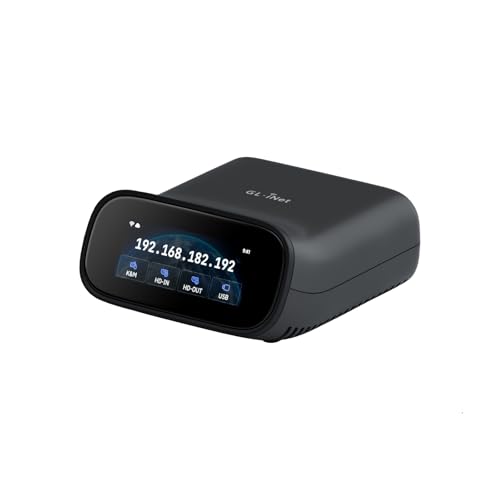
Best Wireless Flexibility – GL-RM10 Comet Pro Remote KVM
The GL.iNet GL-RM10 Comet Pro is a compact option for users comparing kvm over ip switches for windows who want wireless access without giving up local display use. It supports Windows through a web browser or the GLKVM app, while 4K passthrough, two-way audio, and BIOS-level access make it useful for remote support and recovery.
Best For: Home labs, small offices, and Windows users who want wireless remote KVM access with audio and recovery features.
Pros:
- Dual-band Wi-Fi 6 plus wired connectivity
- 4K at 30FPS video passthrough with two-way audio
- Built-in Tailscale and optional self-hosted cloud support
- Supports remote BIOS access, OS reinstallation, and optional power-control accessories
Cons:
- Supports one connected setup rather than a multi-port server rack
- ATX Board and Fingerbot power-control accessories are sold separately
Choose the Comet Pro when flexibility, wireless deployment, and secure remote recovery matter more than controlling many systems from one rack unit.
Best for Large Server Deployments – Tripp Lite 16-Port IP KVM
The Tripp Lite NetDirector B022-U16-IP is a rack-mounted choice for buyers evaluating kvm over ip switches for windows across a larger group of computers or servers. It provides IP access to 16 directly connected systems, supports USB and PS/2 connections, and allows up to 64 secure user accounts.
Best For: Server rooms and IT teams managing multiple Windows-compatible computers through a 1U rack-mounted KVM.
Pros:
- Controls up to 16 computers or servers directly
- IP remote access through LAN, WAN, or the Internet
- Supports USB and PS/2 connections
- Allows up to 64 secure user accounts and can be daisy-chained to 264 devices
Cons:
- Rack-mounted hardware is less suitable for a small desktop setup
- The supplied notes do not specify video resolution or virtual-media support
This is the stronger fit for centralized infrastructure management, especially when multiple operators need controlled access to a sizable server group.
Best PoE Single-Computer Option – GL.iNet Comet PoE Remote KVM
The GL.iNet Comet PoE GL-RM1PE is a single-computer remote KVM for Windows and other compatible systems, with Ethernet, HDMI, PoE, and Type-C power options. It is a practical alternative among kvm over ip switches for windows when you need remote BIOS work, 4K streaming, and a compact installation rather than multiple ports.
Best For: Single PCs or servers in locations where PoE simplifies power and network cabling.
Pros:
- PoE and Type-C dual power supply
- 4K streaming at 30FPS
- Built-in Tailscale support and remote BIOS reinstall capability
- USB interface for ATX and Fingerbot accessories
Cons:
- Supports only one computer or server
- Its Ethernet-based design may be less convenient where PoE is unavailable
The RM1PE makes the most sense for a dedicated remote endpoint, particularly when existing PoE infrastructure can power the KVM and reduce cable clutter.
Best for Virtual Media – Tripp Lite 16-Port Cat5 IP KVM
Tripp Lite Cat5 KVM Switch Over IP 16-Port W/Virtual Media 2 Users 1URM TAA (B064-016-01-IPG)
Check Price On AmazonThe Tripp Lite B064-016-01-IPG combines Cat5 connectivity with IP-based remote access for up to 16 computers or servers. For Windows administrators comparing kvm over ip switches for windows, its virtual-media feature is especially useful for remotely accessing flash drives and optical media while one local and one remote user share control.
Best For: IT administrators who need remote installation or storage access across a 16-system rack setup.
Pros:
- Controls up to 16 computers or servers
- Supports one local and one remote user simultaneously
- Virtual Media supports remote DVD/CD drives and flash drives
- Dual redundant C14 power inlets improve power continuity
Cons:
- Only two users are supported at once
- The supplied notes do not specify Windows version support or video resolution
- Its 1U rack form factor is not intended for casual desktop use
Consider this model when virtual media and redundant power are more important than a large user pool, particularly for rack-based Windows server maintenance.
Best Compact Remote KVM – GL.iNet Comet GL-RM1
For buyers seeking kvm over ip switches for windows without installing software on the controlled computer, the GL.iNet Comet GL-RM1 offers browser- or app-based remote access with BIOS-level control. It supports remote rebooting, operating-system installation, and power-on tasks, making it useful beyond ordinary desktop sharing.
Best For: Remote access to one Windows PC, laptop, router, or server for home labs, remote work, technical support, and maintenance.
Pros:
- Provides BIOS-level access without host-side software.
- Supports up to 4K at 30Hz with low-latency remote viewing and audio output.
- Includes file transfer and H.264 hardware encoding.
- Compact Ethernet, HDMI, USB 2.0, and USB-C design with a 2-year guarantee.
Cons:
- Controls one connected system rather than multiple hosts.
- PD adapters cannot be used.
- 4K output is limited to 30Hz.
The GL-RM1 is a straightforward single-device choice when BIOS access and no-software host control matter more than multi-port switching or rack integration.
Best Rackmount KVM Switch – Tripp Lite NetCommander 8-Port
For conventional kvm over ip switches for windows in a server room, the Tripp Lite NetCommander provides control for eight PC-connected systems over Cat5 cabling. Its 1U rackmount format, IPv4 and IPv6 support, and simultaneous local and remote access suit structured IT environments.
Best For: Small server rooms and business racks needing eight-port management, local console access, and one remote administrator.
Pros:
- Controls up to eight systems and can cascade to support up to 128 servers.
- Allows one local and one remote user simultaneously.
- Supports IPv4, IPv6, RADIUS, LDAP/S, and secure browser-based remote access.
- Uses space-saving 1U rackmount hardware and Cat5 connections.
Cons:
- Remote control uses a Java-based browser application.
- Designed for rack and PC deployments rather than general home use.
- Listed warranty details vary between the product bullets and specifications.
This NetCommander is the more traditional enterprise-oriented option here, especially for buyers who need multi-server expansion, rack installation, and established authentication features.
Best Multi-Port Modern KVM – GL.iNet Comet X Quad-Port Remote KVM
The GL.iNet Comet X is a strong choice among kvm over ip switches for windows when you need to manage several systems from one self-hosted appliance. Four HDMI inputs, PoE, browser access over HTTPS, local controls, and 4K 30Hz loop-out combine remote administration with convenient rack-side operation.
Best For: Home labs, IT professionals, and compact server racks managing up to four computers or servers.
Pros:
- Connects four host systems with dedicated HDMI and USB-C ports.
- Supports PoE, with 5V USB-C backup power.
- Offers HTTPS browser control without client software and 4K 30Hz HDMI loop-out.
- Includes a touchscreen, rack brackets, and 64GB eMMC for images and backup files.
Cons:
- Remote video and loop-out are limited to 4K at 30Hz.
- Its 4-host capacity is smaller than expandable enterprise KVM systems.
- Operating temperature specifications are listed as 25°C to 40°C.
With its four inputs, touchscreen, PoE support, and included rack hardware, Comet X is the most versatile fit for a modern home lab or small IT rack requiring both local and remote control.
Best 4K DisplayPort Pick – ATEN CN9950 DisplayPort KVM Over IP
ATEN 1-Local/Remote Share Access Single Port 4K DisplayPort KVM Over IP Switch
Check Price On AmazonFor demanding kvm over ip switches for windows setups, the ATEN CN9950 combines remote access with DisplayPort video support up to 4K DCI at 30Hz. Its FPGA graphics processor is designed to improve image quality and frame-rate throughput for responsive remote viewing.
Best For: Windows PC or server users who need high-resolution DisplayPort access with backup connectivity and environmental control options.
Pros:
- Supports up to 4096 x 2160 at 30Hz at local and remote consoles.
- FPGA graphics processing supports crisp video response.
- Dual power supplies and dual LAN connections provide backup options.
- 5-pin Relay/DI terminal supports monitoring and reboot control.
Cons:
- 30Hz maximum refresh rate may not suit high-refresh applications.
- DisplayPort connectivity may require adapters for other video standards.
The CN9950 is a strong choice when 4K DisplayPort access and infrastructure redundancy matter more than a compact, basic remote KVM design.
Best Legacy-Connectivity Option – ATEN CN8000A VGA KVM Over IP
Aten 1-Local/Remote Share Access Single Port VGA KVM Over IP Switch (1920 x 1200)
Check Price On AmazonThe ATEN CN8000A is a practical choice among kvm over ip switches for windows when you need VGA video and broad legacy device compatibility. It supports remote sessions at up to 1920 x 1200 at 60Hz, along with virtual media and TLS 1.2 encryption for login protection.
Best For: Windows environments using VGA, PS/2, USB, serial, or other legacy server connections.
Pros:
- Supports up to 1920 x 1200 at 60Hz with 24-bit color.
- Works with Windows, Mac, Sun, Linux, and VT100-based serial devices.
- Includes virtual media support.
- TLS 1.2 encryption helps protect passwords during login.
Cons:
- VGA video is less suited to newer high-resolution displays.
- Its legacy connectivity focus may be unnecessary for modern DisplayPort systems.
Choose the CN8000A for mixed-platform or older equipment where connection flexibility and secure remote access are more important than current-generation video standards.
Best Rack-Friendly DVI Option – ATEN CN9600 DVI KVM Over IP
The ATEN CN9600 offers a straightforward remote-management option for kvm over ip switches for windows systems that use DVI. It supports resolutions up to 1920 x 1200, connects over Ethernet LAN, and uses a rack-mountable design for organized installations.
Best For: Windows computers or servers with DVI video outputs that need Ethernet-based remote control in a rack setup.
Pros:
- Built-in IP functionality enables remote computer control.
- Supports video resolutions up to 1920 x 1200.
- Rack-mountable form factor helps conserve workspace.
- Offers Ethernet connectivity and push-button control.
Cons:
- DVI limits compatibility with systems using newer video connectors.
- It is a single-port design, so it is not intended for managing multiple computers simultaneously.
The CN9600 is a sensible fit for DVI-based Windows infrastructure when rack organization and remote Ethernet access are the priorities.
How We Picked the Best Kvm Over Ip Switches for Windows
We selected models across several use cases rather than treating every KVM as interchangeable. The lineup includes single-computer remote KVMs for home labs, multi-port rackmount switches for data centers, and DisplayPort, HDMI, VGA, or DVI options for systems with different video outputs.
Our comparison emphasizes remote access reliability, operating-system independence, video support, security features, installation requirements, and practical management tools. BIOS-level control is especially important because it allows troubleshooting before Windows starts. We also considered features such as virtual media, Tailscale integration, Power over Ethernet, local-console access, user capacity, and daisy-chaining.
Quick Comparison
| Best For | What to Look For |
|---|---|
| Home labs and individual PCs | Compact design, easy remote access, 4K passthrough, and straightforward networking |
| Multiple rack servers | High port count, local and remote consoles, virtual media, and user permissions |
| Modern Windows workstations | DisplayPort or HDMI support, suitable resolution, and dependable USB HID compatibility |
| Legacy equipment | VGA or DVI support, appropriate resolution limits, and compatible keyboard and mouse connections |
| Flexible remote deployment | PoE, IPv4/IPv6 support, secure remote access, or overlay networking such as Tailscale |
Key Buying Factors for Kvm Over Ip Switches for Windows
Video Interface and Resolution
Match the switch to the computer’s actual video output. DisplayPort is generally the strongest fit for newer Windows PCs, while VGA and DVI models are better suited to older servers and workstations. Check maximum resolution and refresh rate carefully, especially if you need 4K video or smooth graphical administration.
Remote Access and BIOS Control
A true IP KVM should work independently of Windows, allowing access to startup screens, firmware settings, and recovery tools. Confirm whether the product provides BIOS-level keyboard and mouse control, not just remote viewing after the operating system loads.
Ports, Users, and Expansion
Choose a single-port device for one computer, but consider an 8- or 16-port rackmount switch when several systems must share one remote console. Multi-user permissions, simultaneous sessions, daisy-chaining, and local-console support can significantly affect day-to-day administration.
Security and Network Design
Review authentication, encryption, account controls, firmware updates, and compatibility with your network policies. Tailscale or another private overlay may simplify access for smaller deployments, while enterprise environments may need IPv6, centralized permissions, and dedicated management practices.
Virtual Media and Installation
Virtual media can mount ISO files or remote drives for operating-system installation and recovery. Also check whether the unit requires an external power adapter, supports PoE, fits a standard rack, or needs proprietary cables.
Who Should Buy Which Kvm Over Ip Switches for Windows?
Home-lab users and freelancers will usually get the most value from a compact GL.iNet Comet model, particularly when 4K passthrough, Tailscale, or PoE fits the setup. IT professionals managing several machines should prioritize Tripp Lite or ATEN multi-port models with rack mounting, user controls, and virtual media.
Choose DisplayPort for newer Windows systems, VGA or DVI for legacy hardware, and a high-port-count IP KVM when reducing repeated trips to a server room is the main goal. Before buying, verify video connectors, resolution, remote-user requirements, and whether BIOS-level access is included.