Thunderbolt support can turn a desktop PC into a flexible workstation, connecting fast external storage, displays, docks, audio equipment, and other peripherals through a compact high-bandwidth interface.
These 10 best computer motherboards with Thunderbolt in 2026 cover current Intel platforms, creator-focused boards, gaming models, and professional builds. Compare expansion, networking, memory support, and connectivity before choosing.
Best 10 Computer Motherboards with Thunderbolt Picks for 2026
Creator Powerhouse

- Dual Thunderbolt 5 plus Thunderbolt 4
- PCIe 5.0, five M.2 slots, and DDR5
- 10Gb Ethernet and Wi-Fi 7
Best For: High-end creator and AI workstation builds
Value Thunderbolt Pick
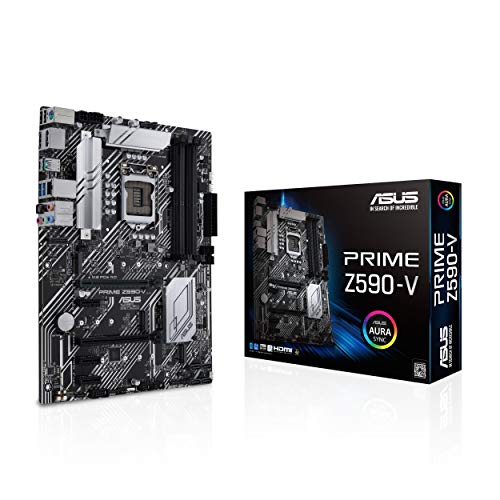
- Thunderbolt 4 support
- PCIe 4.0 and three M.2 slots
- DDR4 platform for 10th/11th Gen Intel CPUs
Best For: Budget LGA1200 desktop builds
ProArt Alternative

- Two Thunderbolt 5 Type-C ports
- DDR5, PCIe 5.0, and five M.2 slots
- Wi-Fi 7 with 10Gb/2.5Gb networking
Best For: Creative professionals and developers
Best DIY-Friendly Upgrade

- LGA 1851 support for Intel Core Ultra Series 2
- Thunderbolt 4, PCIe 5.0, and four M.2 slots
- Wi-Fi 7, 2.5GbE, and EZ-Latch features
Best For: Feature-rich new Core Ultra builds
Best Premium AI-Ready Board

- LGA 1851 and Core Ultra Series 2 support
- Five M.2 slots plus Thunderbolt 4 and PCIe 5.0
- AI tuning, Wi-Fi 7, and 2.5GbE networking
Best For: Enthusiast gaming and AI PC builds
Professional Workstation Pick

- Thunderbolt 4 with 10Gb and 2.5Gb Ethernet
- Two PCIe 5.0 slots and four M.2 slots
- AI features and onboard BMC for workstation builds
Best For: Advanced AI PCs and professional workstations
Balanced Connectivity Pick

- Thunderbolt 4 and USB4 header support
- Wi-Fi 7, 2.5Gb Ethernet, and four M.2 slots
- DIY-friendly latches, releases, and BIOS FlashBack
Best For: Mainstream Intel desktops with fast connectivity
Durable Gaming Pick

- Thunderbolt 4 Type-C and front USB 20Gbps
- Wi-Fi 7, 2.5Gb Ethernet, and four M.2 slots
- Robust power and thermal design for performance builds
Best For: Gaming and enthusiast Intel systems
Creator Powerhouse – ASUS ProArt Z890-CREATOR WIFI
The ASUS ProArt Z890-CREATOR WIFI is a high-end choice for computer motherboards with Thunderbolt, pairing dual Thunderbolt 5 ports and a Thunderbolt 4 port with Intel Z890, DDR5, PCIe 5.0, Wi-Fi 7, and fast wired networking. Its creator-focused expansion and storage options make it suitable for demanding workstation builds.
Best For: Content creators, AI-focused users, and high-performance Intel Core Ultra systems.
Pros:
- Dual Thunderbolt 5 ports plus one Thunderbolt 4 port
- Supports DDR5, PCIe 5.0, five M.2 slots, and up to 192GB of memory
- Includes 10Gb and 2.5Gb Ethernet, Wi-Fi 7, and creator-oriented software features
- DIY-friendly Q-Release, Q-Latch, Q-Slide, BIOS FlashBack, and Q-Connector features
Cons:
- Designed for the newer LGA1851 platform, so it requires a compatible Intel Core Ultra processor
- Its extensive feature set may be more than a basic desktop build needs
This is the most connectivity-rich option in the group, especially for users who need multiple high-speed Thunderbolt connections, fast networking, and extensive PCIe and M.2 expansion.
Value Thunderbolt Pick – ASUS Prime Z590-V
The ASUS Prime Z590-V is a practical, older-platform option among computer motherboards with Thunderbolt. It supports Thunderbolt 4, PCIe 4.0, three M.2 slots, DDR4 memory, and 11th Gen Intel processors, making it a straightforward foundation for a compatible mainstream desktop.
Best For: Budget-conscious builders upgrading or assembling an LGA1200 system.
Pros:
- Thunderbolt 4 support on an affordable Intel Z590 platform
- Three M.2 slots and PCIe 4.0 support
- 8+1 DrMOS power stages and comprehensive cooling features
- OptiMem II layout supports higher memory frequencies with lower voltages
Cons:
- Limited to LGA1200 Intel 10th- and 11th-generation processors
- Uses DDR4 rather than newer DDR5 memory
- Networking is limited to 1Gb LAN
The Prime Z590-V makes sense when Thunderbolt 4 is important but a current-generation platform is not required. Confirm processor, memory, and Thunderbolt compatibility before buying.
ProArt Alternative – ASUS ProArt Z890-CREATOR WIFI
This ASUS ProArt Z890-CREATOR WIFI is built for buyers comparing computer motherboards with Thunderbolt and seeking a creator-oriented Intel platform. It combines two Thunderbolt 5 Type-C ports with PCIe 5.0, DDR5, five M.2 slots, Wi-Fi 7, and 10Gb/2.5Gb networking.
Best For: Creative professionals and developers building a feature-rich LGA1851 workstation.
Pros:
- Two Thunderbolt 5 Type-C ports for high-speed peripheral connectivity
- 16+2+1+2-stage power design for demanding creative workloads
- PCIe 5.0 support, five M.2 slots, and DDR5 compatibility
- AI overclocking, AI cooling, NPU Boost, and AI Advisor features
Cons:
- Requires an Intel Core Ultra Series 2 processor and DDR5 memory
- Its workstation-focused features can be unnecessary for simple builds
With strong storage, expansion, networking, and Thunderbolt 5 support, this ProArt board is a compelling workstation platform. Review the listing carefully for exact port and slot details before purchase.
Enthusiast Thunderbolt 4 – GIGABYTE Z890 AORUS Master
The GIGABYTE Z890 AORUS Master is a strong enthusiast option among computer motherboards with Thunderbolt, offering dual Thunderbolt 4, PCIe 5.0, five M.2 slots, DDR5, Wi-Fi 7, and 10GbE LAN. It is designed for Intel Core Ultra Series 2 systems and emphasizes power delivery and build-friendly installation.
Best For: Enthusiasts who want fast connectivity, extensive storage, and a robust LGA1851 platform.
Pros:
- Dual Thunderbolt 4 ports, Wi-Fi 7, and 10GbE LAN
- 18+1+2 power design with 110A Smart Power Stages
- Five M.2 slots, PCIe 5.0, and DDR5 support up to 256GB
- EZ-Latch features simplify M.2 and PCIe installation
Cons:
- Requires an Intel Core Ultra 200-series processor and DDR5 memory
- Its enthusiast feature set may exceed the needs of a basic workstation
The AORUS Master is a well-rounded choice for users who prefer Thunderbolt 4, fast networking, substantial storage expansion, and a strong power design in one current-generation board.
Best Value Intel Platform – TUF GAMING B760-PLUS WIFI
The ASUS TUF GAMING B760-PLUS WIFI is a practical choice for buyers seeking computer motherboards with Thunderbolt support for a 12th-, 13th-, or 14th-generation Intel build. It combines DDR5 support, PCIe 5.0, three M.2 slots, Wi-Fi 6, and 2.5Gb Ethernet in an ATX design.
Best For: Mainstream gaming PCs and everyday systems using compatible LGA 1700 Intel processors.
Pros:
- Supports 12th-, 13th-, and 14th-generation Intel Core processors.
- Includes a PCIe 5.0 slot, three M.2 slots, and DDR5 memory support.
- Offers Thunderbolt (USB4) header support, Wi-Fi 6, and 2.5Gb Ethernet.
Cons:
- Uses the older LGA 1700 platform rather than Intel’s newer LGA 1851 socket.
- Its B760 chipset is less feature-focused than the Z890 boards in this roundup.
Choose this board when you want broad Intel compatibility and useful high-speed connectivity without moving to a newer Core Ultra platform. Its reinforced power design and comprehensive heatsinks also suit a durable, well-cooled gaming build.
Best DIY-Friendly Upgrade – Z890 AORUS Elite WIFI7 ICE
The GIGABYTE Z890 AORUS Elite WIFI7 ICE is a strong option among computer motherboards with Thunderbolt for an Intel Core Ultra Series 2 system. Its ATX layout pairs DDR5 support with PCIe 5.0, four M.2 slots, Thunderbolt 4, Wi-Fi 7, and 2.5GbE networking.
Best For: Newer Core Ultra builds where fast wireless networking and easy component installation matter.
Pros:
- Supports Intel Core Ultra processors on the LGA 1851 socket.
- Provides four M.2 slots, PCIe 5.0, Thunderbolt 4, and front USB-C.
- Includes Wi-Fi 7, 2.5GbE LAN, and several EZ-Latch installation features.
Cons:
- Requires an LGA 1851 processor and DDR5 memory, increasing platform-upgrade requirements.
- Its advanced features may be unnecessary for basic office or entry-level systems.
This board is appealing for a fresh Intel build that should stay current across storage, networking, and external-device upgrades. The EZ-Latch features and five-year manufacturer warranty add practical value for DIY builders.
Best Premium AI-Ready Board – ROG STRIX Z890-A GAMING WIFI
The ASUS ROG STRIX Z890-A GAMING WIFI targets demanding Intel Core Ultra Series 2 systems and stands out among computer motherboards with Thunderbolt. It offers Thunderbolt 4, five M.2 slots, DDR5 support, Wi-Fi 7, 2.5Gb Ethernet, and AI-oriented tuning features.
Best For: Enthusiast gaming and advanced AI PC builds that need extensive storage and strong platform connectivity.
Pros:
- Supports Intel Core Ultra Series 2 processors on LGA 1851.
- Includes five M.2 slots, Thunderbolt 4, PCIe 5.0, Wi-Fi 7, and 2.5GbE.
- Features AI overclocking, AI cooling, AI networking, and NPU Boost technologies.
Cons:
- Its LGA 1851 and DDR5 requirements make it unsuitable for older Intel systems.
- Enthusiast-grade features may be excessive for a basic gaming or productivity PC.
For buyers building a high-end Core Ultra workstation or gaming PC, this board offers the broadest storage and AI-focused feature set of the three. Its substantial thermal design and 16+2+1+2-stage power solution are suited to demanding configurations.
Professional Workstation Pick – ASUS Pro WS Z890-ACE SE
For demanding workstations and advanced AI PCs, the ASUS Pro WS Z890-ACE SE is one of the most fully equipped computer motherboards with thunderbolt. It combines LGA 1851 support for Intel Core Ultra desktop processors with DDR5, multiple PCIe 5.0 connections, four M.2 slots, Thunderbolt 4, and both 10Gb and 2.5Gb networking.
Best For: Professional workstations, AI-focused systems, and high-speed storage or networking builds.
Pros:
- Thunderbolt 4 plus 10Gb and 2.5Gb Ethernet connectivity.
- Two PCIe 5.0 slots and four M.2 slots, including one PCIe 5.0 M.2 slot.
- Strong 16+2+1+2 teamed power design with AI overclocking and AI cooling features.
- Onboard BMC adds a workstation-oriented management feature.
Cons:
- Its professional feature set may be more than a typical home or gaming build needs.
- It supports Intel Core Ultra Series 2 processors with the LGA 1851 socket, so it is not a universal upgrade for older systems.
This board stands out when expansion, networking, and remote-management-oriented features matter as much as processor performance. It is a strong choice for users building a feature-rich workstation rather than a basic desktop.
Balanced Connectivity Pick – ASUS PRIME Z890-P WIFI
The ASUS PRIME Z890-P WIFI offers a practical mix of modern expansion and everyday convenience for buyers comparing computer motherboards with thunderbolt. It supports Intel Core Ultra Series 2 processors, DDR5 memory, Thunderbolt 4, Wi-Fi 7, four M.2 slots, and 2.5Gb Ethernet in an ATX design.
Best For: Mainstream performance PCs that need fast wireless networking, modern storage, and Thunderbolt 4.
Pros:
- Thunderbolt 4 USB Type-C connectivity and Thunderbolt USB4 header support.
- Wi-Fi 7 and 2.5Gb Ethernet provide flexible networking options.
- Four M.2 slots, including one PCIe 5.0 M.2 slot with cooling.
- DIY-friendly features include M.2 Q-Latch, PCIe Slot Q-Release, BIOS FlashBack, and a pre-mounted I/O shield.
Cons:
- Its 14+1+1+2 power-stage design is less substantial than the higher-tier options in this roundup.
- The listed platform is Windows 11, which may matter when planning a different operating-system setup.
With Wi-Fi 7, Thunderbolt 4, and broad M.2 support, this PRIME model is a well-rounded choice for a new Intel-based desktop. Its convenience-focused design also makes it appealing to builders who value straightforward installation.
Durable Gaming Pick – ASUS TUF Gaming Z890-PRO WiFi
The ASUS TUF Gaming Z890-PRO WiFi targets performance-oriented builders who want computer motherboards with thunderbolt alongside gaming-focused expansion. It supports Intel Core Ultra processors, DDR5 memory, Thunderbolt 4 Type-C, Wi-Fi 7, four M.2 slots, and a 16+1+2+1-stage power solution.
Best For: Gaming PCs and enthusiast systems that need robust power delivery, fast networking, and modern storage.
Pros:
- Thunderbolt 4 Type-C ports plus a front-panel USB 20Gbps Type-C connection.
- Wi-Fi 7 and Intel 2.5Gb Ethernet support high-speed networking.
- Four M.2 slots, including a cooled PCIe 5.0 M.2 slot.
- 8-layer PCB, 16+1+2+1 80A DrMOS stages, and large VRM heatsinks support demanding builds.
Cons:
- Its LGA 1851 socket limits processor compatibility to the supported Intel platform.
- The two-year warranty is shorter than the three-year warranties listed for the other boards here.
The TUF Gaming Z890-PRO WiFi is a strong middle ground for users who want gaming-oriented durability features without giving up Thunderbolt 4 or Wi-Fi 7. Its power and thermal design also suit performance-focused systems with multiple high-speed components.
How We Picked the Best Computer Motherboards with Thunderbolt
We focused on motherboards that either provide built-in Thunderbolt 4 connectivity or clearly support Thunderbolt through the board’s available headers and expansion options. The selection spans Intel LGA 1851, LGA 1700, and LGA 1200 platforms, so processor compatibility is a primary consideration.
We also compared PCIe generation, M.2 storage capacity, memory support, networking, rear I/O, power delivery, wireless connectivity, and overall intended use. Boards with stronger expansion and creator-oriented features received extra attention for demanding workstation builds.
Quick Comparison
- Best creator workstation: ASUS ProArt Z890-CREATOR WIFI
- Best premium enthusiast option: GIGABYTE Z890 AORUS Master
- Best value for a modern Intel build: ASUS PRIME Z890-P WIFI
- Best gaming-focused choice: ASUS ROG STRIX Z890-A GAMING WIFI
- Best professional workstation platform: ASUS Pro WS Z890-ACE SE
- Best older-platform option: ASUS Prime Z590-V or ASUS TUF GAMING B760-PLUS WIFI, depending on CPU generation
Key Buying Factors for Computer Motherboards with Thunderbolt
Check the Exact Thunderbolt Implementation
Thunderbolt may be integrated directly into the rear I/O or supported through a dedicated header and add-in card. Confirm the manufacturer’s specifications before buying, especially if you need multiple Thunderbolt ports, display output, device daisy-chaining, or high-speed external storage.
Match the Socket and Chipset
LGA 1851 boards are designed for Intel Core Ultra Series 2 processors, while LGA 1700 models support select 12th-, 13th-, and 14th-generation Intel Core CPUs. LGA 1200 is an older platform for 10th- and 11th-generation processors. A motherboard cannot compensate for an incompatible socket.
Consider Storage and Expansion
Creators working with large video, photo, or engineering files should prioritize multiple M.2 slots, PCIe 5.0 support, and enough physical room for graphics cards and add-in controllers. Check lane-sharing details if you plan to populate several drives or expansion slots.
Evaluate Networking and Memory
Wi-Fi 7, 10Gb Ethernet, and 2.5Gb Ethernet can improve large-file transfers, but only when your network supports those speeds. DDR5 is standard on the newer LGA 1851 boards; verify maximum capacity, supported speeds, and the number of DIMM slots for your upgrade plans.
Who Should Buy Which Computer Motherboards with Thunderbolt?
Choose a ProArt model if you build a content-creation workstation and need extensive storage, fast networking, and connectivity for professional peripherals. The Pro WS Z890-ACE SE is better suited to users who prioritize workstation features and high-speed wired networking.
Gamers should look toward the ROG STRIX, TUF Gaming, or AORUS models, balancing power delivery, expansion, wireless performance, and aesthetics. The PRIME boards are sensible choices for mainstream builds that need modern platform support without every premium feature.
Finally, select the Z590-V or B760-PLUS WIFI only when its CPU socket matches your existing processor or planned upgrade. For a new long-term build, the newer LGA 1851 options generally offer the strongest upgrade path and latest connectivity.