An external GPU setup is only as reliable as the connection between your computer and eGPU enclosure. The right cable must deliver compatible PCIe performance while handling the bandwidth, length, and power requirements of your hardware.
We selected 10 Thunderbolt and USB4 cable options for different eGPU builds, from compact Thunderbolt 4 connections to newer Thunderbolt 5 cables with higher bandwidth ratings. Use the guide below to narrow the choices by compatibility, performance, and value.
Best 10 Thunderbolt Cable for External GPU Picks for 2026
Best Thunderbolt 5 Cable
Cable Matters 80Gbps Braided Cable

- Up to 80Gbps data transfer
- Supports up to 240W power delivery
- Intel Certified and backward compatible
Best For: High-bandwidth Thunderbolt 5 workstations and future-ready eGPU connections
Best Long USB4 Cable

- 40Gbps USB4 and Thunderbolt support
- Up to 240W PD 3.1 charging
- Supports 8K or dual 4K displays
Best For: Cable-managed docks and eGPU setups needing a four-foot connection
Best Right-Angle Cable
Cable Matters 80G Thunderbolt 5 Cable
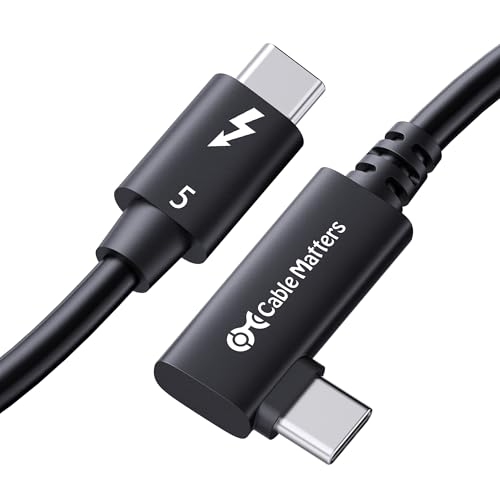
- Compact 90-degree connector design
- Up to 80Gbps data transfer
- Supports up to 240W power delivery
Best For: Space-constrained desktops, docks, and creative workstations
Best eGPU Dock Bundle
PELADN S-3 Thunderbolt 5 eGPU Dock

- Includes a Thunderbolt 5 cable
- 64Gbps PCIe 4.0 x4 eGPU slot
- Adds Ethernet, storage, USB, and SD expansion
Best For: Thunderbolt 5 eGPU builds needing dock-style expansion
Best Value Cable
Anker 515 USB4 Cable for Thunderbolt eGPU

- 40Gbps USB4 data transfer
- Supports up to 240W charging
- 3.3-foot cable tested for 5,000 bends
Best For: Compact Thunderbolt 3 or 4-class eGPU connections
Best for Comfort
CalDigit Thunderbolt 5 Pro Cable

- Up to 120Gbps Thunderbolt 5 bandwidth
- 64Gbps PCIe and 240W power delivery
- Braided, 20,000-bend-rated construction
Best For: High-performance Thunderbolt 5 eGPU and storage systems
Best All-Around Pick

- 80Gbps data and PCIe tunneling for compatible eGPUs
- 240W PD 3.1 charging with automatic negotiation
- Braided 3.3-foot design with 36-month warranty
Best For: Mixed workstations using eGPUs, SSDs, docks, and displays
Best Short Cable
Starinnox USB4 Thunderbolt 5 Cable
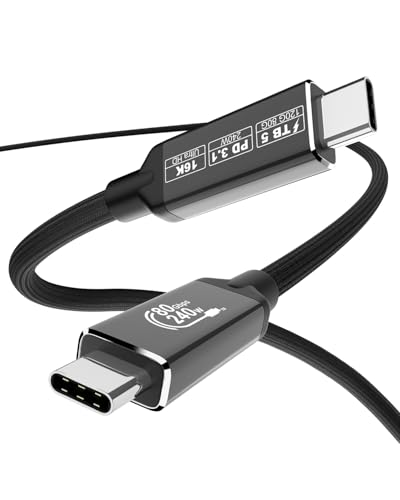
- Compact 0.6-meter length for close eGPU setups
- 80Gbps transfer with PCIe Gen 4 support
- 240W charging and broad backward compatibility
Best For: Compact desks with nearby eGPU or SSD enclosures
Best for High-Refresh Displays

- 80Gbps data and PCIe expansion support for eGPUs
- Up to 4K at 540Hz or 8K at 165Hz
- Braided build with aluminum connectors and EMI resistance
Best For: Gaming and workstation setups using high-refresh displays
Best eGPU Dock – PCIe 3.0 x16 Thunderbolt eGPU Dock
This dock is the most complete option here for building an external graphics setup, combining a PCIe 3.0 x16 slot with a supplied Thunderbolt 4 cable. It is designed for compatible Windows 10/11 or Linux laptops, desktops, and consoles, with support for Thunderbolt 3, Thunderbolt 4, and USB4 systems.
Best For: Users who need a full eGPU dock for graphics work, video editing, AI art, or AAA gaming and already have a compatible NVIDIA or AMD graphics card.
Pros:
- Supports NVIDIA and AMD graphics cards with available official drivers.
- Uses a JHL6340 controller with stated speeds around 22Gbps.
- Offers four power-input options: CPU, Molex, PD 3.0, or DC5521.
- Includes a Thunderbolt 4 cable and 24-pin power jumper cable.
Cons:
- Requires a separate compatible NVIDIA or AMD graphics card.
- Performance depends on the host device, drivers, and available Thunderbolt or USB4 functionality.
- Intel graphics cards are not recommended according to the supplied guidance.
Choose this model when you need more than a replacement cable: it provides the dock hardware and flexible power options for an external GPU build. Check your laptop or console port support and power arrangement before buying.
Best Thunderbolt 5 Cable – Cable Matters 80Gbps Braided Cable
For shoppers seeking a high-bandwidth thunderbolt cable for external gpu setups, this Intel Certified Thunderbolt 5 model offers up to 80Gbps data transfer in a durable 3.3-foot design. It is also backward compatible with Thunderbolt 4 devices, making it a forward-looking choice for newer laptops and docks.
Best For: Thunderbolt 5 users who want maximum cable bandwidth, high-power charging, and a braided cable for demanding workstation or gaming setups.
Pros:
- Supports up to 80Gbps data transfer and up to 120Gbps of video bandwidth.
- Provides up to 240W power delivery.
- Supports dual 6K or 8K displays and triple 4K at 144Hz configurations.
- Intel Certified with a braided jacket and aluminum connectors.
Cons:
- Its full Thunderbolt 5 performance requires compatible host devices.
- The 3.3-foot length may not suit setups needing more reach.
- It may offer more bandwidth than necessary for Thunderbolt 4-only systems.
This is a strong premium cable pick if your external GPU setup uses Thunderbolt 5 hardware or you want substantial headroom for future devices. For older equipment, confirm that the desired speed and display features are supported by the connected ports.
Best Long USB4 Cable – Silkland 40Gbps 4-Foot Cable
The Silkland 4-foot cable is a practical thunderbolt cable for external gpu connections when you need extra reach without giving up 40Gbps performance. It supports USB4 and Thunderbolt 4 functionality, while remaining backward compatible with Thunderbolt 3 and several USB standards.
Best For: Users who need a certified 4-foot cable for a Thunderbolt dock, external GPU enclosure, monitor, SSD, or high-power USB-C setup.
Pros:
- Supports up to 40Gbps data transfer.
- Offers up to 240W PD 3.1 charging with compatible equipment.
- Supports one 8K display or dual 4K displays at 60Hz.
- USB-IF certified and built with braided protection and an aluminum shell.
Cons:
- Actual performance depends on the connected device and its USB4 or Thunderbolt capabilities.
- The supplied guidance recommends cables below 5 feet for stable docking performance.
- It does not provide the 80Gbps bandwidth of the Thunderbolt 5 options.
Consider this cable when a four-foot run makes cable management easier and your equipment tops out at 40Gbps. It balances reach, display support, and charging capacity while remaining compatible with a broad range of modern USB-C devices.
Best Right-Angle Cable – Cable Matters 80G Thunderbolt 5 Cable
This right-angle thunderbolt cable for external gpu setups is designed for tight desktop spaces, with a 90-degree connector that can reduce port strain and keep the cable closer to the device. It delivers Thunderbolt 5 bandwidth while supporting Thunderbolt 3, Thunderbolt 4, USB4, and USB-C devices.
Best For: Compact workstations, desktops, and docking stations where a short, angled cable helps with clearance and cable routing.
Pros:
- Provides up to 80Gbps bidirectional data transfer and up to 120Gbps video bandwidth.
- Supports dual 6K or 8K displays and triple 4K displays at 144Hz.
- Delivers up to 240W power with PD 3.1 support.
- Intel Certified and backward compatible with Thunderbolt 3, Thunderbolt 4, USB4, and USB-C.
Cons:
- The 2.6-foot length may be too short for some layouts.
- Full Thunderbolt 5 speeds require compatible devices.
- The angled connector may not suit every port orientation or enclosure design.
Pick this cable when physical space and connector positioning matter as much as bandwidth. Its short, right-angle design is particularly useful beside docks and desktop systems, provided the port orientation matches your setup.
Best eGPU Dock Bundle – PELADN S-3 Thunderbolt 5 eGPU Dock
If you need a thunderbolt cable for external gpu use and also want a broader expansion setup, the PELADN S-3 combines a Thunderbolt 5 cable with an eGPU dock. Its dual Thunderbolt 5 ports, PCIe 4.0 x4 slot, and power-supply flexibility make it a substantial choice for compatible laptops and mini PCs.
Best For: Users building a Thunderbolt 5 eGPU setup with storage, networking, display, and card-reader expansion.
Pros:
- Includes a Thunderbolt 5 cable and supports Thunderbolt 5, Thunderbolt 4, and USB4 compatibility.
- Provides up to 80Gbps bidirectional Thunderbolt 5 bandwidth and a 64Gbps PCIe 4.0 x4 slot.
- Adds 2.5G Ethernet, USB-A, SD 4.0, and a PCIe 3.0 M.2 slot for broader expansion.
- Supports ATX or SFX power supplies, with up to 140W PD on the upstream link.
Cons:
- Requires a separate compatible graphics card and power supply.
- ATX power supplies are limited to a maximum length of 180mm.
- Its feature-rich enclosure is larger and more involved than a standalone cable.
The S-3 is better viewed as a complete eGPU expansion platform than simply a cable purchase. It is a strong fit when you need graphics connectivity plus ports and storage expansion in one enclosure.
Best Value Cable – Anker 515 USB4 Cable for Thunderbolt eGPU
The Anker 515 is a compact option for shoppers looking for a thunderbolt cable for external gpu connections that also handles fast data and charging. This 3.3-foot USB-C cable supports USB4 40Gbps performance and works with Thunderbolt 4 and Thunderbolt 3 devices.
Best For: Users who need a short, durable USB-C cable for compatible Thunderbolt eGPU, monitor, storage, or laptop connections.
Pros:
- Supports up to 40Gbps data transfer for compatible devices.
- Supports displays up to 8K at 60Hz or 4K at 144Hz.
- Handles up to 240W charging with a compatible charger.
- Tested to withstand up to 5,000 bends and includes an 18-month warranty.
Cons:
- Its 40Gbps rating is below Thunderbolt 5 cable specifications.
- The 3.3-foot length may be limiting for some desk layouts.
- Actual performance depends on the connected devices and ports.
The Anker 515 offers a practical balance of speed, power support, and durability for Thunderbolt 3 or 4-class setups. Choose it when 40Gbps is sufficient and you do not need Thunderbolt 5 bandwidth.
Best for Comfort – CalDigit Thunderbolt 5 Pro Cable
For a high-bandwidth thunderbolt cable for external gpu setups, the CalDigit Thunderbolt 5 Pro is designed for demanding connections. It supports up to 120Gbps Thunderbolt 5 performance, 64Gbps PCIe, and 240W power delivery while remaining compatible with earlier Thunderbolt and USB4 standards.
Best For: Thunderbolt 5 computers, eGPUs, fast storage, docking stations, and high-resolution displays.
Pros:
- Supports up to 120Gbps Thunderbolt 5 bandwidth and 64Gbps PCIe performance.
- Provides up to 240W power delivery for compatible devices.
- Compatible with Thunderbolt 3, Thunderbolt 4, USB4, USB4 v2, and other USB-C devices.
- Braided construction is rated for at least 20,000 bends, with a slim connector housing.
Cons:
- Maximum performance requires a Thunderbolt 5 host device.
- Connected systems may be limited by the specifications of their host ports.
- Its advanced capabilities may exceed the needs of basic USB-C charging or data use.
The CalDigit cable is the most forward-looking option here for a Thunderbolt 5 eGPU system. It is particularly suitable when you want high PCIe bandwidth, strong power support, and compatibility across multiple generations of USB-C devices.
Best All-Around Pick – USB4 Thunderbolt 5 Cable
If you want a versatile thunderbolt cable for external gpu setups, this 3.3-foot USB4 cable combines 80Gbps bidirectional data transfer, PCIe tunneling support, and compatibility with Thunderbolt 5, 4, and 3 devices. It also supports up to 240W charging and high-resolution display output, provided your connected hardware supports the required standards.
Best For: Users who want one durable cable for eGPUs, external SSDs, docks, displays, and high-power USB-C charging.
Pros:
- Supports 80Gbps data transfer and PCIe tunneling for compatible eGPU and storage setups.
- Handles up to 240W PD 3.1 charging with automatic power negotiation.
- Supports advanced display configurations, including dual 8K or triple 4K at 144Hz.
- Braided construction, reinforced connectors, triple shielding, and a 36-month warranty.
Cons:
- Maximum 80Gbps performance requires USB4 V2.0 or Thunderbolt 5 ports on both ends.
- Display output requires a USB-C port with DisplayPort Alt Mode.
- The bright red finish may not suit every workspace.
This is a strong general-purpose option when your eGPU and computer support modern Thunderbolt or USB4 features. Its length, broad compatibility, and durability make it practical for a mixed workstation, though older ports will limit performance.
Best Short Cable – Starinnox USB4 Thunderbolt 5 Cable
This 2-foot cable is a convenient thunderbolt cable for external gpu users who want a short connection between a laptop or desktop and an eGPU enclosure. It supports 80Gbps bidirectional transfer, PCIe Gen 4 throughput, and up to 240W PD 3.1 charging, while remaining backward compatible with Thunderbolt 4, Thunderbolt 3, USB4, and USB 3.2.
Best For: Compact desk setups where a short, high-bandwidth eGPU, SSD, or docking connection helps reduce cable clutter.
Pros:
- Short 0.6-meter length is useful for close-proximity eGPU and SSD connections.
- Supports PCIe Gen 4 throughput for compatible external graphics and storage hardware.
- Offers 80Gbps bidirectional transfer and up to 240W PD 3.1 charging.
- Supports up to 16K, dual 8K, or triple 4K display configurations with compatible equipment.
Cons:
- Its short length may be limiting when the eGPU enclosure sits farther from the computer.
- Advertised peak bandwidth depends on compatible Thunderbolt 5 or USB4 V2.0 hardware.
- Product information lists both 2-foot and 3.3-foot package descriptions, so verify the selected length.
For a tidy workstation, this cable offers the right combination of short reach and high bandwidth. It is especially appealing for eGPU and SSD setups positioned directly beside the host device, but it is less flexible for larger desk layouts.
Best for High-Refresh Displays – Thunderbolt 5 3.3-Foot Cable
Beyond serving as a thunderbolt cable for external gpu connections, this 3.3-foot model is aimed at demanding display and gaming setups. It provides 80Gbps bidirectional data transfer, 120Gbps video bandwidth, support for PCIe expansion and eGPUs, and up to 240W power delivery.
Best For: Gamers and workstation users pairing an eGPU or dock with high-refresh displays and demanding USB-C peripherals.
Pros:
- Supports 80Gbps data transfer and PCIe expansion for compatible eGPU setups.
- Designed for high-refresh output, including 4K at up to 540Hz and 8K at up to 165Hz.
- Supports dual 6K, dual 8K, or triple 4K at 144Hz with compatible hardware.
- Braided jacket, aluminum connectors, EMI resistance, and a stated 82,000-plus plug/unplug test.
Cons:
- High-resolution and refresh-rate claims require compatible Thunderbolt 5, USB4, displays, and source hardware.
- Older Thunderbolt or USB-C devices may not deliver the advertised bandwidth.
- Its feature set may be more than needed for basic eGPU or single-monitor use.
This cable is a good fit when display performance matters as much as eGPU connectivity. The 3.3-foot length offers more placement flexibility than a short cable, while the reinforced braided design suits frequent use in gaming and workstation environments.
How We Picked the Best Thunderbolt Cable for External GPU Setups
We focused on cables and eGPU accessories that clearly state their supported standard, data rate, connector type, and intended compatibility. The selection includes Thunderbolt 4, Thunderbolt 5, and USB4 options, along with cables bundled with eGPU docks. We also considered practical details such as cable length, braided construction, right-angle connectors, power delivery ratings, and backward compatibility.
Bandwidth claims are not the only deciding factor. Your computer, eGPU enclosure, graphics card, and operating system must all support the relevant connection standard. A Thunderbolt 5 cable will not automatically make a Thunderbolt 4 host or enclosure operate at Thunderbolt 5 speeds.
Quick Comparison
| Best For | What to Look For |
|---|---|
| Most Thunderbolt 4 eGPU systems | 40Gbps Thunderbolt 4 or USB4 cable with certified compatibility |
| New Thunderbolt 5 computers and docks | Intel-certified 80Gbps or higher Thunderbolt 5 cable |
| Desk setups with limited space | Short cable or a right-angle connector |
| High-power USB-C accessories | Clearly labeled USB Power Delivery rating, such as 100W or 240W |
| Complete eGPU upgrades | An eGPU dock that includes the appropriate Thunderbolt cable |
Key Buying Factors for a Thunderbolt Cable for External GPU
Compatibility and Certification
Check the ports on both the computer and eGPU enclosure before buying. Thunderbolt 3 and Thunderbolt 4 devices commonly use USB-C connectors, but a USB-C cable is not necessarily a Thunderbolt cable. Intel certification can provide extra assurance for Thunderbolt interoperability, while USB4 cables should specify their supported speed and features.
Bandwidth and PCIe Performance
Most established eGPU systems use Thunderbolt 3 or 4 at up to 40Gbps. Thunderbolt 5 and some USB4 cables advertise 80Gbps, 120Gbps bandwidth boost, or higher display capability, but the actual eGPU connection remains limited by the lowest-rated component. Choose a properly rated cable rather than paying for specifications your enclosure cannot use.
Length, Flexibility, and Connector Design
Shorter cables can be easier to route and may be preferable for a laptop placed beside an eGPU enclosure. A longer cable offers more desk flexibility but can be harder to manage. Braided jackets improve handling, while right-angle connectors can reduce strain when the port faces the edge of a laptop or dock.
Power Delivery and Display Claims
Power delivery ratings matter for charging compatible laptops and accessories, but they do not increase eGPU graphics performance. Likewise, 8K, 16K, or multi-display claims depend on the connected computer, GPU, monitor, and dock. Treat these features as added versatility rather than a guarantee of a specific eGPU result.
Who Should Buy Which Thunderbolt Cable for External GPU?
For a conventional Thunderbolt 3 or Thunderbolt 4 eGPU enclosure, a certified 40Gbps cable from a reputable brand is usually the safest choice. Buyers building around a new Thunderbolt 5 laptop or dock should choose a certified Thunderbolt 5 cable to preserve access to the newer standard. A right-angle model suits compact workstations, while a short cable is best when the enclosure sits directly beside the computer.
If you are starting from scratch, an eGPU dock bundled with a matching cable can simplify compatibility and installation. For maximum future flexibility, select a well-built Thunderbolt 5 or USB4 cable, but confirm that its advertised speed, length, and power rating match the ports and enclosure you actually use.