Open frame computer cases make it easier to test components, monitor temperatures, and access hardware during upgrades or troubleshooting. They are especially useful for builders who prioritize flexibility and airflow over dust protection and acoustic insulation.
Our 2026 roundup covers test benches, modular frames, and open-air chassis for ATX, Micro-ATX, Mini-ITX, and select extended-format builds. Use the guide below to narrow your choices by compatibility, expandability, portability, and intended workload.
Best 10 Open Frame Computer Cases Picks for 2026
Best Budget Test Bench

- ATX, Micro ATX, and Mini ITX support
- Unrestricted graphics-card dimensions
- 0.8 mm SPCC steel construction
Best For: Budget DIY builds and hardware testing
Best Showcase Design

- Tempered-glass viewing panel
- Supports up to a 420 mm radiator
- Eight expansion slots with GPU holder
Best For: Display-oriented ATX gaming builds
Best Reinforced Steel Frame

- Reinforced 0.8 mm SPCC steel
- Supports standard ATX power supplies
- Unrestricted GPU layout for testing
Best For: Overclocking and hardware maintenance
Best Stackable Mining Rack
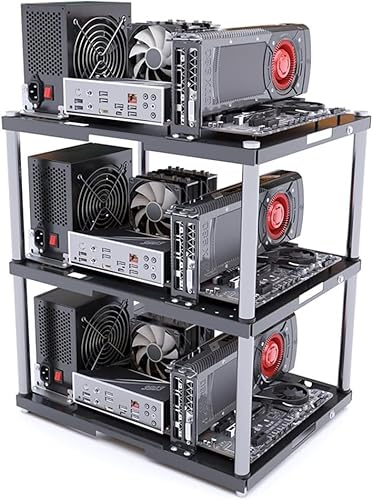
- Supports ATX, Micro ATX, and ITX boards
- Stackable up to 10 layers
- 20 kg capacity per layer
Best For: Mining rigs and expandable DIY builds
Best Portable Test Bench
Zinc-Coated Steel Open Frame Case
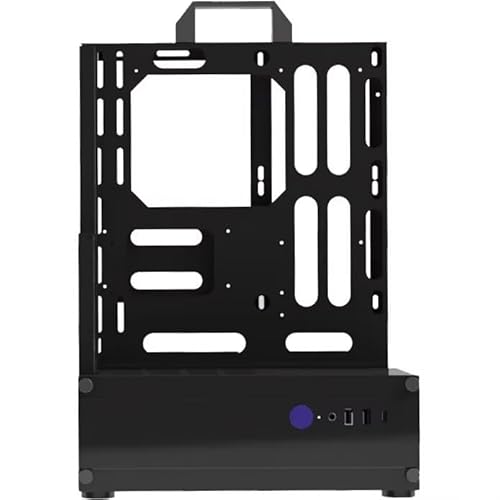
- Durable zinc-coated steel construction
- Supports ATX, ITX, and Micro ATX
- Open structure for easy component access
Best For: Testing, troubleshooting, and upgrade work
Best High-Capacity Test Bench

- Supports EATX through ITX motherboards
- Fits multiple fans, radiators, and drives
- Stackable with horizontal or vertical placement
Best For: Workstations and server-rack-style builds
Best Overall Compatibility
JOYJOM PC077 Open Frame Test Bench

- Supports EATX, ATX, Micro ATX, and Mini ITX
- Holds two HDDs and two SSDs
- Unrestricted graphics-card length
Best For: Flexible DIY builds and component testing
Best Lightweight Test Bench

- Supports ATX, Micro ATX, and ITX
- Tool-free access for quick changes
- Weighs 1.8 pounds
Best For: Frequent hardware testing and upgrades
Best for Cooling and Stacking

- Supports up to eight 120 mm fans
- Stackable up to 10 units horizontally
- Handles EATX boards and multiple radiator sizes
Best For: Workstations, servers, and multi-system setups
Best Budget Test Bench – JOYJOM ATX Open Air Case
This compact JOYJOM model is a practical choice among open frame computer cases for builders who want broad motherboard compatibility, unrestricted graphics-card dimensions, and straightforward hardware access. Its open-air layout suits testing, gaming builds, and maintenance work.
Best For: Budget-conscious DIY builders and hardware testing setups using ATX, Micro ATX, or Mini ITX boards.
Pros:
- Supports ATX, Micro ATX, and Mini ITX motherboards up to 305 x 245 mm.
- Graphics-card length and width are not limited by the frame.
- Supports a standard ATX power supply plus one HDD and one SSD.
- Uses 0.8 mm SPCC steel with a black sandblasted finish.
Cons:
- Provides only one internal drive bay according to the listed specifications.
- Air cooling is the listed cooling method, with no water-cooling support specified.
Choose this case when simple access and compatibility matter more than enclosure-style protection or elaborate expansion features. Its small parts count and open construction make it especially suited to hands-on builds.
Best Showcase Design – Thermaltake Core P3 TG Pro
Thermaltake Core P3 TG Pro Open Frame ATX Compatible PC Case CA-1G4-00M1WN-09 CS8593
Check Price On AmazonThe Thermaltake Core P3 TG Pro combines an open-frame layout with a tempered-glass panel, making it one of the more display-focused open frame computer cases. It is designed for ATX systems and leaves room for large components, custom cooling, and visible RGB hardware.
Best For: Showcase gaming PCs where component visibility, large hardware support, and a distinctive open-frame presentation are priorities.
Pros:
- Tempered-glass panel displays the interior while adding a physical barrier around components.
- Supports ATX, Micro ATX, and Mini ITX motherboards.
- Includes support for a 140 mm fan and up to a 420 mm, three-row radiator.
- Eight expansion slots and a GPU holder accommodate substantial graphics-card setups.
Cons:
- At 7 kg, it is considerably heavier than the compact test-bench options listed here.
- Only one internal storage bay is specified.
This is the strongest fit for a permanent, highly visible gaming build rather than a minimal bench. Its tempered glass and cooling-mount flexibility add presentation value, while the open structure keeps installation access convenient.
Best Modular Cooling Setup – RGEEK BlockCase Test Bench
The RGEEK BlockCase stands out among open frame computer cases for its aluminum construction and modular approach to component placement. It supports multiple motherboard and power-supply formats, flexible GPU orientation, and both air- and liquid-cooling configurations.
Best For: Enthusiasts who want a customizable test bench with broad power-supply support and adjustable cooling layouts.
Pros:
- Supports ATX, Micro ATX, and Mini ITX motherboards.
- Accepts ATX, SFX, and SFX-L power supplies.
- Allows horizontal or vertical GPU installation, with no stated graphics-card size limit.
- Supports 2.5-inch and 3.5-inch drives, multiple fan sizes, and radiators up to 280 mm.
Cons:
- A riser cable is required for vertical GPU installation and is not included.
- Its many adjustment options may require more planning than a fixed-layout frame.
For flexible experimentation, this is the most adaptable option in the group. The aluminum frame and removable cooling-position hardware make it useful for custom loops, component testing, and builds that may change over time.
Best Reinforced Steel Frame – ALAMENGDA AL01 Test Bench
The ALAMENGDA AL01 is a reinforced steel option for shoppers comparing open frame computer cases for testing, overclocking, and maintenance. Its folded edges and triangular supports are intended to improve rigidity, while the open layout leaves graphics-card placement unrestricted.
Best For: Hardware testers and overclockers who want a sturdy SPCC frame with ATX power-supply support and cable-routing provisions.
Pros:
- Uses 0.8 mm SPCC steel with folded-edge and triangular reinforcement.
- Supports ATX, Micro ATX, and ITX motherboards within 305 x 245 mm.
- Has no stated graphics-card length or width restriction based on motherboard layout.
- Includes reserved cable-routing holes and supports standard ATX power supplies.
Cons:
- The listed supported-motherboard field identifies Micro ATX, so buyers should verify ATX and ITX fit before ordering.
- Air cooling is specified; liquid-cooling support is not listed.
This frame makes sense when structural reinforcement and accessible hardware testing are more important than a finished-case appearance. Confirm the exact motherboard fit, especially if using a full ATX or ITX board.
Best Stackable Mining Rack – Modular Open Frame PC Case
This stackable open frame computer case is designed for expandable setups, supporting ATX, Micro ATX, and ITX motherboards in a space-saving rack format. Its open construction prioritizes airflow, while the metal frame supports up to 20 kg per layer.
Best For: Mining rigs, multi-system workstations, and DIY builders who want to expand a setup vertically.
Pros:
- Stackable design supports up to 10 layers.
- Open frame promotes high airflow for demanding workloads.
- Supports ATX, Micro ATX, and ITX motherboards.
- Includes motherboard mounts, power brackets, and screws.
Cons:
- The listed price covers one layer; additional layers are sold separately.
- Open construction provides less enclosure-style protection from dust and accidental contact.
Choose this model when modular expansion and cooling access matter more than a traditional enclosed case. Its single-layer format is flexible, but plan for the added cost of extra layers if you need a larger rack.
Best Portable Test Bench – Zinc-Coated Steel Open Frame Case
This open frame computer case provides a portable test-bench platform for ATX, ITX, and Micro ATX systems. The zinc-coated steel construction is built for durability, and the open structure makes component access and airflow straightforward during testing or upgrades.
Best For: PC testing, troubleshooting, component swapping, and builders who need a sturdy open chassis.
Pros:
- Zinc-coated steel construction offers a sturdy, durable platform.
- Supports ATX, ITX, and Micro ATX motherboards.
- Open structure provides convenient access to components.
- Includes a one-year manufacturer warranty.
Cons:
- Provides less protection from dust and accidental contact than an enclosed case.
- Its tower-style dimensions may be less convenient for compact desktop placement.
This is a practical choice for hands-on maintenance and test work, especially if you value a robust steel frame over a finished enclosure. Its multifunctional open design keeps hardware accessible while supporting common motherboard sizes.
Best High-Capacity Test Bench – Stackable Open Air PC Chassis
This open frame computer case is built for flexible workstation and server-rack-style use, supporting EATX, ATX, Micro ATX, and ITX motherboards up to 330 × 330 mm. It can be placed horizontally or vertically, stacked up to 10 units, and configured for multiple fans, radiators, drives, and larger graphics cards.
Best For: Workstations, server-rack-style setups, and test benches requiring broad hardware support and expansion room.
Pros:
- Supports EATX, ATX, Micro ATX, and ITX motherboards.
- Offers up to eight 120 mm fans or multiple radiator configurations.
- Provides storage for two HDDs and three SSDs.
- Supports horizontal or vertical placement and stacking up to 10 units.
Cons:
- Its broad hardware support and larger layout may be more than a basic desktop build needs.
- GPU clearance varies depending on internal or external fan mounting.
Among these open frame computer cases, this model is the most adaptable for demanding, expandable builds. The rigid SPCC construction, cooling options, drive bays, and placement flexibility make it well suited to technical environments where access and capacity are priorities.
Best Overall Compatibility – JOYJOM PC077 Open Frame Test Bench
For builders who want broad motherboard support, this open frame computer case accommodates EATX, ATX, Micro ATX, and Mini ITX boards. Its open-air layout leaves graphics card length unrestricted and provides room for standard ATX power supplies plus multiple storage drives.
Best For: DIY builders needing flexible motherboard and graphics-card compatibility in a compact test-bench format.
Pros:
- Supports EATX, ATX, Micro ATX, and Mini ITX motherboards up to 305 × 330 mm.
- Supports two HDDs and two SSDs.
- Uses 0.8 mm SPCC with a black sandblasted finish.
- Accommodates standard ATX power supplies from 140 to 250 mm long.
Cons:
- Cooling is listed as air cooling, with no water-cooling support specified.
- The open design provides less enclosure than a conventional PC case.
The JOYJOM PC077 is a practical choice when compatibility and easy component access matter most. Its storage capacity and unrestricted graphics-card length make it especially adaptable for testing and DIY builds.
Best Lightweight Test Bench – ATX Open Frame PC Rack
This lightweight open frame computer case is designed for quick access during PC building, testing, and upgrades. It supports ATX, Micro ATX, and ITX motherboards, while dedicated mounting brackets help organize the board, power supply, and storage devices.
Best For: Hardware testers and builders who prioritize accessibility, easy modifications, and a light test-bench setup.
Pros:
- Supports ATX, Micro ATX, and ITX motherboards, including X79 and X99 builds.
- Open-air construction provides easy access and airflow.
- Tool-free design supports faster installation and maintenance.
- Weighs 1.8 pounds.
Cons:
- Storage capacity and specific drive-bay counts are not provided.
- No warranty is listed in the supplied details.
- Water-cooling support is not specified.
This generic ATX open-frame rack is best viewed as a simple, accessible platform rather than a feature-heavy enclosure. Its low weight and tool-free access suit frequent component swaps and troubleshooting.
Best for Cooling and Stacking – JOYJOM PC096 Techbench
For demanding workstation or server-style builds, the JOYJOM PC096 combines a rigid SPCC structure with extensive cooling support. This open frame computer case supports EATX through ITX boards, up to eight 120 mm fans, several liquid-cooling radiator configurations, and horizontal stacking of up to 10 units.
Best For: Workstations, server builds, and multi-system setups that need robust mounting and substantial cooling flexibility.
Pros:
- Supports EATX, ATX, Micro ATX, and Mini ITX motherboards up to 330 × 330 mm.
- Supports up to eight 120 mm fans or multiple radiator sizes, including one 360 mm radiator.
- Can be placed horizontally or vertically and stacked up to 10 units horizontally.
- Supports two HDDs, three SSDs, and GPUs up to 310 mm with internal fan installation.
Cons:
- The 17.13 × 13.39 × 7.68-inch footprint is larger than simpler test benches.
- GPU clearance decreases when fans are installed internally.
- ATX power-supply support is limited to units up to 300 mm long.
With thick panels, broad cooling options, and stackable construction, the PC096 is the most expandable option in this group. It is a strong fit for users building larger systems or organizing multiple open-air platforms.
How We Picked the Best Open Frame Computer Cases
We evaluated these Open Frame Computer Cases around the factors that matter most in an exposed PC platform: motherboard compatibility, GPU clearance, power-supply support, storage mounting, structural stability, and ease of assembly. We also considered whether each design is better suited to a permanent workstation, a portable test bench, a rack-style installation, or a modular multi-system setup.
Because open-frame products vary widely in their included hardware and exact dimensions, verify the seller’s specifications before ordering. Compatibility claims can differ between revisions, particularly for E-ATX boards, long graphics cards, large radiators, and unusual power supplies.
Quick Comparison
| Best For | Look For | Main Trade-Off |
|---|---|---|
| Routine testing | Easy component access and a stable bench layout | Limited dust protection |
| Gaming builds | GPU clearance, radiator support, and cable routing | Less noise isolation than a closed case |
| Modular workstations | Stackable or rack-mountable construction | May require extra mounting hardware |
| Frequent transport | Rigid frame, handles, and protected component mounting | Exposed hardware needs careful handling |
Key Buying Factors for Open Frame Computer Cases
Motherboard and GPU Compatibility
Confirm support for your board size—Mini-ITX, Micro-ATX, ATX, or E-ATX—and check the mounting pattern rather than relying only on a product title. Measure your graphics card, especially if it uses a thick cooler or a vertical mounting arrangement.
Cooling and Component Access
Open construction provides excellent access and unrestricted ambient airflow, but it does not replace properly positioned fans. Check whether the frame supports standard fan mounts, CPU coolers, radiators, or your preferred test equipment.
Power, Storage, and Expansion
Look for a secure PSU location and enough clearance for the power supply cables. Decide whether you need dedicated 2.5-inch or 3.5-inch drive mounts, expansion-card brackets, or room for multiple GPUs and add-in cards.
Materials and Stability
Steel frames generally offer stronger support, while lighter materials can be easier to move. A wide base, solid motherboard tray, and reliable fasteners help prevent flexing when you connect cables or swap components.
Dust, Noise, and Safety
Open frames are convenient but expose components to dust, spills, pets, and accidental contact. They also provide little sound damping. Position the system in a clean, dry area and consider a closed case if quiet operation or household protection is a priority.
Who Should Buy Which Open Frame Computer Cases?
Choose a basic test-bench design if you frequently troubleshoot parts, update BIOS settings, or assemble systems outside a permanent enclosure. A more structured ATX frame is better for a daily-use custom PC where access and airflow matter. Stackable or rack-oriented models suit labs, studios, mining-style installations, and builders managing several systems. For portable diagnostics, prioritize a rigid, compact chassis with secure component mounting.
Before buying, compare the frame’s measurements with every major component—not just the motherboard. The best Open Frame Computer Cases are the ones that match your build process, workspace, and upgrade plans without requiring improvised brackets or unsupported hardware.