Choosing among the best computer cases for workstations means balancing component clearance, cooling, storage, expansion, and the physical space available for your build.
This roundup compares 10 workstation-ready cases across full towers, NAS-focused enclosures, compact systems, and rackmount chassis so you can match the design to your workload.
Best 10 Computer Cases for Workstations Picks for 2026
Top Airflow Pick

- Two 200 mm intake fans plus a 140 mm exhaust fan
- Supports 420 mm radiators and GPUs up to 440 mm
- Includes fan hub, PWM controls, and dust indicator
Best For: Air-focused creator and workstation builds
Extreme Expansion Choice
Phanteks Enthoo Pro 2 Server Edition

- Supports SSI-EEB motherboards and 11 PCI slots
- Holds up to 10 HDDs or 11 SSDs
- Provides 15 fan positions and 480/360 mm radiator support
Best For: Large server and multi-card workstations
Storage-Focused Workstation

- Fully perforated front mesh for airflow
- Supports up to 15 SSDs or HDDs
- Offers SSI-EEB support and eight expansion slots
Best For: Storage-rich and multi-GPU workstation builds
NAS and Compute Hybrid

- Supports 12 hot-swap HDDs and four SSDs
- Accommodates up to four GPUs and E-ATX boards
- Includes three fans and 240/280 mm AIO support
Best For: Home servers, NAS systems, and storage-heavy workstations
Best Compact Workstation Case

- Slim mATX design for space-limited desks
- 550W TFX PSU included
- USB-C and four total front USB ports
Best For: Compact office and creator workstations
Best High-Capacity Workstation Case

- Up to 10 HDDs and 3 SSDs
- Supports E-ATX through Mini ITX
- 360mm radiator and four fans supported
Best For: Storage-heavy workstation builds
Best NAS Workstation Case

- Up to 11 HDDs or 13 SSDs
- Supports E-ATX and 400mm expansion cards
- USB 3.2 Gen Type-C included
Best For: NAS, AI server, and storage-heavy workstations
High-Airflow Workstation Pick

- Dual 220 mm intake and 180 mm exhaust fans
- Supports 430 mm GPUs and 360 mm AIOs
- GPU holder supports one or two graphics cards
Best For: AI workstations and multi-GPU ATX builds
Rackmount Storage Specialist
Rosewill RSV-R4100U 4U Server Chassis
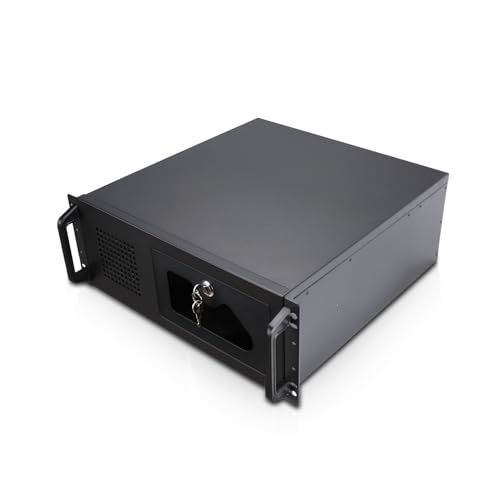
- 4U rackmount design for server environments
- Seven internal 3.5-inch HDD bays
- ATX and CEB motherboard compatibility
Best For: Rack-mounted workstations and storage servers
Modular Open-Frame Option
Cooler Master MasterFrame 500 Mesh

- Open aluminum structure for flexible configurations
- Supports Mini-ITX through E-ATX boards
- Dual 200 mm fans and 360 mm radiator support
Best For: Custom, modded, and airflow-focused workstations
Top Airflow Pick – ASUS ProArt PA602
For demanding computer cases for workstations, the ASUS ProArt PA602 emphasizes airflow, component clearance, and easy fan management. Its full-tower layout supports E-ATX boards, large graphics cards, and radiators up to 420 mm.
Best For: Creators and workstation builders prioritizing strong air cooling, large GPUs, and a spacious full-tower interior.
Pros:
- Includes two 200 mm front fans and a 140 mm rear exhaust fan.
- Supports a 420 mm radiator and graphics cards up to 440 mm.
- Built-in fan hub, two-section PWM control, and USB-C 20Gbps connectivity.
- Front-panel IR dust indicator helps signal when cleaning is needed.
Cons:
- Its 35.5-pound full-tower design requires substantial desk or floor space.
- Includes non-ARGB fans, which may not suit users seeking built-in lighting.
The PA602 is a strong all-around choice when thermal management and component room matter more than compactness or decorative lighting.
Extreme Expansion Choice – Phanteks Enthoo Pro 2 Server Edition
The Phanteks Enthoo Pro 2 Server Edition is built for unusually large computer cases for workstations, with SSI-EEB support, 11 PCI slots, and extensive cooling and storage capacity. Its open interior is suited to high-performance workstation and server configurations.
Best For: Server-style workstations needing multiple expansion cards, numerous drives, and extensive fan placement.
Pros:
- Supports SSI-EEB, E-ATX, ATX, micro ATX, and Mini-ITX motherboards.
- Provides 11 PCI slots and storage capacity for up to 10 HDDs or 11 SSDs.
- Offers up to 15 fan positions, including three over the PCI and CPU areas.
- Accommodates 480 mm and 360 mm radiators.
Cons:
- The large full-tower format may be excessive for conventional desktop workstations.
- Its one-year manufacturer warranty is shorter than some competing options.
Choose this case when expandability is the priority. Its SSI-EEB compatibility and unusually high fan and drive capacity make it especially suitable for specialized builds.
Storage-Focused Workstation – SilverStone SETA H2
Silverstone Technology SETA H2 Full-Size Workstation Tower Chassis, SST-SEH2-B
Check Price On AmazonThe SilverStone SETA H2 is a durable full-size option among computer cases for workstations, combining a fully perforated front panel with support for SSI-EEB and other motherboard formats. It also offers room for up to 15 SSDs or HDDs and multi-GPU configurations.
Best For: Storage-heavy professional systems that need broad motherboard compatibility and multiple graphics cards.
Pros:
- Fully perforated front mesh supports unobstructed airflow.
- Supports SSI-EEB, SSI-CEB, E-ATX, ATX, micro ATX, and Mini-ITX boards.
- Accommodates up to 15 2.5-inch SSDs or 3.5-inch HDDs.
- Provides eight expansion slots for multi-GPU setups.
Cons:
- Fans are not included, so cooling hardware must be purchased separately.
- Its full-size chassis is less suitable for space-constrained work areas.
The SETA H2 makes the most sense for builders planning substantial storage or multi-GPU hardware, provided they budget for a complete fan setup.
NAS and Compute Hybrid – JONSBO N5
The JONSBO N5 takes a compact, storage-oriented approach to computer cases for workstations, combining E-ATX support with hot-swap drive capacity and room for up to four GPUs. Its removable drive cage and built-in fans support home-server, NAS, and high-performance computing builds.
Best For: Home or office servers and workstation hybrids requiring many hard drives, multiple GPUs, and a smaller footprint than conventional full towers.
Pros:
- Supports 12 front-installed 3.5-inch hot-swap HDDs and up to four 2.5-inch SSDs.
- Can accommodate up to four GPUs and eight PCI expansion slots.
- Supports ITX, micro ATX, ATX, and E-ATX motherboards.
- Includes three built-in rear 120 mm fans and supports 240/280 mm AIO cooling.
Cons:
- GPU, CPU cooler, and PSU clearances impose more configuration limits than larger towers.
- Using all 12 HDD bays depends on the selected PSU condition and configuration.
- The compact layout may require more careful installation planning.
The N5 is a distinctive choice for a storage-first workstation or NAS. Verify GPU, cooler, PSU, and drive requirements before building, particularly when populating all drive bays.
Best Compact Workstation Case – Envision S12 SFF
For buyers comparing computer cases for workstations where desk space matters, the Envision S12 offers a slim small-form-factor design with a preinstalled 550W TFX power supply. It supports mATX motherboards, four low-profile expansion slots, and compact graphics cards up to 190mm long and 85mm wide.
Best For: Space-conscious office workstations, compact creator systems, and business deployments using compatible low-profile components.
Pros:
- Compact SFF footprint helps reclaim desk space.
- Includes a 550W TFX PSU.
- Front I/O includes USB-C 5Gbps, two USB-A 5Gbps ports, audio jacks, and an additional USB-A port.
- Provides 5.25-inch, 3.5-inch, and 2.5-inch drive bays.
Cons:
- 80mm CPU cooler height limit restricts cooling choices.
- Graphics card clearance is limited to 190mm in length and 85mm in width.
- Designed for mATX and low-profile expansion rather than large, high-end components.
The Envision S12 is a practical choice when a clean, compact workstation matters more than maximum component clearance. Confirm your motherboard, cooler, GPU, and TFX power requirements before building.
Best High-Capacity Workstation Case – DARKROCK Classico Max
The DARKROCK Classico Max is a full-tower option for computer cases for workstations that need extensive storage and flexible component support. It accommodates E-ATX, ATX, Micro ATX, and Mini ITX boards, with space for up to 10 3.5-inch hard drives and three 2.5-inch SSDs.
Best For: Storage-heavy workstations, data-intensive builds, and users who want radiator and vertical GPU support in one full-tower chassis.
Pros:
- Supports up to 13 internal drives.
- Compatible with E-ATX, ATX, Micro ATX, and Mini ITX motherboards.
- Supports a 360mm top radiator.
- Includes four preinstalled 120mm fans, mesh panels, and a dust filter.
Cons:
- E-ATX installation requires removing the hard-drive cages.
- Large full-tower dimensions require substantial floor or desk space.
- Vertical GPU mounting uses three dedicated slots and may affect component planning.
Choose the Classico Max when drive capacity and cooling flexibility are priorities. Its 13-drive potential is compelling for workstation storage, but the large enclosure and E-ATX trade-off should be considered before purchase.
Best NAS Workstation Case – Rosewill Thor NAS
For computer cases for workstations that also serve as NAS or AI infrastructure, the Rosewill Thor NAS provides a full-tower E-ATX chassis with dense storage support. It accommodates up to 11 3.5-inch hard drives or 13 2.5-inch SSDs, plus expansion cards up to 400mm long.
Best For: NAS systems, AI servers, media servers, and professional workstations requiring extensive drive capacity and long expansion cards.
Pros:
- Supports E-ATX motherboards and large workstation configurations.
- Offers up to 11 3.5-inch HDDs or 13 2.5-inch SSDs.
- Includes 11 external 5.25-inch bays for expansion.
- Provides USB 3.2 Gen Type-C connectivity and supports cards up to 400mm.
Cons:
- Only one 140mm PWM fan is listed as included.
- Its full-tower 20.1-by-9.1-by-20.9-inch footprint is substantial.
- Designed primarily for high-capacity infrastructure rather than a compact workstation.
The Thor NAS is a strong infrastructure-focused enclosure for buyers planning a large storage array or server-style workstation. Budget time for additional cooling evaluation if your components generate significant heat.
High-Airflow Workstation Pick – Cooler Master HAF II 500
For computer cases for workstations that prioritize cooling and expansion, the Cooler Master HAF II 500 is a practical mid-tower option. Its oversized front and rear fans, broad ventilation openings, and support for ATX or E-ATX motherboards suit demanding builds.
Best For: AI workstations, multi-GPU systems, and high-performance ATX builds needing strong airflow.
Pros:
- Includes two 220 mm front intake fans and one 180 mm rear exhaust fan.
- Supports graphics cards up to 430 mm and 360 mm AIO cooling.
- Dual-Mode GPU Holder supports one GPU or two GPUs up to 3.6 slots thick each.
- MasterRail system supports multiple fan and radiator configurations.
Cons:
- The mid-tower design and listed support may not suit unusually large or specialized components.
- Its 21.3-pound weight and large dimensions may require substantial desk or floor space.
The HAF II 500 stands out when thermal performance, GPU stability, and flexible cooling matter more than a compact footprint. Its storage cage and split-level cable management add useful build flexibility for workstation configurations.
Rackmount Storage Specialist – Rosewill RSV-R4100U 4U Server Chassis
Among computer cases for workstations, the Rosewill RSV-R4100U is designed for rack-based environments rather than a conventional desktop setup. Its 4U chassis provides seven internal 3.5-inch bays, ATX and CEB compatibility, and front-panel access suited to server and storage applications.
Best For: Rack-mounted workstations, home servers, and data-center builds requiring multiple hard drives.
Pros:
- Standard 4U rackmount format supports installation in server racks.
- Provides seven internal 3.5-inch HDD bays and two 5.25-inch device bays.
- Supports ATX and CEB motherboards with seven PCI expansion slots listed.
- Includes front USB 3.0 ports, LED monitoring indicators, and a locking front panel.
Cons:
- It only supports HDDs with three screw holes on each side, according to the supplied notes.
- The rackmount form factor is less convenient for ordinary desk-based workstation setups.
- Cooling is based on the included 120 mm and 80 mm fans rather than oversized desktop fans.
The RSV-R4100U is a focused choice for builders who need rack compatibility and drive capacity. Its locking front panel and monitoring indicators add practical utility, while the specialized chassis format limits its appeal for standard desktop workstations.
Modular Open-Frame Option – Cooler Master MasterFrame 500 Mesh
The Cooler Master MasterFrame 500 Mesh offers a flexible alternative for computer cases for workstations, using an open-frame aluminum structure and interchangeable panels. It supports Mini-ITX through E-ATX motherboards, long graphics cards, and extensive fan or radiator configurations.
Best For: Custom workstation builds, modding projects, and users who value accessible components and configuration flexibility.
Pros:
- Open-frame FreeForm 2.0 aluminum structure supports flexible installations.
- Works with Mini-ITX, Micro ATX, ATX, and E-ATX motherboards up to 305 x 330 mm.
- Includes two pre-installed 200 mm front intake fans.
- Supports up to seven fans, 360 mm radiators, and graphics cards up to 390 mm.
Cons:
- The open-frame design may provide less enclosure coverage than a conventional closed case.
- Its 22-pound weight and tall 21.4-inch dimension may make placement more challenging.
- Its customization-focused layout may require more planning during assembly.
The MasterFrame 500 Mesh is a strong fit for workstation builders who want cooling capacity and an easily modified layout. Its broad motherboard support and large fans make it versatile, while the open-frame construction favors custom builds over minimalist office systems.
How We Picked These Computer Cases for Workstations
We selected cases that support demanding workstation configurations rather than focusing only on appearance or gaming features. Our comparison emphasizes motherboard compatibility, GPU clearance, drive capacity, cooling potential, power-supply support, expansion slots, and practical build access. The list includes full-tower models for powerful multi-GPU systems, storage-heavy NAS enclosures, compact workstations, and rackmount options for labs or server rooms.
Because workstation needs vary widely, no single case is ideal for every buyer. Check the manufacturer’s current specifications before purchasing, particularly for radiator support, maximum GPU length, CPU-cooler height, drive cages, and included power supplies.
Quick Comparison
| Best For | Case Type | Priority Strength |
|---|---|---|
| Large professional builds | Full tower | Expansion and cooling |
| Multi-drive storage | NAS/full tower | 3.5-inch and 2.5-inch bays |
| Compact office workstations | SFF | Small footprint |
| Server-room deployment | Rackmount | Rack compatibility |
| Quiet, high-airflow desktops | ATX tower | Accessible cooling layout |
Key Buying Factors for Computer Cases for Workstations
Motherboard and Expansion Compatibility
Confirm whether the case supports your board size, from ATX and E-ATX to SSI-EEB or CEB. Extra PCIe slots matter for capture cards, networking, storage controllers, and multiple graphics cards. Also verify slot spacing if your GPUs use thick coolers.
GPU, CPU, and Cooling Clearance
Professional workloads can produce sustained heat. Look for generous GPU length, CPU-cooler height, front-to-back airflow, and multiple fan mounts. Mesh panels and included fans can reduce the need for immediate upgrades, while radiator support is important for high-wattage processors.
Storage and Power-Supply Support
CAD, video, AI, and virtualization systems may require several NVMe, SATA SSD, or hard-drive devices. Count accessible bays and check whether drive cages conflict with long GPUs. Make sure the chassis accepts your PSU format and has sufficient cable-routing space for a high-capacity power supply.
Size, Noise, and Serviceability
Measure the desk, shelf, or rack before ordering. Large towers provide room to work but can be difficult to move. Tool-less panels, removable drive cages, dust filtration, and front-accessible components are valuable when the system will be upgraded or maintained frequently.
Who Should Buy Which Computer Cases for Workstations?
Choose a full tower such as the ASUS ProArt PA602, Phanteks Enthoo Pro 2 Server Edition, or SilverStone SETA H2 when you need substantial cooling, expansion, and component clearance. Storage-focused builders should consider the JONSBO N5, DARKROCK Classico Max Storage Master, or Rosewill Thor NAS, while checking the exact drive and GPU arrangement required.
The Envision S12 suits buyers who need a compact workstation with an included TFX power supply. For airflow-focused ATX desktops, the Cooler Master HAF II 500 and MasterFrame 500 Mesh are practical choices. If your equipment belongs in a cabinet or server room, the Rosewill 4U rackmount chassis is the more appropriate format. Whichever model you choose, prioritize compatibility with your existing motherboard, graphics cards, drives, and PSU before judging aesthetics or price.