Building a gaming PC on a budget does not mean settling for a cramped or poorly ventilated chassis. The best computer cases under $100 can offer tempered-glass panels, multiple pre-installed fans, modern front I/O, and room for full-size components.
This roundup compares 10 affordable ATX and Micro-ATX cases, focusing on airflow, cooling hardware, layout flexibility, and features that matter during installation and everyday use.
Best 10 Computer Cases Under 100 Picks for 2026
Best Showcase ATX Case

- Panoramic tempered-glass front and side panels
- Three included ARGB PWM fans
- 420 mm GPU and 360 mm radiator support
Best For: ATX gaming builds with visible hardware and upgrade plans
Best Compact Panoramic Case

- 270-degree panoramic glass design
- Three pre-installed ARGB fans
- Type-C 3.2 Gen 2 and built-in ARGB controller
Best For: Compact Micro-ATX and Mini-ITX showcase builds
Best Airflow-Focused ATX Case

- Mesh front panel for airflow
- Supports up to eight fans and a 360 mm radiator
- ATX, Micro-ATX, and Mini-ITX compatibility
Best For: Flexible gaming builds with custom cooling plans
Best Back-Connect Showcase Case
MONTECH TG3 Panoramic ATX Case

- Tiered platform for display accents
- Four included ARGB fans
- 430 mm GPU and 360 mm radiator support
Best For: Panoramic ATX builds with back-connect components
Best Budget Airflow Pick
MOROVOL 621 RGB Mid-Tower Case
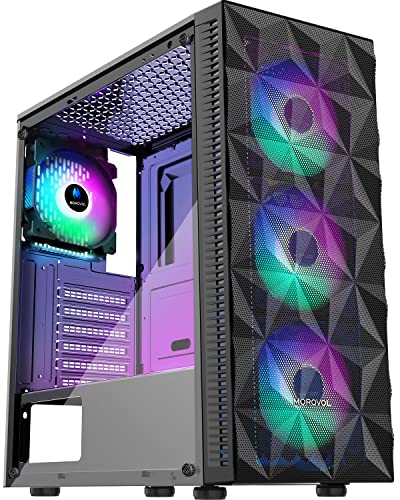
- Four pre-installed 120mm RGB fans
- Mesh front and tempered-glass side
- Supports ATX, Micro-ATX, and Mini-ITX
Best For: Affordable gaming builds needing included fans
Best Feature-Rich Cooling Setup

- Seven PWM ARGB fans included
- Supports 400mm GPUs and 360mm radiators
- Dual tempered glass with USB-C
Best For: High-airflow gaming builds with larger components
Best Balanced Gaming Design
GAMDIAS AURA GC1 ELITE ARGB Case

- Four built-in 120mm ARGB fans
- Supports 340mm GPUs and 360mm AIOs
- Mesh front with tempered-glass side
Best For: Mainstream ATX gaming builds with strong airflow
Compact Panoramic Pick

- 270-degree tempered-glass viewing design
- Supports Micro-ATX and Mini-ITX boards
- Three pre-installed fans included
Best For: Compact gaming builds with visible components
High-Airflow ATX Pick

- Four pre-installed 120mm ARGB PWM fans
- Supports GPUs up to 420mm
- USB 3.0, Type-C, and GPU support bracket
Best For: Roomy ATX gaming builds with strong cooling flexibility
Feature-Rich Cooling Pick

- Six pre-installed PWM ARGB fans
- Opening tempered-glass side panel
- ATX, Micro-ATX, and Mini-ITX support
Best For: RGB builds requiring flexible cooling and easy maintenance
Best Showcase ATX Case – MONTECH XR
For shoppers comparing computer cases under 100, the MONTECH XR stands out as a panoramic ATX mid-tower built to put hardware and lighting on display. Its tempered-glass front and side panels, three included ARGB PWM fans, and generous component clearances make it a practical choice for a feature-focused gaming build.
Best For: ATX gaming systems that prioritize panoramic visibility, large GPU support, and upgrade-friendly cooling.
Pros:
- Panoramic tempered-glass panels showcase components and lighting.
- Includes two reverse-blade side fans and one rear ARGB PWM fan.
- Supports GPUs up to 420 mm and radiators up to 360 mm.
- Includes USB-C, magnetic filters, and support for up to nine fans.
Cons:
- The glass-heavy design weighs 14.5 pounds.
- Its ATX mid-tower format may be larger than needed for compact builds.
The XR is a strong fit when presentation and expansion matter equally. Its included fans reduce initial setup work, while the spacious interior leaves room for high-end graphics cards and future cooling upgrades.
Best Compact Panoramic Case – Okinos Aqua 3 Micro-ATX Case
Among computer cases under 100, the Okinos Aqua 3 is a compact Micro-ATX option for builders who want a display-oriented chassis without moving to a full mid-tower. It combines a 270-degree glass view with three pre-installed ARGB fans, a Type-C port, and magnetic dust filters.
Best For: Micro-ATX or Mini-ITX gaming and creator builds with compact dimensions and showcase styling.
Pros:
- 270-degree panoramic front and side glass provides a broad interior view.
- Three included 120 mm ARGB fans support a vertical airflow layout.
- Offers Type-C 3.2 Gen 2, two USB 3.0 ports, and an ARGB controller.
- Supports GPUs up to 320 mm and CPU coolers up to 164 mm.
Cons:
- Limited to Micro-ATX and Mini-ITX motherboards.
- Its 320 mm GPU clearance requires checking the dimensions of larger cards.
The Aqua 3 makes sense for a smaller build where aesthetics and front-panel connectivity are important. Its quick-release glass and magnetic filters should also make access and routine cleaning more convenient.
Best Airflow-Focused ATX Case – DARKROCK EC2
The DARKROCK EC2 is a straightforward option for shoppers comparing computer cases under 100 and wanting broad motherboard compatibility. Its mesh front panel emphasizes airflow, while the tempered-glass side panel, Type-C readiness, and support for multiple fans give it useful features for a gaming build.
Best For: ATX, Micro-ATX, or Mini-ITX systems needing flexible cooling and a practical mesh-front layout.
Pros:
- Mesh front panel is designed for efficient airflow.
- Supports up to eight 120 mm fans and a 360 mm front radiator.
- Accommodates GPUs up to 340 mm and PSUs up to 200 mm.
- Includes a tempered-glass side panel, Type-C readiness, and separate magnetic filters.
Cons:
- Only one fan is pre-installed.
- Buyers may need additional fans to take advantage of its full cooling capacity.
The EC2 is best viewed as a flexible foundation rather than a fully equipped showcase case. Its roomy cooling support and broad motherboard compatibility make it easy to tailor, but the low included-fan count should be included in the build budget.
Best Back-Connect Showcase Case – MONTECH TG3 Panoramic ATX Case
For buyers seeking computer cases under 100 with a distinctive interior layout, the MONTECH TG3 combines panoramic presentation with back-connect motherboard support. It includes four ARGB fans, a tiered display platform, and clearance for large graphics cards, coolers, and power supplies.
Best For: ATX showcase builds using back-connect hardware, large components, or desk-display accents.
Pros:
- Tiered interior platform provides space for figures and custom accents.
- Includes a single-frame side intake and rear exhaust ARGB fan setup.
- Supports GPUs up to 430 mm, CPU coolers up to 180 mm, and PSUs up to 250 mm.
- Supports up to nine fan positions, 360 mm radiators, and compatible back-connect motherboards.
Cons:
- The display-oriented design may be more case than a simple office build needs.
- Back-connect benefits depend on using a compatible motherboard.
The TG3 is a compelling choice for builders who want the computer to function as part of the room’s visual setup. Its broad clearances and extensive cooling layout also leave considerable flexibility for performance-focused upgrades.
Best Budget Airflow Pick – MOROVOL 621 RGB Mid-Tower Case
For shoppers comparing computer cases under 100, the MOROVOL 621 offers a practical combination of included cooling, broad motherboard support, and a tempered-glass side panel. Its diamond-shaped mesh front and four pre-installed 120mm RGB fans make it a straightforward choice for an affordable gaming build.
Best For: Budget-conscious builders who want an ATX-compatible case with included RGB fans and visible components.
Pros:
- Includes four pre-installed 120mm RGB fans for airflow and lighting.
- Supports ATX, Micro-ATX, and Mini-ITX motherboards.
- Removable tempered-glass side panel simplifies installation and showcases components.
- Supports graphics cards up to 300mm and CPU coolers up to 155mm.
Cons:
- The RGB lighting is fixed rather than addressable.
- Graphics card and CPU cooler clearance are more limited than on larger cases.
- The front I/O has one USB 3.0 port and two USB 2.0 ports, with no listed USB-C port.
The MOROVOL 621 is a sensible low-cost option when included fans and basic component compatibility matter more than premium expansion or advanced lighting control. Check your GPU and cooler dimensions before purchasing.
Best Feature-Rich Cooling Setup – MUSETEX K2 ARGB ATX Case
Among computer cases under 100, the MUSETEX K2 stands out for its seven included PWM ARGB fans, Type-C connectivity, and expansive interior. It is designed for builders who want strong out-of-the-box airflow, panoramic component visibility, and room for larger graphics cards or radiators.
Best For: Gaming builds using larger GPUs or liquid coolers and users who want adjustable fan speeds and ARGB lighting.
Pros:
- Comes with seven pre-installed PWM ARGB fans and supports up to 10 total.
- Supports graphics cards up to 400mm, CPU coolers up to 165mm, and top-mounted radiators up to 360mm.
- 270-degree dual tempered-glass design provides a wide view of the build.
- Includes one USB-C port and two USB 3.0 ports.
Cons:
- The case is relatively large and weighs 15 pounds.
- Power-supply clearance depends on whether the hard-drive cage is installed.
- Lighting and fan-speed customization requires compatible motherboard software.
The K2 offers an unusually generous cooling and display package for this price category. Its spacious layout is appealing for higher-performance hardware, but verify power-supply clearance and available desk space before building.
Best Balanced Gaming Design – GAMDIAS AURA GC1 ELITE ARGB Case
The GAMDIAS AURA GC1 ELITE is a balanced option for computer cases under 100, pairing a mesh front with four built-in ARGB fans and useful support for full-size gaming hardware. It also includes a tempered-glass side panel, PSU shroud, and tool-free panel installation.
Best For: Mainstream ATX gaming PCs that need good airflow, included lighting, and support for larger GPUs or radiators.
Pros:
- Four built-in 120mm ARGB fans support front airflow and lighting.
- Supports graphics cards up to 340mm, CPU coolers up to 160mm, and 360mm radiators.
- Compatible with ATX, Micro-ATX, and Mini-ITX motherboards.
- Includes a magnetic dust filter, PSU shroud, and tool-free tempered-glass access.
Cons:
- The front I/O provides one USB 3.0 and two USB 2.0 ports, with no listed USB-C port.
- Storage support is more limited than cases with larger internal-bay counts.
- Only four fans are included, compared with some competing cases in this category.
The AURA GC1 ELITE is a well-rounded choice when you want a clean gaming appearance without giving up airflow or expansion room. Its component clearances are useful for many modern builds, though storage and front-panel connectivity are relatively basic.
Compact Panoramic Pick – MOROVOL MATX V3
If you want a compact option among computer cases under 100, the MOROVOL MATX V3 combines a three-sided panoramic tempered-glass design with support for Micro-ATX and Mini-ITX motherboards. Its three pre-installed fans also simplify the initial build setup.
Best For: Compact gaming builds that prioritize component visibility and a ready-to-use cooling setup.
Pros:
- 270-degree panoramic tempered-glass panels provide a broad view of the build.
- Supports Micro-ATX and Mini-ITX motherboards in a compact desktop case.
- Includes three pre-installed fans and a front USB 3.0 port.
Cons:
- Limited to four expansion slots.
- Micro-ATX and Mini-ITX support may not suit full-size ATX builds.
The MOROVOL is a practical choice when a smaller footprint, visible hardware, and included airflow matter more than maximum expansion capacity.
High-Airflow ATX Pick – RUIX OV303
The RUIX OV303 is a strong candidate among computer cases under 100 for ATX builders who want generous component clearance and included lighting. It arrives with four 120mm ARGB PWM fans, plus front USB 3.0 and Type-C connectivity.
Best For: ATX gaming systems needing broad GPU support, flexible cooling, and built-in graphics-card support.
Pros:
- Four pre-installed 120mm ARGB PWM fans provide a ready-made airflow setup.
- Supports GPUs up to 420mm and can accommodate up to 10 fans.
- Includes magnetic dust filters, USB 3.0, Type-C, and a built-in GPU support bracket.
Cons:
- Its larger mid-tower dimensions may be excessive for compact desks.
- The panoramic glass design requires more attention to cable presentation and cleaning.
With ATX support, room for a 360mm AIO, and substantial graphics-card clearance, the OV303 favors flexible, high-capacity builds over a small footprint.
Feature-Rich Cooling Pick – MUSETEX NN8
For builders comparing computer cases under 100, the MUSETEX NN8 stands out with six pre-installed PWM ARGB fans, a polygonal mesh front, and an opening tempered-glass side panel. It supports ATX, Micro-ATX, and Mini-ITX motherboards while offering flexible air- or water-cooling configurations.
Best For: RGB-focused builders who want adjustable fan speeds, easy interior access, and extensive storage flexibility.
Pros:
- Six pre-installed PWM ARGB fans offer adjustable speed and customizable lighting when connected to a compatible 3-pin ARGB interface.
- Opening magnetic tempered-glass side panel simplifies access for cleaning and installation.
- Supports ATX, Micro-ATX, and Mini-ITX boards, with two USB 3.0 ports and multiple drive-mounting options.
Cons:
- ARGB control depends on a compatible motherboard interface and lighting software.
- The extensive lighting and glass design may not suit understated builds.
The NN8 is particularly appealing if cooling hardware, interior accessibility, and customizable lighting are higher priorities than a minimalist exterior.
How We Picked the Best Computer Cases Under 100
We focused on cases that balance price with the features most builders notice after installation: motherboard support, ventilation, included fans, radiator and GPU clearance, front-panel connectivity, cable-management space, and ease of access. The list includes both ATX mid-towers and compact Micro-ATX options so you can match the case to your planned build rather than paying for unused space.
Pre-installed fans were treated as a value feature, not an automatic quality guarantee. Fan count, fan type, airflow path, and whether the fans use PWM or fixed-speed connections can all affect noise and cooling performance.
Quick Comparison
| Best For | Recommended Options | What to Look For |
|---|---|---|
| Panoramic showcase builds | MONTECH XR, MONTECH TG3, MOROVOL MATX V3 | Wide glass views, tidy component presentation, and compatible layouts |
| Maximum included cooling | MUSETEX 7-fan, MUSETEX 6-fan, MOROVOL 4-fan | Fan control, airflow balance, and available expansion space |
| Compact Micro-ATX systems | Okinos Aqua 3, MOROVOL MATX V3 | Exact GPU, CPU-cooler, power-supply, and radiator clearances |
| Traditional airflow-focused builds | GAMDIAS, RUIX OV303, DARKROCK EC2 | Mesh intake, dust filtering, front USB access, and upgrade room |
Key Buying Factors for Computer Cases Under 100
Motherboard and Component Compatibility
Confirm whether you need ATX or Micro-ATX support before buying. Then check maximum graphics-card length, CPU-cooler height, power-supply length, and storage mounts. A case can technically support your motherboard while still being a poor fit for a long GPU or tower cooler.
Airflow and Cooling
Mesh-front cases generally provide a more direct intake path than sealed glass-front designs. Panoramic cases can still cool well, but their side or bottom intake layout may require more careful fan placement. Look for room for additional intake and exhaust fans, and favor PWM fans when you want quieter automatic speed control.
Fans, Lighting, and Connectivity
Included ARGB fans improve value, but verify how they connect to the motherboard or controller. Also check for USB 3.0 and USB Type-C ports, since front-panel Type-C may require a compatible motherboard header. A built-in controller can simplify lighting, while separate connectors may provide more customization.
Build Quality and Maintenance
Tempered glass improves presentation but adds weight and needs careful handling. Removable filters, a hinged or easily removable side panel, open cable-routing channels, and adequate space behind the motherboard tray can make the build substantially easier.
Who Should Buy Which Computer Cases Under 100?
Choose a panoramic MONTECH or MOROVOL model if displaying RGB hardware is a priority. Pick a Micro-ATX case such as the Okinos Aqua 3 or MOROVOL MATX V3 for a smaller build, but measure every major component first. Builders who want the most cooling hardware included should compare the MUSETEX and MOROVOL fan bundles, while airflow-first buyers may prefer the mesh-oriented GAMDIAS or RUIX designs.
The DARKROCK EC2 is a sensible choice when you want a straightforward ATX enclosure with modern connectivity. Before ordering any of these Computer Cases Under 100, compare current dimensions, included accessories, and fan specifications with your exact parts list.