Choosing the right USB extension hub for room scale VR can make the difference between a clean setup and constant tracking or connectivity issues. The best options help you place dongles, sensors, and accessories where they work best without adding instability.
Below, we focus on practical picks for long cable runs, powered hubs, and interference reduction so you can build a more reliable VR space.
Best 10 USB Extension Hub for Room Scale Vr Picks for 2026
Tracker Dongle Organizer

- Holds up to 4 VR tracker dongles
- Upright design helps reduce clutter
- 4 ft cable adds placement flexibility
Best For: VR setups centered on Vive Tracker dongles
Long-Reach Active Extender
16.4ft USB 3.0 Cable with Booster
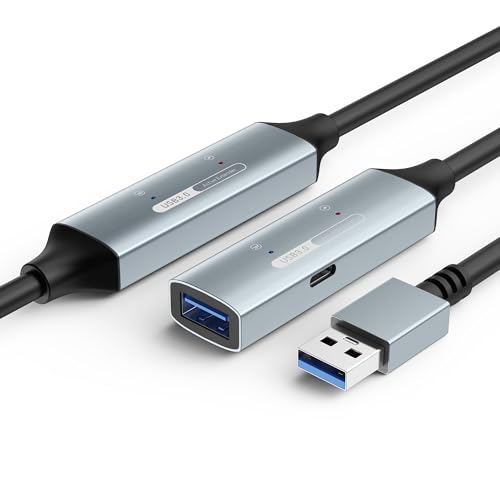
- Active booster helps maintain 5Gbps speed
- USB-C power port supports higher-demand devices
- Long length suits room-sized VR setups
Best For: Big rooms that need a powered USB extension
Interference-Control Hub
Rebuff Reality 4-Port USB 3.0 Hub
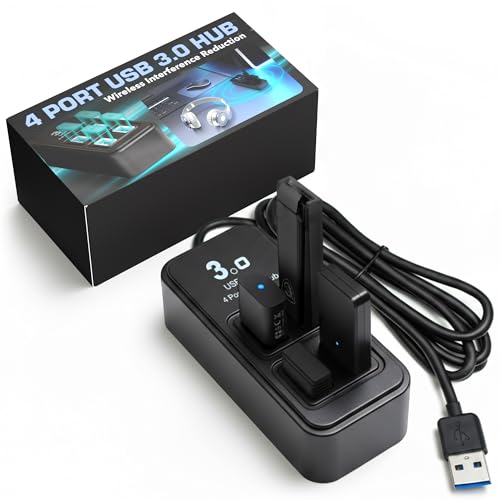
- Wide-spaced ports help reduce USB noise
- Includes power adapter for demanding devices
- Weighted base keeps the hub steady
Best For: Stable wireless VR dongles and peripherals
Simple Long Cable
Amazon Basics USB 3.0 Extension Cable
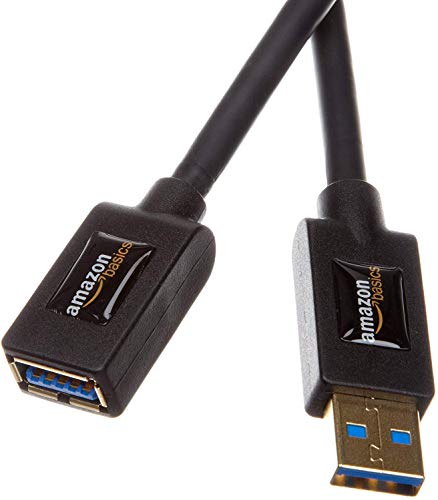
- 9.8-foot reach for flexible placement
- Shielded cable helps minimize interference
- Gold-plated connectors support signal clarity
Best For: Simple, reliable USB extension needs
Room-Scale Tracking Stability Pick

- Seven USB 3.0 ports for VR gear and peripherals
- Wide-spaced upright ports help reduce interference
- Powered design with weighted non-slip base
Best For: VR setups that need stable dongle connections and multiple peripherals
Desk-Ready Expansion Pick

- Adds four USB 3.0 ports for basic expansion
- 2 ft cable improves placement flexibility
- Adhesive tape helps keep the hub secured
Best For: Small desktop VR or gaming setups needing a tidy USB expansion
7-Port Control Hub
VEMONT 7-Port USB 3.0 Hub with Switches
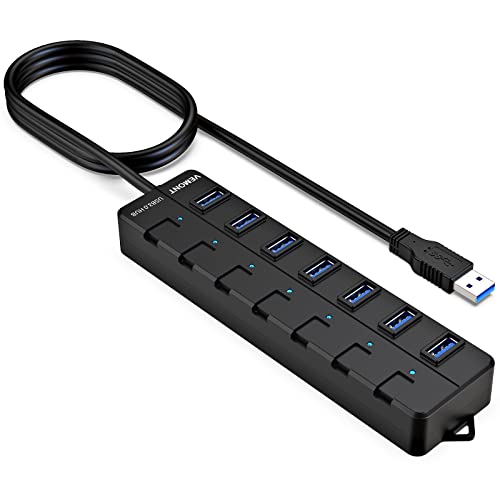
- 7 USB 3.0 ports with up to 5Gbps transfer
- Individual on/off switches with LED lights
- 4ft built-in cable for easier placement
Best For: Busy desktop or laptop setups that need lots of switchable USB ports
Long-Reach Multiport
Arvitek 4-Port USB 3.0 Hub, 10ft Cable

- 10ft cable helps with longer desk or play-area layouts
- 4 USB 3.0 ports with up to 5Gbps transfer
- Plug-and-play on Windows, Mac OS, and Linux
Best For: Long-distance hub placement in a tidy gaming or work setup
Switchable Desktop Extender
MANHATTAN 4-Port USB Extension Cable Hub

- 4 ports with individual switches and LED lights
- 5ft cable for easier hub placement
- Optional 5V/2A power support for heavier loads
Best For: Users who want a compact, switchable USB extender with more reach
Tracker Dongle Organizer – Rebuff Reality 4-Port USB Hub
If you need a usb extension hub for room scale vr, this Rebuff Reality 4-port USB hub is built around tracker dongles rather than general desktop use. Its upright layout keeps up to four Vive Tracker dongles organized and positioned for better spacing, while the included 4 ft cable helps place the hub where it works best in a VR setup.
Best For: VR users who want a compact hub for Vive Tracker dongles and other wireless VR dongles.
Pros:
- Supports up to 4 Vive Tracker dongles and other VR USB dongles
- Upright design helps keep dongles properly oriented
- Includes a 4 ft cable for extended placement
- USB 3.0 data transfer up to 5 Gbps
Cons:
- Built for Windows systems
- Focused on dongles more than general-purpose USB expansion
- Only 4 ports, so it may be too small for larger peripheral stacks
This is a practical pick if your main goal is cleaner dongle placement and reliable tracking hardware organization. It is less about adding lots of general ports and more about keeping VR tracker connections neat and ready for play.
Long-Reach Active Extender – 16.4ft USB 3.0 Cable with Booster
This usb extension hub for room scale vr option is really an active extension cable, and that matters when you need stable distance without sacrificing speed. The built-in signal booster is designed to maintain 5Gbps performance across long runs, and the USB-C auxiliary power port adds support for higher-demand devices in extended setups.
Best For: Large VR rooms and other setups that need a long, powered USB extension.
Pros:
- Active signal booster helps preserve 5Gbps data rates
- USB-C auxiliary power port supports demanding devices
- Available in long lengths for room-sized setups
- Triple-layer shielding and gold-plated connectors help reduce interference
Cons:
- It is a single extension cable, not a multi-port hub
- Best suited to USB-A devices only
- More specialized than a simple plug-in extension
For long-distance VR connectivity, this cable is the most flexible option in the group when reach is the priority. It is especially useful if your setup needs distance, shielding, and extra power rather than additional ports.
Interference-Control Hub – Rebuff Reality 4-Port USB 3.0 Hub
For a usb extension hub for room scale vr that focuses on stability, this Rebuff Reality 4-port USB 3.0 hub is designed to reduce wireless interference and USB 3.0 noise. The upright, wide-spaced port layout is meant to keep dongles and peripherals separated, while the included power adapter supports demanding VR and gaming setups.
Best For: Wireless VR dongles, trackers, and gaming peripherals that need a stable powered hub.
Pros:
- Upright, wide-spaced ports help reduce interference
- Includes a power adapter for demanding devices
- USB 3.0 ports support up to 5Gbps
- Weighted non-slip base helps it stay in place
Cons:
- Only 4 ports, so expansion is limited
- More specialized for VR and peripherals than general use
- Best fit for users who need interference control, not long cable reach
This hub makes sense when your biggest concern is signal stability around wireless dongles and trackers. It is a strong desk-side choice for VR users who want powered, organized connectivity without adding extra cable length.
Simple Long Cable – Amazon Basics USB 3.0 Extension Cable
If you want a straightforward usb extension hub for room scale vr solution without extra features, this Amazon Basics USB 3.0 extension cable offers a reliable 9.8-foot reach. It is a simple male-to-female extension with shielded construction and gold-plated connectors, making it a practical way to move a USB connection farther from the PC.
Best For: Users who want a basic, shielded USB extension for general devices and simpler VR cable routing.
Pros:
- 9.8-foot length gives useful extra reach
- Shielding helps reduce noise and interference
- Gold-plated connectors support signal clarity
- USB 3.0 design supports up to 4.8Gbps
Cons:
- Not an active cable, so it lacks signal boosting
- No extra ports or hub functionality
- Best for simpler extension needs rather than demanding powered VR setups
This is the most basic option here, but that simplicity can be exactly what some setups need. It is a solid pick if you mainly want dependable extension length without the added complexity of a powered hub or booster.
Room-Scale Tracking Stability Pick – Rebuff Reality 7 Port USB Hub
If you need a usb extension hub for room scale vr that keeps dongles and peripherals steady, this Rebuff Reality hub is built around interference reduction. Its upright, wide-spaced ports are designed to help shield wireless adapters from USB 3.0 noise, while the powered 7-port layout gives you room for VR trackers, mouse, keyboard, and headset connections in one compact station.
Best For: VR users building a stable, dongle-heavy setup for full-body tracking, streaming, or competitive gaming.
Pros:
- Wide-spaced upright ports help reduce cross-interference for wireless dongles.
- Seven USB 3.0 ports support multiple peripherals and VR trackers.
- Includes a power adapter for more demanding setups.
- Weighted, non-slip design helps keep the hub in place on a busy desk.
Cons:
- More focused on stability than on a minimal, ultra-compact footprint.
- Primarily aimed at powered peripheral use rather than device charging.
Overall, this is the strongest fit when your VR setup depends on dependable dongle performance and clean cable management. It’s a practical choice for room-scale tracking rigs where interference control matters as much as port count.
Long-Run Signal Booster Pick – CableCreation Active USB 3.0 Extension Cable
For a usb extension hub for room scale vr setup where the headset or sensor needs extra reach, this active USB 3.0 extension cable is built to preserve signal quality over distance. The 16.4 ft length, signal amplification, and gold-plated connectors make it a practical way to position Oculus Quest 2, Rift Sensor, or SteamVR gear farther from the PC without relying on a short standard cable.
Best For: VR users who need a long active extension for sensors or headset positioning.
Pros:
- Active repeater design includes signal amplification for longer runs.
- 16.4 ft length gives more flexibility for room-scale placement.
- Gold-plated connectors and shielding help improve signal clarity.
- Backwards compatibility supports existing USB 2.0 devices too.
Cons:
- It extends one USB connection rather than adding multiple ports.
- Best suited to compatible VR and PC devices, not a general hub solution.
This is the right pick when the main problem is distance, not expansion. If your VR tracking needs a longer, more reliable run to a sensor or headset connection, the active booster design is the key advantage.
Desk-Ready Expansion Pick – FlyingVHUB 4-Port USB 3.0 Hub
If you want a usb extension hub for room scale vr that adds just a few extra ports without taking over your desk, this 4-port USB 3.0 hub is a straightforward option. Its 2 ft cable makes placement easier when your PC is under a desk or your laptop sits farther away, and the hub supports common USB accessories at up to 5 Gbps.
Best For: Users who want a compact 4-port hub for a tidy desktop VR or gaming setup.
Pros:
- Adds four USB 3.0 ports to a compatible PC or laptop.
- 2 ft cable helps with reach when the host machine is out of the way.
- Includes adhesive tape to keep the hub secured on a desktop.
- Supports Windows, Mac, and Linux/Unix systems.
Cons:
- Not designed to charge devices.
- Only four ports, so it may be too small for bigger VR tracker setups.
This hub makes sense when you need simple expansion and an easy-to-place desktop unit. It’s best for smaller VR or gaming configurations where convenience and cable reach matter more than maximum port count.
7-Port Control Hub – VEMONT 7-Port USB 3.0 Hub with Switches
If you want a usb extension hub for room scale vr that also handles everyday desk gear, this 7-port USB 3.0 hub gives you plenty of room to connect accessories without constantly swapping cables. The 4ft attached cable adds reach, while the individual power switches make it easy to control devices one by one.
Best For: Users who need a flexible, multi-device USB hub with per-port control for a busy PC or laptop setup.
Pros:
- 7 USB 3.0 ports for expanding a limited port count
- Individual on/off switches and indicator lights on each port
- 4ft built-in cable adds placement flexibility
- Supports up to 5Gbps data transfer and works with major operating systems
Cons:
- Made for data and accessories, not specialized VR power handling
- Plastic enclosure may feel less robust than metal alternatives
For a room-scale VR setup, the main appeal here is convenience: you get multiple ports, easy cable reach, and fast USB 3.0 data rates in a compact hub. If you also want switchable ports for other peripherals, this is a practical all-around option.
Long-Reach Multiport – Arvitek 4-Port USB 3.0 Hub, 10ft Cable
A usb extension hub for room scale vr works best when the cable length fits your play area, and this 4-port hub is built around that idea with a 10ft cord. It keeps the hub itself farther from the computer while still offering four USB 3.0 connections and fast 5Gbps data transfer.
Best For: Setups that need a long cable run to reach a desk, lounge, or gaming area.
Pros:
- 10ft / 3m cable gives unusually flexible placement
- 4 USB 3.0 ports handle multiple peripherals at once
- Supports up to 5Gbps transfer for quick data movement
- Plug-and-play compatibility with Windows, Mac OS, and Linux
Cons:
- Does not include charging support
- Only 4 ports, which may be limiting for larger accessory collections
The big selling point here is reach, not port count. If you need the hub positioned far from your PC for a cleaner or more adaptable VR setup, the extended cable is the standout feature.
Switchable Desktop Extender – MANHATTAN 4-Port USB Extension Cable Hub
For a usb extension hub for room scale vr, this 4-port USB 3.2 hub focuses on reach and control. The 5ft built-in cable helps position the hub where it is easy to access, and the individual on/off switches with LED lights make it simple to manage connected accessories without unplugging them.
Best For: Desktop users who want a compact, switchable hub with a longer built-in cable.
Pros:
- 4 USB-A ports with individual switches and LED indicators
- 5ft cable gives more placement flexibility than shorter hubs
- 5Gbps USB 3.2 Gen 1 data speed for fast syncing
- Optional external 5V/2A power support for heavier loads
Cons:
- Only 4 ports, so it is less expandable than larger hubs
- Power adapter is not included for optional powered use
This hub is a strong fit if you want a clean desktop extender with practical controls and enough cable length to reduce strain. Its optional external power support also adds flexibility when you are using multiple accessories.
How We Picked the Best USB Extension Hub for Room Scale Vr
For this roundup, we prioritized USB Extension Hub for Room Scale Vr options that support stable data transfer, solid cable length, and reliable power delivery. We also looked for features that matter in VR environments, including signal boosting, shielded cables, powered designs, and hub layouts that help keep wireless dongles away from interference sources.
Quick Comparison
If you need the simplest answer: active extension cables are best for long reaches, powered multiport hubs are better for multiple dongles and accessories, and short extension hubs work well when you only need a little extra placement flexibility. Your ideal choice depends on whether you are extending a single device or building a full VR accessory layout.
Key Buying Factors for USB Extension Hub for Room Scale Vr
Length and Signal Stability
Room scale VR setups often need extra distance between the PC and the play area. Longer cables are useful, but only if they maintain stable data. Active extensions are often the safer choice for runs beyond typical passive cable limits.
Power and Port Count
If you are connecting multiple dongles or accessories, a powered hub can help reduce dropouts. More ports are useful, but only when the hub can deliver enough consistent power to support them.
Interference Reduction
Wireless VR dongles can be sensitive to interference from PCs, metal surfaces, and other USB devices. A good hub placement strategy and better shielding can improve reliability, especially for tracking accessories and wireless adapters.
Compatibility
Check that the hub or extension supports your headset ecosystem, dongles, and operating system. For a USB Extension Hub for Room Scale Vr, compatibility with VR trackers, wireless adapters, and high-speed USB 3.0 devices matters more than raw port count alone.
Who Should Buy Which USB Extension Hub for Room Scale Vr?
Buy an active USB extension cable if your main goal is getting a single VR device or hub farther from the PC. Choose a multiport powered hub if you need several dongles, trackers, or peripherals in one place. If you want a simple desktop-to-play-area bridge, a shorter long-cable hub may be the best balance of convenience and reliability. For most room scale VR users, the safest choice is the one that matches your cable length needs while keeping power and interference under control.