Choosing the right 32GB memory kit can make a noticeable difference in gaming, multitasking, content creation, and everyday responsiveness—but only when it matches your system.
This roundup compares desktop and laptop options across DDR3, DDR4, and DDR5 platforms, with attention to speed, latency, compatibility, and upgrade value.
Best 10 32gb Computer Memory Kits Picks for 2026
Best Low-Profile DDR4 Pick

- 32GB kit with 3200MHz rated speed
- CL16 latency and aluminum heatspreaders
- 34mm profile for compact builds
Best For: DDR4 desktop upgrades and small-form-factor systems
Best Legacy Desktop Upgrade

- Four 8GB DDR3/DDR3L modules
- 1600MHz, CL11, 240-pin UDIMM
- Dual-voltage and non-ECC design
Best For: Compatible older desktop PCs
Best RGB DDR5 Performance Kit

- DDR5-6000 speed with CL30 latency
- AMD EXPO and Intel XMP support
- Ten-zone RGB lighting per module
Best For: Modern DDR5 gaming and performance desktops
Best Laptop Upgrade
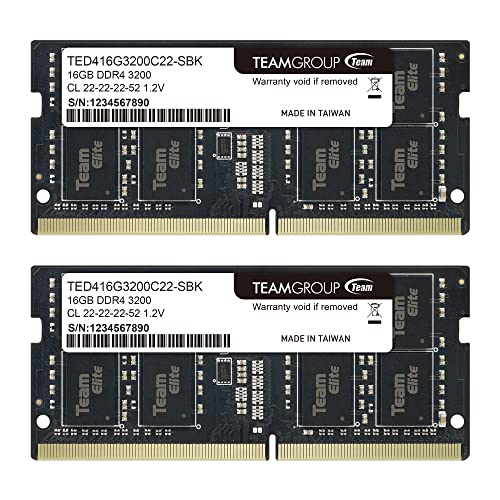
- Two 16GB 260-pin SO-DIMMs
- 3200MHz DDR4 at 1.2V
- May operate at 2933MHz or 2666MHz
Best For: Compatible laptops and notebooks
Fast DDR5 Upgrade

- DDR5-6000 speed with CL30 timings
- Two 16GB desktop UDIMMs
- Intel XMP 3.0 and AMD EXPO support
Best For: High-performance DDR5 desktops
Balanced DDR5 Kit

- DDR5-6000 with CL36 timings
- Dual AMD EXPO and Intel XMP 3.0 profiles
- JEDEC default profile included
Best For: Supported DDR5 desktops and gaming PCs
Best Laptop DDR5 Upgrade
Crucial 32GB DDR5-5600 SODIMM Kit

- 32GB capacity in a matched 2x16GB kit
- Up to 5600MHz with downclocking support
- Intel XMP 3.0 and AMD EXPO compatible
Best For: Compatible DDR5 laptops using newer Intel or AMD processors
Best Value Desktop DDR4 Kit
G.SKILL RipjawsV 32GB DDR4-3200

- 32GB matched 2x16GB desktop kit
- Up to 3200MT/s with Intel XMP
- CL16-18-18-38 timing specification
Best For: DDR4 desktop PCs and gaming systems
Best Low-Profile DDR4 Pick – Corsair Vengeance LPX 32GB
For shoppers comparing 32gb computer memory kits for a DDR4 desktop, the CORSAIR Vengeance LPX combines a 3200MHz rated speed with CL16 latency and a compact 34mm profile. Its compatibility focus and aluminum heatspreader make it a practical option for many Intel and AMD DDR4 builds.
Best For: DDR4 desktop upgrades and compact builds that need a low-profile 32GB kit.
Pros:
- 32GB capacity in a 2 x 16GB configuration
- 3200MHz speed with CL16 latency
- Low-profile 34mm design fits many small-form-factor builds
- Aluminum heatspreaders help dissipate heat
Cons:
- Maximum rated speed requires overclocking or BIOS adjustments
- Actual performance depends on the motherboard, CPU, and other system components
This is a well-rounded DDR4 choice when physical clearance and broad platform compatibility matter. Confirm your system supports the kit’s speed and capacity before purchase.
Best Legacy Desktop Upgrade – Gigastone DDR3 32GB Kit
This Gigastone kit is one of the more specialized 32gb computer memory kits, using four 8GB DDR3 or DDR3L UDIMMs for compatible desktop PCs. Its 1600MHz rating, dual-voltage support, and non-ECC design suit older systems that still use 240-pin memory.
Best For: Compatible legacy desktop computers requiring DDR3 or DDR3L UDIMM memory.
Pros:
- 32GB total capacity across four 8GB modules
- Supports DDR3 1600MHz and PC3-12800 specifications
- Dual-voltage 1.35V/1.5V operation
- Unbuffered, non-ECC 240-pin design
Cons:
- Designed for older DDR3 desktop platforms rather than current systems
- Requires four available compatible memory slots
- 1600MHz speed is lower than newer DDR4 and DDR5 kits
For an older desktop with the right motherboard and slot layout, this kit offers a straightforward capacity upgrade. Check the system’s supported memory type, voltage, and maximum capacity first.
Best RGB DDR5 Performance Kit – Corsair Vengeance RGB 32GB
For newer desktop platforms, this CORSAIR kit stands out among 32gb computer memory kits with DDR5-6000 speed, CL30 timings, and dynamic ten-zone RGB lighting. It supports AMD EXPO and Intel XMP, while onboard voltage regulation is designed to support more finely tuned overclocking.
Best For: DDR5 desktop builds seeking high rated memory speed, tight timings, and customizable RGB lighting.
Pros:
- 32GB capacity in a 2 x 16GB kit
- 6000MHz rated speed with CL30 latency
- AMD EXPO and Intel XMP compatibility
- Ten-zone RGB lighting and onboard voltage regulation
Cons:
- Maximum speed requires overclocking or BIOS adjustments
- Compatibility and performance depend on the motherboard and CPU
- Requires a DDR5-compatible desktop platform
This is a feature-rich choice for a modern DDR5 system where both memory tuning and visual customization are priorities. Verify DDR5 support and the board’s supported memory configuration before installing it.
Best Laptop Upgrade – TEAMGROUP Elite DDR4 32GB
Notebook owners looking at 32gb computer memory kits should consider this TEAMGROUP Elite kit, which includes two 16GB DDR4 SO-DIMMs for compatible laptops. It is rated at 3200MHz and can operate at lower supported speeds such as 2933MHz or 2666MHz.
Best For: Compatible laptops and notebooks that use 260-pin DDR4 SO-DIMM memory.
Pros:
- 32GB capacity in a 2 x 16GB laptop configuration
- 3200MHz DDR4 rating with 1.2V operation
- Unbuffered, non-ECC SO-DIMM design
- Lifetime warranty and free technical support are listed
Cons:
- Actual speed may be reduced to 2933MHz or 2666MHz by the host system
- Not compatible with desktop DIMM slots
- Compatibility depends on the laptop, CPU, BIOS, and supported configuration
This kit is a practical way to expand a compatible notebook to 32GB without using desktop-sized modules. Confirm the laptop’s SO-DIMM type, maximum capacity, and supported speed before ordering.
Fast DDR5 Upgrade – Patriot Viper Venom 32GB
For shoppers comparing 32gb computer memory kits for a high-performance desktop, the Patriot Viper Venom combines a 32GB capacity with DDR5-6000 speed and CL30 timings. It supports both Intel XMP 3.0 and AMD EXPO, making it a flexible option when the motherboard and processor support the relevant profile.
Best For: Desktop users seeking a fast 32GB DDR5 kit with Intel and AMD memory-profile support.
Pros:
- 32GB configuration uses two 16GB modules.
- DDR5-6000 speed with tested 30-40-40-76 timings.
- Supports Intel XMP 3.0 and AMD EXPO overclocking.
- Includes a limited lifetime warranty.
Cons:
- Designed for desktop DIMM slots, not laptops.
- Reaching the rated overclocked profile depends on compatible system hardware.
This kit is a strong fit for a current DDR5 desktop where performance-focused settings and broad platform support matter. Verify motherboard compatibility before purchase.
Laptop Memory Pick – GIGASTONE DDR4 32GB Kit
Among 32gb computer memory kits for portable systems, this GIGASTONE option is built specifically for laptops, notebooks, and compatible all-in-one computers. The two 16GB DDR4 SODIMMs run at 3200MHz and use a 1.2V, non-ECC design.
Best For: Compatible laptops, notebooks, and all-in-one computers needing a 32GB DDR4 SODIMM upgrade.
Pros:
- 32GB kit includes two 16GB laptop memory modules.
- DDR4-3200 specification is also listed with 2933MHz and 2666MHz compatibility.
- 260-pin unbuffered SODIMM design uses 1.2V.
- Backed by a five-year warranty.
Cons:
- Compatible with DDR4 systems only, not DDR5 platforms.
- Designed for laptops and similar systems rather than standard desktop DIMM slots.
This is a practical capacity upgrade for a compatible DDR4 notebook or all-in-one. Confirm the system’s supported memory type, speed, and SODIMM requirements before installing.
Balanced DDR5 Kit – G.SKILL Flare X5 32GB
For desktop builders reviewing 32gb computer memory kits, the G.SKILL Flare X5 offers DDR5-6000 performance in a matched two-module configuration. It includes both AMD EXPO and Intel XMP 3.0 profiles, while also providing a JEDEC default profile for compatible systems running at standard BIOS settings.
Best For: Desktop and gaming systems using supported DDR5 platforms and needing dual Intel/AMD profile support.
Pros:
- 32GB capacity comes as two matched 16GB modules.
- DDR5-6000 speed with CL36-36-36-96 timings.
- Supports AMD EXPO and Intel XMP 3.0 profiles.
- Includes a JEDEC default profile and limited lifetime manufacturer warranty.
Cons:
- Rated speed requires compatible hardware and may require BIOS adjustments.
- G.SKILL advises against mixing memory kits.
- Motherboard and CPU compatibility should be checked using the manufacturer’s QVL or configurator.
This kit offers flexible profile support for a range of current DDR5 desktop platforms. Its rated speed is not guaranteed across every system, so confirm the platform and memory configuration before buying.
Best Laptop DDR5 Upgrade – Crucial 32GB DDR5-5600 SODIMM Kit
For shoppers comparing 32gb computer memory kits for a compatible laptop, this Crucial kit combines 32GB capacity with DDR5 speeds up to 5600MHz. Its 2x16GB SODIMM design supports smoother multitasking and can downclock to 5200MHz or 4800MHz when required by the system.
Best For: Laptop owners with compatible 12th Gen Intel Core or AMD Ryzen 7000 systems seeking a 32GB DDR5 upgrade.
Pros:
- 32GB kit includes two 16GB DDR5 SODIMMs.
- Supports 5600MHz, 5200MHz, or 4800MHz operation.
- Supports Intel XMP 3.0 and AMD EXPO.
- Backed by a limited lifetime warranty and Micron testing.
Cons:
- Designed for laptops, not desktop computers.
- Compatibility is most specifically suited to newer Intel and AMD platforms.
This is a practical high-capacity choice when your laptop supports DDR5 SODIMM memory. Confirm the system’s memory type and supported speed before buying.
Best Value Desktop DDR4 Kit – G.SKILL RipjawsV 32GB DDR4-3200
This G.SKILL RipjawsV kit is a straightforward option among 32gb computer memory kits for desktop PCs. It provides 32GB through two matched 16GB DDR4 UDIMMs, with speeds up to 3200MT/s and a CL16-18-18-38 specification when supported by the system.
Best For: Desktop PC and gaming builds with compatible DDR4 motherboards and Intel XMP support.
Pros:
- Matched 2x16GB kit provides 32GB of capacity.
- Supports DDR4 speeds up to 3200MT/s.
- Includes a JEDEC default profile and Intel XMP profile.
- Covered by a limited lifetime manufacturer warranty.
Cons:
- Requires a desktop motherboard with DDR4 UDIMM support.
- Maximum rated speed may require BIOS adjustments or overclocking.
- G.SKILL advises against mixing memory kits.
For a compatible desktop, this kit balances substantial capacity with a familiar DDR4-3200 performance target. Check the motherboard QVL or RAM configurator and avoid combining it with another kit.
Best RGB Desktop Kit – CORSAIR Vengeance RGB PRO 32GB
For desktop builders who want visual customization alongside 32GB capacity, this CORSAIR kit is one of the more feature-focused 32gb computer memory kits. It uses two 16GB DDR4 DIMMs rated at 3200MHz and adds 10 RGB LEDs per module controlled through CORSAIR iCUE.
Best For: RGB-equipped Intel or AMD DDR4 desktop builds that support compatible motherboards and CORSAIR iCUE lighting control.
Pros:
- 32GB capacity in a 2x16GB DDR4 configuration.
- Dynamic multi-zone RGB lighting with 10 LEDs per module.
- Lighting can synchronize with other CORSAIR RGB products through iCUE.
- Custom PCB and screened ICs support performance and overclocking potential.
Cons:
- Desktop DIMM design is not suitable for laptops.
- RGB features require compatible software and hardware for full control.
- Compatibility is specified for selected Intel Z390 and AMD 400-, 500-, or X570-series platforms.
This kit makes sense when coordinated lighting is part of the build as well as 32GB of DDR4 memory. Verify motherboard compatibility and available clearance before installation.
How We Picked These 32gb Computer Memory Kits
We selected kits that cover the most common upgrade paths: older DDR3 desktops, DDR4 gaming PCs, DDR4 laptops, and current DDR5 desktop and notebook platforms. We prioritized dual-channel 2x16GB configurations where available because they offer a practical balance of capacity and bandwidth. We also considered rated speed, CAS latency, voltage, module type, overclocking profiles, heat spreaders, RGB features, and compatibility claims.
Memory specifications are only useful when they fit the motherboard or laptop. Before buying, confirm the supported DDR generation, module format, maximum capacity, and official speed limits for your system.
Quick Comparison
- Best for current gaming desktops: DDR5-6000 kits with AMD EXPO or Intel XMP support.
- Best for mainstream DDR4 desktops: 3200MHz 2x16GB kits, especially models with CL16 timings.
- Best for laptops: 260-pin DDR4 or DDR5 SODIMM kits matched to your notebook’s generation.
- Best for older systems: DDR3 kits, provided the motherboard supports the required voltage and capacity.
- Best for appearance-focused builds: RGB desktop kits, assuming your case and motherboard support the desired lighting controls.
Key Buying Factors for 32gb Computer Memory Kits
DDR Generation and Form Factor
DDR3, DDR4, and DDR5 are not interchangeable. Desktop systems use 288-pin UDIMMs for DDR4 and DDR5, while laptops generally use shorter 260-pin or 262-pin SODIMMs. Check the existing module or motherboard manual rather than relying only on the processor model.
Speed, Latency, and Profiles
Higher data rates can improve performance, but timings matter too. For example, DDR4-3200 CL16 is generally more responsive than a similarly rated CL22 kit. DDR5-6000 is a popular performance target for newer gaming desktops. XMP and EXPO profiles simplify configuration, but the motherboard and CPU must support them; otherwise, the kit may run at a lower default speed.
Capacity and Channel Configuration
A 2x16GB kit enables dual-channel operation on compatible desktop and laptop platforms. Confirm that two slots are available and that the system supports 32GB total. Older machines may support less memory or require specific module ranks and densities.
Clearance, Voltage, and Stability
Tall heat spreaders and RGB modules can interfere with large CPU coolers. Laptop buyers should verify voltage and maximum supported speed, while desktop buyers should update firmware if a newer DDR5 kit is not recognized correctly. Stability is more important than a small benchmark gain, especially for workstations and long gaming sessions.
Who Should Buy Which 32gb Computer Memory Kits?
Choose DDR5-6000 desktop memory for a new gaming or performance PC built around a compatible modern platform. Choose DDR4-3200 for upgrading an established DDR4 desktop without replacing the motherboard and processor. Choose a DDR4 SODIMM kit for compatible laptops that need more multitasking headroom. Choose DDR5 SODIMM for newer notebooks designed for DDR5. Choose DDR3 only when maintaining an older computer; it is not a suitable upgrade for DDR4 or DDR5 systems. For a clean, coordinated build, RGB models add visual appeal, while non-RGB kits are usually the simpler and more economical choice.