The right mixer can make a podcast studio easier to operate, more flexible for guests, and better prepared for recording, streaming, and remote production.
We compared 10 popular options across input capacity, USB connectivity, monitoring, effects, phantom power, and workflow to help you choose the best fit.
Best 10 Audio Mixer for Podcast Studio Picks for 2026
Best All-in-One Studio

- Four mic inputs and four headphone outputs
- 14-track SD-card recording
- Customizable sound pads and touchscreen control
Best For: Multi-person podcasts and integrated production workflows
Best Premium Compact Option

- Two high-gain combo inputs
- Four faders, touchscreen, and SMART pads
- Built-in APHEX studio effects
Best For: Compact podcast setups with hands-on broadcast controls
Best Traditional Mixer

- 10-input layout for flexible source connection
- USB, SPX effects, EQ, and high-pass filters
- Rugged metal chassis
Best For: Studios wanting conventional hands-on mixing
Best Portable Creator Bundle

- Two XLR combo inputs with 60dB gain
- Eight customizable effects and loopback
- Built-in battery rated for up to eight hours
Best For: Mobile podcasters and beginner streamers
Reliable Analog Control

- Eight channels with two mic/line inputs
- Phantom power and three-band EQ
- Compact, low-noise analog design
Best For: Hands-on podcast mixing with extra line-input flexibility
Feature-Packed Digital Streaming

- 99 DSP effects with three-band EQ
- 48V phantom power and two XLR inputs
- USB recording plus Bluetooth 5.0
Best For: Home podcasting and streaming with built-in digital features
Compact Broadcast-Ready Preamps

- Two Onyx mic preamps with phantom power
- Four line inputs in a desktop format
- 1/4-inch and RCA main outputs
Best For: Small podcast and broadcast setups prioritizing clean preamps
Versatile 12-Channel Pick
12-Channel Bluetooth USB Audio Mixer
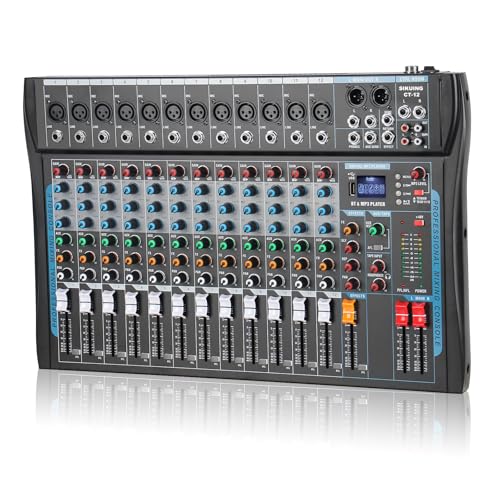
- 12 mic inputs with XLR and balanced line connections
- USB, Bluetooth, headphone monitoring, and +48V phantom power
- 3-band EQ plus 16 DSP effects and sealed controls
Best For: Flexible podcast, streaming, interview, and karaoke studios
Studio-Friendly Streaming Pick

- Balanced XLR inputs, insert points, and +48V phantom power
- Bluetooth, USB recording, and MP3 or USB playback
- 3-band EQ in a slim, dust-resistant chassis
Best For: Podcast studios mixing microphones with mobile and computer audio
Compact 8-Channel Value

- Eight XLR and 1/4-inch microphone inputs
- USB, Bluetooth, flash-drive recording, and headphone monitoring
- 3-band EQ, reverb, delay, PFL, and independent channel controls
Best For: Small podcast studios and streaming setups with up to eight inputs
Best All-in-One Studio – TASCAM Mixcast 4
The TASCAM Mixcast 4 is a versatile audio mixer for podcast studio setups that need multiple microphones, headphone monitoring, sound pads, and recording in one unit. Its touchscreen workflow, four mic inputs, and direct SD-card recording make it suited to podcasts, livestreams, events, and voice-over work.
Best For: Multi-person podcasts and creators who want integrated recording, effects, and touchscreen control.
Pros:
- Four XLR/TRS microphone inputs and four individual headphone outputs
- Records up to 14 tracks directly to an SD card
- Eight banks of customizable sound pads for music, jingles, and effects
- Includes Tascam Podcast Editor for editing and sound-pad configuration
Cons:
- Larger and heavier than the compact alternatives in this roundup
- Its broad feature set may be more than a simple two-person setup requires
Choose the Mixcast 4 if you want a complete production hub rather than a basic mixer. Bluetooth, aux, USB, and SD recording give it considerable flexibility for a dedicated podcast studio.
Best Premium Compact Option – RØDECaster Duo
The RØDECaster Duo is a compact audio mixer for podcast studio use when you want broadcast-oriented processing without a large footprint. It combines two Neutrik combo inputs, high-gain Revolution Preamps, faders, SMART pads, a touchscreen, and APHEX effects in one production console.
Best For: Solo creators or small podcast teams seeking a compact studio with polished processing and hands-on controls.
Pros:
- Two combo inputs with up to 76dB of gain for microphones and instruments
- Four broadcast-quality faders and a touchscreen with haptic feedback
- APHEX processing includes Aural Exciter and Big Bottom effects
- Supports headset monitoring and recording through its 3.5mm TRRS input
Cons:
- Only two microphone/instrument combo inputs are provided
- Has fewer SMART pads than the TASCAM Mixcast 4’s sound-pad system
The RØDECaster Duo is a strong fit when size, tactile mixing, and built-in vocal processing matter most. Its two-input design is focused, so larger interview teams may need a different mixer.
Best Traditional Mixer – Yamaha MG10XU
The Yamaha MG10XU is a traditional 10-input audio mixer for podcast studio setups that need flexible channel capacity and familiar physical controls. USB connectivity, SPX digital effects, three-band EQ, high-pass filters, and one-knob compressors support detailed control over microphones and other sources.
Best For: Studio users who prefer a conventional mixer with multiple inputs and hands-on signal shaping.
Pros:
- Offers 10 inputs for microphones and other audio sources
- Includes USB connectivity and SPX digital effects
- Three-band EQ and high-pass filters help shape and clean up audio
- Rugged powder-coated metal chassis is designed for durability
Cons:
- Does not include podcast-specific sound pads or touchscreen controls
- Its conventional mixer layout may require more manual setup than an all-in-one podcast console
The MG10XU makes sense for buyers who value channel flexibility and classic mixer controls over automated podcast features. It is especially appealing for a studio that also handles instruments or broader audio-production tasks.
Best Portable Creator Bundle – MAONO E2 Gen2
The MAONO E2 Gen2 is a portable audio mixer for podcast studio and mobile creator setups, combining two XLR combo inputs, USB-C and 3.5mm connectivity, sound-effect buttons, and a built-in battery. Its loopback function and phone, computer, and tablet compatibility make it practical for podcasting and streaming.
Best For: Beginners, co-hosts, and mobile creators who want a ready-to-use interface with battery power and built-in effects.
Pros:
- Two low-noise XLR combo inputs with up to 60dB of gain
- Eight customizable sound-effect buttons with adjustable volume
- Built-in 1500mA battery provides up to eight hours of use
- Includes loopback, Bluetooth, phone connectivity, and one-touch mute
Cons:
- Provides two microphone inputs, fewer than the TASCAM Mixcast 4
- Its compact feature set is less suited to larger multi-guest productions
The E2 Gen2 is a practical choice when portability and simple connectivity are priorities. The battery, loopback function, and customizable effects give mobile podcasters useful tools without requiring a larger desktop console.
Reliable Analog Control – Mackie Mix8
The Mackie Mix8 is a practical audio mixer for podcast studio setups that need straightforward analog control, two microphone inputs, and room to connect additional stereo sources. Its compact design and low-noise, high-headroom performance suit simple recording or broadcast workflows.
Best For: Podcasters who want a dependable, compact mixer with hands-on controls and flexible line inputs.
Pros:
- Eight-channel layout with two mic/line inputs and two stereo 1/4-inch line inputs.
- Phantom power supports studio condenser microphones.
- Three-band EQ is available on all channels for practical tone shaping.
- One aux send with stereo 1/4-inch returns adds monitoring or effects flexibility.
Cons:
- Wired, corded-electric design does not provide Bluetooth or USB connectivity.
- Only two inputs are intended for microphones.
The Mix8 is a strong choice when tactile mixing and dependable analog routing matter more than built-in digital features. It offers useful expansion for a compact podcast studio without adding unnecessary complexity.
Feature-Packed Digital Streaming – 4 Channel Podcast Audio Mixer
This compact audio mixer for podcast studio use combines microphone inputs, onboard processing, USB recording, and Bluetooth streaming. It is designed for creators who want convenient digital features alongside basic channel-level control.
Best For: Home podcasters and streamers who want built-in effects, wireless playback, and computer or mobile connectivity.
Pros:
- Two XLR microphone inputs plus stereo line inputs support several source types.
- 48V phantom power supports condenser microphones.
- Includes 99 DSP effects, along with three-band EQ on each channel.
- USB recording, OTG support, and Bluetooth 5.0 enable flexible streaming workflows.
Cons:
- Four-channel capacity is more limited than larger studio mixers.
- Bluetooth streaming range is specified at up to 15 feet.
- The many onboard features may be more than needed for a strictly analog setup.
Choose this mixer if recording convenience and built-in sound-enhancement options are priorities. Its PAD and 80Hz high-pass filter are also useful when managing louder sources or reducing low-frequency rumble.
Compact Broadcast-Ready Preamps – Mackie 402VLZ4
The Mackie 402VLZ4 is a compact audio mixer for podcast studio, broadcast, and small recording setups. Its two Onyx mic preamps provide high headroom and low-noise operation, while the four-channel format keeps the desktop footprint focused.
Best For: Podcasters and broadcasters who need quality microphone preamps in a simple four-channel desktop mixer.
Pros:
- Two Onyx mic preamps include phantom power for compatible condenser microphones.
- Four line inputs expand connection options beyond the microphone channels.
- Main outputs are available on both 1/4-inch and RCA connections.
- External power adapter keeps the mixer light at 2.5 pounds.
Cons:
- Four-channel capacity limits larger or more complex studio setups.
- It uses an external power adapter rather than a built-in power-cord socket.
- The supplied specifications identify a 20 Hz frequency figure, without a complete frequency range.
The 402VLZ4 is a focused option for a small studio that values Mackie’s Onyx preamps and straightforward routing. It is especially appropriate when two microphone inputs and dependable line connectivity are enough for the workflow.
Versatile 12-Channel Pick – 12-Channel Bluetooth USB Audio Mixer
For a podcast studio that also handles streaming, interviews, karaoke, or live audio, this audio mixer for podcast studio setups offers 12 channels, USB and Bluetooth connectivity, headphone monitoring, and onboard effects. Its +48V phantom power also supports condenser microphones.
Best For: Podcast studios needing flexible inputs, wireless playback, and support for multiple microphone types.
Pros:
- Provides 12 mic inputs with XLR and balanced line connections.
- Includes USB, Bluetooth, headphone monitoring, and +48V phantom power.
- Offers independent gain and volume controls, 3-band EQ, LED indicators, and 16 DSP effects.
- Compact chassis with sealed rotary controls and a listed one-year warranty.
Cons:
- The supplied notes do not specify detailed recording software compatibility.
- Its broad DJ and karaoke feature set may be more than a simple podcast setup requires.
This is a strong all-purpose choice when your studio needs room for several microphones and varied audio sources. Choose it over a smaller board if Bluetooth playback, effects, and future expansion are priorities.
Studio-Friendly Streaming Pick – XTUGA CT120 12-Channel Mixer
The XTUGA CT120 is a practical audio mixer for podcast studio workflows that combine microphones, mobile devices, and computer audio. It supports 12 channels, balanced XLR inputs, +48V phantom power, Bluetooth, USB recording, and direct MP3 or USB playback.
Best For: Podcast and streaming users who want multi-device playback, recording, and a slim mixer design.
Pros:
- Supports up to 12 input channels with balanced XLR ports and insert points.
- Works with iOS, Android, tablets, MP3 players, computers, and Bluetooth devices.
- Includes +48V phantom power, 3-band EQ, USB audio recording, and a built-in MP3 player/recorder.
- Its 1.4-inch-thick chassis uses sealed rotary knobs and includes a one-year warranty.
Cons:
- The supplied dimensions are listed as 1.4 inches for depth, width, and height, so buyers should verify sizing before purchase.
- The notes do not identify specific built-in effects beyond the listed digital effect feature.
The CT120 stands out for studios that regularly move audio between phones, computers, USB storage, and microphones. Its recording and playback functions make it especially useful for podcast production and live streaming.
Compact 8-Channel Value – 8-Channel USB Bluetooth Mixer
For smaller podcast rooms, this 8-channel audio mixer for podcast studio use provides a manageable number of inputs without giving up USB, Bluetooth, effects, or headphone monitoring. It also supports recording to a USB flash drive and includes independent channel controls.
Best For: Small podcast studios, streamers, and creators who need several microphone inputs with straightforward mixing controls.
Pros:
- Offers eight mic inputs with XLR and unbalanced 1/4-inch connections.
- Includes USB, Bluetooth, computer, mobile-device, flash-drive, REC, and TAPE connectivity.
- Provides 3-band EQ, gain, reverb, delay, channel faders, PFL monitoring, and peak indicators.
- Has a headphone output, ultra-thin chassis, sealed controls, and a listed one-year warranty.
Cons:
- It has fewer channels than the two 12-channel alternatives.
- The supplied notes do not specify the exact number of available effects or recording formats.
This mixer is a sensible fit when eight inputs cover your current microphones and sources. Its USB flash-drive recording, Bluetooth playback, and monitoring controls give a smaller studio useful flexibility without requiring a larger console.
How We Picked the Best Audio Mixer for Podcast Studio Use
We focused on the features that matter during real podcast sessions: microphone preamp quality, the number and type of inputs, headphone monitoring, USB recording, routing flexibility, and ease of use. We also considered whether each mixer is better suited to a solo creator, a multi-person show, live streaming, or a broader home-studio setup.
Models with built-in recording, sound effects, touchscreen controls, or dedicated podcast workflows received attention for convenience. Traditional analog mixers were evaluated for their straightforward controls, durability, and value rather than judged by features they are not designed to provide.
Quick Comparison
| Best For | Look For | Recommended Type |
|---|---|---|
| Solo or two-person podcasts | Two or four mic inputs, USB, headphone monitoring | Compact podcast mixer or audio interface |
| Guest-heavy shows | Four or more mic inputs and flexible routing | Digital podcast production mixer |
| Live streaming | Sound pads, loopback, easy USB or Bluetooth integration | Streaming-focused mixer |
| Music and podcast production | More channels, effects, and line inputs | Analog or hybrid studio mixer |
| Budget setups | Essential preamps, phantom power, and USB output | Basic compact mixer |
Key Buying Factors for an Audio Mixer for Podcast Studio
Microphone Inputs and Phantom Power
Count how many people may speak at once, then leave room for occasional guests. XLR inputs are important for dynamic and condenser microphones, while 48V phantom power is required by many condenser models. Check whether phantom power is global or individually switchable.
USB Recording and Computer Compatibility
A USB audio interface lets you record directly into podcast software. Confirm whether the mixer sends a stereo mix or separate channels to the computer. Multitrack recording provides more editing control, while a stereo feed is simpler for live production.
Monitoring and Routing
Look for enough headphone outputs or plan to use a headphone amplifier. Independent headphone volume, mute controls, mix-minus support, and reliable monitoring can prevent echo and make remote interviews easier to manage.
Effects, Pads, and Built-In Recording
DSP effects and programmable sound pads are useful for live shows, but they are not essential for clean spoken-word recording. Built-in recording and touchscreen controls can reduce dependence on a computer, although they may increase cost and complexity.
Size, Controls, and Expansion
Compact models suit small desks and mobile setups. Larger mixers provide more channels and hands-on control but require more space and cabling. Consider future microphones, instruments, phone connections, and streaming sources before choosing the smallest option.
Who Should Buy Which Audio Mixer for Podcast Studio?
Choose a Podcast Production Mixer for a Ready-To-Run Studio
Choose a dedicated digital podcast mixer if you want integrated recording, sound pads, effects, guest-friendly routing, and minimal software setup. These models are especially useful for live podcasts and creators who want physical controls.
Choose a Compact Interface or Mixer for Simple Shows
A two- to four-input unit is usually enough for solo hosts and small two-person productions. It can provide the core microphone, USB, and headphone features without taking over your workspace.
Choose a Traditional Analog Mixer for Flexible Audio Sources
An analog mixer makes sense when you need several microphones, instruments, playback devices, or external effects. It offers familiar hands-on mixing, but verify the USB implementation if computer recording is a priority.
Choose a Larger Console for Growth
Multi-channel models are worthwhile for guest-heavy podcasts, live events, music projects, and studios that may expand. Avoid paying for unused channels if your setup will remain a simple voice-recording station.