If your headset runs hot or the lenses fog up mid-session, a good face cover with active airflow can make Meta Quest 2 playtime much more comfortable.
This roundup focuses on the best cooling fan face cover options for cleaner ventilation, less sweat buildup, and a better fit for longer VR sessions.
Best 10 Meta Quest 2 Cooling Fan Face Cover Picks for 2026
RCstyle Quiet Fan
Soft Lycra Face Cover With 2-Speed Cooling

- Two fan speeds for basic airflow control
- Lightweight 59.7g design for Quest 2
- Lycra surface is breathable and easy to clean
Best For: Lightweight anti-fog comfort with simple controls
Alcopanda A2 Pro
3-Speed Face Interface With Emergency Charging

- 3-speed fan for different gaming needs
- Dual 800mAh batteries with 3-8 hour runtime
- Includes light-proof nose pad and extra pads
Best For: Active players wanting cooling plus backup power
DESTEK Wraparound Vent
Anti-Fog Cooling Fan Face Cover

- Wraparound airflow design boosts air inlets
- Bottom matrix openings support more air volume
- Focuses on fog reduction during intense play
Best For: Straightforward anti-fog cooling for hard gaming
Sonicgrace Dual Fan

- Dual fans target both lenses for ventilation
- 5 speed modes include gentle to fast defogging
- 1100mAh battery rated for about 5 hours
Best For: Users who want maximum airflow control and comfort
Active Defogging Pick

- Built-in defogging fan with 2 modes
- Leather pad with easy-clean Velcro design
- Keeps room for glasses without reducing FOV
Best For: Quest 2 users who want fog control and glasses clearance
High-Flow Comfort Choice
Sonicgrace Cooling Fan Face Pad
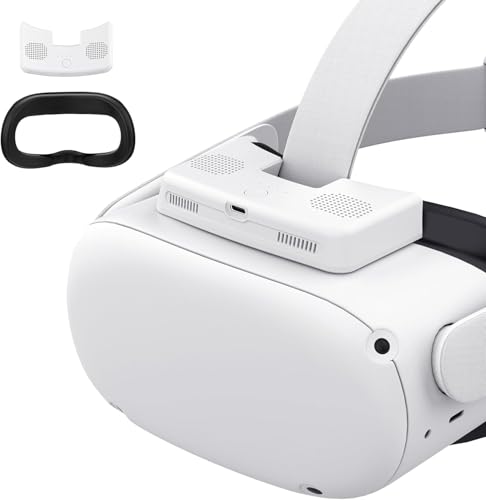
- Dual fans with top-to-bottom airflow
- 5 speed modes for different use cases
- Thick PU pad plus USB-C charging
Best For: Quest 2 owners who want adjustable cooling and comfort
Lightweight Fitness Pick

- Mini turbo fan with extra airflow vents
- Lightweight 44.8 g assembled design
- 3 speed modes for gaming or workouts
Best For: Workout-heavy Quest 2 sessions that need lightweight cooling
Editor’s Pick
Hibloks Cooling Fan Face Cover for Quest 2

- Two fan speeds for anti-fog cooling
- Silicone leather pad is easy to clean
- Lightweight design at 59.7g
Best For: Quest 2 players who want a simple anti-fog face cover with cooling fan
Most Comfortable

- Dual fans with two adjustable speeds
- Memory foam and PU leather pad
- Includes two sizes of nose pieces
Best For: Active Quest 2 users who want softer cushioning and stronger airflow
Best for Quest 3S
HiBloks Dual-Speed Cooling Interface
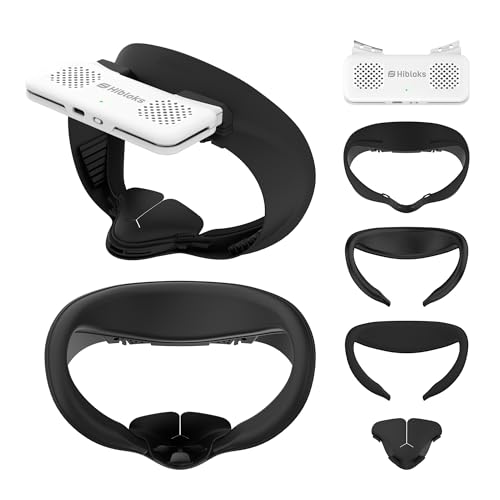
- Built for Meta Quest 3S only
- Two pad styles included
- Two-speed fan with quick install
Best For: Quest 3S players wanting a cooling face interface with swappable pads
RCstyle Quiet Fan – Soft Lycra Face Cover With 2-Speed Cooling
If you want a meta quest 2 cooling fan face cover that helps fight fog and sweat during longer sessions, this RCstyle option is built around simple ventilation and a skin-friendly Lycra surface. It adds active airflow with two speed settings, while keeping the face interface lightweight and easy to install.
Best For: Players who want a lightweight anti-fog face cover with adjustable airflow and room for glasses.
Pros:
- Two wind speed modes for basic cooling control
- Designed to reduce lens fogging and sweat buildup
- Soft silicone-skin-friendly Lycra surface that is easy to clean
- Lightweight 59.7g design with simple top-hole installation
Cons:
- 700mAh battery is rated for about 3.5 hours
- Only two speed settings, so fine-tuning is limited
- Cooling claims are tied to the built-in fan rather than passive airflow alone
Overall, this is a practical pick if your priority is a comfortable Quest 2 face cover with fan-assisted defogging rather than a feature-heavy interface. It keeps the setup straightforward while still addressing the most common comfort issues in VR.
Alcopanda A2 Pro – 3-Speed Face Interface With Emergency Charging
This meta quest 2 cooling fan face cover focuses on stronger airflow control, with a 3-speed fan, dual 800mAh batteries, and a face interface designed for active play. It is aimed at users who want help with fog, sweat, and longer sessions without a lot of setup hassle.
Best For: Active Quest 2 users who want a feature-packed cooling face cover with multiple speeds and backup charging.
Pros:
- 3 fan speeds for different game and comfort needs
- Dual 800mAh batteries can last 3-8 hours depending on use
- Includes a light-proof nose pad to help block stray light and dust
- Comes with PU foam and ice cotton pads for replacement and cleaning
Cons:
- Battery life varies a lot by speed setting
- More components may mean a slightly bulkier kit than a basic face cover
- The battery adds complexity compared with non-powered interfaces
In practice, this is one of the more versatile Quest 2 cooling options because it combines adjustable airflow with spare padding and emergency charging support. If you play hard and want extra flexibility, it is a strong all-in-one style pick.
DESTEK Wraparound Vent – Anti-Fog Cooling Fan Face Cover
If your main goal is keeping the Quest 2 lens clear during intense sessions, this meta quest 2 cooling fan face cover emphasizes wraparound airflow and anti-fog performance. The design uses peripheral openings and bottom matrix vents to increase air intake and support cooler, drier gameplay.
Best For: Users who want a straightforward anti-fog cooling face cover for intense Quest 2 gaming.
Pros:
- Peripheral wraparound design increases air inlets
- Bottom matrix openings help move more air to the fan
- Built to reduce sweat and fog during heavier gameplay
- Simple, focused cooling design without extra add-ons
Cons:
- Supplied notes provide fewer feature details than some rivals
- No battery, speed, or pad specifics are listed in the notes
- Best suited to cooling performance rather than premium comfort extras
This is a good choice if you value the core job of a cooling face cover more than accessory-heavy bundles. Its selling point is concentrated on airflow and lens clarity during demanding VR sessions.
Sonicgrace Dual Fan – 5-Speed PU Leather Face Pad
For buyers comparing a meta quest 2 cooling fan face cover with more granular control, this Sonicgrace model stands out with 5 speed modes and dual fans. It is designed to push air across both lenses, improve ventilation efficiency, and keep comfort in mind with a thick PU leather face pad.
Best For: Quest 2 users who want adjustable cooling, stronger fog control, and a comfort-focused face pad.
Pros:
- Dual fans are positioned to support better lens ventilation
- Five speed modes cover everything from gentle airflow to fast defogging
- 1100mAh battery is rated for about 5 hours of use
- Includes a thick PU leather pad, ergonomic nose pad, and memory mode
Cons:
- More speed options may be more than casual users need
- Runtime still depends on the selected mode
- Comfort and airflow features make it more complex than a basic replacement pad
As a whole, this is the most configurable option in the group and a strong fit if you like tuning airflow for different activities. It balances active ventilation with comfort upgrades and a fairly long battery rating.
Active Defogging Pick – KKCOBVR K2 Fan Face Cover
If you want a meta quest 2 cooling fan face cover that focuses on fog control and comfort, the KKCOBVR K2 is built around a built-in defogging fan and a PU leather facial interface. It offers two fan modes, including a continuous setting for active play and an interval mode for movies or chat, while also keeping space for glasses without cutting into the field of view.
Best For: Players who want simple defogging support, glasses clearance, and a leather-style face pad for Meta Quest 2 sessions.
Pros:
- Built-in defogging fan with 2 modes for active play or lighter use.
- Leather face pad is designed not to block the Quest 2 sensor and is easy to remove and clean.
- Ergonomic nose pad helps reduce light leakage.
- Reserves space for myopia glasses without reducing FOV.
Cons:
- Uses a Micro USB connector rather than USB-C.
- Only two fan modes, so airflow control is less granular than some competitors.
- Best suited to Quest 2 users rather than broader headset compatibility.
This is a practical choice if your top priority is keeping lenses clearer without giving up comfort or glasses room. The design is straightforward, and the focus on fit and fog reduction makes it a strong everyday upgrade.
High-Flow Comfort Choice – Sonicgrace Cooling Fan Face Pad
The Sonicgrace cooling fan face cover is aimed at Meta Quest 2 users who want stronger airflow and a softer face pad for longer sessions. It combines dual fans, active vents, and a thick PU leather cushion, with 5 speed modes so you can dial it down for media or ramp it up for intense gameplay.
Best For: Users who want adjustable cooling, dual-fan airflow, and a comfortable Quest 2 face pad for mixed use.
Pros:
- Dual fans and top-to-bottom airflow are designed to improve ventilation and reduce fogging.
- 5 speed modes cover movies, gaming, active play, and quick defogging.
- Thick PU leather face pad and ergonomic nose pad improve comfort and light leakage control.
- Snap-on installation and USB-C charging make setup and recharging simple.
Cons:
- Battery life is listed at about 5 hours, so marathon sessions may need recharging.
- Bulkier cooling hardware may be more involved than a standard face cover.
- Primarily designed for Meta/Oculus Quest 2, not universal VR use.
This option stands out for its more flexible airflow control and built-in cooling focus. If you want a meta quest 2 cooling fan face cover that can shift from casual viewing to active gaming, it offers a balanced set of features.
Lightweight Fitness Pick – NVNV VR Fan Face Cover
The NVNV VR Fan is a meta quest 2 cooling fan face cover built for active use, with a mini turbo fan, added top and bottom vents, and a lightweight assembled design. It also includes a replaceable thick cushion, anti-light nose pad, and three wind-speed settings for everything from movie watching to fitness and intense VR games.
Best For: Fitness, workout, and high-motion Quest 2 sessions where lighter weight and airflow matter most.
Pros:
- Mini turbo fan and extra vents are designed to improve airflow and reduce fogging.
- Lightweight 44.8 g assembled design helps avoid noticeable counterweight.
- 3 speed modes make it easy to match movies, normal games, or intense workouts.
- Thick replaceable cushion and PU leather surface add comfort and cleanup ease.
Cons:
- Only 3 speed modes, so control is simpler than 5-speed rivals.
- Listed field of view is 110 degrees, which is lower than some other Quest 2 accessories.
- Compatibility is focused on Oculus/Meta Quest 2 rather than broader headset support.
For active players, the lightweight build is the key advantage here. It aims to solve fogging and heat without adding much bulk, making it a smart pick for exercise-heavy VR use.
Editor’s Pick – Hibloks Cooling Fan Face Cover for Quest 2
If you want a meta quest 2 cooling fan face cover that focuses on fog reduction and all-day comfort, this Hibloks option is built around that use case. It combines an upgraded fan with a skin-friendly silicone leather face pad, aiming to keep the lens clearer while staying comfortable for longer sessions.
Best For: Quest 2 users who want a lighter, easy-to-clean cooling face cover with two fan speeds.
Pros:
- Two adjustable fan speeds help reduce lens fog and keep air moving.
- Silicone leather face pad is easy to clean and designed for long-term wear.
- Lightweight 59.7g design makes it less noticeable on the headset.
- Battery is rated for about 3.5 hours of use.
Cons:
- Noise is listed at 43 to 50.6 dB, so it is not silent.
- Battery life may be short for very long play sessions.
- Fit is specific to Oculus/Meta Quest 2, not newer headsets.
Overall, this is a practical Quest 2 cooling upgrade if your main priorities are clearer lenses, simple installation, and a face cover that is easier to maintain than standard foam.
Most Comfortable – HANTNOOL Dual-Fan Face Cover
This meta quest 2 cooling fan face cover is geared toward users who want stronger airflow and a softer facial interface. HANTNOOL uses dual built-in fans, memory foam, and PU leather to tackle lens fogging while adding comfort for workouts and longer VR sessions.
Best For: Quest 2 users who want a softer face cushion and dual-fan airflow for fitness or active play.
Pros:
- Dual fans and two speed settings are designed to improve defogging.
- Memory foam and PU leather add soft support and comfort.
- Includes two ergonomic nose pads to help block light around the nose.
- Clip-on installation and USB-C charging keep setup straightforward.
Cons:
- Battery life is listed at about 3 to 5 hours, depending on use.
- Bulk may be more noticeable than a simple passive face pad.
- Best suited to Meta Quest 2 users; headset is not included.
If comfort matters as much as cooling, this model stands out thanks to its memory-foam face pad and included nose pieces. It is a strong pick for active users who want a more complete facial interface upgrade.
Best for Quest 3S – HiBloks Dual-Speed Cooling Interface
For Quest 3S owners, this meta quest 2 cooling fan face cover style upgrade is not the right match because it is built specifically for the Meta Quest 3S. It does, however, follow the same idea: add active airflow, reduce lens fogging, and give you a more comfortable facial interface with interchangeable pads.
Best For: Meta Quest 3S users who want a cooling facial interface with both ice silk cotton and PU leather pads.
Pros:
- Two-speed fan includes a quieter natural-wind mode and a stronger cooling mode.
- Two face pad options: breathable ice silk cotton and PU leather.
- Thickened pads help reduce facial pressure during longer sessions.
- Quick swap design makes it easy to change pads and install.
Cons:
- Designed for Quest 3S, so it is not compatible with Quest 2.
- Charging and battery details are good, but still limited versus wired power.
- Best value depends on whether you will use both included pad styles.
This is a strong cooling interface for Quest 3S owners who want flexibility in pad material and fan speed. If you are shopping for Quest 2, you should skip this one and look at a dedicated Quest 2 model instead.
How We Picked These Meta Quest 2 Cooling Fan Face Cover Options
We looked for models that combine active airflow with a comfortable facial interface, practical material choices, and simple installation. Priority went to options that help reduce lens fogging, manage heat, and stay comfortable during longer games or workouts.
We also considered speed controls, pad materials, compatibility wording, and whether the design appears better suited for casual use, fitness play, or extended sessions. Since a Meta Quest 2 Cooling Fan Face Cover can vary a lot in fit and build, we focused on versatility and buyer-friendly design features.
Quick Comparison
In general, the main differences come down to airflow strength, noise level, pad material, and how much facial comfort you want versus maximum cooling. Dual-fan and multi-speed models usually offer more control, while simpler fan-face interfaces may be easier to set up and maintain.
Best for Comfort
Look for softer facial materials and a less rigid contact surface if you plan to wear the headset for long periods.
Best for Fog Control
Choose a model with active air circulation and adjustable fan settings if lens fog is your biggest problem.
Best for Active Play
If you sweat during rhythm, fitness, or action games, prioritize stronger ventilation and a secure seal.
Key Buying Factors for a Meta Quest 2 Cooling Fan Face Cover
Airflow and fan control: More airflow can help with heat and fog, but adjustable speeds are useful if you want to balance cooling and noise.
Comfort materials: PU leather, foam, and fabric-based covers each feel different. Softer surfaces may be better for sensitive skin, while wipe-clean materials are easier to maintain.
Fit and interface shape: A good face cover should sit securely without pressing too hard on the cheeks or nose. Poor fit can reduce comfort and block part of the airflow benefit.
Fog reduction: Cooling helps most when warm, humid air is moved away from the lens area. If fogging is your main issue, choose a design built specifically for anti-fogging circulation.
Cleaning and upkeep: Removable pads and easy-to-wipe surfaces matter, especially if multiple people share the headset or you use it for workouts.
Who Should Buy Which Meta Quest 2 Cooling Fan Face Cover?
Choose a softer, comfort-first model if you mostly play seated games or want the least face pressure.
Choose a stronger, multi-speed fan model if you often deal with fog, sweat, or hotter play environments.
Choose a simpler replacement-style face cover if you mainly want a fresh fit, easier cleaning, and basic airflow improvement.
Choose a premium adjustable interface if you use VR often and want the best blend of cooling, comfort, and control from your Meta Quest 2 Cooling Fan Face Cover.