Schools often need dependable ways to distribute lessons, training materials, event recordings, software, and archival media across multiple classrooms or departments. The right optical disc duplicator can make that work faster and more consistent than copying discs one at a time on individual computers.
This roundup compares 10 standalone duplicators across different target counts, disc formats, automation features, and storage options. Use the guide below to match your school’s workload, media requirements, and budget with the most practical configuration.
Best 10 Optical Disc Duplicators for Schools Picks for 2026
Archival-Ready Workhorse

- Duplicates up to five discs without a PC
- Supports M-Disc archival DVD media
- Reaches up to 24x DVD and 52x CD-R writing
Best For: School media labs and archival projects
High-Volume Automation Pick

- Loads and copies up to 50 discs per run
- Includes a 1TB hard drive for master storage
- Automates copying and tracks successful output
Best For: District media rooms and recurring batch jobs
Compact Archiving Choice

- Produces three copies per duplication cycle
- Works without a computer
- Supports M-Disc and copy-protected DVD creation
Best For: Small departments with moderate duplication needs
Five-Copy Production Tower
SATA Standalone 1-to-5 Duplicator

- Burns five discs per cycle without a PC
- Supports common CD, DVD, and dual-layer formats
- Includes test, verify, compare, and diagnostics
Best For: Routine school media production with verification
Best Standalone M-Disc Option
PlexCopier 1-to-1 DVD Duplicator

- Standalone operation needs no PC
- Supports M-Disc DVD archival media
- Up to 24x DVD and 52x CD-R writing
Best For: Routine school copying and long-term disc archiving
Best for Batch Copying
BestDuplicator 1-to-3 DVD/CD Duplicator

- Three built-in target burners
- Supports common DVD and CD formats
- Includes test, verify, and compare modes
Best For: Small-batch copying in school offices and media labs
Best for Simple Operation
AutoDupe 1-to-1 DVD/CD Duplicator

- Automatically starts after detecting discs
- Standalone operation requires no PC
- Supports M-Disc and high-speed writing
Best For: Easy one-to-one copying by occasional school users
Best Blu-ray Capacity
1-to-5 Blu-ray Disc Duplicator
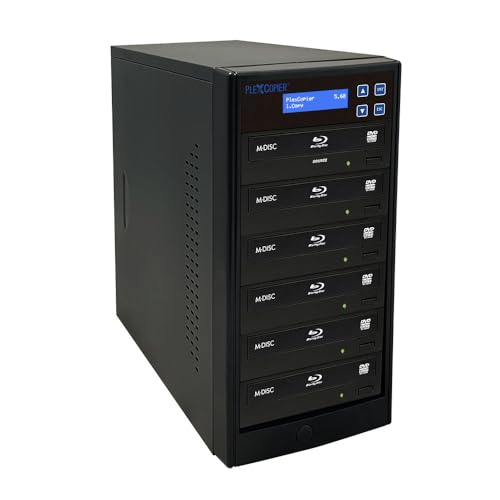
- Supports Blu-ray, BDXL, M-Disc, CD, and DVD
- Copies to up to five target drives
- Works with Windows and macOS
Best For: Schools handling mixed-format disc projects
Best Standalone DVD Value
1-to-1 DVD/CD Duplicator Tower

- Runs without a PC
- Writes DVDs at up to 24x and CDs at up to 52x
- Supports M-Disc DVD media
Best For: Small school media rooms and occasional duplication
Best Multi-Copy DVD/CD Tower
Kingdom 4-Drive DVD/CD Duplicator

- Creates up to four copies simultaneously
- Supports 24x DVD and 48x CD duplication
- Offers disc-to-disc and 320 GB hard-drive modes
Best For: Schools making repeated DVD or CD distributions
Archival-Ready Workhorse – 1-to-5 M-Disc DVD Duplicator
For schools looking for optical disc duplicators for schools, this standalone 1-to-5 tower offers a practical way to produce multiple CD or DVD copies without using a computer. It supports up to 24x DVD and 52x CD-R writing, plus M-Disc DVD media for long-term archiving.
Best For: Schools that need simultaneous five-disc duplication and archival M-Disc support.
Pros:
- Standalone operation requires no PC.
- Writes up to five discs per cycle.
- Supports M-Disc DVD media for archival projects.
- Can create copy-protected DVD video copies with compatible OptoDisc MID media.
Cons:
- Will not copy encrypted discs.
- The 17-pound tower may be less convenient to move between classrooms.
- Copy-protection creation depends on specified compatible media.
This is a strong fit for media labs, libraries, and departments producing several identical discs at once. Its standalone design simplifies operation, while M-Disc support adds a useful option for preserving school records and instructional materials.
High-Volume Automation Pick – PCX-1 MiniLoader Duplicator
PlexCopier PCX-1 MiniLoader 1 Target DVD CD Automated Duplicator with 1TB Hard Drive
Check Price On AmazonAmong optical disc duplicators for schools, the PCX-1 stands out for reducing hands-on loading. Its 50-disc capacity, automated copying, and built-in 1TB hard drive make it suited to repeated duplication jobs involving multiple master projects.
Best For: Schools, districts, or print rooms handling larger batches and recurring disc projects.
Pros:
- Operates independently of a computer.
- Holds up to 50 discs per run.
- Stores numerous master projects on its 1TB hard drive.
- Supports single- and dual-layer DVD formats and CD features such as CD-TEXT.
Cons:
- Will not copy encrypted discs.
- Its automated loader may be more capacity than a small classroom needs.
- The unit weighs 12 pounds and uses a mechanical hard drive.
The PCX-1 is the most automation-focused option in this group. Multi-Master Recognition, Auto-Copy, and an output counter can help staff process batches with less supervision, making it a practical choice for centralized school duplication work.
Compact Archiving Choice – 1-to-3 M-Disc Tower
PlexCopier 24X 1 to 3 CD DVD M-Disc Supported Duplicator Copier Tower with Free Copy Protection
Check Price On AmazonThis 1-to-3 tower is a practical option for schools seeking optical disc duplicators for schools with a smaller simultaneous output. It works without a PC, supports M-Disc DVD media, and can write up to 24x on DVD and 52x on CD-R.
Best For: Smaller school offices and departments that usually need up to three copies at a time.
Pros:
- Standalone operation simplifies setup.
- Duplicates three discs per cycle.
- Supports M-Disc media for data archiving.
- Can create copy-protected DVD video copies with compatible OptoDisc MID media.
Cons:
- Will not copy encrypted discs.
- Three-target output is lower than the five-target models.
- Copy-protection creation requires specified compatible media.
Choose this model when three simultaneous copies meet your normal workload and archival support matters. It offers the core convenience of a standalone tower without the larger output capacity of a five-target duplicator.
Five-Copy Production Tower – SATA Standalone 1-to-5 Duplicator
Schools comparing optical disc duplicators for schools may prefer this five-target SATA tower for straightforward production runs. Its LCD interface, automatic source analysis, and test, verify, and compare functions support a simple standalone workflow.
Best For: Schools needing five copies per cycle with verification tools and broad CD/DVD media compatibility.
Pros:
- Produces up to five copies in one burn cycle.
- Requires no computer for duplication.
- Supports DVD±R/RW, dual-layer DVD, CD-R, and CD-RW media.
- Includes test, verify, compare, and self-diagnostic functions.
Cons:
- Will not copy encrypted discs.
- At 26 pounds, it is the heaviest model in this roundup.
- It lacks the stated M-Disc support and built-in hard-drive storage of other options here.
This model emphasizes reliable, repeatable disc production rather than automated storage or archival features. The LCD controls and verification functions make it a sensible choice for school staff who want a dedicated five-copy tower with included technical support and a one-year warranty.
Best Standalone M-Disc Option – PlexCopier 1-to-1 DVD Duplicator
PlexCopier 24X 1 to 1 CD DVD M-Disc Supported Duplicator Copier Tower with Free Copy Protection
Check Price On AmazonFor schools comparing optical disc duplicators for schools, this standalone PlexCopier model offers a straightforward 1-to-1 setup without requiring a computer. It supports DVD and CD duplication, M-Disc DVD recording, and up to 24x DVD or 52x CD-R write speeds.
Best For: Schools needing a standalone duplicator for routine one-disc-at-a-time DVD and CD copying, including long-term M-Disc archiving.
Pros:
- Operates without a PC.
- Supports M-Disc DVD media for archival recording.
- Offers up to 24x DVD and 52x CD-R write speeds.
- Includes lifetime technical support and a one-year parts-and-labor warranty.
Cons:
- Has only one target drive, so it produces one copy per cycle.
- Will not copy encrypted discs.
- Copy-protected DVD video copying requires OptoDisc MID media.
This is a practical choice when ease of use, archival media support, and manufacturer assistance matter more than high-volume simultaneous duplication.
Best for Batch Copying – BestDuplicator 1-to-3 DVD/CD Duplicator
Schools looking at optical disc duplicators for schools may prefer this 1-to-3 unit when several copies are needed at once. Its three built-in burners support common DVD and CD formats and include copy, test, verify, and compare functions.
Best For: School offices, media departments, or labs that regularly need up to three DVD or CD copies per duplication cycle.
Pros:
- Three target burners enable simultaneous copying.
- Supports DVD+/-R, DVD+/-RW, dual-layer DVD, CD-R, and CD-RW media.
- Includes test, verify, compare, and master error-proof functions.
- Password protection can help prevent unauthorized use.
Cons:
- Write speeds top out at 16x for DVD and 52x for CD.
- Supplied notes do not identify M-Disc support.
- The enclosure is described as plastic.
With three built-in burners and verification features, this model is better suited to staff who need repeatable small-batch production than to users seeking the fastest available DVD writing.
Best for Simple Operation – AutoDupe 1-to-1 DVD/CD Duplicator
PlexCopier AutoDupe Easy to USE STANDALONE 24X 1 to 1 CD DVD Burner Writer Drive Duplicator Tower
Check Price On AmazonFor schools seeking optical disc duplicators for schools with minimal setup, the AutoDupe is designed to begin copying automatically after detecting a master and blank disc. It works as a standalone tower and supports high-speed DVD and CD writing plus M-Disc DVD recording.
Best For: Staff who want a simple one-to-one duplicator for school projects, personal archiving, small-office tasks, or professional duplication work.
Pros:
- Requires no PC for operation.
- Automatically starts duplication when the master and blank disc are detected.
- Supports up to 24x DVD and 52x CD-R write speeds.
- Records to M-Disc DVD media for archival use.
Cons:
- One target drive limits output to one copy per cycle.
- Will not copy encrypted discs.
- Includes a one-year manufacturer warranty rather than the lifetime support listed for the other PlexCopier model.
The simplified AutoDupe workflow can reduce training needs, making it a useful fit for schools where occasional users need to create individual copies without navigating a computer-based process.
Best Blu-ray Capacity – 1-to-5 Blu-ray Disc Duplicator
PlexCopier 1 to 5 Blu-ray BD BDXL M-Disc CD DVD Duplicator Copier Tower with FREE Copy Protection
Check Price On AmazonFor schools seeking optical disc duplicators for schools that can handle varied media, this tower supports Blu-ray, BDXL, M-Disc, CD, and DVD duplication. Its five-drive configuration is suited to preparing several copies at once, while Windows and macOS compatibility can fit existing computer environments.
Best For: Schools producing Blu-ray, archival M-Disc, DVD, or CD copies in moderate batches.
Pros:
- Supports Blu-ray, BDXL, M-Disc, CD, and DVD media.
- Duplicates to as many as five target drives.
- Compatible with Windows and macOS systems.
- Includes free copy-protection capability.
Cons:
- At 17 pounds, it is less convenient to move between classrooms.
- Compatibility depends on PCs with compatible optical drives.
- The supplied notes do not specify detailed Blu-ray write speeds.
This is the most versatile choice of the three when a school needs Blu-ray support alongside standard CDs and DVDs. Its larger tower format makes it better suited to a fixed media workstation than casual, mobile use.
Best Standalone DVD Value – 1-to-1 DVD/CD Duplicator Tower
Vinpower Digital Standard 1 to 1 Target 24x DVD CD Disc Duplicator Tower SATA Optical Drives - Black
Check Price On AmazonSchools looking for optical disc duplicators for schools without adding another computer to the workflow may appreciate this standalone DVD/CD tower. It offers up to 24x DVD and 52x CD-R write speeds, supports common CD formats, and can record archival M-Disc DVDs.
Best For: Schools needing straightforward one-to-one DVD and CD duplication with standalone operation.
Pros:
- Operates without a PC.
- Supports up to 24x DVD and 52x CD-R write speeds.
- Recognizes common CD formats, including CD-TEXT and ISRC.
- Supports M-Disc DVD media and includes free copy-protection capability.
Cons:
- Its one-to-one configuration is less suitable for larger copy runs.
- It will not copy encrypted discs.
- The free copy-protection feature requires compatible OptoDisc MID media for DVD video copies.
For a school media room focused on standard DVDs and CDs, this model keeps operation simple and independent of a computer. Its one-to-one design is best for smaller jobs rather than high-volume classroom distribution.
Best Multi-Copy DVD/CD Tower – Kingdom 4-Drive DVD/CD Duplicator
For schools that regularly distribute classroom, event, or instructional media, this optical disc duplicator for schools can create up to four copies simultaneously. It supports common CD and DVD formats, offers disc-to-disc or 320 GB hard-drive duplication, and includes an industrial cooling system for sustained operation.
Best For: Educational institutions producing multiple DVD or CD copies without relying on a computer.
Pros:
- Produces up to four copies simultaneously.
- Duplicates DVDs at 24x and CDs at 48x.
- Supports disc-to-disc and 320 GB hard-drive duplication.
- Standalone operation eliminates the need for a computer.
Cons:
- Supports CD and DVD formats but not Blu-ray.
- Its tower design and 500-watt power supply may be more equipment than small jobs require.
- The supplied notes identify specific duplication capacities of four copies from the hard drive and three disc-to-disc.
This is the strongest fit when throughput matters more than Blu-ray support. The four-drive layout and internal hard drive can streamline repeated school distributions, while the cooling and power features are aimed at dependable tower operation.
How We Picked These Optical Disc Duplicators for Schools
We focused on standalone systems that can copy discs without requiring a connected computer. The selection covers one-to-one models for occasional jobs, multi-target towers for classroom-wide distribution, automated systems for repeat workflows, and Blu-ray-capable units for higher-capacity media. We also considered support for CD, DVD, M-Disc, and BDXL formats, along with practical features such as built-in hard drives, SATA drives, one-touch operation, and copy-protection options.
For schools, reliability and ease of use matter as much as headline duplication speed. A duplicator should be simple enough for staff to operate, consistent across repeated batches, and compatible with the blank media the school already uses.
Quick Comparison
- Best for occasional copying: A 1-to-1 tower is compact, straightforward, and usually the easiest fit for a small office or department.
- Best for classroom distribution: Three- or five-target systems can create several copies simultaneously and reduce staff time.
- Best for repeat projects: Models with internal hard drives or automated loading can handle recurring batches with less supervision.
- Best for high-capacity media: Blu-ray and BDXL support is useful when files exceed standard DVD capacity.
- Best for archival use: M-Disc compatibility may help schools preserve important records, media projects, or institutional history.
Key Buying Factors for Optical Disc Duplicators for Schools
Target Count and Workload
The target count indicates how many blank discs a system can write at once. A one-target model suits occasional requests, while a three- or five-target tower is more efficient for assemblies, course materials, promotional events, and department-wide distribution. Higher target counts generally require more workspace and a larger upfront investment.
Supported Formats
Confirm whether the duplicator supports the formats your school actually uses. DVD and CD remain common for legacy materials, while Blu-ray and BDXL are better suited to larger video or data projects. M-Disc support can be valuable for long-term storage, but both the duplicator and blank media must be compatible.
Automation and Source Options
A built-in hard drive allows staff to store frequently used disc images and duplicate them without repeatedly inserting a master. Automated loaders can reduce hands-on work during large batches. If simplicity is the priority, look for clear menus and one-touch controls rather than features staff will rarely use.
Copy Protection and Verification
Schools should review copyright and licensing requirements before duplicating commercial or externally supplied content. A copy-protection feature does not replace permission. Disc verification, error handling, and quality blank media are also important for avoiding failed copies.
Who Should Buy Which Optical Disc Duplicators for Schools?
Choose a compact one-to-one duplicator for a counselor’s office, small library, or department with modest copying needs. Select a three-target model for regular classroom or club distribution, and a five-target tower when batches are frequent enough to justify faster throughput. Schools producing large video files should prioritize Blu-ray or BDXL support, while archives and media departments may prefer M-Disc compatibility. For recurring projects managed by multiple staff members, an automated or hard-drive-equipped system can provide the best balance of convenience and consistency.