Finding a comfortable trackball for large hands means looking beyond ball size. Shell width, finger placement, palm support, button reach, and connection type all affect whether a mouse feels natural during long work sessions.
We’ve gathered 10 options ranging from compact wireless models to oversized and adaptive designs, so you can match control style, ergonomics, and desk setup to your needs.
Best 10 Trackballs for Large Hands Picks for 2026
Large-Hand Wired Comfort

- Hand-conforming design for larger right hands
- Five DPI levels and a 44mm control ball
- Plug-and-play wired USB connectivity
Best For: Office, design, and general computer work
Premium Wireless Ergonomics

- 20-degree tilt and sculpted grip
- Bluetooth and Logi Bolt wireless options
- Quiet clicks with USB-C rechargeable power
Best For: Right-handed users seeking premium ergonomic wireless control
Oversized Ambidextrous Control

- Oversized 55mm ball for fingertip precision
- One-touch switching for left- or right-handed use
- Includes wrist rest and dual scroll wheels
Best For: Shared workspaces and detailed design tasks
Adjustable Wireless Comfort

- Flat or 15-degree adjustable angle
- 2.4GHz and Bluetooth multi-device support
- Quiet clicks with five DPI settings
Best For: Quiet, space-saving wireless office setups
Top Pick
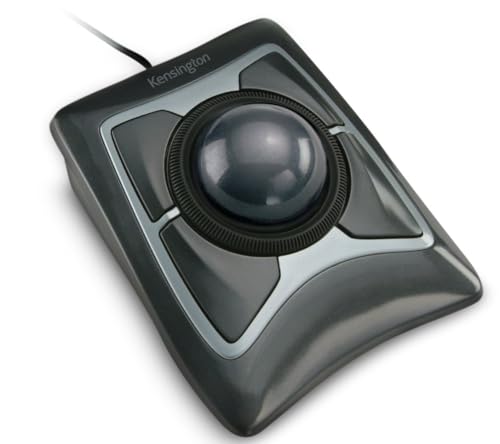
- Large 55mm ball for precise control
- Detachable ergonomic wrist rest
- Ambidextrous four-button wired design
Best For: Large-handed users seeking a full-size office trackball
Accessibility Pick

- Oversized trackball for easier cursor control
- Two large blue buttons simplify operation
- Ambidextrous adaptive design with switch jacks
Best For: Users with limited dexterity or fine-motor control
Best Large-Fit Wireless Pick
ELECOM HUGE Index-Finger Trackball

- Roomy 52mm ball for large hands
- Eight-button layout with horizontal scrolling
- Wireless design with adjustable DPI
Best For: Large-handed desktop users wanting broad palm support and extensive controls
Best Space-Saving Option
Logitech ERGO M575S Wireless Trackball

- Thumb control saves desk space
- Bluetooth and Logi Bolt connectivity
- Up to 18 months from one AA battery
Best For: Everyday users needing ergonomic control in a compact setup
Best Feature-Rich Large Trackball

- Large 52mm ball in an ergonomic body
- Tri-mode Bluetooth, wireless, and wired use
- Ten programmable buttons and rechargeable battery
Best For: Large-handed power users building a customizable multi-device setup
Large-Hand Wired Comfort – 44mm Index-Finger Trackball
If you want a straightforward option among trackballs for large hands, this wired model emphasizes a hand-conforming shape, reduced wrist pressure, and index-finger control. Its 44mm ball and five DPI levels suit office work, browsing, and design tasks, while the USB connection avoids battery management.
Best For: Right-handed office users, designers, and anyone who wants precise trackball control without moving a mouse around the desk.
Pros:
- Large-hand ergonomic design with a 44mm finger-operated ball.
- Five adjustable DPI levels support different cursor-speed preferences.
- USB-A/USB-C wired connectivity requires no drivers and works with Windows and macOS.
- Includes six buttons and an 18-month limited warranty.
Cons:
- Not recommended for gaming because of its tracking profile and response characteristics.
- Forward/backward buttons are not supported on Mac systems.
- Wired operation limits portability compared with wireless alternatives.
This is a practical pick if comfort, stable positioning, and no-recharge operation matter more than gaming performance or wireless convenience.
Premium Wireless Ergonomics – Logitech MX Ergo S
The Logitech MX Ergo S is a polished wireless choice for trackballs for large hands, combining thumb control with a sculpted shape, soft rubber grip, and adjustable 20-degree tilt. It supports Bluetooth or the included Logi Bolt receiver, making it convenient for flexible desk setups.
Best For: Medium- to large-handed right-handed users who want adjustable ergonomics, quiet clicks, and multi-device wireless connectivity.
Pros:
- Ergonomist-certified contoured design with a 20-degree tilt for forearm posture.
- Wireless connectivity through Bluetooth or the included Logi Bolt receiver.
- Six customizable buttons and Smart Actions support through the Logi Options+ app.
- USB-C charging provides up to 24 hours from a one-minute charge or up to 120 days on a full charge.
Cons:
- Designed for right-handed use rather than ambidextrous operation.
- Charging cable is not included.
- Some customization features depend on the Logi Options+ app.
Choose this model when you want a refined thumb-controlled trackball with strong wireless flexibility and a more adjustable ergonomic profile than a basic wired design.
Oversized Ambidextrous Control – 55mm Finger Trackball
For shoppers comparing trackballs for large hands, this wired model stands out with an oversized 55mm ball, finger control, and an included wrist rest. Its ambidextrous layout and one-touch hand switching make it suitable for shared workspaces, while four DPI settings cover both precision work and faster navigation.
Best For: Left- or right-handed users handling design, CAD, video editing, or long office sessions who prefer a large finger-operated ball.
Pros:
- Large 55mm trackball provides fingertip control for detailed cursor movements.
- Ambidextrous design includes one-touch left/right hand switching.
- Includes an ergonomic wrist rest and dual scroll wheels.
- Four DPI settings range from 400 to 1600 for adjustable cursor speed.
Cons:
- Buttons have fixed functions and are not programmable.
- Wired USB operation does not offer wireless flexibility.
- Some extra controls may require time to learn.
This is the most adaptable option here for households or offices where multiple users share a trackball, especially when a very large ball and ambidextrous control are priorities.
Adjustable Wireless Comfort – ProtoArc EM02 Trackball
The ProtoArc EM02 is a flexible wireless option among trackballs for large hands, with a hinge that switches between a flat 0-degree position and a 15-degree tilt. It combines quiet clicks, five DPI settings, rechargeable USB-C power, and both 2.4GHz and Bluetooth connections for adaptable everyday use.
Best For: Right-handed users working in tight or cluttered spaces who want adjustable posture, quiet operation, and multi-device connectivity.
Pros:
- Adjustable 0- or 15-degree angle helps personalize hand posture.
- Supports both 2.4GHz wireless and Bluetooth connections.
- Five DPI settings from 200 to 1600 allow fine cursor-speed adjustment.
- Rechargeable USB-C design offers up to 90 days of standby time.
Cons:
- Forward/backward buttons are not compatible with Mac OS.
- Right-handed design is not suited to left-handed users.
- The manufacturer notes a one- to two-week learning curve for new trackball users.
The EM02 is a strong everyday choice if you value wireless freedom and adjustable positioning, particularly where desk space is limited or quiet clicks are useful.
Top Pick – Kensington Expert Trackball
Kensington Expert Trackball Mouse (K64325), Black Silver, 5"W x 5-3/4"D x 2-1/2"H
Check Price On AmazonThe Kensington Expert is a strong choice among trackballs for large hands, thanks to its large 55mm ball, full-size housing, and detachable wrist rest. Its ambidextrous design and wired USB-A connection make it a practical option for users who prioritize steady tracking and reliable connectivity.
Best For: Large-handed users who want a full-size, ambidextrous trackball for office work.
Pros:
- Large 55mm ball supports precise cursor control.
- Scroll ring makes moving through long pages convenient.
- Detachable wrist rest adds ergonomic support.
- Four buttons and adjustable settings offer customization through KensingtonKonnect on supported systems.
Cons:
- Wired USB-A connectivity limits placement flexibility.
- Customization is not supported on Windows ARM-based computers and is limited on ChromeOS.
Choose the Expert if a generous ball, wrist support, and ambidextrous layout matter more than wireless convenience. It is especially well suited to a permanent desk setup.
Wireless Choice – Nulea M505A Trackball
The Nulea M505A is a flexible option for shoppers comparing trackballs for large hands who also want wireless freedom. Its 44mm index-finger ball, adjustable DPI, and support for up to three connected devices make it useful for compact desks and multi-device setups.
Best For: Right-handed users who want a rechargeable wireless trackball for small workspaces.
Pros:
- 44mm index-finger ball provides cursor control without moving the mouse across the desk.
- Five DPI modes allow users to adjust sensitivity.
- Bluetooth and USB receiver connections support up to three devices.
- Rechargeable battery is rated for up to 60 days per charge.
Cons:
- Right-handed design is not ambidextrous.
- The trackball’s operation may require an adjustment period.
- Its 44mm ball is smaller than the Kensington Expert’s 55mm ball.
The M505A stands out when cable-free use and device switching are priorities. Its wireless design is convenient, while the index-finger control can help keep movement contained on a crowded desk.
Accessibility Pick – AbleNet BIGtrack 2
The AbleNet BIGtrack 2 is an adaptive option among trackballs for large hands, built around an oversized ball and simple controls. Its two large blue buttons and ambidextrous layout are designed for users who may have limited fine-motor control or find conventional mice difficult to operate.
Best For: Users with limited dexterity, motor challenges, or accessibility-focused computing needs.
Pros:
- Large trackball simplifies cursor movement.
- Two oversized blue buttons provide a straightforward interface.
- Ambidextrous design accommodates either hand.
- Includes switch jacks and a drag-lock feature for additional accessibility support.
Cons:
- Only two mouse buttons provide fewer controls than many standard trackballs.
- USB connectivity does not provide wireless flexibility.
- Its specialized design may be more than typical users need for everyday pointing tasks.
The BIGtrack 2 is best evaluated as an assistive input device rather than a conventional desktop mouse. Its large ball, simplified buttons, and accessibility features can be valuable where ease of operation is the main concern.
Best Large-Fit Wireless Pick – ELECOM HUGE Index-Finger Trackball
For shoppers comparing trackballs for large hands, the ELECOM HUGE stands out with its oversized 52mm ball, broad palm rest, and full-size housing. Its index-finger control and wireless 2.4GHz connection suit extended desktop work where minimizing hand movement matters.
Best For: Large-handed users who want a spacious wireless trackball with extensive controls.
Pros:
- Large 52mm ball and soft palm rest provide a roomy, supportive layout.
- Eight physical buttons include tilting scroll-wheel controls for horizontal scrolling.
- Switchable 500, 1000, and 1500 DPI settings accommodate different cursor speeds.
- Large ruby bearings are designed to resist dust buildup and simplify maintenance.
Cons:
- Right-hand orientation limits suitability for left-handed users.
- Its large 7.2-inch-long body may take up substantial desk space.
- Uses a removable battery rather than a rechargeable design.
The ELECOM HUGE is a particularly practical choice when fit and palm support take priority over compactness. It offers more programmable-style control than a basic trackball, though its sizable footprint is best suited to a roomy workstation.
Best Space-Saving Option – Logitech ERGO M575S Wireless Trackball
Logitech Ergo M575S Wireless Ergonomic Trackball Mouse, Black/Blue (910-007026)
Check Price On AmazonThe Logitech ERGO M575S is a streamlined option for shoppers seeking trackballs for large hands without giving up a compact workspace. Its thumb-controlled ball lets you move the cursor while keeping your hand in place, making it useful on small desks and varied surfaces.
Best For: Users who want an ergonomic, space-saving trackball with Bluetooth and USB receiver connectivity.
Pros:
- Ergonomic shape supports the hand and promotes a more natural forearm position.
- Thumb control works without moving the mouse across the desk.
- Bluetooth and included Logi Bolt receiver provide flexible wireless connections.
- Included AA battery is rated for up to 18 months of use.
Cons:
- Three customizable buttons provide fewer controls than the ELECOM models.
- The thumb-ball layout may not suit users who prefer index-finger control.
- The notes describe it as a fit for most hand sizes, rather than specifically oversized hands.
The M575S prioritizes efficient desk use and familiar ergonomic support over maximum ball size or button count. It is a sensible everyday pick when you need wireless flexibility and a small footprint, but users with exceptionally large hands may prefer the roomier ELECOM HUGE designs.
Best Feature-Rich Large Trackball – ELECOM HUGE Plus
The ELECOM HUGE Plus is built for shoppers looking at trackballs for large hands who also want broad connectivity and customization. Its 52mm ball, right-handed ergonomic shape, 10 programmable buttons, and silent clicks make it suited to detailed productivity setups.
Best For: Large-handed power users who need multi-device connectivity, programmable controls, and rechargeable operation.
Pros:
- Large 52mm ball provides fluid control in a full-size ergonomic body.
- Tri-mode connectivity supports Bluetooth, 2.4GHz wireless, and wired USB-C use.
- Ten programmable buttons allow extensive shortcut customization.
- Rechargeable battery lasts up to five months, and silent clicks reduce noise.
Cons:
- At 291 g, it is substantially heavier than a compact wireless mouse.
- Right-hand orientation excludes left-handed setups.
- Its extensive controls and larger body may be more than casual users need.
The HUGE Plus is the most versatile choice in this group, combining the large-hand-friendly 52mm ball with wired, wireless, and Bluetooth operation. Choose it when customization and device flexibility justify a larger, heavier trackball.
How We Picked the Best Trackballs for Large Hands
We evaluated these trackballs by focusing on the features that matter most to larger-handed users: overall body size, ball diameter and placement, palm support, button accessibility, tracking method, connectivity, and adjustability. We also included different control layouts, including index-finger, thumb, ambidextrous, and adaptive designs.
Because comfort is highly personal, this list does not assume that the largest mouse is automatically the best choice. A well-shaped medium-size shell may provide better support than an oversized model, while a large ball can make cursor control easier for users who prefer broader finger movements.
Quick Comparison
| Best For | Features to Prioritize |
|---|---|
| All-day office work | Full palm support, smooth tracking, and easy-to-reach buttons |
| Maximum control | A large index-finger ball, adjustable sensitivity, and programmable buttons |
| Travel or flexible setups | Wireless connectivity, dependable battery life, and a compact receiver |
| Shared workstations | Bluetooth or multi-device connectivity and easy switching |
| Limited fine-motor control | Very large ball, simple controls, and adaptive compatibility |
Key Buying Factors for Trackballs for Large Hands
Hand Fit and Palm Support
Check the mouse’s width, height, and rear contour rather than relying only on the advertised ball size. Your palm should rest naturally without forcing your wrist to bend upward or your fingers to stretch for the buttons.
Ball Size and Control Position
Index-finger trackballs often suit users who want precise control without repeatedly moving a thumb. A 44mm ball can be a practical middle ground, while 52mm or 55mm designs may offer broader movement and easier manipulation for some users. Thumb-operated models can feel familiar, but confirm that the thumb position does not create strain.
Wired Versus Wireless Connections
Wired models avoid charging and minimize connection variables, making them useful for fixed desks. Wireless options reduce cable clutter and may support Bluetooth, a USB receiver, or both. Multi-connection models are especially useful if you switch between a desktop, laptop, and tablet.
Buttons, Scrolling, and Customization
Look for a scroll wheel that your fingers can reach without shifting your palm. Programmable buttons can improve productivity, but simpler layouts may be preferable if you want fewer accidental clicks or easier setup.
Who Should Buy Which Trackballs for Large Hands?
Choose a large index-finger model if precise cursor control and a supported palm position are your priorities. Consider an ambidextrous design if you alternate hands or share the mouse. Wireless ergonomic models are the best fit for uncluttered desks and multiple devices, while wired units suit users who want consistent plug-and-play operation.
For users with limited fine-motor skills, an adaptive trackball with an especially large ball and simplified controls may be more practical than a conventional office mouse. If you want maximum flexibility, prioritize a model with adjustable angle, multiple connection modes, and programmable controls. Ultimately, the best Trackballs for Large Hands are the ones that let your fingers and wrist remain relaxed while providing reliable, predictable cursor movement.