The right video switcher can make a church livestream easier to operate, more engaging to watch, and more reliable week after week. The best choice depends on your camera connections, volunteer experience, audio workflow, and streaming requirements.
We compared 10 church-friendly options, from compact HDMI switchers for small worship spaces to advanced SDI and PTZ-capable systems for larger production teams.
Best 10 Video Switcher for Church Picks for 2026
Best Budget-Friendly Pick

- Four HDMI inputs with multiview
- Built-in streaming, recording, and audio mixing
- Compact design with advanced keying and transitions
Best For: Small church teams using up to four HDMI cameras
Best for Live Event Control

- Four HDMI inputs and 14-channel audio mixer
- Four-layer effects and keying engine
- Eight memory presets and optional remote control
Best For: Church production teams needing video and audio control together
Best All-in-One PTZ Solution
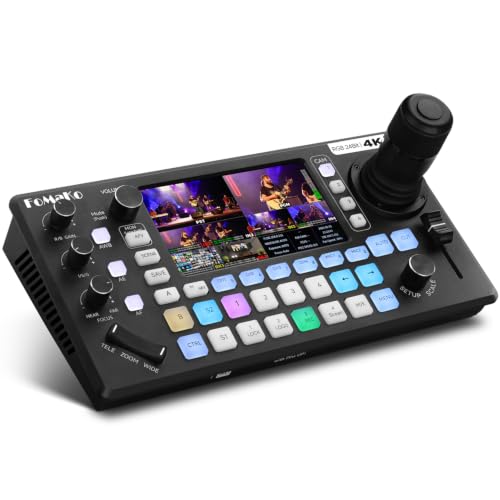
- Built-in four-camera PTZ joystick and AI tracking
- 4K HDMI, XLR audio, USB, and SD recording
- Streams to three platforms plus one UVC feed
Best For: Churches using PTZ cameras with solo operators or small crews
Best Premium Production Hub

- Six video inputs across HDMI and USB
- Seven customizable multi-source scenes
- Direct streaming plus audio and ISO recording
Best For: Churches wanting an integrated video and studio-audio workflow
Best Broadcast-Style Pick
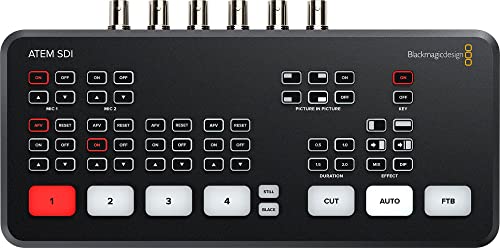
- Four 3G-SDI inputs with 10-bit HD support
- Six-input audio mixer with Fairlight processing
- USB-C webcam output for straightforward streaming
Best For: Churches using SDI cameras for polished live production
Best Touchscreen Workflow
FEELWORLD L4 10.1-Inch Switcher

- 10.1-inch touchscreen with T-bar control
- Four HDMI and one SDI input
- Chroma key and logo overlay functions
Best For: Churches needing intuitive mixed HDMI/SDI camera switching
Best Direct-Streaming Option

- Ethernet streaming to up to three platforms
- SD card recording plus USB streaming
- Eight physical macro buttons for quick control
Best For: Churches wanting an all-in-one HDMI streaming and recording workflow
Professional Production Pick
Tenveo PC500 5-Channel Video Switcher

- HDMI, SDI, USB, and NDI|HX3 source support
- PTZ control with presets and cruise tracks
- Dual recording and two-platform streaming
Best For: Multi-camera worship services and larger church productions
Portable Church Setup
Mixer Plus 4-Channel HDMI Switcher

- Four HDMI inputs with built-in 4-inch multiview
- PTZ control, keying, PIP, and logo overlay
- Configurable AUX output and scene presets
Best For: Portable HDMI-based worship and event productions
Simple Streaming Choice
RGBlink Mini 4-Input HDMI Mixer

- Four HDMI inputs with 2K support
- USB 3.0 webcam output for streaming software
- Built-in transitions, PIP, and LAN control
Best For: Small church teams and solo streaming operators
Best Budget-Friendly Pick – Blackmagic ATEM Mini Pro
The Blackmagic Design ATEM Mini Pro is a practical video switcher for church teams that need four-camera HDMI production, built-in streaming, recording, and multiview monitoring in a compact unit. Its familiar live-production controls and integrated audio mixer can help simplify a small worship-streaming setup.
Best For: Churches running up to four HDMI cameras and streaming services with a small production team.
Pros:
- Four HDMI inputs with 4-camera multiview.
- Built-in streaming, recording, and a 6-input, 2-channel audio mixer.
- Supports multiple transitions, upstream keys, and a downstream keyer.
Cons:
- Limited to HDMI inputs and a single HDMI output.
- Does not include integrated PTZ camera control.
The ATEM Mini Pro is a strong fit when your church values straightforward HDMI switching and streaming without a larger rack-style system. It is especially appealing for compact teams that want production features without adding separate streaming and recording hardware.
Best for Live Event Control – Roland V-1HD+
The Roland V-1HD+ is a compact video switcher for church services, events, and livestreams where an operator needs video switching and audio control in one device. Its four HDMI inputs, effects engine, audio mixer, and memory presets support repeatable production workflows.
Best For: Churches and live-event teams that want hands-on switching plus integrated audio mixing.
Pros:
- Combines an HD video switcher with a 14-channel audio mixer.
- Includes four-layer effects and keying for graphics and lower thirds.
- Eight memory presets can recall visual layouts quickly.
- Optional V-1HD+ Remote app enables remote control of many functions.
Cons:
- Uses HDMI connectivity and is positioned as an HD solution.
- Weighs more than the smaller ATEM Mini Pro.
The V-1HD+ makes sense for churches that prefer a dedicated control surface and need more substantial audio handling than a basic switcher provides. Its presets and assisted switching features can also help operators manage recurring service layouts.
Best All-in-One PTZ Solution – FoMaKo KC800
The FoMaKo KC800 is an all-in-one video switcher for church worship productions that use PTZ cameras and want camera control, switching, audio, streaming, and recording in one unit. Its four 4K HDMI inputs, integrated joystick, AI tracking, and 5.5-inch screen are designed for solo operators and compact crews.
Best For: Churches using up to four PTZ cameras and needing an integrated control and recording workflow.
Pros:
- Controls up to four PTZ cameras with a built-in 4D joystick, presets, and AI tracking.
- Provides four 4K HDMI inputs, three HDMI outputs, and UVC connectivity.
- Includes XLR inputs with 48V phantom power and a six-channel audio mixer.
- Records to USB or SD card and can stream to three platforms plus one UVC feed.
Cons:
- Its extensive feature set may require more setup and training.
- PTZ control benefits specifically from compatible VISCA or VISCA-over-IP cameras.
The KC800 is a particularly capable choice when a church wants to reduce the number of separate devices in a PTZ-based production system. It offers considerable flexibility for operators who need local recording, multichannel audio, and streaming controls at the switcher.
Best Premium Production Hub – RØDECaster Video
The RØDE RØDECaster Video is a versatile video switcher for church productions that need multi-source scenes, polished audio, direct streaming, and recording. It accepts four HDMI and two USB video sources, while its front-panel controls provide access to overlays, chroma keying, transitions, and media playback.
Best For: Churches building a flexible production hub for multi-camera video and studio-grade audio.
Pros:
- Switches up to six video sources: four HDMI and two USB.
- Offers seven customizable multi-source scenes.
- Includes two Neutrik combo inputs with high-gain Revolution Preamps.
- Supports direct streaming, USB streaming software, external recording, and ISO recording.
Cons:
- Its broader feature set may be more than a basic worship stream requires.
- Video inputs are designed around 1080p60 rather than 4K production.
The RØDECaster Video is well suited to churches that want video switching and high-quality audio capture centered in one workflow. Scene presets, automatic switching options, overlays, and ISO recording give experienced teams room to build a more polished production system.
Best Broadcast-Style Pick – Blackmagic ATEM SDI Switcher
For churches building a reliable video switcher for church production, the Blackmagic Design ATEM SDI Live Production Switcher offers four 3G-SDI inputs with 10-bit HD support. Its hardware processing, audio controls, Ethernet connectivity, and USB-C webcam output make it suited to polished services and live streams.
Best For: Churches using SDI cameras that want broadcast-oriented video quality and flexible audio mixing.
Pros:
- Four 3G-SDI inputs support 10-bit HD video.
- Built-in frame-rate and format converters help provide smooth real-time processing.
- Six-input audio mixer includes gain control, audio-follow-video, compressor, gate, and EQ features.
- USB Type-C output simplifies webcam-style streaming.
Cons:
- Its SDI-only video inputs may not suit churches primarily using HDMI cameras.
- Requires corded power and compatible SDI cabling.
This is a strong choice when dependable SDI connectivity and detailed audio control matter more than a touchscreen interface or direct multi-platform streaming.
Best Touchscreen Workflow – FEELWORLD L4 10.1-Inch Switcher
The FEELWORLD L4 is a practical video switcher for church teams that want an integrated preview and control surface. Its 10.1-inch touchscreen, T-bar, four HDMI inputs, and one SDI input support multi-camera production, while chroma keying and logo overlays add presentation flexibility.
Best For: Churches mixing HDMI and SDI cameras that value touchscreen operation, real-time preview, and built-in overlays.
Pros:
- Large 10.1-inch touchscreen provides an intuitive menu and preview interface.
- Supports four HDMI inputs plus one SDI input for multi-camera setups.
- Includes chroma keying and logo overlay functions.
- Offers HDMI, SDI, and USB 3.0 outputs for streaming and display workflows.
Cons:
- Its broad format support still requires cameras and displays to use compatible resolutions and frame rates.
- The supplied notes do not indicate a built-in hardware encoder for direct network streaming.
The L4 stands out for hands-on operation and mixed HDMI/SDI flexibility, making it appealing for volunteer teams that want preview and switching controls in one unit.
Best Direct-Streaming Option – Osee GoStream Deck Pro
The Osee GoStream Deck Pro is a versatile video switcher for church streaming teams that want recording and distribution features built in. It accepts four HDMI sources plus a USB camera, records high-bitrate MP4 video to an SD card, and can stream through Ethernet without relying on an external computer.
Best For: Churches that need direct network streaming, local recording, and fast physical control for recurring services.
Pros:
- Streams through Ethernet to up to three platforms simultaneously.
- Records to an SD card while also outputting video over USB.
- Supports four HDMI sources plus an additional USB camera input.
- Eight physical macro buttons enable quick scene, overlay, and transition control.
Cons:
- Its video inputs are HDMI and USB rather than SDI.
- Direct streaming depends on a suitable Ethernet network connection.
For churches prioritizing streamlined distribution and repeatable live-production cues, the GoStream Deck Pro combines switching, recording, Ethernet streaming, and tactile macro control in a compact mixer.
Professional Production Pick – Tenveo PC500 5-Channel Video Switcher
For churches needing a capable video switcher for church services, the Tenveo PC500 is built for multi-camera production, streaming, monitoring, and recording. It accepts HDMI, SDI, USB, and NDI|HX3 sources, while its built-in 5.5-inch display helps operators manage live switching.
Best For: Churches running multi-camera worship services, larger live productions, and simultaneous streaming and recording.
Pros:
- Supports up to four HDMI inputs, four SDI inputs, USB input, and NDI|HX3.
- Includes PTZ camera control with presets, cruise tracks, and adjustable camera parameters.
- Streams to up to two platforms and supports UVC, SRT, RTMP, RTSP, and NDI|HX3.
- Offers dual recording and multiple configurable program, auxiliary, and multiview outputs.
Cons:
- Its extensive controls and connectivity may be more than a small church team needs.
- Outputs are limited to 1080p60 even though some inputs support 4K60.
The PC500 is the most production-oriented option here, especially for churches planning to expand camera infrastructure or add PTZ control. Its feature set is strongest when a trained operator is available to manage switching, streaming, and recording.
Portable Church Setup – Mixer Plus 4-Channel HDMI Switcher
The Mixer Plus is a practical video switcher for church teams that want four HDMI camera inputs and onboard monitoring in a compact unit. Its built-in 4-inch screen provides multiview previews, while production tools such as keying, picture-in-picture, overlays, and PTZ control support polished services and events.
Best For: Small-to-midsize churches, portable worship setups, and teams using several HDMI cameras.
Pros:
- Four HDMI inputs and a built-in 4-inch multiview display fit portable productions.
- Provides 30 transition effects and four customizable scene presets.
- Supports PTZ control over VISCA IP for up to four cameras with four presets each.
- Offers chroma key, luma key, PIP, DSK, logo overlay, and configurable AUX output.
Cons:
- Connectivity is HDMI-only, which may not suit churches with SDI cameras.
- The compact built-in screen is useful for monitoring but smaller than a dedicated multiview display.
This switcher balances portability and production control well. It is a strong fit when the church uses HDMI cameras and wants advanced visual tools without moving to a larger broadcast-style system.
Simple Streaming Choice – RGBlink Mini 4-Input HDMI Mixer
The RGBlink Mini is a straightforward video switcher for church streaming teams using up to four HDMI sources. It connects to a computer as a USB 3.0 webcam, supports multiview output and picture-in-picture layouts, and can be controlled remotely through a LAN connection.
Best For: Smaller churches, solo operators, and services streamed through OBS, vMix, or social platforms.
Pros:
- Accepts four HDMI inputs with 2K input and output support.
- USB 3.0 output works as a webcam for streaming software and social platforms.
- Includes 14 transition effects, nine PIP layouts, and six-picture preview or program options.
- Supports remote control from a phone or computer through LAN.
Cons:
- Onboard recording is not included; the notes direct buyers to Mini-Pro or higher models for that feature.
- It lacks the SDI, PTZ, and dual-platform production features found on more advanced switchers.
The RGBlink Mini is best when ease of connection matters more than extensive broadcast features. Its webcam-style USB output and compact design make it approachable for churches building a basic multi-camera streaming workflow.
How We Picked the Best Video Switcher for Church
We focused on features that matter during real worship services: dependable switching, practical input options, preview and program monitoring, audio integration, streaming support, and ease of use for volunteers. We also considered whether each unit fits common church setups, including HDMI cameras, SDI cameras, PTZ systems, confidence monitors, presentation computers, and livestream encoders.
Because churches vary widely in size and production style, this list includes both straightforward entry-level mixers and more capable systems for multicamera productions. Compatibility should always be confirmed before purchase, particularly for resolution, frame rate, connector type, and audio inputs.
Quick Comparison
| Best For | Recommended Type | What to Look For |
|---|---|---|
| Small churches and beginners | Compact HDMI switcher | Simple controls, USB streaming, and reliable HDMI inputs |
| Volunteer-led services | Switcher with multiview or built-in display | Clear preview screens and intuitive operation |
| PTZ camera installations | PTZ-capable switcher or controller | Camera control, joystick operation, and preset support |
| Larger production teams | SDI or hybrid professional switcher | Long cable runs, more inputs, multiview, and expansion |
| Audio-focused livestreams | Video switcher with integrated audio workflow | Dedicated audio inputs, mixing, and routing flexibility |
Key Buying Factors for a Video Switcher for Church
Input Type and Camera Compatibility
HDMI is common and affordable, making it suitable for smaller rooms and short cable runs. SDI is generally better for larger sanctuaries because it supports longer runs and locking connectors. Count every camera, presentation computer, playback device, and spare input you may need—not just the cameras you own today.
Resolution, Frame Rate, and Output
Match the switcher to your cameras and streaming platform. A 1080p60 workflow is often sufficient for church livestreaming, while 4K support may help with future upgrades or local recording. Check whether the switcher can simultaneously provide a program feed, multiview output, and a clean feed for recording or overflow displays.
Audio and Streaming Workflow
Decide whether audio will come from the church mixing console, the switcher, or a dedicated production interface. Look for the required inputs and outputs, including XLR, HDMI embedded audio, USB, or network connections. Built-in streaming can simplify setup, but an external encoder may offer greater flexibility and redundancy.
Ease of Operation and Reliability
A switcher used by rotating volunteers should have clearly labeled controls, useful presets, and an easy-to-read preview. Test the complete system before services, including camera handshakes, audio levels, internet stability, and recovery after power or cable interruptions.
Who Should Buy Which Video Switcher for Church?
Choose a compact HDMI model if your church uses two to four nearby cameras and wants a manageable setup for weekly livestreams. A unit with a built-in screen is especially useful when desk space and monitoring equipment are limited.
Choose a PTZ-oriented system if cameras are mounted high or far from the production desk. Remote camera control and presets can let one operator cover more angles without physically adjusting cameras.
Choose an SDI or higher-end hybrid switcher for larger sanctuaries, permanent cable runs, multiple operators, or productions that need more inputs and room to grow. Churches that prioritize polished sound should also favor a model that fits cleanly into the existing audio-console workflow.