If your headset runs hot, fogs up, or feels uncomfortable after a few minutes, the right face interface can make a big difference. A good upgrade can improve airflow, reduce sweat, and help you stay immersed longer.
Below, we focus on practical VR facial interface ventilation upgrade options that prioritize comfort, anti-fog performance, and better hygiene across popular Quest models.
Best 10 Vr Facial Interface Ventilation Upgrade Picks for 2026
Ventilated Comfort Pick
VR Facial Interface and Foam Replacement Set for Quest 2

- Adds ventilation and exhaust holes
- PU leather with foam for comfort
- Includes nose pad and lens cover
Best For: Quest 2 users wanting a breathable, shareable interface
Cooling Defogger
K3 Facial Interface Fan for Quest 3

- Built-in fan with four air inlets
- Two airflow speeds for different activities
- Three depth settings for fit adjustment
Best For: Quest 3 users dealing with lens fogging
Breathable Open Fit
VR Open Facial Interface for Quest 3S

- Open design improves airflow
- Made only for Quest 3S
- Breathable foam pad is easy to clean
Best For: Quest 3S users who want a lighter, more breathable face pad
Ventilated Comfort Frame
F3 Facial Interface for Quest 3

- Three ventilation channels for airflow
- Stepless adjustment for face distance and FOV
- Soft Lycra nose guard helps block light
Best For: Quest 3 users wanting adjustable comfort with airflow support
Quest 2 Airflow Upgrade
Breathable Fitness Facial Interface

- Ventilated bracket helps improve air circulation.
- Multiple pad thicknesses let you tune comfort and fit.
- Includes nose pad and lens protector for added coverage.
Best For: Quest 2 users wanting a cooler, sweat-friendly face interface for active play
Quest 2 Cooling Swap
Removable Vent Design Interface
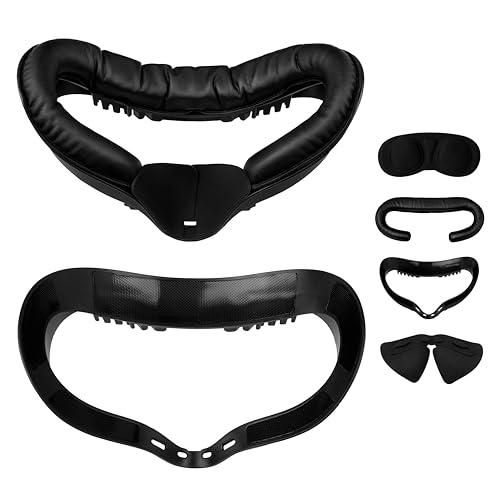
- Built-in vents help release heat and reduce fogging.
- Removable cushion is easy to wipe clean after use.
- Includes nose pad and lens cover for extra protection.
Best For: Quest 2 owners who want a basic cooling and easy-clean facial interface
Quest 3 Magnetic Ventilation

- Ice silk pad and vents are designed to improve cooling.
- Magnetic system makes swapping face pads quick and simple.
- Knob-adjusted height helps with fit and glasses clearance.
Best For: Quest 3 users wanting a cooling, adjustable interface for halo or fan head straps
Active Cooling Pick
Quest 2 Fan Face Interface Upgrade

- Mini turbo fan helps reduce heat and fogging.
- Thick PU leather cushion adds comfort and easy cleaning.
- Three speed modes fit movies, gaming, or workouts.
Best For: Quest 2 players who want active cooling for sweaty or intense VR sessions.
Adjustable Fit Upgrade
Quest 3 Knob-Adjust Facial Interface

- Knob height adjustment helps tune fit and FOV.
- Y-shaped vents are designed to reduce fogging.
- Includes PU leather and ice silk face pads.
Best For: Quest 3 users who want customizable comfort and passive ventilation.
Value Vent Pad

- L-shaped vents and exhaust holes improve airflow.
- PU leather foam is soft, sweatproof, and easy to clean.
- Velcro mounting makes installation simple.
Best For: Quest 2 users seeking a low-cost comfort pad with passive ventilation.
Ventilated Comfort Pick – VR Facial Interface and Foam Replacement Set for Quest 2
If you want a vr facial interface ventilation upgrade for the Meta Quest 2 without changing the headset’s basic feel, this TechKen set is a practical option. It adds ventilation and exhaust holes, uses PU leather with sponge foam for comfort, and includes a nose pad and lens cover for a more private, cleaner setup.
Best For: Quest 2 users who want better airflow, sweat resistance, and a more shareable face interface.
Pros:
- Ventilation and exhaust holes help move heat out more easily.
- PU leather and sponge foam aim for soft, comfortable wear.
- Includes an anti-leakage silicone nose pad to help block light.
- Lens cover is included for scratch and dust protection when stored.
Cons:
- Made only for Oculus/Meta Quest 2.
- Does not include any active fan cooling.
For Quest 2 owners who mainly want a more breathable replacement interface, this set covers comfort, privacy, and basic protection in one package. It is a straightforward upgrade if you prefer passive airflow over powered cooling.
Cooling Defogger – K3 Facial Interface Fan for Quest 3
This kkcobvr K3 is a strong vr facial interface ventilation upgrade if fogged lenses are your biggest Quest 3 problem. Its built-in defogging fan uses four air inlets, and the two speed settings let you choose lighter airflow for casual use or stronger airflow for active sessions.
Best For: Quest 3 users who want active lens defogging and adjustable airflow.
Pros:
- Built-in fan with four air inlets helps improve airflow and reduce fogging.
- Two wind speeds support movies, chatting, gaming, or fitness.
- Three depth adjustments make it easier to fine-tune fit.
- PU leather pad and ergonomic nose pads help with comfort and light leakage.
Cons:
- Only compatible with Quest 3.
- Battery life depends on speed setting and is listed at about 1.5 to 4 hours.
If you want a powered cooling-style face accessory instead of a passive vented frame, this model is built around fog control and comfort adjustments. It is especially relevant for longer or more intense VR use where lens clarity matters.
Breathable Open Fit – VR Open Facial Interface for Quest 3S
For Quest 3S owners looking for a vr facial interface ventilation upgrade, this open facial interface focuses on airflow, reduced fogging, and less face pressure. It uses a breathable foam pad and an expanded frame design, and it is specifically made for the Quest 3S rather than other Quest models.
Best For: Quest 3S users who want an open, breathable replacement face cover for longer sessions.
Pros:
- Open design improves airflow and helps reduce fogging.
- Expanded frame is made specifically for Quest 3S and works with the original glasses spacer.
- Breathable foam pad is easy to clean with a cloth or water.
- Designed to reduce facial pressure during games, movies, or workouts.
Cons:
- Not compatible with Quest 3 or other Quest models.
- Open design may not suit users who prefer a more enclosed face cushion.
This is a simple, comfort-first replacement if you want more breathing room on the Quest 3S. It trades a traditional sealed feel for easier airflow and easier cleaning.
Ventilated Comfort Frame – F3 Facial Interface for Quest 3
If you want a premium vr facial interface ventilation upgrade for Quest 3, the BOBOVR F3 is built around airflow, fit, and light blocking. It uses three ventilation channels in the forehead area, stepless face-distance adjustment, and a soft Lycra nose guard to keep the setup comfortable during longer sessions.
Best For: Quest 3 users who want adjustable comfort, better airflow, and a glasses-friendly design.
Pros:
- Three ventilation channels are designed to improve airflow with the S3 Pro fan.
- Stepless adjustment wheels let you fine-tune face distance and FOV.
- Soft silicone and foam padding are meant to reduce pressure points.
- Lycra nose guard is breathable and designed to help block light without pressing on glasses.
Cons:
- Only compatible with Quest 3, not Quest 3S.
- Works as part of the BOBOVR ecosystem, so it makes the most sense with compatible accessories.
The F3 is aimed at users who care about both ventilation and a more tailored fit. If you want a face interface that pairs cooling-focused design with adjustability, this is the most feature-rich option in the group.
Quest 2 Airflow Upgrade – Breathable Fitness Facial Interface
If you want a vr facial interface ventilation upgrade for Quest 2, this AMVR set focuses on airflow, sweat control, and a closer fit. The ventilated bracket is designed to improve air circulation and help reduce lens fogging during active play, while the PU foam cushions aim to stay comfortable and skin-friendly over longer sessions.
Best For: Quest 2 owners who want a cooler, more breathable facial interface for fitness and long gaming sessions.
Pros:
- Ventilation structure is designed to improve air circulation and reduce fogging.
- Includes multiple cushion thicknesses and side wedges for comfort and fit tuning.
- PU leather and sponge foam are described as soft, skin-friendly, and sweat-proof.
- Nose pad and lens protector add light blocking and scratch protection.
Cons:
- Only compatible with Meta Quest 2, not Quest 3.
- Best results depend on choosing the right cushion thickness.
- Fit can vary depending on face shape and preferred eye relief.
Overall, this is a practical upgrade if your main goal is better ventilation without giving up cushioning or field of view. The included extras make it more of a full comfort kit than a simple face pad replacement.
Quest 2 Cooling Swap – Removable Vent Design Interface
This vr facial interface ventilation upgrade for Oculus Quest 2 is aimed at players who want a simpler way to manage heat and fog. The frame adds top and bottom vents to help heat escape, while the PU leather foam pad is meant to feel soft against the skin and be easy to wipe clean after use.
Best For: Quest 2 users who want a removable, easy-to-clean interface with basic airflow improvements.
Pros:
- Air circulation vents are built into the top and bottom of the interface frame.
- Removable design makes the face cushion easier to clean after sweaty sessions.
- Includes a leak-proof nose pad and lens protection pad.
- Soft PU leather pad is described as skin-friendly and pressure-reducing.
Cons:
- Only compatible with Meta Quest 2.
- Does not include the thicker multi-pad adjustment options of some kits.
- Fit and comfort will still depend on individual face shape.
For buyers who want a straightforward cooling-oriented replacement, this set keeps the focus on airflow, cleanup, and light blocking. It is best viewed as a practical comfort swap rather than a highly adjustable premium system.
Quest 3 Magnetic Ventilation – Magnetic Cooling Interface
If you need a vr facial interface ventilation upgrade for Meta Quest 3, this AMVR FC4M is built around airflow, fast pad swaps, and adjustable fit. The curved ice silk pad uses ventilation channels to help keep things cooler and drier, while the magnetic attachment makes it easier to switch between the included PU leather and ice silk pads.
Best For: Quest 3 users, especially those with halo or fan head straps, who want better cooling and quick pad changes.
Pros:
- Curved ice silk pad and ventilation channels are designed to improve airflow and reduce fogging.
- Magnetic attachment system allows fast 1-second pad changes.
- Knob-adjusted height helps dial in fit and preserve room for glasses.
- Silicone nose guard helps block outside light for a more immersive view.
Cons:
- Only compatible with Meta Quest 3, not Quest 3S.
- The ice silk pad is positioned as best for halo or fan head strap setups.
- Getting the best comfort may require adjusting the knob and choosing the right pad.
This is the most feature-rich airflow option in the group, especially if you already use a halo or fan strap. Between the ventilation-focused pad design and the adjustable height, it is built to solve both heat and fit issues at once.
Active Cooling Pick – Quest 2 Fan Face Interface Upgrade
If you want a vr facial interface ventilation upgrade for Quest 2, this NVNV set adds active cooling instead of relying on passive vents alone. The mini turbo fan, top and bottom air vents, and replaceable thicker cushion are aimed at reducing heat buildup and lens fogging during fitness, workouts, and longer gaming sessions.
Best For: Quest 2 users who do sweaty, intense VR sessions and want active airflow plus a fuller face interface replacement.
Pros:
- Mini turbo fan and air-duct style vents are designed to improve airflow and reduce fogging.
- Thickened 0.63-inch PU leather cushion aims for softer, more comfortable wear and easier cleaning.
- Very light assembled weight at 44.8 g, with a snap-on facial interface for straightforward installation.
- Three speed modes let you match airflow to movies, normal games, or intense fitness play.
Cons:
- Requires a Type-C connection and an attached fan, so it is less minimal than a basic face pad.
- Airflow settings and buckle fit need to be checked before use to keep the fan securely in place.
- Made specifically for Oculus/Meta Quest 2, so it is not a universal option.
This is a practical upgrade if your main goal is cooler, drier sessions on Quest 2. It combines ventilation, comfort, and easy-clean materials in one accessory instead of just swapping the face foam.
Adjustable Fit Upgrade – Quest 3 Knob-Adjust Facial Interface
For buyers looking for a vr facial interface ventilation upgrade on Meta Quest 3, this AMVR FC3 focuses on adjustable fit and breathable airflow. The knob-adjusted height, two included face pads, and Y-shaped vents are meant to improve comfort, widen usable fit, and help reduce lens fog during gameplay.
Best For: Quest 3 users who want a customizable face interface with breathable pads and simple fog reduction.
Pros:
- Knob adjustment offers three recommended height settings for fit, comfort, and field of view tuning.
- Y-shaped air vents are designed to reduce fogging and improve airflow during VR play.
- Includes two pad options: PU leather for easy cleaning and ice silk cotton for breathability.
- Light-blocking nose guard and glasses-friendly fit add practical comfort for longer sessions.
Cons:
- Not compatible with Meta Quest 3S, so compatibility matters before purchase.
- It is a face interface and pad set, not an active cooling fan solution.
- Best fit depends on adjusting the knob rather than a fixed one-size design.
This is a solid choice if you want a more dialed-in Quest 3 facial interface with ventilation built in. It leans toward comfort, fit control, and easier maintenance rather than adding powered cooling.
Value Vent Pad – Quest 2 L-Vent Face Cushion
If you mainly need a simple vr facial interface ventilation upgrade for Quest 2, this AMZDM face cushion focuses on comfort, sweat resistance, and passive airflow. Its L-shaped vent and exhaust hole layout is designed to move heat and gas away from the eye area without light leakage, while the PU leather foam build aims to stay soft and easy to clean.
Best For: Quest 2 owners who want an affordable replacement face pad with improved ventilation and light-blocking support.
Pros:
- L-shaped vent design and exhaust holes are intended to improve air circulation and reduce heat.
- PU leather foam construction is described as soft, sweatproof, and durable.
- Improved nosepieces help address light leakage around the nose for a more immersive fit.
- Velcro attachment makes installation and cleaning simple.
Cons:
- It is a replacement face pad only, so it does not include a fan or active cooling.
- Designed specifically for Meta Quest 2, limiting broader headset compatibility.
- Warranty coverage is shorter than some alternatives at 6 months.
This is a straightforward comfort-first upgrade for Quest 2 users who want better airflow without extra hardware. It is a practical pick if you prefer a lightweight replacement pad over a powered ventilation system.
How We Picked These Vr Facial Interface Ventilation Upgrade Options
We looked for face interfaces and cooling accessories that solve the most common comfort problems: heat buildup, lens fogging, pressure points, and sweaty foam. We also favored products with clear compatibility, adjustable fit, easy cleaning, and features that make sense for different play styles.
Quick Comparison
Some options are simple replacement cushions for softer comfort, while others add fans or open-frame ventilation for more active sessions. If you want the biggest reduction in fog and heat, active cooling models stand out. If you want a quieter, simpler setup, breathable pads and improved interface frames are often the better value.
Key Buying Factors for Vr Facial Interface Ventilation Upgrade
Compatibility
Always match the interface to your exact headset model. Quest 2, Quest 3, and Quest 3S parts are not always interchangeable, and a mismatched frame can hurt comfort or tracking fit.
Ventilation Style
There are two main approaches: passive airflow through open or breathable designs, and active cooling with built-in fans. Passive designs are simpler and quieter; fan-based upgrades are better if fogging and sweat are your biggest issues.
Face Cushion Material
PU leather, foam, and ice silk all feel different on the skin. Softer materials can improve comfort, while sweat-resistant and wipeable surfaces are usually easier to maintain after long sessions or shared use.
Fit, Field of View, and Glasses Clearance
Some interfaces let you adjust face distance or FOV, which can improve immersion and reduce lens contact risk for glasses wearers. If you wear glasses, prioritize designs marketed as glasses-friendly or adjustable.
Maintenance and Hygiene
Removable, washable, or easy-wipe pads are the most practical choice for frequent use. If multiple people share the headset, replaceable cushions and simple cleaning matter more than premium textures alone.
Who Should Buy Which Vr Facial Interface Ventilation Upgrade?
If you mainly want a cooler, less sweaty fit, look for breathable open-face designs or padded replacements with better airflow. If lens fog is your main complaint, a fan-assisted Vr Facial Interface Ventilation Upgrade is usually the smartest pick. For comfort-first buyers, softer foam and adjustable face pads are the best starting point. For fitness, multiplayer, or long sessions, prioritize moisture control, quick cleaning, and stable fit over extra features you may not use.