Moving data between drives does not have to mean installing software or opening a desktop PC. A hard drive enclosure with offline cloning can duplicate a compatible SSD or hard drive directly, while also serving as a convenient USB dock for everyday file access.
This roundup compares 10 options across NVMe, SATA, USB-C, USB 3.0, dual-bay, and multi-bay designs. The right choice depends on your drive format, required transfer speed, cloning capacity, and whether you need a compact enclosure or a flexible desktop dock.
Best 10 Hard Drive Enclosure with Offline Cloning Picks for 2026
Most Versatile
ICY BOX Triple-Bay NVMe/SATA Cloner

- One-touch offline cloning
- Supports NVMe and SATA drives
- Three tool-free bays with 10Gbps USB
Best For: Mixed-drive setups and multi-drive management
Best Four-Bay SATA Dock

- Four trayless SATA bays
- Offline drive-to-drive cloning
- USB 3.0 up to 5Gbps
Best For: Managing multiple 2.5-inch and 3.5-inch SATA drives
Best Portable USB4 Option
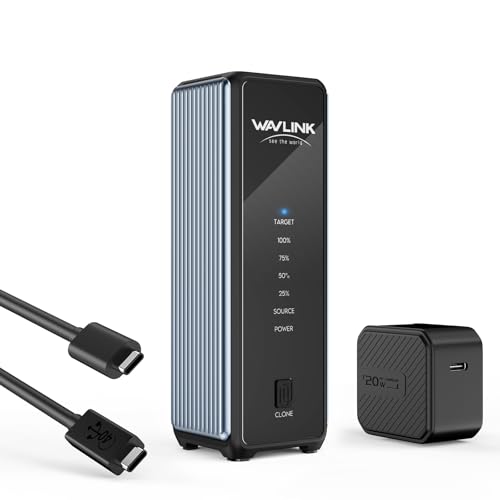
- 40Gbps USB4 connectivity
- Active cooling in a compact enclosure
- One-click dual-NVMe offline cloning
Best For: Portable NVMe upgrades and high-speed transfers
Best Hybrid Dock

- Supports M.2 NVMe and 2.5/3.5-inch SATA drives
- Offline cloning with buttons and progress LEDs
- Includes USB-C and USB-A cables
Best For: Mixed-drive backups, upgrades, and drive access
Best Dual-NVMe Pick

- Dual bays support compatible M Key and B+M Key NVMe SSDs
- One-button offline cloning without a computer
- USB 3.2 Gen 2x2 interface rated up to 20Gbps
Best For: High-speed NVMe duplication and transfers
Best Cooled Cloning Dock

- Clones between NVMe and SATA without a computer
- Supports M.2, 2.5-inch, and 3.5-inch SATA drives
- Built-in fan offers three cooling speeds
Best For: Cross-format migrations and sustained backups
Best NVMe Pick
Dual-Bay USB-C NVMe Cloner Dock

- Offline cloning without a computer
- Supports PCIe NVMe sizes 2230–2280
- 10Gbps USB-C dual-drive docking
Best For: Compatible M.2 NVMe SSD upgrades and duplication
Best Value SATA Dock

- Supports 2.5-inch and 3.5-inch SATA drives
- Offline cloning without a computer
- Up to 10TB drives and 5Gbps USB 3.0
Best For: Affordable SATA HDD and SSD cloning
Best USB-C SATA Option

- Offline 1-to-1 SATA cloning
- Fits bare 2.5-inch and 3.5-inch drives
- USB-C connectivity with dual-bay computer access
Best For: USB-C-equipped systems using SATA HDDs or SSDs
Most Versatile – ICY BOX Triple-Bay NVMe/SATA Cloner
If you need a hard drive enclosure with offline cloning that can handle more than one drive type, the ICY BOX TripleBay is a flexible option. Its three tool-free bays support M.2 PCIe NVMe drives alongside 2.5-inch and 3.5-inch SATA SSDs and HDDs, while USB 3.2 Gen 2 provides transfers up to 10Gbps when connected to a computer.
Best For: Users managing mixed NVMe and SATA drives, multi-drive backups, or frequent drive migrations.
Pros:
- One-touch offline cloning without software or a computer
- Supports NVMe-to-NVMe and SATA-to-NVMe cloning
- Three independent bays allow simultaneous drive access
- Includes USB-C/USB-A connectivity and a two-year warranty
Cons:
- The plastic enclosure may be less rugged than metal alternatives
- Its larger three-bay design is less portable than a compact enclosure
The ICY BOX stands out for compatibility and capacity rather than maximum transfer speed. Choose it if your storage setup includes several drive formats and you want a single offline cloning station.
Best for Dual NVMe Workflows – MOKiN USB4 M.2 Duplicator
The MOKiN is a hard drive enclosure with offline cloning built specifically for two M.2 NVMe SSDs. Its USB4 interface is rated up to 40Gbps, and a built-in cooling fan helps manage heat during demanding transfers or cloning. The tool-free clips support 2230, 2242, 2260, and 2280 drives.
Best For: NVMe-only users who want fast computer-based transfers and straightforward dual-drive cloning.
Pros:
- Offline cloning starts by holding the clone button for three seconds
- Supports two M.2 NVMe SSDs and multiple common lengths
- Built-in fan and metal enclosure assist with heat management
- Works with Windows, Linux, macOS, and Chrome OS
Cons:
- Does not support SATA SSDs or SSDs with heatsinks
- The target SSD must have capacity equal to or greater than the source
- Requires the power adapter for computer operation and maintenance
This MOKiN model is a focused NVMe duplicator, not a universal SATA dock. It makes the most sense when both source and destination drives are compatible bare M.2 NVMe SSDs.
Best Four-Bay SATA Dock – SABRENT DS-U3B4
For shoppers seeking a hard drive enclosure with offline cloning for several traditional SATA drives, the SABRENT DS-U3B4 offers four trayless bays. It accepts 2.5-inch and 3.5-inch SATA HDDs and SSDs, supports direct drive-to-drive cloning without a computer, and connects to a host over USB 3.0 at up to 5Gbps.
Best For: Desktop users who need to access, back up, or clone multiple 2.5-inch and 3.5-inch SATA drives.
Pros:
- Four independent bays support simultaneous drive management
- Offline clone function works without a computer
- Trayless design makes drive insertion simple
- Plug-and-play operation requires no drivers or software
Cons:
- Limited to SATA drives and USB 3.0 speeds up to 5Gbps
- Offline cloning is performed with the dock powered off from the host setup
- One-year limited warranty is shorter than some alternatives
The SABRENT is a practical, high-capacity SATA dock for users who value four-bay access over newer NVMe support. It is a strong fit for drive rotation, backups, and straightforward SATA cloning.
Best Portable USB4 Option – WAVLINK Dual NVMe Cloner
The WAVLINK combines a compact design with a hard drive enclosure with offline cloning for two M.2 NVMe SSDs. Its USB4 connection supports up to 40Gbps, while active cooling, an aluminum housing, and vents help control temperatures during heavy workloads. It supports M-key and B&M-key NVMe drives in sizes from 2230 through 2280.
Best For: Portable NVMe upgrades, fast transfers, and users working across modern laptops, tablets, and desktop systems.
Pros:
- One-click offline cloning between two NVMe SSDs
- Supports up to 8TB per drive and several M.2 sizes
- Active fan cooling and aluminum construction aid heat dissipation
- Compatible with USB4, Thunderbolt 3/4/5, USB 3.2, and USB 2.0 hosts
Cons:
- Does not support SATA drives
- The target drive must be at least as large as the source and is formatted during cloning
- Reported maximum speeds depend on the connected host and drive
WAVLINK is a compelling choice when portability and high-speed NVMe connectivity matter. Before cloning, back up important files and confirm the destination SSD has sufficient capacity because it will be formatted.
Best Hybrid Dock – Dual-Format NVMe/SATA Cloner
The SABRENT DS-UFNC is a practical hard drive enclosure with offline cloning for users who need one tool for M.2 PCIe NVMe drives and 2.5- or 3.5-inch SATA drives. Its tool-free lay-flat design supports quick swaps, while the included USB-C and USB-A cables make it easy to connect to newer and older computers.
Best For: Users upgrading, backing up, or accessing both NVMe and SATA drives.
Pros:
- Supports M.2 PCIe NVMe plus 2.5- and 3.5-inch SATA SSDs and HDDs.
- Offline cloning works without a computer, using a direction switch, clone button, and progress LEDs.
- Includes USB-C and USB-A cables, a 12V adapter, and tool-free drive access.
- Compatible with Windows, macOS, and Linux.
Cons:
- It supports one installed drive at a time for computer-connected use.
- The clone target must be equal to or larger than the source drive.
- Actual transfer speeds depend on the installed drive, especially with mechanical HDDs.
This is the most flexible option of the three for mixed-drive households or workbenches. Its 10Gbps interface is well suited to fast backups, while the broad format support reduces the need for separate docks.
Best Dual-NVMe Pick – Rosewill 20Gbps SSD Cloner
The Rosewill RS-N2-CL is a dual-bay hard drive enclosure with offline cloning designed specifically for M.2 NVMe SSDs. It supports M Key and B+M Key drives, offers a one-button standalone cloning function, and uses USB 3.2 Gen 2×2 for advertised speeds up to 20Gbps.
Best For: Users duplicating or transferring two compatible NVMe SSDs at high interface speeds.
Pros:
- Dual bays allow two NVMe SSDs to be used together.
- One-button offline cloning works without a computer.
- USB 3.2 Gen 2×2 supports advertised transfer rates up to 20Gbps.
- Includes USB-C and USB-A cables plus a 12V/2A power adapter.
Cons:
- It is intended for NVMe SSDs rather than 2.5- or 3.5-inch SATA drives.
- Maximum speeds depend on the host, cable, and installed SSD.
- It has a one-year warranty, shorter than the two-year warranties listed for the other options.
Choose this model when your workflow centers on two M.2 NVMe drives and fast transfers. Its narrower compatibility is a tradeoff for dual-bay NVMe functionality and a 20Gbps interface.
Best Cooled Cloning Dock – NVMe-to-SATA Backup Station
The GRAUGEAR 18140 is a hard drive enclosure with offline cloning that combines one M.2 NVMe slot with support for M.2 SATA, 2.5-inch SATA, and 3.5-inch SATA drives. It can clone between SATA and NVMe without a computer and adds a three-speed cooling fan for longer backup or migration sessions.
Best For: Users migrating between NVMe and SATA drives who want adjustable active cooling.
Pros:
- Supports offline SATA-to-NVMe and NVMe-to-SATA cloning.
- Handles M.2 NVMe, M.2 SATA, 2.5-inch SATA, and 3.5-inch SATA drives.
- Offers up to 10Gbps for NVMe and up to 6Gbps for SATA.
- Three-speed fan settings help manage drive heat during use.
Cons:
- The cloning process requires holding the button for five seconds before starting.
- It provides one M.2 NVMe slot and one SATA connection rather than two NVMe bays.
- Transfer performance varies by drive and connection type.
The adjustable fan makes this a useful choice for repeated transfers or workloads where drive temperature matters. Its SATA and NVMe cross-cloning support also suits system upgrades involving different drive formats.
Best NVMe Pick – Dual-Bay USB-C NVMe Cloner Dock
If you need a hard drive enclosure with offline cloning for M.2 storage, the SABRENT EC-SSD2 is designed specifically for PCIe NVMe SSDs. Its two bays support computer-free cloning, while USB-C connectivity lets you use both drives as a dual-drive dock.
Best For: Users upgrading or duplicating compatible M.2 NVMe SSDs.
Pros:
- Clones NVMe SSDs without a computer, software, or drivers.
- Supports 2230, 2242, 2260, and 2280 PCIe NVMe drives.
- USB 3.2 Gen 2 supports transfers up to 10Gbps, with both bays usable simultaneously.
- Aluminum body and built-in fan help manage heat during sustained transfers.
Cons:
- Supports NVMe only; M.2 SATA, AHCI, 2.5-inch, and 3.5-inch SATA drives are not compatible.
- The fan runs whenever the dock is powered.
- Large clones can take considerable time depending on data volume and drive speeds.
This is a specialized choice rather than a universal enclosure. Confirm that both drives are PCIe NVMe before buying, then use it as either an offline cloner or a fast two-drive USB-C dock.
Best Value SATA Dock – USB 3.0 Dual-Bay SATA Cloner
The SABRENT EC-HD2B is a practical hard drive enclosure with offline cloning for standard 2.5-inch and 3.5-inch SATA drives. It accommodates hard drives or SSDs, connects over USB 3.0, and works as a plug-and-play dock without requiring drivers.
Best For: Users cloning or accessing standard SATA hard drives and SSDs on a budget.
Pros:
- Supports both 2.5-inch and 3.5-inch SATA HDDs and SSDs.
- Provides offline cloning without a computer.
- Supports drives up to 10TB and transfer speeds up to 5Gbps over USB 3.0.
- Includes a power supply, USB 3.0 cable, and docking station.
Cons:
- Offline cloning is limited to up to 60Mbps.
- It uses USB 3.0 rather than USB-C.
- Designed for SATA drives, not M.2 or NVMe SSDs.
Choose this model when broad compatibility with bare SATA drives matters more than the fastest interface. It is a straightforward option for drive cloning, reading, and basic desktop storage access.
Best USB-C SATA Option – Dual-Bay SATA Drive Cloner
For standard SATA storage, the SABRENT EC-CH2B offers a hard drive enclosure with offline cloning and USB-C connectivity. It accepts bare 2.5-inch and 3.5-inch SATA drives, supports computer-free 1-to-1 cloning, and exposes both bays as separate drives when connected to a computer.
Best For: Users who want USB-C access and offline cloning for bare SATA HDDs or SSDs.
Pros:
- Clones one SATA drive to another without a computer.
- Supports bare 2.5-inch and 3.5-inch SATA HDDs and SSDs.
- Both bays can read and write simultaneously when connected to a computer.
- Tool-free, hot-swappable design with an access LED for each bay.
Cons:
- Does not support IDE/PATA, M.2, or NVMe drives.
- Offline cloning runs at up to 60MBps and requires a target drive at least as large as the source.
- The included cable is USB-C to USB-C; a USB-C-to-USB-A cable may be needed for some computers.
This dock is a strong fit for SATA users who specifically want USB-C. Check your computer’s port and verify the destination drive is large enough before starting an offline clone.
How We Picked the Best Hard Drive Enclosure with Offline Cloning
We focused on docks and enclosures that support standalone drive duplication, meaning the source and target drives can be cloned without relying on a computer-based cloning application. The selection covers M.2 NVMe models, SATA drive docks, dual-bay systems, and larger multi-bay stations.
We also considered interface speed, drive compatibility, installation method, physical layout, and practical use cases. A fast USB-C or USB4 connection matters when the enclosure is used as a reader, but offline cloning speed can still depend on the drives, controller, and source data.
Quick Comparison
- Best for mixed drive types: Choose a dock that accepts both M.2 and 2.5-inch or 3.5-inch SATA drives.
- Best for NVMe upgrades: Look for dual-bay M.2 models with support for the correct key type and size.
- Best for several SATA drives: A four-bay docking station offers more convenient access and cloning flexibility.
- Best for high-speed file transfers: USB4 or 40Gbps models can outperform USB 3.0 designs when your computer and SSD support the same standard.
- Best for simple desktop backups: A dual-bay SATA dock is usually easier to operate and less expensive than a multi-format station.
Key Buying Factors for a Hard Drive Enclosure with Offline Cloning
Drive Compatibility
Check whether the enclosure supports NVMe, SATA, or both. For M.2 drives, verify the interface, keying, and physical sizes such as 2230, 2242, 2260, and 2280. An NVMe slot does not automatically support SATA M.2 drives, and vice versa.
Cloning Direction and Capacity
Offline cloning normally copies one source drive to a target drive, so the target should be at least as large as the source. Some devices clone only between matching drive types, while multi-format docks may offer more flexibility. Confirm the product instructions before starting, because cloning usually erases existing data on the destination drive.
Connection Speed and Everyday Use
USB 3.0 is adequate for many hard drives, while USB-C 10Gbps is better suited to SATA SSDs and general file transfers. USB 3.2 Gen 2×2, USB4, or 40Gbps hardware can be worthwhile for fast NVMe drives, but the host computer, cable, and SSD must all support the faster standard.
Design and Installation
Tool-free M.2 bays make frequent drive changes easier. Lay-flat docks can be more stable on a desk, while enclosed designs offer better protection during transport. For several bare drives, consider power requirements, cooling, dust exposure, and whether the dock leaves connectors accessible.
Who Should Buy Which Hard Drive Enclosure with Offline Cloning?
Choose a dual-bay NVMe enclosure if you regularly upgrade M.2 SSDs or need fast drive-to-drive duplication. Choose a SATA dock for older laptop drives, desktop hard drives, and straightforward backup tasks. Choose a mixed-format or triple-bay station if your storage collection includes both M.2 and SATA drives. Choose a four-bay dock when you manage several bare SATA drives and value capacity over portability.
Before cloning, back up important files separately, identify the source and destination drives carefully, and avoid disconnecting power during the process. Offline cloning is convenient, but it is not a substitute for maintaining a second independent backup.