The best hard drive enclosure with Thunderbolt 4 can turn an internal SSD or multiple drives into fast, flexible external storage for a Mac, PC, or professional workstation.
These 10 picks cover compact NVMe enclosures, multi-bay RAID systems, and USB4 models with Thunderbolt compatibility, helping you match capacity, speed, cooling, and expandability to your workflow.
Best 10 Hard Drive Enclosure with Thunderbolt 4 Picks for 2026
Best Multi-Drive Array

- Four bays for 3.5-inch or 2.5-inch SATA drives
- Supports multiple RAID configurations
- Up to 1,527MB/s sustained performance
Best For: Desktop RAID storage on Mac or Windows Thunderbolt systems
Best Five-Bay USB4 Enclosure

- Five-bay design for 3.5-inch drives
- USB4 40Gbps with Thunderbolt 3/4/5 compatibility
- Lockable removable drive trays
Best For: High-capacity desktop storage for USB4 and Thunderbolt workstations
Best Four-SSD RAID Box

- Four slots for 2230, 2242, or 2280 NVMe SSDs
- Up to 3,200MB/s real-world performance
- SoftRAID and adaptive cooling support
Best For: Expandable NVMe RAID storage for creative Mac and Windows workstations
Best Multi-Drive NVMe Expansion
TERRAMASTER D4 SSD 4-Bay Enclosure

- Four M.2 NVMe bays with up to 32TB capacity
- 40Gbps interface supports Thunderbolt 4
- Tool-free, hot-swappable design with active cooling
Best For: Multi-drive video editing, backups, and desktop storage expansion
Best Hybrid RAID Storage
ACASIS 4-Bay Thunderbolt Enclosure

- Combines SATA HDD and NVMe bays
- Supports HDD RAID 1 and NVMe RAID 0
- Includes active cooling and 8K@60Hz output
Best For: Hybrid storage workflows needing capacity, speed, and RAID flexibility
Best Portable Single-Drive Pick

- USB4 40Gbps with Thunderbolt 4 compatibility
- Compact aluminum design with built-in cooling fan
- Tool-free support for one 2280 PCIe NVMe SSD
Best For: Portable, high-speed NVMe storage expansion
Fanless Speed Pick

- 40Gbps USB4 and Thunderbolt 4/5 support
- Silent fanless aluminum chassis
- Fits M.2 NVMe drives up to 8TB
Best For: Quiet, high-speed Mac and Windows storage
Active-Cooling Workhorse
UGREEN Dual-Chip NVMe Enclosure
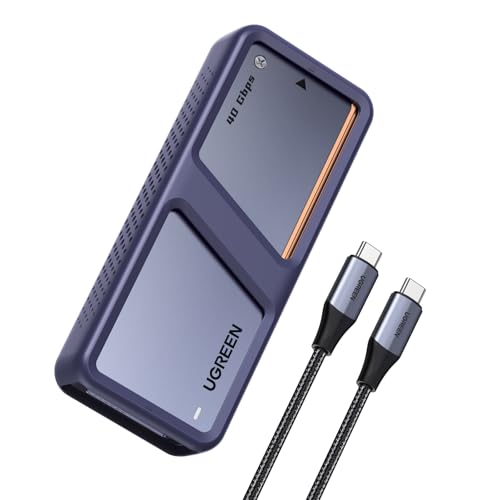
- 40Gbps Thunderbolt 4 and USB4 support
- Temperature-activated cooling fan
- Supports NVMe SSDs up to 8TB
Best For: Sustained transfers, video editing, and Mac mini setups
Tool-Free Design Pick
Yottamaster 40Gbps NVMe Enclosure

- Tool-free installation with transparent cover
- 40Gbps Thunderbolt 4 and USB4 connectivity
- Active cooling and ASM2464PD controller
Best For: Easy drive swaps, gaming, and video editing
Best Multi-Drive Array – OWC ThunderBay 4
The OWC ThunderBay 4 is a strong choice when a hard drive enclosure with Thunderbolt 4-style high-bandwidth connectivity needs to support several drives. Its four bays accept 3.5-inch or 2.5-inch SATA drives, while RAID options add flexibility for performance or redundancy.
Best For: Desktop users building a four-drive storage array for Mac or Windows systems with Thunderbolt connectivity.
Pros:
- Holds up to four 3.5-inch or 2.5-inch drives without adapters
- Supports RAID 0, 1, 4, 5, and 1+0 configurations
- Offers up to 1,527MB/s sustained performance
- Aluminum chassis is designed for heat dissipation and quiet operation
Cons:
- Uses Thunderbolt 3 rather than Thunderbolt 4
- Large, heavier desktop enclosure
- Drives are not included in the listed configuration
Choose the ThunderBay 4 if expandability and RAID support matter more than portability. It is less suitable for a simple one-drive setup or a travel-focused workstation.
Best Portable NVMe Pick – SABRENT USB4 NVMe Enclosure
The SABRENT EC-U4TN is a compact hard drive enclosure with Thunderbolt 4 compatibility for a single PCIe NVMe SSD. It combines tool-free installation, USB4 connectivity, and active cooling in a portable design.
Best For: Creators and mobile users who want fast, portable NVMe storage for USB4 or Thunderbolt-equipped computers.
Pros:
- Supports PCIe NVMe drives from 2230 through 2280 sizes
- Tool-free installation simplifies drive swaps
- Rated for up to 3,900MB/s over USB4 and 2,700MB/s with Thunderbolt 3/4
- Integrated fan helps manage heat during large transfers
Cons:
- Does not support SATA M.2 SSDs
- Holds only one SSD
- Thunderbolt operation is listed below the maximum USB4 speed
This enclosure is a practical match for users who already have an NVMe drive and need a small, high-speed external housing. Confirm that your SSD is PCIe NVMe before buying.
Best Five-Bay USB4 Enclosure – Oyen Digital Fortis
The Oyen Digital Fortis is a five-drive hard drive enclosure with Thunderbolt 4 compatibility through its USB4 40Gbps interface. It is built for users who need substantial desktop storage, removable trays, and a durable aluminum chassis.
Best For: Professional or creative workstations that need five 3.5-inch drives and USB4 or Thunderbolt host compatibility.
Pros:
- Provides five drive bays for 3.5-inch drives
- USB4 40Gbps works with USB4 and Thunderbolt 3, 4, and 5 hosts
- Removable trays include key locks
- Includes a USB-C cable, power adapter, and key set
Cons:
- Not compatible with USB 3.x or earlier ports
- Listed as a USB4 enclosure rather than a native Thunderbolt device
- Designed for desktop use and requires external power
The Fortis stands out for capacity and access control, making it more appropriate for a fixed workstation than a portable setup. Check your computer’s port support carefully, especially if it uses older USB connections.
Best Four-SSD RAID Box – OWC Express 4M2
The OWC Express 4M2 is a four-slot hard drive enclosure with Thunderbolt 4-compatible USB4 connectivity, designed for users who prefer multiple NVMe M.2 SSDs. Its SoftRAID support, aluminum construction, and adaptive cooling target demanding creative workloads.
Best For: Mac and Windows users assembling a high-speed four-SSD workspace with flexible RAID options.
Pros:
- Accepts four NVMe M.2 drives in 2230, 2242, or 2280 sizes
- Supports USB4, Thunderbolt, and USB-C hosts
- Offers up to 3,200MB/s real-world performance
- Adaptive fans activate under heavier loads for quieter everyday use
Cons:
- Requires separate NVMe SSDs
- External power supply is required
- Four-drive RAID setup may be more involved than a single-drive enclosure
The Express 4M2 is a versatile option when you want scalable NVMe storage rather than a preconfigured external disk. Its RAID support and cooling features make it especially relevant for sustained creative workflows.
Best Multi-Drive NVMe Expansion – TERRAMASTER D4 SSD 4-Bay Enclosure
If you need a hard drive enclosure with thunderbolt 4 support for several high-speed SSDs, the TERRAMASTER D4 SSD is a compact four-bay NVMe option. It supports Thunderbolt 5, 4, and 3 through its 40Gbps USB-C interface, with claimed speeds up to 3,224MB/s using four SSDs.
Best For: Video editors, backup users, and Mac or Windows owners who want four individually managed M.2 NVMe drives in one enclosure.
Pros:
- Supports four M.2 NVMe 2280 SSDs and up to 32TB total capacity.
- Compatible with Thunderbolt 4, Thunderbolt 3, USB4, and earlier USB standards.
- Tool-free, hot-swappable design with temperature-controlled cooling.
Cons:
- It does not include built-in RAID; software RAID requires third-party tools.
- SSD drives are not included.
The D4 SSD is a strong choice when expandability matters more than a simple single-drive setup. Its cooling, backup features, and compact design suit demanding storage workflows, but users wanting turnkey hardware RAID should consider another model.
Best Hybrid RAID Storage – ACASIS 4-Bay Thunderbolt Enclosure
The ACASIS combines SATA and NVMe storage in one hard drive enclosure with thunderbolt 4 compatibility. Its two HDD bays accept 3.5-inch or 2.5-inch SATA drives, while two NVMe bays target faster editing and gaming workloads through a USB4 40Gbps connection.
Best For: Creative professionals and power users who want high-capacity HDD storage alongside faster NVMe storage, RAID options, and 8K display output.
Pros:
- Combines two SATA HDD/SSD bays with two M.2 NVMe bays.
- Supports hardware RAID 1 for HDD mirroring and software RAID 0 for NVMe drives.
- Aluminum construction, active cooling, 96W power supply, and 8K@60Hz output.
Cons:
- Full 40Gbps performance requires RAID mode and a compatible Thunderbolt 3/4/5 or USB4 port.
- Drive capacity and performance depend on the installed drives.
- Its hybrid design is less compact than a single-drive enclosure.
This is the most versatile option of the three for users managing different storage tiers. It can pair affordable, high-capacity HDDs with fast NVMe drives, though its RAID setup and broader feature set may be excessive for basic external storage.
Best Portable Single-Drive Pick – WAVLINK 40Gbps NVMe Enclosure
For a compact hard drive enclosure with thunderbolt 4 compatibility, the WAVLINK offers a straightforward single-drive solution. Its USB4 interface supports PCIe NVMe SSDs at up to 40Gbps, while the aluminum body, thermal pad, strip, and built-in fan help manage heat during intensive transfers.
Best For: Portable storage users who already own a compatible 2280 PCIe NVMe SSD and want fast plug-and-play expansion for Windows, macOS, or Linux.
Pros:
- USB4 40Gbps interface is compatible with Thunderbolt 4, Thunderbolt 3, and USB4.
- Compact, lightweight design includes a pouch and carrying strap.
- Tool-free installation and active cooling support sustained performance.
Cons:
- Supports one PCIe NVMe SSD only, with expansion support up to 8TB.
- Does not support AHCI or SATA SSDs.
- Maximum speeds depend on the computer, SSD, and connection.
The WAVLINK is a practical travel-friendly choice for adding one fast NVMe drive without the size or complexity of a multi-bay enclosure. Confirm that your SSD is a supported M-key or B&M-key PCIe NVMe 2280 model before buying.
Fanless Speed Pick – Qwiizlab USB4 NVMe Enclosure
If you want a hard drive enclosure with Thunderbolt 4 for fast external storage, the Qwiizlab ES40UR combines USB4 40Gbps connectivity with a quiet, fanless aluminum design. It supports M.2 NVMe PCIe drives in several sizes and capacities up to 8TB, though the SSD must be purchased separately.
Best For: Mac and Windows users who prioritize quiet operation, high throughput, and a compact aluminum enclosure.
Pros:
- Supports USB4 and Thunderbolt 4/5 with advertised transfer rates up to 40Gbps.
- Fanless aluminum construction helps dissipate heat without mechanical fan noise.
- Fits M.2 NVMe drives in 2230, 2242, 2260, and 2280 sizes up to 8TB.
- Includes a 40Gbps USB-C cable, thermal pads, screws, screwdriver, and carrying bag.
Cons:
- SSD is not included.
- Not compatible with Thunderbolt 1 or Thunderbolt 2 ports.
- Peak performance depends on the host, cable, and installed SSD.
The Qwiizlab is a strong choice when silent operation matters as much as speed. Its broad M.2 size support and included installation accessories add flexibility, while Thunderbolt 3 backward compatibility helps with older compatible systems.
Active-Cooling Workhorse – UGREEN Dual-Chip NVMe Enclosure
For a hard drive enclosure with Thunderbolt 4 designed for demanding transfers, the UGREEN D703 pairs a 40Gbps JHL7440 chip with a 10Gbps RTL9210 chip. Its aluminum housing and temperature-activated fan are intended to manage heat during sustained workloads, and it supports NVMe storage up to 8TB.
Best For: Mac mini owners and Windows, macOS, or Linux users handling large files, video editing, and backups.
Pros:
- Supports Thunderbolt 4/3 and USB4 with speeds up to 40Gbps.
- Smart cooling fan activates above 40°C to help manage heat.
- Supports 2280 M.2 NVMe M-Key or B+M-Key SSDs up to 8TB.
- Includes S.M.A.R.T. monitoring and TRIM support for drive management.
Cons:
- SSD is not included.
- Does not support SATA-based, PCIe 5.0, or 9100 SSDs.
- Thunderbolt 4 cables and devices are required to reach the stated 3600MB/s maximum.
The D703 stands out for active thermal management and broad operating-system support. It is a practical fit for performance-oriented users, provided their SSD and Thunderbolt setup meet the enclosure’s compatibility requirements.
Tool-Free Design Pick – Yottamaster 40Gbps NVMe Enclosure
The Yottamaster is a hard drive enclosure with Thunderbolt 4 aimed at quick installation and portable performance. Its transparent, tool-free cover accepts multiple M.2 NVMe sizes, while the ASM2464PD controller and active cooling fan support stable operation during demanding tasks.
Best For: DIY builders, gamers, and video editors who want a visible, easy-to-install enclosure for Windows, USB-C, Thunderbolt 4, or USB4 devices.
Pros:
- Tool-free installation takes three steps and does not require a screwdriver.
- Supports Thunderbolt 4 and USB4 with a 40Gbps-rated connection.
- Fits 2230, 2242, 2260, and 2280 NVMe SSDs up to 8TB.
- Transparent cover displays the activity LED and fan status.
Cons:
- Actual sustained speeds are typically listed at 2800–3200MB/s rather than the full interface rate.
- SSD is not included.
- Performance varies with the SSD, host system, cable, and workload.
The Yottamaster emphasizes convenience and visual feedback without giving up high-speed connectivity. Its tool-free design is especially appealing for users who frequently swap drives or want a straightforward enclosure for creative and gaming workflows.
How We Picked the Best Hard Drive Enclosure with Thunderbolt 4
We focused on enclosure design, interface performance, drive compatibility, cooling, expandability, and practical installation. The lineup includes single-drive NVMe models, four-bay and five-bay systems, and hybrid enclosures for users who need more than portable scratch storage.
Because USB4 and Thunderbolt 4 products can vary substantially, we also considered whether each enclosure is better suited to a single high-speed SSD, multiple independent drives, or a RAID-based desktop setup. Features such as tool-free installation, included cooling, SoftRAID support, fanless construction, and compatibility with 2.5-inch or 3.5-inch SATA drives helped distinguish the options.
Quick Comparison
| Best For | Recommended Type | What to Look For |
|---|---|---|
| Portable high-speed storage | Single NVMe enclosure | 40Gbps USB4, strong thermal management, tool-free access |
| Video editing and large projects | Four-bay NVMe enclosure | RAID support, sustained cooling, reliable power delivery |
| Mixed drive collections | Multi-bay SATA or hybrid enclosure | Drive-size support, independent bays, flexible RAID options |
| Quiet desk setups | Fanless aluminum enclosure | Thermal pads, ventilation, and realistic sustained-speed expectations |
Key Buying Factors for a Hard Drive Enclosure with Thunderbolt 4
Interface and Real-World Speed
Thunderbolt 4 and USB4 advertise up to 40Gbps, but actual file-transfer rates depend on the SSD, controller, cable, host computer, filesystem, and workload. A fast NVMe drive benefits most from a direct connection to a compatible Thunderbolt 4 or USB4 port. Check whether the enclosure includes an appropriate cable and whether your computer supports the advertised mode.
Drive Compatibility and Capacity
Confirm the enclosure’s physical and electrical requirements before buying. M.2 models generally use NVMe drives rather than SATA M.2 drives, while multi-bay systems may accept 2.5-inch or 3.5-inch SATA disks. Maximum capacity limits, drive-length support, and single-sided versus double-sided M.2 compatibility can also matter.
Cooling, Noise, and Sustained Transfers
High-speed SSDs generate heat during long transfers. Fans can preserve performance but add noise and moving parts; fanless aluminum designs are quieter but rely more heavily on heatsinks, thermal pads, and airflow. For sustained video, backup, or project-file workloads, prioritize cooling over peak burst-speed claims.
RAID, Power, and Software
Multi-drive enclosures may support RAID for speed, redundancy, or combined capacity, but RAID is not a substitute for a backup. Desktop four- and five-bay models usually need dedicated power, while compact single-drive units are more portable. Check software requirements, operating-system support, and whether RAID management is hardware- or software-based.
Who Should Buy Which Hard Drive Enclosure with Thunderbolt 4?
Choose a compact single-NVMe enclosure if you want portable scratch space, a bootable external drive, or a simple way to reuse one M.2 SSD. A four-slot NVMe enclosure makes more sense for editors, developers, and creators who need several fast volumes or a flexible RAID workspace.
Pick a SATA multi-bay model if you already own larger hard drives or want economical bulk storage. Hybrid designs suit buyers who need both SATA and NVMe flexibility. Finally, select a fanless model for quiet everyday use, and a fan-cooled enclosure when sustained performance and thermal headroom matter most.