Building a network-attached storage system around a PC gives you more control over hardware, operating systems, drive capacity, and upgrades than many prebuilt appliances. The right enclosure is the foundation of that setup, affecting cooling, noise, expandability, and installation convenience.
Our roundup covers everything from compact USB-connected multi-drive enclosures to full-size ATX and rackmount cases. Use the guide below to match each design with your storage goals, motherboard, drive mix, and available space.
Best 10 Nas Enclosures for PC Picks for 2026
Best High-Capacity DIY NAS Case

- Supports up to 11 internal 3.5-inch HDDs
- Four 140mm PWM fans with mesh front panel
- ATX and BTF motherboard compatibility
Best For: DIY NAS, media servers, and file storage builds
Best USB-C Four-Drive DAS

- Four-bay diskless enclosure with USB 3.2 Gen 2
- Supports hot swapping and tool-free trays
- Works with Windows, Mac, and Linux
Best For: Direct-attached storage and plug-and-play drive expansion
Best Full-Tower NAS PC Case

- Supports up to 13 hard drives
- Mesh panels and 360mm radiator support
- ATX, Micro-ATX, and Mini-ITX compatible
Best For: Large storage builds with demanding cooling needs
Best Budget Four-Bay DAS

- Supports four 2.5-inch or 3.5-inch SATA drives
- USB 3.0 with USB-A and USB-C cables
- Hot-swappable, tool-free drive installation
Best For: Affordable external storage expansion for desktop or laptop users
Rackmount Expansion Pick
Rosewill RSV-R4100U 4U Server Chassis
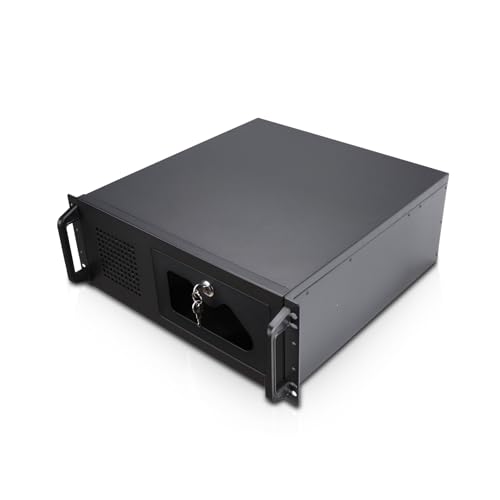
- Seven internal 3.5-inch HDD bays
- ATX/CEB support with PCI expansion room
- Front USB 3.0, lock, monitoring, and PWM fans
Best For: Expandable rack-based PC NAS builds
Flexible Multi-Drive Build

- Supports eight 3.5-inch HDDs and two 2.5-inch SSDs
- Works with MATX, uATX, and ITX motherboards
- Three power-supply and drive configurations
Best For: High-capacity DIY private-cloud builds
External Expansion Dock

- Four SATA bays for 3.5-inch and 2.5-inch drives
- 10Gbps USB-C connectivity with independent bay switches
- Built-in cooling fans and 4K HDMI output
Best For: External desktop or laptop storage expansion
High-Capacity Workstation NAS
Rosewill Thor Full-Tower NAS Chassis

- Supports E-ATX and cards up to 400mm
- Holds up to 11 HDDs or 13 SSDs
- Includes USB-C and a 140mm PWM fan
Best For: Large storage arrays, AI servers, and workstation builds
Quiet DIY Storage NAS
AUDHEID 8-Bay Hot-Swap Enclosure

- Eight hot-swap HDD or SSD bays
- Separate cooling paths for drives and board
- Includes three quiet temperature-controlled fans
Best For: Media servers, backups, and small-business storage
Best High-Capacity DIY NAS Case – Rosewill Helium NAS Max
For builders comparing nas enclosures for pc, the Rosewill Helium NAS Max is a spacious ATX mid-tower designed around large local storage arrays. It supports up to 11 internal 3.5-inch hard drives, includes four pre-installed 140mm PWM fans, and offers a mesh front panel for airflow.
Best For: DIY NAS systems, media servers, file storage, and small-business server builds.
Pros:
- Supports up to 11 3.5-inch HDDs.
- Compatible with Mini-ITX, Micro-ATX, ATX, and BTF motherboards.
- Includes four 140mm PWM fans and a mesh front panel.
- Provides a front USB 3.2 Type-C port.
Cons:
- Its mid-tower dimensions and 15-pound weight require substantial desk or floor space.
- It is a computer case, so drives, motherboard, power supply, and other components are sold separately.
The Helium NAS Max stands out when maximum internal drive capacity matters more than compact size. Its cooling and motherboard compatibility make it a flexible foundation for a custom NAS, though assembling the complete system requires separate components.
Best USB-C Four-Drive DAS – TERRAMASTER D4-320
The TERRAMASTER D4-320 is a useful alternative for shoppers seeking nas enclosures for pc but needing direct-attached storage rather than a networked NAS. This diskless four-bay enclosure connects over USB 3.2 Gen 2, supports individual drives without RAID, and works with Windows, Mac, and Linux.
Best For: Plug-and-play external storage, desktop backups, and users who want four individually accessible drives.
Pros:
- USB 3.2 Gen 2 Type-C connectivity supports up to 10Gbps.
- Holds four 3.5-inch or 2.5-inch SATA drives, with up to 120TB total capacity according to the supplied specifications.
- Tool-free trays and hot-swappable drive support simplify drive management.
- Temperature-controlled cooling, sound-absorbing panels, and vibration damping support quieter operation.
Cons:
- It is a DAS, not a network-attached storage device.
- It has no RAID function.
- Drives are not included.
The D4-320 is best viewed as a fast, simple external drive enclosure rather than a complete NAS. Its USB-C interface and hot-swap design suit direct computer access, while the lack of RAID and networking limits its role in a traditional NAS setup.
Best Full-Tower NAS PC Case – DARKROCK Classico MAX
The DARKROCK Classico MAX is a full-tower option among nas enclosures for pc, combining extensive drive support with room for larger PC cooling hardware. It accommodates up to 13 hard drives, uses mesh front and side panels, and supports a 360mm radiator for more demanding builds.
Best For: High-capacity NAS or storage-oriented PC builds that need expansive cooling and component room.
Pros:
- Supports up to 13 hard drives, including 10 3.5-inch HDDs and three 2.5-inch SSDs according to the supplied highlight.
- Compatible with ATX, Micro-ATX, and Mini-ITX motherboards.
- Mesh front and side panels promote airflow.
- Supports a 360mm radiator and vertical GPU mounting.
Cons:
- Its full-tower footprint is relatively large.
- The supplied specifications are inconsistent about the fan count, so verify the included fan configuration before purchase.
- It is an empty case and does not include storage drives or core PC components.
Choose the Classico MAX when your priority is a roomy storage chassis with strong cooling flexibility. It is particularly appealing for custom builds that combine many drives with high-performance components, although its size may be excessive for a compact home NAS.
Best Budget Four-Bay DAS – CENMATE 4-Bay Enclosure
For shoppers considering nas enclosures for pc on a smaller scale, the CENMATE 4-Bay enclosure provides straightforward external storage expansion. It accepts 2.5-inch and 3.5-inch SATA drives, connects through USB 3.0, and includes both USB-A and USB-C cables.
Best For: Personal or business desktop storage expansion with up to four SATA drives.
Pros:
- Supports four 2.5-inch or 3.5-inch HDDs and SSDs.
- Offers up to 80TB capacity based on four 20TB drives.
- Tool-free, hot-swappable design simplifies drive changes.
- Aluminum construction and a built-in cooling fan help manage heat.
Cons:
- It is explicitly a DAS with no RAID or NAS functionality.
- USB 3.0 provides up to 5Gbps, slower than newer USB 3.2 Gen 2 enclosures.
- The supplied notes report fan noise around 40–50 decibels.
The CENMATE is a practical choice for adding several SATA drives to a computer without building a full NAS. Its capacity and drive flexibility are useful, but users wanting networking, RAID, or quieter operation should consider a more advanced enclosure or dedicated NAS.
Rackmount Expansion Pick – Rosewill RSV-R4100U 4U Server Chassis
For builders seeking NAS enclosures for PC projects, the Rosewill RSV-R4100U is a spacious 4U rackmount chassis designed around expandable server hardware. It provides seven internal 3.5-inch bays, ATX/CEB motherboard compatibility, and front-access utility features for home-server or rack-based installations.
Best For: PC-based NAS builds that need rackmount installation, multiple hard-drive bays, and room for expansion.
Pros:
- Seven internal 3.5-inch HDD bays support larger storage builds.
- ATX and CEB compatibility plus seven PCI expansion slots provide upgrade flexibility.
- Includes front USB 3.0 ports, HDD monitoring, a lock, and three pre-installed PWM fans.
Cons:
- It supports HDDs with three screw holes on each side, not models with two screw holes on each side.
- The rackmount form factor is large and less suitable for compact desktop setups.
- The power supply mounting arrangement is external, so planning is required during assembly.
The RSV-R4100U is a strong choice when drive capacity and rack compatibility matter more than a small footprint. Verify your hard-drive mounting pattern and available rack space before buying.
Flexible Multi-Drive Build – AUDHEID 8-Bay NAS Chassis
This AUDHEID chassis is one of the more purpose-built NAS enclosures for PC storage projects, supporting up to eight 3.5-inch hard drives alongside two 2.5-inch SSDs. Its layered internal layout and multiple power-supply configurations give builders flexibility when balancing drive count, cooling, and component selection.
Best For: DIY private-cloud and NAS builds using multiple hard drives with a compact MATX, uATX, or ITX motherboard.
Pros:
- Supports eight 3.5-inch HDDs and two 2.5-inch SSDs.
- Offers three drive-and-power-supply combinations for different build priorities.
- Compatible with MATX, uATX, and ITX boards, with a layered design intended to improve airflow and assembly.
Cons:
- Half-height PCIe devices are limited to less than 285 mm.
- Water-cooling radiator height is limited to 80 mm.
- The chassis does not include a warranty according to the supplied details.
With its high drive count and broad small-form-factor motherboard support, this chassis is well suited to custom storage servers. Confirm your power-supply format, expansion-card dimensions, and cooling hardware before assembling the system.
External Expansion Dock – WAVLINK 4-Bay USB-C Enclosure
For users who want NAS enclosures for PC storage expansion without installing a new internal chassis, the WAVLINK four-bay enclosure connects through USB-C. It accepts 3.5-inch and 2.5-inch SATA drives, adds 10Gbps transfer capability, and includes independent bay power controls for a convenient desktop setup.
Best For: Desktop or laptop users who need removable multi-drive storage, fast USB-C transfers, and an external enclosure.
Pros:
- Four SATA 6Gbps bays support 3.5-inch HDDs and 2.5-inch SSDs.
- USB 3.2 Type-C provides data transfer speeds of up to 10Gbps.
- Aluminum construction, temperature-controlled fans, independent power switches, and HDMI output add versatility.
Cons:
- 2.5-inch drives require separate 2.5-to-3.5-inch mounting brackets.
- HDMI output requires a host USB-C port with video output and a USB-C-to-C cable.
- It is an external four-bay dock rather than a full internal PC chassis or rackmount enclosure.
The WAVLINK is a practical plug-in expansion option for computers that need several SATA drives without a full system rebuild. Check your host USB-C capabilities and plan for mounting brackets if using 2.5-inch drives.
High-Capacity Workstation NAS – Rosewill Thor Full-Tower NAS Chassis
For builders seeking nas enclosures for pc projects with substantial storage and expansion needs, the Rosewill Thor is a full-tower option supporting E-ATX motherboards and up to 11 3.5-inch HDDs or 13 2.5-inch SSDs. Its large chassis is suited to demanding DIY NAS, workstation, media-server, and AI-server builds.
Best For: Enterprise-style storage, AI servers, professional workstations, and large media hubs.
Pros:
- Supports E-ATX motherboards and expansion cards up to 400mm.
- Offers capacity for up to 11 3.5-inch HDDs or 13 2.5-inch SSDs.
- Includes a 140mm PWM fan, dust filter, hot-swap support, and USB 3.2 Type-C.
Cons:
- Its full-tower 20.1-by-9.1-by-20.9-inch footprint requires considerable space.
- Only one fan is included, so high-performance builds may need additional cooling planning.
The Thor emphasizes maximum capacity and component flexibility rather than compactness. It is a strong choice when a home or small-business NAS needs workstation-class expansion room and many drive bays.
Compact Walnut NAS – JONSBO N4 8-Drive PC Case
The JONSBO N4 is a compact choice among nas enclosures for pc builders who want an attractive home or office server. It combines an 8-drive layout with four hot-swap bays, Micro-ATX or Mini-ITX compatibility, and a distinctive black walnut front treatment.
Best For: Home servers, compact office storage, and personal media or backup systems.
Pros:
- Provides six 3.5-inch HDD positions and two 2.5-inch SSD positions.
- Four of the HDD bays support hot swapping.
- Compact design includes USB 3.2 Gen 2 Type-C and a built-in 120mm fan.
- Walnut wood accents give the enclosure a furniture-friendly appearance.
Cons:
- Limited to Mini-ITX or Micro-ATX motherboards and SFX power supplies.
- The 70mm CPU-cooler and 230mm GPU limits restrict component choices.
- Only one 120mm fan is built in.
The N4 balances storage capacity with a relatively compact 286-by-300-by-228mm chassis. Check cooler, PSU, and graphics-card dimensions carefully before choosing it for a customized build.
Quiet DIY Storage NAS – AUDHEID 8-Bay Hot-Swap Enclosure
The AUDHEID 8-bay enclosure is designed for DIY builders comparing nas enclosures for pc-based media servers, private clouds, and backup systems. It supports both 3.5-inch HDDs and 2.5-inch SSDs, while its separate air channels and temperature-controlled fans are intended for continuous operation.
Best For: Plex or Jellyfin servers, home backups, surveillance storage, and small-business file archives.
Pros:
- Eight hot-swap bays support both 3.5-inch HDDs and 2.5-inch SSDs.
- Dual independent air channels separate drive and motherboard cooling.
- Includes three temperature-controlled silent fans and drive status indicators.
- Supports Mini-ITX and Micro-ATX boards, plus 1U or FLEX power supplies.
Cons:
- CPU cooler height is limited to 58mm.
- Motherboard, CPU, and other core components are not included.
- The supplied details do not specify a USB-C port or included power supply.
With included drive stands, SATA cables, screws, and fans, the AUDHEID offers a practical starting point for a customized 8-drive server. Its airflow layout and hot-swap access make it especially appealing for frequently used storage systems.
How We Picked These Nas Enclosures for PC
We selected models across the main DIY NAS categories: external multi-bay enclosures, compact Mini-ITX and Micro-ATX cases, ATX towers, and rackmount chassis. We considered drive capacity, support for 3.5-inch hard drives and 2.5-inch SSDs, cooling, motherboard compatibility, hot-swap access, expansion potential, and connectivity.
Because these products serve different purposes, there is no single best enclosure for every build. A diskless USB enclosure may suit simple desktop storage expansion, while a full tower or server chassis is better for a custom NAS with a dedicated motherboard, power supply, and operating system.
Quick Comparison
| Enclosure type | Best for | Main advantage | Watch for |
|---|---|---|---|
| External 4-bay enclosure | Simple storage expansion | Easy USB setup | Less server-hardware flexibility |
| Compact NAS case | Quiet home servers | Small footprint | Limited internal space |
| ATX tower | Expandable DIY NAS builds | Broad component compatibility | Requires more room |
| Rackmount chassis | Homelabs and server racks | High-density installation | Potentially louder and deeper |
Key Buying Factors for Nas Enclosures for PC
Drive Capacity and Layout
Count your current drives and planned expansion. Check whether the listed bays are dedicated 3.5-inch trays, shared 2.5/3.5-inch mounts, or external-facing bays. Hot-swap trays are convenient for replacing drives, but fixed internal mounts can reduce cost and improve structural simplicity.
Motherboard and Power-Supply Compatibility
DIY cases may support Mini-ITX, Micro-ATX, ATX, CEB, or E-ATX boards. Verify the exact form factor before buying, along with power-supply dimensions and cable clearance. A case that holds many drives still needs enough room for the motherboard, controller cards, and power wiring.
Cooling and Noise
Hard drives generate heat during sustained transfers and parity operations. Look for direct airflow across the drive bays, included PWM fans, dust-filter access, and sensible fan placement. Larger fans can move air more quietly, while small rackmount fans often prioritize density over acoustics.
Connectivity and Expansion
External enclosures depend heavily on their USB interface and controller quality. USB 3.2 or 10Gbps connectivity can improve transfer performance, but actual speeds depend on the host port, drives, bridge chipset, and workload. For a PC-based NAS, leave room for SATA, SAS, 10GbE, or HBA expansion if your plans may grow.
Who Should Buy Which Nas Enclosures for PC?
Choose an external four-bay enclosure if you want a straightforward, diskless way to attach several drives to an existing computer without building a complete server. These are also practical for backups and removable storage pools.
Choose a compact NAS case for a home server that must fit on or under a desk. Confirm motherboard, cooler, GPU, and drive-clearance limits before purchasing.
Choose an ATX tower if flexibility and future expansion matter most. Larger cases are generally easier to build in and can accommodate more cards, cooling hardware, and storage.
Choose a rackmount chassis when your NAS belongs in a standard server rack or homelab. Measure rack depth and account for fan noise, rails, front clearance, and the location of your network and power connections.