High-end PCs generate serious heat, especially during gaming, content creation, and sustained workloads. The right case fans help maintain consistent temperatures without adding distracting noise or complicating cable management.
These 10 options cover premium 120mm and 140mm fans, high-static-pressure designs, ARGB models, and value-focused multipacks. Use the guide below to match airflow, acoustics, control features, and installation needs to your build.
Best 10 Computer Cooling Fans for High End PCs Picks for 2026
Premium Quiet Pick

- Quiet 120mm design rated at 22.6 dB(A)
- Up to 2,000 RPM with 4-pin PWM control
- Includes radiator gasket and anti-vibration accessories
Best For: Quiet, high-performance case and radiator cooling
ARGB Multi-Fan Choice
CORSAIR RS120 ARGB Triple Pack
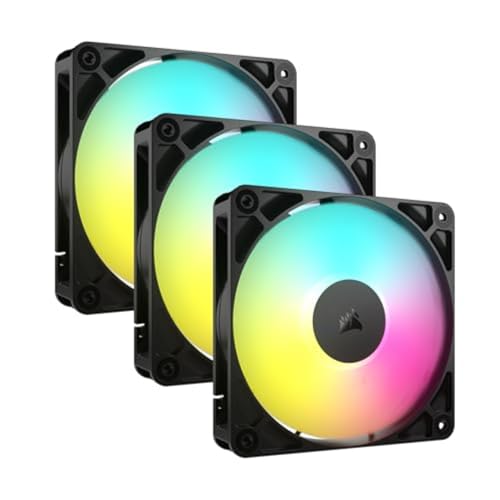
- Three 120mm PWM fans with ARGB lighting
- Daisy-chain control simplifies cable management
- Up to 2,100 RPM with 72.8 CFM airflow
Best For: ARGB-equipped multi-fan gaming and workstation builds
Large Quiet Airflow Pick

- 140mm design delivers 155.6 m³/h airflow
- 300–1,500 RPM PWM range with 0% PWM stop
- All-black finish and extensive accessory kit
Best For: Quiet 140mm case, radiator, and CPU-cooler airflow
Value ARGB Triple Pack
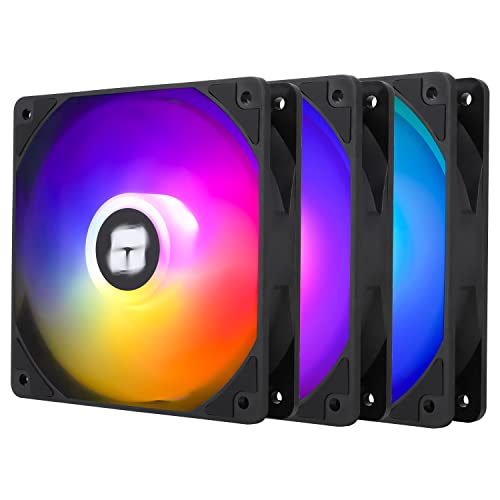
- Three 120mm PWM ARGB fans included
- Up to 66.17 CFM airflow at 1,550 RPM
- S-FDB bearings and up to 25.6 dBA rated noise
Best For: Coordinated ARGB case cooling on a practical budget
Premium Quiet Performance
Noctua NF-A12x25 chromax.Black.swap

- 450–2000 RPM 4-pin PWM control
- High airflow and static pressure
- Swappable anti-vibration color pads
Best For: Quiet, premium case, cooler, or radiator upgrades
ARGB Five-Fan Value

- Five 120mm PWM fans included
- ARGB lighting with up to 17 effects
- S-FDB bearing and 1550 RPM speed
Best For: ARGB-equipped multi-fan case builds
Radiator-Ready Five-Pack

- Five pressure-optimized 120mm fans
- 2.2 mmH₂O static pressure
- 1800 RPM with fluid dynamic bearing
Best For: Radiators, heatsinks, and multi-fan airflow layouts
Premium Modular Pick
TOUGHFAN EX12 Pro Snow 120mm 3-Pack

- 70.8 CFM airflow with 2,000 RPM PWM control
- Magnetic daisy-chaining and swappable blades
- Includes three reverse fan blades
Best For: High-end gaming PCs and modular white builds
Balanced Performance Pick

- 49.9 CFM airflow at up to 1,600 RPM
- Optimized frame supports radiator performance
- 80,000-hour average rifle-bearing lifespan
Best For: High-performance 120mm case and radiator setups
Premium Quiet Pick – Noctua NF-A12x25 PWM
For high-end PCs where acoustics and cooling performance both matter, the Noctua NF-A12x25 PWM is a versatile 120mm option. Its high airflow and static-pressure design suits cases, CPU coolers, radiators, and AIO liquid-cooling systems.
Best For: Enthusiasts seeking a quiet, premium 120mm fan for cases, heatsinks, or radiators.
Pros:
- Quiet operation rated up to 22.6 dB(A)
- 4-pin PWM control with speeds up to 2,000 RPM
- Strong airflow and static-pressure performance
- Includes anti-vibration mounts, gasket, cables, and a low-noise adaptor
Cons:
- Single-fan pack may cost more than multi-fan alternatives
- Its brown-and-beige standard styling may not suit every build
With a long-rated MTTF, six-year warranty, and extensive accessory kit, this is a well-equipped choice for performance-focused builds where refined noise control is a priority.
ARGB Multi-Fan Choice – CORSAIR RS120 ARGB Triple Pack
The CORSAIR RS120 ARGB triple pack is a practical way to add coordinated airflow and lighting to high-end PCs. Daisy-chain connections simplify installation, while PWM control and AirGuide vanes help direct cooling toward radiators, heatsinks, and hot components.
Best For: Multi-fan builds that need synchronized ARGB lighting and streamlined cabling.
Pros:
- Three 120mm fans included
- Daisy-chains through one 4-pin PWM and one 5V ARGB connection
- Up to 2,100 RPM and 72.8 CFM airflow per fan
- 2.8mm-H2O static pressure supports radiator use
Cons:
- Requires a compatible motherboard for ARGB control
- Rated noise reaches 36 dB
- Lighting and fan control depend on motherboard header support
This pack emphasizes convenient installation and visual customization, making it a strong fit when you want several matching fans without managing separate connection runs for each one.
Large Quiet Airflow Pick – Noctua NF-A14x25 G2 chromax
The Noctua NF-A14x25 G2 PWM chromax.Black offers larger 140mm airflow for high-end PCs while keeping a low-profile all-black appearance. Its 300–1,500 RPM range, high airflow capacity, and static-pressure design make it suitable for cases, CPU coolers, and water-cooling radiators.
Best For: Large cases and cooling systems with 140mm mounts where quiet, high-volume airflow is important.
Pros:
- High airflow capacity rated at 155.6 m³/h
- Quiet operation rated at up to 24.8 dB
- 0% PWM stop enables semi-passive operation
- Includes LNA, gasket, splitter, extension cable, and anti-vibration mounts
Cons:
- Requires 140mm mounting space
- Maximum speed is 1,500 RPM, lower than some 120mm performance fans
For compatible cases, the 140mm format can move substantial air at moderate speeds. The chromax.Black finish and included installation accessories also make it easy to integrate into understated premium builds.
Value ARGB Triple Pack – Thermalright TL-C12C-S X3
The Thermalright TL-C12C-S X3 gives high-end PCs three 120mm PWM fans with motherboard-synchronized ARGB lighting. With up to 66.17 CFM airflow, 1,550 RPM speed, and compatibility with cases, radiators, and CPU coolers, it is designed for broad cooling use.
Best For: Builders who want three matching ARGB fans with PWM control and straightforward series cabling.
Pros:
- Three-fan pack for front, rear, or radiator setups
- Up to 66.17 CFM airflow at 1,550 RPM
- 4-pin PWM control and cables up to 55cm for series control
- S-FDB bearings and rated noise of 25.6 dBA or less
Cons:
- ARGB synchronization requires a compatible motherboard connection
- Air pressure is rated at 1.53mm H2O, which may be less suited to restrictive radiators than higher-pressure options
- Three-year warranty is shorter than some premium alternatives
This pack balances airflow, lighting, and quantity for a complete case refresh. It is especially appealing when you need several coordinated fans while retaining automatic motherboard-based speed control.
Premium Quiet Performance – Noctua NF-A12x25 chromax.Black.swap
For high end PCs where noise control and versatile cooling matter, the Noctua NF-A12x25 PWM chromax.Black.swap is a premium 120mm option. Its 4-pin PWM control, 450–2000 RPM range, and combination of high airflow and static pressure make it suitable for cases, CPU coolers, radiators, and AIO systems.
Best For: Quiet, performance-focused builds that need one premium fan for either case or radiator use.
Pros:
- High airflow and static-pressure performance in a 25mm-thick frame.
- Quiet operation rated up to 22.6 dB(A), with automatic 4-pin PWM control.
- Includes interchangeable anti-vibration pads for customizable styling.
- Backed by a six-year manufacturer’s warranty and over 150,000 hours MTTF.
Cons:
- Sold as a single fan, so outfitting a larger case can be costly.
- Premium construction and features may be more than a basic case setup requires.
The NF-A12x25 is the strongest all-around choice here for buyers prioritizing refined acoustics, PWM flexibility, and high-end construction over the lowest upfront cost.
ARGB Five-Fan Value – Thermalright TL-C12C-S 5-Pack
This Thermalright five-pack is a practical way to add airflow across a high end PC without buying fans individually. The 120mm TL-C12C-S uses 4-pin PWM control, reaches up to 1550 RPM, and combines ARGB lighting with an S-FDB bearing for case, radiator, and CPU-cooler applications.
Best For: Multi-fan builds that want coordinated ARGB lighting and PWM control at a pack-friendly price.
Pros:
- Five 120mm fans provide broad case airflow coverage.
- 4-pin PWM control can adjust fan speed based on motherboard temperature.
- ARGB lighting supports up to 17 effects and motherboard synchronization.
- S-FDB bearings are designed to reduce noise and extend service life.
Cons:
- Maximum speed is 1550 RPM, below the Noctua and Arctic options listed here.
- Rated noise is up to 25.6 dBA.
- ARGB synchronization requires a compatible motherboard connection.
Choose this pack when quantity and lighting are priorities. It offers a straightforward way to populate a case while retaining PWM speed control and compatibility with cooling hardware.
Radiator-Ready Five-Pack – ARCTIC P12 120mm Fans
The ARCTIC P12 five-pack suits high end PCs that need several pressure-oriented fans for radiators, heatsinks, or restricted case locations. Its 120mm design delivers 56.3 CFM airflow, 2.2 mmH₂O static pressure, and up to 1800 RPM, while the fluid dynamic bearing is designed for quiet, durable operation.
Best For: Multi-fan cooling layouts using heatsinks, radiators, or airflow paths with higher resistance.
Pros:
- Pressure-optimized design is suited to heatsinks and radiators.
- Five fans make it easy to populate a case or cooling array.
- Provides up to 56.3 CFM airflow and 2.2 mmH₂O static pressure.
- Fluid dynamic bearing is designed for low friction, quiet operation, and long service life.
Cons:
- Uses a 3-pin connector rather than 4-pin PWM control.
- No ARGB lighting is included.
- Noise is specified as 0.3 sone rather than a dB(A) rating.
The P12 pack is a strong functional choice for buyers focused on pressure and coverage rather than lighting. Its 3-pin connection is the main limitation for systems that require automatic PWM speed control.
Premium Modular Pick – TOUGHFAN EX12 Pro Snow 120mm 3-Pack
For high-end PCs that need strong airflow and clean cable management, the Thermaltake TOUGHFAN EX12 Pro Snow is a feature-rich choice. Its 120mm PWM fans reach 2,000 RPM and deliver up to 70.8 CFM, while the magnetic connection system simplifies daisy-chaining.
Best For: High-end gaming PCs, white-themed builds, and users who want modular fan installation.
Pros:
- High 70.8 CFM airflow and 2,000 RPM maximum speed
- MagForce 2.0 magnetic connection design helps simplify daisy-chaining
- Swappable fan blades include three additional reverse blades
- LCP fan-blade material is designed to reduce vibration
Cons:
- Higher maximum noise rating than the quieter options in this roundup
- Specialized features may be unnecessary for simpler builds
This three-pack is the strongest performance-oriented option here, especially when airflow, reversible fan placement, and streamlined connections matter more than basic installation.
Balanced Performance Pick – Pure Wings 3 120mm PWM 3-Pack
The be quiet! Pure Wings 3 120mm PWM triple pack is a practical option for computer cooling fans for high end PCs when you want solid airflow without moving to a more specialized design. Its optimized frame and seven-blade rotor are intended to improve airflow and radiator performance.
Best For: Mainstream high-performance gaming systems and mixed case or radiator configurations.
Pros:
- Optimized frame outlet helps minimize air leaks
- Seven airflow-optimized blades help reduce turbulence
- 4-pin PWM control supports adjustable fan speeds
- Rifle bearing design is rated for an average 80,000-hour lifespan
Cons:
- Lower airflow and maximum speed than the Thermaltake 120mm pack
- 25.5 dB noise rating is higher than the 140mm Pure Wings 3 model
With three fans included and a 1,600 RPM ceiling, this model suits builders who need dependable 120mm replacements for a performance-focused case or radiator setup.
Quiet Airflow Pick – Pure Wings 3 140mm PWM 3-Pack
For high-end PCs with room for larger fans, the be quiet! Pure Wings 3 140mm PWM triple pack combines a larger 140mm format with a 21.9 dB noise rating. Its seven-blade design and optimized frame are built to support airflow in demanding configurations.
Best For: Quiet performance builds with 140mm fan mounts and users prioritizing lower operating noise.
Pros:
- 57.4 CFM airflow from the larger 140mm format
- Lower 21.9 dB noise rating than the listed 120mm Pure Wings 3 model
- Optimized frame outlet helps reduce air leaks
- Includes three fans with 4-pin PWM control
Cons:
- 1,200 RPM maximum speed is lower than the 120mm version
- Requires compatible 140mm mounting space
This is the sensible choice when your case supports 140mm fans and you want a quieter three-fan setup with more airflow than the smaller Pure Wings 3 pack.
How We Picked the Best Computer Cooling Fans for High End PCs
We focused on fans suited to demanding desktop systems, prioritizing PWM speed control, dependable bearings, useful airflow characteristics, and compatibility with common 120mm or 140mm mounts. We also considered radiator and heatsink use, where static pressure matters more than unrestricted case airflow.
The selection includes premium quiet fans from Noctua and be quiet!, ARGB and daisy-chain options from CORSAIR and Thermalright, pressure-optimized multipacks from ARCTIC, and feature-rich designs from Thermaltake. Pack size and overall value were considered for builders outfitting several case positions.
Quick Comparison
| What You Need | Best Fit From This List | Why |
|---|---|---|
| Premium quiet 120mm airflow | Noctua NF-A12x25 PWM | Strong performance with refined acoustics |
| Premium 140mm cooling | Noctua NF-A14x25 G2 PWM | Larger blades can move substantial air at lower speeds |
| ARGB multipack value | Thermalright TL-C12C-S packs | Multiple PWM fans with lighting at an accessible price |
| Pressure-optimized 5-pack | ARCTIC P12 | Practical choice for several case or radiator positions |
| Easy linked installation | CORSAIR RS120 ARGB | Daisy-chain design can reduce cable clutter |
Key Buying Factors for Computer Cooling Fans for High-End PCs
Size, Airflow, and Static Pressure
Check your case, cooler, and radiator specifications before choosing a size. 120mm fans are widely compatible, while 140mm models may deliver comparable cooling at lower RPM if your chassis supports them. For radiators, dust filters, and restrictive front panels, prioritize a fan designed for strong static pressure.
PWM Control and Motherboard Support
Four-pin PWM fans allow the motherboard or fan controller to adjust speed according to temperature. Confirm that your headers can supply the required fan count, particularly when installing multipacks. A powered hub may be useful for larger builds.
Noise, Bearings, and Lighting
Maximum RPM figures do not tell the whole story. Bearing design, blade geometry, motor acoustics, and your motherboard fan curve all affect perceived noise. ARGB adds visual customization but requires compatible lighting headers or a controller; standard black fans are often simpler to integrate.
Installation and Cable Management
Measure clearance around GPU power cables, radiators, memory, and drive cages. Daisy-chain or magnetic-link systems can simplify wiring, while conventional fans offer broader controller compatibility. Verify whether screws, splitters, or controllers are included before ordering.
Who Should Buy Which Computer Cooling Fans for High End PCs?
Choose Noctua if quiet, consistent performance is more important than lighting or lowest cost. Pick be quiet! for understated acoustics and straightforward case ventilation. ARCTIC and Thermalright multipacks make sense when you need several fans on a budget. CORSAIR is a strong fit for builders who want coordinated ARGB and cleaner daisy-chain wiring, while Thermaltake suits users who value premium modular installation features.
For a high-end gaming or workstation system, combine front or bottom intake fans with rear or top exhaust, then tune the fan curve after installation. Positive or neutral case pressure can help limit unfiltered dust entry, but the best layout depends on your case and radiator placement.