The best external hard drive with RAID can provide high-capacity storage, faster workflows, or protection against a single drive failure, depending on its RAID configuration. The right choice depends on more than terabytes: interface speed, included drives, compatibility, cooling, and backup features all matter.
We compared ready-to-use desktop RAID systems with diskless enclosures so you can match your budget and storage plans to the setup that makes the most sense.
Best 10 External Hard Drive with Raid Picks for 2026
Best Performance Pick
SanDisk Professional G-RAID Project 2

- 24TB dual-drive desktop storage
- Thunderbolt 3 and USB connectivity
- RAID 0 performance with SSD Mag expansion
Best For: Creative professionals needing fast, high-capacity storage
Best Flexible Enclosure
TERRAMASTER D2-320 USB RAID Enclosure

- Diskless two-bay RAID enclosure
- Supports RAID 0, 1, JBOD, and SINGLE
- USB 3.2 Gen 2 with tool-free trays
Best For: Custom two-drive storage builds
Best Simple High-Capacity Drive

- Single-drive 20TB capacity
- Plug-and-play Windows setup
- Mac-compatible after reformatting
Best For: Straightforward desktop storage and backups
Best Four-Bay RAID Enclosure

- Four bays with up to 80TB capacity
- Eight RAID and storage modes
- USB 3.0 and eSATA connectivity
Best For: Multi-drive DAS setups and expandable storage
Best for Professional Media

- 48TB capacity and speeds up to 550MB/s
- RAID 0 and RAID 1 configuration options
- Five-year warranty with Rescue Data Recovery Services
Best For: Photographers, filmmakers, and high-volume media storage
Best DIY RAID Enclosure

- Four modes: RAID 0, RAID 1, Normal, and JBOD
- Supports two 2.5- or 3.5-inch SATA drives
- USB-A/USB-C 3.0 connectivity and tool-free installation
Best For: Users supplying their own drives and building a flexible RAID setup
Best Secure Desktop Storage

- 16TB capacity with RAID 0 ready out of the box
- Auto/system backup software included
- 256-bit AES encryption and password protection
Best For: Home, gaming, and business desktop storage
Best with Extra Features
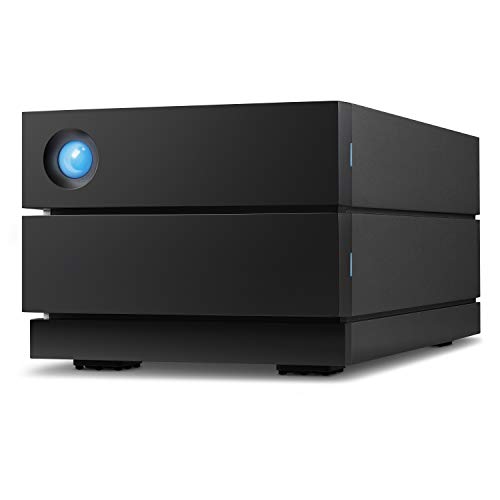
- 16TB desktop RAID storage
- RAID 0/1 configuration
- Up to 440MB/s read speed
Best For: Creative professionals needing fast, configurable storage
Balanced Capacity Pick
- 20TB desktop storage
- RAID-0 ready
- Encryption and auto backup software
Best For: Users seeking capacity, backup, and security features
Maximum Capacity Pick
- 28TB desktop RAID storage
- RAID-0 ready with backup software
- Password protection and AES encryption
Best For: Capacity-focused users with extensive storage needs
Best Performance Pick – SanDisk Professional G-RAID Project 2
For shoppers seeking an external hard drive with RAID for demanding transfers, multimedia work, or backups, the SanDisk Professional G-RAID Project 2 combines two 7200RPM enterprise-class hard drives with a fast Thunderbolt 3 connection. Its 24TB capacity and performance-focused design suit desktop workflows where speed and substantial storage matter.
Best For: Video editors, creative professionals, and business users needing high-capacity, fast desktop storage.
Pros:
- 24TB capacity with two 7200RPM Ultrastar enterprise-class drives
- Ships in RAID 0 for improved performance, with up to 540MB/s read speeds listed
- Thunderbolt 3 and USB 3.2 Gen 2×1 connectivity
- Includes a PRO-BLADE SSD Mag slot for expandable SSD-based capacity
Cons:
- RAID 0 prioritizes performance rather than mirrored data redundancy
- Desktop-oriented 3.5-inch enclosure weighs 6.8 pounds
The G-RAID Project 2 is a strong premium option when fast access and large capacity are more important than portability or built-in mirroring. Its five-year limited warranty and expandable SSD slot add value for long-term creative workflows.
Best Flexible Enclosure – TERRAMASTER D2-320 USB RAID Enclosure
The TERRAMASTER D2-320 is an external hard drive with RAID for buyers who already have compatible SATA drives and want control over their storage setup. This diskless, two-bay DAS supports RAID 0, RAID 1, JBOD, and SINGLE modes through USB 3.2 Gen 2.
Best For: Users building a customized two-drive storage system with replaceable HDDs or SSDs.
Pros:
- Supports RAID 0, RAID 1, JBOD, and SINGLE configurations
- Accepts two 3.5-inch or 2.5-inch SATA HDDs or SSDs
- Supports up to 44TB total capacity based on two 22TB drives
- Tool-free trays and temperature-controlled fan simplify installation and cooling
Cons:
- Diskless design requires purchasing compatible drives separately
- This is a DAS, not a NAS, so it is intended for direct computer connection
The D2-320 offers useful flexibility for shoppers who want to choose their own drives and RAID level. RAID 1 provides mirrored protection, while RAID 0 can deliver higher performance, making this enclosure adaptable to different storage priorities.
Best Simple High-Capacity Drive – WD Elements Desktop 20TB
The WD Elements Desktop is not an external hard drive with RAID, but it is a straightforward alternative for shoppers who mainly need substantial plug-and-play storage. Its single 20TB drive connects over USB 3.0 and is ready for use with Windows PCs.
Best For: Personal desktop backups, media libraries, and users who want simple single-drive storage.
Pros:
- Large 20TB capacity in a single desktop enclosure
- Plug-and-play setup for Windows PCs
- Compatible with Mac after reformatting
- Includes USB 3.0 cable, AC adapter, and a two-year limited warranty
Cons:
- Does not provide RAID or drive redundancy
- Mac users must reformat the drive before use
- USB 3.0 is less performance-focused than the faster interfaces on some RAID products
Choose the WD Elements when capacity and simplicity matter more than redundancy or advanced storage management. If protecting data from a drive failure is essential, pair it with a separate backup strategy or consider a true RAID enclosure.
Best Four-Bay RAID Enclosure – CENMATE Aluminum 4-Bay RAID
The CENMATE four-bay enclosure is an external hard drive with RAID for users who need multiple drive bays and broad configuration options. It accepts 2.5-inch and 3.5-inch SATA HDDs or SSDs, supports up to 80TB total capacity, and connects through USB 3.0 or eSATA.
Best For: Advanced home or small-business users assembling a multi-drive DAS with flexible RAID modes.
Pros:
- Four bays support up to 80TB total capacity based on four 20TB drives
- Offers RAID 0, 1, 3, 5, 10, CLONE, LARGE, and NORMAL modes
- Supports both 2.5-inch and 3.5-inch SATA HDDs and SSDs
- Aluminum construction and built-in fans support drive cooling
Cons:
- Fan noise is listed at approximately 40–50 decibels
- Hot-swapping is not supported
- RAID mode changes require a power-off and manual switch procedure, and changing modes may cause data loss
The CENMATE provides more bays and RAID choices than a typical two-drive enclosure, but it requires careful setup. Buyers should verify their computer’s eSATA RAID support and maintain backups before changing RAID modes.
Best for Professional Media – LaCie 2big RAID 48TB
The LaCie 2big RAID is a high-capacity external hard drive with RAID for photographers, filmmakers, and other media professionals. Its two 7200 RPM enterprise-class drives deliver up to 550MB/s, while configurable RAID 0 and RAID 1 modes let you prioritize speed or redundancy.
Best For: Professional media creation, large video libraries, and users who want substantial capacity with selectable performance or data redundancy.
Pros:
- Massive 48TB capacity with speeds up to 550MB/s.
- Supports RAID 0 for performance and RAID 1 for redundancy.
- Includes hot-swappable IronWolf Pro drives and five-year Rescue Data Recovery Services.
- Works with USB-C and USB 3.0 computers.
Cons:
- Desktop-sized enclosure requires an external power setup.
- Mechanical 3.5-inch drives are less portable than compact SSD storage.
Choose the 2big RAID when capacity, sustained performance, and long-term support matter more than portability. RAID 1 is the more cautious configuration, while RAID 0 is suited to performance-focused workflows.
Best DIY RAID Enclosure – CENMATE 2-Bay RAID Enclosure
The CENMATE 2-bay enclosure is a flexible external hard drive with RAID for users who already have SATA drives or want to choose their own storage. It supports 2.5- and 3.5-inch HDDs or SSDs, four operating modes, and USB 3.0 connections with both USB-A and USB-C cables included.
Best For: Personal or small-business users who want a configurable dual-drive enclosure rather than a pre-populated storage system.
Pros:
- Supports RAID 0, RAID 1, Normal, and JBOD modes.
- Accommodates two 2.5- or 3.5-inch SATA HDDs or SSDs.
- Includes USB-A and USB-C 3.0 connectivity with tool-free drive installation.
- Aluminum construction and built-in cooling fan help manage heat.
Cons:
- Drives are not included, so total cost depends on the disks you supply.
- The cooling fan operates around 40–50 decibels and may be noticeable.
- RAID setup can result in data loss if configured incorrectly.
This enclosure is a practical way to build a customizable RAID system, especially if you have compatible SATA drives on hand. Confirm your preferred RAID mode and back up important data before changing the array.
Best Secure Desktop Storage – WD My Book Duo 16TB
The WD My Book Duo is a ready-to-use external hard drive with RAID that combines 16TB of desktop storage with automatic backup software and security features. It is RAID 0-ready out of the box and connects over USB 3.1, while built-in password protection and 256-bit AES hardware encryption add privacy for stored files.
Best For: Home, gaming, and business users who want high-capacity desktop storage with backup tools and hardware-based protection.
Pros:
- Provides 16TB of desktop storage with RAID 0 ready out of the box.
- Includes auto and system backup software.
- Offers 256-bit AES hardware encryption and password protection.
- Includes two USB 3.0 hub ports and USB 3.1 connectivity.
Cons:
- Large desktop enclosure is not designed for highly portable use.
- The listed read speed of 360MB/s is below the LaCie 2big RAID’s quoted performance.
- RAID 0 prioritizes speed and capacity rather than drive redundancy.
The My Book Duo is a convenient choice for users who prefer an included software ecosystem and straightforward desktop storage. Consider your backup strategy carefully when using RAID 0, since it does not provide redundancy for drive failure.
Best with Extra Features – LaCie 2big RAID 16TB
For photographers, indie filmmakers, and YouTubers seeking an external hard drive with RAID, the LaCie 2big RAID combines 16TB of desktop capacity with enterprise-class 7200 RPM drives. Its RAID 0/1 wizard lets you prioritize speed or redundancy, while USB-C and USB 3.0 compatibility supports modern desktop setups.
Best For: Creative professionals who need fast, configurable desktop storage.
Pros:
- Up to 440MB/s read speed for demanding file transfers.
- RAID 0/1 configuration supports performance or redundancy.
- Includes hot-swappable IronWolf Pro enterprise-class drives.
- Five-year limited warranty with Rescue Data Recovery Services.
Cons:
- Desktop form factor requires an AC-powered workstation setup.
- Maximum capacity is lower than the 20TB and 28TB alternatives here.
The LaCie 2big RAID is a strong choice when speed, drive reliability, and flexible RAID configuration matter more than maximum capacity.
Balanced Capacity Pick – WD My Book Duo 20TB
The WD My Book Duo is a practical external hard drive with RAID for users who want substantial desktop storage plus backup and security features. This 20TB model is RAID-0 ready, includes auto and system backup software, and connects through USB 3.1 while remaining compatible with USB 3.0.
Best For: Home offices, businesses, and personal users balancing capacity, backup tools, and security.
Pros:
- 20TB capacity provides ample room for large files and backups.
- RAID-0 ready out of the box.
- Includes password protection and 256-bit AES hardware encryption.
- Two USB 3.0 hub ports add connection flexibility.
Cons:
- Its listed read speed is 360MB/s, below the LaCie option.
- Three-year warranty is shorter than the LaCie model’s five-year coverage.
With high capacity, integrated backup software, hardware encryption, and convenient hub ports, the 20TB My Book Duo offers a well-rounded desktop RAID setup.
Maximum Capacity Pick – WD My Book Duo 28TB
When maximum space is the priority, the WD My Book Duo 28TB delivers one of the largest capacities in this external hard drive with RAID roundup. It includes auto and system backup software, RAID-0 readiness, USB 3.1 connectivity, password protection, and 256-bit AES hardware encryption.
Best For: Businesses and personal users storing extensive media libraries, backups, or other large files.
Pros:
- 28TB capacity offers the most storage among these picks.
- RAID-0 ready with auto and system backup support.
- 256-bit AES hardware encryption and password protection.
- Two USB 3.0 hub ports provide added connectivity.
Cons:
- Large 7.1-pound desktop enclosure is not designed for portability.
- Formatted NTFS for Windows and requires reformatting for other operating systems.
- Listed drive speed is 5400 RPM.
The 28TB My Book Duo is best suited to capacity-focused buyers who can accommodate a sizable desktop enclosure and want built-in backup and security tools.
How We Picked the Best External Hard Drive with Raid
We focused on capacity, RAID flexibility, connection options, drive performance, cooling, operating-system compatibility, and ease of setup. The list includes complete systems with preinstalled hard drives as well as diskless enclosures for buyers who want to choose their own SATA HDDs or SSDs.
We also considered practical extras such as hardware-based RAID modes, USB-C or Thunderbolt connectivity, included backup software, password protection, enterprise-class drives, warranty coverage, and data-recovery services. A RAID array can improve availability, but it is not a replacement for an independent backup.
Quick Comparison
| Type | Best For | What to Check |
|---|---|---|
| Preconfigured RAID desktop | Simple, high-capacity storage | RAID mode, usable capacity, included drives |
| Diskless two-bay enclosure | Flexible upgrades and lower entry cost | Drive compatibility, setup, RAID controls |
| Diskless four-bay enclosure | More capacity and advanced arrays | Cooling, power needs, interface bandwidth |
| Thunderbolt-equipped system | Video, photography, and workstation use | Computer port compatibility and cable requirements |
Key Buying Factors for an External Hard Drive with Raid
RAID Level and Usable Capacity
RAID 0 combines drives for speed and full capacity but offers no redundancy. RAID 1 mirrors data, reducing usable capacity while protecting against one drive failure. Some multi-bay systems support additional modes, including RAID 5 or RAID 10, which can balance capacity, performance, and redundancy. Verify the supported modes before buying.
Connection and Speed
USB 3.0 or USB 3.1 is adequate for general backups and media storage, while USB-C describes the connector rather than the actual speed. Thunderbolt 3 is better suited to demanding video and large-file workflows when the computer also supports Thunderbolt. Mechanical 7200 RPM drives can deliver strong sequential performance, but they will not match an SSD for random access.
Included Drives Versus Diskless Design
Preconfigured products are easier to deploy and usually arrive tested as a matched array. Diskless enclosures let you reuse existing drives, select higher-capacity models, and replace disks independently, but you must purchase and install compatible SATA drives separately.
Cooling, Noise, and Backup
Multiple hard drives generate heat, so active cooling and ventilation are important for sustained transfers. Desktop RAID units can also be audible in quiet rooms. Look for automatic backup software, encryption or password features, and a separate backup destination for irreplaceable files.
Who Should Buy Which External Hard Drive with Raid?
Choose a preconfigured two-drive RAID system if you want straightforward setup, desktop backup, and predictable capacity. A high-capacity professional model is a better fit for photographers, editors, and studios working with large media libraries. Pick a diskless two-bay enclosure if you already own drives or want to control the components. A four-bay enclosure makes more sense for expanding storage, experimenting with different RAID layouts, or building a larger local archive.
Before ordering, confirm the computer’s ports, supported operating system, required RAID mode, physical drive compatibility, and the difference between advertised and usable capacity. Most importantly, maintain at least one additional copy of valuable data outside the RAID enclosure.