Optical disc duplicators with erase functions can streamline recurring disc production, data cleanup, and media transfers without requiring a computer for every job. The right model depends on your required output volume, supported formats, and whether you also work with flash media.
This roundup compares 10 standalone duplicators, including high-capacity USB systems, Blu-ray-capable units, CD/DVD towers, and specialized CFast or CompactFlash erasers. Use the guide below to match the hardware to your workflow and budget.
Best 10 Optical Disc Duplicators with Erase Functions Picks for 2026
Best High-Capacity USB Sanitizer
USB Pantera 3.0 1-to-63 Duplicator
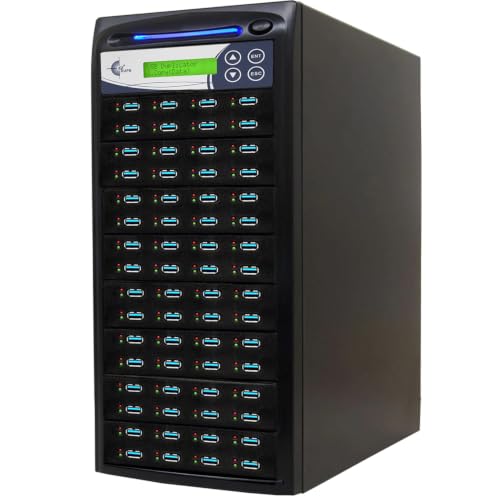
- Copies up to 63 USB drives
- Includes four erase modes
- Runs standalone at up to 150MB/s
Best For: High-volume USB duplication and sanitization
Best Optical-and-Flash Versatility
Media Mirror Plus Blu-Ray Duplicator

- Copies between discs and flash media
- Supports Blu-ray, DVD, and CD
- Includes verify and disc-spanning functions
Best For: Mixed-media backup and duplication
Best Mid-Range USB Eraser
Acumen Disc 1-to-47 Duplicator
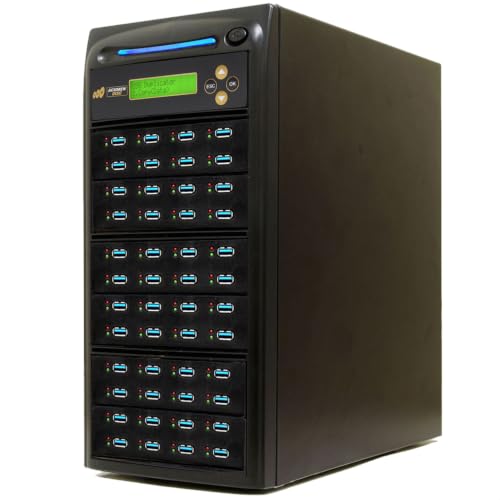
- Copies up to 47 USB drives
- Includes DoD 3-pass erasure
- Adds copy-and-compare verification
Best For: Verified USB duplication and basic secure erasure
Best Traditional Disc Tower
Produplicator 1-to-5 CD/DVD Duplicator

- Duplicates up to five discs at once
- Works without a computer
- Supports CD, DVD, and dual-layer formats
Best For: Small-batch standalone CD and DVD production
High-Speed CFAST Sanitizer
1-to-7 CFAST Duplicator & Eraser
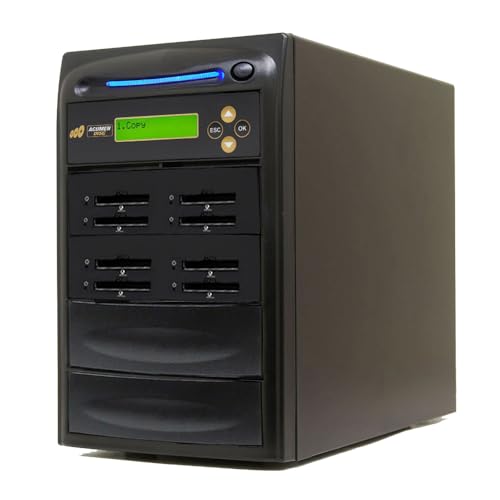
- Copies up to seven CFAST cards at up to 150MB/sec.
- Offers Quick, Full, DoD 3-pass, and DoD 7-pass erasure.
- Standalone operation with copy-and-compare verification.
Best For: Secure, high-volume CFAST duplication and reuse
Standalone DVD Production Tower

- Burns up to five target discs per cycle.
- Supports CD, DVD, rewritable, and dual-layer media.
- Includes test, verify, compare, and source-analysis functions.
Best For: Computer-free CD/DVD duplication in five-disc batches
CompactFlash Data Sanitizer

- Duplicates up to seven CF cards at up to 35MB/sec.
- Includes Quick, Full, DoD 3-pass, and DoD 7-pass erasure.
- Verifies copies in real time and operates without a computer.
Best For: Standalone CompactFlash duplication and secure reuse
Most Versatile
Media Mirror Plus 1-to-10 Blu-ray Duplicator

- Copies optical discs and flash media in multiple directions
- Duplicates one source to up to 10 discs
- Includes test, verify, compare, and disc-spanning modes
Best For: Mixed-media duplication and higher-volume business workflows
Best for M-Disc Batches

- Duplicates to five DVD or CD targets
- Supports M-Disc archival DVD media
- Runs standalone without a PC
Best For: Small business DVD/CD batches and archival M-Disc recording
Compact Single-Target Pick

- Copies one master disc to one target
- Supports DVD, CD-R, and M-Disc media
- Includes lifetime support and a one-year warranty
Best For: Occasional DVD/CD duplication and archival M-Disc recording
Best High-Capacity USB Sanitizer – USB Pantera 3.0 1-to-63 Duplicator
For organizations handling large batches of flash media, this USB Pantera is a powerful alternative to optical disc duplicators with erase functions. It copies up to 63 USB drives at up to 150MB per second and offers four erase modes, including DoD 3-pass and 7-pass options, without requiring a computer.
Best For: High-volume USB duplication and standalone media sanitization.
Pros:
- Supports up to 63 simultaneous USB copies.
- Offers quick, full, DoD 3-pass, and DoD 7-pass erase modes.
- Standalone operation avoids software and host-computer requirements.
Cons:
- Designed for USB media rather than optical discs.
- Type-C media requires separate adapters.
- Its 23-pound form factor may be excessive for occasional users.
Choose this model when throughput and flexible erase standards matter more than optical-disc support. Its dedicated slots and 150MB-per-second rating make it especially suited to production environments.
Best Optical-and-Flash Versatility – Media Mirror Plus Blu-Ray Duplicator
This Media Mirror Plus is a versatile choice for buyers comparing optical disc duplicators with erase functions, although its supplied features emphasize copying rather than dedicated erasing. It transfers data among Blu-ray, DVD, CD, USB, CF, SD, Micro SD, and MS media, with support for disc spanning and data appending.
Best For: Mixed-media backup and copying across optical discs and flash cards.
Pros:
- Copies flash media to optical discs and optical discs to flash media.
- Supports Blu-ray, DVD, and CD duplication.
- Includes test, verify, compare, disc-spanning, and multi-session functions.
Cons:
- The supplied notes do not specify a dedicated erase or secure-wipe mode.
- Optical duplication is limited to one source and two target discs.
- Its listed 128MB-per-second transfer rate may vary by media.
This is the strongest fit when format flexibility is the priority. Buyers specifically seeking secure erase functions should verify that the available workflow meets their requirements before purchasing.
Best Mid-Range USB Eraser – Acumen Disc 1-to-47 Duplicator
The Acumen Disc AD47-USB100 is a practical standalone option for buyers considering optical disc duplicators with erase functions but primarily working with USB drives. It duplicates up to 47 Type-A devices at up to 100MB per second and adds quick, full, and DoD 3-pass erase modes.
Best For: Businesses needing verified USB duplication and basic DoD-compliant erasure.
Pros:
- Handles up to 47 simultaneous USB copies.
- Provides quick, full, and DoD 3-pass erase options.
- Copy-and-compare technology helps verify completed duplications.
- Offers standalone operation with a simple four-key interface.
Cons:
- Supports USB Type-A media only without an optional adapter.
- Does not support hardware-encrypted or protected USB devices.
- It is slower and lower-capacity than the 63-port alternative.
For moderate production volumes, this model balances capacity, verification, and sanitization features well. Confirm that source drives are USB-IF compliant and not hardware encrypted before ordering.
Best Traditional Disc Tower – Produplicator 1-to-5 CD/DVD Duplicator
Produplicator 1 to 5 24X Burner CD DVD Duplicator - Standalone Copier Duplication Tower
Check Price On Amazon
Produplicator 1 to 5 24X Burner CD DVD Duplicator - Standalone Copier Duplication Tower
Check Price On AmazonFor shoppers who specifically need optical media, the Produplicator 1-to-5 is a straightforward standalone CD/DVD tower. Unlike optical disc duplicators with erase functions, the supplied specifications focus on disc burning and format compatibility rather than a dedicated erase or secure-wipe feature.
Best For: Small-batch CD and DVD duplication without a computer.
Pros:
- Duplicates up to five discs from one master.
- Operates without a computer or software.
- Automatically recognizes the master disc format.
- Supports DVD, CD, dual-layer, mini-disc, Video CD, and Photo CD formats.
Cons:
- The supplied notes do not list a dedicated erase function.
- Its maximum listed write speed is 24X.
- It is limited to optical media workflows.
This tower is a sensible pick for routine physical-media production, especially when standalone operation and broad disc compatibility matter. Choose a different model if secure erasure is a central requirement.
High-Speed CFAST Sanitizer – 1-to-7 CFAST Duplicator & Eraser
For buyers seeking optical disc duplicators with erase functions—or a comparable standalone flash-media workflow—the Acumen AD07-CFAST150 combines duplication, verification, formatting, and data erasure in one unit. It supports up to seven CFAST targets and lists transfer speeds up to 150MB/sec., depending on the media.
Best For: Production, testing, and secure CFAST duplication where standalone operation and DoD-compliant erase modes are important.
Pros:
- Copies to up to seven CFAST cards at speeds up to 150MB/sec.
- Includes quick, full, DoD 3-pass, and DoD 7-pass erase modes.
- Supports synchronous and asynchronous copying, formatting, and real-time copy-and-compare verification.
- Standalone design requires no computer and includes a one-year warranty plus lifetime technical support.
Cons:
- Works with CFAST media rather than optical discs.
- It cannot connect to other devices as a computer peripheral.
Its combination of multi-target copying, bit-for-bit comparison, and multiple erase standards makes it a strong fit for organizations handling reusable CFAST media. Confirm that your workflow uses CFAST rather than CD or DVD media before buying.
Standalone DVD Production Tower – 1-to-5 SATA CD/DVD Duplicator
For buyers comparing optical disc duplicators with erase functions, the BestDuplicator BD115PK is a dedicated standalone CD/DVD duplication tower. It burns up to five target discs per cycle, supports common recordable and rewritable formats, and includes test, verify, and compare functions.
Best For: Users who need straightforward computer-free duplication of CD and DVD media in batches of up to five discs.
Pros:
- Duplicates one source to five target discs without requiring a computer.
- Supports DVD+/-R, DVD+/-RW, dual-layer DVD media, CD-R, and CD-RW.
- Offers up to 24x DVD and 52x CD-R write speeds.
- Includes source analysis, error checking, test, verify, compare, and buffer underrun protection features.
Cons:
- The supplied specifications do not list a dedicated erase or data-sanitization mode.
- It cannot copy discs protected by encryption or copy protection.
- At 26 pounds, it is less convenient to move than a compact duplicator.
This tower is the closest match here for traditional optical-disc duplication, particularly when five copies per cycle are sufficient. However, buyers specifically requiring secure erasure should note that the supplied details describe rewritable-media support but not a standalone erase function.
CompactFlash Data Sanitizer – 1-to-7 CF Duplicator & Eraser
For workflows that need optical disc duplicators with erase functions but actually use flash cards, the Acumen AD07-CF provides standalone CompactFlash duplication and sanitization. It supports up to seven CF targets, with listed speeds up to 35MB/sec., and offers four erase modes.
Best For: Teams duplicating and securely reusing CompactFlash Type I, Type II, or Microdrive media without a computer.
Pros:
- Copies to up to seven CompactFlash targets at up to 35MB/sec., depending on the media.
- Includes Quick Erase, Full Erase, DoD 3-pass, and DoD 7-pass modes.
- Supports synchronous or asynchronous copying of files, systems data, or entire media.
- Provides real-time copy-and-compare verification and three formatting options.
Cons:
- Designed for CompactFlash and Microdrives, not CD or DVD discs.
- Actual transfer speed depends on the CF flash media.
- Its standalone design does not connect to other devices or operating systems.
The AD07-CF is a practical choice when erase controls and verification matter more than optical-disc compatibility. Its seven-slot capacity and DoD erase options suit repeatable media-preparation workflows, while the no-computer design keeps operation simple.
Most Versatile – Media Mirror Plus 1-to-10 Blu-ray Duplicator
For buyers seeking optical disc duplicators with erase functions, the EZ DUPE Media Mirror Plus stands out for its broad media support and standalone workflow. It can copy between Blu-ray, DVD, CD, USB, and several flash-card formats, although the supplied specifications emphasize appending data rather than explicitly erasing it.
Best For: Businesses and multimedia users that need high-volume disc duplication plus flash-media conversion.
Pros:
- Duplicates one source optical disc to up to 10 Blu-ray, DVD, or CD discs.
- Copies between optical discs and USB, CF, SD, Micro SD, MS, and MMC media.
- Includes copy, test, verify, compare, disc-spanning, and multi-session functions.
- Standalone design does not require connection to another computer.
Cons:
- The 38-pound unit is relatively heavy and occupies substantial space.
- The listed functions describe data appending, but do not explicitly confirm disc erasure.
- Its many media modes may be more than needed for simple DVD or CD duplication.
This is the most flexible option in the group for mixed-media workflows and larger duplication jobs. Choose it when format versatility and verification tools matter more than a compact footprint or a clearly documented erase feature.
Best for M-Disc Batches – 1-to-5 SATA DVD Duplicator
This PlexCopier tower is a straightforward choice for optical disc duplicators with erase functions, though its supplied information does not specify an erase command. It operates without a PC, supports M-Disc DVD media, and writes to five targets at once from a master disc.
Best For: Businesses producing small batches of DVD or CD copies, including archival M-Disc projects.
Pros:
- Standalone operation requires no PC during duplication.
- Supports up to 24x DVD and 52x CD-R write speeds.
- Supports 1000-year archival-grade M-Disc DVD media.
- Can create copy-protected DVD Video copies with compatible OptoDisc MID media.
Cons:
- It will not copy encrypted discs.
- The supplied notes do not confirm an erase function.
- Its SATA-oriented configuration may be less convenient for users wanting broader media inputs.
With five target drives, this model offers a practical middle ground between single-disc copying and larger production towers. It is best suited to DVD/CD duplication and archival recording rather than workflows requiring clearly documented disc erasure or flash-media support.
Compact Single-Target Pick – 1-to-1 SATA DVD Duplicator
PlexCopier 24X 1 to 1 CD DVD M-Disc Supported Duplicator Copier Tower with Free Copy Protection
Check Price On AmazonFor buyers comparing optical disc duplicators with erase functions, this 1-to-1 PlexCopier focuses on simple, low-volume disc production. It does not explicitly list erasing in the supplied specifications, but it provides standalone copying, M-Disc support, and optional DVD Video copy protection with compatible media.
Best For: Users who need occasional one-disc-at-a-time DVD or CD duplication in a compact tower.
Pros:
- Standalone operation eliminates the need for a PC during use.
- Supports up to 24x DVD and 52x CD-R write speeds.
- Records to 1000-year archival-grade M-Disc DVD media.
- Includes lifetime free technical support and a one-year parts-and-labor warranty.
Cons:
- One target drive is slower for larger duplication runs.
- It will not copy encrypted discs.
- The supplied details do not explicitly confirm an erase function.
This model makes sense when simplicity, support, and a smaller footprint are more important than throughput. For frequent batch production, the five-target PlexCopier or the 10-target EZ DUPE offers greater capacity.
How We Picked the Best Optical Disc Duplicators with Erase Functions
We focused on standalone duplicators that support optical-disc copying and include an erase, overwrite, or data-removal function where specified. We also considered target capacity, advertised transfer or writing speed, supported media types, format flexibility, and practical features such as USB 3.0, Blu-ray support, M-Disc compatibility, and flash-card connectivity.
Because these machines serve very different workloads, capacity is not automatically a quality ranking. A one-to-one tower may be the better choice for occasional duplication, while a high-output system makes more sense for production environments.
Quick Comparison
- Highest-capacity production systems: The EZ DUPE 1-to-63 and Acumen Disc 1-to-47 models are designed for large batch runs.
- Blu-ray and mixed-media flexibility: Media Mirror Plus units support combinations of flash media and Blu-ray, DVD, or CD copying.
- Specialized flash erasing: The CFast and CompactFlash models target workflows that require dedicated card duplication and DOD erasure.
- Traditional CD/DVD towers: The Produplicator and SATA-based models suit straightforward disc-only duplication.
- Small or occasional jobs: One-to-one and one-to-five towers generally require less space and have simpler operating procedures.
Key Buying Factors for Optical Disc Duplicators with Erase Functions
Target Count and Throughput
Target count indicates how many blank discs or media devices can be written simultaneously. More targets can reduce labor during large runs, but they also increase equipment size and cost. Compare the advertised speed with your actual media type, since maximum figures may vary by disc, source, and writing mode.
Media Compatibility
Check whether you need CD, DVD, Blu-ray, M-Disc, USB, SD, CompactFlash, or CFast support. A disc-only tower is often simpler and more economical, while a multimedia duplicator offers greater flexibility for mixed-source workflows.
Erasure Method and Data Handling
Confirm what “erase” means for the specific model. DOD erasure features may be useful for reusable flash media, while optical discs may be written over only when using rewritable formats. If sensitive data is involved, verify the erasure standard, verification options, and whether the process meets your organization’s policies.
Standalone Operation and Connectivity
Standalone controls reduce dependence on a computer and can simplify repetitive jobs. USB 3.0 support is valuable when transferring larger source files, but it does not guarantee identical performance across every media type.
Who Should Buy Which Optical Disc Duplicators with Erase Functions?
Choose a high-target USB duplicator for schools, offices, event producers, or businesses handling frequent batch jobs. Choose a Media Mirror Plus model if your workflow combines optical discs with flash cards or USB media. Choose a CFast or CompactFlash unit when dedicated card duplication and secure erasure matter more than disc production.
Choose a SATA CD/DVD tower for dependable, conventional disc copying at a lower complexity level. A one-to-five model balances moderate volume and footprint, while a one-to-one tower is suitable for occasional duplication, testing, archival projects, or small offices. Before ordering, confirm regional power requirements, blank-media compatibility, and the manufacturer’s current support documentation.