Thunderbolt external GPU enclosures offer a practical way to add a desktop graphics card to a compatible laptop, mini PC, or handheld without replacing the entire system. The right enclosure can improve gaming, 3D rendering, AI workloads, video editing, and multi-display performance.
These 10 options range from compact 40Gbps USB4 and Thunderbolt docks to high-power Thunderbolt 5 models and versatile PCIe expansion chassis. Compare connection standards, power delivery, GPU support, operating-system compatibility, and included features before choosing.
Best 10 Thunderbolt External GPU Enclosures Picks for 2026
Best Overall Thunderbolt 5 Pick

- Supports up to four-slot-wide NVIDIA and AMD GPUs
- Thunderbolt 5 bandwidth up to 80Gbps
- Tool-free design with 140W USB-C power delivery
Best For: Windows 11 users seeking a flexible, upgradeable eGPU enclosure
Best OCuLink Performance Option
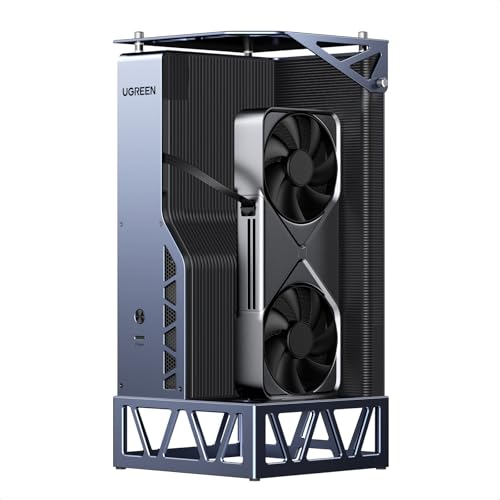
- OCuLink 64Gbps and USB4 40Gbps connectivity
- Includes an 850W ATX 3.1 power supply
- Supports NVIDIA, AMD, and Intel GPUs
Best For: Users prioritizing high-performance gaming, creation, or AI workloads
Best PCIe Expansion Alternative
StarTech Thunderbolt 3 Chassis

- Adds one external PCIe 3.0 x16 slot
- Supports capture, networking, storage, and FireWire cards
- Does not support GPU graphics cards
Best For: Users needing specialized PCIe expansion instead of an external GPU
Best Built-In Power Option

- Built-in 850W power supply for demanding GPUs
- Supports triple-wide NVIDIA and AMD cards
- Adds USB-A, 5GbE, and Thunderbolt 5 connectivity
Best For: Windows users needing a powerful, connected eGPU workstation
Best for Private AI Workflows
Plugable Thunderbolt 5 AI eGPU Enclosure

- 80Gbps Thunderbolt 5 with PCIe x16 slot
- 850W PSU with up to 600W for the GPU
- Dock features include 96W charging and 2.5Gbps Ethernet
Best For: Windows 11 users building private, offline AI and graphics workstations
Best Portable Kit
GODLIY Compact Thunderbolt eGPU Enclosure

- Includes 240W PSU, cables, and carrying case
- Supports Thunderbolt 3/4 and USB4 systems
- Fits GPUs up to 205mm in a compact aluminum chassis
Best For: Portable laptop, mini PC, and handheld graphics upgrades
Best for Handhelds
ANQUORA ANQ-L336 Mini eGPU Dock

- Supports Thunderbolt 3/4 and USB4 systems
- 85W charging supports ROG Ally X Turbo Mode
- Accepts ATX, SFX, FLEX, or DC 12V power supplies
Best For: USB4 handhelds, laptops, and mini PCs needing a flexible eGPU dock
Best Complete Kit
Compact Thunderbolt 4/3 eGPU Enclosure

- Includes 240W PSU, cables, and carrying case
- Supports compatible NVIDIA and AMD cards up to 205mm
- Provides 85W PD, 15W PD, and DisplayPort
Best For: Portable, bundled eGPU setups
Best Modular Option
Mini Thunderbolt 3/4 eGPU Dock

- Works with multiple ATX, SFX, FLEX, and DC power options
- Adds USB A, second Thunderbolt port, and 85W PD
- Requires separate power supply and graphics card
Best For: DIY desktop-style eGPU builds
Best Open-Frame Design
High-Bandwidth Thunderbolt eGPU Dock

- Open frame supports graphics cards without a stated length limit
- Supports PCIe 4.0 x16 mode and certified controllers
- Offers 85W PD, dual Thunderbolt ports, and DisplayPort
Best For: Large-card and airflow-focused builds
Best Overall Thunderbolt 5 Pick – Razer Core X V2
The Razer Core X V2 is a strong choice among thunderbolt external gpu enclosures for Windows 11 laptops and compatible USB4 devices. It supports full-size NVIDIA and AMD desktop graphics cards, including models up to four slots wide, and adds up to 140W USB-C power delivery.
Best For: Windows 11 users who want a flexible Thunderbolt 5 enclosure for gaming, creative work, and future GPU upgrades.
Pros:
- Supports four-slot-wide PCIe 4.0 NVIDIA and AMD desktop GPUs.
- Thunderbolt 5 connectivity offers up to 80Gbps bandwidth.
- Tool-free installation supports interchangeable GPUs and ATX power supplies.
- Built-in 120mm active cooling fan with customizable fan-curve support.
Cons:
- Graphics card and power supply are sold separately.
- Macs with M1 or later chipsets do not support eGPUs.
- Compatibility depends on a Thunderbolt 4, Thunderbolt 5, or USB4 host device.
The Core X V2 stands out for its broad device compatibility and roomy, upgrade-friendly design. It is particularly appealing if you already own a desktop GPU or want to choose your own card and ATX PSU.
Best OCuLink Performance Option – UGREEN LinkStation eGPU Dock
The UGREEN LinkStation is a performance-focused option among thunderbolt external gpu enclosures, though its headline interface is OCuLink rather than Thunderbolt. It also provides USB4 connectivity and includes an 850W ATX 3.1 power supply for full-size NVIDIA, AMD, or Intel GPUs.
Best For: Gamers, creators, and AI users with compatible laptops, handhelds, or mini PCs who prioritize desktop GPU performance.
Pros:
- Offers OCuLink 64Gbps and USB4 40Gbps connectivity.
- Includes an 850W ATX 3.1 power supply.
- Supports GPUs from NVIDIA, AMD, and Intel.
- Designed for gaming, content creation, and local AI workloads.
Cons:
- OCuLink and USB4 compatibility should be verified before purchase.
- The included power supply is non-modular.
- Its 11.2-pound build is less portable than a compact dock.
With a powerful included PSU and high-bandwidth connection options, the LinkStation is aimed at users building a more desktop-like setup. Check your host device’s available interface before choosing it over a conventional Thunderbolt enclosure.
Best PCIe Expansion Alternative – StarTech Thunderbolt 3 Chassis
The StarTech TB31PCIEX16 is a Thunderbolt 3 PCIe expansion chassis rather than a graphics enclosure. It is included as a useful alternative for shoppers comparing thunderbolt external gpu enclosures, but it does not support GPU graphics cards; instead, it accepts one low-profile PCIe card for other expansion tasks.
Best For: Laptop and desktop users who need external PCIe connectivity for capture, networking, storage, or FireWire cards.
Pros:
- Adds one external PCIe 3.0 x16 slot over Thunderbolt 3 or 4.
- Supports cards such as video capture, fiber or Ethernet, NVMe, and FireWire adapters.
- Includes a Thunderbolt cable and universal 65W power adapter.
- Toolless aluminum design includes active cooling and daisy-chain support.
Cons:
- Does not support GPU graphics cards.
- Accepts only single-width cards up to 8 inches long.
- Provides up to 25W through the PCIe slot.
This chassis is a poor fit for anyone specifically seeking external graphics, but it is a practical Thunderbolt expansion box for specialized PCIe cards. Its driverless macOS and Windows compatibility adds flexibility for workstation setups.
Best Built-In Power Option – Sonnet Breakaway Box 850 T5
The Sonnet Breakaway Box 850 T5 is a high-capacity choice among thunderbolt external gpu enclosures for Windows 11 systems. Its Thunderbolt 5 connection delivers up to 80Gbps, while the built-in 850W power supply supports triple-wide NVIDIA and AMD graphics cards.
Best For: Windows users running demanding gaming, editing, rendering, animation, visual effects, or AI applications.
Pros:
- Supports triple-wide NVIDIA GeForce and AMD Radeon GPUs.
- Built-in 850W power supply handles power-hungry graphics cards.
- Compatible with Thunderbolt 5, Thunderbolt 4, and most USB4 Windows 11 computers.
- Adds three 10Gbps USB-A ports, 5GbE, and an extra Thunderbolt 5 peripheral port.
Cons:
- Designed for Windows systems rather than broad cross-platform use.
- Its 14.1-pound weight makes it better suited to a stationary setup.
- Triple-wide GPU clearance may still require checking the specific card’s dimensions.
The Breakaway Box 850 T5 is a compelling all-in-one solution when you want substantial GPU capacity without sourcing a separate power supply. Its built-in networking and USB expansion also reduce the need for additional desktop accessories.
Best for Private AI Workflows – Plugable Thunderbolt 5 AI eGPU Enclosure
For Windows 11 users seeking thunderbolt external gpu enclosures for local AI, high-end graphics, or workstation expansion, the Plugable TBT5-AI combines a PCIe x16 slot with Thunderbolt 5 connectivity, a powerful included PSU, and useful dock features. You supply the compatible GPU separately.
Best For: Windows 11 users building a private, offline AI or high-performance graphics workstation around a full-size NVIDIA or AMD GPU.
Pros:
- Thunderbolt 5 offers 80Gbps connectivity and works with Thunderbolt 5, Thunderbolt 4, and compatible USB4 systems.
- Includes an 850W 80+ Gold PSU with up to 600W dedicated to the GPU.
- Supports large GPUs up to 346mm long, 170mm high, 77mm wide, and 3.5 slots.
- Functions as a dock with 96W host charging, 2.5Gbps Ethernet, USB ports, and a downstream Thunderbolt 5 port.
Cons:
- GPU is not included.
- Not compatible with macOS, Linux, ChromeOS, or Thunderbolt 3.
- Requires checking both GPU dimensions and USB4 eGPU support before purchase.
The TBT5-AI is a particularly capable choice when privacy, power delivery, and expansion matter more than portability. Its Windows-only compatibility and substantial enclosure requirements make it less suitable for casual or cross-platform setups.
Best Portable Kit – GODLIY Compact Thunderbolt eGPU Enclosure
This GODLIY model is a practical option among thunderbolt external gpu enclosures for laptop, mini PC, and handheld users who want a complete, portable setup. It includes the enclosure, 240W power supply, Thunderbolt 4 cable, PCIe power cable, and a carrying case, but the graphics card must be purchased separately.
Best For: Mobile Windows, Linux, or compatible handheld setups using shorter NVIDIA or AMD graphics cards.
Pros:
- Complete kit includes a 240W PSU, Thunderbolt 4 cable, 8-pin PCIe cable, and custom carrying case.
- Supports Thunderbolt 3, Thunderbolt 4, and USB4 devices running Windows 10 or 11, with Linux support noted.
- Compact aluminum enclosure supports GPUs up to 205mm long, 150mm high, and 55mm wide.
- Provides 85W host charging, 15W downstream charging, and a DisplayPort output.
Cons:
- GPU is not included and card-size compatibility is limited.
- The USB-C connection must support Thunderbolt 3, Thunderbolt 4, or USB4.
- Warranty coverage is listed as 30 days.
Its included accessories and carrying case make this enclosure convenient for travel, provided your graphics card fits within the compact chassis. Buyers with larger or more power-hungry GPUs should consider a roomier enclosure instead.
Best for Handhelds – ANQUORA ANQ-L336 Mini eGPU Dock
The ANQUORA ANQ-L336 is a flexible choice among thunderbolt external gpu enclosures for laptops, mini PCs, and USB4 gaming handhelds. Its certified JHL7440 controller, 85W charging, and support for multiple power-supply formats make it adaptable, though the PSU and graphics card are not included.
Best For: ROG Ally X, MSI Claw 8, laptop, and mini PC owners who need an adaptable external GPU dock with hub functionality.
Pros:
- Supports Thunderbolt 3, Thunderbolt 4, and USB4 systems with NVIDIA and AMD GPUs.
- Offers PCIe 4.0 x4 connectivity and up to 32Gbps data transfer according to the supplied notes.
- 85W Power Delivery can enable ROG Ally X 30W Turbo Mode through the eGPU connection.
- Accepts ATX, SFX, FLEX, or DC 12V power supplies and includes a 10Gbps USB-A port plus two Thunderbolt 4 ports.
Cons:
- Power supply and graphics card are not included.
- NVIDIA RTX 50-series support is limited.
- Actual compatibility depends on the host device’s Thunderbolt or USB4 implementation.
The ANQ-L336 stands out for flexible power options and handheld-friendly charging rather than an all-in-one package. It is a strong fit for technically minded buyers who already have, or plan to choose, a suitable PSU and GPU.
Best Complete Kit – Compact Thunderbolt 4/3 eGPU Enclosure
This complete option is a practical choice among thunderbolt external gpu enclosures when you want a ready-to-use setup for a compatible laptop, NUC, or handheld. It includes a 240W power supply, Thunderbolt 4 cable, 8-pin PCIe cable, and carrying case, though the graphics card must be purchased separately.
Best For: Users who want a portable, bundled enclosure for compatible NVIDIA or AMD cards up to 205mm long.
Pros:
- Includes power supply, cables, and custom carrying case.
- Supports NVIDIA and AMD graphics cards within the stated size limits.
- Offers Thunderbolt connectivity, 85W and 15W PD charging, and a DisplayPort output.
- Works with Windows 10/11 and Linux systems.
Cons:
- Graphics card is not included.
- Compatibility requires Thunderbolt 3/4 or USB4 support; a standard USB-C port is not enough.
- Limited to cards no larger than the listed dimensions.
Choose this model if convenience and portability matter more than supporting oversized graphics cards. Its included accessories make it easier to get started, while the compact aluminum shell and carrying case suit mobile setups.
Best Modular Option – Mini Thunderbolt 3/4 eGPU Dock
This mini dock is a flexible pick among thunderbolt external gpu enclosures for buyers who already have a suitable power supply and graphics card. Its JHL7440 controller, USB A port, and second Thunderbolt port support a compact hub-style setup, but compatibility checks and some DIY configuration are required.
Best For: Technically confident users building a compact eGPU system with their own compatible power supply.
Pros:
- Supports Thunderbolt 3/4 and USB4 connections at up to 40Gbps.
- Compatible with SFX, ATX, FLEX, and specified DC power supplies.
- Includes a USB A port and second Thunderbolt port for hub use and daisy chaining.
- Provides up to 85W PD charging and a one-year manufacturer warranty.
Cons:
- Power supply and graphics card are not included.
- Requires hardware, driver, and compatibility troubleshooting knowledge.
- The maker does not recommend it for handheld game consoles.
This is a good value-oriented foundation when you want flexibility rather than an all-in-one package. Confirm that the host exposes Thunderbolt or USB4 controllers before buying, and match the external power supply to the graphics card.
Best Open-Frame Design – High-Bandwidth Thunderbolt eGPU Dock
This open-frame model stands out among thunderbolt external gpu enclosures for its airflow-focused design and PCIe 4.0 x16 mode. It supports current NVIDIA and AMD cards, including listed RTX 50-series models, and connects to compatible laptops, NUCs, and handhelds through Thunderbolt 3/4 or USB4.
Best For: Users seeking an open, airflow-friendly enclosure with broad graphics-card support and 85W charging.
Pros:
- Open-frame construction places no stated limit on graphics card length.
- Supports listed NVIDIA RTX 50-series and AMD RX 7000-series cards.
- Uses certified JHL7540/JHL7440 controllers and PCIe 4.0 x16 mode.
- Provides dual Thunderbolt ports, DisplayPort, and 85W PD charging.
Cons:
- Requires a separate ATX power supply and graphics card.
- Only compatible with host ports supporting Thunderbolt 3/4 or USB4.
- Some Apple Silicon Mac AI functionality is intended for deep-learning development, not gaming or 3D rendering.
Consider this enclosure when card size and cooling access are priorities. Its open structure is less protective than a closed case, but it offers a flexible platform for larger cards and specialized AI experimentation.
How We Picked These Thunderbolt External GPU Enclosures
We selected models across several use cases, including gaming laptops, creative workstations, mini PCs, handheld systems, and professional PCIe expansion. Our comparison emphasizes connection bandwidth, graphics-card compatibility, power-supply capacity, host-device support, cooling, portability, and useful extras such as USB ports, charging, and docking functionality.
Compatibility deserves special attention. Thunderbolt 3, Thunderbolt 4, Thunderbolt 5, USB4, and OCuLink do not provide identical performance or features, even when an enclosure supports multiple standards. Check both the computer’s port specification and the operating system before buying.
Quick Comparison
- Best for broad compatibility: Choose a Thunderbolt 4/USB4 enclosure with clear Windows support and a built-in power supply.
- Best for maximum bandwidth: Thunderbolt 5 models can reduce the interface bottleneck with compatible host systems and graphics cards.
- Best for compact setups: Mini enclosures suit laptops and handhelds, but may have lower power limits or less room for large GPUs.
- Best for expansion: A PCIe expansion chassis can support more than graphics cards, depending on drivers and operating-system compatibility.
- Best for peak GPU throughput: OCuLink can offer a direct, high-bandwidth connection, but it is less universal than Thunderbolt or USB4.
Key Buying Factors for Thunderbolt External GPU Enclosures
Connection Standard and Real-World Bandwidth
Thunderbolt 3 and 4 commonly provide up to 40Gbps, while USB4 implementations vary. Thunderbolt 5 can reach substantially higher link speeds, but both the host computer and enclosure must support the standard. A faster enclosure will not overcome a slower laptop port.
GPU Size, Power, and Compatibility
Confirm maximum card length, height, slot width, and power-connector support. Four-slot designs provide more room for oversized modern GPUs, while mini models may be limited to compact cards. Verify Windows, macOS, or Linux support for the specific graphics card and enclosure combination; external GPU support on macOS is particularly limited.
Power Delivery and Included PSU
A high-wattage internal power supply is important for demanding GPUs. If you also want laptop charging, check the enclosure’s USB Power Delivery rating and whether it supplies enough wattage for your computer under load.
Ports, Cooling, and Practical Design
Extra USB, Ethernet, display, or storage connectivity can turn an enclosure into a useful dock. Look for adequate ventilation, a quiet fan, removable panels, and a sturdy cable connection. Compact designs are easier to carry but often sacrifice expansion room or cooling capacity.
Who Should Buy Which Thunderbolt External GPU Enclosures?
Choose a high-power Thunderbolt 5 enclosure if you use a newer laptop or workstation and want the strongest available connection for gaming, AI, or professional graphics. Choose a Thunderbolt 4 or USB4 model for the best balance of compatibility, convenience, and value with current laptops.
Choose a compact mini enclosure for a handheld or small laptop setup, provided your graphics card fits and the power limit is sufficient. Choose an OCuLink dock when maximum GPU bandwidth matters more than universal compatibility. Finally, choose a PCIe expansion chassis if you need flexible add-in-card support beyond a standard external GPU.