The best compact mechanical keyboards save desk space without forcing you to give up responsive switches, useful controls, or comfortable typing. This roundup compares 10 popular options across 60%, 68%, 75%, and 81-key layouts.
Whether you want wireless flexibility, hot-swappable switches, RGB lighting, or an affordable wired board, the right choice depends on how much functionality you need within a smaller footprint.
Best 10 Compact Mechanical Keyboards Picks for 2026
Best Wireless Customizer

- Tri-mode wireless and wired connectivity
- Hot-swappable 3-pin/5-pin switch support
- 4000mAh battery and multifunction knob
Best For: Wireless gaming, work, and keyboard customization
Best Creamy Typing Feel
- Gasket mount with five-layer padding
- Tri-mode connectivity and 4000mAh battery
- Hot-swappable switches and programmable RGB
Best For: Dampened typing for work and gaming
Best Wired Value

- Compact 75% layout with aluminum volume roller
- Gasket mount and triple absorption layers
- Hot-swappable board with linear silver switches
Best For: Wired gaming and everyday desktop typing
Best Budget TKL Classic

- 87-key tenkeyless space-saving layout
- Smooth linear red mechanical switches
- Plug-and-play USB with full-key N-key rollover
Best For: Beginners and budget-minded wired gamers
Balanced Wireless Pick

- 75% layout preserves function keys and arrows
- USB-C, 2.4GHz, and Bluetooth connectivity
- Hot-swappable linear switches with cushioned sound
Best For: Multi-device users wanting a compact, customizable keyboard
Feature-Rich Gaming Choice

- 81-key compact layout with a media and lighting knob
- Tri-mode connectivity for PC, laptop, and tablet use
- Gasket mount and five-layer noise dampening
Best For: Gamers wanting convenient controls and customizable RGB
Budget Wired Mini

- Compact 68-key layout with separate arrow keys
- Smooth linear red switches for gaming and typing
- Blue LED modes with adjustable brightness and speed
Best For: Users seeking an affordable, simple wired keyboard
Versatile 96% Wireless Pick

- Tri-mode wireless and wired connectivity
- Hot-swappable switches with PBT keycaps
- 96% layout with arrow and number keys
Best For: Multi-device work and gaming setups
Space-Saving Gaming Pick

- Compact 61-key 60% layout
- Hot-swappable 3-pin and 5-pin support
- 20-mode RGB and programmable software
Best For: Wired PC gaming with extra mouse room
Budget Mini Office Pick

- Ultra-compact 61-key layout
- RGB lighting with adjustable modes
- Mechanical-feeling membrane design
Best For: Small desks, travel, and everyday use
Best Wireless Customizer – AULA F75 Pro
The AULA F75 Pro is a strong choice among compact mechanical keyboards for shoppers who want wireless flexibility, extensive customization, and a dedicated control knob. Its 75% layout keeps arrow keys while freeing desk space.
Best For: Users who want a feature-rich wireless keyboard for gaming, work, and multi-device setups.
Pros:
- Tri-mode Bluetooth 5.0, 2.4GHz, and USB-C connectivity supports up to five devices.
- Hot-swappable sockets accept 3-pin and 5-pin switches without soldering.
- 4000mAh battery, pre-lubricated switches, layered sound dampening, and RGB lighting.
- Dedicated knob controls lighting or media, depending on the selected mode.
Cons:
- The 75% layout omits a dedicated number pad.
- Its many lighting and customization features may be more than basic users need.
Choose the F75 Pro if wireless connectivity and future switch customization matter as much as compact sizing. It offers a versatile, enthusiast-oriented package without sacrificing the arrow keys useful for gaming and everyday work.
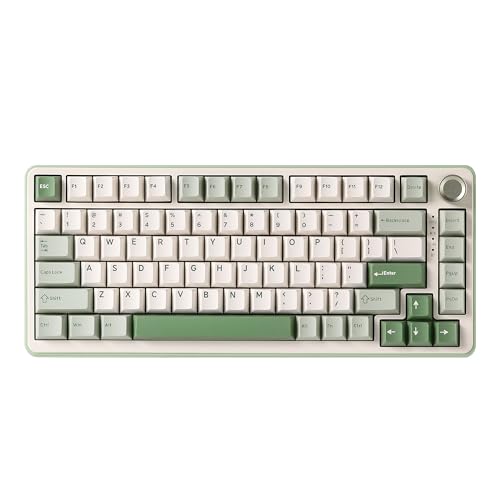
Best Creamy Typing Feel – YUNZII B75 PRO
The YUNZII B75 PRO combines a compact 75% layout with a gasket mount, five-layer padding, and a multifunction knob. It suits shoppers comparing compact mechanical keyboards for a softer, quieter-feeling typing experience.
Best For: Typists and gamers who want a customizable wireless keyboard with a dampened, creamy sound profile.
Pros:
- 82-key 75% layout retains function, arrow, and number-row keys.
- Gasket mount, five-layer padding, pre-lubricated switches, and tuned stabilizers support a solid typing feel.
- Tri-mode Bluetooth, 2.4GHz, and wired connectivity with a 4000mAh battery.
- Hot-swappable 3-pin/5-pin sockets and programmable RGB support customization.
Cons:
- Wireless features and software customization are primarily suited to Windows users.
- The compact layout does not include a dedicated number pad.
The B75 PRO is a well-rounded pick when typing feel is a priority. Its combination of layered padding, gasket construction, and wireless connectivity makes it practical for both desk work and gaming.
Best Wired Value – RK ROYAL KLUDGE R75
The RK ROYAL KLUDGE R75 is a wired 75% keyboard that keeps essential navigation keys while reducing desk footprint. It is a practical option among compact mechanical keyboards for shoppers who prefer a simple USB-C connection and responsive linear switches.
Best For: Gamers and typists who want a sturdy, customizable wired keyboard with fast-feeling switches.
Pros:
- 75% layout and CNC aluminum volume roller preserve useful controls in a compact design.
- Gasket mount with Poron, IXPE, case foam, and space-bar silencing helps reduce vibration.
- Hot-swappable PCB supports 3-pin and 5-pin switches.
- MDA-profile doubleshot PBT keycaps and RGB lighting add durability and customization.
Cons:
- USB-C wired connectivity does not provide wireless flexibility.
- The included silver switches are linear and designed for quick response rather than tactile feedback.
The R75 makes sense for a fixed desk setup where reliable wired performance matters more than portability. Its sound-dampening construction, hot-swap support, and volume roller give it useful enthusiast features at a straightforward size.
Best Budget TKL Classic – Redragon K552
The Redragon K552 is a straightforward tenkeyless option for shoppers seeking compact mechanical keyboards with a familiar full-height layout. Its wired design, red linear switches, metal top plate, and plug-and-play setup keep the focus on practical gaming and typing.
Best For: Budget-conscious gamers and beginners who want a simple wired mechanical keyboard.
Pros:
- 87-key TKL layout saves space while retaining function and navigation keys.
- Linear red switches provide smooth, rapid keystrokes without a tactile bump.
- Metal construction, anti-slip feet, and full-key N-key rollover support gaming stability.
- Works with Windows, macOS, Linux, and most gaming systems without requiring drivers.
Cons:
- Rainbow LED lighting uses fixed color patterns rather than fully customizable RGB.
- Wired USB connectivity offers no wireless mode.
- Its 87-key TKL layout is less compact than a 75% keyboard.
The K552 is a sensible entry point for users who value dependable basics over enthusiast extras. It delivers a space-saving TKL format, responsive linear switches, and easy compatibility in a beginner-friendly package.
Balanced Wireless Pick – Kisnt KN85
The Kisnt KN85 is a strong choice for shoppers comparing compact mechanical keyboards for a small desk, hybrid setup, or gaming station. Its 75% layout keeps function keys and arrows while omitting the number pad, and tri-mode connectivity supports wired USB-C, 2.4GHz, and Bluetooth use.
Best For: Multi-device users who want a compact layout, quiet cushioned typing, and switch customization.
Pros:
- 75% layout saves desk space while retaining F1-F12 keys and arrows.
- Tri-mode connectivity supports USB-C, 2.4GHz, and Bluetooth across multiple devices.
- Gasket mounting, pre-lubed linear switches, and foam produce a softer, mellow typing sound.
- Hot-swappable sockets accept compatible 3-pin and 5-pin switches without soldering.
Cons:
- No dedicated number pad, so frequent spreadsheet or number entry may be less convenient.
- Key remapping and macro programming require Windows software in wired or 2.4GHz mode.
- Animated RGB effects use more battery, and the initial full charge can take approximately 7–8 hours.
The KN85 offers one of the more flexible layouts in this group, combining compact dimensions with wireless versatility and enthusiast-friendly hot-swap support. Choose it if you want a refined everyday board rather than the smallest possible footprint.
Feature-Rich Gaming Choice – Redragon K673 PRO
The Redragon K673 PRO is designed for shoppers seeking compact mechanical keyboards with gaming-focused controls. Its 81-key layout, tri-mode wireless support, gasket construction, and dedicated control knob give it a practical balance of desk-saving size and everyday convenience.
Best For: Gamers and media-focused users who want wireless flexibility, RGB lighting, and quick knob controls.
Pros:
- Multi-function knob adjusts backlight brightness and media playback.
- Tri-mode USB-C, Bluetooth, and 2.4GHz connectivity supports multiple devices.
- Gasket mount and five-layer dampening provide a soft, quieter typing feel.
- Hot-swap socket accepts most 3-pin and 5-pin switches, with software for macros and lighting.
Cons:
- It has an 81-key layout rather than a more minimal 60% design.
- Listed software compatibility is for Windows, which may limit customization on other systems.
- Its one-year warranty is shorter than some competing options.
The K673 PRO stands out when a compact board needs to do more than save space. The control knob and extensive customization make it particularly appealing for gaming desks and multimedia setups, while the cushioned construction keeps it suitable for regular typing.
Budget Wired Mini – MageGee MK-Box
The MageGee MK-Box is a straightforward option for shoppers who want compact mechanical keyboards without paying for wireless features. Its 68-key layout keeps separate arrow keys and provides access to F1-F12 through the compact design, while the wired USB connection offers plug-and-play simplicity.
Best For: Budget-conscious gamers, students, and office users who prefer a small wired keyboard.
Pros:
- Compact 68-key layout saves space while retaining separate arrow keys.
- Linear red switches offer smooth presses with low resistance and no tactile bump.
- Blue LED backlighting includes multiple lighting modes and adjustable speed and brightness.
- Full anti-ghosting covers all 68 keys, and the detachable USB cable aids portability.
Cons:
- Wired USB connectivity does not offer Bluetooth or 2.4GHz wireless use.
- Backlighting is single-color blue rather than full RGB.
- Function-row commands require the Fn layer in this compact layout.
The MK-Box is a practical entry point into compact mechanical keyboards. It focuses on the essentials—smooth linear switches, anti-ghosting, adjustable blue lighting, and broad Windows, Mac, and Linux compatibility—without adding wireless or software complexity.
Versatile 96% Wireless Pick – AULA F99
The AULA F99 is a strong choice if you want compact mechanical keyboards that preserve arrow keys and a number area. Its 96% layout saves desk space while tri-mode connectivity, hot-swappable switches, and a large battery support work, gaming, and multi-device setups.
Best For: Users who want a feature-rich compact keyboard for gaming, productivity, and several connected devices.
Pros:
- Tri-mode Bluetooth, 2.4GHz, and USB-C connectivity supports up to five devices.
- Hot-swappable PCB accepts 3-pin and 5-pin switches without soldering.
- Gasket structure, five-layer filling, pre-lubed linear switches, and PBT keycaps target a smoother, quieter typing experience.
- 8000mAh battery, RGB lighting, macro support, and N-key rollover add useful flexibility.
Cons:
- The 96% layout is less compact than a 60% keyboard.
- Its extensive customization features may be more than some simple office users need.
The F99 stands out when you need a compact footprint without giving up dedicated navigation and number keys. It is particularly well suited to buyers who value wireless flexibility and future switch customization.
Space-Saving Gaming Pick – Redragon K617 Fizz
The Redragon K617 is a practical option among compact mechanical keyboards for gamers who want maximum mouse space. Its 60% wired layout removes the numpad and navigation cluster, while hot-swappable sockets and RGB software provide room for customization.
Best For: PC gamers who prefer a small wired keyboard and extra desk room for low-sensitivity mouse movement.
Pros:
- 61-key 60% design leaves more room for wide mouse swipes.
- Hot-swappable sockets support many 3-pin and 5-pin switches without soldering.
- Up to 20 RGB lighting modes offer adjustable brightness and speed.
- Software supports custom lighting effects, macros, and keybindings.
Cons:
- USB-C wired connectivity does not provide wireless use.
- The 60% layout omits dedicated arrow, navigation, and number-pad keys.
- It is listed as compatible with PC and Windows systems rather than a broad range of devices.
The K617 focuses on the essentials for competitive PC gaming: a small footprint, linear switches, and customization options. Choose it if desk space and mouse freedom matter more than dedicated navigation keys or wireless convenience.
Budget Mini Office Pick – MageGee TS91
The MageGee TS91 is aimed at shoppers seeking compact mechanical keyboards on a small budget, though it uses membrane technology with a mechanical-feeling design rather than true mechanical switches. Its 61-key footprint, RGB backlight, and IPX4-rated circuit board suit compact home, office, and gaming spaces.
Best For: Users who want an inexpensive, ultra-compact keyboard with RGB lighting and a mechanical-style feel.
Pros:
- 60% 61-key layout creates more desktop space.
- RGB backlighting offers multiple colors, modes, brightness levels, and breathing speeds.
- IPX4-certified circuit board helps with routine spill and cleaning concerns, though the interface is not waterproof.
- Works with Windows and MacOS and connects through USB-C.
Cons:
- It is a membrane keyboard with mechanical-feeling keys, not a true mechanical keyboard.
- The compact layout omits a number pad and dedicated navigation keys.
- The USB interface itself is not waterproof.
The TS91 makes sense when size, price, and basic backlighting take priority over mechanical switch customization. Be sure to choose it for its compact membrane design rather than expecting the switch feel or modding options of a mechanical board.
How We Picked These Compact Mechanical Keyboards
We selected keyboards that offer a meaningful space-saving layout and cover a range of budgets, connection types, switch styles, and feature sets. Our comparison considers practical specifications such as key count, wireless support, hot-swappable sockets, lighting, media controls, and portability.
Because product configurations can vary, verify the current listing for switch type, included accessories, battery details, and operating-system compatibility before buying.
Quick Comparison
- 60% and 61-key models: Best for maximum desk space and portability, but usually omit dedicated arrow, function, and navigation keys.
- 68-key models: Add arrow keys while remaining highly compact.
- 75% models: Retain a function row and navigation controls in a condensed arrangement, making them a strong everyday option.
- 81-key models: Provide a little more functionality while still taking up less space than a full-size keyboard.
- Wireless choices: Better for clean desks and flexible setups; wired models are typically simpler and do not require charging.
Key Buying Factors for Compact Mechanical Keyboards
Layout and Missing Keys
Choose the layout based on your daily habits. A 75% keyboard is often the safest compromise for work and gaming because it keeps the function row, arrow keys, and several navigation keys. A 60% model is more portable, but you may rely on Fn-layer shortcuts or a separate keypad.
Switches and Hot-Swap Support
Linear switches provide smooth, consistent presses and are popular for gaming. Tactile switches add a noticeable bump for typing feedback, while clicky switches produce more sound. Hot-swappable sockets let you replace compatible switches without soldering, which is useful if you are still refining your preferred feel.
Connectivity and Compatibility
Tri-mode keyboards that support Bluetooth, 2.4GHz wireless, and USB-C offer the most flexibility. Check whether wireless modes support your computer, tablet, or console, and confirm that the included receiver has a convenient range. Wired USB-C models are a dependable choice for stationary gaming or office use.
Build, Controls, and Lighting
Features such as gasket mounting, pre-lubricated switches, stabilizers, a volume knob, and RGB backlighting can improve the experience, but they should not outweigh layout and switch preferences. Also check whether the key legends, side printing, and lighting style suit your visibility needs.
Who Should Buy Which Compact Mechanical Keyboards?
Choose a 75% model if you want one compact keyboard for productivity, gaming, and general use. It offers the best balance of familiar controls and reduced desk footprint.
Choose a 60% or 68-key model if portability, minimalist desk space, or gaming is your priority and you are comfortable using layers or shortcuts.
Choose a wireless model for a flexible multi-device setup or a cleaner desk. Choose wired if you want a lower-maintenance keyboard for a fixed workstation.
Choose a hot-swappable keyboard if experimentation and future upgrades matter. For the lowest-cost setup, a fixed-switch wired model may deliver better value when you already know the switch feel you prefer.