A mechanical keyboard with an LCD screen can put system stats, media controls, custom graphics, and shortcuts directly at your fingertips. The models in this roundup span compact 75% layouts, tenkeyless designs, 96% boards, and full-size options.
We focused on display usability, typing features, connectivity, layout, controls, and overall practicality so you can choose a screen-equipped keyboard that fits your desk and workflow.
Best 10 Mechanical Keyboard with Lcd Screen Picks for 2026
Best Wireless Pick
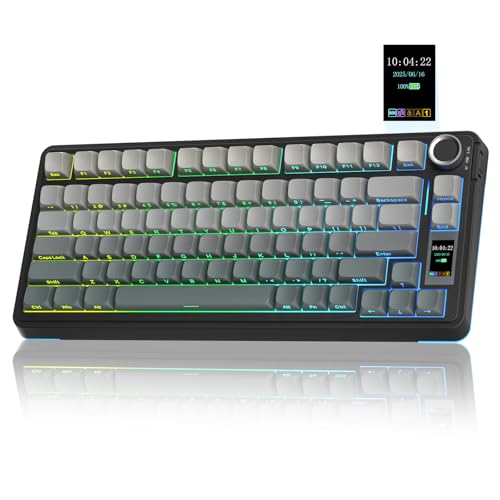
- LCD screen with status information and GIF support
- Tri-mode wireless and wired connectivity
- Hot-swappable 75% layout with PBT keycaps
Best For: Wireless gaming and customizable compact setups
Best for Streaming

- Six programmable LCD stream-deck keys
- Three assignable control knobs
- Hot-swap gasket-mounted TKL design
Best For: Streaming, creative shortcuts, and productivity workflows
Best Wireless Full-Featured Option

- TFT info screen with GIF and meme support
- Tri-mode connectivity with 95-key layout
- Gasket mount and five-layer sound dampening
Best For: Wireless gaming, media control, and comfortable everyday typing
Best Premium Gaming Layout
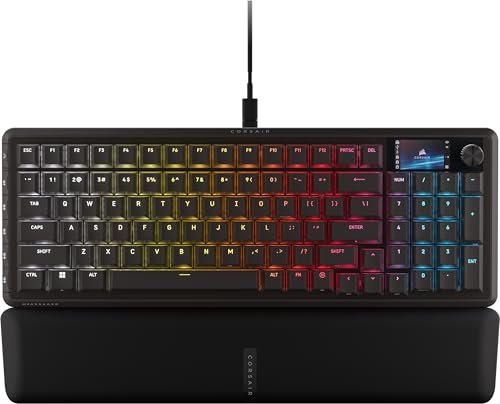
- 1.9-inch full-color LCD screen
- 96% layout with number pad and six G-keys
- 8,000Hz polling and Stream Deck integration
Best For: Competitive gaming, streaming, and full-featured wired setups
Best All-Rounder

- Smart display shows status details and custom GIFs
- Tri-mode Bluetooth, 2.4GHz, and USB-C connectivity
- Hot-swappable 98-key layout with layered dampening
Best For: Gamers and everyday users wanting wireless flexibility and a near-full-size layout
Best Touchscreen Design

- Detachable oversized touchscreen with controls and plugins
- QMK/VIA customization with macros and RGB profiles
- Gasket-mounted 75% layout with pre-lubricated linear switches
Best For: Streamers and keyboard enthusiasts who want an interactive screen
Best Compact Wireless Option
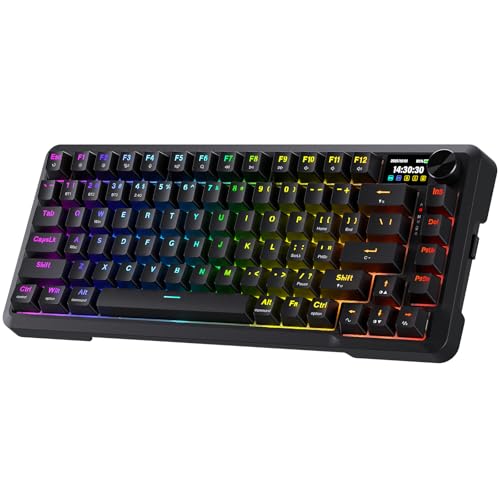
- TFT display supports status details and custom GIFs
- Tri-mode USB-C, Bluetooth, and 2.4GHz connectivity
- 81-key gasket design with hot-swappable switches
Best For: Wireless gaming and productivity setups with limited desk space
Best with Extra Features

- 96-key layout with LCD status screen and multifunction knob
- Tri-mode connectivity with support for up to five devices
- Hot-swappable switches, PBT keycaps, and sound-dampened construction
Best For: Gamers and multitaskers wanting a customizable compact keyboard with a number pad
Best for Customization

- LCD screen and metal knob provide quick control over settings
- 97-key 96% layout retains a number pad while saving space
- Hot-swappable design with gasket structure and web-driver customization
Best For: Gamers and office users who want extensive controls in a compact layout
Best Full-Size Pick
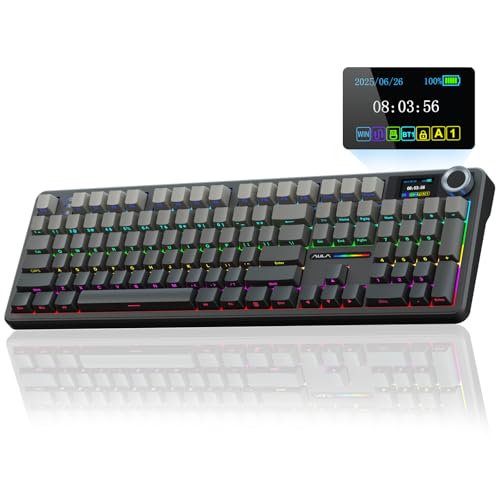
- Full-size 104-key layout with TFT color screen and multifunction knob
- 8000mAh battery plus Bluetooth, 2.4GHz, and USB-C connectivity
- Hot-swappable switches, PBT keycaps, and five-layer sound dampening
Best For: Users who need a traditional number pad for work and gaming
Best Wireless Pick – AULA S75 Pro
The AULA S75 Pro is a versatile mechanical keyboard with LCD screen for shoppers who want wireless flexibility, customization, and a compact layout. Its screen displays information such as battery status, connection details, time, GIFs, volume, and backlight settings, while the knob provides quick control.
Best For: Gamers and keyboard enthusiasts who want a customizable 75% wireless board with hot-swappable switches.
Pros:
- Tri-mode connectivity supports Bluetooth 5.0, 2.4GHz wireless, and USB-C wired use.
- Hot-swappable 3-pin and 5-pin switch support requires no soldering.
- LCD screen, multifunction knob, PBT keycaps, and layered sound dampening add customization and comfort.
Cons:
- Windows software and wired mode are required to configure screen images or GIFs.
- The compact 75% layout does not include a dedicated number pad.
The S75 Pro balances a space-saving design with extensive customization and multi-device support. It is a strong choice if you want a mechanical keyboard with LCD screen without giving up wireless connectivity.
Best for Streaming – darkFlash K87PRO
The darkFlash K87PRO is a mechanical keyboard with LCD screen functionality built into six customizable stream-deck keys. These display icons, GIFs, or system information and can trigger macros, apps, websites, and shortcuts, making the wired TKL board useful for streaming and productivity.
Best For: Streamers, creators, and multitaskers who want programmable visual shortcut keys.
Pros:
- Six customizable LCD keys support icons, GIFs, system information, macros, and shortcuts.
- Three rotary knobs can control volume, media, brightness, zoom, or other assigned functions.
- Hot-swap support, gasket mounting, RGB lighting, and full-key programming offer broad customization.
Cons:
- It is a wired-only keyboard.
- The customizable software and LCD features are designed for Windows and macOS use.
With six visual controls and three knobs, the K87PRO is more workflow-focused than a typical gaming keyboard. Choose it when quick access to commands matters more than wireless portability.
Best Wireless Full-Featured Option – Redragon K719 PRO
The Redragon K719 PRO is a mechanical keyboard with LCD screen that combines a compact 95-key layout with tri-mode connectivity. Its TFT display shows battery, connection mode, and typing status, and it can display custom GIFs or memes while the knob handles media and lighting controls.
Best For: Users who want wireless flexibility, a number-friendly layout, and a cushioned typing feel.
Pros:
- USB-C, Bluetooth, and 2.4GHz modes support switching among PCs, laptops, and tablets.
- 95-key layout retains practical keys while remaining more compact than a full-size board.
- Gasket mounting, five-layer dampening, lubricated linear switches, and hot-swap support emphasize a softer typing experience.
Cons:
- The TFT display and software customization may require setup to use fully.
- Its compact layout may not suit shoppers who prefer a traditional full-size keyboard.
The K719 PRO is a well-rounded option for buyers who want a screen, knob, wireless connectivity, and a practical 95-key layout. Its cushioned construction also makes it appealing for quieter, softer-feeling typing.
Best Premium Gaming Layout – CORSAIR VANGUARD 96
The CORSAIR VANGUARD 96 is a wired mechanical keyboard with LCD screen designed for users who want nearly full-size functionality in a compact frame. Its 1.9-inch color display supports custom animations, images, and system information, while the board also includes a number pad, rotary dial, and six programmable G-keys.
Best For: Competitive gamers and power users who need a number pad, programmable controls, and fast wired input.
Pros:
- 96% layout includes arrow keys, number pad, LCD screen, dial, and six G-keys.
- Full-color 1.9-inch LCD supports custom animations, images, and system specifications.
- 8,000Hz polling, FlashTap SOCD handling, hot-swappable construction, and Elgato Virtual Stream Deck integration support gaming workflows.
Cons:
- It is a wired-only keyboard.
- The feature-rich design may be more than casual typists need.
The VANGUARD 96 is the most feature-dense choice here for shoppers who want a mechanical keyboard with LCD screen and a number pad. Its programmable controls and gaming-focused technologies make it especially suited to competitive play and streaming.
Best All-Rounder – RK Royal Kludge S98
The RK Royal Kludge S98 is a practical choice if you want a mechanical keyboard with lcd screen-style functionality, wireless flexibility, and a compact full-featured layout. Its smart display shows useful status information and custom GIFs, while the rotary knob provides quick control over volume, lighting, and connection settings.
Best For: Gamers and everyday users who want a customizable 98-key keyboard with wireless and wired connectivity.
Pros:
- Smart display supports custom GIFs, date, connection mode, layout, and battery information.
- Bluetooth 5.0, 2.4GHz wireless, and USB-C connectivity provide flexible setup options.
- Hot-swappable PCB supports both 3-pin and 5-pin switches without soldering.
- Layered dampening and a top-mount design help reduce noise and hollow sound.
Cons:
- It is not water resistant.
- The 98-key layout is less compact than a typical 75% keyboard.
- The smart display is smaller and less interactive than a full touchscreen.
The S98 balances useful display functions, a dedicated knob, wireless connectivity, and switch customization. It is a strong fit for buyers who want an enthusiast-style keyboard without giving up a near-full-size layout.
Best Touchscreen Design – Womier DUO87
The Womier DUO87 stands out among mechanical keyboard with lcd screen options because its oversized smart screen is detachable and touch-enabled. Keep it docked for controls and plugins, or remove it to use the keyboard in a more traditional 75% layout with hot-swappable customization.
Best For: Streamers, creators, and enthusiasts who want a large interactive display and deep software customization.
Pros:
- Detachable touchscreen supports controls, plugins, icons, GIFs, and photos.
- QMK/VIA firmware enables remapping, macros, profiles, layers, and custom RGB effects.
- Gasket mount, five-layer filling, and pre-lubricated linear switches provide a cushioned typing feel.
- Hot-swappable PCB accepts 3-pin and 5-pin switches.
Cons:
- USB-C wired connectivity is the only listed connection option.
- The large screen can increase power consumption.
- The screen-equipped design may be more elaborate than needed for basic typing.
The DUO87 is the most screen-focused option in this roundup. Its detachable touchscreen gives it unusual flexibility, while VIA support and a hot-swappable design make it appealing to users who enjoy tuning both software and hardware.
Best Compact Wireless Option – Redragon K724 PRO
The Redragon K724 PRO is a compact mechanical keyboard with lcd screen-style status features, a dedicated control knob, and tri-mode connectivity. Its TFT display can show battery, connection, and typing information, while the gasket-mounted construction targets a softer, quieter typing experience.
Best For: Users who want an 81-key wireless gaming keyboard with a compact footprint and quick media controls.
Pros:
- TFT display supports battery, connection, typing status, and custom GIFs or memes.
- USB-C, Bluetooth, and 2.4GHz modes allow switching between multiple devices.
- Gasket mounting, five-layer dampening, and lubed linear switches provide a cushioned feel.
- Hot-swappable sockets make future switch changes convenient.
Cons:
- The 81-key layout omits the extra keys found on larger boards.
- The supplied details list a custom linear switch rather than multiple included switch types.
- It is not described as water resistant.
The K724 PRO is a sensible choice when desk space and connection flexibility matter. It delivers a useful information display and knob without moving to a larger layout, while its gasket construction and switch-ready design leave room for personalization.
Best with Extra Features – AULA S98 Pro
If you want a mechanical keyboard with lcd screen that balances compact sizing, customization, and device flexibility, the AULA S98 Pro is a practical option. Its 96-key layout keeps a number pad while adding a screen and multifunction knob for quick status checks and controls.
Best For: Gamers and multitaskers who want a customizable wireless keyboard with a compact full-featured layout.
Pros:
- LCD screen shows time, battery, system, connection mode, and status information.
- Tri-mode connectivity supports Bluetooth 5.0, 2.4GHz wireless, and USB-C wired use, with up to five devices saved.
- Hot-swappable 3-pin and 5-pin support, pre-lubricated components, PBT keycaps, and five layers of sound-dampening material.
Cons:
- Windows software and wired mode are required to configure screen GIFs and calibrate the date and time.
- The compact 96-key layout may not suit shoppers who specifically want a full-size keyboard.
The S98 Pro stands out as a versatile middle ground: it provides useful screen controls and strong customization without taking up as much space as a 100% layout. Its software limitations are worth considering if you expect to customize the display from another operating system.
Best for Customization – SOLAKAKA A99 Pro
The SOLAKAKA A99 Pro is a mechanical keyboard with lcd screen designed for users who want extensive control over lighting, macros, connectivity, and display content. Its 97-key, 96% layout preserves a number pad and navigation keys while reducing desk footprint.
Best For: Users who prioritize web-based customization, multi-device switching, and a space-saving layout for gaming or office work.
Pros:
- LCD screen displays date, time, battery, connected system, connection mode, and GIF images.
- Metal multifunction knob controls settings such as volume, systems, lighting, and display options.
- Full-key hot-swapping supports 3-pin and 5-pin switches, while the gasket structure and five cushioning layers aim for a softer, quieter feel.
Cons:
- Custom screen GIFs and advanced settings require the web driver.
- The 96% layout is space-saving but is not a full-size 104-key design.
Choose the A99 Pro if you want the LCD screen to be part of a broader customization system rather than a simple status display. Its tri-mode connection and 97-key layout make it flexible, while RGB and web-driver options give enthusiasts plenty to adjust.
Best Full-Size Pick – AULA F108 Pro
For shoppers who need a mechanical keyboard with lcd screen but do not want to give up a traditional number pad, the AULA F108 Pro offers a full-size 104-key layout. It combines a TFT color display, multifunction knob, wireless modes, and a large battery for work and gaming setups.
Best For: Productivity-focused users and gamers who prefer a complete full-size layout with long-use wireless capability.
Pros:
- Interactive TFT color screen and knob control GIFs, volume, date, time, battery, backlight, and connection modes.
- Tri-mode connectivity supports Bluetooth 5.0, 2.4GHz wireless, and USB-C wired operation, with up to five saved devices.
- Full-size 104-key layout, hot-swappable 3-pin and 5-pin support, PBT keycaps, and an 8000mAh battery.
Cons:
- Windows software and wired mode are needed for screen GIF setup and date/time calibration.
- Its full-size footprint requires more desk space than the 96% alternatives.
- The supplied notes mention possible abnormal F-zone behavior with incompatible Linux driver versions.
The F108 Pro is the clearest choice when a number pad and dedicated function keys matter more than compactness. Its large battery and 1000Hz polling claim in wired and 2.4GHz modes also make it suited to extended work sessions and responsive gaming use.
How We Picked the Best Mechanical Keyboard with Lcd Screen
We compared these keyboards by looking at the features that matter most in daily use: screen placement and usefulness, layout, switch and keycap design, wireless connectivity, battery capacity where specified, customization, and dedicated controls. We also considered whether each board suits gaming, streaming, office work, or mixed use.
A display alone does not make a keyboard better. The best Mechanical Keyboard with Lcd Screen should combine a readable, useful interface with reliable typing performance, sensible software, and a layout that matches your available desk space.
Quick Comparison
| Layout type | Best suited for | What to look for |
|---|---|---|
| 75% and compact | Small desks and portable setups | Function-layer access, display readability, and wireless flexibility |
| TKL and 80%+ | Gaming and general productivity | Dedicated navigation keys, stable wireless performance, and knob placement |
| 96% | Users who want a numpad without a full-size footprint | Compressed spacing, navigation layout, and software support |
| Full size | Numerical entry and office-heavy work | Numpad access, desk space, battery size, and comfortable key spacing |
Key Buying Factors for a Mechanical Keyboard with Lcd Screen
Display and Controls
Check the screen’s size, viewing angle, brightness, and supported functions. Some displays show animations or system information, while others work as configurable dashboards. A rotary knob can make volume, lighting, or menu control faster, but its location matters if you use a mouse close to the keyboard.
Layout and Desk Fit
Choose a 75% or TKL board if space is limited, a 96% model for a compact numpad, or a full-size keyboard for frequent spreadsheet and number-entry work. Remember that unusual layouts may require an adjustment period or make replacement keycaps harder to find.
Connectivity and Battery
For gaming, wired USB-C can provide a simple, dependable connection. Wireless models are more flexible for multi-device setups, especially when they support both 2.4GHz and Bluetooth. Compare stated battery capacity, charging method, and whether the display or RGB lighting significantly reduces runtime.
Typing Hardware and Software
Hot-swappable sockets, pre-lubed switches, gasket construction, PBT keycaps, and sound-dampening features can improve the typing experience. Also verify that the companion software supports your operating system and lets you customize the screen, macros, lighting, and key assignments.
Who Should Buy Which Mechanical Keyboard with Lcd Screen?
Choose a compact 75% model if you want a screen-equipped board while preserving mouse space. TKL options are a strong middle ground for gaming and everyday work. A 96% keyboard is better for users who need a numpad but want a smaller footprint than traditional full size. Full-size models make the most sense for accounting, data entry, and users who prefer dedicated navigation keys.
Streamers and creators should prioritize programmable screens, macro support, and a convenient knob or streaming-control integration. Competitive gamers should emphasize connection stability, latency, switch feel, and unobstructed mouse movement. For a mixed setup, wireless tri-mode connectivity, hot-swappable switches, and a clear display offer the best long-term flexibility.