A mesh Wi-Fi system with PoE nodes can deliver dependable coverage while using a single Ethernet cable for both network data and power. That makes it especially useful for multi-story homes, large properties, offices, and outdoor installations where wall outlets are inconvenient.
Our roundup includes consumer mesh kits, business-grade access points, Wi-Fi 6 and Wi-Fi 7 options, and weather-resistant outdoor hardware. Use the buying guide below to match the right system to your layout, network speed, management needs, and installation plan.
Best 10 Mesh Wi Fi System with Poe Nodes Picks for 2026
Best Whole-Home Value

- Wi-Fi 6 mesh coverage up to 6,500 sq. ft.
- PoE+ or standard power options
- Two 2.5Gbps ports per node
Best For: Large homes needing flexible PoE placement
Best Business Access Point

- Wi-Fi 6 speeds up to 2,976Mbps
- 802.3at PoE+ support
- Omada cloud and controller management
Best For: Business networks and multi-AP deployments
Best Wi-Fi 7 Upgrade

- Tri-band Wi-Fi 7 performance
- Dual 5Gbps WAN/LAN ports
- PoE-powered wall or ceiling installation
Best For: Multi-gig homes upgrading to Wi-Fi 7
Best Outdoor Mesh Option

- Indoor/outdoor mesh access point
- Supports 802.3af and 24V passive PoE
- Includes Gigabit PoE adapter
Best For: Outdoor coverage and hard-to-wire areas
Best Wired-Backhaul Access Point

- AX3000 WiFi 6 with 160MHz channels
- 2.5GbE uplink and PoE+ support
- Local or free Nebula cloud management
Best For: Expanding a wired WiFi network with a PoE-capable access point
Best UniFi Mesh Node

- WiFi 6 with 4x4 MU-MIMO
- PoE injector included
- Works with other UniFi access points
Best For: Expanding an existing UniFi network with a powered mesh node
Best High-Capacity Whole-Home Mesh

- Three-pack covers up to 7,600 square feet
- WiFi 7 supports over 200 devices
- 10Gbps and 2.5Gbps Ethernet ports
Best For: Large homes needing WiFi 7 capacity and multi-gig connectivity
Best Outdoor Wi-Fi 7 Pick
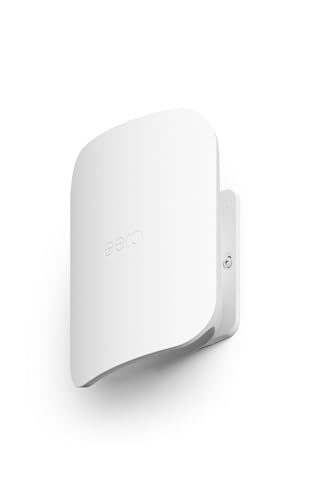
- Wi-Fi 7 speeds up to 2.1 Gbps
- IP66 outdoor protection
- Up to 15,000 sq. ft. of outdoor coverage
Best For: Large outdoor spaces needing fast, weatherproof mesh coverage
Best Business PoE Bundle

- Five AC1750 access points
- Mesh and seamless roaming support
- PoE adapters and mounting kits included
Best For: Business networks requiring several managed access points
Best Outdoor Mesh Add-On

- Wi-Fi 6 speeds up to 1.8 Gbps
- Adds up to 2,200 sq. ft.
- PoE+ or AC power with IP65 protection
Best For: Deco users extending mesh coverage outdoors
Best Whole-Home Value – TP-Link Deco X50-PoE 3-Pack
For shoppers seeking a mesh wi fi system with poe nodes, the TP-Link Deco X50-PoE 3-Pack combines Wi-Fi 6 performance with flexible PoE+ installation. It covers up to 6,500 square feet, supports up to 150 devices, and can use wired multi-Gig backhaul through a PoE+ switch.
Best For: Large homes that need broad Wi-Fi 6 coverage and ceiling- or wall-friendly PoE placement.
Pros:
- Three-node system covers up to 6,500 square feet.
- Supports PoE+ or standard power, with two 2.5Gbps ports per unit.
- Includes AI-driven mesh, app management, and basic HomeShield security features.
Cons:
- PoE+ switch is not included.
- Requires a separate modem for most internet providers.
The X50-PoE is a practical choice when you want the installation flexibility of PoE without moving to a business-focused access-point platform. Its three-pack coverage and 2.5Gbps connectivity make it well suited to demanding connected homes.
Best Business Access Point – TP-Link Omada EAP653
The TP-Link Omada EAP653 is a single Wi-Fi 6 access point for building a mesh wi fi system with poe nodes through the Omada platform. It supports PoE+, centralized management, seamless roaming, and ceiling or wall installation, making it a better fit for structured business networks than a typical plug-in mesh kit.
Best For: Offices, classrooms, hotels, and other multi-access-point deployments using Omada management.
Pros:
- Dual-band Wi-Fi 6 speeds up to 2,976Mbps.
- Supports 802.3at PoE+ and Omada mesh and roaming features.
- Offers cloud, hardware, software, or standalone management options.
- Includes a five-year manufacturer warranty.
Cons:
- Sold as a single access point, not a complete multi-node kit.
- DC power adapter is not included.
- Omada mesh and seamless roaming require an Omada SDN controller.
The EAP653 makes sense when you want scalable business Wi-Fi and centralized control. Plan for the appropriate controller and PoE hardware if you intend to use its full mesh and roaming capabilities.
Best Wi-Fi 7 Upgrade – TP-Link Deco BE65-PoE
The TP-Link Deco BE65-PoE is a single-node Wi-Fi 7 option for a mesh wi fi system with poe nodes. It can draw power and network connectivity from an 802.3at PoE switch or suitable adapter, while tri-band Wi-Fi 7 and dual 5Gbps ports target multi-gig internet, 4K/8K streaming, and demanding wireless devices.
Best For: Early Wi-Fi 7 adopters who want a high-speed, ceiling- or wall-mountable PoE node.
Pros:
- Tri-band Wi-Fi 7 with up to 11,000Mbps combined data rate.
- Supports PoE input and flexible wall, ceiling, or tabletop placement.
- Two 5Gbps WAN/LAN ports support multi-Gig wired connections.
- Can operate as a standalone router or join a Deco system.
Cons:
- This listing is for one node and covers up to 3,000 square feet.
- Wireless backhaul requires at least two Deco units.
- PoE power requires a compatible 802.3at switch or adapter rated at 24W or more.
The BE65-PoE is the strongest performance-oriented choice in this group, especially for newer Wi-Fi 7 devices and multi-gig networks. Its one-node format means expansion may be necessary for whole-home coverage.
Best Outdoor Mesh Option – Ubiquiti UniFi AC Mesh
The Ubiquiti UniFi AC Mesh is an outdoor-oriented access point for extending a mesh wi fi system with poe nodes across patios, yards, or other large areas. Its plug-and-play mesh support, adjustable dual-band antennas, and included Gigabit PoE adapter simplify deployments where running power separately is difficult.
Best For: Outdoor coverage and multi-access-point networks that need flexible PoE powering.
Pros:
- Designed for indoor/outdoor use and mesh multi-hop coverage.
- Supports 802.3af and 24V passive PoE, with a Gigabit PoE adapter included.
- Adjustable dual-band omnidirectional antennas support flexible coverage.
- Gigabit Ethernet connectivity supports wired uplinks.
Cons:
- Uses older Wi-Fi 5 technology rather than Wi-Fi 6 or Wi-Fi 7.
- Single-unit design may require additional access points for broad coverage.
- Listed wireless throughput is up to 1,167Mbps.
The UniFi AC Mesh remains a sensible choice for outdoor or hard-to-wire areas when cost and PoE flexibility matter more than the newest wireless standard. It is best viewed as an access point for an expandable deployment, not a complete whole-home kit.
Best Wired-Backhaul Access Point – Zyxel NWA50AXPRO WiFi 6
The Zyxel NWA50AXPRO is a strong building block for a mesh wi fi system with poe nodes when you want WiFi 6 coverage with wired power and backhaul flexibility. Its 2.5GbE port, PoE+ support, and three high-gain internal antennas make it well suited to homes or small professional deployments where reliable placement matters.
Best For: Buyers expanding a wired network across multiple rooms or floors with a WiFi 6 access point that can use PoE+ or DC power.
Pros:
- AX3000 WiFi 6 performance with 160MHz channel support.
- 2.5GbE uplink can avoid the bottleneck of a standard 1Gbps port while using existing Cat5e cabling.
- Supports mesh networking, VLAN tagging, WPA3, band steering, and fast roaming.
- Can be managed locally or through the free Nebula Control Center.
Cons:
- This is an access point rather than a complete multi-node mesh kit.
- Only one network port is listed.
The NWA50AXPRO is a practical choice when you already have a router or gateway and want a centrally managed, PoE-capable WiFi 6 node. Its 2.5GbE connectivity gives it more upgrade headroom than typical gigabit access points.
Best UniFi Mesh Node – Ubiquiti U6-MESH WiFi 6
The Ubiquiti U6-MESH is a convenient option for a mesh wi fi system with poe nodes, especially if you want to expand an existing UniFi network. It combines WiFi 6, 4×4 MU-MIMO, a supplied PoE injector, and compatibility with other UniFi access points for broader coverage.
Best For: UniFi users who need an additional WiFi 6 mesh node with simplified PoE installation and coverage rated at up to 1,500 square feet.
Pros:
- WiFi 6 with 4×4 MU-MIMO for handling multiple connected devices.
- Up to 4.8Gbps on the 5GHz band and 573.5Mbps on 2.4GHz.
- PoE injector is included for easier power delivery and installation.
- Designed to expand coverage when paired with other UniFi access points.
Cons:
- The listed LAN port bandwidth is 1Gbps, limiting wired throughput compared with multi-gig access points.
- It is most naturally suited to a UniFi-based network rather than a standalone whole-home kit.
The U6-MESH is a sensible pick for extending a UniFi deployment without changing platforms. The included injector reduces installation complexity, while the WiFi 6 radio and 4×4 design support busy home or high-density environments.
Best High-Capacity Whole-Home Mesh – TP-Link Deco 7 Pro WiFi 7
The TP-Link Deco 7 Pro is a whole-home alternative for shoppers comparing a mesh wi fi system with poe nodes, although the supplied specifications emphasize WiFi mesh and multi-gig Ethernet rather than PoE power. Its three-unit WiFi 7 system covers up to 7,600 square feet, supports more than 200 devices, and provides a 10Gbps WAN/LAN port for demanding networks.
Best For: Large homes and performance-focused households that prioritize WiFi 7 capacity, broad coverage, and multi-gig wired connectivity over PoE-powered nodes.
Pros:
- Three-pack coverage is rated for up to 7,600 square feet and over 200 devices.
- Tri-band WiFi 7 supports listed speeds up to 5,188Mbps on 6GHz, 4,324Mbps on 5GHz, and 574Mbps on 2.4GHz.
- Includes a 10Gbps WAN/LAN port, four 2.5Gbps WAN/LAN ports, and USB 3.0.
- Offers AI-assisted roaming, network security, parental controls, VPN support, and app management.
Cons:
- The supplied notes do not identify PoE support, so it may not suit a PoE-node requirement.
- A separate modem is required.
- Actual wireless speeds vary with distance, walls, obstacles, and network conditions.
The Deco 7 Pro is the strongest fit here for users seeking a high-capacity, future-ready whole-home mesh system rather than a conventional PoE access-point deployment. Its multi-gig ports and WiFi 7 radios provide substantial headroom for large households and demanding applications.
Best Outdoor Wi-Fi 7 Pick – eero Outdoor 7
If you need a mesh wi fi system with poe nodes for broad outdoor coverage, the eero Outdoor 7 is a strong fit. This weatherproof Wi-Fi 7 node can cover up to 15,000 square feet outdoors, support 100-plus devices, and connect through AC power or PoE+.
Best For: Large patios, yards, and outdoor spaces that need high-speed mesh coverage.
Pros:
- IP66-rated design is built for dust, rain, snow, and temperatures from -40°F to 131°F.
- Wi-Fi 7 delivers wireless speeds up to 2.1 Gbps.
- Can wirelessly bridge two units up to 1,000 feet apart with clear line of sight.
- App-guided setup, network management, and automatic updates.
Cons:
- AC power adapter is not included.
- Some advanced security features require an optional eero Plus subscription.
The eero Outdoor 7 stands out when outdoor range, weather resistance, and Wi-Fi 7 performance matter most. Its PoE+ support adds installation flexibility, though buyers should plan for compatible power equipment or a separate adapter.
Best Business PoE Bundle – TP-Link EAP245 5-Pack
The TP-Link EAP245 5-pack is designed for business networks that need multiple ceiling-mounted access points. As a mesh wi fi system with poe nodes, it combines AC1750 dual-band Wi-Fi, mesh support, seamless roaming, MU-MIMO, and PoE-powered installation through the Omada platform.
Best For: Businesses, offices, and larger properties building a multi-access-point Wi-Fi network.
Pros:
- Five AC1750 dual-band wireless access points are included.
- Supports mesh networking and seamless roaming.
- PoE adapters, mounting hardware, and installation materials are included.
- Omada app and cloud access support centralized management.
Cons:
- Uses Wi-Fi 5 rather than newer Wi-Fi 6 or Wi-Fi 7 technology.
- Its access-point design is better suited to network installations than simple home-router replacement.
For a business-oriented deployment with several wired locations, the EAP245 bundle offers a practical way to expand coverage and simplify management. The included PoE adapters make setup more approachable, while the Wi-Fi 5 standard may limit future-proofing.
Best Outdoor Mesh Add-On – TP-Link Deco X20-Outdoor
The TP-Link Deco X20-Outdoor is an add-on node for an existing Deco mesh network. It suits shoppers seeking a mesh wi fi system with poe nodes because it supports PoE+ or AC power, adds up to 2,200 square feet of coverage, and uses a weather-resistant design for outdoor placement.
Best For: Deco owners extending reliable Wi-Fi to patios, gardens, garages, and other outdoor areas.
Pros:
- Wi-Fi 6 offers combined speeds up to 1.8 Gbps.
- Adds up to 2,200 square feet and supports up to 150 devices.
- IP65-rated housing helps protect against rain, dust, moisture, shocks, and vibrations.
- Supports PoE+ or AC power with pole, wall, and tabletop mounting options.
Cons:
- Requires an indoor Deco mesh Wi-Fi system to operate as an outdoor extension.
- It is an add-on node, not a complete standalone mesh system.
The Deco X20-Outdoor is a convenient choice for extending an existing Deco network beyond the walls of the home. Its PoE+ compatibility and mounting flexibility are useful for permanent installations, but buyers without a Deco system will need to budget for the indoor network components too.
How We Picked the Best Mesh Wi Fi System with Poe Nodes
We compared the selected systems by wireless standard, throughput class, PoE requirements, Ethernet speed, coverage potential, management features, and installation flexibility. We also considered whether each option is designed for whole-home mesh networking, centrally managed access points, or targeted indoor and outdoor expansion.
Because PoE equipment varies widely, check whether a product includes a PoE injector, requires a PoE or PoE+ switch, or needs a separate power adapter. A system advertised as mesh may also depend on a compatible controller, gateway, or app configuration.
Quick Comparison
- Best for straightforward home deployment: TP-Link Deco PoE systems offer app-based setup and a familiar whole-home mesh format.
- Best for advanced network control: Omada and UniFi access points suit users who want VLANs, centralized management, roaming controls, and detailed monitoring.
- Best for newer wireless devices: Wi-Fi 7 models provide wider channels and newer multi-link capabilities, but compatible clients and fast wired networking improve their value.
- Best for outdoor coverage: Weather-resistant products are designed for patios, yards, and other exposed locations; confirm placement, temperature limits, and cable protection.
Key Buying Factors for a Mesh Wi-Fi System with PoE Nodes
PoE Standard and Installation
Confirm the required power standard before buying. Some nodes accept 802.3af PoE, while higher-performance hardware may need 802.3at PoE+. If your switch cannot provide the correct standard, you may need an injector. Also plan for outdoor-rated Ethernet cable and sealed connections when installing outside.
Wi-Fi Generation and Capacity
Wi-Fi 6 remains a strong choice for most homes and small businesses. Wi-Fi 7 can be worthwhile for high-speed internet, dense client environments, or future-proofing, but the benefits are limited if most devices use older Wi-Fi standards. Tri-band systems can dedicate a band to wireless backhaul, reducing congestion between nodes.
Wired Backhaul and Ethernet Ports
PoE nodes are most effective when connected by Ethernet. Wired backhaul avoids the performance loss associated with wireless hops and improves consistency across distant rooms. Check port speeds carefully: a 2.5Gbps or faster port may be important for multi-gig internet or Wi-Fi 7 hardware.
Management and Compatibility
Consumer mesh systems prioritize simple app control, while Omada and UniFi platforms offer deeper configuration and centralized administration. Choose one ecosystem where possible; mixing brands can work for basic access-point expansion but usually reduces roaming and management integration.
Who Should Buy Which Mesh Wi Fi System with Poe Nodes?
Choose a Deco PoE kit if you want simple whole-home coverage with Ethernet-powered nodes and minimal configuration. Choose Omada or UniFi if you are comfortable managing a network and need business features, multiple access points, or more precise control. Select a Wi-Fi 7 model for a new high-speed installation rather than upgrading solely for the label. For yards, detached buildings, or exposed mounting locations, choose an outdoor-rated node and verify that the rest of the network can supply the required PoE power and backhaul speed.