The best drawing tablets make digital art, photo editing, animation, and handwritten notes feel more natural and precise. The right choice depends on whether you want a compact pen tablet, a screen-based display, or a standalone device that works without a computer.
We compared 10 popular drawing tablets across size, pressure sensitivity, controls, portability, compatibility, and intended user. This roundup includes practical options for beginners, serious artists, students, and children.
Best 10 Drawing Tablets Picks for 2026
Premium Screen Pick

- 15.6-inch Full HD laminated display with 120% sRGB
- 8192-level battery-free pen with tilt support
- Six keys, touch bar, and adjustable stand included
Best For: Artists seeking a spacious, color-rich pen display
Compact Starter Pick

- Compact, lightweight design with a 6-by-3.7-inch active area
- Battery-free pen with a natural paper-like feel
- Four ExpressKeys and software access after registration
Best For: Beginners, students, and small-space creative setups
Advanced Compact Display

- 13.3-inch laminated display with 99% sRGB coverage
- 16384 pressure levels and three programmable pen buttons
- Five keys, dual dials, and adjustable stand included
Best For: Creators wanting precise input in a portable pen display
Large Beginner Pad

- Spacious 10-by-6.25-inch drawing area
- 16K battery-free stylus with tilt support
- Eight customizable keys and broad device compatibility
Best For: Beginners who prefer a large screenless drawing surface
Balanced Wireless Pick

- Battery-free EMR pen with 4,096 pressure levels
- Bluetooth and USB-A connectivity
- Four shortcut keys plus included software access
Best For: Students and creators seeking a flexible, screen-free tablet
Screen-Based Pro Workflow

- 13.3-inch Full HD laminated IPS display
- 16,384-pressure-level battery-free stylus
- Red dial and eight customizable shortcut keys
Best For: Artists who want direct-on-screen drawing and detailed controls
Compact Beginner-Friendly Pad

- Compact 6-by-4-inch active area
- Battery-free pen with 8,192 pressure levels
- Six customizable keys and broad computer compatibility
Best For: Beginners and mobile users needing a lightweight screen-free tablet
Best Kids’ Pick
Bravokids 10-Inch LCD Writing Tablet

- Colorful, glare-free 10-inch LCD doodle screen
- One-button erase and content-lock function
- Lightweight, durable design for ages 3–8
Best For: Young children, travel, and paper-free doodling
Best Shortcut Control
HUION Inspiroy H1060P Graphics Tablet

- 10-by-6.25-inch working area
- 12 press keys plus 16 soft keys
- Battery-free pen with 8192 pressure levels
Best For: Digital artists who want customizable computer-based controls
Best Standalone Display
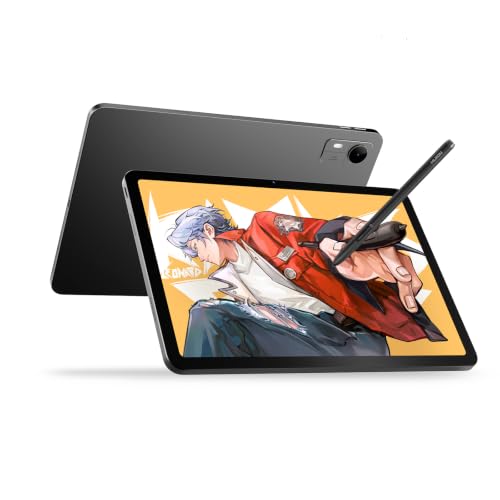
- 12.2-inch 2K+ display with 90Hz refresh rate
- 16,384-pressure-level battery-free stylus
- Android 16 tablet with 8GB RAM and 256GB storage
Best For: Creators who want an all-in-one portable drawing device
Premium Screen Pick – HUION Kamvas Pro 16
For artists who want a spacious canvas, the HUION Kamvas Pro 16 is a feature-rich choice among drawing tablets. Its 15.6-inch full-laminated display combines a textured drawing feel, anti-glare glass, vivid color, and an adjustable stand for more comfortable computer-based work.
Best For: Digital artists who prioritize a large, color-rich screen and customizable workflow controls.
Pros:
- 15.6-inch Full HD display with 120% sRGB coverage and a 1000:1 contrast ratio
- Battery-free pen offers 8192 pressure levels, 60-degree tilt recognition, and low-lag tracking
- Six shortcut keys, a touch bar, and included adjustable stand support efficient, comfortable work
- Compatible with Windows, macOS, Linux, and popular creative software
Cons:
- Requires connection to a computer or laptop; it is not standalone
- Its larger display footprint is less convenient for highly portable setups
The Kamvas Pro 16 is a strong fit when screen size, color range, and ergonomic adjustability matter more than minimal desk space. The included stand and shortcut controls add practical value for longer drawing sessions.
Compact Starter Pick – Wacom Intuos Small
The Wacom Intuos Small is a compact, straightforward option for anyone beginning with drawing tablets. Its battery-free pen, four ExpressKeys, broad software compatibility, and included software access make it useful for digital art, photo editing, design, and document markup.
Best For: Students, teachers, beginners, and creators who want a small wired tablet with dependable pen control.
Pros:
- Battery-free EMR pen provides a natural pen-on-paper feel
- Compact 6-by-3.7-inch active area and lightweight 8.1-ounce design suit small workspaces
- Four ExpressKeys provide quick access to shortcuts
- Works with Windows, macOS, Android, and Chromebook, with software and training included after registration
Cons:
- Small active area may feel limiting for broad gestures or large illustrations
- Offers 4096 pressure levels, fewer than the other listed pen tablets
- Uses a wired USB-A connection
The Intuos Small keeps the setup uncomplicated and portable. It is a sensible entry point for learning digital drawing or editing without paying for a built-in display.
Advanced Compact Display – HUION Kamvas 13 Gen 3
The HUION Kamvas 13 Gen 3 brings advanced pen performance and color accuracy to a relatively compact drawing tablet with screen. Its 13.3-inch laminated display uses Canvas Glass 2.0, while dual dials, shortcut keys, and a supplied stand help streamline everyday creative work.
Best For: Illustrators, animators, and designers who want a portable pen display with precise input and modern workflow controls.
Pros:
- 16384 pressure levels, 2g initial activation force, and three programmable pen buttons support precise strokes
- Factory-calibrated display offers 99% sRGB coverage and an average Delta E below 1.5
- Five shortcut keys and dual dials provide quick access to creative controls
- Supports Windows, macOS, Linux, and compatible Android devices
Cons:
- Requires a computer or compatible device; it is not standalone
- Its 13.3-inch screen provides less drawing area than a 15.6-inch display
- Full-featured USB-C cable is sold separately
This model is compelling for creators who value high pen sensitivity and dependable color in a smaller display. The included ST300 stand and flexible device compatibility make it adaptable across desks and workflows.
Large Beginner Pad – XPPen Deco 01 V3
The XPPen Deco 01 V3 is a screenless drawing tablet designed to give beginners plenty of working room. Its 10-by-6.25-inch surface, battery-free 16K stylus, eight customizable keys, and support for computers and Android devices make it a flexible way to start with digital art.
Best For: Beginners who want a generous drawing area, simple connectivity, and customizable shortcuts without a display.
Pros:
- Large 10-by-6.25-inch drawing area offers room for broad strokes
- Battery-free stylus provides 16384 pressure levels and up to 60-degree tilt support
- Eight customizable keys work for both right- and left-handed users
- Supports Windows, macOS, Chrome OS, Linux, and Android 10 or later
Cons:
- Screenless design requires looking at a connected device while drawing
- Android use depends on compatible device support and recommended mapping software
- It is a wired tablet rather than a standalone creative device
The Deco 01 V3 offers a strong balance of workspace and beginner-friendly controls. Choose it over a pen display if you prefer a larger pad and lighter, more portable design at the drawing surface.
Balanced Wireless Pick – Wacom Intuos Medium
The Wacom Intuos Medium is a versatile choice for drawing tablets if you want a familiar pen-on-paper feel without a built-in screen. Its battery-free EMR pen, Bluetooth connectivity, and compatibility with Mac, Windows, and Chromebook make it practical for drawing, photo editing, design work, and document markup.
Best For: Students, teachers, and creators who want a medium-size wireless drawing tablet for general creative work.
Pros:
- Battery-free pen with 4,096 levels of pressure sensitivity.
- Bluetooth or USB-A connectivity supports flexible use at a desk or on the go.
- Four ExpressKeys provide convenient shortcut access.
- Includes access to creative software and Wacom online training after registration.
Cons:
- It is a pen tablet without an integrated display, so you draw while viewing a separate screen.
- The included USB connection uses USB-A.
The Intuos Medium is a dependable all-purpose option for buyers who value wireless flexibility, a portable design, and straightforward compatibility over a built-in drawing screen.
Screen-Based Pro Workflow – XPPen Artist 13.3 Pro V2
The XPPen Artist 13.3 Pro V2 stands out among drawing tablets for its built-in Full HD display, 16,384 pressure levels, and paper-like laminated surface. It is designed for artists who want to draw directly on the image while using a dial and customizable keys to speed up common controls.
Best For: Illustrators, designers, animators, and hobbyists who prefer a display tablet with detailed pen response and hardware shortcuts.
Pros:
- Full-laminated 13.3-inch IPS display with Full HD resolution and anti-glare film.
- Battery-free stylus offers 16,384 pressure levels for nuanced strokes.
- Red dial and eight customizable keys support efficient brush, zoom, and navigation controls.
- Supports Windows, macOS, Chrome OS, Android devices with compatible USB-C, and Linux with driver support.
Cons:
- It is not standalone and must be connected to a computer or laptop.
- Color-setting adjustments through the tablet interface are noted as Windows-only.
- The compact display may provide less workspace than a larger pen display.
For artists who want direct-on-screen drawing and extensive control options, the Artist 13.3 Pro V2 offers a feature-rich setup, provided you are comfortable connecting it to a compatible host device.
Compact Beginner-Friendly Pad – HUION Inspiroy H640P
The HUION Inspiroy H640P is a compact drawing tablet suited to users who want precise pen control without taking up much desk or bag space. Its 6-by-4-inch active area, battery-free stylus, and six customizable keys support drawing, photo editing, note-taking, signatures, and everyday navigation.
Best For: Beginners, students, and mobile creators who need a lightweight tablet for computers or compatible Android devices.
Pros:
- Battery-free PW100 stylus provides 8,192 levels of pressure sensitivity.
- Six programmable keys can be assigned to common commands and app-specific profiles.
- Thin, lightweight design is easy to carry between home, school, and studio.
- Works with Mac, Windows, Linux, and Android 6.0 or later, with left-handed use supported.
Cons:
- It does not support iPhone or iPad.
- The 6-by-4-inch active area is smaller than the workspace on many medium-size tablets.
- It is a screen-free tablet and requires a separate display.
The H640P is a practical entry point for drawing tablets, especially when portability and shortcut customization matter more than a large active area or built-in screen.
Best Kids’ Pick – Bravokids 10-Inch LCD Writing Tablet
If you’re looking for drawing tablets for young children, the Bravokids 10-inch LCD writing tablet is a simple, screen-based alternative to paper and markers. Its colorful, glare-free display is designed for doodling, writing, and quiet travel-time entertainment.
Best For: Children ages 3–8, travel, handwriting practice, and mess-free drawing.
Pros:
- Colorful 10-inch LCD screen is designed for comfortable viewing without glare or radiation.
- One-button erasing and a lock function make it easy to use and help preserve drawings.
- Lightweight 150-gram plastic construction includes rounded corners and anti-fall protection.
- Reusable surface can be rewritten more than 100,000 times, reducing paper and ink use.
Cons:
- It is a basic doodle board rather than a pressure-sensitive computer graphics tablet.
- The supplied notes do not indicate app, computer, or phone connectivity.
Choose this model when portability and simplicity matter more than advanced digital-art tools. It is especially practical for keeping children occupied in cars, airplanes, restaurants, or at home.
Best Shortcut Control – HUION Inspiroy H1060P Graphics Tablet
For artists comparing drawing tablets for computer-based illustration, the HUION Inspiroy H1060P offers a large 10-by-6.25-inch active area, a battery-free pen, and extensive shortcut controls. It connects to compatible Windows, macOS, Android, and Linux devices for drawing, painting, and writing.
Best For: Beginners, hobbyists, and digital artists who want programmable shortcuts and a roomy working surface.
Pros:
- 8192 pressure levels and ±60° tilt support provide varied line weight and shading control.
- Includes 12 programmable press keys and 16 programmable soft keys for customizable shortcuts.
- Battery-free stylus supports uninterrupted drawing without charging.
- Symmetrical design can accommodate right- or left-handed users.
Cons:
- It is a pen tablet without a built-in drawing display, so it must be used with a compatible device.
- iPhone and iPad are not supported according to the supplied notes.
- Linux use requires the Xorg display server; Wayland is not supported.
The H1060P is a capable traditional graphics tablet for users who prefer working on a computer or supported Android device. Its shortcut count and generous active area make it particularly useful for software-heavy workflows.
Best Standalone Display – HUION KAMVAS Pad 12
Among drawing tablets with built-in screens, the HUION KAMVAS Pad 12 stands out as a standalone Android device for creating without a computer. It combines a 12.2-inch 2K+ display, a battery-free stylus, extensive storage, and a high refresh rate for drawing, note-taking, and multimedia use.
Best For: Artists, animators, designers, students, and creators who want a portable all-in-one drawing tablet.
Pros:
- 12.2-inch 2K+ display offers 236 PPI, 350 nits brightness, and a 3:2 canvas ratio.
- PenTech 4.0 stylus provides 16,384 pressure levels, ±60° tilt, and a 2g initial activation force.
- 90Hz refresh rate and fully laminated, nano-etched glass are designed for fluid, paper-like drawing.
- Android 16, 8GB RAM, 256GB storage, and expansion up to 1TB support standalone workflows.
Cons:
- Its larger feature set may be more than casual doodlers or users seeking a basic pen tablet need.
- The supplied notes do not specify the exact model number or a stated warranty period.
This is the most self-contained option in the group, with apps, storage, cameras, and a full Android operating system built in. It suits creators who want a sharp on-device canvas that can also handle notes, study, entertainment, and multitasking.
How We Picked the Best Drawing Tablets
We focused on the features that most affect everyday drawing: active area, pen responsiveness, shortcut controls, display quality, connectivity, portability, and software compatibility. The selection includes screenless tablets that pair with a computer, pen displays with built-in screens, and a standalone Android-based model.
We also considered different budgets and experience levels. A beginner may benefit more from simple setup and comfortable shortcuts than from maximum pressure levels, while illustrators and designers may prioritize color coverage, screen resolution, a larger work area, and customizable controls.
Quick Comparison
- Best for a built-in display: HUION Kamvas Pro 16 and XPPen Artist 13.3 Pro V2.
- Best compact beginner options: Wacom Intuos Small and HUION Inspiroy H640P.
- Best larger screenless workspaces: Wacom Intuos Medium, XPPen Deco 01 V3, and HUION Inspiroy H1060P.
- Best for portable standalone drawing: HUION KAMVAS Pad 12.
- Best for young children: Bravokids 10 Inch LCD Writing Tablet.
Key Buying Factors for Drawing Tablets
Screen or Screenless Design
A pen display lets you draw directly on the image, which many artists find intuitive. It usually costs more and needs more desk space. A screenless tablet is often lighter, more affordable, and durable, but takes practice because your hand works on the tablet while your eyes stay on the monitor.
Active Area and Size
Small tablets are easier to carry and work well for notes, photo adjustments, and limited desk space. Medium and large models provide more room for broad strokes and complex illustrations. Match the tablet size to your monitor and posture rather than choosing solely by the largest dimensions.
Pen Performance and Controls
Battery-free pens reduce charging interruptions. Pressure sensitivity helps control line width and opacity, while tilt support can improve shading with compatible software. Express keys, dials, and touch bars can speed up zooming, brush sizing, undoing, and canvas navigation.
Compatibility and Connectivity
Check support for your operating system and preferred apps before buying. Also confirm whether the tablet uses USB-C, requires multiple cables for display output, supports Bluetooth, or can operate independently. Driver quality and replacement-pen availability matter for long-term ownership.
Display Quality
For pen displays, look at resolution, color coverage, viewing angles, surface texture, brightness, and parallax. A laminated screen can make the cursor feel closer to the pen tip, while a textured surface may provide a more paper-like feel.
Who Should Buy Which Drawing Tablets?
Beginners and students should start with a straightforward Wacom Intuos or compact HUION model if they already have a computer. These options keep costs down while providing the essential tools for learning.
Illustrators and digital artists who want to draw directly on the image should consider the HUION Kamvas Pro 16, HUION Kamvas 13 Gen 3, or XPPen Artist 13.3 Pro V2. Compare screen size, color performance, shortcut layout, and desk space.
Designers and frequent editors may prefer a medium or large screenless tablet such as the Wacom Intuos Medium, XPPen Deco 01 V3, or HUION Inspiroy H1060P for efficient gestures and broad working space.
Traveling creators should look at the standalone HUION KAMVAS Pad 12, while parents shopping for young children may prefer the simple Bravokids LCD writing tablet for doodling rather than professional computer-based artwork.