The right capture card can make the difference between a smooth, professional stream and frustrating dropped frames, delay, or inconsistent audio. This roundup compares internal PCIe and external USB models for consoles, gaming PCs, cameras, and portable setups.
We focus on resolution, passthrough, latency, connectivity, software compatibility, and practical setup requirements so you can choose a capture card that fits your hardware and workflow.
Best 10 Capture Cards Picks for 2026
Premium Console Capture

- 4K60 capture with HDR10 support
- 1440p120 and 1080p240 passthrough
- Analog audio input and USB-C
Best For: High-refresh-rate PS5, Xbox, and Switch 2 capture
Plug-and-Play Value
Acer USB 3.0 HDMI Capture Card

- 4K input with 1080p60 output
- 3.5mm mic-in for commentary
- Plug-and-play compatibility with many devices
Best For: Simple gaming, teaching, and live-streaming setups
Internal HDMI 2.1 Performance

- 8K60 passthrough and 4K60 capture
- Up to 1080p240 recording
- VRR and dual-PC support
Best For: Advanced Windows desktop gaming and streaming
Budget HDMI Loop-Out

- 1080p capture with 4K input support
- HDMI loop-out for low-delay play
- Plug-and-play with mic-in support
Best For: Affordable console and camera streaming
Camera-to-Computer Pick

- 1080p60 and 4K capture support
- Connects cameras, camcorders, action cams, and iPhone
- Low latency with PC, Mac, and iPad compatibility
Best For: Creators upgrading to a camera-based streaming setup
Console Passthrough Pick
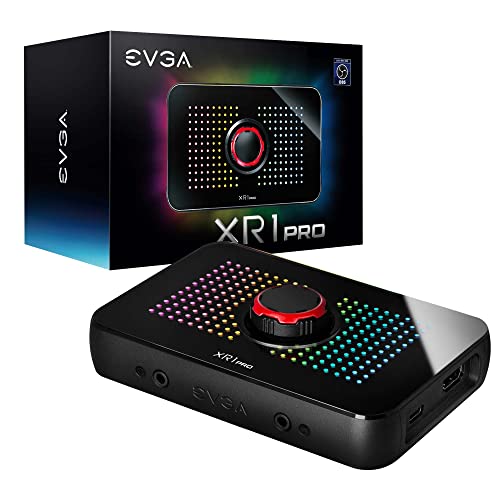
- Captures up to 1440p60 or 4K30
- HDR passthrough up to 1440p144 and 4K60
- Built-in audio mixer and control dial
Best For: Windows gamers prioritizing HDR passthrough and easy OBS setup
High-Refresh 4K Pick

- 4K60 capture with HDR and VRR passthrough
- Supports 1440p144, 1080p240, and ultrawide inputs
- PC, Mac, and iPad compatibility
Best For: Advanced gamers using high-refresh or ultrawide displays
Best Portable Pick
Guermok 1080p60 USB-C Capture Card

- 1080p at 60fps output
- USB-C and USB-A connectivity
- Plug-and-play, compact design
Best For: Portable streaming and recording
Best High-Refresh-Rate Pick

- Up to 240Hz refresh-rate support
- 4K144 HDR pass-through
- Internal PCIe 3.0 installation
Best For: High-performance Windows gaming desktops
Best Beginner USB Pick
Dcyfol 1080p60 HDMI Capture Card

- 1080p at 60fps capture
- 4K HDMI real-time preview
- Works with OBS, Streamlabs, and XSplit
Best For: Beginner console and camera streaming
Premium Console Capture – Elgato 4K S
The Elgato 4K S is a strong choice among capture cards for console players who want detailed 4K60 recording, high-refresh-rate passthrough, and HDR10 support. Its USB-C connection and analog audio input also make it practical for commentary and in-game chat.
Best For: PS5, Xbox Series X/S, and Switch 2 users seeking high-quality capture with smooth passthrough.
Pros:
- Captures video at up to 4K60 with HDR10 support.
- Supports 1440p120 and 1080p240 passthrough for responsive gameplay.
- Includes a 3.5mm analog audio input for chat or commentary.
- Works with Windows, macOS, and compatible iPadOS USB-C devices.
Cons:
- Windows use requires Windows 11, while macOS requires Ventura 13 or later.
- Requires a compatible USB 3.0 Type-C port and suitable computer hardware.
Choose this model if smooth high-refresh-rate gaming and HDR-capable capture matter more than basic 1080p recording. Its broad console compatibility and low-latency design make it a versatile premium option.
Plug-and-Play Value – Acer USB 3.0 HDMI Capture Card
This Acer capture card is designed for straightforward streaming and recording, combining 4K HDMI input with 1080p at 60Hz output. USB 3.0 connectivity, plug-and-play setup, and built-in mic-in support make it a practical option for gaming, classes, and live video.
Best For: Beginners and creators who want an affordable, broadly compatible capture card with simple setup.
Pros:
- Accepts 4K input and provides 1080p60 output.
- Uses YUY2 technology for richer color than MJPEG, according to the supplied notes.
- Includes a 3.5mm mic-in for commentary without extra adapters.
- Works with OBS, XSplit, VLC, major platforms, consoles, cameras, computers, and Android devices.
Cons:
- Capture resolution is listed as up to 1080p rather than 4K recording.
- USB 3.0 is required for USB 3.0 operation.
Its emphasis is convenience rather than advanced enthusiast features. If you need a compact, driver-free device for 1080p streaming from modern consoles or cameras, this Acer model covers the essentials.
Internal HDMI 2.1 Performance – Elgato 4K Pro
The Elgato 4K Pro is an internal capture card for Windows desktops with a PCIe slot. It targets demanding gaming and streaming setups with HDMI 2.1, 8K60 passthrough, 4K60 capture, high-frame-rate recording, and VRR support.
Best For: Desktop gamers, streamers, and dual-PC users who need advanced HDMI 2.1 passthrough performance.
Pros:
- Supports gameplay passthrough up to 8K60 and capture up to 4K60.
- Handles recording up to 1080p240 and supports HDMI 2.1 input and output.
- VRR passthrough helps provide smooth visuals without screen tearing.
- Designed for ultra-low-latency and dual-PC streaming setups.
Cons:
- Requires a Windows 10 system with an available PCIe slot.
- As an internal card, it is less portable than USB capture cards.
- The supplied system requirements call for 1080p video capture capability, so system compatibility should be checked.
This is the specialist option in the group. It makes the most sense when your desktop setup can support an internal PCIe card and you want HDMI 2.1 features, VRR passthrough, or high-refresh-rate recording.
Budget HDMI Loop-Out – VIXLW 4K HDMI Capture Card
This VIXLW capture card offers a practical route to 1080p60 streaming from HDMI devices. It supports 4K input, HDMI loop-out for gameplay without added delay, USB 3.0 connectivity, and a microphone input for commentary.
Best For: Budget-conscious streamers using consoles, cameras, or PCs with a USB 3.0 port.
Pros:
- Captures up to 1080p and accepts 4K input up to 60Hz.
- HDMI loop-out is designed for delay-free gameplay.
- Plug-and-play operation requires no driver or external power supply.
- Supports Windows and Mac systems and works with OBS, Twitch, YouTube, VLC, and other software.
Cons:
- It does not support 4K120Hz or 4K144Hz input.
- Output is listed as up to 2K30Hz, with 1080p capture as the main target.
- The supplied warranty description is only 60 days.
For basic streaming, this model focuses on the features most users need: 1080p capture, loop-out, mic-in, and simple setup. Confirm your source refresh rate and desired output before buying, especially if you use 4K high-refresh gaming.
Camera-to-Computer Pick – Elgato Cam Link 4K
If you want to use a DSLR, mirrorless camera, camcorder, action cam, or iPhone for streaming, the Elgato Cam Link 4K is one of the most camera-focused capture cards in this roundup. It connects through USB 3.0 and supports 1080p60 plus 4K capture, with low latency for keeping video and audio synchronized.
Best For: Creators turning a compatible camera into a webcam or live-streaming source.
Pros:
- Supports 1080p60 and up to 4K capture.
- Works with cameras, camcorders, action cameras, and iPhone sources.
- Compatible with OBS, Zoom, Discord, PC, Mac, and iPad.
- Compact design with ultra-low latency.
Cons:
- Requires a compatible camera and HDMI output for camera-based use.
- Listed system compatibility includes Windows and macOS, so check requirements for your setup.
Choose the Cam Link 4K if camera connectivity and a compact USB workflow matter more than console-focused passthrough features. Its low-latency design and broad app compatibility make it a practical option for webcam upgrades and live production.
Console Passthrough Pick – EVGA XR1 Pro Capture Card
The EVGA XR1 Pro is a gaming-oriented choice among these capture cards, combining high-resolution recording with HDR passthrough. It can capture up to 1440p at 60fps or 4K at 30fps, while allowing 1440p at 144Hz or 4K at 60Hz HDR passthrough for supported gaming setups.
Best For: Console and PC gamers who want HDR passthrough, OBS support, and convenient audio controls.
Pros:
- Captures up to 1440p60 or 4K30.
- Supports 1440p144 and 4K60 HDR passthrough.
- Built-in audio mixer and control dial.
- Plug-and-play setup with OBS certification and no driver installation required.
Cons:
- Requires a USB 3.1 interface and HDMI-compatible device.
- Capture resolution tops out at 1440p60 or 4K30 rather than 4K60 capture.
- Its listed operating-system platform is Windows.
The XR1 Pro makes sense when smooth HDR passthrough is a priority and 4K30 capture is sufficient. Its physical control dial and integrated audio mixer are useful additions for streamers who want quick adjustments without relying entirely on software.
High-Refresh 4K Pick – AVerMedia Live Gamer Ultra S
For advanced gaming setups, the AVerMedia Live Gamer Ultra S brings 4K60 capture together with HDR and VRR passthrough. These capture cards also support high-refresh inputs such as 1440p144 and 1080p240, plus ultrawide formats for compatible console and PC workflows.
Best For: Gamers and streamers using 4K, HDR, VRR, high-refresh, or ultrawide displays.
Pros:
- Supports 4K60 capture with HDR and VRR passthrough.
- Handles 1440p144 and 1080p240 capture modes.
- Supports ultrawide inputs including 3440×1440 and 2560×1080.
- Offers Windows 5.1-channel audio support and compatibility with PC, Mac, and iPad.
Cons:
- Some features, including 5.1-channel audio, depend on Windows software support.
- Requires a recent operating system: Windows 10/11, macOS 13/14 or later, or iPadOS 17 or later.
- Its advanced feature set may be more than a basic streaming setup needs.
The Live Gamer Ultra S is the strongest fit for users building around modern high-refresh gaming hardware. Its combination of 4K60 capture, VRR support, ultrawide compatibility, and multiple platform options gives it a broad feature set for demanding streaming workflows.
Best Portable Pick – Guermok 1080p60 USB-C Capture Card
For a compact option among capture cards, the Guermok model combines USB 3.0 connectivity with USB-C support and up to 1080p at 60fps output. It is designed for recording, streaming, meetings, and online teaching rather than directly casting HDMI video to a monitor or TV.
Best For: Portable streaming, recording, and users who need USB-C or USB-A connectivity.
Pros:
- Supports up to 1080p at 60fps output, with 2K at 30Hz and input up to 4K at 30Hz.
- Plug-and-play design requires no additional drivers or external power.
- Works with Windows, macOS, Linux, Android, OBS Studio, VLC, Zoom, and major streaming platforms.
- Compact aluminum-alloy housing is convenient for travel and outdoor streaming.
Cons:
- It is intended for capture and requires capture software; it is not a direct HDMI-to-display adapter.
- USB 3.0 is recommended for the intended bandwidth and resolution.
- Audio setup in OBS may require restarting the software, and video decoding introduces millisecond-level latency.
The Guermok is a flexible, travel-friendly choice for creators who want straightforward capture across several devices. Its USB-C adapter and broad software compatibility are useful, but buyers should follow the USB 3.0 and OBS setup notes for the best results.
Best High-Refresh-Rate Pick – AVerMedia Live Gamer 4K 2.1
Among capture cards for demanding gaming setups, the AVerMedia Live Gamer 4K 2.1 stands out with an internal PCIe design, HDMI 2.1 support, and high-refresh-rate capability. It supports 4K144 HDR pass-through and capture modes including 1080p240 and 1440p120.
Best For: Windows users building a high-performance desktop streaming or recording setup for modern consoles.
Pros:
- Supports refresh rates up to 240Hz, including 1080p240 and 1440p120 capture modes.
- Offers 4K144 HDR pass-through for compatible gaming hardware.
- Designed for ultra-low-latency game capture with plug-and-play installation.
- Compatible with PS5 and Windows systems and includes a three-year manufacturer warranty.
Cons:
- Its internal PCIe 3.0 format requires a compatible desktop installation.
- The supplied details specify Windows 10/11 compatibility, not broad cross-platform support.
- Its feature set is likely more than necessary for basic 1080p streaming.
The GC575 is the performance-oriented choice in this group, especially for high-refresh gaming and HDMI 2.1 setups. It makes the most sense for desktop users who can install a PCIe card and want advanced pass-through capabilities.
Best Beginner USB Pick – Dcyfol 1080p60 HDMI Capture Card
For beginners comparing USB capture cards, this Dcyfol model offers a simple plug-and-play setup with 1080p at 60fps capture and 4K HDMI real-time preview. It works with common streaming software and supports consoles, PCs, cameras, and both Windows and Mac systems.
Best For: New streamers and creators who want an easy USB setup for consoles, cameras, or computers.
Pros:
- Captures 1080p video at 60fps while supporting 4K HDMI real-time preview.
- Requires no drivers and works with OBS Studio, Streamlabs, and XSplit.
- Compatible with PS5, PS4, Nintendo Switch, Xbox, PCs, Macs, and cameras.
- Compact design includes USB and Type-C adapters plus extension cables.
Cons:
- Requires a USB 3.0 port for operation.
- The product records 4K sources in 1080p at 60fps rather than capturing 4K video.
- The supplied warranty information lists one year.
The Dcyfol is a practical entry-level option for creators who prioritize simple setup and broad device compatibility. It is especially appealing for 1080p streaming, while buyers seeking true 4K capture should look elsewhere.
How We Picked These Capture Cards
We selected models across the main capture-card categories: external USB devices for flexible setups, internal PCIe cards for desktop gaming PCs, camera-focused HDMI interfaces, and budget-friendly options for basic 1080p streaming. We considered advertised capture and passthrough resolutions, refresh-rate support, connection standards, compatibility with consoles and cameras, audio handling, and suitability for common broadcasting software such as OBS.
Specifications can vary by input source, cable, computer, and software settings. In particular, 4K passthrough does not always mean 4K recording, so check both figures before buying.
Quick Comparison
| Best For | Recommended Type | What to Prioritize |
|---|---|---|
| Console streaming | External HDMI capture card | 4K passthrough, low latency, USB 3.x |
| High-end PC setup | Internal PCIe card | Bandwidth, HDR, refresh-rate support |
| DSLR or mirrorless camera | Camera-oriented HDMI interface | Clean HDMI output and reliable USB connection |
| Travel or laptop streaming | Compact USB capture card | Plug-and-play setup and USB-C compatibility |
| Budget 1080p streaming | Basic USB 3.0 model | Stable 1080p60 capture and dependable audio |
Key Buying Factors for Capture Cards
Capture Resolution and Frame Rate
Choose based on what you record, not only what your console or monitor outputs. A card advertised for 1080p60 is suitable for most live streams, while 4K capture is better for high-resolution recording and future-proofing. Confirm whether the specification applies to capture, passthrough, or both.
Passthrough and Latency
Passthrough sends the source signal to your gaming display while the computer records it. Look for support matching your monitor or television, including 4K, HDR, and high refresh rates when needed. Low-latency passthrough is especially important for competitive games.
Connection and Compatibility
USB 3.0 or faster is generally preferred for external cards, but the computer must also have a compatible port and sufficient bandwidth. Internal PCIe models require an available slot and a desktop case. Check HDMI input requirements, HDCP limitations, operating-system support, and compatibility with OBS or your preferred software.
Audio and Camera Features
For microphones, party chat, or camera audio, inspect the available audio inputs and how the device handles embedded HDMI sound. Camera users should verify that the camera provides a clean HDMI feed and can remain powered during longer sessions.
Who Should Buy Which Capture Cards?
Console streamers should choose an external card with suitable 4K passthrough and 1080p60 capture, especially when using a PS5, Xbox Series X/S, or newer Nintendo hardware. PC streamers with a desktop and demanding display should consider an internal PCIe model or a premium external card with strong high-refresh-rate support.
Creators using a DSLR, mirrorless camera, camcorder, or action camera should prioritize a dedicated camera-link model and confirm clean HDMI output. Laptop users and beginners will generally benefit from a compact USB device that works with OBS without requiring an internal installation. If you mainly need straightforward 1080p streaming, a budget USB 3.0 card can be sufficient; spend more only when you need 4K recording, HDR, higher refresh rates, advanced audio, or additional headroom.