The best mechanical keyboard for typing should make long writing sessions feel comfortable, consistent, and efficient. Switch feel, layout, sound, keycap design, and connectivity all affect how well a keyboard fits your daily workflow.
This roundup compares 10 standout options, from quiet office keyboards and full-size boards to compact hot-swappable models with wireless connectivity and programmable features.
Best 10 Mechanical Keyboard for Typing Picks for 2026
Best Full-Size Value
Keychron C2 Retro Brown Switch
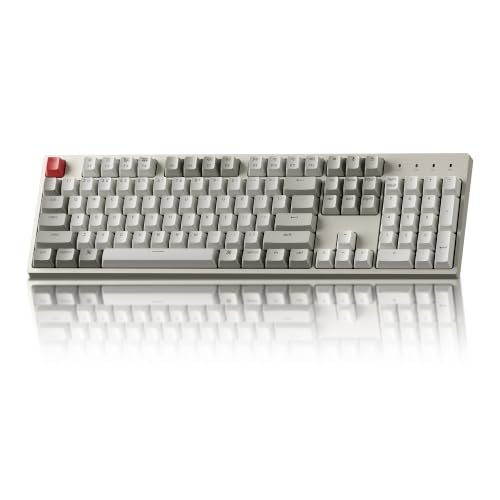
- Full-size layout with number pad
- Tactile brown switches
- Mac/Windows compatible USB-C design
Best For: Everyday office typing and full-size layout fans
Best Customizable Wireless Pick

- Tri-mode wireless and wired connectivity
- Hot-swappable 75% layout
- Pre-lubed switches with RGB and knob
Best For: Compact, customizable typing setups
Best Quiet Office Keyboard

- Quiet linear Silent Red switches
- Full-size office layout
- Aluminum construction with media shortcuts
Best For: Quiet, dependable Windows office typing
Best Gaming-Ready Full-Size Pick

- Tactile switches with durable PBT keycaps
- Brushed aluminum top case
- White backlight and media controls
Best For: Typing and gaming on one full-size keyboard
Flexible Full-Size Pick

- Full-size 108-key layout with four shortcut keys
- Hot-swappable support for 3-pin and 5-pin switches
- Quiet linear switches with adjustable RGB lighting
Best For: Customizable, quiet typing in a full-size wired layout
Retro Clicky Option
AULA F2088 Typewriter Keyboard

- Typewriter-style round keycaps with blue clicky switches
- Media controls and multifunction volume/backlight knob
- Includes aluminum panel and magnetic wrist rest
Best For: Audible, tactile typing with distinctive retro styling
Premium Compact Layout

- 98-key layout keeps the number pad in a smaller footprint
- Gasket mount, foam layers, and pre-lubed linear switches
- Hot-swappable design with PBT keycaps and volume knob
Best For: Smooth, customizable typing with a compact number-pad layout
Best for Customizable Clicky Typing

- Clicky Blue switches with tactile feedback
- Five onboard macro keys and media wheel
- Hot-swappable, full-size 104-key layout
Best For: Typists who like loud, tactile keystrokes and dedicated controls
Best for Wireless Customization

- Bluetooth, 2.4GHz, and USB-C connectivity
- Pre-lubed linear switches with hot-swap support
- Compact 96% layout and 8000mAh battery
Best For: Multi-device typists seeking smooth, customizable wireless typing
Best for Retro Typing Style
RK Royal Kludge S108 Typewriter

- Clicky Blue switches with tactile feedback
- 108-key anti-ghosting full-size layout
- Detachable wrist rest and retro round keycaps
Best For: Typists who want a distinctive typewriter-inspired keyboard
Best Full-Size Value – Keychron C2 Retro Brown Switch
The Keychron C2 is a practical mechanical keyboard for typing when you want a familiar full-size layout, dedicated number pad, and dependable wired connectivity. Its tactile brown switches, adjustable feet, and Mac/Windows compatibility make it well suited to everyday office and home use.
Best For: Writers, office users, and anyone who prefers a traditional 104-key layout with tactile feedback.
Pros:
- Full-size 104-key layout includes a number pad and multimedia/function keys.
- Tactile Keychron Brown switches are rated for up to 50 million keystrokes.
- USB-C wired connection provides consistent power and includes Mac and Windows keycaps.
- Inclined frame and two-level adjustable feet provide typing support.
Cons:
- Non-backlight version offers no illumination.
- Wired-only design is less flexible than wireless alternatives.
- Not water resistant.
The C2 prioritizes straightforward productivity over customization or portability. Choose it if a spacious layout, tactile switches, and reliable wired performance matter more than wireless features or backlighting.
Best Customizable Wireless Pick – AULA F75 Pro
The AULA F75 Pro is a mechanical keyboard for typing that combines a compact 75% layout with wireless flexibility and a cushioned, quieter-feeling construction. Its pre-lubed switches, hot-swap support, and multiple connection modes make it appealing for users who want to tailor both feel and setup.
Best For: Typists who want a compact keyboard, wireless connectivity, and room to customize switches and lighting.
Pros:
- Supports Bluetooth 5.0, 2.4GHz wireless, and USB-C wired connections.
- Hot-swappable socket supports 3-pin and 5-pin switches without soldering.
- Pre-lubed Reaper switches, stabilizers, and five-layer filling are designed for a smoother, softer sound.
- Includes arrow keys, a control knob, RGB lighting, and a 4000mAh battery.
Cons:
- 75% layout omits the dedicated number pad.
- Its gaming-focused features and RGB lighting may be unnecessary for simple office use.
- Customization and software features may require additional setup.
The F75 Pro offers more flexibility than a basic office keyboard, especially if you value wireless use or plan to experiment with switches. Its compact layout saves desk space while retaining arrow keys and a control knob.
Best Quiet Office Keyboard – Cherry KC 200 MX
The Cherry KC 200 MX is a mechanical keyboard for typing designed for quieter office use. Its linear MX2A Silent Red switches, aluminum surface, full-size layout, and dedicated volume and calculator controls provide a focused combination of comfort and practicality.
Best For: Office typists who want a full-size mechanical keyboard with a smooth, quiet key feel.
Pros:
- MX2A Silent Red switches provide smooth, quiet, non-clicky operation.
- Full N-key rollover and anti-ghosting support reliable input.
- Aluminum plate and metal surface give the keyboard a robust construction.
- Includes status LEDs plus shortcut keys for calculator and volume control.
Cons:
- USB-A wired connection limits cable flexibility.
- Windows compatibility is specified; Mac support is not listed.
- Full-size design occupies more desk space than compact layouts.
The KC 200 MX is a sensible choice when noise control and dependable office functionality take priority. Its linear switches feel different from tactile models, so it suits typists who prefer smooth key travel without a click.
Best Gaming-Ready Full-Size Pick – Logitech G413 SE
The Logitech G413 SE is a mechanical keyboard for typing that adds gaming-oriented durability and controls to a full-size wired design. Tactile switches, PBT keycaps, white backlighting, and an aluminum top case make it suitable for users who split their time between productivity and gaming.
Best For: Users who want a sturdy full-size keyboard for typing, gaming, and media control.
Pros:
- Full-size layout provides familiar access to the number pad.
- Tactile mechanical switches and PBT keycaps support durable everyday use.
- Brushed aluminum-magnesium top case minimizes flex.
- White LED backlighting, six-key rollover, and FN media controls add practical gaming features.
Cons:
- Wired USB 2.0 connectivity offers no wireless option.
- Gaming-focused six-key rollover is less comprehensive than full N-key rollover.
- Only single-color white backlighting is specified.
The G413 SE is a strong crossover option for a desk that handles both work and play. It emphasizes a durable build and tactile response, while its full-size layout keeps it practical for routine typing tasks.
Flexible Full-Size Pick – Redragon K668
The Redragon K668 is a practical mechanical keyboard for typing if you want a full-size layout, quiet linear switches, and room to customize later. Its 108-key design includes a number pad, dedicated shortcut keys, hot-swappable switch sockets, and adjustable feet for longer sessions.
Best For: Typists who want a customizable full-size keyboard with discreet keystrokes and dedicated shortcuts.
Pros:
- Quiet-feeling linear Red switches suit shared workspaces.
- Hot-swappable sockets support compatible 3-pin and 5-pin switches without soldering.
- Dedicated mute, calculator, screen-lock, and desktop keys are useful for everyday work.
- Includes adjustable feet, two keycap sets, and customizable RGB lighting.
Cons:
- Its wired, Windows-focused design may be less convenient for users seeking wireless or broad platform support.
- Plastic construction may feel less premium than an aluminum-bodied keyboard.
The K668 balances typing comfort and customization without giving up the familiar full-size layout. It is especially appealing if quiet linear switches and programmable shortcuts matter more than wireless connectivity.
Retro Clicky Option – AULA F2088 Typewriter Keyboard
The AULA F2088 brings a typewriter-inspired design to the mechanical keyboard for typing category. Its blue clicky switches provide crisp tactile feedback, while the stepped round keycaps, wrist rest, media controls, and backlight knob add a distinctive desktop setup for work or gaming.
Best For: Typists who enjoy audible clicky feedback, retro styling, and convenient media controls.
Pros:
- Clicky blue switches offer springy response and clear tactile feedback.
- Round double-shot keycaps are designed for durability and backlight visibility.
- Dedicated media controls and a multifunction knob simplify volume and lighting adjustments.
- Includes a magnetic wrist rest and anti-ghosting across the 104-key layout.
Cons:
- Clicky switches and crisp sound may be distracting in shared or quiet spaces.
- The keyboard is wired and is not water resistant.
- Its retro round-key design may require an adjustment period for some typists.
The F2088 is a style-forward choice for people who actively like the sound and feel of clicky switches. Its wrist rest and controls make it practical, but the audible feedback is worth considering before using it in a shared office.
Premium Compact Layout – RK Royal Kludge R98 Pro
The RK Royal Kludge R98 Pro is a mechanical keyboard for typing that keeps a number pad while reducing the footprint of a traditional full-size board. Its gasket mount, five layers of sound-absorbing foam, pre-lubed linear switches, MDA keycaps, and PBT construction focus on a smoother, quieter-feeling typing experience.
Best For: Typists who want a space-saving layout with a number pad, smooth linear switches, and enthusiast-friendly customization.
Pros:
- 98-key layout retains the number pad, arrow keys, and most full-size functions.
- Pre-lubed linear switches, gasket mounting, and sound-absorbing foam support a smooth, creamy feel.
- Hot-swappable sockets accept compatible 3-pin and 5-pin switches.
- Durable PBT keycaps, programmable controls, and a detachable aluminum volume knob add flexibility.
Cons:
- It is a wired keyboard, so it does not provide wireless convenience.
- The compact 98% arrangement may take some adjustment compared with a conventional full-size layout.
- Advanced customization features are accessed through the online driver.
The R98 Pro is a strong fit when desk space matters but a number pad remains essential. Its enthusiast-oriented construction and smooth linear switches make it the most typing-focused option here, while Windows and Mac support broadens its usefulness.
Best for Customizable Clicky Typing – Redragon K580 VATA
The Redragon K580 is a practical mechanical keyboard for typing if you prefer pronounced clicky feedback, a full-size layout, and dedicated controls. Its hot-swappable design also gives you room to experiment with compatible switches later.
Best For: Typists and gamers who want audible Blue-switch feedback, macro keys, and a full number pad.
Pros:
- Clicky Outemu Blue switches provide tactile feedback and audible keystrokes.
- Five onboard macro keys and dedicated media controls streamline shortcuts.
- Hot-swappable sockets allow switch changes without soldering.
- Double-shot keycaps and a 50-million-keystroke rating suit heavy use.
Cons:
- The clicky switches may be loud in shared workspaces.
- It requires a wired USB-C connection.
- Its full-size 104-key design takes more desk space than compact boards.
The K580 is a strong choice when typing feel and dedicated functionality matter more than wireless convenience. Its loud switches are a feature for some users but a potential distraction for others.
Best for Wireless Customization – AULA F99 Tri-Mode Keyboard
The AULA F99 is a versatile mechanical keyboard for typing across work, study, and gaming setups. Its tri-mode connectivity, smooth pre-lubed linear switches, and compact 96% layout make it useful when you want flexibility without giving up arrow keys or a number area.
Best For: Multi-device users who want a quieter linear typing feel, wireless connectivity, and easy switch customization.
Pros:
- Connects through Bluetooth 5.0, 2.4GHz wireless, or USB-C.
- Pre-lubed linear switches provide a smooth typing experience.
- Hot-swappable PCB supports compatible three- and five-pin switches.
- 8000mAh battery and double-shot PBT keycaps support extended use.
Cons:
- The supplied details list an AZERTY layout, which may not suit every typist.
- Its 99-key layout is less familiar than a standard full-size keyboard.
- Advanced lighting and macro features use the driver software.
The F99 stands out for users who move between devices or want to tune their keyboard over time. Its linear switches prioritize smoothness rather than the audible confirmation provided by clicky models.
Best for Retro Typing Style – RK Royal Kludge S108 Typewriter
The RK Royal Kludge S108 combines a typewriter-inspired design with full-size mechanical functionality. For a mechanical keyboard for typing, its Blue switches offer tactile, audible feedback, while the wrist rest and aluminum panel add support and durability to the wired setup.
Best For: Typists who want a distinctive retro look, clicky feedback, and a complete 108-key layout.
Pros:
- Blue switches provide medium resistance, tactile feedback, and an audible click.
- Full-size 108-key anti-ghosting layout includes a number pad.
- Detachable wrist rest helps support the palms during extended use.
- Compatible keycaps can be swapped for a different typing style.
Cons:
- The clicky switches may be too noisy for quiet environments.
- It is wired rather than wireless.
- The retro round-key design and 17-inch footprint may not suit minimalist desks.
The S108 is a style-forward option that still delivers practical full-size typing features. Choose it if the typewriter aesthetic and clicky response are central to your setup.
How We Picked the Best Mechanical Keyboard for Typing
We focused on features that matter during real-world typing rather than gaming specifications alone. Our selection considers switch characteristics, layout, key stability, ergonomics, connectivity, construction, customization, and useful extras such as volume knobs, media controls, RGB lighting, and hot-swappable sockets.
Because typing preferences vary, the list includes tactile, linear, and quieter switch options, along with full-size, 96%, 75%, and retro typewriter-style layouts. We also considered whether each keyboard suits office work, writing, programming, gaming, or a mixed setup.
Quick Comparison
- Best for a traditional layout: Keychron C2, Logitech G413 SE, or Cherry KC 200 MX.
- Best for compact desks: AULA F75 Pro or AULA F99.
- Best for number-pad users: RK Royal Kludge R98 Pro, Redragon K580, or a full-size model.
- Best for customization: AULA F75 Pro, AULA F99, or Redragon K668.
- Best for retro styling: AULA F2088 or RK Royal Kludge S108.
- Best for extra controls: Redragon K580 or RK Royal Kludge R98 Pro.
Key Buying Factors for a Mechanical Keyboard for Typing
Switch Feel and Sound
Tactile switches provide a noticeable bump that can help confirm each keystroke. Linear switches feel smoother and are often preferred for fast, uninterrupted key presses. Silent switches are a better choice for shared offices, bedrooms, or calls where typing noise may be distracting. If possible, consider the keyboard’s included switch type and whether it can be replaced later.
Layout and Desk Space
Full-size keyboards include a dedicated number pad and are useful for spreadsheets, finance, and data entry, but they take up more room. A 96% layout keeps most essential keys while reducing gaps. A 75% board saves more space but typically removes the number pad and some navigation keys. Check the key arrangement before buying if you rely on Home, End, Insert, or dedicated function keys.
Comfort and Build
Look for adjustable feet, a sensible typing angle, stable larger keys, and a sturdy case. A detachable wrist rest can improve comfort for some users, while gasket-mounted or pre-lubed designs may provide a softer, less hollow typing experience. These features are helpful, but correct desk height and wrist position matter just as much.
Connectivity and Customization
Wired keyboards offer simple, reliable plug-and-play use. Wireless and tri-mode models are more flexible for multi-device setups, but battery life and connection switching become additional considerations. Hot-swappable sockets let you change compatible switches without soldering, making the keyboard easier to personalize over time.
Who Should Buy Which Mechanical Keyboard for Typing?
Office professionals and writers should prioritize comfortable switches, low noise, and a familiar layout; the Cherry KC 200 MX or Keychron C2 may be strong starting points. Data-entry users should choose a full-size or 96% model with a dedicated number pad, such as the R98 Pro or Redragon K580.
Small-desk users and programmers may prefer the AULA F75 Pro or AULA F99 for their compact layouts and customization potential. Shoppers who want a distinctive appearance should consider the AULA F2088 or RK Royal Kludge S108. For a mixed work-and-gaming setup, prioritize the features you will use daily—such as media controls, RGB lighting, wireless connectivity, or macro keys—rather than paying for extras that will remain unused.