Wi-Fi is convenient, but a wired connection can deliver lower latency, steadier speeds, and fewer interruptions. The best USB 3.0 Ethernet adapters make it easy to add gigabit networking to laptops, desktops, and compatible devices without installing an internal network card.
We compared compact adapters, multiport hubs, and models designed for Windows, macOS, Linux, and gaming devices so you can choose the right fit for your setup and budget.
Best 10 USB 3.0 Ethernet Adapters Picks for 2026
Reliable Everyday Pick
Amazon Basics Gigabit Ethernet Adapter
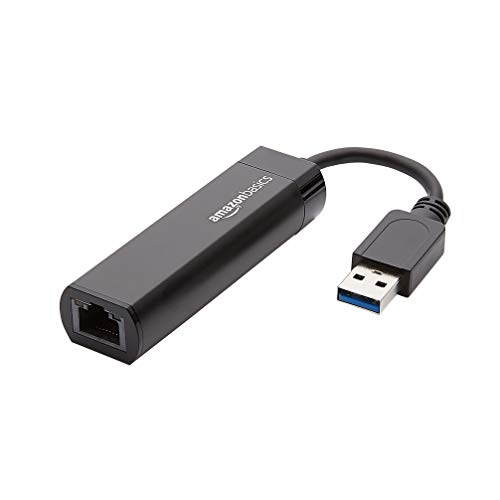
- Gigabit Ethernet up to 1000 Mbps
- Wake-on-LAN and Energy Efficient Ethernet
- Designed for compatible computers and laptops
Best For: Simple wired networking for Windows or Mac computers
Best for Nintendo Switch
TP-Link UE306 USB Ethernet Adapter

- Explicit Nintendo Switch support
- 10/100/1000 Mbps Gigabit Ethernet
- Foldable, compact, and USB-powered
Best For: Switch gaming and portable wired networking
Best Hub Combination
Cable Matters 4-in-1 USB Ethernet Hub

- Adds Gigabit Ethernet and three USB-A ports
- Supports USB transfers up to 5 Gbps
- Bus-powered and driver-free
Best For: Laptops needing Ethernet and extra peripheral ports
Best Portable Switch Option
UGREEN 1000Mbps USB Ethernet Adapter

- Gigabit speeds up to 1000 Mbps
- Compatible with Switch and Switch OLED
- Plug-and-play support across major platforms
Best For: Portable laptop, Mac, and Nintendo Switch connectivity
Best Foldable Gigabit Adapter

- 10/100/1000Mbps Gigabit Ethernet
- Foldable, travel-friendly design
- Broad modern OS compatibility
Best For: Portable wired networking for laptops and desktops
Best for Everyday Use
UGREEN 1Gbps USB Ethernet Adapter

- Up to 1000Mbps Gigabit networking
- Compatible with Switch and Switch OLED
- Aluminum shell with reinforced cable point
Best For: Switch gaming and durable everyday laptop networking
Best USB Hub Combo
ABLEWE 4-in-1 Ethernet Adapter
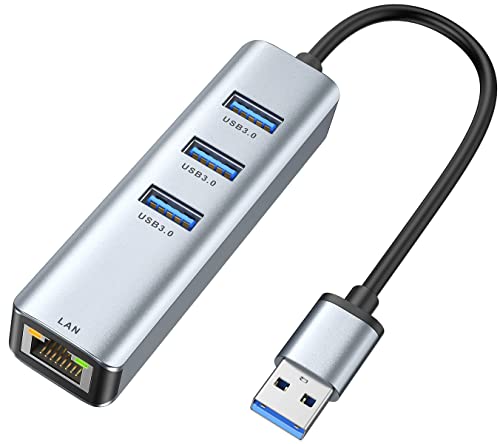
- Gigabit Ethernet plus three USB 3.0 ports
- Simultaneous hub-port operation
- Compact aluminum construction
Best For: Laptops needing wired networking and extra USB connectivity
Best Overall
Cable Matters USB 3.0 Gigabit Ethernet Adapter

- Gigabit Ethernet over USB 3.0
- Native support for ChromeOS, macOS, and Windows
- Lightweight design with advanced network features
Best For: Portable wired networking and upgrading older computers
Best Value
eqimaimai USB-A Gigabit Ethernet Adapter

- Up to 1Gbps with 10/100Mbps backward compatibility
- Driver-free support across major operating systems
- Aluminum shell with status indicators
Best For: USB-A laptops, desktops, and Nintendo Switch
Best Dual-Connector Option
BENFEI USB A/C Gigabit Ethernet Adapter

- Works with USB-A and USB-C devices
- Gigabit speeds with broad OS compatibility
- 18-month warranty and compact aluminum design
Best For: Mixed-device households and USB-A/USB-C computers
Reliable Everyday Pick – Amazon Basics Gigabit Ethernet Adapter
For straightforward wired networking, this Amazon Basics adapter is a practical choice among USB 3.0 ethernet adapters. It connects a compatible computer or laptop to a router, modem, or network switch at up to Gigabit Ethernet speeds.
Best For: Windows and macOS computers or laptops that need a simple USB-to-RJ45 connection.
Pros:
- Supports 10/100/1000 Mbps Ethernet connections.
- Includes Wake-on-LAN and Energy Efficient Ethernet support.
- Supports Windows, macOS, ChromeOS, and Linux families.
Cons:
- Not intended for Smart TVs or gaming consoles such as Nintendo Switch.
- Compatibility details vary by operating-system version.
This is a sensible no-frills option when you want Gigabit networking for a computer rather than console or television use. Its compact black housing and USB 3.0 interface suit everyday desk setups.
Best for Nintendo Switch – TP-Link UE306 USB Ethernet Adapter
The TP-Link UE306 stands out among USB 3.0 ethernet adapters for its explicit Nintendo Switch support. It adds a wired RJ45 connection to laptops, tablets, Ultrabooks, and the Switch, with 10/100/1000 Mbps performance and no external power.
Best For: Nintendo Switch owners and travelers who want a compact, plug-and-play wired connection.
Pros:
- Supports Nintendo Switch and Switch-compatible wired networking.
- Offers 10/100/1000 Mbps speeds and backward compatibility with USB 2.0 and 1.1.
- Foldable connector and compact 2.8-by-1-by-0.6-inch design aid portability.
- No driver is required for Nintendo Switch, Windows 11/10/8.1/8, and Linux.
Cons:
- Uses a USB Type-A connection, so device-port compatibility should be checked.
- The supplied notes do not specify driver-free support for every listed operating system.
With its foldable design, USB-powered operation, and console compatibility, the UE306 is particularly convenient for gaming setups and travel. It also carries a manufacturer two-year warranty.
Best Hub Combination – Cable Matters 4-in-1 USB Ethernet Hub
If you need more than a network port, this Cable Matters model combines Gigabit Ethernet with three USB ports. It is a versatile entry among USB 3.0 ethernet adapters for connecting peripherals while adding wired networking to a computer without an RJ45 port.
Best For: Laptop users who need Ethernet plus connections for keyboards, mice, flash drives, or other USB devices.
Pros:
- Combines a Gigabit Ethernet adapter with three USB-A ports.
- Supports USB 3.0 peripheral transfers up to 5 Gbps and USB 2.0 devices.
- Bus-powered design requires no external power.
- Compact housing, short cable tail, and status LEDs support portable use.
Cons:
- It occupies one USB port while providing the hub and Ethernet functions.
- Its short cable tail may limit placement in some setups.
This is the most flexible choice here for users who want to consolidate a wired connection and everyday peripherals in one small accessory. Driver-free installation and support for Chrome, Linux, Mac, and Windows add convenience.
Best Portable Switch Option – UGREEN 1000Mbps USB Ethernet Adapter
The UGREEN adapter is a compact way to add Gigabit networking to a USB-A-equipped computer, TV box, or Nintendo Switch. Among USB 3.0 ethernet adapters, it combines up to 1000 Mbps performance with broad operating-system support and plug-and-play setup.
Best For: Users who want a small, driver-free adapter for laptops, desktops, Mac devices, or Nintendo Switch.
Pros:
- Supports Gigabit Ethernet up to 1000 Mbps.
- Plug-and-play support is listed for Windows 11/10/8.1/8, macOS, and ChromeOS.
- Compatible with Nintendo Switch and Switch OLED.
- Compact design is convenient for carrying in a briefcase or pocket.
Cons:
- Requires a USB-A port, which may limit use with newer USB-C-only devices.
- The supplied dimensions appear unusually formatted, so buyers should confirm fit and clearance.
UGREEN makes a strong case for portable wired networking, especially if Nintendo Switch compatibility matters. Its broad device coverage and 24-month warranty service provide additional flexibility for everyday use.
Best Foldable Gigabit Adapter – TP-Link UE300
If you want a dependable upgrade from wireless networking, the TP-Link UE300 is a straightforward choice among USB 3.0 ethernet adapters. It connects a computer’s USB 3.0 port to a 10/100/1000Mbps Gigabit Ethernet network and folds down for easy transport.
Best For: Travelers and users of Windows PCs, Macs, Chromebooks, Surface devices, or Linux computers who want a compact wired connection.
Pros:
- Supports Gigabit Ethernet speeds up to 1000Mbps over USB 3.0.
- Foldable design is convenient for carrying.
- Driver-free setup is supported on newer Windows, macOS, Chrome OS, and Linux versions.
- Includes a two-year warranty and lifetime technical support.
Cons:
- Does not support Nintendo Switch, Wii U, or Wii.
- Older Mac OS versions 10.6–10.8 require a driver download.
The UE300 is a practical, portable adapter for replacing unreliable Wi-Fi with wired Gigabit networking. Its main limitation is compatibility with Nintendo gaming consoles and certain older Mac versions.
Best for Everyday Use – UGREEN 1Gbps USB Ethernet Adapter
The UGREEN adapter is a strong option among USB 3.0 ethernet adapters when you need Gigabit networking and Nintendo Switch support. Its aluminum shell, reinforced cable connection, and plug-and-play setup make it suitable for everyday laptop use and gaming.
Best For: Nintendo Switch and Switch OLED owners, plus Windows, Mac, Chrome OS, or Android users with a USB 3.0 port.
Pros:
- Delivers network speeds up to 1000Mbps.
- Works with Nintendo Switch and Switch OLED.
- Driver-free on Windows 11/10/8.1/8, macOS, Chrome OS, and Android.
- Aluminum housing helps with durability and heat dissipation.
Cons:
- Requires driver installation on Windows XP/7/Vista and Linux.
- Designed for devices with USB 3.0 connectivity.
UGREEN’s model stands out for console compatibility and a durable aluminum build. It is especially appealing for Switch users, though older operating systems and Linux require additional setup.
Best USB Hub Combo – ABLEWE 4-in-1 Ethernet Adapter
The ABLEWE combines a Gigabit Ethernet connection with three USB 3.0 ports, making it a flexible choice among USB 3.0 ethernet adapters. It can connect a wired network while also adding ports for peripherals such as storage drives, keyboards, mice, and printers.
Best For: Laptop users who need wired Gigabit networking and extra USB ports from a single compact accessory.
Pros:
- Combines a 10/100/1000Mbps RJ45 port with three USB 3.0 ports.
- USB hub ports can operate simultaneously.
- Supports up to 5Gbps USB data transfer according to the supplied specifications.
- Compact aluminum design includes a two-year warranty.
Cons:
- Requires an available USB 3.0 port.
- The supplied compatibility information is more limited for newer operating systems than the other listed models.
ABLEWE is the most versatile pick here if you need both Ethernet and additional peripheral connectivity. Its hub functionality adds convenience, though buyers should confirm compatibility with their specific operating system and device.
Best Overall – Cable Matters USB 3.0 Gigabit Ethernet Adapter
For dependable wired networking, this Cable Matters model is a well-rounded choice among USB 3.0 ethernet adapters. It adds a standard RJ45 port to USB 3.0 laptops and desktops, supports Gigabit Ethernet, and offers native driver support across ChromeOS, macOS, and Windows.
Best For: Users who want a lightweight, broadly compatible adapter for streaming, gaming, downloads, or replacing an unreliable network port.
Pros:
- Supports 10/100/1000Mbps Ethernet and USB 3.0 transfer rates up to 5Gbps.
- Driver-free installation with Chrome, Mac, and Windows support.
- Includes features such as Wake-on-LAN, PXE, Auto MDIX, and MAC address pass-through support.
- Weighs less than one ounce for easy portability.
Cons:
- Ethernet cable is sold separately.
- Does not support Windows RT.
This is a particularly flexible pick if you need a compact adapter with advanced network features as well as straightforward plug-and-play setup.
Best Value – eqimaimai USB-A Gigabit Ethernet Adapter
This eqimaimai adapter is a practical option for devices with USB-A ports. Among USB 3.0 ethernet adapters, it stands out for its claimed 1Gbps performance, driver-free setup across several operating systems, and compatibility with devices including laptops, desktops, and Nintendo Switch.
Best For: USB-A users seeking an affordable, portable Gigabit Ethernet connection with broad device compatibility.
Pros:
- Supports up to 1Gbps and remains backward compatible with 100Mbps and 10Mbps networks.
- Driver-free operation for Windows, macOS, iPadOS, ChromeOS, Linux, and Android systems.
- Aluminum housing, reinforced construction, and two status indicators.
- Listed as compatible with Nintendo Switch and many USB-A computers and consoles.
Cons:
- Designed around a USB-A connection, so newer USB-C-only devices may need an additional adapter.
- Cat6 or better cabling is recommended to reach 1Gbps.
Choose this model when USB-A compatibility and a durable aluminum shell matter more than having a native USB-C connector.
Best Dual-Connector Option – BENFEI USB A/C Gigabit Ethernet Adapter
The BENFEI adapter is a versatile choice for computers and tablets that use either USB-A or USB-C. It adds Gigabit Ethernet for file transfers, video conferencing, gaming, and streaming while retaining backward compatibility with USB 2.0 and 1.1 devices.
Best For: Users who want one compact wired adapter for USB-A and USB-C computers, with a longer warranty for added purchase confidence.
Pros:
- Supports 10/100/1000Mbps Ethernet over USB A/C.
- Driver-free setup with broad Windows, macOS, Linux, Android, and ChromeOS compatibility.
- Compact aluminum-shell design with nylon cable, link and activity LEDs, and no external power requirement.
- Includes an 18-month warranty and supports features such as Wake-on-LAN and Auto MDIX.
Cons:
- Not compatible with Nintendo Switch.
- Does not support Windows RT.
- Cat6 or better Ethernet cabling is needed to reach 1Gbps.
Its dual USB connector design makes the BENFEI a convenient long-term choice for households or workplaces using a mix of older USB-A and newer USB-C systems.
How We Picked the Best USB 3.0 Ethernet Adapters
We focused on adapters with USB 3.0 connectivity and gigabit Ethernet support, since these provide substantially more bandwidth than older 10/100Mbps models. We also considered operating-system compatibility, plug-and-play support, portability, build quality, additional USB ports, and whether the design suits laptops, desktops, consoles, or USB-C systems.
Because real-world network performance depends on your router, cabling, internet plan, and device, a gigabit rating indicates the adapter’s maximum interface speed rather than a guaranteed internet speed.
Quick Comparison
| Type | Best For | Main Advantage |
|---|---|---|
| Basic USB-A adapter | Everyday laptops and desktops | Simple, affordable wired networking |
| USB hub with Ethernet | Thin laptops and limited-port setups | Networking plus extra USB connectivity |
| Aluminum compact adapter | Travel and frequent mobile use | Portable design with added durability |
| USB-C to Ethernet model | Modern MacBooks and USB-C devices | Direct compatibility without an adapter |
Key Buying Factors for USB 3.0 Ethernet Adapters
Connector and Device Compatibility
Check whether your computer has USB-A or USB-C ports. Many USB-A adapters can work with USB-C devices through a suitable hub or adapter, but a native USB-C model is usually cleaner. Also verify support for your operating system, especially with Linux, macOS, ChromeOS, or gaming consoles.
Speed and Network Standards
For most home broadband, office, and gaming connections, 10/100/1000Mbps gigabit Ethernet is the sensible choice. USB 3.0 offers enough bandwidth for gigabit networking, while older USB 2.0 adapters may limit throughput. Use Cat5e or better Ethernet cable and a gigabit-capable router or switch to achieve the best results.
Portability, Hubs, and Build
A small single-port adapter is easiest to carry and store. If your laptop has few ports, a 3-port or 4-in-1 hub with Ethernet can add useful peripherals while providing wired networking. Aluminum housings may improve durability, but they can become warm during sustained transfers; this is generally normal.
Drivers and Plug-And-Play Setup
Look for driverless or plug-and-play operation when possible. Some systems may still require a driver download, particularly after a major operating-system update. Confirm current compatibility before buying if the adapter will be used for work or a fixed installation.
Who Should Buy Which USB 3.0 Ethernet Adapters?
Choose a basic USB-A gigabit adapter for a straightforward desktop or laptop upgrade. Pick a hub model if you need Ethernet and additional USB ports from one connection. Travelers and MacBook owners may prefer a compact aluminum design, while USB-C users should select a USB-C-to-RJ45 adapter for the most direct fit. For Nintendo Switch or similar devices, prioritize models that specifically list console compatibility and follow the manufacturer’s setup instructions.