A wired connection can reduce wireless interference and deliver more consistent latency during competitive gaming. The right adapter depends on your device, available port, network speed, and installation preferences.
These 10 options cover USB, PCIe, powerline, and hub-style designs for gaming PCs, laptops, consoles, and handheld systems.
Best 10 Ethernet Adapters for Gaming Picks for 2026
Best Compact Pick
Anker USB-C Gigabit Ethernet Adapter
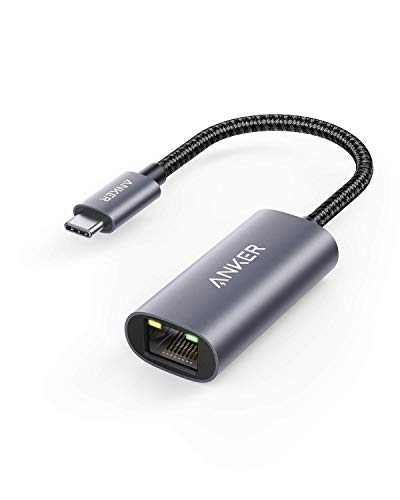
- Up to 1 Gbps wired connection
- Lightweight, portable aluminum design
- 18-month limited warranty
Best For: Portable USB-C gaming setups
Best Desktop Upgrade
TP-Link TX201 2.5Gb PCIe Network Card

- Up to 2.5 Gbps throughput
- QoS support for PC gaming
- Standard and low-profile brackets included
Best For: Desktop PCs with PCIe expansion
Best 2.5Gb USB-C Pick
UGREEN USB-C 2.5G Ethernet Adapter

- Up to 2.5 Gbps wired speeds
- Works with USB-C and Thunderbolt 3/4
- Aluminum body with status indicators
Best For: Modern USB-C laptops and tablets
Best for Difficult Rooms
TP-Link AV1000 Powerline Ethernet Kit
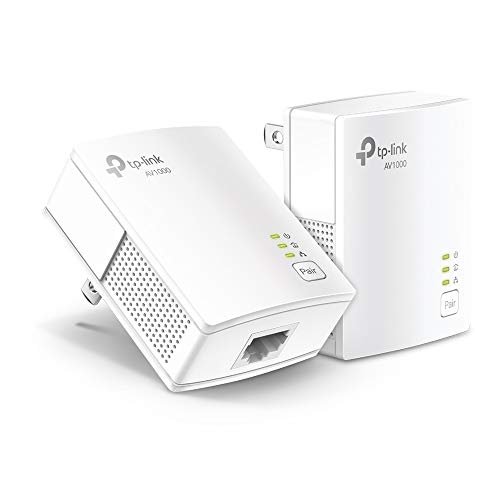
- Uses existing electrical wiring
- Gigabit Ethernet for consoles and desktops
- Includes two adapters and Ethernet cables
Best For: Gaming rooms far from the router
Top Speed Pick
UGREEN 2.5Gb Aluminum Ethernet Adapter

- Up to 2.5Gbps wired networking
- Low-power RTL8156BG chip
- Aluminum housing with status lights
Best For: Gaming systems with compatible 2.5Gbps network hardware
Console-Friendly Pick
TP-Link UE306 Gigabit Ethernet Adapter

- Gigabit speeds up to 1000Mbps
- Nintendo Switch support
- Foldable, USB-powered design
Best For: Nintendo Switch and portable Gigabit gaming setups
Flexible Budget Pick
BENFEI USB A/C Gigabit Ethernet Adapter

- USB-A and USB-C connectivity
- Gigabit performance up to 1000Mbps
- 18-month warranty and broad OS support
Best For: PC and Mac gamers using different USB port types
Best USB-C Pick
UGREEN USB-C Gigabit Ethernet Adapter

- Up to 1,000Mbps wired networking
- Compact aluminum design with reinforced cable
- Broad USB-C and Thunderbolt compatibility
Best For: USB-C laptops, tablets, phones, Switch, and Steam Deck
Best Simple USB-A Option
Amazon Basics USB 3.0 Gigabit Ethernet Adapter
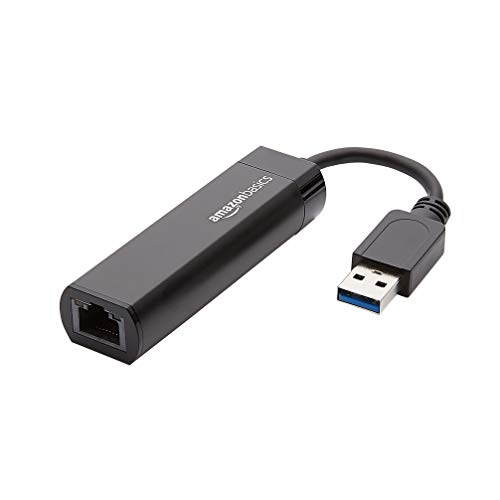
- Supports up to 1,000Mbps Ethernet
- Includes Wake-on-LAN and energy-saving features
- Designed for compatible computers and laptops
Best For: Computer-based gaming setups with USB-A
Best Hub Combo
ALL-LUCKY 4-in-1 USB Ethernet Hub

- Adds Gigabit Ethernet and three USB 3.0 ports
- Convertible USB-A and USB-C connector
- Supports up to 5Gbps USB data transfers
Best For: Gaming laptops needing Ethernet and extra peripheral ports
Best Compact Pick – Anker USB-C Gigabit Ethernet Adapter
If you need ethernet adapters for gaming on a USB-C device, the Anker PowerExpand provides a simple wired connection at speeds up to 1 Gbps. Its compact design suits laptops, tablets, and other compatible USB-C devices when portability matters.
Best For: Portable USB-C gaming setups and devices that need a straightforward Gigabit Ethernet connection.
Pros:
- Supports wired connection speeds up to 1 Gbps.
- Compact, lightweight design is easy to carry.
- Aluminum exterior and braided-nylon cable provide a premium feel.
- Includes an 18-month limited warranty.
Cons:
- Offers only one Ethernet port.
- Limited to USB-C devices and Gigabit-class speeds.
This is a practical choice for gamers who want a small, dependable adapter without adding a hub or extra ports. Verify that your device has a compatible USB-C port before buying.
Best Desktop Upgrade – TP-Link TX201 2.5Gb PCIe Network Card
For desktop gamers, the TP-Link TX201 is one of the more performance-focused ethernet adapters for gaming. It installs in a PCIe slot and supports up to 2.5 Gbps, while QoS technology is designed to prioritize performance for PC gaming.
Best For: Desktop PCs with an available PCIe slot, especially gaming systems connected to a 2.5Gb-capable network.
Pros:
- Supports data rates up to 2.5 Gbps.
- QoS technology is designed to help prioritize PC gaming traffic.
- Automatically supports 2.5 Gbps, 1 Gbps, and 100 Mbps connections.
- Includes standard and low-profile brackets plus Wake on LAN support.
Cons:
- Requires desktop installation in a compatible PCIe slot.
- Its top speed depends on compatible networking equipment and conditions.
The TX201 makes the most sense when your desktop, router, and network plan can take advantage of speeds beyond Gigabit. Broad Windows and Linux support adds flexibility for different gaming PCs.
Best 2.5Gb USB-C Pick – UGREEN USB-C 2.5G Ethernet Adapter
The UGREEN USB-C 2.5G adapter is a strong option for modern laptops and tablets that lack a built-in Ethernet port. Among ethernet adapters for gaming, its 2.5 Gbps capability can provide extra headroom when paired with compatible 2.5Gb networking hardware.
Best For: USB-C laptops, tablets, and mobile devices used with 2.5Gb-capable routers, switches, or NAS equipment.
Pros:
- Supports wired data rates up to 2.5 Gbps.
- RTL8156BG chip is designed for stable, lower-power operation.
- Compatible with USB-C and Thunderbolt 3/4 devices.
- Aluminum housing, reinforced construction, and indicator lights add usability.
Cons:
- Requires compatible USB-C hardware and 2.5Gb network equipment for maximum speed.
- Supplied operating-system support lists Android and Windows, so compatibility should be checked for other platforms.
This adapter is a good fit for gamers moving beyond Gigabit networking without installing an internal card. Its compact aluminum build also works well for portable gaming and laptop-based setups.
Best for Difficult Rooms – TP-Link AV1000 Powerline Ethernet Kit
The TP-Link AV1000 kit takes a different approach to ethernet adapters for gaming by sending the network connection through existing electrical wiring. It can help connect a console or desktop in a distant room where thick walls make a direct Ethernet run difficult.
Best For: Multi-story homes, basements, garages, and gaming rooms that need a wired connection without running new Ethernet cable.
Pros:
- Uses existing electrical wiring for Ethernet networking.
- Provides a Gigabit Ethernet port and includes Ethernet cables.
- Plug-and-play setup requires two or more powerline adapters.
- Power-saving mode can reduce power consumption by up to 85 percent.
Cons:
- Adapters must connect directly to wall outlets on the same electrical circuit.
- Actual performance can vary with wiring quality, distance, interference, and the internet plan.
- May be limited by AFCI breakers or unsuitable electrical setups.
This kit is useful when physical layout is the main obstacle, but it is less predictable than a direct Ethernet cable. Check your home’s electrical circuit and outlet requirements before relying on it for gaming.
Top Speed Pick – UGREEN 2.5Gb Aluminum Ethernet Adapter
For gamers who want more headroom than standard Gigabit Ethernet, the UGREEN adapter is one of the fastest ethernet adapters for gaming in this roundup. Its 2.5Gbps connection can help compatible laptops take advantage of faster networking hardware, while the aluminum housing and low-power RTL8156BG chip support practical everyday use.
Best For: Gaming laptops and desktops with USB 3.0 that use a compatible 2.5Gbps router or switch.
Pros:
- Supports wired speeds up to 2.5Gbps.
- Uses a low-power RTL8156BG chip designed for stable performance and reduced heat.
- Durable aluminum construction with transmission-status indicator lights.
- Works with Windows, macOS, Linux, and ChromeOS systems.
Cons:
- Requires compatible 2.5Gbps networking equipment to exceed Gigabit speeds.
- Not compatible with all Nintendo Switch, TV, Synology NAS, or Wii devices.
- Uses a USB 3.0 Type-A connection rather than USB-C.
The UGREEN is the strongest performance-oriented choice here when your network supports 2.5Gbps. If your setup is limited to Gigabit Ethernet, a less expensive 1Gbps adapter may provide all the speed you can use.
Console-Friendly Pick – TP-Link UE306 Gigabit Ethernet Adapter
The TP-Link UE306 is a straightforward option for gamers who need a stable wired connection without external power. It supports up to 1000Mbps through USB 3.0 and is specifically listed as compatible with Nintendo Switch, making it a practical choice among ethernet adapters for gaming on consoles and portable devices.
Best For: Nintendo Switch owners and Windows or Linux users who want a compact, plug-and-play Gigabit adapter.
Pros:
- Supports 10/100/1000Mbps Gigabit Ethernet.
- Works with Nintendo Switch and requires no driver on Switch and several Windows versions.
- Foldable USB connector and compact 2.8-inch design suit travel.
- USB-powered operation requires no external power supply.
Cons:
- Limited to 1Gbps rather than 2.5Gbps networking.
- Uses USB Type-A, which may require an adapter for some newer devices.
- The supplied compatibility details emphasize Windows and Linux rather than broad macOS support.
Choose the UE306 when console compatibility and simple setup matter more than maximum bandwidth. Its foldable design also makes it convenient for gaming on the go or adding wired networking to a tablet or laptop.
Flexible Budget Pick – BENFEI USB A/C Gigabit Ethernet Adapter
The BENFEI adapter adds Gigabit Ethernet to devices with either USB-A or USB-C, giving gamers more connection flexibility than single-port dongles. It supports up to 1000Mbps, includes link and activity LEDs, and is designed for stable wired networking without an external power supply.
Best For: PC and Mac users who want one compact Gigabit adapter for both USB-A and USB-C devices.
Pros:
- Supports USB-A and USB-C connections.
- Delivers up to 1000Mbps over USB 3.0.
- Supports Windows, macOS, Linux, ChromeOS, and Android systems listed by the manufacturer.
- Includes Wake-on-LAN, duplex support, Auto-MDIX, and an 18-month warranty.
Cons:
- Not compatible with Nintendo Switch.
- Reaching 1Gbps requires CAT6 or newer Ethernet cabling.
- Limited to Gigabit speeds rather than 2.5Gbps.
The BENFEI is a versatile choice for gamers who move between USB-A and USB-C computers. It is especially appealing for mixed-device households, but Nintendo Switch users should choose the TP-Link instead.
Best USB-C Pick – UGREEN USB-C Gigabit Ethernet Adapter
For gamers using a laptop, tablet, phone, Nintendo Switch, or Steam Deck with USB-C, the UGREEN adapter is a straightforward way to add a wired connection. It supports up to 1,000Mbps and can help provide a more stable connection than unreliable Wi-Fi, making it a strong option among ethernet adapters for gaming.
Best For: USB-C devices that need a compact, plug-and-play Gigabit Ethernet connection.
Pros:
- Supports up to 1,000Mbps and is backward compatible with 100/10Mbps networks.
- Works with many Windows, macOS, Chrome OS, and Android devices without drivers.
- Aluminum housing, reinforced cable tail, and compact design support portable everyday use.
- Compatible with USB-C and Thunderbolt 3/4 ports, including Nintendo Switch and Steam Deck.
Cons:
- Windows XP/7/Vista and Linux require drivers.
- It provides one Ethernet port rather than additional USB expansion.
Choose this model when your gaming device has USB-C and you want a small, durable adapter with broad compatibility. Confirm your device supports wired networking through its USB-C port before buying.
Best Simple USB-A Option – Amazon Basics USB 3.0 Gigabit Ethernet Adapter
The Amazon Basics USB 3.0 adapter connects a compatible computer or laptop to a router, modem, or network switch at Gigabit Ethernet speeds. Its simple USB-A design makes it a practical choice among ethernet adapters for gaming when you are connecting a Windows or macOS computer rather than a console.
Best For: Windows, macOS, ChromeOS, or Linux computers with an available USB 3.0 port.
Pros:
- Supports 10/100/1000Mbps Ethernet speeds.
- Offers Wake-on-LAN and Energy Efficient Ethernet features.
- IPv4/IPv6 Checksum Offload Engine support can help reduce CPU loading.
- Lightweight black housing is easy to add to a laptop setup.
Cons:
- Does not support smart TVs or gaming consoles such as Nintendo Switch.
- Compatibility is focused on computers and laptops with USB connectivity.
- Listed compatibility requires Windows 8.1 or higher and supported macOS versions.
This is a sensible computer-only choice if you want Gigabit Ethernet without extra hub features. It is not the right fit for a console gaming setup, so check the supported device list before ordering.
Best Hub Combo – ALL-LUCKY 4-in-1 USB Ethernet Hub
The ALL-LUCKY adapter combines a Gigabit Ethernet port with three USB 3.0 ports, giving laptop gamers both wired networking and room for peripherals. Its convertible USB-A/USB-C connector makes it a flexible option among ethernet adapters for gaming, particularly for portable work-and-play setups.
Best For: Laptop users who need wired Gigabit Ethernet plus three additional USB-A ports.
Pros:
- Combines one 1,000Mbps RJ45 port with three USB 3.0 ports.
- Convertible connector supports USB-A and USB-C devices.
- USB 3.0 supports data transfers up to 5Gbps.
- Plug-and-play support is listed for Windows 11/10/8.1/8, macOS, iPadOS, and ChromeOS.
Cons:
- Windows 7 requires a driver.
- Does not support charging devices, with a maximum output current of 900mA.
- Reaching 1Gbps requires a CAT6 or better Ethernet cable.
This model is worth considering when a gaming laptop needs both a wired connection and extra ports for a mouse, keyboard, or storage device. Its larger hub format is less minimalist than a single-port adapter, but it adds useful connectivity in return.
How We Picked the Best Ethernet Adapters for Gaming
We compared these adapters by connection type, maximum Ethernet speed, device compatibility, installation requirements, portability, and practical gaming use. We also considered whether each model suits a desktop PC, laptop, console, or home network where running a long cable is difficult.
Advertised speeds are theoretical maximums. Actual performance depends on your router or switch, Ethernet cable, USB or PCIe interface, home wiring, and internet plan. A faster adapter cannot increase a network connection beyond the slowest component.
Quick Comparison
| Adapter Type | Typical Best Use | Main Advantage | Important Limitation |
|---|---|---|---|
| USB 1Gbps | Laptops, consoles, and general gaming | Affordable and simple | Limited to Gigabit speeds |
| USB 2.5Gbps | Modern laptops and fast home networks | Higher throughput | Needs compatible USB and network hardware |
| PCIe 2.5Gbps | Desktop gaming PCs | Permanent, high-speed installation | Requires opening the computer |
| Powerline | Rooms without convenient cable runs | Uses existing electrical wiring | Performance varies by home wiring |
| USB Hub Adapter | Thin laptops with few ports | Adds Ethernet and USB connectivity | Shared hub bandwidth may vary |
Key Buying Factors for Ethernet Adapters for Gaming
Speed and Interface
Gigabit Ethernet is sufficient for most gaming and internet plans, since online games generally use relatively little bandwidth. Choose 2.5Gbps when you transfer large files locally, have faster-than-gigabit service, or want additional headroom. Confirm that the adapter’s USB 3.x or PCIe interface can support its advertised speed.
Compatibility and Drivers
Check operating-system support and connector type before buying. USB-C models are convenient for newer laptops, while USB-A versions suit older computers and many consoles. Nintendo Switch compatibility can depend on the console version, dock, and operating-system updates, so verify the manufacturer’s supported setup.
Latency, Stability, and Setup
Ethernet can provide steadier latency than congested Wi-Fi, but the adapter itself is only one part of the connection. Use a quality cable, connect directly to the router or switch when possible, and avoid relying on a powerline kit if your electrical circuits produce inconsistent results. Plug-and-play models are best for quick installation; PCIe cards are better for a permanent desktop setup.
Portability and Extra Connections
Compact aluminum USB adapters travel well and are useful for laptops. A hub with additional USB ports may be worthwhile if your computer has limited connectivity, but it can occupy more desk space and share bandwidth across connected devices.
Who Should Buy Which Ethernet Adapters for Gaming?
- For most laptops: Choose a compact USB-C or USB-A Gigabit adapter for reliable wired gaming without opening the computer.
- For newer fast networks: Select a 2.5Gbps USB-C adapter if your laptop, router, switch, and cabling support multi-gigabit Ethernet.
- For desktop gaming PCs: A PCIe network card is the cleanest permanent choice, especially when the motherboard lacks suitable Ethernet or you need 2.5Gbps performance.
- For consoles and handhelds: Favor a clearly compatible plug-and-play Gigabit adapter, and confirm dock or console requirements before ordering.
- For difficult cable runs: Consider a powerline kit, but buy it with realistic expectations because speed and latency depend heavily on household wiring.
- For port-limited laptops: A USB A/C hub with Ethernet can combine wired networking and extra peripherals in one accessory.