Switching a keyboard, mouse, printer, scanner, or webcam between Windows computers should not require unplugging cables every time. The best USB switch boxes for Windows make shared peripherals easier to manage from one desk.
This roundup compares 10 practical options, from compact USB 2.0 selectors to faster USB 3.0 and USB-C models with remote controls and multi-device support.
Best 10 USB Switch Boxes for Windows Picks for 2026
Best Overall
BENFEI 2-Computer 4-Port USB 3.0 Switch

- Shares four USB devices between two computers
- 5Gbps USB 3.0 data transfer
- One-button switching with LED indicator
Best For: Windows workstations with multiple shared USB peripherals
Best High-Speed Pick
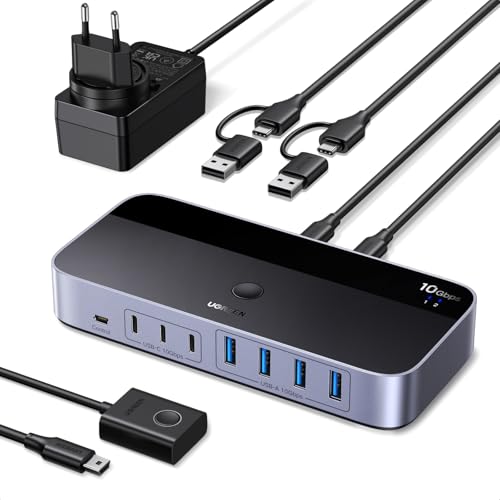
- Seven shared USB-A and USB-C ports
- Up to 10Gbps transfer speed
- Power adapter included
Best For: Mixed-port setups with multiple high-bandwidth peripherals
Best Premium Compact Option
ATEN Essentials US4324 4-Port USB Switch

- Shares four USB peripherals between two computers
- 5Gbps USB 3.2 Gen 1 performance
- Built-in and remote switching controls
Best For: Compact desks needing convenient USB switching
Best Flexible Design
Bi-Directional Aluminum USB 3.0 Switch

- Works in 2-in-1-out or 1-in-2-out modes
- 5Gbps USB 3.0 transfer speed
- Includes two USB-A-to-A cables
Best For: Simple printer sharing or switching between two USB devices
Best Budget USB Switch
UGREEN 2-Computer 4-Port USB 2.0 Switch

- Shares four USB peripherals between two PCs
- One-button, driver-free switching
- Windows-compatible, but no video support
Best For: Basic keyboard, mouse, printer, and scanner sharing
Best Remote-Controlled USB Switch

- Three USB 3.0 ports plus one USB-C port
- Up to 5Gbps transfer speeds
- Button and remote-control switching
Best For: Fast peripheral sharing in a two-computer workspace
Best USB-C USB Switch

- Three USB-A ports and one USB-C port
- Up to 5Gbps transfer speeds
- Button and controller switching options
Best For: Sharing mixed USB-A and USB-C peripherals between two PCs
Best with Extra Features
Aluminum 2-Computer USB 3.0 Switch

- Up to 5Gbps USB 3.0 transfers
- One-button switching with LED status
- Includes two USB 3.0 cables
Best For: Sharing peripherals between two Windows computers
Best for Larger Setups

- Shares four devices across four computers
- Includes a wired desktop controller
- Supports Windows and several other operating systems
Best For: Multi-computer offices and shared USB 2.0 peripherals
Best Brand-Name Option
UGREEN 2-Computer USB 3.0 Switch

- Up to 5Gbps USB 3.0 data transfer
- Driver-free Windows compatibility
- Includes two 5-foot USB 3.0 cables
Best For: Switching peripherals between a work PC and personal laptop
Best Overall – BENFEI 2-Computer 4-Port USB 3.0 Switch
For shoppers comparing usb switch boxes for windows, the BENFEI offers a practical way to share four USB peripherals between two computers. Its driver-free design, one-button switching, and Windows compatibility make it well suited to workstations that use a keyboard, mouse, printer, scanner, or other USB devices.
Best For: Windows users sharing several everyday USB peripherals between a work computer and a personal computer.
Pros:
- Shares four USB devices between two computers.
- USB 3.0 supports data transfer speeds up to 5Gbps and is backward compatible with USB 2.0.
- Push-button switching and LED status indication simplify operation.
- Includes an extra USB-C power input for higher-power devices.
Cons:
- Requires USB-A-to-USB-A cables for connection.
- Power adapter is not included, although a USB-A charging cable is provided.
- It switches USB peripherals only, not video.
The BENFEI is a balanced choice when you need four shared USB ports and broad operating-system support. Plan for a separate power adapter if you intend to run demanding devices such as external drives, cameras, or headphones.
Best High-Speed Pick – UGREEN 7-Port USB 3.2 Switch
The UGREEN is a strong option among usb switch boxes for windows when you need both high bandwidth and a mix of USB-A and USB-C connections. It lets two computers share up to seven peripherals, while the included power adapter helps support higher-power devices.
Best For: Mixed USB-A and USB-C setups that need many shared peripherals and faster file transfers.
Pros:
- Provides seven shared ports: four USB-A and three USB-C.
- USB 3.2 Gen 2 supports transfer speeds up to 10Gbps.
- Includes a USB-C-to-USB-A cable for mixed-computer setups.
- Included power adapter supports devices such as external hard drives and printers.
Cons:
- It is not a KVM switch and does not provide video output.
- Audio device connections are not recommended according to the supplied notes.
- The seven-port layout may be more than a simple setup requires.
Choose the UGREEN if port count, USB-C compatibility, and speed matter more than basic simplicity. Its included power supply is a notable convenience for demanding peripherals, but users seeking display switching will need a separate KVM solution.
Best Premium Compact Option – ATEN Essentials US4324 4-Port USB Switch
The ATEN Essentials US4324 is a compact choice for usb switch boxes for windows, sharing four USB peripherals between two computers at up to 5Gbps. Its built-in button, included remote port selector, and InstaSync technology are designed to make switching quick and smooth.
Best For: Users who want a compact, polished USB-sharing switch with both local and remote controls.
Pros:
- Shares four USB peripherals between two computers.
- Supports USB 3.2 Gen 1 speeds up to 5Gbps.
- Includes both a built-in pushbutton and remote port selector.
- Compact enclosure includes accent lighting and LED indication.
Cons:
- Provides four USB device ports, fewer than the UGREEN alternative.
- The supplied compatibility details list Windows 11 as the minimum Windows version.
- It is a USB peripheral switch rather than a video KVM.
The ATEN stands out when convenient control and a compact enclosure are priorities. It is a good fit for a tidy desk or shared workstation, especially if the included remote selector is more useful to you than having extra ports.
Best Flexible Design – Bi-Directional Aluminum USB 3.0 Switch
This bi-directional model gives usb switch boxes for windows a flexible twist: it can let two computers share one USB peripheral or let one computer switch between two USB devices. Its compact aluminum housing, included cables, and driver-free operation suit straightforward home-office setups.
Best For: Users who need either shared access to one peripheral or quick selection between two USB devices.
Pros:
- Supports both 2-in-1-out and 1-in-2-out switching modes.
- USB 3.0 provides speeds up to 5Gbps and supports USB 2.0 and 1.1 devices.
- Includes two USB-A-to-A cables.
- Aluminum housing is scratch-resistant and helps with heat dissipation.
Cons:
- It switches independently rather than providing simultaneous A+B output.
- Does not support HDMI video output.
- Its one-peripheral sharing mode is less suitable for setups needing several shared devices.
The bi-directional design makes this switch especially adaptable for simple printer-sharing or device-selection tasks. Consider a four-port model instead if you need one button to move a complete keyboard, mouse, and storage setup between computers.
Best Budget USB Switch – UGREEN 2-Computer 4-Port USB 2.0 Switch
For shoppers comparing usb switch boxes for windows, this UGREEN model offers a straightforward way to share up to four USB 2.0 peripherals between two computers. Its one-button switching, driver-free setup, and broad Windows compatibility make it practical for basic office and home peripherals.
Best For: Windows users sharing a keyboard, mouse, printer, scanner, or other USB 2.0 devices between two PCs.
Pros:
- Shares four USB devices between two computers with one-button switching.
- Compatible with Windows 10/8/8.1/7/Vista/XP, Mac, Linux, and Chrome OS.
- Includes two USB A-to-A cables and offers optional power for demanding devices.
Cons:
- USB 2.0 limits transfer speeds compared with newer USB 3.0 switches.
- Does not support monitor or video transmission, so it is not a true KVM switch.
- Power adapter and charging cable are not included.
This is a sensible low-complexity choice when your main goal is sharing conventional USB peripherals rather than displays or high-speed storage. Add external power when several devices are connected to help avoid disconnections.
Best Remote-Controlled USB Switch – BENFEI USB 3.0/USB-C Switch
Among usb switch boxes for windows, the BENFEI stands out for combining three USB 3.0 ports, one USB-C port, and remote switching. It supports up to 5Gbps data transfer and provides a convenient way to move shared peripherals between two computers.
Best For: Windows users who want faster USB connectivity and remote-controlled switching for keyboards, storage devices, printers, scanners, or cameras.
Pros:
- Provides three USB 3.0 ports and one USB-C port for shared devices.
- Supports transfer speeds up to 5Gbps and is backward compatible with USB 2.0.
- Switches by front button or remote control and includes optional USB-C power input.
Cons:
- Requires the included BENFEI USB A-to-A connection cable for operation.
- External power may be needed for high-consumption devices such as hard drives and cameras.
- Does not provide monitor or video switching.
The BENFEI is a strong fit for a two-computer workspace where remote access and faster peripheral transfers matter. Its USB-C port adds flexibility, while the optional power input helps support more demanding setups.
Best USB-C USB Switch – UGREEN 4-Port USB 3.0 Switch
This UGREEN model is a versatile option for usb switch boxes for windows, with three USB-A ports, one USB-C port, and both button and controller switching. It lets two computers share up to four peripherals while supporting USB 3.0 speeds and plug-and-play compatibility.
Best For: Windows users who need flexible USB-A and USB-C peripheral sharing between a work computer and a personal PC.
Pros:
- Shares four USB devices between two computers, including USB-C and USB-A peripherals.
- Supports up to 5Gbps transfer speeds and USB 2.0 backward compatibility.
- Offers both device-button and remote-controller switching, plus optional USB-C power.
Cons:
- It is not a KVM switch and cannot transmit video or connect a display.
- External power may be necessary when multiple or high-power devices are attached.
- The USB-C port is for data, not video output or display docking.
Choose this switch when port variety and flexible control are more important than display switching. It is especially useful for sharing modern USB peripherals between two computers while keeping the setup driver-free.
Best with Extra Features – Aluminum 2-Computer USB 3.0 Switch
If you need USB switch boxes for Windows that let two computers share essential peripherals, this 2-in-2-out model is a practical choice. It supports USB 3.0 transfer speeds up to 5Gbps, switches with one button, and requires no software or drivers.
Best For: Windows users sharing a keyboard, mouse, printer, webcam, or other USB devices between two computers.
Pros:
- USB 3.0 supports data transfer speeds up to 5Gbps and works with USB 2.0 and 1.1 devices.
- One-button switching and an LED indicator make the active computer easy to identify.
- Includes two 3.28-foot USB 3.0 A-to-A cables and works with Windows, macOS, Linux, and Chrome OS.
- Aluminum-alloy housing is designed for durability and heat dissipation.
Cons:
- It switches USB peripherals only and does not provide monitor or video switching.
- Its two-computer, two-device layout may be limiting for larger setups.
Choose this model if fast USB 3.0 performance, a compact design, and simple manual control matter more than supporting many computers or peripherals.
Best for Larger Setups – 4-Computer USB 2.0 Switch Box
For Windows users managing several computers, this 4-in-4-out USB switch box provides four shared USB ports and two ways to change the active computer. It is a useful option when multiple keyboards, mice, printers, scanners, or storage devices need to move between four systems without repeated cable swapping.
Best For: Offices, classrooms, meeting spaces, and home setups with up to four computers sharing USB 2.0 peripherals.
Pros:
- Connects four computers to four shared USB devices.
- Offers switching from the front-panel buttons or the included wired desktop controller.
- Plug-and-play support is listed for Windows 10, 8, 8.1, 7, Vista, and XP, plus macOS, Linux, and Chrome OS.
- Includes four USB cables, a desktop controller, power cord, and user manual.
Cons:
- USB 2.0 transfer speeds are limited to 480Mbps.
- A 5V/1A power adapter is not included and may be needed for high-power devices such as hard drives.
- It is bulkier than simpler two-computer switchers.
This is the better fit when connection capacity and flexible switching are priorities. If you regularly transfer large files, a USB 3.0 model may be more suitable.
Best Brand-Name Option – UGREEN 2-Computer USB 3.0 Switch
This UGREEN model is one of the more straightforward USB switch boxes for Windows, allowing two computers to share two USB peripherals with a single button press. USB 3.0 connectivity supports transfers up to 5Gbps, while the plug-and-play design avoids driver installation.
Best For: Switching a keyboard, mouse, printer, scanner, or webcam between a work computer and a personal laptop.
Pros:
- Supports up to 5Gbps USB 3.0 data transfer and is backward compatible with USB 2.0.
- One-button control and an LED indicator simplify switching between the two computers.
- Works with Windows, macOS, Chrome OS, and Linux without requiring drivers.
- Includes two 5-foot USB 3.0 A-to-A cables.
Cons:
- It is not a KVM switch and cannot switch a monitor or transmit video.
- Only two USB output ports are provided.
- File transfer performance depends on the connected devices and computers.
Consider this UGREEN switch when you want a recognizable brand, longer included cables, and fast peripheral sharing between two computers without video support.
How We Picked the Best USB Switch Boxes for Windows
We evaluated these switches by looking at compatibility, USB speed, port selection, switching methods, device capacity, and desk-friendly design. Priority went to models that clearly support Windows computers and common peripherals such as keyboards, mice, printers, scanners, storage devices, and webcams.
We also separated simple two-computer selectors from more capable hubs. A basic switch can be ideal for office peripherals, while a higher-speed model is better for external drives or other bandwidth-sensitive devices. USB-C support, included cables, remote controls, and the number of upstream and downstream ports were also considered.
Quick Comparison
| Best For | Recommended Type | What to Look For |
|---|---|---|
| Keyboard and mouse sharing | USB 2.0 or USB 3.0 | Reliable button or remote switching |
| Printers and scanners | USB 2.0 or USB 3.0 | Driver compatibility and enough device ports |
| External storage | USB 3.0 or USB 3.2 | 5 Gbps or 10 Gbps data rates |
| Modern laptops | USB-C-compatible model | Correct upstream and downstream connector types |
| Several computers | Multi-input switch | More than two upstream ports and clear indicators |
Key Buying Factors for USB Switch Boxes for Windows
USB Speed
USB 2.0 is generally sufficient for keyboards, mice, printers, and scanners. Choose USB 3.0 or USB 3.2 when transferring files to external storage, using a webcam, or connecting devices that need greater bandwidth. The switch, computer port, cable, and peripheral must all support the advertised speed.
Port Layout and Device Capacity
Check how many computers the switch can connect and how many peripherals it can share at once. A four-port model is useful for a complete workstation, while a two-port selector may be smaller and easier to place. Pay attention to whether the ports are USB-A, USB-C, or a combination.
Switching Method and Power
Physical buttons are simple and dependable. Wired desktop controllers or remote buttons can be more convenient when the main switch is hidden behind a monitor. Most low-power peripherals can run from the USB connection, but powered hubs may be preferable for hard drives, multiple devices, or inconsistent laptop ports.
Windows Compatibility
Most USB switches work as hardware pass-through devices and do not require special Windows software. Still, confirm that your computer has the required USB connectors and that your printer, scanner, webcam, or storage device is supported. A switch does not automatically share a device across both computers simultaneously; it selects one active computer at a time.
Who Should Buy Which USB Switch Boxes for Windows?
Choose a compact USB 2.0 switch if you mainly share a keyboard, mouse, printer, or scanner and want an affordable, low-clutter setup. Pick a USB 3.0 model for faster storage, webcams, or a broader mix of peripherals. USB-C models make more sense for newer laptops and mixed USB-A/USB-C workstations.
For a home office with two Windows PCs, a four-device switch offers a useful balance of capacity and simplicity. If you need to connect several computers, look for a four-input model instead of relying on multiple smaller selectors. Buyers who switch frequently should favor a model with a convenient remote or desktop controller, while occasional users can save space with a button-operated box.