Choosing the right Thunderbolt cable can make a noticeable difference when moving large files, connecting fast external SSDs, or driving high-resolution displays. The products in this roundup cover Thunderbolt 3, Thunderbolt 4, Thunderbolt 5, and USB4 options with varying speeds, lengths, power ratings, and connector designs.
Use the buying guide below to match a cable’s bandwidth and compatibility with your computer, dock, storage drive, and monitor setup—without paying for specifications your devices cannot use.
Best 10 Thunderbolt Cables for Data Transfer Picks for 2026
Best Overall

- 40Gbps file transfers
- Up to 8K@60Hz display support
- 240W charging capacity
Best For: Fast transfers and compact USB-C workstations
Best Thunderbolt 3 Pick
Belkin 20Gbps Thunderbolt 3 Cable

- 20Gbps Thunderbolt 3 transfers
- Supports 4K displays
- Connects up to six peripherals
Best For: Thunderbolt 3 docks, drives, and displays
Best Certified Value
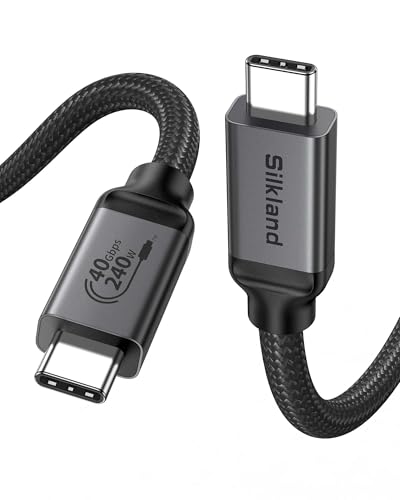
- USB-IF certified
- 40Gbps transfer speed
- 240W charging and 8K support
Best For: Certified USB4 and Thunderbolt desk setups
Best High-Bandwidth 2-Pack

- Two 5-foot cables included
- Up to 80Gbps on supported devices
- Braided, 240W-rated construction
Best For: Longer high-bandwidth USB4 connections
Best Certified 40Gbps Pick
Silkland USB4 Thunderbolt 4 Cable

- 40Gbps USB4 data transfer
- Up to 240W PD 3.1 charging
- 8K or dual-4K display support
Best For: Professional workstations needing certified USB4 performance
Best Next-Gen Speed Option

- Up to 80Gbps data transfer
- 240W PD 3.1 charging
- Up to 16K display output
Best For: Large-file transfers and high-performance multi-display setups
Best Compact Thunderbolt Cable
Anker 40Gbps Thunderbolt 4 Cable
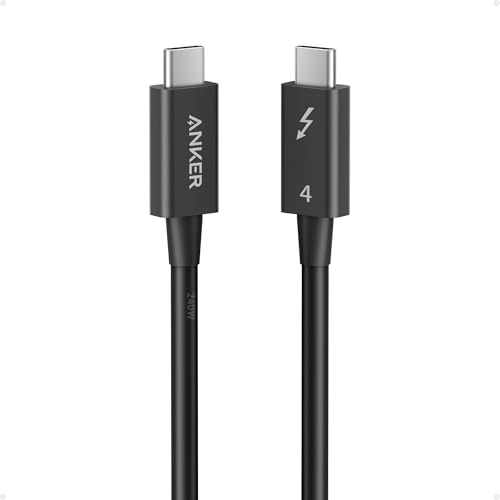
- 40Gbps Thunderbolt 4 transfers
- Up to 240W charging
- Compact 2.3-foot length
Best For: Short, uncluttered laptop and dock connections
Thunderbolt 5 Power Pick

- 80Gbps data transfer with USB-IF certification
- Up to 120Gbps display bandwidth
- 240W PD 3.1 charging
Best For: Professional Thunderbolt 5 workstations and multi-display setups
Balanced High-Speed Choice

- 40Gbps data transfer for large files
- 240W PD 3.1 charging
- 8K at 60Hz video support
Best For: Thunderbolt 4 laptops, SSDs, docks, and 8K displays
Desk Setup Specialist
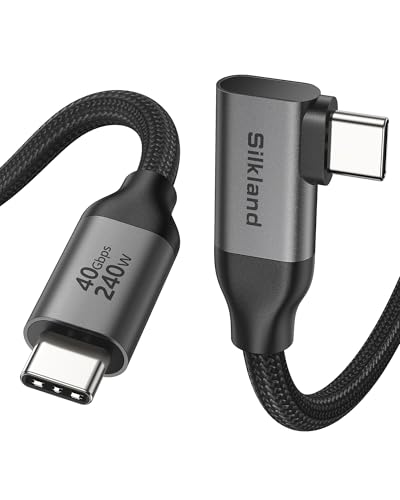
- 40Gbps Thunderbolt 4/3 data transfer
- 90-degree connector for cleaner routing
- 240W charging and 8K video support
Best For: Compact workstations and docking-station cable management
Best Overall – Anker USB4 40Gbps Cable
For shoppers comparing thunderbolt cables for data transfer, the Anker 515 offers a strong balance of speed, display support, and charging capacity. Its USB4 connection reaches up to 40Gbps, while the 3.3-foot length suits side-by-side desk setups.
Best For: Fast file transfers, high-resolution monitor connections, and charging USB-C laptops and accessories.
Pros:
- Supports data transfer speeds up to 40Gbps.
- Handles up to 8K at 60Hz or 4K at 144Hz display output.
- Supports up to 240W charging with a compatible charger.
- Tested to withstand up to 5,000 bends and includes an 18-month warranty.
Cons:
- The 3.3-foot length may be limiting for floor-level or widely spaced equipment.
- Actual performance depends on the connected devices and charger.
This is a versatile pick when you want one short USB-C cable for demanding transfers, monitor use, and high-wattage charging. It is especially appealing for compact workstations and laptop setups.
Best Thunderbolt 3 Pick – Belkin 20Gbps Thunderbolt 3 Cable
The Belkin Thunderbolt 3 cable is a practical option among thunderbolt cables for data transfer when your setup uses Thunderbolt 3 devices. It supports transfers up to 20Gbps, 4K displays, and daisy-chaining multiple Thunderbolt peripherals.
Best For: Thunderbolt 3 laptops, docks, hard drives, and 4K display setups requiring a 1-meter cable.
Pros:
- Provides up to 20Gbps data transfer between Thunderbolt devices.
- Supports 4K and Ultra HD displays.
- Can connect up to six Thunderbolt peripherals in a compatible setup.
- Supplies up to 60W of power delivery and includes a limited warranty.
Cons:
- Its 20Gbps rating is lower than the 40Gbps and 80Gbps options in this roundup.
- Best suited to Thunderbolt 3-compatible equipment rather than newer high-speed standards.
Choose this cable when compatibility with an established Thunderbolt 3 workflow matters more than maximum current-generation bandwidth. The 1-meter length is useful for nearby docks, displays, and storage devices.
Best Certified Value – Silkland USB4 40Gbps Cable
The Silkland USB4 cable combines 40Gbps transfer capability with broad USB4 and Thunderbolt compatibility. For buyers seeking thunderbolt cables for data transfer, its USB-IF certification, display support, and 240W charging make it a well-rounded 3.3-foot option.
Best For: USB4 or Thunderbolt 4/3 laptops, docks, SSDs, and monitors in a close-range desktop arrangement.
Pros:
- Supports up to 40Gbps data transfer.
- Can drive a single 8K display or dual 4K displays when devices support the required modes.
- Offers up to 240W PD 3.1 charging with a compatible charger.
- USB-IF certified and backward compatible with several USB standards.
Cons:
- The 3.3-foot cable is intended for nearby devices.
- Display and transfer results depend on host, monitor, and device support.
Silkland is a sensible middle-ground choice if you want modern USB4 performance without giving up compatibility with older USB-C and Thunderbolt equipment. Its short length is best for organized desk setups.
Best High-Bandwidth 2-Pack – USB4 80Gbps Braided Cables
This two-pack targets demanding users who need very high bandwidth and extra reach. Among thunderbolt cables for data transfer, it advertises up to 80Gbps, 240W charging, and advanced multi-display support, provided the connected hardware supports those capabilities.
Best For: Compatible high-bandwidth USB4 setups, large file transfers, high-refresh displays, and users who want two 5-foot braided cables.
Pros:
- Advertises transfer speeds up to 80Gbps on compatible devices.
- Supports up to 240W charging with the appropriate power adapter.
- Offers dual 8K or 6K, triple 4K@144Hz, and 4K@540Hz display claims for compatible systems.
- Includes two 5-foot braided cables with reinforced construction and an 18-month warranty.
Cons:
- The 80Gbps performance is limited to devices that support that speed.
- The notes state it is not compatible with Thunderbolt displays and Thunderbolt docks.
- High-end display modes require matching host, monitor, and adapter support.
This pack is most compelling for users who specifically need long cables and maximum advertised USB4 bandwidth. Verify port and dock compatibility carefully before buying, especially if your setup includes Thunderbolt displays or docks.
Best Certified 40Gbps Pick – Silkland USB4 Thunderbolt 4 Cable
For shoppers comparing thunderbolt cables for data transfer, the Silkland is a versatile 4-foot option with USB4 performance, up to 40Gbps speeds, and broad backward compatibility. It also supports high-power charging and advanced display setups, making it useful for desks that combine storage, monitors, and a laptop.
Best For: Professionals who need certified 40Gbps transfers, 8K or dual-4K display support, and up to 240W charging in one cable.
Pros:
- USB-IF certified USB4 cable with data transfer rates up to 40Gbps.
- Supports one 8K display, dual 4K displays, and 4K at 144Hz.
- Offers up to 240W PD 3.1 charging with an E-Marker chip.
- Braided construction, aluminum housing, and 24-month customer care.
Cons:
- Maximum performance depends on the connected device and charger.
- The manufacturer recommends cables under 5 feet for stable docking-station performance.
This is a strong all-around choice when you want certified USB4 capability rather than a cable focused only on charging. Its 4-foot length balances reach and signal stability, while compatibility with Thunderbolt 3, Thunderbolt 4, and several USB standards adds flexibility.
Best Next-Gen Speed Option – UGREEN 80Gbps USB4 Gen4 Cable
The UGREEN cable targets users who want exceptionally fast thunderbolt cables for data transfer. Its USB4 Gen4 bandwidth reaches up to 80Gbps, while support for 240W charging and high-resolution displays makes the 3.3-foot cable suited to demanding desktop, storage, and gaming setups.
Best For: Photographers, developers, gamers, and workstation users moving very large files between SSDs, NAS devices, or computers.
Pros:
- Up to 80Gbps USB4 Gen4 data transfer for large-file workflows.
- Supports up to 240W PD 3.1 charging and backward compatibility with lower-power devices.
- Supports DisplayPort 2.1 output up to 16K at 60Hz, dual 8K, or triple 4K at 144Hz.
- Nylon braiding, aluminum housing, and triple shielding are designed for frequent use.
Cons:
- At 3.3 feet, the cable may be short for widely spaced equipment.
- Its advertised 80Gbps and display capabilities require compatible devices.
Choose this model when maximum bandwidth matters more than extra cable length. It combines the fastest stated transfer rate in this roundup with powerful charging and expansive display support, although the full benefit depends on matching USB4 Gen4 or compatible hardware.
Best Compact Thunderbolt Cable – Anker 40Gbps Thunderbolt 4 Cable
If you need a short, tidy connection, the Anker Thunderbolt 4 cable is a practical option among thunderbolt cables for data transfer. Its 2.3-foot length helps reduce desk clutter while providing up to 40Gbps transfers, 240W charging, and support for compatible displays and devices.
Best For: Compact laptop, dock, display, and external-storage setups where a short Thunderbolt 4 cable is preferable.
Pros:
- Provides up to 40Gbps data transfer with Thunderbolt 4 and USB-IF specifications listed.
- Supports up to 240W charging.
- Designed for data transfer, charging, and connecting compatible displays.
- Broad device listings include MacBooks, Windows laptops, iPhones, iPads, Galaxy devices, and Pixel phones.
Cons:
- The 2.3-foot length limits reach between separated devices.
- Display projection requires USB-C ports that support DisplayPort Alt Mode or Thunderbolt protocols.
This Anker model makes the most sense for close-range connections where cable management is important. It delivers the core 40Gbps Thunderbolt 4 experience and high-power charging, but buyers should verify port support and measure the required distance before choosing its compact length.
Thunderbolt 5 Power Pick – 80Gbps USB4 Cable
If you need thunderbolt cables for data transfer with extra bandwidth for demanding displays, the Silkland 80Gbps USB4 cable is a future-ready option. It supports 80Gbps bidirectional data transfer, up to 120Gbps display bandwidth, and 240W charging, though actual performance depends on the connected devices.
Best For: Professional workstations, high-resolution multi-monitor setups, and users who want Thunderbolt 5 compatibility with USB-IF certification.
Pros:
- 80Gbps bidirectional data transfer and USB-IF certification.
- Supports up to 120Gbps display bandwidth for dual 8K/6K or triple 4K displays.
- 240W PD 3.1 charging with backward compatibility.
- Braided nylon, triple shielding, and a case-friendly connector design.
Cons:
- Full speeds require compatible USB4 Version 2.0 or Thunderbolt 5 hardware.
- Its advanced capabilities may exceed the needs of basic USB-C charging and file transfers.
This is the strongest choice here for buyers planning around newer Thunderbolt 5 systems. Its combination of high-speed data, display bandwidth, and 240W power makes it versatile for demanding setups.
Balanced High-Speed Choice – UGREEN 40Gbps USB-C Cable
For most current Thunderbolt 4 setups, the UGREEN cable delivers a practical mix of fast data transfer, high-power charging, and video support. It reaches 40Gbps, supports up to 8K at 60Hz, and uses a 3.3-foot braided design suited to nearby laptop, monitor, SSD, and dock connections.
Best For: Everyday Thunderbolt 4 and USB4 users transferring large files while charging laptops or connecting an 8K display.
Pros:
- 40Gbps data transfer for large files between SSDs, NAS devices, and computers.
- Supports 240W PD 3.1 charging and backward compatibility with lower-power devices.
- Handles up to 8K at 60Hz video output.
- Nylon braiding, aluminum housing, and rated durability up to 10,000 bends.
Cons:
- Its 40Gbps limit is below newer 80Gbps USB4 Version 2.0 cables.
- The 3.3-foot length may be short for larger desk or home-theater layouts.
UGREEN offers a well-rounded option when you want one cable for data, charging, and video without stepping up to Thunderbolt 5-era bandwidth. It is especially sensible for existing Thunderbolt 4 and USB4 hardware.
Desk Setup Specialist – Right-Angle 40Gbps Cable
The Silkland right-angle cable is a practical pick among thunderbolt cables for data transfer when cable routing matters. It provides 40Gbps performance, 240W charging, and high-resolution display support in a compact 3.3-foot design with a 90-degree connector for cleaner desk and docking-station setups.
Best For: Tidy workstations, nearby docking stations, external SSDs, and devices where a right-angle connector helps reduce cable clutter.
Pros:
- 40Gbps data transfer with Thunderbolt 4/3 and USB4 compatibility.
- Right-angle connector improves cable management around docks and laptops.
- Supports 240W PD 3.1 charging and up to 8K at 60Hz video.
- Braided construction, triple-layer shielding, and an E-Marker chip.
Cons:
- The 3.3-foot length is intended for close-range connections.
- The connector is recommended only with cases under 1.5mm thick.
- Actual 40Gbps speeds require compatible host devices and peripherals.
Choose this model when physical layout is as important as throughput. The angled connector is its defining advantage, while 40Gbps data, 8K video, and 240W charging cover demanding everyday connections.
How We Picked the Best Thunderbolt Cables for Data Transfer
We compared these cables by advertised data rate, Thunderbolt and USB4 compatibility, power-delivery rating, supported display capabilities, length, connector design, and overall practicality. Certification and clear specification labeling also matter because USB-C connectors look alike even when their performance differs substantially.
Our selection includes 40Gbps cables for Thunderbolt 3 and 4 systems, newer 80Gbps options for Thunderbolt 5, short cables for desk setups, longer choices for flexible routing, and a right-angle model for tight spaces. Advertised performance still depends on the connected computer, peripheral, host controller, and operating system.
Quick Comparison
| Best For | Recommended Specification | Typical Use |
|---|---|---|
| Everyday fast transfers | 40Gbps Thunderbolt 4 or USB4 | External SSDs, docks, and monitors |
| Thunderbolt 5 systems | 80Gbps USB4 or Thunderbolt 5 cable | High-performance storage and advanced displays |
| High-power charging | 240W USB Power Delivery | Compatible laptops and accessories |
| Compact desktop connections | 2.3- to 3.3-foot cable | Dock, drive, or monitor beside a laptop |
| Flexible cable management | 4- or 5-foot cable | Desks where extra reach is useful |
Key Buying Factors for Thunderbolt Cables for Data Transfer
Bandwidth and Generation
Thunderbolt 3 and Thunderbolt 4 commonly support up to 40Gbps, while Thunderbolt 5 and compatible USB4 implementations can reach up to 80Gbps. A faster cable cannot increase the maximum speed of an older port, so check the specifications of both devices before upgrading.
Power Delivery
A 240W rating can be useful for newer laptops and demanding USB-C equipment, but the charger, computer, and cable must all support the required USB Power Delivery profile. Higher wattage does not improve file-transfer speed.
Display and Device Compatibility
For docks and monitors, verify support for the resolution, refresh rate, and number of displays you need. Thunderbolt cables may work with USB-C devices, but features can be limited by the host port or peripheral.
Length and Construction
Short cables generally keep a clean signal path and reduce desk clutter. Choose a longer cable when routing around a monitor or dock, and consider braided jackets or right-angle connectors when durability and positioning are priorities.
Who Should Buy Which Thunderbolt Cables for Data Transfer?
Choose a 40Gbps Thunderbolt 4 or USB4 cable for most external SSDs, docks, and everyday high-speed laptop connections. A Thunderbolt 5 or 80Gbps USB4 cable makes more sense for a Thunderbolt 5 computer and next-generation storage or display hardware. Select a 240W model if your compatible laptop needs high-power charging, and choose a 4- or 5-foot option when a short cable will not reach comfortably. For a tightly arranged desk, a right-angle cable can reduce strain at the port. Before buying, match the cable to the slowest component in your setup and confirm that its advertised speed, charging, and display features are supported by your devices.