A cramped desk can turn a keyboard, webcam, printer, or external drive into a cable-management headache. The right USB extension cable adds useful reach without forcing you to rearrange your entire setup.
We selected 10 options spanning USB 2.0 and USB 3.0, short and long lengths, single cables, and multipacks. Use the guide below to match speed, distance, durability, and value to your desktop needs.
Best 10 USB Extension Cables for Desktop Setups Picks for 2026
Long-Run Performance Pick
Cable Matters 10ft USB 3.0 Extension

- 5 Gbps USB 3.0 data transfer
- Backward compatible with USB 2.0 and 1.x
- Shielded construction with molded strain relief
Best For: Long desktop runs, hubs, drives, and compatible VR headsets
Best Two-Pack Value
AINOPE 6.6ft Braided USB 3.0 Extensions
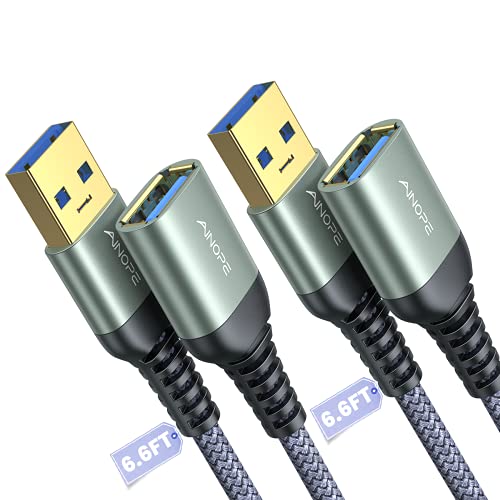
- Two 6.6-foot cables included
- 5 Gbps transfer with USB 2.0/1.1 compatibility
- Braided design and sticky cable-management buckles
Best For: Multi-device desks and organized shared workspaces
Compact Desktop Choice
StarTech 5ft USB 3.0 Extension

- Convenient five-foot desktop reach
- Up to 5 Gbps data transfer
- Shielded twisted-pair construction and lifetime warranty
Best For: Compact desks with nearby USB-A peripherals
Durable Long-Length Option
10ft Braided USB 3.0 Extension

- 10-foot reach for hard-to-access ports
- 5 Gbps transfer with broad backward compatibility
- Braided jacket and reinforced construction
Best For: Long runs to consoles, printers, cameras, and external drives
Best Compact Extension

- Up to 5Gbps data transfer
- Compact 3.3-foot desktop length
- Shielded, reinforced construction
Best For: Short USB extensions for desks, offices, and gaming consoles
Best Long-Reach Pair
UGREEN Braided USB 3.0 Extensions

- Two 6-foot cables included
- Up to 5Gbps data transfer
- Braided jackets and alloy connectors
Best For: Longer desktop runs and multi-device workstations
Best Bulk Value

- Five 3-foot cables included
- 480Mbps USB 2.0 transfer speed
- Useful for common peripherals
Best For: Equipping multiple desks with short, basic extensions
Best Long-Reach Pick
JSAUX 10ft USB 3.0 Extension 2-Pack

- Two 10-foot cables for hard-to-reach ports
- Up to 5Gbps USB 3.0 data transfer
- Braided construction with 18-month warranty
Best For: Large desktop layouts and multiple USB peripherals
Best Budget Multipack
3-Pack 6ft USB 2.0 Extension Cables
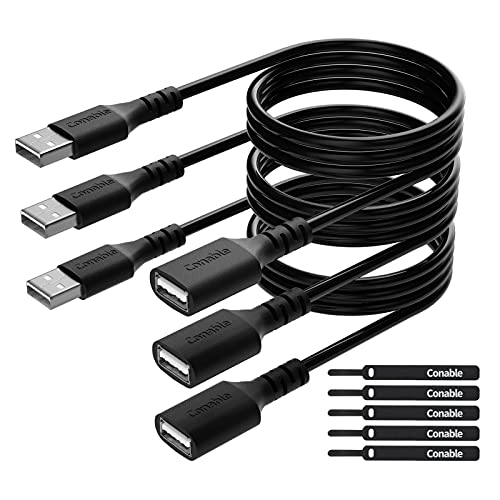
- Three 6-foot cables in one pack
- Supports up to 480Mbps data transfer
- Includes five cable ties
Best For: Everyday USB 2.0 peripherals and tidy desk routing
Best Multi-Cable USB 3.0 Set
4-Pack 6ft Braided USB 3.0 Extensions

- Four 6-foot cables for multi-device desks
- Up to 5Gbps USB 3.0 transfer speeds
- Braided, gold-plated design with 18-month service
Best For: Workstations connecting several USB peripherals
Long-Run Performance Pick – Cable Matters 10ft USB 3.0 Extension
For desktop setups that need extra reach, this 10-foot Cable Matters cable extends USB 3.0 or USB 2.0 peripherals while supporting data speeds up to 5 Gbps. It is a practical choice among usb extension cables for desktop setups when you need to position drives, hubs, printers, or other accessories farther from the computer.
Best For: Long desktop runs, external storage, USB hubs, and compatible VR headsets.
Pros:
- Supports up to 5 Gbps USB 3.0 data transfer.
- Backward compatible with USB 2.0 and USB 1.x devices.
- Uses molded strain relief, gold-plated connectors, copper conductors, and foil-and-braid shielding.
- 10-foot length provides substantial placement flexibility.
Cons:
- Its 10-foot length may be more cable than compact desks require.
- It uses a round PVC outer material rather than a braided jacket.
This is a strong all-purpose option when reach and SuperSpeed performance matter. Its male-to-female USB-A design also makes it useful for relocating frequently accessed peripherals without changing the host device.
Best Two-Pack Value – AINOPE 6.6ft Braided USB 3.0 Extensions
This AINOPE two-pack is useful when a desktop setup needs extensions in more than one location. Each 6.6-foot USB 3.0 cable supports up to 5 Gbps, and the included sticky buckles help keep extra length organized—useful features for usb extension cables for desktop setups.
Best For: Multi-device desks, shared workspaces, and users who want cable management accessories included.
Pros:
- Includes two 6.6-foot male-to-female USB 3.0 cables.
- Supports up to 5 Gbps and remains compatible with USB 2.0 and USB 1.1 devices.
- Nylon braided material, reinforced joints, and an all-metal connector shell support durability.
- Sticky buckles help shorten and organize the cables.
Cons:
- Each cable is shorter than the 10-foot alternatives in this roundup.
- The two-pack may be unnecessary if only one connection needs extension.
Choose this set when flexibility and organization are more important than maximum length. Having two cables can simplify a desk with separate peripherals on opposite sides of the workstation.
Compact Desktop Choice – StarTech 5ft USB 3.0 Extension
The StarTech USB3SEXT5DKB adds five feet between a computer and a USB peripheral, making it suited to compact desktop layouts where a little extra reach is enough. Its shielded twisted-pair construction supports reliable data communication at up to 5 Gbps.
Best For: Short desktop extensions for flash drives, cameras, storage devices, and other USB-A peripherals.
Pros:
- Five-foot length fits many standard desktop arrangements.
- Supports data rates up to 5 Gbps.
- Shielded twisted-pair construction helps limit electromagnetic interference.
- Backward compatible with USB 2.0 and backed by a lifetime warranty.
Cons:
- Provides less reach than the 6.6-foot and 10-foot options.
- Only one cable is included.
- The supplied specifications do not identify a braided outer jacket.
This is a sensible pick for a tidy workstation where the computer case and peripherals are close together. Its shorter length can reduce excess cable on smaller desks while retaining USB 3.0 performance.
Durable Long-Length Option – 10ft Braided USB 3.0 Extension
This 10-foot USB 3.0 extension is designed for setups where peripherals need to reach across or around a desk. It supports up to 5 Gbps and combines a nylon braided jacket with reinforced joints, making it a practical contender among usb extension cables for desktop setups.
Best For: Long-distance connections to gaming consoles, printers, cameras, drives, and input devices.
Pros:
- 10-foot length helps avoid reaching behind desks or moving close to the computer.
- Supports up to 5 Gbps and backward compatibility with USB 2.0, 1.1, and 1.0 devices.
- Nylon braided construction, aluminum alloy housing, and nickel-plated connectors support durability.
- Designed to withstand more than 10,000 bend tests.
Cons:
- A 10-foot cable can create excess slack on smaller workstations.
- Only one cable is included.
Consider this model when long reach and a reinforced braided build are priorities. It is especially useful for repositioning peripherals or connecting devices such as game consoles, printers, and external drives without repeatedly accessing the computer’s USB port.
Best Compact Extension – 3.3-Foot USB 3.0 Cable
For desktop setups that need a little extra reach, this USB 3.0 cable is a straightforward choice among USB extension cables for desktop setups. Its 3.3-foot length helps bring a port within reach while supporting data transfers up to 5Gbps.
Best For: Extending a nearby USB port for keyboards, mice, flash drives, printers, and other indoor desktop or gaming accessories.
Pros:
- Supports USB 3.0 transfer speeds up to 5Gbps.
- Compact 3.3-foot length suits desks, offices, and gaming consoles.
- Multi-layer shielding is designed to reduce interference and signal loss.
- Reinforced connectors and a flexible design support frequent use.
Cons:
- Its 3.3-foot reach may be limiting for ports located farther away.
- It is a single-cable package rather than a multi-pack.
This is a practical pick when you want USB 3.0 performance without excess cable to manage. Choose it for short-distance extensions where a single, compact cable is enough.
Best Long-Reach Pair – UGREEN Braided USB 3.0 Extensions
When a desktop port sits behind furniture or under a desk, the UGREEN two-pack offers more reach than a short extender. These USB extension cables for desktop setups provide two 6-foot USB 3.0 cables with up to 5Gbps data transmission and a braided exterior.
Best For: Workstations, webcams, printers, hubs, and other peripherals that need a longer connection or multiple extension points.
Pros:
- Includes two 6-foot USB 3.0 extension cables.
- Supports data transmission up to 5Gbps and charging up to 2A.
- Braided shielding and aluminum alloy connectors are designed for durability.
- Compatible with peripherals including webcams, keyboards, mice, printers, hard drives, and headsets.
Cons:
- The longer cables can create more slack on a compact desk.
- Charging is specified at up to 2A, so it may not suit every high-power use.
This package stands out when flexibility and reach matter more than minimizing cable length. The two-cable format is useful for a multi-device workstation, while the braided construction is suited to regular handling.
Best Bulk Value – Five-Pack USB 2.0 Extensions
For outfitting several workstations or keeping spare cables on hand, this five-pack offers a practical budget-oriented option. These USB extension cables for desktop setups use USB 2.0 connections, 3-foot lengths, and support transfer speeds up to 480Mbps.
Best For: Offices, classrooms, and home setups that need several short extensions for basic peripherals such as mice, keyboards, printers, and controllers.
Pros:
- Includes five USB-A male-to-female extension cables.
- Three-foot length works for many nearby desktop connections.
- Supports charging and data transfer for common USB peripherals.
- USB 2.0 compatibility covers devices such as printers, cameras, mice, keyboards, and controllers.
Cons:
- USB 2.0 transfer speed is limited to 480Mbps.
- PVC construction is less feature-rich than braided cable designs.
- It may not be the right choice for demanding high-speed storage transfers.
This pack makes sense when quantity and basic connectivity are the priorities. It is best suited to everyday peripherals rather than setups that require USB 3.0 transfer performance.
Best Long-Reach Pick – JSAUX 10ft USB 3.0 Extension 2-Pack
For desktop setups where ports are difficult to reach, this two-pack of 10-foot USB extension cables adds substantial range without giving up USB 3.0 performance. It is a practical choice among USB extension cables for desktop setups when you need to connect peripherals farther from the computer.
Best For: Extending webcams, printers, hard drives, hubs, keyboards, and other USB peripherals across a larger desk or workspace.
Pros:
- Two 10-foot cables provide generous reach.
- USB 3.0 supports data transfer speeds up to 5Gbps and works with USB 2.0 and 1.1 devices.
- Nylon braiding, gold-plated connectors, and molded joints add durability.
- Includes an 18-month warranty.
Cons:
- The long cable length may be more than compact desks require.
- Uses USB Type-A male-to-female connections rather than newer connector types.
Choose this JSAUX set when reach and faster data transfer matter more than minimizing cable length. The two-cable bundle is especially useful for multi-device desktop layouts.
Best Budget Multipack – 3-Pack 6ft USB 2.0 Extension Cables
This three-pack offers an affordable way to reposition everyday peripherals around a desktop. For USB extension cables for desktop setups that mainly handle keyboards, mice, printers, controllers, and similar devices, its 6-foot length and included cable ties keep the arrangement practical.
Best For: Budget-conscious users who need several extensions for standard USB 2.0 accessories and organized cable routing.
Pros:
- Three 6-foot cables provide useful coverage for multiple devices.
- Supports plug-and-play charging and data transfer up to 480Mbps.
- Includes five cable ties for tidier cable management.
- Pure copper conductors, shielding, and reinforced strain relief support durability.
Cons:
- USB 2.0 speeds are slower than USB 3.0 alternatives.
- Less suitable when high-speed transfers are a priority.
This is a sensible value pick for routine desktop accessories and basic cable management. Select a USB 3.0 option instead if you regularly move large files through external storage.
Best Multi-Cable USB 3.0 Set – 4-Pack 6ft Braided USB 3.0 Extensions
With four 6-foot braided cables, this set is designed for desktop users who want several matching extensions at USB 3.0 speeds. It fits USB extension cables for desktop setups that connect hard drives, hubs, webcams, printers, and input devices while keeping extra reach available.
Best For: Multi-device workstations that need several 6-foot USB 3.0 extensions.
Pros:
- Four cables provide strong value for multi-device setups.
- Supports USB 3.0 data transfer up to 5Gbps and is backward compatible with USB 2.0 devices.
- Nylon braiding and gold-plated connectors are built for durability and conductivity.
- Includes an 18-month refund or replacement service.
Cons:
- All four cables are 6 feet long, so there is no shorter or longer size in the pack.
- USB Type-A connections may not suit devices using other connector formats.
This set is a strong fit when you need multiple high-speed extensions rather than just one. Its consistent 6-foot length works well for spreading peripherals around a typical desk.
How We Picked the Best USB Extension Cables for Desktop Setups
We focused on practical desktop requirements: connector compatibility, advertised transfer speed, cable length, construction, pack size, and likely use cases. The selection includes USB-A male-to-female extension cables for common peripherals, with USB 3.0 models prioritized for devices that move data quickly and USB 2.0 models included for basic accessories and lower-cost bulk coverage.
Because extension cables can vary by device and setup, advertised performance should be treated as a maximum rather than a guarantee. Your computer, peripheral, original cable, and connected hub all influence real-world results.
Quick Comparison
| Best For | Recommended Type | What to Look For |
|---|---|---|
| External drives and fast storage | USB 3.0 or higher | 5Gbps-rated cable, short-to-moderate length |
| Webcams and cameras | USB 3.0 | Reliable shielding, suitable length, secure connectors |
| Keyboard, mouse, and printer | USB 2.0 or USB 3.0 | Compatibility and convenient reach |
| Multiple workstations or peripherals | Multipack | Consistent lengths and good per-cable value |
Key Buying Factors for USB Extension Cables for Desktop Setups
USB Version and Speed
USB 3.0 cables are generally the better choice for external storage, cameras, and other data-heavy devices, with a commonly advertised maximum of 5Gbps. USB 2.0 cables typically advertise up to 480Mbps and are usually sufficient for keyboards, mice, printers, and simple controllers. A faster cable cannot make a USB 2.0 device operate at USB 3.0 speeds.
Length and Signal Reliability
Choose the shortest length that solves your placement problem. Six-foot cables suit most desks, while 10-foot models help when a computer tower is positioned farther away. Longer runs can be more sensitive to signal loss, especially with high-bandwidth devices or additional adapters and hubs.
Connector and Device Compatibility
These products use USB-A male-to-female connections, so confirm that your computer or hub has a USB-A port. If your computer only has USB-C ports, you may need a USB-C adapter or a different cable. Also check whether your device requires USB 3.x data capability rather than charging alone.
Build Quality and Cable Management
Braided jackets can help resist everyday abrasion and repeated bending, while flexible PVC cables may be easier to route through tight spaces. Look for molded strain relief, firm connectors, and a length that avoids sharp bends or excess loops behind the desk.
Who Should Buy Which USB Extension Cables for Desktop Setups?
Choose a USB 3.0 cable for external hard drives, flash drives, webcams, cameras, and other devices where transfer speed matters. A 6-foot option is a practical default for most desktop layouts; select 10 feet when the computer sits under or beside the desk.
USB 2.0 multipacks are a sensible budget choice for keyboards, mice, printers, and other low-bandwidth accessories. They can also be useful when several peripherals need modest extra reach. If you are outfitting multiple desks or replacing several short cables, a multipack usually offers better value than buying individually.
Finally, avoid assuming that an extension cable will solve every connectivity issue. For demanding devices, test the cable directly with your computer, avoid chaining multiple extensions, and keep high-speed runs away from unnecessary hubs and adapters.