The right USB extension cable can add reach without sacrificing charging performance, data transfer speed, or everyday reliability. This roundup compares 10 USB-A extension options for desks, entertainment centers, gaming setups, webcams, and other connected devices.
Before choosing, consider the cable’s USB standard, rated charging current, length, connector quality, shielding, and construction. A longer cable is convenient, but shorter, better-built options may deliver more consistent performance.
Best 10 USB Extension Cables for Fast Charging Picks for 2026
Heavy-Duty Speed Pick
6.6-Foot Braided USB 3.0 Extension Cable

- Up to 5Gbps data transfer
- Nylon braid tested for 400,000+ bends
- USB-A male-to-female design with 2A maximum current
Best For: Durable everyday extensions for computers, consoles, and peripherals
Long-Reach Choice
10-Foot USB 3.0 Extension Cable

- 10-foot reach for desks and TVs
- Up to 5Gbps data transfer
- Braided jacket and reinforced construction
Best For: Room-spanning connections and hard-to-reach USB ports
Two-Cable Value Pick
AINOPE 6.6-Foot USB 3.0 Extension 2-Pack
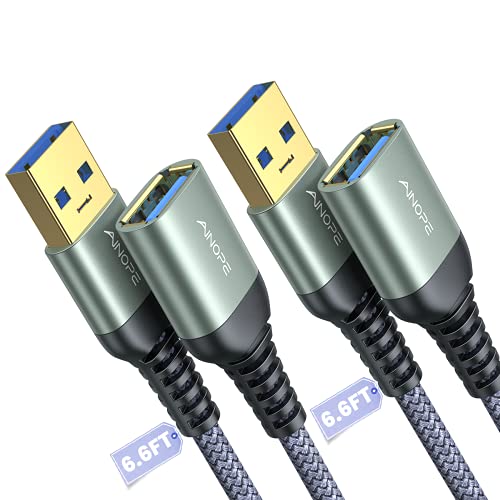
- Includes two 6.6-foot cables
- Up to 5Gbps data transfer and USB 3.0 charging
- Sticky buckles help manage cable length
Best For: Multiple workstations, devices, or shared household setups
High-Current Long Cable

- Supports stated 3A charging
- Up to 5Gbps data transfer
- 10-foot braided cable with reinforced SR design
Best For: Long-distance connections where charging capability is a priority
Best Balanced Pick
UGREEN 3-Foot USB 3.0 Extension Cable 2-Pack
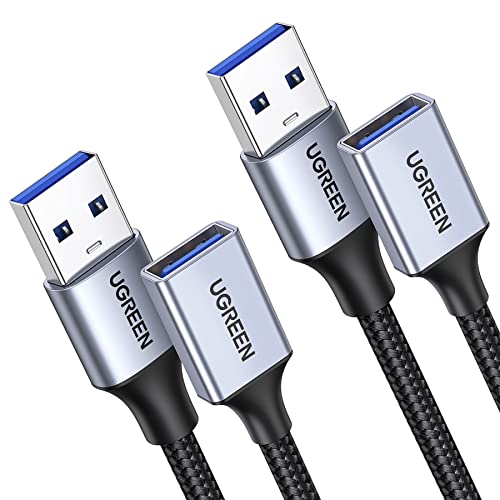
- Two 3-foot USB-A extension cables
- Up to 2A charging and 5Gbps data transfer
- Braided build with aluminum-alloy connectors
Best For: Everyday desk setups and dual-device use
Best Fast-Charging Value
6-Foot USB Extension Cable 2-Pack

- Two 6-foot USB-A extension cables
- Up to 3A charging and 5Gbps data transfer
- Reinforced joints rated for 20,000+ bends
Best For: Long-reach charging and peripheral connections
Best Long-Reach Single Cable

- 10-foot USB-A male-to-female reach
- Up to 2A charging and 5Gbps data transfer
- Braided cable with included sticky buckles
Best For: Gaming, sofa-side use, and USB-A surveillance cameras
Best Overall
6-Foot 3A USB 3.0 Extension Cable

- Up to 3A charging and 5Gbps data transfer
- Six-foot nylon-braided cable
- Two-pack with broad USB-A compatibility
Best For: Everyday charging and peripheral extensions
Best for Long Reach
JSAUX 10-Foot USB 3.0 Extension Cables

- Two 10-foot cables for flexible placement
- Up to 5Gbps USB 3.0 data transfer
- Braided build with an 18-month warranty
Best For: Large desks, TVs, and entertainment setups
Best Multi-Pack

- Four 6-foot cables in one pack
- Up to 5Gbps data transfer
- Braided USB-A extension design
Best For: Multi-device home and office setups
Heavy-Duty Speed Pick – 6.6-Foot Braided USB 3.0 Extension Cable
For shoppers comparing usb extension cables for fast charging, this 6.6-foot USB-A male-to-female cable combines USB 3.0 transfer speeds with a durable nylon-braided build. It supports up to 5Gbps data transfer and up to 2A current, making it a practical choice for extending compatible peripherals without sacrificing everyday performance.
Best For: Users who want a compact, rugged extension for computers, gaming consoles, drives, printers, and other USB peripherals.
Pros:
- USB 3.0 supports up to 5Gbps transfer speeds and is backward compatible with USB 2.0 and 1.1.
- Military-grade nylon braid and reinforced connectors are designed for frequent use and tested for 400,000+ bends.
- Compatible with devices including PCs, MacBooks, PS5, PS4, Xbox, printers, webcams, and external drives.
- Includes a stated 2-year warranty and 24/7 support.
Cons:
- Its listed maximum current is 2A, so charging performance depends on the connected device and power source.
- At 6.6 feet, it provides less reach than the 10-foot options in this roundup.
This is a strong all-purpose pick when durability and high-speed data transfer matter more than maximum length. Its USB-A design is best suited to extending existing USB-A connections.
Long-Reach Choice – 10-Foot USB 3.0 Extension Cable
If you need extra reach from usb extension cables for fast charging, this 10-foot USB-A male-to-female cable is designed for desks, TVs, and seating areas where standard cables fall short. It supports up to 5Gbps data transfer and is intended for both charging and syncing compatible devices.
Best For: Extending USB peripherals across a room, behind a desk, or near a TV without needing to sit close to the host device.
Pros:
- Extra-long 10-foot length helps avoid bending under desks or reaching behind TVs.
- USB 3.0 offers up to 5Gbps transfer speeds and backward compatibility with USB 2.0, 1.1, and 1.0 devices.
- Nylon braiding, nickel-plated connectors, an aluminum-alloy case, and a reinforced joint support durability.
- Compatible with gaming consoles, keyboards, mice, printers, cameras, flash drives, and hard drives.
Cons:
- The supplied notes do not specify a maximum charging current or wattage.
- A 10-foot cable may be more length than needed for close-range setups.
This model stands out for reach and broad peripheral compatibility. It is a sensible option for home offices and entertainment setups where cable placement is the main problem.
Two-Cable Value Pick – AINOPE 6.6-Foot USB 3.0 Extension 2-Pack
For buyers who need usb extension cables for fast charging in more than one location, this AINOPE package includes two 6.6-foot USB-A male-to-female cables. USB 3.0 support provides up to 5Gbps transfer speeds, while the braided construction and included sticky buckles help with durability and cable organization.
Best For: Households, offices, or gaming setups that need two matching extensions for hubs, computers, consoles, and accessories.
Pros:
- Two-cable pack offers convenient coverage for separate workstations or devices.
- Supports up to 5Gbps data transfer and backward compatibility with USB 2.0 and USB 1.1.
- All-metal and aluminum-alloy connector construction, shielding, and nylon braiding are designed for long-term use.
- Includes sticky buckles to shorten and organize excess cable.
Cons:
- Each cable is 6.6 feet, so it does not provide the reach of the 10-foot alternatives.
- The notes specify USB 3.0 fast charging but do not list a charging wattage.
This is the most practical choice when quantity and organization matter. The two-pack is especially useful for outfitting multiple USB connections while keeping cables manageable.
High-Current Long Cable – 10-Foot 3A USB 3.0 Extension
This 10-foot USB-A male-to-female cable is aimed at shoppers seeking usb extension cables for fast charging with a stated 3A charging capability. It also supports up to 5Gbps data transfer, making it suitable for extending compatible USB peripherals while maintaining fast file syncing.
Best For: Users who want maximum reach plus a clearly specified 3A charging rating for compatible setups.
Pros:
- Stated support for 3A charging and up to 5Gbps data transfer.
- 10-foot length helps connect devices behind desks, under workstations, or near TVs.
- Pure copper core, multi-layer shielding, reinforced SR design, and nylon braid support signal quality and durability.
- Works with peripherals such as webcams, cameras, phones, hubs, keyboards, printers, drives, consoles, and microphones.
Cons:
- Charging results still depend on the connected device, host port, and power source.
- Only one cable is included.
Among these options, this cable offers the clearest stated charging specification while preserving USB 3.0 transfer performance. Choose it when a long run and a listed 3A capability are priorities.
Best Balanced Pick – UGREEN 3-Foot USB 3.0 Extension Cable 2-Pack
For shoppers comparing USB extension cables for fast charging, the UGREEN 2-pack combines 2A charging support with USB 3.0 data transfer up to 5Gbps. The two 3-foot cables are useful for extending webcams, hubs, keyboards, storage devices, and other USB peripherals without reaching behind a desk or TV.
Best For: Everyday desk setups, office peripherals, and buyers who want two durable short extensions.
Pros:
- Includes two 3-foot USB-A male-to-female cables.
- Supports up to 2A charging and 5Gbps data transfer.
- Nylon-braided construction, aluminum-alloy connectors, and multilayer shielding support durability and signal clarity.
- Works with a wide range of peripherals and requires no drivers.
Cons:
- Its 2A charging limit is lower than some competing extensions.
- The 3-foot length may not suit setups requiring a longer reach.
This is a practical all-around option when you need two compact extensions for charging and data use. Its USB 3.0 performance and reinforced braided design make it especially appealing for everyday indoor workstations.
Best Fast-Charging Value – 6-Foot USB Extension Cable 2-Pack
This two-pack stands out among USB extension cables for fast charging with a stated 3A charging capability and 5Gbps data transfer. Each 6-foot USB-A male-to-female cable adds useful reach for chargers, computers, hubs, cameras, storage devices, and other compatible peripherals.
Best For: Users who need extra reach, higher stated charging capacity, and two long extensions for home or office use.
Pros:
- Provides two 6-foot USB-A extension cables.
- Supports up to 3A charging and 5Gbps data transfer.
- Backward compatible with USB 2.0 and USB 1.1 ports.
- Gold-plated connectors, multilayer shielding, and reinforced joints rated for 20,000+ bends.
Cons:
- Only supports USB-A connections rather than newer USB-C connectors.
- Longer cables can be more than needed for compact desk setups.
With two six-foot cables and the highest stated charging limit in this group, this model is a strong choice for flexible placement. It is particularly useful when a short charging or peripheral cable cannot comfortably reach a port.
Best Long-Reach Single Cable – AINOPE 10FT USB 3.0 Extension
For setups that need substantial reach, the AINOPE 10-foot USB 3.0 extension adds flexibility while supporting up to 2A charging and 5Gbps data transfer. Its USB-A male-to-female design works with devices such as webcams, keyboards, flash drives, hard drives, printers, and compatible surveillance cameras.
Best For: Extended-reach gaming, sofa-side device use, and surveillance-camera setups with a USB-A connection.
Pros:
- Offers a generous 10-foot length for distant devices.
- Supports up to 2A charging and USB 3.0 data transfer up to 5Gbps.
- Nylon braiding, an all-metal shell, aluminum-alloy connector, and reinforced joints improve durability.
- Includes sticky buckles for managing excess cable length.
Cons:
- It is a single cable rather than a multi-pack.
- The stated 2A charging support is lower than the 3A option in this roundup.
- It requires a USB-A port on the connected device.
This is the best fit when distance matters more than pack quantity. The 10-foot reach and included cable-management buckles make it convenient for living-room, gaming, or camera arrangements, while its USB 3.0 support handles both charging and data syncing.
Best Overall – 6-Foot 3A USB 3.0 Extension Cable
For shoppers comparing usb extension cables for fast charging, this two-pack combines a 6-foot reach with support for up to 3A charging and USB 3.0 data speeds up to 5Gbps. It is a practical choice for extending phone charging cables or connecting peripherals farther from a computer, TV, or desk.
Best For: Everyday charging and data connections where you want two durable, moderately long USB-A extension cables.
Pros:
- Supports up to 3A charging and data transfer speeds up to 5Gbps.
- Six-foot length helps reach ports behind desks or TVs.
- Nylon braiding, gold-plated connectors, and reinforced strain relief support durability.
- Two cables are included, with backward compatibility for USB 2.0 and USB 1.1 devices.
Cons:
- Uses USB Type-A connectors, so it is not a USB-C extension cable.
- The supplied specifications identify indoor usage.
This is the most balanced option in the group for users who want fast charging support, high-speed data transfer, and a useful 6-foot length without buying cables individually.
Best for Long Reach – JSAUX 10-Foot USB 3.0 Extension Cables
The JSAUX two-pack is designed for situations where a standard extension is not long enough. Each 10-foot USB-A male-to-female cable supports USB 3.0 data transfer up to 5Gbps and can place connected devices in a more convenient location.
Best For: Extending webcams, printers, storage drives, game consoles, and other USB peripherals across larger desks or entertainment setups.
Pros:
- Extra-long 10-foot length provides substantial placement flexibility.
- Supports USB 3.0 data speeds up to 5Gbps and is backward compatible with USB 2.0 and USB 1.1.
- Nylon-braided construction and gold-plated connectors are designed for durability and signal clarity.
- Includes two cables and an 18-month warranty.
Cons:
- The product notes emphasize data transfer performance rather than a specific fast-charging current rating.
- Longer cables may be more cable than needed for compact setups.
Choose this pair when reach is the priority. It offers the longest listed length while retaining USB 3.0 performance for compatible devices.
Best Multi-Pack – Four 6-Foot USB 3.0 Extenders
If you need several usb extension cables for fast charging and high-speed connections, this four-pack offers broad coverage. Each 6-foot USB-A male-to-female cable supports USB 3.0 transfer rates up to 5Gbps and works with both USB 3.0 and USB 2.0 peripherals.
Best For: Homes, offices, or workstations that need multiple extensions for drives, keyboards, mice, printers, cameras, or game consoles.
Pros:
- Four cables provide convenient coverage for multiple devices.
- Six-foot length helps with hard-to-reach USB ports.
- Supports data transfer up to 5Gbps and is backward compatible with USB 2.0 devices.
- Nylon braiding, tinned copper, and gold-plated connectors are intended to support reliable connections.
Cons:
- The supplied notes do not specify a maximum charging current.
- All four included cables are listed in black, with no mixed-color assortment.
This is the practical bulk-buy option. It is well suited to users who want several matching 6-foot extensions for a range of USB-A peripherals rather than a single cable.
How We Picked the Best USB Extension Cables for Fast Charging
We focused on USB-A male-to-female extension cables suited to common charging and data-transfer tasks. The selection represents several lengths, single- and multi-pack configurations, USB 3.0 models rated for up to 5Gbps transfers, and cables advertised for fast charging. We also considered braided jackets, connector durability, compatibility with peripherals, and value for buyers who need multiple cables.
Because charging results depend on the connected device, charger, cable length, and power requirements, treat advertised charging ratings as a useful comparison point rather than a guarantee of maximum charging speed in every setup.
Quick Comparison
| What to compare | Best fit |
|---|---|
| 3–6.6 feet | Desks, monitors, keyboards, mice, and nearby hubs |
| 10 feet | TV consoles, gaming systems, cameras, and hard-to-reach ports |
| USB 3.0 / 5Gbps | External storage and other high-speed data accessories |
| Braided construction | Frequent bending, travel, or exposed cable runs |
| Multi-packs | Multiple workstations, rooms, or connected peripherals |
Key Buying Factors for USB Extension Cables for Fast Charging
Charging Capability
Check the stated current rating, such as 3A, and match it with the charger and device. A USB extension cannot increase the power supplied by a charger, and excessive length or poor construction can contribute to voltage drop. For demanding devices, use a cable with a clearly stated charging specification from a reputable seller.
Data-Transfer Speed
USB 3.0 extension cables commonly advertise up to 5Gbps, but the connected ports and devices must also support that standard. For keyboards, mice, and basic charging, USB 2.0-level performance may be sufficient. Choose USB 3.0 when extending a hard drive, flash drive, webcam, or other high-bandwidth accessory.
Length and Signal Reliability
Buy only as much length as needed. Six-foot cables are often a practical balance, while 10-foot models provide useful reach for entertainment centers and distant ports. Avoid chaining several extension cables unless the manufacturer explicitly supports it, since added connections can reduce reliability.
Build Quality and Fit
Look for snug connectors, strain relief, corrosion-resistant contacts, and a jacket that matches the installation. Nylon braiding can improve abrasion resistance, while a flexible PVC cable may be easier to route behind furniture. Confirm that the cable is male-to-female USB-A if you need to extend an existing USB-A cable.
Who Should Buy Which USB Extension Cables for Fast Charging?
For Everyday Desk Accessories
Choose a 3- to 6.6-foot cable for a keyboard, mouse, printer, webcam, or nearby phone connection. A multi-pack is practical when several ports need extra reach.
For Gaming and Home Entertainment
A 10-foot USB 3.0 option is better for consoles, controllers, cameras, and devices positioned away from the USB port. Prioritize sturdy strain relief and a cable that is long enough without excessive slack.
For Storage and Fast Transfers
Select a clearly labeled USB 3.0, 5Gbps cable with secure connectors. Keep it as short as your setup allows and connect it to matching USB 3.x ports for the best chance of reaching advertised speeds.
For Multiple Rooms or Workstations
Multi-packs offer better value when you need consistent cables in several locations. Before buying, verify the package lengths and make sure each cable has the connector type and charging rating your devices require.