A slow or unreliable wireless connection can hold back downloads, streaming, gaming, and everyday work—even when your internet plan is fast. The right adapter can add modern WiFi performance to a desktop or upgrade an older laptop without replacing the entire system.
We selected 10 options spanning USB dongles, PCIe expansion cards, WiFi 6E and WiFi 7 models, and adapters with wired gigabit output. The best choice depends on your router, computer, operating system, available ports, and whether you prioritize maximum speed, range, or simple setup.
Best 10 Wifi Adapters with Gigabit Speeds Picks for 2026
Best Long-Range 6E Value
ALFA Network AWUS036AXML AXE3000

- Tri-band Wi-Fi 6E with up to 3Gbps combined throughput
- Two detachable 5dBi high-gain antennas
- Compatible with Windows and Linux
Best For: Desktop, laptop, or smart TV users who prioritize range and 6GHz connectivity
Best High-Speed Windows Dongle
UGREEN AXE5400 WiFi 6E Adapter
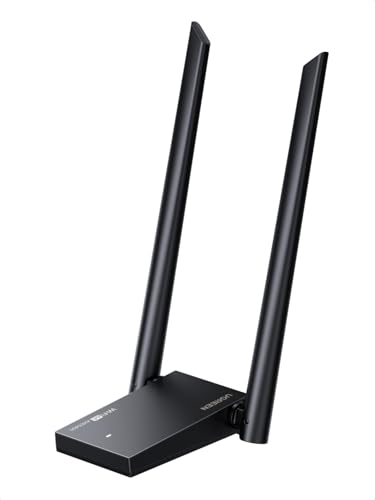
- Advertised tri-band speeds up to 5400Mbps
- Dual 5dBi high-gain antennas
- Supports WPA3, OFDMA, and MU-MIMO
Best For: Windows 10/11 users seeking maximum advertised throughput
Best PCIe Desktop Upgrade
GIGABYTE GC-WBAX210 WiFi 6E Card
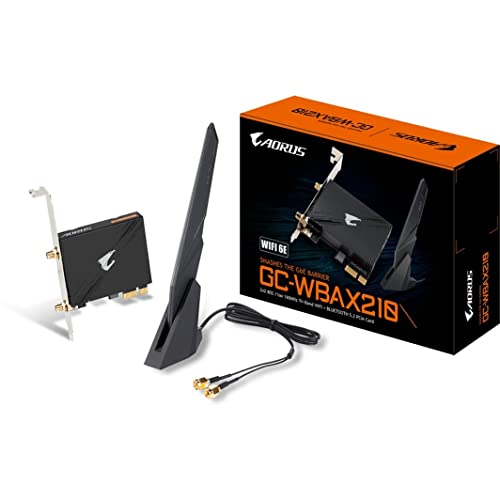
- Internal PCIe design for desktop installation
- Tri-band Wi-Fi 6E with speeds up to 2400Mbps
- Includes Bluetooth 5.2
Best For: Desktop users wanting a permanent Wi-Fi and Bluetooth upgrade
Best Easy-Setup USB Adapter

- AXE3000 tri-band speeds up to 3Gbps
- Flippable antenna with included cradle
- Supports Windows 10/11 and WPA3
Best For: Windows users seeking a simple USB upgrade for streaming and gaming
Best Ethernet Bridge

- Gigabit LAN port with up to 1 Gbps throughput
- Connects TVs, consoles, PCs, printers, and more
- WPS setup with no driver installation
Best For: Adding WiFi 6 to wired Ethernet devices
Best Windows USB Upgrade
TP-Link AX1800 High-Gain Adapter

- Up to 1,201 Mbps on 5 GHz and 574 Mbps on 2.4 GHz
- Two adjustable high-gain antennas with beamforming
- USB 3.0, WPA3, and Windows 10/11 support
Best For: Modernizing WiFi on a compatible Windows PC
Best WiFi 7 Performance

- WiFi 7 tri-band speeds up to 6.5 Gbps
- Supports 6 GHz, 5 GHz, and 2.4 GHz bands
- External antennas and preloaded drivers
Best For: High-demand Windows 11 gaming and streaming PCs
Best Budget Long-Range Pick
Nineplus AC1300 USB WiFi Adapter

- 1300 Mbps dual-band rating
- Two 5 dBi high-gain antennas
- Windows-only compatibility
Best For: Affordable long-range Wi-Fi upgrades for Windows PCs
Best Wi-Fi 6E Upgrade
ALFA AWUS036AXM AXE3000 USB Adapter

- Tri-band Wi-Fi 6E with 6 GHz
- Up to 3 Gbps rated speed
- Detachable 5 dBi antennas
Best For: Wi-Fi 6E users seeking maximum USB adapter performance
Best Mainstream Wi-Fi 6 Pick

- AX1800 dual-band Wi-Fi 6
- MU-MIMO and OFDMA support
- One-meter USB 3.0 cable
Best For: Windows users upgrading a desktop or laptop to Wi-Fi 6
Best Long-Range 6E Value – ALFA Network AWUS036AXML AXE3000
If you need wifi adapters with gigabit speeds for a desktop, laptop, or smart TV, the ALFA Network AWUS036AXML combines Wi-Fi 6E tri-band connectivity with a rated combined throughput of up to 3Gbps. Its detachable high-gain antennas are useful when range and signal penetration matter.
Best For: Users seeking a Linux- or Windows-compatible Wi-Fi 6E USB adapter with external antennas for streaming, gaming, or large file transfers.
Pros:
- Tri-band 2.4GHz, 5GHz, and 6GHz Wi-Fi 6E support
- Rated combined throughput up to 3000Mbps
- Two detachable 5dBi high-gain antennas
- Supports Windows and Linux systems
Cons:
- Windows support requires Windows 10 or newer
- External antennas make it less compact than a basic dongle
The AWUS036AXML is a strong fit when you want fast 6GHz connectivity and flexible antenna placement, especially if you also need Linux compatibility.
Best High-Speed Windows Dongle – UGREEN AXE5400 WiFi 6E Adapter
For buyers comparing wifi adapters with gigabit speeds, the UGREEN AXE5400 offers tri-band Wi-Fi 6E with advertised speeds of 2400Mbps on both 6GHz and 5GHz, plus 574Mbps on 2.4GHz. Its dual high-gain antennas and USB 3.0 interface are designed for demanding desktop use.
Best For: Windows 10/11 desktop users who want high advertised wireless throughput for gaming, professional work, and multiple connected devices.
Pros:
- AXE5400 tri-band performance across 6GHz, 5GHz, and 2.4GHz
- Dual 5dBi high-gain external antennas
- OFDMA and MU-MIMO help manage network traffic
- Includes Windows drivers and setup guidance
Cons:
- Only compatible with Windows 10/11
- USB 3.0 connection and external antennas may limit portability
The UGREEN adapter is the most speed-focused option here on paper, but its Windows-only compatibility makes it less flexible for Linux or other operating systems.
Best PCIe Desktop Upgrade – GIGABYTE GC-WBAX210 WiFi 6E Card
GIGABYTE WiFi 6E GC-WBAX210 (2x2 802.11ax/ Tri-Band WiFi/Bluetooth 5.2/ PCIe Expansion Card)
Check Price On AmazonThe GIGABYTE GC-WBAX210 takes a different approach from USB wifi adapters with gigabit speeds: it installs inside a desktop through a PCIe expansion slot. With Intel Wi-Fi 6E, tri-band support, Bluetooth 5.2, and wireless speeds up to 2400Mbps, it suits a permanent desktop upgrade.
Best For: Desktop owners who prefer an internal PCIe card and want Wi-Fi 6E plus Bluetooth 5.2 in one expansion solution.
Pros:
- Intel Wi-Fi 6E AX210 module with dedicated 6GHz support
- 2×2 dual-stream operation across three bands
- Wireless connection speeds up to 2400Mbps
- Adds Bluetooth 5.2 to a compatible desktop
Cons:
- Requires a compatible desktop and PCIe installation
- Less convenient to move between computers than a USB adapter
The GC-WBAX210 is the sensible choice for a desktop that can accommodate an internal card, particularly when Bluetooth is also needed alongside Wi-Fi 6E.
Best Easy-Setup USB Adapter – NETGEAR Nighthawk A8000
The NETGEAR Nighthawk A8000 is a convenient pick among wifi adapters with gigabit speeds, offering AXE3000 tri-band performance up to 3Gbps through USB 3.0. Its flippable external antenna and included cradle help position the adapter for reception, while setup is designed for Windows 10 and 11.
Best For: Windows users who want a straightforward USB upgrade for 4K streaming, low-latency gaming, and video calls.
Pros:
- Wi-Fi 6E tri-band connectivity with speeds up to 3Gbps
- Flippable high-gain antenna and compact cradle
- Works with Wi-Fi 6E, Wi-Fi 6, Wi-Fi 5, and older routers
- Includes drivers on a USB drive and supports WPA3
Cons:
- Compatible with Windows 10 and 11
- Full 6GHz benefits require a Wi-Fi 6E router
The A8000 is a polished choice for a quick Windows upgrade, especially if you value flexible antenna positioning and compatibility with existing router generations.
Best Ethernet Bridge – AX1500 WiFi 6 Gigabit Adapter
If you need wifi adapters with gigabit speeds for a TV, game console, printer, or other wired device, the BrosTrend AX1500 provides a practical wireless-to-Ethernet upgrade. Its Gigabit LAN port supports up to 1 Gbps, while WiFi 6 connectivity reaches up to 1,201 Mbps on the 5 GHz band.
Best For: Adding WiFi 6 and a wired gigabit connection to devices without built-in wireless networking.
Pros:
- Gigabit Ethernet port supports up to 1 Gbps.
- Works with TVs, computers, consoles, switches, printers, and VoIP phones.
- WPS pairing and no driver installation make setup straightforward.
- External antennas and 5 GHz support can help improve connection performance.
Cons:
- Best performance depends on a compatible 5 GHz router and favorable placement.
- It is designed for wired devices rather than direct USB WiFi access for a PC.
Choose this model when your priority is connecting an existing Ethernet-only device to a modern WiFi network. Positioning it in an open area with the antennas aimed toward the router can help maintain a more stable link.
Best Windows USB Upgrade – TP-Link AX1800 High-Gain Adapter
For Windows desktops and laptops that need wifi adapters with gigabit speeds, the TP-Link Archer TX30U Plus offers up to 1,201 Mbps on 5 GHz and 574 Mbps on 2.4 GHz. Its USB 3.0 interface, adjustable high-gain antennas, and beamforming are suited to streaming, gaming, and video calls.
Best For: Windows 10 or 11 users replacing an outdated or unreliable internal WiFi card.
Pros:
- Dual-band AX1800 performance with up to 1,201 Mbps on 5 GHz.
- Two high-gain antennas and beamforming support stronger reception.
- USB 3.0 supports faster data transfer than USB 2.0.
- Includes WPA3 security and a preloaded internal driver.
Cons:
- Compatible only with Windows 10 and Windows 11.
- Actual speeds vary with distance, obstacles, and network conditions.
The TX30U Plus is a sensible refresh for a Windows PC that lacks dependable WiFi 6 connectivity. Its folding, adjustable antennas make it easier to position for reception, but check your operating system before buying.
Best WiFi 7 Performance – BE6500 Tri-Band USB Adapter
The BrosTrend BE6500 is built for users seeking wifi adapters with gigabit speeds and next-generation wireless capability. It supports tri-band WiFi 7 with advertised rates up to 2,882 Mbps on both 6 GHz and 5 GHz, plus 688 Mbps on 2.4 GHz, making it a strong option for demanding PC workloads.
Best For: Windows 11 desktops and laptops used for competitive gaming, high-bandwidth multitasking, or 4K and 8K streaming.
Pros:
- Tri-band WiFi 7 supports advertised aggregate speeds up to 6.5 Gbps.
- 6 GHz support, 4K-QAM, 160 MHz channels, Multi-RU, and preamble puncturing target congestion and throughput.
- Dual external antennas and beamforming help focus the signal toward the router.
- Preloaded drivers simplify installation, with no CD or download required.
Cons:
- Windows 11 is required for 6 GHz access.
- Windows 10 is limited to the 5 GHz and 2.4 GHz bands.
- Not compatible with macOS, Linux, or Bluetooth, and MLO is not supported.
This adapter makes the most sense when your PC and router can take advantage of WiFi 7 features, especially the 6 GHz band. Its compatibility limitations are significant, so confirm your operating system and wireless equipment before choosing it.
Best Budget Long-Range Pick – Nineplus AC1300 USB WiFi Adapter
If you need wifi adapters with gigabit speeds without spending much, the Nineplus AC1300 is a practical upgrade for compatible Windows desktops and laptops. It combines dual-band Wi-Fi, two high-gain antennas, and USB 3.0 connectivity for everyday browsing, streaming, meetings, and gaming.
Best For: Windows users who want an affordable dual-band adapter with extended reception.
Pros:
- Up to 867 Mbps on 5 GHz and 400 Mbps on 2.4 GHz, with a 1300 Mbps combined rating.
- Two 5 dBi antennas help improve signal reception over longer distances.
- USB 3.0 supports faster data transfer and remains backward compatible with USB 2.0.
- Includes online setup support and a two-year support period.
Cons:
- Does not support Mac OS, Chromebook, or Linux.
- Windows 7 requires manual driver installation.
The Nineplus is a sensible value choice when coverage and broad Windows compatibility matter more than newer Wi-Fi standards. Its dual antennas are especially useful for a desktop or laptop located farther from the router.
Best Wi-Fi 6E Upgrade – ALFA AWUS036AXM AXE3000 USB Adapter
The ALFA AWUS036AXM is one of the most capable wifi adapters with gigabit speeds in this lineup, offering tri-band Wi-Fi 6E and a rated speed of up to 3 Gbps. It is designed for users with a compatible Wi-Fi 6E router who want access to the less congested 6 GHz band.
Best For: Advanced Windows 11 or Linux users with a Wi-Fi 6E router and demanding wireless workloads.
Pros:
- AXE3000 tri-band support covers 6 GHz, 5 GHz, and 2.4 GHz.
- Up to 3 Gbps data transfer rate with USB 3.0 for best performance.
- Two detachable 5 dBi antennas can be replaced with compatible higher-gain or directional antennas.
- Supports WPA3 and includes a connector option that can help avoid blocking nearby USB ports.
Cons:
- 6 GHz access requires a Wi-Fi 6E router and Windows 11 or newer Linux support.
- Mac support does not extend beyond macOS 10.15, and M1/M2 chipsets are not supported.
- It is a computer client adapter, not a router, and is not compatible with phones or televisions.
The ALFA offers the highest performance ceiling here, but its benefits depend heavily on compatible hardware. Choose it when you specifically want Wi-Fi 6E and can meet its operating-system and router requirements.
Best Mainstream Wi-Fi 6 Pick – TP-Link Archer TX20U Plus
The TP-Link Archer TX20U Plus is a balanced choice among wifi adapters with gigabit speeds, pairing Wi-Fi 6 efficiency with a dual-band AX1800 rating. Its adjustable antennas and one-meter USB 3.0 cable make it easier to position for better reception on a compatible Windows desktop or laptop.
Best For: Windows 10 and 11 users who want a dependable Wi-Fi 6 adapter for streaming, gaming, and downloads.
Pros:
- Up to 1201 Mbps on 5 GHz and 574 Mbps on 2.4 GHz.
- Wi-Fi 6 features including MU-MIMO and OFDMA help manage network congestion.
- Adjustable high-gain antennas and a one-meter USB 3.0 cable provide flexible placement.
- Supports WPA3 security and includes a two-year manufacturer warranty.
Cons:
- Compatible only with Windows 10 and 11; Linux and Mac are not supported.
- Actual speeds depend on the connected router, with best results from a Wi-Fi 6 or newer router.
The Archer TX20U Plus is a strong middle-ground option for users who want newer Wi-Fi 6 features without moving to tri-band Wi-Fi 6E. Its cable and adjustable antennas are useful when the computer’s built-in USB placement is inconvenient.
How We Picked the Best Wifi Adapters with Gigabit Speeds
We compared these adapters by wireless standard, advertised throughput, band support, connection type, antenna design, compatibility, and intended use. WiFi 6E models can use the less-congested 6 GHz band with a compatible router, while WiFi 7 models may offer greater long-term headroom. USB adapters are generally easiest to install; PCIe cards can provide a cleaner permanent upgrade for desktop PCs.
Advertised speeds are theoretical maximums rather than guaranteed internet performance. Real-world results depend on router capability, channel width, signal strength, interference, computer hardware, drivers, and your broadband plan.
Quick Comparison
| Type | Best For | What to Check |
|---|---|---|
| USB WiFi 6 or 6E | Simple desktop or laptop upgrades | USB 3.0 support, driver compatibility, antenna placement |
| USB WiFi 7 | Newer routers and future-proofing | Operating-system support, router features, available USB bandwidth |
| PCIe WiFi 6E | Permanent desktop installations | Open PCIe slot, internal antennas, Bluetooth header requirements |
| WiFi-to-Ethernet adapter | Connecting wired-only devices wirelessly | Gigabit Ethernet port and placement near the device |
Key Buying Factors for Wifi Adapters with Gigabit Speeds
Wireless Standard and Bands
Choose WiFi 6 for strong value and broad compatibility, WiFi 6E if you have a 6 GHz router and nearby devices, or WiFi 7 for a newer network and longer-term use. Dual-band adapters use 2.4 GHz and 5 GHz; tri-band models add 6 GHz.
Connection Type and Port Speed
USB adapters offer portability and easy installation, but use a USB 3.0 port when available to avoid restricting throughput. PCIe cards are better suited to desktops and often include Bluetooth. If you need to connect a printer, media player, or other wired device, select a WiFi-to-Ethernet model with a gigabit port.
Compatibility, Range, and Setup
Check Windows versions, driver availability, and whether the adapter supports your router’s security mode. External antennas can improve positioning and reception, while compact dongles are more convenient. Avoid placing a high-speed adapter behind a metal PC case or beside sources of USB interference.
Who Should Buy Which Wifi Adapters with Gigabit Speeds?
- For the easiest upgrade: Choose a USB WiFi 6 or WiFi 6E adapter with supplied drivers and external antennas.
- For a compatible 6 GHz network: Select a WiFi 6E USB or PCIe adapter to access an additional, lower-congestion band.
- For future-proofing: Consider the WiFi 7 USB option if your router and operating system support its features.
- For a desktop with a free expansion slot: A PCIe card is a tidy, permanent solution and can add Bluetooth.
- For wired-only equipment: Use a WiFi-to-Ethernet adapter with gigabit output rather than a conventional USB wireless dongle.