The right WiFi adapter can help an older Mac, desktop, or MacBook achieve a more dependable wireless connection when its built-in networking is limited or unreliable.
We selected 10 compact, dual-band, WiFi 5, and WiFi 6 models, while highlighting the compatibility and driver details Mac users should verify before buying.
Best 10 Wifi Adapters for Mac Picks for 2026
Best Nano Upgrade

- Compact dual-band AC1200 design
- Up to 867 Mbps on 5 GHz
- MU-MIMO support and three-year warranty
Best For: Portable Mac wireless upgrades
Best Mac Compatibility

- Supports macOS 10.8.3–10.15.7
- AC1200 dual-band speeds
- Compact design with WPA2/WPA3 support
Best For: Macs running supported older macOS versions
Best External Antenna

- AC1300 dual-band connectivity
- Rotatable high-gain antenna
- Supports macOS 10.9–10.15
Best For: Desktop setups needing adjustable antenna positioning
Best Wi-Fi 6 Windows Option

- Wi-Fi 6 AX900 dual-band connection
- Built-in Windows drivers
- Explicitly not compatible with macOS
Best For: Supported Windows PCs, not Macs
Best Long-Range Pick
TP-Link AC600 USB WiFi Adapter

- Dual-band AC600 connectivity
- Adjustable 5 dBi high-gain antenna
- Two-year manufacturer warranty
Best For: Windows users prioritizing reception and range
Best Wi-Fi 6 Value

- Wi-Fi 6 dual-band connectivity
- Built-in Windows 10/11 drivers
- USB 3.0 interface
Best For: Windows 10/11 users with a Wi-Fi 6 router
Best Compact Wi-Fi 6 Pick

- AX1800 dual-band Wi-Fi 6 speeds
- Miniature travel-friendly design
- OFDMA, MU-MIMO, and WPA3
Best For: Windows 10/11 users wanting compact high-speed connectivity
Long-Range Windows Pick
Nineplus AC1300 Dual-Antenna Adapter

- AC1300 dual-band performance
- Two 5 dBi high-gain antennas
- Windows only; no macOS support
Best For: Windows desktops and laptops needing improved range
Mac-Compatible Budget Pick
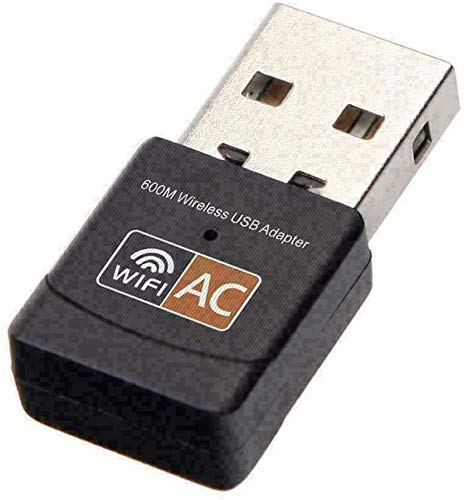
- Lists Mac OS 10.12 Sierra support
- Dual-band 2.4/5 GHz connectivity
- Compact 600 Mbps USB design
Best For: Users with compatible older macOS systems
Best Nano Upgrade – ASUS USB-AC53 Nano
The ASUS USB-AC53 Nano is a compact choice for shoppers comparing wifi adapters for mac. Its dual-band AC1200 connection supports up to 867 Mbps on 5 GHz, while MU-MIMO compatibility can help it work efficiently with compatible routers.
Best For: Mac users who want a very small dual-band adapter for a desktop or laptop.
Pros:
- Ultra-compact nano design with dual-band 2.4 GHz and 5 GHz connectivity.
- Supports AC1200 speeds of up to 867 Mbps.
- MU-MIMO support works with compatible routers and access points.
- Includes a three-year warranty.
Cons:
- The supplied notes do not specify a current macOS version.
- Its nano form factor may offer less signal positioning flexibility than an adapter with an external antenna.
This ASUS model emphasizes portability and simple wireless upgrading. Verify macOS compatibility for your specific Mac before buying, especially since the listed operating-system details focus mainly on Windows.
Best Mac Compatibility – NETGEAR A6150
The NETGEAR A6150 is a practical pick among wifi adapters for mac, with stated compatibility for macOS 10.8.3 through 10.15.7. Its compact AC1200 dual-band design adds up to 867 Mbps on 5 GHz and supports WPA2/WPA3 mixed-mode security.
Best For: Mac users who want clearly listed macOS support in a compact dual-band adapter.
Pros:
- Explicitly supports macOS 10.8.3–10.15.7.
- AC1200 dual-band performance with up to 867 Mbps on 5 GHz.
- Beamforming+ and MU-MIMO are designed to support stronger, more consistent connections.
- Compact nano dongle design does not block adjacent USB ports.
Cons:
- The listed macOS support ends at version 10.15.7.
- Setup requires installing drivers from the included USB drive.
- Coverage is dependent on the router, connected devices, and internet plan.
With the clearest Mac-specific compatibility range in this group, the A6150 is easy to shortlist for older supported macOS systems. Confirm your exact macOS version before ordering.
Best External Antenna – TP-Link Archer T3U Plus
The TP-Link Archer T3U Plus is a strong option for wifi adapters for mac when signal positioning matters. Its AC1300 dual-band connection is paired with a high-gain, multidirectional antenna that can be rotated toward the router.
Best For: Desktop users who need more antenna flexibility and support for macOS 10.9–10.15.
Pros:
- AC1300 dual-band speeds reach up to 867 Mbps on 5 GHz and 400 Mbps on 2.4 GHz.
- High-gain external antenna can be rotated toward the router.
- MU-MIMO technology improves throughput and network efficiency with compatible equipment.
- Supports macOS 10.9–10.15 and includes a two-year warranty.
Cons:
- Listed Mac support ends at macOS 10.15.
- The external antenna is less discreet than a nano adapter.
- The supplied details identify it primarily as a desktop-compatible device.
The Archer T3U Plus trades portability for antenna adjustability, making it especially suitable when a desktop sits farther from the router or needs more flexible signal orientation. Check the listed macOS range before purchase.
Best Wi-Fi 6 Windows Option – Tenda U11
The Tenda U11 is not a Mac-compatible choice, but it is useful to identify when comparing wifi adapters for mac. This AX900 Wi-Fi 6 adapter supports Windows 7, 10, and 11, while its notes explicitly state that it is not compatible with macOS.
Best For: Windows users who want a compact Wi-Fi 6 adapter with built-in drivers.
Pros:
- Wi-Fi 6 dual-band operation with up to 600 Mbps on 5 GHz and 286 Mbps on 2.4 GHz.
- Built-in drivers support quick installation on Windows 7, 10, and 11.
- Can receive Wi-Fi and share an internet connection with other devices.
- Supports WPA and WPA2 encryption.
Cons:
- Not compatible with macOS, Linux, Windows 8/8.1, or Windows XP.
- Reaching the combined AX900 rating requires a Wi-Fi 6 router.
- The supplied notes recommend placing it within 30 feet of the router for the strongest signal.
For a Mac roundup, the key takeaway is straightforward: skip the U11 unless you are buying for a supported Windows computer. Its built-in-driver setup and Wi-Fi 6 support are relevant only within those stated compatibility limits.
Best Long-Range Pick – TP-Link AC600 USB WiFi Adapter
If you need wifi adapters for mac, verify driver support before buying: although the listing includes macOS among compatible operating-system families, its detailed support notes specifically list Windows versions. The Archer T2U Plus combines dual-band AC600 connectivity with a high-gain antenna for desktops and laptops.
Best For: Windows users who want an adjustable antenna and improved reception for browsing, streaming, or gaming.
Pros:
- Dual-band speeds of up to 433 Mbps on 5 GHz and 200 Mbps on 2.4 GHz.
- 5 dBi high-gain antenna can be rotated toward the router.
- Supports WPA/WPA2 security and includes a two-year manufacturer warranty.
Cons:
- The supplied compatibility details specifically support Windows 11, 10, 8.1, 8, 7, and XP.
- Actual performance varies with distance, walls, and other conditions.
The Archer T2U Plus is a practical choice when signal reach matters more than a tiny form factor. Mac buyers should confirm current driver availability with TP-Link before ordering.
Best Wi-Fi 6 Value – UGREEN AX900 USB WiFi Adapter
For shoppers comparing wifi adapters for mac, this UGREEN model is not a fit: the supplied notes explicitly say it does not support macOS. On compatible Windows 10 and 11 systems, it offers Wi-Fi 6 dual-band connectivity through USB 3.0 and includes built-in drivers for simpler setup.
Best For: Windows 10 or 11 desktop and laptop users with a Wi-Fi 6 router who want straightforward installation.
Pros:
- Wi-Fi 6 speeds up to 600 Mbps on 5 GHz and 287 Mbps on 2.4 GHz.
- Built-in drivers support CD-free installation on Windows 10/11 systems with x86/x64 CPUs.
- Supports WPA-PSK, WPA2-PSK, and mixed WPA/WPA2 encryption modes.
Cons:
- Does not support macOS, Linux, or Windows 7/8/8.1/XP.
- Reaching AX900 speeds requires a Wi-Fi 6 router.
- The notes recommend keeping the adapter within 30 feet of the router.
The AX900 is appealing for compatible Windows installations, especially if you already use a Wi-Fi 6 router. Mac users should skip this model rather than rely on the general adapter category wording.
Best Compact Wi-Fi 6 Pick – TP-Link AX1800 Nano Adapter
When evaluating wifi adapters for mac, compatibility is the first checkpoint. The Archer TX20U Nano is explicitly designed for Windows 10 and 11, not macOS, but it is a highly compact USB Wi-Fi 6 option for supported systems needing faster dual-band performance.
Best For: Windows 10/11 users who want a travel-size adapter for streaming, gaming, and busy home networks.
Pros:
- AX1800 speeds reach 1,201 Mbps on 5 GHz and 574 Mbps on 2.4 GHz.
- OFDMA and MU-MIMO are designed to help manage simultaneous network traffic with a compatible router.
- Nano design can remain plugged in, and WPA3 adds newer wireless security.
Cons:
- Supports Windows 10 and 11 only according to the supplied compatibility information.
- Peak features and performance require a compatible router and suitable network conditions.
The TX20U Nano is the strongest performance-focused choice of these three for compatible Windows PCs, while its miniature size suits travel or permanent laptop use. It is not a Mac-compatible recommendation based on the supplied notes.
Long-Range Windows Pick – Nineplus AC1300 Dual-Antenna Adapter
For shoppers comparing wifi adapters for mac, compatibility is the first consideration—and this Nineplus model is specifically intended for Windows rather than macOS. It offers AC1300 dual-band performance, two high-gain antennas, and a USB 3.0 connection for compatible desktop or laptop setups.
Best For: Windows users who need stronger long-range reception for streaming, gaming, or everyday browsing.
Pros:
- Dual-band speeds rated up to 867 Mbps on 5 GHz and 400 Mbps on 2.4 GHz.
- Two 5 dBi antennas are designed to improve signal reception and coverage.
- USB 3.0 supports faster transfers and remains backward compatible with USB 2.0.
- Includes two-year support and installation guidance.
Cons:
- Does not support Mac OS, Chromebook, or Linux.
- Windows 7 may require manual driver installation.
- The external antennas are less compact than a nano adapter.
This is a practical Windows upgrade when range and throughput matter more than portability. Mac users should choose a model with explicitly stated macOS support instead.
Compact Wi-Fi 6 Combo – TP-Link AX900 Nano Adapter
When evaluating wifi adapters for mac, note that this TP-Link nano adapter is designed for Windows 11 and 10, not macOS. It combines Wi-Fi 6 connectivity with Bluetooth 5.3 in a tiny USB 2.0 form factor, making it useful for a compact Windows setup.
Best For: Windows users who want a discreet Wi-Fi and Bluetooth upgrade for a desktop or laptop.
Pros:
- Combines dual-band AX900 Wi-Fi 6 with Bluetooth 5.3.
- Supports up to 600 Mbps on 5 GHz and 287 Mbps on 2.4 GHz.
- Nano design stays nearly invisible when plugged in.
- Includes WPA3 security, OFDMA, and MU-MIMO features.
Cons:
- Compatible with Windows 11 and 10 rather than macOS.
- Uses USB 2.0 instead of USB 3.0.
- Bluetooth may require disabling an existing internal Bluetooth adapter; Wi-Fi conflicts can also require disabling the internal adapter.
The TX10UB Nano is a tidy, versatile choice for Windows systems that need both wireless networking and Bluetooth. Its compact design is appealing, but Mac buyers should look elsewhere for confirmed compatibility.
Mac-Compatible Budget Pick – DWS AC600 Mini Adapter
For shoppers specifically seeking wifi adapters for mac, the DWS AC600 is the clearest match in this group because its supplied information lists Mac OS 10.12 Sierra compatibility. It is a small dual-band USB adapter rated for up to 600 Mbps and also supports Windows and Linux driver downloads.
Best For: Mac users with compatible older macOS systems who want an affordable dual-band USB adapter.
Pros:
- Explicitly lists support for Mac OS 10.12 Sierra.
- Dual-band 2.4 GHz and 5 GHz wireless connectivity.
- Compact, lightweight design at about 3 g.
- Driver downloads are available for Mac, Linux, and Windows if no CD drive is available.
Cons:
- The listed Mac compatibility is specifically Mac OS 10.12 Sierra, so newer macOS versions are not confirmed in the supplied details.
- Driver installation may be required.
- Its 600 Mbps rating is below the faster AC1300 and AX900 options.
This is the most suitable option here for a compatible Mac, particularly when a simple and inexpensive USB adapter is the priority. Confirm your macOS version and driver requirements before buying.
How We Picked These Wifi Adapters for Mac
We focused on adapters with useful wireless standards, dual-band support, practical USB designs, and clearly stated compatibility information. The selection includes compact nano adapters for travel, models with external antennas for desktops, and newer WiFi 6 options that can better match modern routers.
Mac compatibility deserves special attention. Many USB WiFi adapters are designed primarily for Windows and may require a manufacturer driver, while some newer macOS versions offer limited or no support. Before purchasing, check the product page and driver download section for your exact macOS version, Mac model, and processor type. If native Mac support is not clearly stated, treat the adapter as a compatibility-risk purchase.
Quick Comparison
| Type | Best suited for | What to look for |
|---|---|---|
| Nano adapter | Travel and limited space | Low-profile design and confirmed drivers |
| External-antenna adapter | Desktops or weak-signal areas | Antenna placement and stable USB positioning |
| WiFi 5 adapter | Older routers and everyday use | Dual-band AC support and realistic throughput |
| WiFi 6 adapter | Newer routers and busy networks | AX support, driver availability, and USB speed |
Key Buying Factors for Wifi Adapters for Mac
MacOS Driver Support
This is the most important factor. Confirm support for your current macOS release rather than relying on a generic “Mac compatible” label. Driver support can change after operating-system updates.
Wireless Standard and Bands
Dual-band 2.4GHz and 5GHz support is preferable for most homes. WiFi 5 is sufficient for many connections, while WiFi 6 can reduce congestion and improve efficiency when paired with a compatible router. Advertised speeds are theoretical and will vary with distance, interference, router capability, and internet service.
USB Design and Placement
A nano adapter is discreet and convenient, but an adapter with an extension cable or external antennas may perform better when the computer is behind a desk or surrounded by metal. Check whether your Mac has the required USB-A port or whether a reliable USB-C hub or adapter will be needed.
Security and Network Features
Look for support appropriate to your router, including modern WPA2 or WPA3 security where available. MU-MIMO and WiFi 6 features can help on busy networks, but they do not compensate for missing drivers or poor signal placement.
Who Should Buy Which Wifi Adapters for Mac?
- Choose a nano model if you want the smallest option for travel, office use, or a minimally visible connection.
- Choose an external-antenna model if your desktop has weak reception or sits far from the router.
- Choose a WiFi 5 adapter for a straightforward upgrade on an older or midrange router.
- Choose WiFi 6 if you already own a WiFi 6 router and want better efficiency on a busy household network.
- Choose a 2-in-1 WiFi and Bluetooth adapter if adding both wireless networking and Bluetooth is useful, provided its macOS drivers are confirmed.
For any of these Wifi Adapters for Mac, verify return coverage and driver availability before opening the package. A slightly slower adapter with dependable macOS support is usually a better buy than a faster model that cannot connect reliably.