The best right-angle USB extension cables make crowded ports easier to reach while reducing sharp bends and strain around computers, TVs, hubs, and other USB-A devices. The right connector orientation and cable length can make a noticeable difference in a compact setup.
We compared these 10 options by connector design, USB version, length, flexibility, pack value, and stated data-transfer capability so you can choose a practical fit for your space.
Best 10 Right Angle USB Extension Cables Picks for 2026
Best Overall
CableCreation 1-Foot Right-Angle USB 3.0 Extension

- 90-degree design for tight spaces
- USB 3.0 speeds up to 5 Gbps
- Braided cable with 24-month warranty
Best For: Compact computer, TV, console, and VR setups
Best Multipack
Jadebones 4-Pack 90-Degree USB 3.0 Extensions

- Four 30 cm male-to-female cables
- 5 Gbps USB 3.0 data transfer
- Vertical and horizontal 90-degree routing
Best For: Multiple computers, hubs, chargers, and power banks
Best Angle Variety
Antrader USB 3.0 Up-and-Down Extension Set

- Two up-angle and two down-angle cables
- USB 3.0 speeds up to 5 Gbps
- Shielded conductors for stable transmission
Best For: Desktop rear ports with varying cable directions
Best Connector Options
UCEC 90-Degree USB 3.0 Extension Set

- Up, down, left, and right angle options
- USB 3.0 speeds up to 5 Gbps
- Shielded design with smaller connectors
Best For: Mixed USB Type-A setups needing multiple orientations
Space-Saving Pair
Oxsubor USB 3.0 Angle Extension Cables

- Left- and right-angle cables included
- USB 3.0 data synchronization
- Compact 20 cm length
Best For: Short USB-A extensions behind desktops, TVs, and hubs
Fast Compact Combo
Cable Matters Right Angle USB Extensions
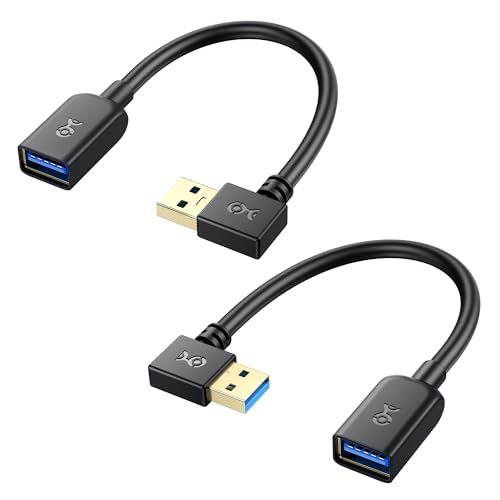
- 90- and 270-degree cables included
- Up to 5Gbps USB 3.0 transfer
- Shielded construction with lifetime warranty
Best For: High-speed USB-A connections in tight or wall-mounted setups
Directional Adapter Set
Togconn USB 3.0 Up and Down Adapters

- Up- and down-angle USB-A options
- Supports 5Gbps data and 2.1A charging
- Aluminum alloy with 3-year warranty
Best For: Redirecting USB-A cables without adding meaningful cable length
Compact CarPlay Pick

- Up and down 90-degree angles
- Soft, heat-resistant silicone cable
- Two 4-inch USB 2.0 extensions
Best For: CarPlay and tight-space USB connections
Versatile Angle Pair
USB 3.0 Left-and-Right Extensions

- Left and right 90-degree cables
- USB 3.0 speeds up to 5 Gbps
- Two cables with 8-inch listed length
Best For: USB 3.0 peripherals in crowded setups
Long-Reach Speed Pick

- 1-meter male-to-female extension
- Up to 5 Gbps USB 3.0 transfer
- Backward compatible with USB 2.0 and 1.1
Best For: Fast, longer-reach USB-A peripheral connections
Best Overall – CableCreation 1-Foot Right-Angle USB 3.0 Extension
For shoppers comparing right angle usb extension cables, this 1-foot CableCreation model is a practical choice for routing USB connections around tight spaces. Its 90-degree male connector, USB 3.0 support, braided exterior, and broad peripheral compatibility suit setups behind TVs, all-in-one PCs, and gaming or VR equipment.
Best For: Compact cable management with computers, consoles, TVs, and USB peripherals.
Pros:
- 90-degree design helps redirect connections in narrow spaces.
- Supports USB 3.0 transfer rates up to 5 Gbps and works with USB 2.0 devices.
- Nylon-braided construction and aluminum-alloy housing are designed for everyday durability.
- Plug-and-play operation with a 24-month warranty and technical service.
Cons:
- The 1-foot length may not suit longer cable-routing needs.
- Buyers need to check the male connector’s angle direction before ordering.
This is a well-rounded single-cable option when you need a short, durable extension rather than a multipack. Its high-speed USB 3.0 capability and angled design make it especially versatile for crowded setups.
Best Multipack – Jadebones 4-Pack 90-Degree USB 3.0 Extensions
The Jadebones four-pack is a useful pick among right angle usb extension cables when several devices need better port routing. Each 30 cm male-to-female cable supports USB 3.0 transfer, backward compatibility, and 90-degree redirection in vertical or horizontal orientations.
Best For: Multi-device setups that need several short angled extensions.
Pros:
- Includes four 30 cm USB 3.0 male-to-female extension cables.
- Supports data transfer speeds up to 5 Gbps and USB 2.0 compatibility.
- 90-degree angles can redirect ports vertically or horizontally.
- Plug-and-play design is rated for up to 10,000 plug-and-unplug cycles.
Cons:
- The fixed 30 cm length may be short for some installations.
- The listing provides less construction detail than some competing cables.
Choose this set if quantity matters more than getting one premium-feeling cable. Four matching extensions can simplify cable management across PCs, hubs, chargers, and power banks.
Best Angle Variety – Antrader USB 3.0 Up-and-Down Extension Set
Antrader stands out among right angle usb extension cables by including both upward- and downward-facing versions. The four-piece set uses 23 cm cables with male-to-female USB Type-A connectors, helping route rear desktop ports while maintaining USB 3.0 performance.
Best For: Desktop users who need flexibility in connector direction.
Pros:
- Includes two up-angle and two down-angle USB 3.0 cables.
- Supports transfer rates up to 5 Gbps and works with USB 2.0 peripherals.
- Shielding and tin-plated oxygen-free copper are intended to reduce interference.
- Short 23 cm length is convenient for extending rear-facing desktop ports.
Cons:
- The set focuses on up and down angles rather than left- and right-facing options.
- At approximately 23 cm, the cables may not provide much reach.
This set is a strong fit for desktop cable management where port direction varies from device to device. Its matched up-and-down assortment offers more placement flexibility than a single-angle pack.
Best Connector Options – UCEC 90-Degree USB 3.0 Extension Set
The UCEC set is a versatile option among right angle usb extension cables, offering updated smaller connectors and multiple angle orientations. These USB Type-A male-to-female extensions support USB 3.0 speeds up to 5 Gbps, backward compatibility, and shielded construction for peripherals such as monitors, printers, chargers, and game controllers.
Best For: Users who need different right-angle orientations across several USB Type-A connections.
Pros:
- Offers black-up, down, left, and right angle connector options.
- Supports USB 3.0 throughput up to 5 Gbps and older USB standards.
- Smaller connectors are designed to save space.
- Double-foil shielding and twisted-pair wiring support stable transmission.
Cons:
- The listing’s quantity details are inconsistent, so buyers should verify the package contents.
- It uses USB Type-A connectors, not USB-C.
UCEC is appealing when one orientation is not enough and you want a selection for different devices. Confirm the included cable count before purchase, then use the set to improve routing around monitors, printers, chargers, or controllers.
Space-Saving Pair – Oxsubor USB 3.0 Angle Extension Cables
Oxsubor SuperSpeed USB 3.0 Male to Female Extension Data Cable Left and Right Angle 2PCS (20CM,8IN)
Check Price On AmazonFor anyone comparing right angle usb extension cables, this Oxsubor 2-pack offers left- and right-angle USB 3.0 connections for extending ports behind desktops, TVs, laptops, and hubs. The 20 cm length helps add reach while reducing clutter in tight setups.
Best For: Extending rear-facing USB 3.0 ports where cable direction and workspace clearance matter.
Pros:
- Includes one left-angle and one right-angle USB 3.0 extension cable.
- Supports USB 3.0 high-speed data synchronization with shielding to help reduce interference.
- Compact design helps save space and reduce accidental strain on USB ports.
- Includes a 24-month replacement warranty and lifetime customer support.
Cons:
- The 20 cm length may be too short for setups requiring substantial extra reach.
- Uses USB Type-A connectors, so it is not intended for USB-C-only ports.
This is a practical choice when you need two directional options and a short extension for a USB Type-A setup. Its compact format is particularly useful behind equipment or along a crowded desk.
Fast Compact Combo – Cable Matters Right Angle USB Extensions
This Cable Matters combo is a strong option among right angle usb extension cables for tight laptop, desktop, and wall-mounted installations. It includes short 0.5-foot cables with different connector directions and supports USB 3.0 transfer rates up to 5Gbps.
Best For: Fast USB-A peripheral connections in compact spaces behind monitors, TVs, laptops, or wall-mounted equipment.
Pros:
- Includes one 90-degree and one 270-degree USB-A extension cable.
- Supports up to 5Gbps USB 3.0 data transfer.
- Foil and braid shielding, bare copper conductors, and molded strain relief support reliable use.
- Backed by a lifetime warranty.
Cons:
- The 0.5-foot length is designed for close connections, not long-distance extension.
- USB Type-A connectors limit compatibility with devices that lack USB-A ports.
Choose this pack when connector direction and fast data transfer are more important than cable length. The two angle options make it easier to adapt the same type of extension to different layouts.
Directional Adapter Set – Togconn USB 3.0 Up and Down Adapters
These Togconn adapters take a different approach to right angle usb extension cables by changing the direction of an existing USB-A connection. The two-pack provides up- and down-angle options, supports USB 3.0 data and charging, and is designed to reduce cable bending around wall-mounted devices and computer ports.
Best For: Redirecting USB-A cables around monitors, laptops, PCs, TVs, keyboards, mice, and other devices in restricted spaces.
Pros:
- Up- and down-angle USB-A male-to-female adapters provide directional flexibility.
- Supports up to 5Gbps data transfer and up to 5V/2.1A charging.
- Backward compatible with USB 2.0 and USB 1.1 devices.
- Aluminum-alloy construction and a stated 3-year warranty add durability and support.
Cons:
- These are adapters rather than cables, so they add little or no extra cable length.
- Compatibility is limited to USB Type-A connections.
This set is best when the main problem is cable direction rather than distance. Its compact form can help relieve strain at USB-A ports while preserving charging and data functionality.
Compact CarPlay Pick – Flat 90-Degree USB 2.0 Pair
These right angle usb extension cables are a practical choice for CarPlay and other USB connections where a standard plug crowds the port. The two-piece set includes one upward-facing and one downward-facing adapter, with a flexible 4-inch flat design for tight spaces.
Best For: CarPlay setups, vehicle interiors, and compact connections requiring basic USB 2.0 data and power support.
Pros:
- Includes both up-angle and down-angle cables for flexible positioning.
- Soft, foldable, heat-resistant silicone construction helps reduce tangling.
- Supports plug-and-play connections with PCs, TVs, laptops, hard drives, and peripherals.
- Includes two cables and a stated one-year warranty.
Cons:
- USB 2.0 transfer speed is limited to 480 Mbps.
- The 4-inch length may not suit setups needing more reach.
This set emphasizes compact routing and flexibility rather than high-speed transfers. Choose it when the main goal is relieving port strain or fitting a USB connection into a narrow space.
Versatile Angle Pair – USB 3.0 Left-and-Right Extensions
For shoppers comparing right angle usb extension cables with faster connectivity, this two-pack provides one left-angle and one right-angle USB 3.0 male-to-female cable. The 8-inch length helps route peripherals around crowded ports while supporting USB 3.0 data transfer.
Best For: PCs, laptops, TV installations, PS4 systems, USB hubs, webcams, chargers, and other USB 3.0 peripherals.
Pros:
- Includes both left- and right-angle cable orientations.
- Supports USB 3.0 transfer speeds up to 5 Gbps according to the supplied specifications.
- Shielded construction is designed to help reduce electromagnetic interference.
- Plug-and-play design works with a broad range of USB devices.
Cons:
- Only indoor usage is specified in the product details.
- The listing describes the length as 8 inches in the title and 25 centimeters in the details.
This is a useful middle-ground option for users who need more speed than USB 2.0 and want both angle directions in one pack. Verify the available clearance and required cable reach before ordering.
Long-Reach Speed Pick – 1M SuperSpeed USB 3.0 Cable
This right angle usb extension cable combines a 1-meter reach with a 90-degree USB-A male-to-female design. It is built for narrow spaces and supports SuperSpeed USB 3.0 transfers up to 5 Gbps, while remaining backward compatible with USB 2.0 and 1.1 devices.
Best For: Extending connections to external drives, cameras, hubs, printers, scanners, keyboards, and other USB-A peripherals where extra reach is useful.
Pros:
- 1-meter length offers more routing flexibility than short extension cables.
- Supports USB 3.0 data transfer rates up to 5 Gbps.
- Right-angle construction helps with cable management and narrow clearances.
- Plug-and-play and hot-swappable with no driver installation required.
Cons:
- This is a single cable rather than a multi-pack.
- The supplied listing identifies the product as a left-angle model, so shoppers should confirm the desired orientation.
Choose this cable when fast USB 3.0 performance and longer reach matter more than having multiple angle options. Its broad Type-A compatibility makes it suitable for many common computer and peripheral connections.
How We Picked the Best Right Angle USB Extension Cables
We focused on USB-A male-to-female extension cables and adapters designed for tight or awkward port locations. Our comparison considers connector direction, USB 2.0 or USB 3.0 support, cable length, pack size, construction, and the product’s stated transfer speed. We also looked for options suited to different layouts, including upward, downward, left, and right-facing connections.
Because performance depends on the host port, connected device, and cable quality, advertised speeds should be treated as maximum ratings rather than guaranteed real-world results. These extensions are primarily useful for improving access and cable management.
Quick Comparison
- Best overall flexibility: Choose a USB 3.0 cable or combo pack offering multiple angle orientations.
- Best for a single tight bend: Short 0.5-foot to 1-foot extensions keep excess cable off the desk.
- Best for multiple devices: Four-packs provide several orientations or spares for different setups.
- Best for basic peripherals: USB 2.0 options can suit keyboards, mice, and other lower-bandwidth accessories.
- Best for higher-speed transfers: Select a USB 3.0 model with a stated 5Gbps rating and use it with compatible ports.
Key Buying Factors for Right-Angle USB Extension Cables
Connector Direction
Check whether the plug points up, down, left, or right when inserted. A cable with the wrong orientation may still work but can defeat the purpose by pushing the cord into a wall, desk, or adjacent port. Two-way or multi-angle packs are useful when you are outfitting several devices.
USB Version and Speed
USB 3.0 extensions are generally the better choice for external storage and other data-heavy accessories, with many products listing up to 5Gbps. USB 2.0 cables may be adequate for input devices and simple charging or data tasks, but they are not the best match for high-speed storage.
Length and Flexibility
Short cables reduce clutter and keep connections close to the port. Longer one-foot options provide more routing freedom. Look for a flexible cable jacket, while avoiding unnecessary slack that can pull on the connector.
Fit, Clearance, and Compatibility
Confirm that both ends use the USB-A shape you need and allow enough room around neighboring ports. Right-angle housings vary in thickness, so a bulky connector may block an adjacent socket. These products do not convert USB-A to USB-C or guarantee compatibility with every proprietary device.
Who Should Buy Which Right Angle USB Extension Cables?
Choose a short single cable if you need to reposition one peripheral or protect a side-facing laptop port. Pick a multi-pack when several devices have different port orientations or you want backups. For external drives, cameras, and other high-throughput accessories, prioritize USB 3.0 models with clear 5Gbps specifications. For keyboards, mice, printers, and basic accessories, an inexpensive USB 2.0 option may be sufficient.