The best wireless video receivers for home studios make it easier to monitor cameras, route video to multiple displays, and livestream without adding long HDMI or SDI cable runs.
These 10 options cover budget-friendly plug-and-play HDMI kits, multi-receiver systems, and professional wireless video platforms with 4K support, low latency, and SDI connectivity.
Best 10 Wireless Video Receivers for Home Studios Picks for 2026
Professional 4K Production Pick

- 4Kp30 HDMI transmission
- HDMI and 3G-SDI connectivity
- Up to four app monitoring devices
Best For: Hybrid HDMI/SDI home studio production
Multi-Display Value Pick

- Includes one transmitter and two receivers
- Supports up to six receivers
- 165-foot open-space range
Best For: Multi-screen studio and presentation setups
Long-Range Pro Pick

- Up to 750 feet line of sight
- 10-bit 4:2:2 video support
- HDMI and 3G-SDI outputs
Best For: Long-distance professional monitoring
Compact Creator Pick

- 1080p60 with stated 50ms latency
- HDMI transmitter loop-out
- NP-F and USB-C power options
Best For: Portable Full HD camera monitoring
Long-Range Streaming Pick

- UVC output for computer livestreaming
- Up to 1,200-foot range and under 0.06-second latency
- Dual-band 2.4GHz and 5GHz transmission
Best For: Home-studio livestreaming and remote monitoring
Simple Wireless HDMI Pick

- Plug-and-play setup without apps or Wi-Fi
- 4K decode with 1080p/60 output
- Supports mirror and extend display modes
Best For: Quick studio displays and presentation setups
4K Production Pick

- End-to-end 4K30 wireless transmission
- H.265 encoding for efficient, detailed video
- Wireless camera control through the Accsoon SEE app
Best For: 4K camera monitoring and advanced home-studio production
Studio Hub
7-Inch Multi-Viewer HDMI System
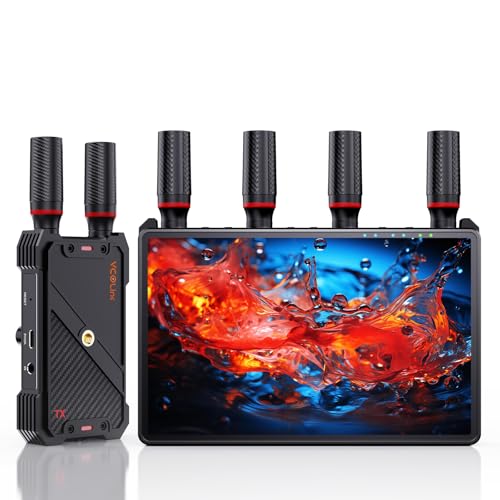
- Built-in 7-inch monitoring screen
- 1080p60 with claimed sub-0.05s latency
- Supports up to five receivers
Best For: Multi-viewer studio and live-production monitoring
Smart Signal Pick
TIMBOOTECH OLED Wireless Receiver

- 1080p60 wireless video support
- 2.4GHz and 5.8GHz operation
- Supports up to four receivers
Best For: Flexible HD studio and presentation monitoring
Pro 4K Choice

- 4K60 HDMI and HDMI/SDI support
- Claimed 25ms 1080p latency
- Monitoring for up to five devices
Best For: Professional 4K filmmaking and livestream workflows
Professional 4K Production Pick – Hollyland Mars 4K
For home studios that need flexible wireless video receivers for home studios, the Hollyland Mars 4K combines 4K HDMI transmission with SDI connectivity for cameras, monitors, and production equipment. It supports up to 450 feet of line-of-sight range and offers app monitoring for remote viewing.
Best For: Home studios, small production teams, and creators using both HDMI and SDI equipment.
Pros:
- Supports up to 4Kp30 video through HDMI.
- Includes HDMI and 3G-SDI input/output options.
- Supports up to four app monitoring connections and offers a full-color LCD with joystick controls.
Cons:
- The stated 450-foot range and 66ms latency apply to interference-free laboratory conditions.
- QC/PD charging is not supported.
- Battery and power accessories may add setup complexity.
The Mars 4K is a versatile choice when a home studio workflow includes professional SDI gear alongside HDMI devices. Its monitoring flexibility is useful for directors or collaborators, while its 4K support suits higher-resolution camera setups.
Multi-Display Value Pick – Wireless HDMI 2-Receiver Kit
This wireless HDMI kit is designed for home studios and presentation spaces that need to send one source to multiple displays. It includes one transmitter and two receivers, supports up to six receivers in total, and offers a stated range of up to 165 feet in open environments.
Best For: Home studios, classrooms, conference rooms, and entertainment setups feeding several TVs or projectors.
Pros:
- Supports two included receivers and up to six receivers overall.
- Works with laptops, cameras, consoles, set-top boxes, TVs, projectors, and monitors.
- Uses dual-band 2.4GHz/5.8GHz transmission and includes USB-C, Micro HDMI, and Mini HDMI adapters.
Cons:
- Transmission distance may drop to about 50 feet through walls.
- It cannot transmit from TV to TV.
- The phone app does not currently control laptops or the transmitter source.
This is a practical option for multi-screen wireless video rather than a dedicated cinema-production link. Its included receivers and broad source compatibility make it especially useful when a studio or shared workspace needs the same content on several displays.
Long-Range Pro Pick – Teradek Bolt 6 LT 750
The Teradek Bolt 6 LT 750 is a professional-grade choice among wireless video receivers for home studios, especially when a camera must feed a monitor over a long line-of-sight distance. It provides HDMI and 3G-SDI outputs, supports up to 4Kp30 through HDMI, and is rated for up to 750 feet.
Best For: Serious home studios and production spaces that prioritize long range, high-quality monitoring, and secure wireless transmission.
Pros:
- Offers up to 750 feet of stated line-of-sight range.
- Supports 10-bit video with YCbCr 4:2:2 and HDMI/3G-SDI outputs.
- Includes AES-256 encryption and RSA-1024 key exchange.
Cons:
- 4Kp30 support is available through HDMI only.
- This listing is for a receiver, so a compatible transmitter is required.
- Its professional feature set may be more than a basic home monitoring setup needs.
The Bolt 6 LT 750 stands out for demanding workflows where range, color handling, and link security matter. It is best considered as part of a compatible Teradek system rather than a simple plug-and-play consumer HDMI kit.
Compact Creator Pick – Lemorele R5000
The Lemorele R5000 is a compact 1080p wireless HDMI system for creators seeking practical wireless video receivers for home studios. It supports 1080p at 60Hz, includes an HDMI loop-out on the transmitter, and offers both NP-F battery and USB-C power options.
Best For: Camera-based home studios, streaming setups, live presentations, and mobile shooting workflows.
Pros:
- Transmits 1080p60 with stated 50ms latency.
- Provides HDMI loop-out for local monitoring while sending the wireless signal.
- Supports up to four receivers and offers NP-F or USB-C power.
Cons:
- The 656-foot range is specified for open, unobstructed spaces.
- NP-F batteries are not included.
- It does not provide 4K transmission.
For Full HD studio work, the R5000 balances portability and useful monitoring features without requiring complicated network setup. The loop-out and dual-power design are particularly helpful for camera operators who need both a local display and a remote monitor.
Long-Range Streaming Pick – Accsoon CineView HE Receiver
For home studios that need wireless video receivers for home studios with livestreaming flexibility, the Accsoon CineView HE combines HDMI monitoring with UVC output for computer-based streaming. Its dual-band transmission and 1080p/60 support suit creators who prioritize range and practical production workflows.
Best For: Home-studio livestreaming, remote monitoring, and multi-device video production.
Pros:
- UVC output supports streaming through OBS, YouTube, TikTok, and Twitch.
- Transmits up to 1,200 feet with latency below 0.06 seconds under suitable conditions.
- Uses simultaneous 2.4GHz and 5GHz transmission for added connection stability.
- Can run from NP-F batteries, DC input, or USB-C power.
Cons:
- NP-F batteries, DC cable, and USB-C cable are not included.
- It supports up to 1080p/60 rather than 4K output.
The HE is a strong fit when streaming and long-range monitoring matter more than 4K resolution. Its UVC workflow is especially useful for a studio computer, while the flexible power options make it easier to use in different setups.
Simple Wireless HDMI Pick – 360FT Wireless HDMI Kit
This wireless HDMI transmitter and receiver kit is a straightforward option for home studios seeking wireless video receivers for home studios without apps, software, or network configuration. It supports 4K decoding with 1080p/60 output and offers both mirrored and extended display modes.
Best For: Presentations, home theaters, classrooms, and studio displays that need quick plug-and-play setup.
Pros:
- Connects automatically without requiring Wi-Fi, apps, or software.
- Supports up to 360 feet outdoors or 165 feet indoors in the stated conditions.
- Offers 2.4GHz and 5.8GHz dual-band transmission.
- Supports mirror and extend modes, with one receiver pairing with up to eight transmitters.
Cons:
- Output is limited to 1080p at 60Hz despite 4K decoding input.
- Walls and other obstacles can reduce transmission distance and speed.
- The supplied notes do not specify detailed input/output port counts.
Choose this kit when ease of installation is the priority. Its automatic pairing, status LED, and display-mode support make it convenient for sending a computer, camera, or media source to a larger screen, though it is not an end-to-end 4K solution.
4K Production Pick – Accsoon CineView SE 4K System
For creators who need wireless video receivers for home studios with higher-resolution monitoring, the Accsoon CineView SE 4K provides end-to-end 4K30 transmission over HDMI and SDI workflows. H.265 encoding, dual-band connectivity, and wireless camera control make it suited to more advanced production environments.
Best For: 4K camera monitoring, filmmaking, and home studios using remote camera control.
Pros:
- Supports end-to-end 4K at 30 frames per second.
- Uses H.265 encoding to preserve detail and improve motion efficiency.
- Combines 2.4GHz and 5GHz transmission with Accsoon RTMS 4.0 protocol.
- Supports wireless camera control through the Accsoon SEE app.
Cons:
- The supplied product details identify the kit as a transmitter-and-receiver system but do not list all included accessories.
- Its advanced features may be more than needed for basic 1080p display sharing.
The CineView SE 4K is the most production-focused choice in this group. It makes sense for a home studio built around 4K cameras, detailed client monitoring, and remote control, while its dual-band design helps maintain connectivity in busy wireless environments.
Studio Hub – 7-Inch Multi-Viewer HDMI System
For home studios that need flexible monitoring, this wireless video receiver system combines a built-in 7-inch display with HDMI output and support for up to five receivers. It delivers 1080p at 60Hz with claimed sub-0.05-second latency and includes loop-out connectivity for a practical camera or streaming setup.
Best For: Home studios, small crews, live production, and multi-viewer camera monitoring.
Pros:
- Built-in 7-inch screen reduces the need for an additional monitor.
- Supports 1080p at 60Hz and a claimed 1312-foot line-of-sight range.
- One transmitter can connect with up to five receivers.
- Offers HDMI loop out, IR remote control, headphone monitoring, and flexible power options.
Cons:
- External HDMI cable is not included.
- Smartphone and tablet use requires a Type-C-to-HDMI cable.
- The advertised range depends on line-of-sight conditions.
This is a versatile choice among wireless video receivers for home studios, especially when you want a self-contained monitor and the option to share a feed with several viewers.
Smart Signal Pick – TIMBOOTECH OLED Wireless Receiver
The TIMBOOTECH R200 is a straightforward option for home studios seeking wireless video receivers with 1080p60 output and a built-in OLED display. Its dual-band 2.4GHz and 5.8GHz system, smart channel functionality, and claimed 1,000-foot line-of-sight range suit presentations, live viewing, and camera monitoring.
Best For: Home studios, presentations, gaming setups, and general 1080p wireless monitoring.
Pros:
- Supports 1080p at 60Hz for smooth HD viewing.
- Uses both 2.4GHz and 5.8GHz bands.
- Supports up to four receivers for expanded viewing.
- OLED screen and smart channel system simplify operation.
Cons:
- Its listed 66ms latency is higher than the fastest production-focused systems.
- It is specified for 1080p rather than 4K video.
- The claimed 1,000-foot range is based on line-of-sight use.
Choose this model when dependable 1080p distribution and easy channel management matter more than 4K resolution or ultra-low latency.
Pro 4K Choice – Accsoon CineView Master 4K
The Accsoon CineView Master 4K is aimed at advanced home studios and creators who need HDMI and SDI connectivity, 4K60 transmission, and app-based monitoring. It claims up to 25ms latency at 1080p, 35ms at 4K, and support for monitoring on up to five devices through compatible receivers and mobile devices.
Best For: Filmmakers, livestreamers, production studios, and creators building a professional multi-device monitoring workflow.
Pros:
- Supports video formats up to 4K at 60fps through HDMI.
- Handles HDMI and SDI sources, with claimed 8,202-foot range in open conditions.
- Supports up to five monitoring devices, including compatible iOS and Android devices.
- Accsoon SEE adds monitoring tools and RTMP/SRT livestreaming without a capture card.
Cons:
- NP-F, DC, and V-Mount power sources are not included.
- Some mobile monitoring features depend on compatible devices and cables.
- Its professional feature set may be more than a basic home studio requires.
This is the strongest fit for users who need 4K, SDI compatibility, and production-oriented app features rather than a simple plug-and-play HD receiver.
How We Picked the Best Wireless Video Receivers for Home Studios
We compared the selected systems by video resolution, supported inputs and outputs, transmission range, latency, receiver capacity, wireless-band design, setup requirements, and intended use. We also considered whether each unit is better suited to basic TV or projector extension, camera monitoring, multi-display production, or professional studio and livestream workflows.
Because specifications can vary with obstacles, interference, antennas, and regional conditions, treat quoted range as an ideal maximum rather than a guaranteed indoor distance. Compatibility with your camera, monitor, capture device, and power setup is equally important.
Quick Comparison
| Best For | What to Prioritize | Recommended Type |
|---|---|---|
| Basic home viewing | Simple setup and dependable 1080p output | Plug-and-play HDMI kit |
| Camera monitoring | Low latency and stable wireless link | Dedicated video transmission system |
| Multiple displays | Several receivers or loop-out support | Multi-receiver HDMI system |
| Professional production | 4K, SDI, 10-bit support, and robust range | Pro-grade CineView, Bolt, or Mars system |
| Wireless livestreaming | UVC support, app access, and flexible routing | System with USB or mobile integration |
Key Buying Factors for Wireless Video Receivers for Home Studios
Resolution, Frame Rate, and Signal Type
Confirm that the receiver supports the exact format your source produces. A system advertised as 4K may output only 1080p at higher frame rates, while SDI models are often better suited to cinema cameras and professional switchers. Check HDMI version, SDI connectors, frame-rate compatibility, and whether HDR or 10-bit workflows are supported.
Latency and Wireless Stability
Low latency matters when monitoring focus, audio, or live performance. Look for clearly stated delay figures, but remember that interference and distance can affect real-world performance. Dual-band or tri-band designs may offer more flexibility in busy wireless environments, though they still need sensible channel placement.
Range, Receiver Count, and Installation
Choose based on the actual room layout rather than the headline range. Walls, metal fixtures, and other Wi-Fi devices can reduce coverage. If you need several displays, verify the maximum receiver count and whether every receiver gets the same resolution and frame-rate options.
Power and Everyday Operation
Battery-powered transmitters and receivers are convenient for cameras, while USB or mains-powered units are often better for permanent studio installations. Check included cables, mounting options, antenna placement, pairing controls, and whether the system can operate continuously without overheating.
Who Should Buy Which Wireless Video Receivers for Home Studios?
Choose a basic HDMI extender if you mainly need to send a 1080p signal to a nearby television, projector, or monitor. A multi-receiver kit is the better fit for teaching, presentations, or studios with several viewing positions. For camera operators and livestreamers, prioritize low latency, stable dual-band transmission, and convenient monitoring or UVC features.
Choose a professional SDI/HDMI system when you use cinema cameras, wireless director monitors, switchers, or demanding 4K workflows. Models with stronger range, higher frame-rate support, 10-bit capability, or app integration cost more, but they can reduce cable clutter without forcing compromises in a production environment.