Choosing among the best computer cases for high-end PCs means balancing graphics-card clearance, cooling capacity, cable management, and long-term upgrade space. The right enclosure should protect expensive components while making installation and maintenance easier.
This roundup covers 10 premium-ready cases, including airflow-focused mid-towers, panoramic glass designs, dual-chamber layouts, and spacious full towers. Use the guide below to narrow the options by build size, cooling needs, and preferred features.
Best 10 Computer Cases for High End PCs Picks for 2026
Best Showcase Build

- Dual-chamber layout for cleaner cable routing
- Seven included RGB fans and Control Hub
- Supports 420mm radiators and large GPUs
Best For: Showcase ATX gaming builds with RGB and organized internals
Best Airflow Value

- High-airflow mesh front and internal air guide
- Three included 140mm performance fans
- Supports E-ATX and GPUs up to 349mm
Best For: Performance-focused builds emphasizing airflow over RGB
Best EATX Showcase
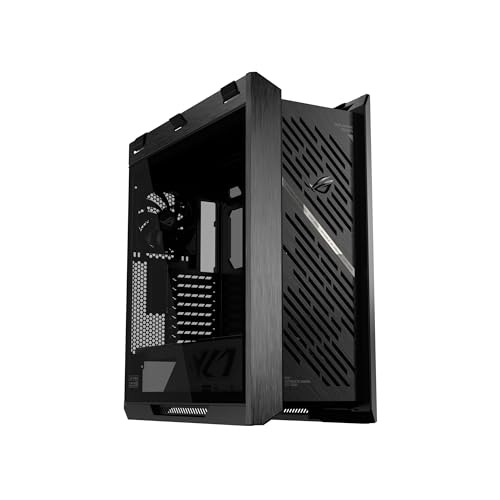
- Supports EATX motherboards and 450mm GPUs
- Four pre-installed 140mm performance fans
- Radiator support up to 420mm at the front
Best For: Large, premium showcase systems with oversized components
Best Extreme Cooling Capacity

- Fits up to 18 120mm fans
- Supports 480mm front and roof radiators
- InfiniRail enables flexible fan placement
Best For: Large custom-loop and maximum-capacity ATX builds
Best Airflow Mid-Tower

- Four PWM ARGB fans included
- Supports GPUs up to 420mm
- Fits radiators up to 360mm
Best For: High-end ATX builds with flexible cooling and motherboard support
Best Premium Design

- Aluminum and tempered-glass exterior
- Distinctive 90-degree motherboard layout
- Embedded ARGB and USB-C I/O
Best For: Style-focused premium tower builds
Best Display-Focused Full Tower

- Built-in 9.16-inch 1920x480 display
- Eight 120mm fan mounting positions
- Supports GPUs up to 420mm
Best For: Showcase builds with integrated display features and flexible cooling
Best for Customization

- Modular FRAME system
- Three pre-installed ARGB PWM fans
- Flexible airflow-focused mounting
Best For: Customizable ATX builds with strong airflow
Best for Dual-Chamber Builds

- Dual-chamber cable management
- Supports up to 13 120mm fans
- Multiple radiator mounting locations
Best For: Large, airflow-focused ATX showcase builds
Best Value Cooling Package

- Seven pre-installed ARGB PWM fans
- Supports GPUs up to 400mm
- Panoramic dual tempered glass
Best For: RGB gaming builds with included cooling
Best Showcase Build – NZXT H9 Flow RGB+
For builders comparing computer cases for high end pcs, the NZXT H9 Flow RGB+ combines a dual-chamber layout, panoramic glass, and substantial cooling support. Its included RGB fans and Control Hub make it a strong choice for a polished showcase build without starting the lighting setup from scratch.
Best For: High-end ATX gaming systems that prioritize presentation, airflow, RGB, and organized cable management.
Pros:
- Dual-chamber design separates the PSU and drives from the main components.
- Includes seven RGB fans and an NZXT Control Hub.
- Supports up to 420mm radiators and large graphics cards.
- Compatible with ASUS BTF and MSI Project Zero rear-connecting motherboards.
Cons:
- The mid-tower layout may offer less expansion room than a full tower.
- Its tempered-glass showcase design may not suit understated builds.
The H9 Flow RGB+ is a well-rounded option when you want strong cooling potential and a clean, display-focused interior. Its dual-chamber construction is especially useful for keeping high-end components and cabling visually organized.
Best Airflow Value – Fractal Design Meshify 3
The Fractal Design Meshify 3 is a practical pick among computer cases for high end pcs when airflow and component compatibility matter more than built-in lighting. Its ventilated front, air guide, and three included 140mm fans support a powerful, quieter-leaning build.
Best For: Air-cooled or hybrid gaming systems using large GPUs and E-ATX-compatible hardware.
Pros:
- Rockface-inspired mesh front panel supports high airflow.
- Includes three Momentum 14 fans with LCP blades and FDB bearings.
- Supports graphics cards up to 349mm and E-ATX motherboards up to 277mm.
- Accommodates radiators up to 280mm on top and 360mm in front.
Cons:
- It does not include RGB fans or tempered-glass panels.
- GPU clearance is lower than some larger high-end cases.
The Meshify 3 focuses on the fundamentals: ventilation, useful stock fans, and broad component support. It is a sensible choice for a performance-focused build where efficient cooling and a restrained exterior take priority.
Best EATX Showcase – ASUS ROG Strix Helios II
The ASUS ROG Strix Helios II is designed for builders who need generous component clearance in a premium-looking chassis. Among computer cases for high end pcs, it stands out with EATX support, room for graphics cards up to 450mm, four pre-installed 140mm fans, and extensive radiator compatibility.
Best For: Large showcase systems using EATX motherboards, oversized graphics cards, and substantial liquid-cooling hardware.
Pros:
- Supports EATX, ATX, Micro-ATX, and Mini-ITX motherboards.
- Fits graphics cards up to 450mm long.
- Includes four 140 x 28mm performance fans.
- Provides graphics card braces and multiple cable-management covers.
Cons:
- Its 39.7-pound weight makes it less convenient to move.
- The mid-tower classification may still require careful planning for especially dense builds.
Helios II is a strong fit when clearance, cooling flexibility, and presentation are equally important. Its included support hardware can also make a large GPU installation and cable cleanup more manageable.
Best Extreme Cooling Capacity – Corsair 9000D RGB Airflow
For truly ambitious builds, the Corsair 9000D RGB Airflow offers the expansive interior expected from a full tower. It is one of the most capable computer cases for high end pcs here, supporting extensive fan arrays, multiple large radiators, and flexible InfiniRail mounting.
Best For: Custom-loop builds and maximum-capacity systems that need exceptional cooling and expansion room.
Pros:
- Supports up to 18 120mm, seven 140mm, or four 200mm fans.
- Accommodates radiators up to 480mm in the front and roof.
- InfiniRail allows flexible front and roof fan positioning.
- Includes an iCUE LINK System Hub for expanding the Corsair ecosystem.
Cons:
- Its 29.1kg weight and full-tower size demand substantial space.
- The large capacity may be excessive for simpler ATX builds.
- Fans and cooling hardware beyond the included hub may require additional purchases.
The 9000D RGB Airflow is the specialist choice for builders who refuse to compromise on cooling capacity or internal room. Its size is considerable, but that space enables complex airflow layouts and custom cooling configurations.
Best Airflow Mid-Tower – Lian Li V100-ATX
The Lian Li V100-ATX is a practical choice among computer cases for high end pcs, combining generous component clearance with pre-installed lighting and fans. It supports GPUs up to 420mm, CPU coolers up to 178mm, and radiators up to 360mm, making it suitable for powerful gaming or workstation hardware.
Best For: High-end ATX builds that need strong hardware compatibility, included airflow, and flexible motherboard support.
Pros:
- Includes four PWM-controlled 120mm ARGB fans with daisy-chain connectivity.
- Supports GPUs up to 420mm and top-mounted radiators up to 360mm.
- Offers tool-less side panels, USB-C connectivity, a dust filter, and an included GPU bracket.
- Supports ATX, Micro-ATX, Mini-ITX, and select back-connect motherboards.
Cons:
- The 178mm CPU cooler limit may exclude some especially tall air coolers.
- Its plastic, stainless-steel, and tempered-glass construction may not suit buyers seeking an all-metal enclosure.
With its spacious GPU clearance and four included fans, the V100-ATX is a well-rounded option for performance-focused builders who want less accessory shopping and straightforward assembly.
Best Premium Design – SilverStone ALTA F1
The SilverStone ALTA F1 brings a distinctive premium look to computer cases for high end pcs, pairing an aluminum exterior with tempered-glass side panels and embedded ARGB lighting. Its tower layout rotates the motherboard 90 degrees and includes modern front-panel connectivity.
Best For: Builders prioritizing premium materials, unusual internal layout, and polished RGB presentation.
Pros:
- Uses an aluminum shell with tempered-glass side panels.
- 90-degree motherboard orientation creates a distinctive stack-effect design.
- Includes embedded ARGB lighting and quick-release side-panel buttons.
- Front I/O provides USB 3.1 Gen 2 Type-C and a 3.5mm audio jack.
Cons:
- The supplied notes do not specify maximum GPU, cooler, or radiator clearance.
- Its premium tower design may be less suitable for buyers seeking a compact case.
- Only three internal drive bays are listed.
The ALTA F1 stands out when appearance and build materials matter as much as basic functionality. However, builders with unusually large components should verify clearance before purchasing because detailed hardware limits are not provided here.
Best Display-Focused Full Tower – Thermalright A70 Vision
The Thermalright A70 Vision is a feature-rich full tower among computer cases for high end pcs, combining panoramic glass, broad fan support, and a built-in 9.16-inch display. Its layout supports ATX, Micro-ATX, and Mini-ITX systems, with clearance for GPUs up to 420mm.
Best For: High-end builders who want a showcase chassis with integrated monitoring or media display capabilities.
Pros:
- Includes a magnetic 1920×480 display that supports themes, images, video, and screen mirroring.
- Provides eight 120mm fan mounting positions and supports 120mm, 240mm, and 360mm cooling configurations.
- Supports GPUs up to 420mm and includes an adjustable GPU support bracket.
- Offers hidden cable-routing channels, liquid-cooling tubing pathways, and front USB-C.
Cons:
- The CPU cooler height limit is 168.4mm, which may restrict some large air coolers.
- The display requires TRCC software for operation.
- Its full-tower dimensions may be excessive for smaller desks or compact setups.
The A70 Vision is particularly compelling for showcase systems and heavy graphics-card builds. Its display and support hardware add practical and visual value, while the airflow-focused design gives builders room to configure cooling around demanding components.
Best for Customization – CORSAIR 4000D RS ARGB
For builders comparing computer cases for high end pcs, the CORSAIR 4000D RS ARGB stands out for its modular design, airflow-focused front panel, and included lighting. Its ATX mid-tower layout supports air cooling, liquid cooling, and dual 360mm radiators.
Best For: Enthusiasts who want a customizable ATX case with pre-installed ARGB fans and flexible cooling options.
Pros:
- FRAME system supports future customization, including interchangeable panels and components.
- Includes three RS ARGB PWM fans with daisy-chainable connections and Zero RPM mode.
- InfiniRail mounting supports flexible front and roof fan positioning.
- 3D Y-pattern front panel is designed for high airflow with minimal restriction.
Cons:
- It is a mid-tower rather than a larger full-tower enclosure.
- Advanced modular upgrades may require additional purchases.
The 4000D RS ARGB is a practical choice when airflow and adaptability matter as much as appearance. Its included fans make it easier to start a high-performance build without immediately adding cooling hardware.
Best for Dual-Chamber Builds – CORSAIR 6500D Airflow
The CORSAIR 6500D Airflow is a strong contender among computer cases for high end pcs, especially for builders prioritizing airflow, cable organization, and expansive cooling support. Its dual-chamber mid-tower design separates components from much of the cable routing.
Best For: Showcase-oriented ATX builds needing extensive fan and radiator capacity with a clean interior presentation.
Pros:
- Dual-chamber layout provides dedicated space for cable routing and up to four storage drives.
- Supports up to 13 120mm fans or nine 140mm fans.
- Offers radiator mounting locations at the front, roof, bottom, and side.
- Supports reverse-connection motherboards for a cleaner visible build.
Cons:
- No fans are included, so cooling hardware must be purchased separately.
- Its 31.97-pound weight makes it less convenient to move than a lighter case.
Choose the 6500D Airflow when you want room to build a highly cooled, carefully organized system. The lack of included fans raises the initial setup cost, but the broad cooling capacity leaves considerable room for customization.
Best Value Cooling Package – MUSETEX K2 ATX Case
The MUSETEX K2 combines a panoramic dual-tempered-glass design with seven pre-installed PWM ARGB fans, making it an appealing value-focused option among computer cases for high end pcs. It supports ATX, Micro-ATX, and Mini-ITX motherboards and accommodates sizeable graphics cards and radiators.
Best For: Gamers who want included cooling, prominent component visibility, and broad hardware compatibility without adding fans separately.
Pros:
- Seven pre-installed ARGB PWM fans can expand to 10 total.
- Supports graphics cards up to 400mm and top-mounted radiators up to 360mm.
- 270-degree panoramic dual tempered glass highlights internal components.
- Includes a Type-C port, two USB 3.0 ports, and adjustable fan speeds.
Cons:
- Included fans provide a maximum airflow rating of 24.72 CFM each.
- The power-supply length limit varies depending on whether the hard-drive cage is installed.
The K2 is well suited to builders who want a visually open system and a ready-made cooling setup. Its component clearances are generous for a mid-tower, while the included fan package helps control the overall build budget.
How We Picked the Best Computer Cases for High End PCs
We focused on cases suited to demanding gaming, workstation, and enthusiast builds rather than basic office systems. The selection emphasizes support for large graphics cards, full-size motherboards, multiple radiators or fans, practical cable routing, and construction quality. We also considered layout flexibility, front-panel connectivity, included accessories, and whether the design makes high-performance hardware easier to install and maintain.
Because component compatibility can vary by configuration, always confirm radiator, GPU, power-supply, and motherboard clearances in the manufacturer’s specifications before buying.
Quick Comparison
| Case style | Best suited to | Main advantage |
|---|---|---|
| Mid-tower | Most high-end gaming PCs | Strong balance of capacity, airflow, and desk space |
| Dual-chamber | Clean showcase builds | Separates cables and heat-producing components |
| Full or super-full tower | Extreme workstations and custom cooling | Maximum expansion and cooling capacity |
| Panoramic glass case | RGB-focused display systems | Wide component visibility |
Key Buying Factors for Computer Cases for High-End PCs
GPU and Motherboard Clearance
Large modern graphics cards can exceed standard dimensions, especially with thick coolers or angled power connectors. Check maximum GPU length and thickness, then account for front-mounted radiators and cable clearance. EATX support is useful for workstation boards, but it may reduce room around cable-routing openings in smaller cases.
Cooling and Airflow
Look for a ventilated front or side intake, unobstructed exhaust paths, and enough fan mounts for balanced intake and exhaust. High-end CPUs and GPUs benefit from larger fans or liquid-cooling support, but a case is only as effective as the fans and radiator configuration installed in it. Confirm whether fans are included and whether the case supports your preferred radiator size.
Layout, Cable Management, and Power Delivery
Dual-chamber cases can hide cables and improve presentation, while conventional mid-towers may offer simpler installation. Check space behind the motherboard tray, routing channels, PSU clearance, and support for rear- or reverse-connector motherboards if that feature matters to your build.
Build Quality and Usability
Tempered glass panels showcase components but add weight and require careful handling. Tool-less panels, removable filters, accessible dust screens, and a convenient front I/O panel make regular upgrades less frustrating. USB-C is particularly useful for newer peripherals and storage devices.
Who Should Buy Which Computer Cases for High End PCs?
Choose a Mid-Tower for Most High-End Gaming Builds
Cases such as the Fractal Design Meshify 3, Lian Li V100, CORSAIR 4000D RS ARGB, and similar mid-tower options are appropriate when you want strong cooling and modern hardware support without the footprint of a full tower.
Choose a Dual-Chamber Case for a Clean Showcase System
The NZXT H9 Flow RGB+ and CORSAIR 6500D Airflow are compelling for builders who prioritize visible components, separated cable storage, and flexible fan placement. They are especially useful for glass-sided RGB systems with substantial cooling hardware.
Choose a Full Tower for Extreme Expansion
The CORSAIR 9000D is better suited to custom loops, multiple radiators, unusually large graphics cards, or workstation builds requiring many drives and expansion components. Its extra capacity is valuable only if you will use it; otherwise, a large case can consume unnecessary space.
Choose a Design-Led Case for a Display Build
The ASUS ROG Strix Helios II, SilverStone ALTA F1, Thermalright A70 Vision, and MUSETEX options appeal to buyers who want distinctive styling, panoramic glass, or included RGB hardware. Prioritize verified clearances and fan quality over appearance alone, particularly for sustained heavy workloads.