Audio interfaces with DSP effects can streamline recording, streaming, and podcasting by handling monitoring, mixing, and selected effects before sound reaches your computer or audience.
This roundup compares 10 options across studio recording, live content, karaoke, and mobile setups, with attention to connectivity, inputs, control features, and practical workflow benefits.
Best 10 Audio Interfaces with Dsp Effects Picks for 2026
Best Studio Monitoring Pick

- 32-bit/192kHz USB-C recording
- Latency-free DSP effects and monitoring
- Two combo inputs with phantom power
Best For: Home recording, vocal monitoring, and guitar tracking
Best Streaming and Podcasting Pick

- Real-time vocal and guitar DSP effects
- Loopback for system-audio capture
- Independent mixes for two headphones
Best For: Streaming, podcasting, mobile creation, and guitar
Best Effects-Heavy Mixer

- 99 built-in DSP effects
- Two XLR and two stereo inputs
- USB recording plus Bluetooth playback
Best For: Karaoke, home audio, and hands-on mixer control
Best Simple Recording Interface
Focusrite Scarlett Solo 4th Gen

- 120dB dynamic range and 192kHz recording
- One mic input plus one Hi-Z input
- Air mode and extensive software bundle
Best For: Songwriters and beginners recording vocals and instruments
Versatile Mixer Pick

- Six inputs with XLR, 1/4-inch, USB, and Bluetooth connectivity
- Includes 16 DSP effects plus 3-band channel EQ
- 48V phantom power for compatible condenser microphones
Best For: Karaoke, live gigs, streaming, and multi-source mixing
Compact Hardware Effects Pick
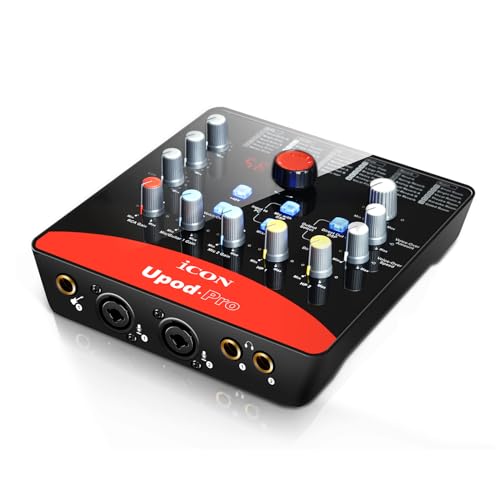
- Built-in 72-DSP effect with top-panel control
- Two mic inputs plus a dedicated guitar input
- 2x2 full-duplex I/O with +48V and +5V phantom power
Best For: Solo musicians, guitar-and-vocal recording, and compact home setups
Compact Studio Pick
Focusrite Scarlett Solo 3rd Gen

- Air mode for added recording clarity
- 24-bit/192kHz converters
- Includes recording and effects software
Best For: Solo musicians, vocalists, and beginner home studios
Streamer’s DSP Choice

- 80dB gain for XLR microphones
- Onboard voice enhancement, compression, and EQ
- Wave Link routing with low-latency monitoring
Best For: Streamers, podcasters, and XLR microphone users
Budget Live-Use Option
USB Audio Interface with Echo Control

- 48V phantom power and dual combo inputs
- Direct monitoring with adjustable echo
- USB-C support for PC, Mac, and iOS
Best For: Beginners, streamers, podcasters, and karaoke users
Best Studio Monitoring Pick – Yamaha URX22C
The Yamaha URX22C is a strong choice for musicians who want audio interfaces with dsp effects in a compact 2-in/2-out format. Its onboard DSP supports latency-free monitoring with reverb, channel-strip processing, and guitar amp effects, while the two combo inputs accommodate microphones and instruments.
Best For: Home recording, vocal monitoring, and guitarists who want built-in effects without relying entirely on computer processing.
Pros:
- 32-bit/192kHz USB-C audio with 2-in/2-out analog I/O
- Two Class-A D-PRE combo inputs with +48V phantom power
- Latency-free DSP monitoring with REV-X reverb, Channel Strip, and Guitar Amp Classics
- Rugged full-metal housing and Windows, macOS, and iOS compatibility
Cons:
- Only two analog input channels
- Some software features require using the included or compatible applications
The URX22C balances durable hardware, flexible connectivity, and useful monitoring effects. It is especially appealing if you want a traditional recording interface with DSP-powered tracking rather than a larger mixer-style setup.
Best Streaming and Podcasting Pick – Antelope Audio Zenith 2
The Antelope Audio Zenith 2 is designed for creators who need audio interfaces with dsp effects for streaming, podcasting, vocals, and guitar. Its onboard processing includes a Smart Vocal Chain, guitar amp and cab simulations, loopback, and real-time monitoring effects, all in a USB-C bus-powered interface.
Best For: Streamers, podcasters, mobile creators, and guitarists who need flexible real-time processing and independent headphone mixes.
Pros:
- Class-compliant USB-C operation for PC, Mac, iOS, and Android
- Onboard DSP enables zero-latency monitoring with vocal and guitar effects
- Loopback supports system-audio capture for streaming and podcasting
- Two headphone outputs provide independent mixes
Cons:
- Some control features are accessed through optional computer software
- Its extensive effects and controls may be more than a basic recording setup needs
Zenith 2 stands out when live sound shaping is central to the workflow. The combination of DSP effects, loopback, dual headphone mixes, and mobile compatibility makes it more versatile for content creation than a simple two-input interface.
Best Effects-Heavy Mixer – 4-Channel USB Audio Mixer
This four-channel mixer is a practical option for buyers seeking audio interfaces with dsp effects alongside hands-on mixing controls. It combines 99 selectable DSP effects with two XLR inputs, stereo line inputs, channel EQ, output EQ, USB recording and playback, and Bluetooth streaming.
Best For: Karaoke, small home audio setups, basic recording, and users who prefer mixer-style control with many built-in effects.
Pros:
- Built-in DSP processor offers 99 selectable effects
- Two XLR inputs plus two stereo line inputs
- 48V phantom power supports condenser microphones
- USB recording/playback and Bluetooth music streaming
Cons:
- It is a mixer-style device rather than a simple recording interface
- Bluetooth range is listed at approximately 15 feet
- Software-update support is unspecified
The mixer offers more immediate routing and sound-shaping control than a basic interface. Its broad effects selection and multiple input types suit casual production and live-use scenarios, while the 7-band main-output EQ adds further tonal control.
Best Simple Recording Interface – Focusrite Scarlett Solo 4th Gen
The Focusrite Scarlett Solo 4th Gen is a straightforward choice for recording vocals and instruments, though its supplied features focus more on conversion and software-based production than onboard DSP. It provides one XLR mic input, one Hi-Z instrument input, 120dB dynamic range, 192kHz operation, and an Air mode for added vocal and guitar presence.
Best For: Songwriters and beginners who want a compact USB-C interface for one microphone and one instrument.
Pros:
- 120dB dynamic range and up to 24-bit/192kHz recording
- Dedicated XLR mic input and Hi-Z instrument input
- Air mode adds presence and harmonic drive to vocals and guitars
- Includes multiple DAWs, plugins, instruments, and mastering tools
Cons:
- It does not list onboard DSP effects like the other effects-focused options
- Only one microphone input is provided
Scarlett Solo is best viewed as an easy, high-quality entry point for recording rather than a dedicated DSP-effects unit. Choose it when clean capture, simple controls, Air mode, and bundled production software matter more than extensive real-time processing.
Versatile Mixer Pick – 6-Channel DSP DJ Mixer
For buyers seeking audio interfaces with dsp effects in a live or karaoke-friendly format, this six-channel mixer combines analog mixing controls with USB playback, Bluetooth streaming, phantom power, and 16 built-in DSP effects. Its multiple inputs make it suitable for connecting microphones, instruments, and stereo sources.
Best For: Karaoke, live gigs, streaming setups, and users who want several input options with onboard reverb and delay.
Pros:
- Six input channels, including four XLR inputs and stereo 1/4-inch inputs.
- Built-in 16-effect DSP processor with adjustable reverb and delay.
- Bluetooth and USB support music playback, mixing, and recording.
- 48V phantom power supports compatible condenser microphones.
Cons:
- It is a traditional analog mixer rather than a computer-focused interface.
- The supplied specifications list 16-bit operation and a 90-day manufacturer warranty.
- Its broad control layout may require some setup familiarity.
This is a practical choice when hands-on mixing, multiple physical inputs, and built-in effects matter more than advanced computer production features. It offers a broad feature set for live sound and casual recording at a relatively compact size.
Creator Workflow Pick – MAONO P2 Hybrid USB Interface
The MAONO P2 is a modern option for audio interfaces with dsp effects, especially for creators who record and stream across multiple devices. Its dual USB connectivity can link a computer and phone or iPad at the same time, while loopback, direct monitoring, and creator software support help combine microphones, instruments, and desktop audio.
Best For: Podcasters, streamers, musicians, and mobile creators who need flexible computer-and-phone recording.
Pros:
- Dual USB ports support simultaneous computer and mobile-device connections.
- Dual XLR inputs provide up to 56dB of gain and support condenser and dynamic microphones.
- 24-bit/192kHz recording, ASIO support, and direct monitoring suit home production.
- ProStudio 2 supports VST effects, loopback, routing, and real-time noise reduction.
Cons:
- Its effects and routing features rely substantially on the included creator software and computer workflow.
- The product is geared toward creators and may offer more features than a simple one-input recording setup needs.
- The supplied notes do not specify a hardware DSP effects processor.
Choose the P2 if flexible routing and cross-device creation are priorities. It is particularly well suited to podcasts, live streams, and cover performances where microphone, instrument, backing-track, and desktop audio sources need to work together.
Compact Hardware Effects Pick – iCON UPod Pro USB Interface
The iCON UPod Pro is a compact USB recording interface for shoppers comparing audio interfaces with dsp effects in a straightforward desktop format. It provides two microphone inputs, a guitar input, full-duplex analog I/O, phantom power, and a built-in 72-DSP effect controlled from the top panel.
Best For: Solo musicians and home users who want simple USB recording with accessible onboard effects.
Pros:
- Built-in 72-DSP effect with a dedicated top-panel control knob.
- Two microphone inputs and one guitar input accommodate common solo recording setups.
- Supports 2×2 analog I/O for full-duplex recording and playback.
- Includes +48V and +5V phantom power options.
Cons:
- Its maximum sample rate is 48kHz and recording is specified as 16-bit.
- The compact input configuration is less suitable for larger multi-microphone sessions.
- The supplied details do not identify the specific DSP effect types.
With its built-in effect control and small footprint, the UPod Pro emphasizes quick access and uncomplicated recording. It is a sensible fit for guitar-and-vocal work, basic keyboard recording, and users who prefer hardware effects rather than relying entirely on software.
Compact Studio Pick – Focusrite Scarlett Solo 3rd Gen
The Focusrite Scarlett Solo 3rd Gen is a compact choice for musicians and podcasters who want reliable recording quality in an audio interface with DSP effects software included. Its Air mode, high-headroom instrument input, and 24-bit/192kHz converters support detailed guitar, vocal, and podcast recordings.
Best For: Solo musicians, vocalists, guitarists, and beginner home-studio users.
Pros:
- Air mode can add clarity to acoustic instruments and vocals.
- Includes an XLR mic preamp and Hi-Z instrument input.
- Supports recording and mixing up to 24-bit/192kHz.
- Includes several recording programs, effects, instruments, and mastering tools.
Cons:
- Provides only one XLR mic preamp.
- Its included software is not the same as built-in hardware DSP effects.
The Solo is a strong entry point for straightforward recording, especially if you value bundled software and high-resolution capture more than onboard effects processing.
Streamer’s DSP Choice – Elgato Wave XLR MK.2
The Elgato Wave XLR MK.2 is purpose-built for creators seeking audio interfaces with DSP effects. It combines 80dB of XLR gain, low-latency monitoring, onboard voice processing, and Wave Link routing for streamlined streaming, podcasting, and voice recording.
Best For: Streamers, podcasters, gamers, and creators using an XLR microphone.
Pros:
- 80dB of gain supports a wide range of XLR microphones.
- Built-in voice enhancer, compressor, and EQ provide onboard processing.
- Wave FX Processor combines DSP effects and VST plugins in one signal chain.
- Touch controls, LED feedback, and mute operation simplify live use.
Cons:
- Wave Link requires Windows 11 or Apple Silicon Mac compatibility.
- Designed around a single XLR microphone input rather than multi-mic recording.
For live voice work, the Wave XLR MK.2 offers the most direct match for this category, with hands-on controls and integrated processing designed around real-time creator workflows.
Budget Live-Use Option – USB Audio Interface with Echo Control
This USB audio interface is aimed at beginners and creators who want simple audio interfaces with DSP effects for recording, livestreaming, karaoke, and online content. It provides 48V phantom power, dual XLR/TRS inputs, direct monitoring, and an adjustable echo control.
Best For: Beginner musicians, podcasters, streamers, singers, and karaoke users.
Pros:
- 48V phantom power supports condenser microphones.
- Dual XLR/TRS combo inputs accept microphones, instruments, and line-level sources.
- Direct monitoring provides real-time, low-latency listening.
- Independent gain, instrument, echo, and monitor controls allow quick adjustments.
Cons:
- Maximum sample rate is 48kHz.
- Its echo control is more limited than a broader studio effects suite.
- Includes only a three-month warranty.
The interface is practical for accessible home recording and live content, particularly when echo and straightforward physical controls matter more than high-resolution production features.
How We Picked the Best Audio Interfaces with Dsp Effects
We focused on interfaces and compact mixers that combine computer connectivity with onboard digital signal processing, such as reverb, echo, compression, routing, or low-latency monitor control. The selection spans traditional two-channel recording interfaces, streaming-focused units, and mixer-style designs with multiple inputs.
We also considered connection type, microphone compatibility, phantom power, instrument support, monitoring options, software compatibility, portability, and ease of use. Because DSP implementations vary widely, we distinguish between genuine onboard processing and simple hardware controls that only adjust monitoring or effects levels.
Quick Comparison
| Best For | What to Prioritize | Typical Format |
|---|---|---|
| Solo recording | Clean preamp, instrument input, direct monitoring | Compact 2-in/2-out interface |
| Streaming and podcasting | Loopback, mute controls, vocal processing, easy routing | Streaming interface or mixer |
| Multiple microphones | Several XLR inputs, 48V phantom power, independent gain | Multichannel mixer/interface |
| Mobile production | USB-C compatibility, low power needs, phone or tablet support | Portable hybrid interface |
| Karaoke and live audio | Built-in effects, Bluetooth, simple physical controls | DSP mixer board |
Key Buying Factors for Audio Interfaces with Dsp Effects
Inputs, Outputs, and Phantom Power
Count the microphones, instruments, and playback sources you will use at the same time. XLR inputs suit microphones, while combo XLR/TRS inputs can also accept line-level sources and guitars. Condenser microphones generally require switchable 48V phantom power, but phantom power should be used carefully with incompatible equipment.
DSP Features and Latency
Look for the exact effects included and where they operate. Some devices provide reverb or echo for monitoring only; others offer more complete channel processing, loopback, or software-controlled routing. Direct monitoring can reduce distracting latency, while higher sample rates and bit depth may benefit detailed recording but should not outweigh preamp quality and reliable drivers.
Compatibility and Workflow
Confirm support for your computer, operating system, phone, or tablet before buying. USB-C describes the connector, not necessarily the data standard or power behavior. Check whether the interface includes a control app, bundled recording software, MIDI connectivity, Bluetooth, or loopback if those features matter to your setup.
Controls and Monitoring
Large gain knobs, clear meters, headphone volume control, mute buttons, and separate monitor outputs make everyday use easier. For streaming, fast access to mute and routing controls can be more valuable than extra sample-rate specifications.
Who Should Buy Which Audio Interfaces with Dsp Effects?
- Choose a compact recording interface if you mainly record one vocalist, guitarist, or instrument and want dependable preamps with straightforward monitoring.
- Choose a streaming-oriented interface if you need quick vocal effects, loopback, mute control, or flexible routing for broadcasts and podcasts.
- Choose a multichannel DSP mixer if you regularly connect several microphones, music sources, or live inputs and prefer hands-on controls.
- Choose a hybrid mobile model if you record with a phone or tablet as often as you use a computer.
- Choose a basic budget interface if DSP effects are optional and your priority is clean input capture rather than onboard processing.
Before buying, match the interface’s input count and DSP workflow to your actual setup. The best option is the one that reduces extra software, adapters, and latency without adding controls you will not use.