The best compact mini PCs save desk space without sacrificing the essentials for work, streaming, browsing, and home projects. This roundup compares 10 models across performance levels, memory, storage, display support, and upgrade potential.
Whether you need an inexpensive office computer or a faster Ryzen-powered desktop, the right choice depends on more than processor speed. Use the guide below to match each system to your workload, connectivity needs, and budget.
Best 10 Compact Mini PCs Picks for 2026
Best Expandable Workstation

- Ryzen 5 7430U with 16GB RAM and 1TB NVMe SSD
- Supports up to four 4K displays and 8K visuals
- Upgradeable memory and storage with three-year warranty
Best For: Business multitasking and expandable home-office setups
Best Budget Refurbished PC
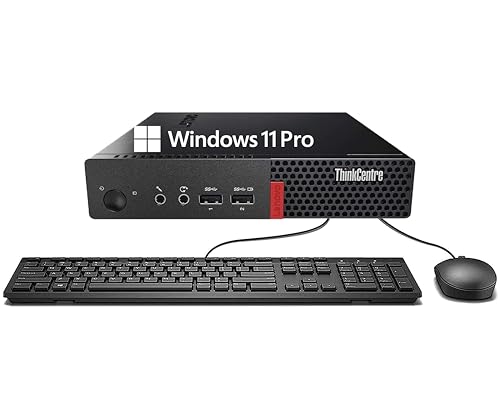
- 6th Gen Core i3, 8GB DDR4 RAM, and 256GB SSD
- Windows 11 Pro with keyboard and mouse included
- Compact design with Wi-Fi, Bluetooth, USB, and DisplayPort
Best For: Basic office, education, and web-browsing tasks
Best Commercial Mini PC

- Core Ultra 5 125U with integrated NPU for supported AI tasks
- Dual 2.5G LAN, USB4, quad-display output, and commercial I/O
- Quiet cooling design and three-year business-grade coverage
Best For: Commercial, industrial, NAS, and continuous-use deployments
Best Triple-Display Value
BOSGAME E2 Plus Ryzen 5 Mini PC

- Supports up to three displays with HDMI and USB-C
- Upgradeable DDR4 memory up to 32GB
- Windows 11 Pro, Ubuntu support, Wi-Fi 5, and Bluetooth 5.0
Best For: Remote work and multi-screen everyday productivity
Renewed Business Value

- Quad-core Core i5 with 16GB DDR4 RAM
- 240GB SSD with Windows 11 Pro
- VGA and DisplayPort outputs
Best For: Office, education, and everyday home computing
Modern Multitasking Pick

- Ryzen 5 3501U with 16GB RAM
- 512GB NVMe SSD with expansion options
- Supports up to three displays
Best For: Home offices, streaming, and multi-monitor setups
Expandable Everyday Choice

- Intel N5030 with 12GB memory
- Dual 4K HDMI display support
- Expandable storage up to 4TB total
Best For: Basic office, education, signage, and media use
Best Renewed Business PC

- Six-core Intel Core i5-8500T processor
- 16GB RAM and 256GB NVMe SSD
- HDMI and DisplayPort dual-monitor support
Best For: Affordable office and home-work setups
Best Budget Storage Value

- 16GB RAM with a 512GB NVMe SSD
- Dual 4K HDMI display support
- Wi-Fi 6, Bluetooth 5.3, and one-year warranty
Best For: Everyday home office and streaming
Best Expandable Workstation – GEEKOM A5 Ryzen 5 Mini PC
The GEEKOM A5 is one of the more flexible compact mini pcs for office work, multitasking, and long-term upgrades. Its Ryzen 5 7430U, 16GB of RAM, 1TB NVMe SSD, and metal-reinforced chassis make it well suited to demanding everyday productivity without taking much desk space.
Best For: Business users, home offices, multitasking, multi-monitor setups, and expandable storage needs.
Pros:
- 16GB RAM and 1TB NVMe storage are upgradeable, with support for expanded memory and additional drives.
- Supports up to four 4K displays and 8K visuals through USB-C.
- Metal-reinforced construction, 24/7 operation support, and a three-year limited warranty.
- Useful connectivity and compatibility for office, NAS, retail, and commercial deployments.
Cons:
- Integrated Radeon Vega 7 graphics are aimed at productivity and media rather than demanding modern gaming.
- Memory and storage upgrades may add to the overall cost.
The A5 stands out among compact mini pcs when upgradeability and multi-display capability matter more than the smallest possible footprint. It is a practical choice for users who want room to expand instead of a sealed, short-term system.
Best Budget Refurbished PC – Lenovo ThinkCentre M710q Tiny
The renewed Lenovo ThinkCentre M710q is a straightforward option among compact mini pcs for basic office work, web browsing, education, and media use. Its 6th Gen Intel Core i3 processor, 8GB of DDR4 RAM, 256GB SSD, and included keyboard and mouse provide a simple Windows 11 Pro setup.
Best For: Basic productivity, education, web browsing, and space-saving desktop installations.
Pros:
- Compact ThinkCentre design with a 256GB SSD for quick booting and everyday file access.
- Includes Windows 11 Pro, Wi-Fi, Bluetooth, keyboard, and mouse.
- Six USB ports plus DisplayPort and Ethernet support common peripherals and displays.
- Can be a practical low-cost choice for straightforward computing tasks.
Cons:
- The older dual-core 6th Gen Core i3 is less suitable for demanding multitasking.
- 8GB RAM and 256GB storage provide limited headroom for heavier workloads.
- Renewed condition includes only a 90-day warranty.
This ThinkCentre is best viewed as an economical basic workstation rather than a high-performance mini PC. It makes sense where dependable everyday functionality and included accessories are more important than modern processor performance.
Best Commercial Mini PC – GEEKOM IT12 MAX Core Ultra 5
The GEEKOM IT12 MAX is a business-focused choice among compact mini pcs, combining an Intel Core Ultra 5 125U with an integrated NPU, fast LPDDR5 memory, and commercial-grade connectivity. Its cooling system, dual 2.5G LAN, USB4 ports, and multi-display support make it especially suitable for professional and continuous-use environments.
Best For: Commercial deployments, kiosks, signage, industrial control, NAS setups, and AI-assisted productivity.
Pros:
- Core Ultra 5 processor with CPU, GPU, and NPU resources for supported AI workloads.
- 16GB LPDDR5 memory and a 500GB PCIe 4.0 SSD, with SSD expansion up to 2TB.
- Dual 2.5G LAN ports support network isolation, firewalls, load balancing, and NAS configurations.
- Supports quad 4K output, includes commercial I/O, and offers three-year business-grade coverage.
Cons:
- The 16GB LPDDR5 memory is not described as upgradeable.
- Advanced commercial features may be unnecessary for simple home-office use.
For buyers deploying multiple systems or running equipment continuously, the IT12 MAX offers a stronger feature set than typical compact mini pcs. Its business-oriented I/O and thermal design are the main reasons to choose it over a simpler consumer model.
Best Triple-Display Value – BOSGAME E2 Plus Ryzen 5 Mini PC
The BOSGAME E2 Plus is a practical pick among compact mini pcs for home offices, classrooms, and everyday desktop use. Its Ryzen 5 3501U, DDR4 memory, SSD storage, and support for three displays provide useful productivity features in a small, easy-to-place system.
Best For: Remote work, spreadsheets, online learning, web browsing, streaming, and multi-screen productivity.
Pros:
- Supports up to three displays through two HDMI 2.0 ports and USB-C, including 4K at 60Hz through HDMI.
- Dual-channel DDR4 memory can be upgraded to 32GB.
- Includes Windows 11 Pro support, Ubuntu compatibility, Wi-Fi 5, Bluetooth 5.0, and Gigabit Ethernet.
- Compact design includes a VESA mounting bracket for flexible placement.
Cons:
- The Ryzen 5 3501U is intended for everyday workloads rather than demanding creative applications.
- The 256GB SATA SSD is slower and offers less capacity than many newer NVMe-based systems.
- The supplied notes list conflicting memory capacities, so buyers should confirm the exact configuration.
The E2 Plus is a sensible value option when three-screen support and upgrade potential are priorities. It is best suited to practical daily computing, not intensive gaming or professional video production.
Renewed Business Value – HP EliteDesk 800 G2 Mini
For shoppers comparing compact mini pcs, the renewed HP EliteDesk 800 G2 offers a practical business-oriented setup with a quad-core Intel Core i5 processor, 16GB of DDR4 memory, and a 240GB SSD. Its small chassis, Windows 11 Pro, and included keyboard and mouse make it a ready-to-use option for everyday office, education, and home tasks.
Best For: Business users, students, and home offices that want a refurbished desktop with useful memory and legacy display connectivity.
Pros:
- Quad-core Intel Core i5-6500T processor with speeds up to 3.1GHz.
- 16GB DDR4 RAM, with support for up to 32GB.
- Includes a 240GB SSD, Windows 11 Pro, keyboard, and mouse.
- Offers VGA and DisplayPort outputs plus multiple USB ports.
Cons:
- As a renewed product, it may arrive in generic packaging and carries a minimum 90-day warranty.
- The 240GB SSD provides less storage than newer mini PCs with 512GB drives.
- Display connectivity uses VGA and DisplayPort rather than HDMI.
This HP is a sensible choice when dependable everyday performance and expandability matter more than having the newest platform. Its refurbished status and smaller SSD are the main trade-offs.
Modern Multitasking Pick – Getorli Ryzen 5 Mini PC
Among compact mini pcs, the Getorli GT100 stands out for combining 16GB of RAM, a 512GB PCIe NVMe SSD, and flexible display support in a chassis measuring just 5.0 by 4.4 by 1.6 inches. It is designed for office work, streaming, online learning, media playback, and other everyday computing needs.
Best For: Home offices, compact workspaces, streaming setups, and users who need three-display support with upgrade options.
Pros:
- AMD Ryzen 5 3501U processor provides four cores and eight threads.
- 16GB DDR4 RAM and a 512GB PCIe 3.0 NVMe SSD offer a balanced starting configuration.
- Dual HDMI ports and full-function USB-C support up to three displays.
- Supports memory expansion to 32GB, SSD expansion up to 2TB, and a 2.5-inch drive.
Cons:
- Integrated Radeon Vega 8 graphics are aimed at everyday use and light gaming rather than demanding gaming.
- The listed 2.1GHz processor speed is lower than the chip’s maximum boost capability.
The GT100 offers a strong mix of storage, connectivity, and compact placement options, including VESA mounting. Its capabilities make it one of the more flexible choices here for multitasking and multi-monitor work.
Expandable Everyday Choice – KAMRUI AK1PLUS Mini PC
The KAMRUI AK1PLUS is one of the more storage-flexible compact mini pcs for basic work, study, and home use. Its Intel N5030 processor, 12GB LPDDR4 memory, 256GB M.2 SSD, dual 4K display outputs, and small 5.04-inch square footprint suit desks where space and low power use are priorities.
Best For: Web browsing, online classes, video calls, office tasks, digital signage, and compact media-center setups.
Pros:
- Four-core Intel N5030 processor reaches up to 3.1GHz.
- Dual HDMI 2.0 outputs support two simultaneous 4K displays at 60Hz.
- Storage can expand through an M.2 drive and an additional 2.5-inch SATA SSD or HDD.
- Includes four USB 3.2 ports, Gigabit Ethernet, Wi-Fi, Bluetooth, and business-oriented wake features.
Cons:
- The Intel N5030 is intended for everyday computing rather than demanding applications.
- Its 256GB starting SSD is modest for large media libraries without expansion.
- Memory is listed as non-expandable beyond the installed 12GB/16GB configuration details.
This KAMRUI is a practical low-power option when dual 4K displays and future storage expansion are more important than high-end performance. It fits especially well in simple business and education environments.
Best Performance Pick – KAMRUI Pinova P2 Ryzen 7330U
The KAMRUI Pinova P2 is one of the more capable compact mini pcs for multitasking, coding, office work, and multi-display setups. Its Ryzen 7330U processor, 16GB of LPDDR4X memory, and quiet cooling provide a strong balance of performance and efficiency in a small, VESA-mountable chassis.
Best For: Home offices, business users, developers, and anyone needing three 4K displays.
Pros:
- Ryzen 7330U offers 4 cores and 8 threads for smooth multitasking.
- Supports simultaneous triple 4K output through HDMI, DisplayPort, and USB-C.
- Includes 16GB RAM, a 256GB SSD, and two storage expansion slots.
- Compact design includes VESA mounting and quiet cooling.
Cons:
- The included 256GB SSD may be limiting for large media libraries.
- Integrated graphics are suited to productivity and light creative work rather than demanding gaming.
Choose this model when display flexibility and responsive everyday performance matter more than maximum storage out of the box. Its expansion options and efficient processor make it a versatile compact workstation.
Best Renewed Business PC – HP EliteDesk 800 G4 Mini
The renewed HP EliteDesk 800 G4 is a practical choice among compact mini pcs for general office work. It combines a six-core Intel Core i5-8500T, 16GB DDR4 RAM, a 256GB NVMe SSD, Windows 11 Pro, and dual-monitor support in a space-saving business chassis.
Best For: Office users, home workers, and budget buyers who want Windows 11 Pro.
Pros:
- Six-core Core i5 processor supports dependable multitasking.
- 16GB DDR4 RAM and NVMe SSD help with quick startups and everyday responsiveness.
- HDMI and DisplayPort support a dual-monitor workspace.
- Professionally renewed and backed by a 90-day warranty.
Cons:
- As a renewed product, it may show minor cosmetic wear.
- Its older integrated Intel UHD 630 graphics are intended for everyday display use.
- Storage capacity is limited to 256GB out of the box.
This HP is a sensible value option for straightforward productivity, especially if Windows 11 Pro and a traditional business-focused design are priorities. Verify the seller’s condition details and warranty terms before buying.
Best Budget Storage Value – Getorli Ryzen 5 3501U Mini PC
The Getorli GT101 delivers useful everyday features in a budget-friendly compact mini pcs format. Its Ryzen 5 3501U, 16GB of DDR4 RAM, and 512GB NVMe SSD are well suited to browsing, office tasks, streaming, and light home use, while Wi-Fi 6 and Bluetooth 5.3 provide modern wireless connectivity.
Best For: Everyday computing, streaming, home offices, and buyers needing more included storage.
Pros:
- 512GB NVMe SSD provides generous space and fast boot and app loading.
- 16GB RAM supports multiple applications and browser tabs.
- Dual HDMI ports support two 4K displays.
- Includes Wi-Fi 6, Bluetooth 5.3, multiple USB ports, and a one-year warranty.
Cons:
- The Ryzen 5 3501U is an older 15W mobile processor.
- Integrated graphics are better suited to everyday use and streaming than demanding games.
- Operating-system details are listed inconsistently as OS/Windows 11 Pro, so confirm the exact configuration.
The GT101 stands out when included storage and connectivity are more important than cutting-edge processing power. It is a practical compact computer for routine tasks, dual-screen work, and media playback.
How We Picked These Compact Mini PCs
We selected systems across several price and performance tiers, including refurbished business desktops and newer consumer mini PCs. Our comparison emphasizes processor capability, included RAM and storage, upgradeability, display outputs, wireless connectivity, operating system, and overall suitability for common desktop tasks.
Specifications can vary by seller, especially for refurbished models, so verify the listing before purchase. Check the exact processor generation, storage type, included accessories, warranty, and whether Windows is activated.
Quick Comparison
| Best For | What to Look For |
|---|---|
| Office work and browsing | At least 8GB RAM, an SSD, and a current-enough processor |
| Multitasking | 16GB RAM and a modern Ryzen 5 or Intel Core processor |
| Multiple monitors | Two or more video outputs and confirmed resolution support |
| Long-term flexibility | Upgradeable memory, accessible storage, and newer connectivity |
| Lowest-cost computing | Refurbished business hardware or an entry-level processor with an SSD |
Key Buying Factors for Compact Mini PCs
Processor and Everyday Speed
For email, documents, video calls, and web apps, an SSD and adequate RAM often matter as much as the CPU. Newer Ryzen 5 and Intel Core systems are better suited to heavier multitasking, large spreadsheets, light content creation, and sustained workloads. Older business-class processors can still be practical, but they may use more power and offer less headroom.
Memory and Storage
Choose 8GB RAM for basic use and 16GB for a smoother experience with many browser tabs or productivity applications. Upgradable memory is valuable if your needs may grow. A 256GB SSD works for office files, while 500GB or 1TB provides more room for media, applications, and local projects. Confirm whether the drive is SATA or NVMe when performance matters.
Ports, Displays, and Wireless
Review the actual port layout rather than relying on the product name. HDMI, DisplayPort, USB ports, Ethernet, Wi-Fi, and Bluetooth determine how easily the mini PC fits your setup. If you plan to run two or three monitors, confirm that the outputs can support your intended resolutions simultaneously.
Size, Thermals, and Reliability
Compact systems need adequate airflow. Leave ventilation space around the chassis and consider fan noise if the computer will sit near your monitor or television. Refurbished business PCs can offer excellent value, but inspect condition, included power adapters, and return coverage.
Who Should Buy Which Compact Mini PCs?
Choose a newer Ryzen 5 or Core-based model for demanding multitasking, frequent video calls, and a desktop you plan to keep for several years. Select a model with 16GB RAM and larger storage if you regularly use many applications or store files locally.
Budget shoppers and light users can save with an entry-level system or refurbished business mini PC. These are well suited to browsing, documents, media playback, point-of-sale tasks, and basic home-office use. Buyers who need multiple monitors should prioritize confirmed display outputs, while tinkerers should favor accessible RAM and storage upgrades.