A mini PC with Thunderbolt can deliver desktop-style connectivity in a remarkably small enclosure. With support for fast displays, external storage, docks, and other peripherals, these systems suit home offices, creative workspaces, and compact business setups.
Our roundup covers 10 options with different processor tiers, memory configurations, storage capacities, display outputs, and upgrade paths. Use the guide below to narrow the choices based on performance, expandability, and the way you plan to connect your desk.
Best 10 Mini PC with Thunderbolt Picks for 2026
Powerhouse Pick

- Core i9-13900HK with 32GB DDR5 and 1TB SSD
- Thunderbolt 4 plus PCIe x8 expansion
- Dual 2.5G LAN and triple-display support
Best For: Demanding creative work, gaming, and multitasking
Business Essential

- Core i5-1340P with 16GB RAM and 512GB SSD
- Two Thunderbolt 4 ports with USB4 and DisplayPort
- Windows 11 Pro and upgradeable memory
Best For: Office productivity and managed business setups
Connectivity Value

- Dual Thunderbolt 4 and triple 4K display support
- 10GbE plus 2.5GbE wired networking
- Dual M.2 PCIe 4.0 expansion slots
Best For: Connected home offices and multi-display productivity
Efficient Everyday Choice

- 15W Ryzen 7 7730U with 32GB RAM
- Expandable to 64GB RAM and 4TB SSD
- Dual USB-C, dual HDMI, and 2.5G LAN
Best For: Low-power multitasking and always-on home use
Best AI-Ready Value
Beelink EQI Mini PC with Thunderbolt 4

- Thunderbolt 4 with triple 4K display support
- 24GB DDR5 RAM, expandable to 64GB
- Up to 24 TOPS offline AI computing
Best For: Home offices, students, and local AI workloads
Best Business Desktop
ASUS NUC 13 Pro with Thunderbolt

- Two Thunderbolt and two HDMI 2.1 ports
- 13th Gen Core i5 processor up to 4.6GHz
- Windows 11 Pro and quiet compact design
Best For: Business offices and multi-monitor professional setups
Best Multi-Screen Performance

- TB4 supports 8K output and up to four displays
- Core i5-12600H with 12 cores and 16 threads
- Dual RAM and M.2 expansion slots
Best For: Multi-monitor productivity and upgrade-focused users
Best Compact Office Pick

- Core i3-1215U with 16GB RAM and 512GB PCIe SSD
- Thunderbolt 4, HDMI, DisplayPort, and Wi-Fi 6
- Supports up to three 4K displays
Best For: Compact office and remote-work setups
Best Performance Choice

- 13th Gen Core i5-13420H with boost speeds up to 4.6GHz
- Two Thunderbolt ports plus two HDMI 2.1 outputs
- Wi-Fi 6E, Bluetooth 5.3, and quiet slim design
Best For: Multi-monitor professional productivity
Best Expandable Business Pick
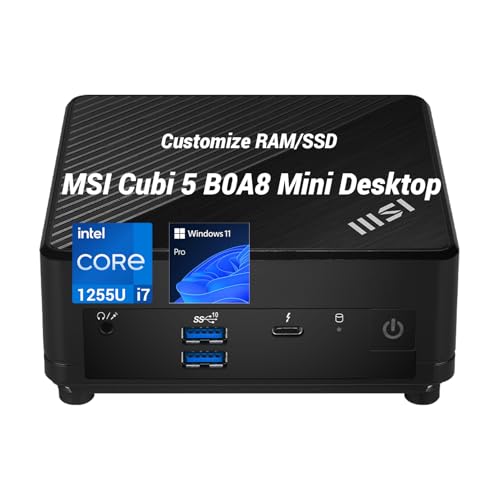
- Core i7-1255U with 10 cores and boost speeds up to 4.7GHz
- Configurable up to 32GB RAM and expanded NVMe storage
- Thunderbolt 4 with support for up to three displays
Best For: Expandable professional workstations
Powerhouse Pick – Beelink GTi13 i9 Mini PC
For shoppers seeking a mini PC with Thunderbolt for demanding work, the Beelink GTi13 stands out with its Core i9-13900HK processor, generous memory, and expansion-friendly design. It combines 32GB DDR5 RAM, a 1TB SSD, Thunderbolt 4, dual 2.5G LAN, and a PCIe x8 slot in a compact desktop.
Best For: Video editors, 3D creators, programmers, gamers, and users who need high-end multitasking performance.
Pros:
- Core i9-13900HK with 14 cores and 20 threads supports demanding multitasking.
- 32GB DDR5 RAM and a 1TB SSD provide a strong starting configuration.
- Thunderbolt 4 supports 40Gbps data transfer, video output, and 100W PD charging.
- Dual 2.5G LAN, Wi-Fi 6, triple-display support, and a PCIe x8 slot add flexibility.
Cons:
- Its powerful 65W configuration may be more than needed for basic office tasks.
- The compact chassis and performance-focused hardware may require attention to cooling during sustained workloads.
The GTi13 is the most capable option here for users who want workstation-class performance and expansion potential in a small footprint. Its Thunderbolt 4 and PCIe support make it especially adaptable for creative and performance-oriented setups.
Business Essential – ASUS NUC 13 Pro i5
The ASUS NUC 13 Pro is a practical mini PC with Thunderbolt for offices, home workspaces, and managed business environments. Its 13th Gen Core i5-1340P processor, 16GB DDR4 RAM, 512GB PCIe SSD, Windows 11 Pro, and compact 4×4 design prioritize dependable everyday productivity.
Best For: Business users, office productivity, digital signage, collaboration, and space-conscious workstations.
Pros:
- Core i5-1340P offers up to 12 cores and 16 threads for everyday multitasking.
- Two Thunderbolt 4 ports support DisplayPort 2.1 and USB4 connectivity.
- Upgradeable memory supports up to 64GB of dual-channel DDR4.
- Windows 11 Pro, Wi-Fi 6E, dual HDMI 2.1, and business management features are included.
Cons:
- Integrated Intel Iris Xe graphics are intended for general use rather than demanding gaming.
- The supplied 16GB RAM and 512GB storage may need expansion for larger projects.
This NUC is a strong fit when business features, serviceability, and compact dimensions matter more than maximum processing power. Its dual Thunderbolt 4 ports make it easy to build a flexible desk setup with compatible docks and displays.
Connectivity Value – Beelink EQI 304 Mini PC
The Beelink EQI is a compact mini PC with Thunderbolt aimed at efficient office work, media use, and connected workstations. It includes 16GB LPDDR5 memory, 512GB UFS 3.1 storage, dual Thunderbolt 4 ports, three-display support, and unusually fast dual wired networking.
Best For: Home offices, everyday productivity, multi-display setups, light editing, and local AI applications.
Pros:
- Two Thunderbolt 4 ports provide 40Gbps connectivity and DisplayPort support.
- Supports up to three simultaneous 4K displays through Thunderbolt and HDMI.
- 10GbE and 2.5GbE LAN provide high-speed wired networking options.
- Dual M.2 PCIe 4.0 slots allow storage expansion up to 8TB.
Cons:
- Its 16GB LPDDR5 memory is listed as non-expandable.
- The five-core processor is better suited to everyday work and light workloads than intensive rendering.
- The initial 512GB UFS storage is less flexible than a standard installed NVMe SSD.
The EQI makes the most sense for buyers who value connectivity, quiet efficiency, and multiple displays. It is a particularly interesting choice for a modern home office or compact network workstation rather than a high-end production system.
Efficient Everyday Choice – GEEKOM A7 Ryzen 7 Mini PC
The GEEKOM A7 is worth considering if you want a low-power mini PC with Thunderbolt-style USB-C connectivity for everyday computing. Its Ryzen 7 7730U, 32GB RAM, 500GB PCIe Gen4 SSD, dual USB-C ports, and 2.5G LAN create a capable, energy-conscious desktop for work and home use.
Best For: Always-on assistants, multitasking, office work, streaming, light creative tasks, and casual gaming.
Pros:
- 15W Ryzen 7 7730U helps reduce power use, heat, and operating noise.
- Eight cores, 16 threads, and 32GB RAM support heavy everyday multitasking.
- Storage and memory can be expanded to up to 4TB SSD and 64GB RAM.
- Dual USB-C, dual HDMI 2.0, five USB 3.2 ports, and 2.5G LAN offer broad connectivity.
Cons:
- The supplied notes do not explicitly identify the USB-C ports as Thunderbolt 4.
- Integrated Radeon graphics are aimed at 4K playback, multi-display work, and casual gaming rather than demanding gaming.
- The 500GB starting SSD may be limiting for large media libraries.
The A7 is a sensible low-power option for users who want plenty of memory and quiet, continuous operation. However, buyers specifically requiring certified Thunderbolt 4 should verify the USB-C specifications before choosing it over the other models.
Best AI-Ready Value – Beelink EQI Mini PC with Thunderbolt 4
For shoppers seeking a mini PC with Thunderbolt, the Beelink EQI stands out with Thunderbolt 4, triple 4K display support, and fast wireless and wired networking. Its Intel Core 3 304 processor, 24GB of DDR5 RAM, and compact design suit everyday productivity, multitasking, and local AI workloads.
Best For: Home offices, students, business users, and buyers interested in local AI computing.
Pros:
- Thunderbolt 4 and HDMI 2.0 support triple 4K displays at 60Hz.
- 24GB DDR5 RAM is expandable to 64GB, with dual M.2 slots supporting up to 8TB total storage.
- Up to 24 TOPS of offline AI computing through NPU and GPU acceleration.
- Integrated 85W power supply and a stated 32dB quiet cooling system simplify desk setup.
Cons:
- The 5-core, 5-thread processor is geared more toward everyday work and light gaming than demanding workstation tasks.
- Its included 512GB UFS 3.1 storage is less conventional than a standard M.2 SSD.
The EQI is a versatile choice if Thunderbolt connectivity, multiple 4K screens, quiet operation, and expandable storage matter more than high-end graphics performance. Its local AI features add useful flexibility for compatible workloads.
Best Business Desktop – ASUS NUC 13 Pro with Thunderbolt
The ASUS NUC 13 Pro is a practical mini PC with Thunderbolt for professional setups that need strong connectivity in a small footprint. Its 13th Gen Intel Core i5-13420H processor, Windows 11 Pro, dual HDMI 2.1 ports, and dual Thunderbolt ports support productivity-focused multi-monitor work.
Best For: Business offices, conference rooms, trading desks, and professional multi-display workspaces.
Pros:
- Two Thunderbolt ports and two HDMI 2.1 ports enable flexible multi-monitor configurations.
- Intel Core i5-13420H reaches speeds up to 4.6GHz for office applications and multitasking.
- Windows 11 Pro is preinstalled for business-oriented use.
- Wi-Fi 6E, Bluetooth 5.3, Ethernet, USB, and HDMI provide broad connectivity.
Cons:
- Uses integrated Intel UHD Graphics, so it is not intended for demanding dedicated-GPU workloads.
- The supplied memory and storage configuration may be less straightforward than the listed upgrade limits.
Choose the ASUS NUC 13 Pro when business features, quiet operation, and versatile display connectivity are priorities. It is particularly well suited to a clean, professional desk with several monitors and Windows 11 Pro.
Best Multi-Screen Performance – MINIX NGC N512 with TB4
The MINIX NGC N512 is a mini PC with Thunderbolt 4 aimed at multitaskers who need flexible display output and strong expansion options. Its Intel Core i5-12600H processor, Iris Xe graphics, dual LAN ports, and support for up to four 4K screens make it a capable fit for home-office and business environments.
Best For: Multi-monitor productivity, remote work, business applications, and users who want upgradeable memory and storage.
Pros:
- Thunderbolt 4 supports up to 8K at 60Hz, while HDMI 2.1 and USB-C enable up to four-screen setups.
- 12-core, 16-thread Intel Core i5-12600H processor reaches up to 4.5GHz.
- Dual DDR5 SODIMM slots support up to 64GB total memory, and two M.2 slots provide storage flexibility.
- Dual Ethernet ports, Wi-Fi 6, and Bluetooth 5.2 support fast networking and peripheral connectivity.
Cons:
- It includes one Thunderbolt 4 port, fewer than some competing multi-Thunderbolt designs.
- The included 16GB RAM may need expansion for heavier multitasking.
- Graphics are integrated Iris Xe, limiting suitability for demanding 3D workloads.
The NGC N512 is a strong option when display flexibility and upgradeability are central to your buying decision. Its powerful mobile processor and dual-network design add useful headroom for sustained office multitasking.
Best Compact Office Pick – MSI Cubi 5 Professional
The MSI Cubi 5 Professional is a practical mini PC with Thunderbolt for everyday business, remote-work, and home-office setups. Its Core i3-1215U processor, 16GB of RAM, 512GB PCIe SSD, and Windows 11 Pro provide a balanced foundation for multitasking and productivity.
Best For: Office users who need a compact Windows 11 Pro desktop with Thunderbolt 4, Wi-Fi 6, and support for up to three 4K displays.
Pros:
- 16GB DDR4 RAM and a 512GB PCIe SSD support smooth multitasking and quick boot times.
- Thunderbolt 4, HDMI, and DisplayPort enable flexible display and peripheral connections.
- Supports up to three 4K displays and includes Wi-Fi 6, Bluetooth, and dual Ethernet ports.
- Windows 11 Pro includes business-focused features such as BitLocker and Remote Desktop.
Cons:
- Intel UHD integrated graphics are intended for everyday computing rather than demanding graphics workloads.
- The Core i3 processor is less powerful than the Core i5 and Core i7 options in this roundup.
Choose this Cubi 5 when compact size, business features, and broad connectivity matter more than high-end processing performance. It is a sensible fit for standard office applications and multi-monitor productivity.
Best Performance Choice – ASUS NUC 13 Pro Tall
The ASUS NUC 13 Pro Tall is a strong mini PC with Thunderbolt for users who want more processing headroom in a compact desktop. Its 13th Gen Core i5-13420H processor, 16GB RAM, Windows 11 Pro, and dual Thunderbolt ports suit demanding productivity and multi-display workflows.
Best For: Business users, traders, and professionals who need a powerful compact computer with quad-display capability and fast wireless connectivity.
Pros:
- Core i5-13420H reaches boost speeds up to 4.6GHz for responsive multitasking.
- Two Thunderbolt ports and two HDMI 2.1 ports support flexible multi-monitor configurations.
- Wi-Fi 6E and Bluetooth 5.3 provide current wireless connectivity options.
- The slim design and quiet operation suit offices, conference rooms, and space-constrained desks.
Cons:
- Integrated Intel UHD Graphics are not designed for dedicated-GPU gaming or intensive 3D work.
- The supplied details list conflicting storage capacities, so verify the exact configuration before buying.
With a faster mobile processor and four display outputs, this NUC is the most capable choice here for productivity-heavy setups. Confirm the specific storage configuration, then consider it for a quiet professional workstation.
Best Expandable Business Pick – MSI Cubi Core i7
This upgraded MSI Cubi is a versatile mini PC with Thunderbolt for professional users who want strong multitasking performance in a very small enclosure. The Core i7-1255U, configurable memory and storage, Windows 11 Pro, and three-display support make it well suited to business workflows.
Best For: Professionals who need a space-saving business desktop with up to 32GB RAM, expanded SSD options, and multiple-display support.
Pros:
- Core i7-1255U offers 10 cores, 12 threads, and boost speeds up to 4.7GHz.
- Configurations are available with up to 32GB DDR4 RAM and expanded PCIe NVMe storage.
- Thunderbolt 4, HDMI 2.0b, and DisplayPort 1.4 support up to three independent displays or one 8K monitor.
- The 0.66L chassis includes a VESA mount for hiding the PC behind a monitor.
Cons:
- The product is opened for upgrades, so coverage is split between the seller and the original manufacturer.
- Exact RAM and SSD capacity depends on the selected configuration.
- Integrated Iris Xe graphics are not a substitute for a dedicated graphics card in demanding workloads.
This Cubi stands out when you want more memory, storage flexibility, and display capability than a basic office mini PC provides. Its tiny VESA-mountable design is especially useful for clean, clutter-free workstations.
How We Picked the Best Mini PC with Thunderbolt
We selected systems based on the features that matter most in a compact Thunderbolt setup: processor capability, memory and storage configuration, display support, port selection, upgrade potential, size, and practical value. The list includes Intel and AMD options, as well as models aimed at office work, multitasking, media use, and heavier productivity.
Thunderbolt specifications can vary by model and configuration, so verify the exact port labeling, supported protocols, included power adapter, and operating-system compatibility before buying. A product listing that mentions Thunderbolt 4 may still differ in charging, display, or external-GPU support.
Quick Comparison
- Best for maximum performance: Choose a high-core-count model such as the Beelink GTi13 when demanding applications and substantial multitasking are priorities.
- Best for balanced office use: ASUS NUC 13 Pro and MSI Cubi configurations offer compact designs, modern connectivity, and enough performance for productivity workloads.
- Best for displays and peripherals: Look for models advertising Thunderbolt 4 alongside quad-display or triple-display support, such as the MINIX NGC N512 and selected Beelink systems.
- Best for flexible configurations: Models with replaceable RAM, multiple M.2 slots, or configurable storage can remain useful longer as your needs grow.
Key Buying Factors for a Mini PC with Thunderbolt
Processor and Memory
Match the CPU to your workload rather than choosing solely by model number. Everyday office work, browsing, streaming, and light editing can run well on a midrange Core i5 or Ryzen 7 system. Heavy multitasking, compiling, virtual machines, and demanding creative applications benefit from higher sustained performance and at least 16GB of RAM. If you routinely keep many applications open, 32GB provides more headroom.
Thunderbolt, Display, and Docking Support
Thunderbolt 4 can simplify a desk by carrying high-speed data, display output, and compatible dock connections through one cable. Check whether the mini PC supports the number and resolution of monitors you need, especially when mixing Thunderbolt, HDMI, and DisplayPort outputs. For an eGPU or high-speed external SSD, confirm the exact bandwidth and compatibility requirements.
Storage and Upgradeability
A 512GB SSD is a practical starting point for general use, while 1TB is more comfortable for large applications and local media. Multiple M.2 slots are valuable if you want to add storage without replacing the original drive. Also check whether memory is socketed or soldered, since that directly affects future upgrades.
Thermals, Noise, and Networking
Small computers have less room for cooling, so sustained workloads can make fan noise and thermal performance important. Look for reviews that test long-running loads rather than short benchmarks. Wi-Fi 6 or newer, 2.5GbE, and additional high-speed networking can also make a noticeable difference in office, NAS, and media workflows.
Who Should Buy Which Mini PC with Thunderbolt?
Choose the most powerful Beelink option if you need maximum CPU performance in a compact chassis. Pick an ASUS NUC or MSI Cubi if you prioritize a business-friendly design, straightforward office deployment, and dependable multi-monitor connectivity. The MINIX model is appealing for users who want Windows 11 Pro, Thunderbolt 4, and broad display support in a small workstation.
Beelink EQI and GEEKOM systems make sense for buyers seeking efficient everyday performance, compact dimensions, and useful storage or display flexibility. Before checkout, compare the exact RAM and SSD configuration, because several families in this roundup are sold in multiple variants. Finally, budget for a Thunderbolt dock or suitable cable if you want to connect several peripherals through one port.