The best condenser microphone for podcasting can make voices sound clearer, warmer, and more detailed without requiring a complicated studio. The right choice depends on your recording space, connection type, budget, and how much control you want over your audio.
We’ve selected 10 USB and XLR microphones for different podcasting needs, including beginner-friendly kits, streaming-ready models, and studio condensers designed for more demanding setups.
Best 10 Condenser Microphone for Podcasting Picks for 2026
Best All-Around USB Pick

- USB plug-and-play setup
- Four selectable pickup patterns
- Onboard gain and mute controls
Best For: Flexible podcast, streaming, and desktop recording setups
Best Complete XLR Kit

- Requires 48V phantom power
- Includes boom arm and shock mount
- Pop filter and XLR cable included
Best For: Home-studio podcasting and vocal recording with XLR equipment
Best for Mobile Compatibility

- USB plug-and-play connectivity
- USB-C and Lightning adapters included
- Zero-latency headphone monitoring
Best For: Podcasting across computers, tablets, and smartphones
Best Studio Value
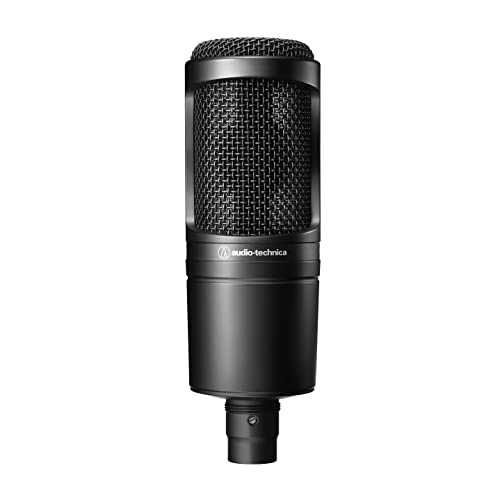
- Cardioid XLR studio microphone
- Requires phantom power
- Includes stand mount and pouch
Best For: Project and home-studio podcasting with an XLR interface
Best All-in-One USB Kit

- 192kHz/24-bit USB recording
- Includes arm, shock mount, and pop filter
- Plug-and-play computer compatibility
Best For: Beginners building a complete podcast setup
Best Studio-Style XLR Pick
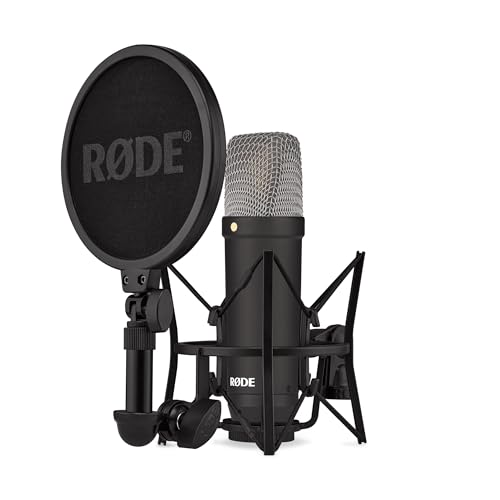
- Very low 4.5dBA self-noise
- Tight cardioid vocal pickup
- Shock mount, pop filter, and XLR cable included
Best For: Podcasters with an audio interface
Best Simple Desktop Option

- Direct USB plug-and-play setup
- Built-in volume knob
- Metal body with tripod stand
Best For: Compact desktop podcasting and online calls
Premium Studio Pick
Shure SM4 XLR Condenser Microphone Kit

- Smooth, controlled audio reproduction
- Integrated pop filter and RF shielding
- Includes shock mount and carrying case
Best For: XLR-based podcast studios and close-miked vocals
Easy Desktop Value
TONOR TC-777 USB Podcast Microphone

- Plug-and-play USB setup
- Includes tripod, shock mount, and pop filter
- Mute and volume controls on the microphone
Best For: Beginner desktop podcasting and online communication
Complete Boom-Arm Kit
FIFINE T669 USB Studio Microphone

- USB plug-and-play recording
- Includes boom arm and double pop filter
- Cardioid capsule with 20 Hz–20 kHz range
Best For: Home podcasting, streaming, and voice-over setups
Best All-Around USB Pick – Blue Yeti Blackout
The Blue Yeti Blackout is a versatile condenser microphone for podcasting when you want plug-and-play USB setup, onboard controls, and flexibility for different recording arrangements. Its four pickup patterns make it useful beyond solo podcasting, while the included stand supports desktop recording.
Best For: Podcasters, streamers, and creators who want an easy USB microphone with multiple pickup patterns.
Pros:
- USB plug-and-play setup for Mac and PC
- Four pickup patterns: cardioid, omnidirectional, bidirectional, and stereo
- Onboard gain, headphone volume, mute, and pattern controls
- Zero-latency monitoring and adjustable desktop stand
Cons:
- USB connectivity may be less suitable for users building an XLR-based setup
- Its 3.5-pound weight makes it less portable than smaller microphones
The Blue Yeti stands out as a flexible, straightforward option for creators who value convenient controls and recording versatility over a minimalist setup.
Best Complete XLR Kit – MAONO PM320S
The MAONO PM320S is a condenser microphone for podcasting aimed at users who already have, or plan to use, an audio interface, mixer, or preamp. It requires 48V phantom power, but the included boom arm, shock mount, pop filter, windscreen, and XLR cable make it a practical starting kit for a home studio.
Best For: Podcasters and vocal creators who want an XLR microphone package with positioning and plosive-control accessories.
Pros:
- Large 16mm condenser capsule with cardioid pickup
- Includes boom arm, shock mount, pop filter, windscreen, and XLR cable
- Metal housing and integrated vibration-reduction features
- Designed for podcasting, vocals, streaming, and voice-over work
Cons:
- Requires a stable 48V phantom power source
- Not a direct USB plug-and-play microphone
This package is especially appealing if you want to assemble an XLR recording station without purchasing the basic mounting and pop-filter accessories separately.
Best for Mobile Compatibility – ZealSound K66
The ZealSound K66 is a condenser microphone for podcasting designed for creators who record across computers, tablets, and phones. Its USB plug-and-play design, included USB-C and Lightning adapters, headphone monitoring, adjustable controls, and noise-reduction mode make it adaptable for both desktop and mobile workflows.
Best For: Mobile-first podcasters, streamers, and content creators who need broad device compatibility.
Pros:
- Works with Windows PCs, Mac, PS4, PS5, tablets, and compatible phones
- Includes USB-C and Lightning adapters
- Built-in headphone jack enables zero-latency monitoring
- Dedicated controls for mic volume, monitoring volume, echo, and mute
Cons:
- Noise reduction is a selectable mode rather than a replacement for room treatment
- Its stated frequency response is narrower than some studio-focused options
The K66 is a convenient choice for creators who want one microphone to support podcasting, streaming, meetings, and mobile recording without installing drivers or software.
Best Studio Value – Audio-Technica AT2020
The Audio-Technica AT2020 is a condenser microphone for podcasting suited to project and home studios using an XLR interface. Its cardioid pattern helps focus on the speaker while reducing sound from the sides and rear, and its high SPL handling and wide dynamic range provide flexibility for voice and other recording applications.
Best For: Home-studio podcasters who already have an XLR interface and want a focused cardioid recording microphone.
Pros:
- Cardioid pattern improves isolation from side and rear sounds
- High SPL handling and wide dynamic range
- Low-mass diaphragm supports extended response and transient detail
- Includes stand mount, thread adapter, and protective pouch
Cons:
- Requires phantom power and an audio interface
- Microphone-only package does not include a boom arm or pop filter
The AT2020 is a straightforward studio microphone for buyers who prefer a traditional XLR signal path and already have the supporting equipment needed to power and position it.
Best All-in-One USB Kit – MAONO A04
The MAONO A04 is a practical condenser microphone for podcasting when you want a complete USB setup without adding an audio interface. Its 16mm capsule, cardioid pattern, pop filter, shock mount, and boom arm make it ready for voice recording, streaming, and calls.
Best For: Beginners who want a versatile plug-and-play podcast microphone kit for a computer or compatible console.
Pros:
- Supports high-resolution 192kHz/24-bit sampling.
- Includes a pop filter, windscreen, shock mount, and adjustable arm stand.
- USB plug-and-play connectivity works with most laptops, PCs, PS4, PS5, and mobile phones.
- Cardioid pickup and a 16mm capsule are suited to focused voice recording.
Cons:
- Not compatible with Xbox.
- The included desk clamp is intended for desktops under 2.1 inches thick.
- It is not compatible with Maono Link.
Choose the A04 if convenience and included accessories matter more than building a separate XLR recording chain. It offers a straightforward path to podcasting, streaming, and voice-over work.
Best Studio-Style XLR Pick – RØDE NT1 Signature
The RØDE NT1 Signature is a condenser microphone for podcasting aimed at creators who already use, or plan to add, an audio interface. Its large-diaphragm design, tight cardioid pattern, and very low self-noise are suited to detailed vocal recording.
Best For: Podcasters, vocalists, and streamers seeking an XLR microphone with a studio-oriented setup and included accessories.
Pros:
- Uses the established NT1 large-diaphragm condenser voicing.
- Very low 4.5dBA self-noise helps keep recordings quiet.
- Tight cardioid pickup focuses on the speaker and rejects room sound.
- Includes an SM6 shock mount, pop filter, six-meter XLR cable, and dust cover.
Cons:
- Requires an audio interface for connection.
- XLR connectivity is less direct than a USB microphone setup.
- Designed primarily for singing and vocal recording rather than a fully bundled USB workflow.
The NT1 Signature makes sense when you want an upgrade-friendly XLR path and value quiet vocal capture. Budget separately for an audio interface before recording.
Best Simple Desktop Option – FIFINE K669B
The FIFINE K669B is a straightforward condenser microphone for podcasting, meetings, and streaming. It connects directly to a computer through USB, includes a desktop tripod, and adds a built-in volume knob for quick level adjustments.
Best For: Budget-conscious users who need a compact desktop microphone for podcasting, calls, gaming, or voice-over work.
Pros:
- Plug-and-play USB setup requires no 48V phantom power.
- Cardioid pickup is designed to focus on the main voice and reduce background sound.
- Built-in volume control allows quick adjustments and privacy muting.
- Durable metal construction and a stable tripod stand suit desktop use.
Cons:
- Not compatible with Xbox or phones.
- Includes a desktop tripod rather than a boom-arm setup.
- Some applications may require automatic volume adjustment to be disabled for steadier levels.
The K669B is a sensible choice for uncomplicated desktop recording. It keeps the setup compact while covering common podcasting, conferencing, streaming, and voice-chat needs.
Premium Studio Pick – Shure SM4 XLR Condenser Microphone Kit
If you want a polished condenser microphone for podcasting and already use an audio interface, the Shure SM4 is built for clean, controlled recording. Its uniform cardioid pattern helps reject off-axis noise, while the integrated pop filter and RF shielding target common podcasting distractions.
Best For: Podcasters with an XLR audio interface who want mix-ready sound and a durable studio microphone.
Pros:
- Smooth, detailed audio with controlled low end and natural highs.
- Integrated pop filter, shock mount, and RF interference shielding help reduce unwanted noise and plosives.
- Handles sound levels up to 140 dB and uses rugged all-metal construction.
Cons:
- Requires phantom power and an audio interface.
- Its XLR setup is less direct than a USB microphone for beginners.
The SM4 is the most studio-oriented option here. Its large sweet spot, noise rejection, and included accessories make it a strong choice for consistent close-miked podcast vocals, provided you have the necessary XLR equipment.
Easy Desktop Value – TONOR TC-777 USB Podcast Microphone
The TONOR TC-777 is a straightforward condenser microphone for podcasting when you want a compact USB setup. Its cardioid pickup focuses on sound in front of the mic, and the included tripod, shock mount, and pop filter make it ready for desktop recording.
Best For: Beginners, remote communicators, and podcasters recording directly to a Windows or Mac computer.
Pros:
- USB plug-and-play connection requires no additional drivers.
- Includes a foldable tripod, mini shock mount, and pop filter.
- One-click mute and volume controls simplify recording and calls.
Cons:
- Not compatible with Xbox.
- The compact tripod setup offers less positioning reach than a boom arm.
Choose the TC-777 for convenience rather than a more elaborate studio rig. It is easy to deploy on a desk and supports common platforms such as Zoom, Skype, and Discord, making it a practical starter microphone.
Complete Boom-Arm Kit – FIFINE T669 USB Studio Microphone
The FIFINE T669 bundles the main accessories many creators need with a USB condenser microphone for podcasting. Its cardioid capsule captures sound from the front, while the included boom arm and double pop filter support a cleaner, more adjustable voice-recording position.
Best For: Home podcasters, streamers, and voice-over creators who want an adjustable arm and a broad accessory package.
Pros:
- Plug-and-play USB connection works with PC and laptop without extra hardware or drivers.
- Includes a steel scissor boom arm, shock mount, double pop filter, and USB cable.
- Cardioid pickup and wide 20 Hz–20 kHz frequency range suit voice recording.
Cons:
- Incompatible with Xbox.
- USB setup is intended for computer-based recording rather than XLR studio systems.
The T669 is a strong all-in-one choice if desk placement matters. Its arm provides up to a 30-inch reach and helps keep the microphone off the work surface, while the included accessories reduce the need for separate purchases.
How We Picked the Best Condenser Microphone for Podcasting
We focused on microphones suited to spoken-word recording, evaluating connection type, pickup pattern, included accessories, monitoring controls, recording quality, and setup difficulty. USB models were prioritized for plug-and-play convenience, while XLR microphones were included for buyers who want an audio interface, stronger upgrade potential, or more control over gain and processing.
We also considered whether each microphone is practical for a desk, boom arm, home studio, or multi-person podcast environment. A capable microphone still needs sensible placement and a reasonably quiet room, so features such as cardioid pickup, mute controls, headphone monitoring, shock isolation, and pop filters were treated as useful—not automatic substitutes for good recording technique.
Quick Comparison
| Best For | Recommended Type | Why It Stands Out |
|---|---|---|
| Simple computer setup | USB condenser | Connects directly to a PC or Mac |
| Flexible streaming and podcasting | USB condenser with controls | Convenient gain, mute, and headphone monitoring |
| Entry-level studio recording | Budget XLR or USB kit | Improves control without a large investment |
| Long-term studio use | Professional XLR condenser | Greater interface and upgrade flexibility |
Key Buying Factors for a Condenser Microphone for Podcasting
USB Vs. XLR
USB microphones are the easiest option for solo podcasters, remote interviews, gaming, and streaming because they include the required digital interface. XLR microphones connect to an audio interface or mixer, adding cost and setup time but allowing better gain control, multiple microphones, hardware processing, and future upgrades.
Pickup Pattern and Room Noise
A cardioid condenser focuses mainly on sound from the front and helps reduce noise from behind the microphone. Condensers are sensitive and detailed, which is useful for voice clarity but can also capture keyboards, fans, traffic, and room reflections. Position the microphone close to your mouth and use a quiet, treated space when possible.
Monitoring and Controls
A headphone output with zero-latency monitoring helps you hear your voice without distracting delay. Gain knobs, mute buttons, and volume controls are especially useful during live broadcasts. These features matter less if you already manage levels through an interface or recording software.
Accessories and Placement
A boom arm, pop filter, shock mount, and stable stand can improve results as much as a modest microphone upgrade. Look for a kit that includes the accessories you need, but check compatibility and build quality before relying on bundled hardware.
Who Should Buy Which Condenser Microphone for Podcasting?
Choose a USB model if you want to start quickly, record alone, or use the microphone with a laptop and minimal equipment. USB kits are also practical for creators who switch between podcasting, video calls, streaming, and voiceovers.
Choose an XLR microphone if you already own an audio interface or plan to build a more expandable studio. XLR is the better path for multiple hosts, hardware processing, and precise control over several microphones.
Choose a budget kit if you need the microphone, stand, cable, and pop filter together. Choose a higher-end studio condenser if vocal detail, durability, and long-term recording quality matter more than instant setup. Whichever model you select, use a cardioid-front placement, keep the capsule roughly 6–12 inches from your mouth, and adjust gain so loud speech does not clip.