External GPU enclosures with power supplies let compatible laptops, mini PCs, and desktops use a more powerful desktop graphics card without replacing the entire system. The right enclosure can improve gaming, 3D rendering, video production, and AI workloads while keeping your setup flexible.
This roundup compares 10 options ranging from compact Thunderbolt and USB4 docks to high-wattage OCuLink enclosures designed for demanding NVIDIA and AMD GPUs. Pay close attention to interface support, power headroom, physical clearance, and host-device compatibility before buying.
Best 10 External GPU Enclosures with Power Supplies Picks for 2026
Best OCuLink Value

- Built-in 800W supply
- Supports GPUs up to 600W
- Open frame with unrestricted card length
Best For: OCuLink-equipped systems using high-power NVIDIA or AMD GPUs
Best Thunderbolt 5 Enclosure

- 850W built-in power supply
- Supports triple-wide GPUs
- Includes USB, 5GbE, and Thunderbolt 5 ports
Best For: Windows 11 creators and power users with Thunderbolt 5 or compatible USB4 systems
Best Modular OCuLink Dock

- Supports ATX and SFX supplies
- Designed for high-end GPUs
- Compact PCIe 4.0 x4 OCuLink dock
Best For: Mini-PC owners supplying their own compatible ATX or SFX PSU
Best Thunderbolt 3 Option

- 750W built-in power supply
- Supports cards up to 312mm
- Adds four USB-A ports and Gigabit Ethernet
Best For: Compatible Thunderbolt 3 Mac and Windows systems needing GPU acceleration
High-Wattage OCuLink Pick
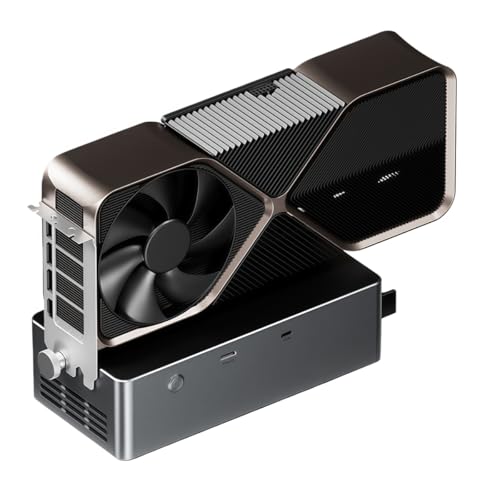
- Integrated 800W power supply
- Supports cards up to 600W
- OCuLink, USB4.0, and TGX interfaces
Best For: High-power GPU setups using compatible Windows systems
DIY-Friendly Modular Pick

- Compact 280 g enclosure
- Supports multiple PSU formats
- Includes USB-A and downstream Thunderbolt
Best For: Experienced users building a custom Thunderbolt or USB4 setup
Complete Portable Kit

- Includes 240W PSU and cables
- Supports cards up to 205 mm
- Comes with a custom carrying case
Best For: Portable Thunderbolt or USB4 graphics expansion
Premium Thunderbolt 5 Choice

- Fits four-slot NVIDIA and AMD desktop GPUs
- Thunderbolt 5 supports up to 80 Gbps
- GPU and ATX PSU sold separately
Best For: Windows 11 users building an upgradeable, high-performance eGPU setup
Best Heavy-Duty Pick
GODLIY External eGPU Enclosure

- Includes 240W PSU, cables, and carrying case
- Supports cards up to 205 mm long
- Provides 85W PD, 15W PD, and DisplayPort
Best For: Portable laptop, mini PC, and handheld users seeking an all-in-one kit
Flexible ATX-Powered Option
VIKINYEE VK-Y900 eGPU Enclosure

- Supports Thunderbolt 3/4 and USB4 hosts
- Uses an ATX PSU with 85W PD charging
- Offers broad NVIDIA and AMD GPU support
Best For: DIY builders with an ATX PSU who want laptop or handheld charging
Best OCuLink Value – AOOSTAR AG01 800W eGPU Dock
The AOOSTAR AG01 is a practical choice among external gpu enclosures with power supplies if your laptop or mini PC has an OCuLink connection. Its open-frame design, built-in 800W Huntkey supply, and support for graphics cards drawing up to 600W make it suitable for high-power desktop GPUs, while its unrestricted card length improves installation flexibility.
Best For: OCuLink-equipped Windows or Mac systems needing a high-wattage, open-frame GPU dock.
Pros:
- Built-in 800W power supply supports graphics cards up to 600W.
- Open aluminum-profile design has no graphics card length limit.
- OCuLink offers PCIe 4.0 x4 bandwidth up to 64Gbps effectively.
- Supports most mainstream NVIDIA and AMD graphics cards.
Cons:
- Only works with devices that have an OCuLink port.
- OCuLink does not support hot-plugging and requires careful cable unlocking.
- The built-in power supply powers the dock only; TGX hot-swap is limited to compatible TGX devices.
Choose the AG01 when maximum GPU flexibility and an integrated power supply matter more than enclosure protection. Confirm your device has OCuLink before buying and power down before connecting or disconnecting.
Best Thunderbolt 5 Enclosure – Sonnet Breakaway Box 850 T5
The Sonnet Breakaway Box 850 T5 is a full enclosure for shoppers comparing external gpu enclosures with power supplies for demanding Windows 11 workloads. Its 850W supply, triple-wide GPU support, Thunderbolt 5 connectivity, and built-in expansion ports make it a strong desktop-style option for rendering, editing, AI applications, and gaming.
Best For: Windows 11 users who want a high-power Thunderbolt eGPU enclosure with built-in connectivity.
Pros:
- 850W power supply supports current and future power-hungry GPUs.
- Supports triple-wide NVIDIA GeForce and AMD Radeon cards.
- Thunderbolt 5 provides 80Gbps bidirectional bandwidth.
- Includes a Thunderbolt 5 peripheral port, three 10Gbps USB-A ports, and 5GbE.
Cons:
- Thunderbolt 5 performance is primarily aimed at compatible Windows 11 systems.
- The enclosure is relatively large and weighs 14.1 pounds.
- It may be more connectivity and capacity than users with basic GPU needs require.
This is the most complete option here for a protected, high-wattage Thunderbolt setup. Its integrated networking and USB ports can also reduce the need for a separate dock, provided your computer supports the required connection.
Best Modular OCuLink Dock – MINISFORUM DEG1 eGPU Dock
The MINISFORUM DEG1 takes a modular approach to external gpu enclosures with power supplies. Instead of including a power brick, it accepts a standard ATX or SFX supply, letting mini-PC owners match power capacity and format to their setup. Its PCIe 4.0 x4 OCuLink link supports powerful cards including the RTX 4090 and RX 7900 XTX.
Best For: Mini-PC users who already have, or specifically want to choose, an ATX or SFX power supply.
Pros:
- Accepts standard ATX and SFX power supplies.
- Supports high-end GPUs such as the RTX 4090 and RX 7900 XTX.
- PCIe 4.0 x4 OCuLink uplink and PCIe x16 card connection.
- Compact 10.64-by-6.87-by-1.6-inch dock design.
Cons:
- Power supply and graphics card are not included.
- Only supports OCuLink and does not support Thunderbolt.
- OCuLink requires the system to be turned off before connecting or disconnecting.
The DEG1 is a flexible foundation rather than an all-in-one enclosure. It makes sense when you want to reuse or select an ATX/SFX supply, but the total setup cost and space requirements should include that separate component.
Best Thunderbolt 3 Option – Sonnet Breakaway Box 750ex
The Sonnet Breakaway Box 750ex is a proven-style choice among external gpu enclosures with power supplies for Thunderbolt 3 computers. Its 750W supply supports a broad range of compatible AMD and NVIDIA cards, while four USB-A ports and Gigabit Ethernet add useful desk connectivity for Mac and Windows systems.
Best For: Thunderbolt 3 Mac or Windows users seeking GPU acceleration plus integrated USB and Ethernet ports.
Pros:
- 750W power supply supports compatible high-performance GPUs.
- Supports many AMD Radeon and NVIDIA GeForce, TITAN, and Quadro cards.
- Handles graphics cards up to 312mm with 375W continuous GPU power.
- Includes four USB-A ports and Gigabit Ethernet.
Cons:
- M1 Macs are not compatible with GPUs.
- Thunderbolt 3 limits bandwidth compared with newer Thunderbolt 5 designs.
- GPU card is not included.
This enclosure remains a sensible pick for compatible Thunderbolt 3 computers that need a straightforward GPU upgrade and extra peripheral connectivity. Check your Mac model carefully, especially if it uses an M1 processor, and verify that your card fits within the 312mm limit.
High-Wattage OCuLink Pick – Tangxi 800W eGPU Dock
For shoppers comparing external gpu enclosures with power supplies, the Tangxi stands out with an integrated 800W unit and support for graphics cards drawing up to 600W. Its open-frame design includes OCuLink, USB4.0, and TGX connectivity, making it a flexible option for compatible Windows laptops and PCs.
Best For: Users who need substantial built-in power and OCuLink or TGX connectivity for a high-power graphics card.
Pros:
- Built-in 800W power supply supports graphics cards up to 600W.
- Offers OCuLink, USB4.0, and a PCIe 4.0 x4 extension interface.
- Open aluminum-alloy chassis supports graphics cards of various lengths.
- TGX interface supports hot swapping and is designed for select ThinkBook 14+ and 16+ 2024 models.
Cons:
- Not suitable for graphics cards requiring more than 600W, including the listed 5090 and 5090D models.
- Compatibility is focused on Windows 11 22H2 or later.
- It has only one USB port and a 90-day manufacturer warranty.
The Tangxi is a power-focused dock rather than a compact, fully enclosed case. Verify your laptop interface, operating system, card power needs, and physical fit before buying.
DIY-Friendly Modular Pick – TREBLEET Mini eGPU Enclosure
The TREBLEET is a compact choice among external gpu enclosures with power supplies, but it does not include a power supply or graphics card. Instead, it supports SFX, ATX, FLEX, and specified 19.5–20V DC supplies, giving experienced builders flexibility when matching power to their PCIe card.
Best For: DIY users with Thunderbolt 3, Thunderbolt 4, or USB4 hardware who already have a suitable power supply.
Pros:
- Certified JHL7440 controller is designed for stable Thunderbolt connectivity.
- Includes a USB-A port and a second Thunderbolt 3 port for downstream devices.
- Supports NVIDIA and AMD PCIe graphics cards with 85W PD charging.
- Compact 280 g design and compatibility with SFX, ATX, FLEX, and DC power supplies.
Cons:
- Power supply and graphics card are not included.
- Requires careful hardware, driver, and compatibility setup.
- USB4 or Thunderbolt support must be confirmed before purchase; handheld consoles are not recommended.
This enclosure offers useful modularity, but it is not a plug-and-play complete kit. Confirm the host port and select a power supply appropriate for your graphics card before ordering.
Complete Portable Kit – GOLDSOUN 240W eGPU Enclosure
For buyers seeking external gpu enclosures with power supplies in a ready-to-use package, the GOLDSOUN includes a 240W external PSU, Thunderbolt 4 cable, 8-pin PCIe cable, and carrying case. Its aluminum enclosure supports selected NVIDIA and AMD cards while adding charging and display connectivity.
Best For: Laptop, mini-PC, and compatible handheld users who want a portable kit with an included power supply and accessories.
Pros:
- Includes a 240W power supply, Thunderbolt 4 cable, 8-pin PCIe cable, and carrying case.
- Supports NVIDIA and AMD cards up to 205 mm long, 150 mm high, and 55 mm wide.
- Provides Thunderbolt ports with 85W and 15W PD, plus a DisplayPort output.
- Lightweight anodized aluminum shell is designed for portability.
Cons:
- Graphics card is not included.
- Card dimensions are limited, so larger GPUs will not fit.
- USB-C connection requires Thunderbolt 3, Thunderbolt 4, or USB4 support, and the warranty is 30 days.
The GOLDSOUN is convenient for mobile setups because the core accessories are included, but its 240W supply and compact card bay require careful GPU compatibility checks.
Premium Thunderbolt 5 Choice – Razer Core X V2
For shoppers comparing external gpu enclosures with power supplies, the Razer Core X V2 is a high-end enclosure built for users who already have—or plan to buy—a desktop graphics card and ATX power supply. It supports four-slot NVIDIA and AMD cards, PCIe 4.0, Thunderbolt 5, Thunderbolt 4, and USB 4 devices, but the GPU and PSU are sold separately.
Best For: Windows 11 laptop and handheld users who want a spacious, upgradeable enclosure for demanding gaming or creative applications.
Pros:
- Supports PCIe desktop GPUs up to four slots wide.
- Thunderbolt 5 bandwidth reaches up to 80 Gbps.
- Includes 140W USB-C power delivery and a 120 mm active cooling fan.
- Tool-free installation supports replaceable GPUs and ATX power supplies.
Cons:
- Graphics card and power supply are not included.
- Mac devices with M1 or later chipsets do not support eGPUs.
- Its large, 5.06 kg steel chassis is less portable than compact alternatives.
The Core X V2 is a strong long-term platform if you value four-slot clearance, modern connectivity, and the ability to swap both the GPU and PSU. Budget separately for those components before buying.
Best Heavy-Duty Pick – GODLIY External eGPU Enclosure
This GODLIY model stands out among external gpu enclosures with power supplies because it includes a 240W external PSU, cables, and a carrying case. Its compact aluminum enclosure supports compatible NVIDIA and AMD cards up to 205 mm long, making it a practical option for Thunderbolt 3/4 laptops, mini PCs, and handhelds.
Best For: Users who want a compact, travel-ready eGPU kit with the main power and connection accessories included.
Pros:
- Includes a 240W power supply, Thunderbolt 4 cable, 8-pin PCIe cable, and carrying case.
- Supports compatible NVIDIA and AMD cards up to 205 mm long.
- Offers Thunderbolt connectivity, DisplayPort, and 85W or 15W PD charging ports.
- Lightweight anodized aluminum construction is suited to portable setups.
Cons:
- The graphics card is not included.
- Card clearance is limited to 205 mm length, 150 mm height, and 55 mm width.
- It uses PCIe 3.0 x16 transfer mode and has a listed 30-day warranty.
Unlike bare enclosures, this package reduces the accessory hunt and is easy to carry. Check your graphics card dimensions carefully, especially if you plan to use a larger desktop card.
Flexible ATX-Powered Option – VIKINYEE VK-Y900 eGPU Enclosure
The VIKINYEE VK-Y900 is an external GPU enclosure for buyers who prefer using their own ATX power supply. It supports NVIDIA and AMD graphics cards, Thunderbolt 3/4 and USB4 hosts, and 85W power delivery, with dual Thunderbolt ports and DisplayPort for a flexible laptop or handheld setup.
Best For: Enthusiasts who already own an ATX PSU and want broad GPU compatibility with laptop charging through one cable.
Pros:
- Supports NVIDIA RTX cards up to the 50 series and AMD Radeon RX cards up to the 9000 series, according to the supplied specifications.
- Accepts an ATX power supply and provides 85W PD charging.
- Uses an Intel JHL7440/7450 controller and includes 15W and 85W Thunderbolt ports.
- Designed for laptops, handhelds, and NUCs with Thunderbolt 3/4 or USB4.
Cons:
- The ATX power supply is not stated as included, so buyers should plan to provide one.
- Compatibility and performance depend on the host device, GPU, and drivers.
- The Apple Silicon Mac feature is described for AI development with TinyGPU, not gaming or 3D rendering.
The VK-Y900 offers useful flexibility for users assembling a custom eGPU system around an existing ATX PSU. Its 85W pass-through is especially helpful for supported handhelds and laptops, but verify your intended GPU and host compatibility first.
How We Picked the Best External GPU Enclosures with Power Supplies
We focused on enclosure and dock designs that include an integrated power supply or clearly support a suitable external PSU. Selection factors included host connectivity, graphics-card compatibility, rated power output, expansion support, physical clearance, and practical use with Windows, macOS, mini PCs, and laptops.
Because performance depends heavily on the connection between the computer and the enclosure, we separated high-bandwidth OCuLink and USB4 options from Thunderbolt-based models. We also considered features such as power delivery, hot swapping, PCIe expansion, cooling, and support for large modern GPUs.
Quick Comparison
- For maximum power: Look for 750W- or 850W-class units when pairing the enclosure with flagship GPUs.
- For broad laptop compatibility: Thunderbolt 3, Thunderbolt 4, Thunderbolt 5, and USB4 models are generally easier to integrate.
- For mini PCs and performance-focused setups: OCuLink docks can offer a more direct PCIe connection, though the host device must provide an OCuLink port.
- For compact workspaces: Verify card length, thickness, ventilation, and whether the design is a full enclosure or an open dock.
Key Buying Factors
Connection and Bandwidth
Thunderbolt and USB4 provide convenient one-cable connectivity, but actual performance varies by host port, cable, controller, and system configuration. OCuLink can reduce connection overhead, but it is less common and may not provide charging or accessory connectivity.
Power Supply Capacity
Match the enclosure’s wattage to the graphics card’s recommended power supply and transient demands. Leave headroom rather than choosing a unit that operates close to its limit. Confirm whether the listed wattage is dedicated to the GPU or shared with power delivery and other components.
GPU Size and Compatibility
Check maximum card length, height, slot thickness, and connector placement. Large triple- or four-slot cards may not fit standard enclosures. Also confirm driver support for your operating system and whether the enclosure supports both NVIDIA and AMD cards.
Cooling and Expansion
Built-in fans, open-frame designs, and adequate ventilation help maintain consistent performance. If you need storage, networking, or other PCIe cards, check expansion slots and available bandwidth rather than assuming every eGPU dock supports them.
Who Should Buy Which External GPU Enclosures with Power Supplies?
Choose a high-wattage Sonnet or similar enclosed model if you want a polished workstation setup with strong power reserves and broad laptop compatibility. Razer’s Core X V2 is a practical choice for users who prioritize a mainstream enclosure and newer Thunderbolt or USB4 connectivity.
Choose an AOOSTAR, MINISFORUM, or Tangxi OCuLink-oriented dock if you are upgrading a compatible mini PC and want a direct, performance-focused connection. Compact 240W and USB4 or Thunderbolt enclosures suit smaller GPUs, modest gaming upgrades, and users who value portability.
Before ordering, verify the host port, operating-system support, GPU dimensions, cable requirements, power delivery behavior, and return policy. Those details matter more than the headline wattage alone.